JORHAT INSTITUTE OF SCIENCE &
TECHNOLOGY

A SEMINAR ON
TOUCHSCREEN TECHNOLOGY
SUBMITTED BY:
BIDYUT BIKASH DAS
ETC-07/09
DEPARTMENT: ELECTRONICS AND
INTRODUCTION TO TOUCHSCREEN
TECHNOLOGY
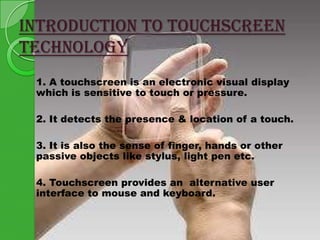
1. A touchscreen is an electronic visual display
which is sensitive to touch or pressure.
2. It detects the presence & location of a touch.
3. It is also the sense of finger, hands or other
passive objects like stylus, light pen etc.
4. Touchscreen provides an alternative user
interface to mouse and keyboard.
HISTORY
1.

2.
3.

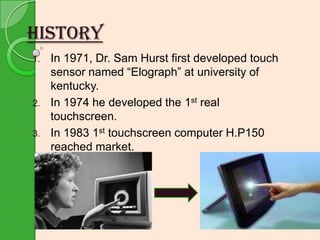
In 1971, Dr. Sam Hurst first developed touch
sensor named “Elograph” at university of
kentucky.
In 1974 he developed the 1st real
touchscreen.
In 1983 1st touchscreen computer H.P150
reached market.
WHY TOUCHSCREEN ?
1.

Enable first-time users to interface with
computers instantly, without any training.
2. Durability is tested over 35 million finger
touches.
3. Eliminate keyboards and mice, which many
novice users find difficult to use.
4. Ensure that no space is wasted since the
input device is completely integrated into the
monitor.
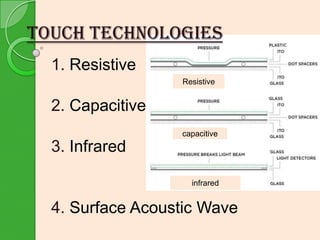
touch TECHNOLOGIES
1. Resistive
Resistive

2. Capacitive
capacitive

3. Infrared
infrared

4. Surface Acoustic Wave
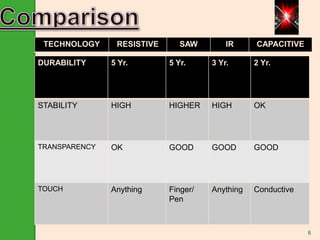
TECHNOLOGY

RESISTIVE

SAW

IR

CAPACITIVE

DURABILITY

5 Yr.

5 Yr.

3 Yr.

2 Yr.

STABILITY

HIGH

HIGHER

HIGH

OK

TRANSPARENCY

OK

GOOD

GOOD

GOOD

TOUCH

Anything

Finger/
Pen

Anything

Conductive

6
CONSTRUCTION
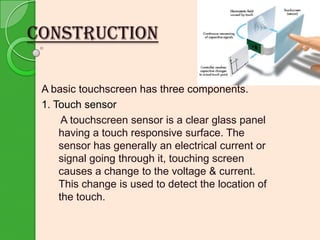
A basic touchscreen has three components.
1. Touch sensor
A touchscreen sensor is a clear glass panel
having a touch responsive surface. The
sensor has generally an electrical current or
signal going through it, touching screen
causes a change to the voltage & current.
This change is used to detect the location of
the touch.
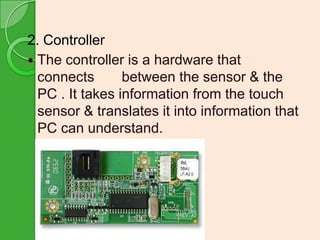
2. Controller
 The controller is a hardware that
connects
between the sensor & the
PC . It takes information from the touch
sensor & translates it into information that
PC can understand.
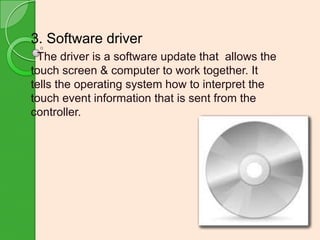
3. Software driver
The driver is a software update that allows the
touch screen & computer to work together. It
tells the operating system how to interpret the
touch event information that is sent from the
controller.
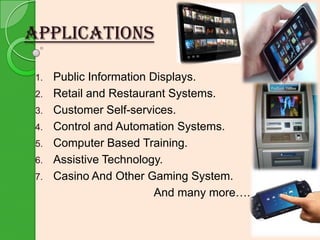
APPLICATIONS
1.
2.
3.
4.

5.
6.
7.

Public Information Displays.
Retail and Restaurant Systems.
Customer Self-services.
Control and Automation Systems.
Computer Based Training.
Assistive Technology.
Casino And Other Gaming System.
And many more….
DISADVANTAGES


Screen has to be really big, not to miss things
when
pressing them with your finger.

 Screen

 Most

gets very dirty.

user interfaces are not optimized for thumb
operation, so a stylus is necessary.
CONCLUSION

With the growing use of touchscreen, the marginal
cost of touchscreen technology is routinely
absorbed into the products that incorporate it and is
nearly eliminated. Touchscreen now have proven
reliability. Thus, touchscreen displays are found
today in airplanes, automobiles, gaming consoles,
machine control systems, appliances etc.
And now by j ust m f yi ng a l i t t l e, i t can
odi
r epl ace t he m
ouse and key boar d com et el y i n
pl
near f ut ur e.
THANK YOU

TouchScreen Technology

  • 1.
    JORHAT INSTITUTE OFSCIENCE & TECHNOLOGY A SEMINAR ON TOUCHSCREEN TECHNOLOGY SUBMITTED BY: BIDYUT BIKASH DAS ETC-07/09 DEPARTMENT: ELECTRONICS AND
  • 2.
    INTRODUCTION TO TOUCHSCREEN TECHNOLOGY 1.A touchscreen is an electronic visual display which is sensitive to touch or pressure. 2. It detects the presence & location of a touch. 3. It is also the sense of finger, hands or other passive objects like stylus, light pen etc. 4. Touchscreen provides an alternative user interface to mouse and keyboard.
  • 3.
    HISTORY 1. 2. 3. In 1971, Dr.Sam Hurst first developed touch sensor named “Elograph” at university of kentucky. In 1974 he developed the 1st real touchscreen. In 1983 1st touchscreen computer H.P150 reached market.
  • 4.
    WHY TOUCHSCREEN ? 1. Enablefirst-time users to interface with computers instantly, without any training. 2. Durability is tested over 35 million finger touches. 3. Eliminate keyboards and mice, which many novice users find difficult to use. 4. Ensure that no space is wasted since the input device is completely integrated into the monitor.
  • 5.
    touch TECHNOLOGIES 1. Resistive Resistive 2.Capacitive capacitive 3. Infrared infrared 4. Surface Acoustic Wave
  • 6.
    TECHNOLOGY RESISTIVE SAW IR CAPACITIVE DURABILITY 5 Yr. 5 Yr. 3Yr. 2 Yr. STABILITY HIGH HIGHER HIGH OK TRANSPARENCY OK GOOD GOOD GOOD TOUCH Anything Finger/ Pen Anything Conductive 6
  • 7.
    CONSTRUCTION A basic touchscreenhas three components. 1. Touch sensor A touchscreen sensor is a clear glass panel having a touch responsive surface. The sensor has generally an electrical current or signal going through it, touching screen causes a change to the voltage & current. This change is used to detect the location of the touch.
  • 8.
    2. Controller  Thecontroller is a hardware that connects between the sensor & the PC . It takes information from the touch sensor & translates it into information that PC can understand.
  • 9.
    3. Software driver Thedriver is a software update that allows the touch screen & computer to work together. It tells the operating system how to interpret the touch event information that is sent from the controller.
  • 10.
    APPLICATIONS 1. 2. 3. 4. 5. 6. 7. Public Information Displays. Retailand Restaurant Systems. Customer Self-services. Control and Automation Systems. Computer Based Training. Assistive Technology. Casino And Other Gaming System. And many more….
  • 11.
    DISADVANTAGES  Screen has tobe really big, not to miss things when pressing them with your finger.  Screen  Most gets very dirty. user interfaces are not optimized for thumb operation, so a stylus is necessary.
  • 12.
    CONCLUSION With the growinguse of touchscreen, the marginal cost of touchscreen technology is routinely absorbed into the products that incorporate it and is nearly eliminated. Touchscreen now have proven reliability. Thus, touchscreen displays are found today in airplanes, automobiles, gaming consoles, machine control systems, appliances etc. And now by j ust m f yi ng a l i t t l e, i t can odi r epl ace t he m ouse and key boar d com et el y i n pl near f ut ur e.
  • 13.