Central Institute of Technology,
Kokrajhar
 Presentation on

Touch Screen Technology
In Mobiles
Presented By:
Ajay Kachari
Roll No: Gau-C-12/48

Sweta Kriti
Roll No: Gau-C-12/52
Introduction
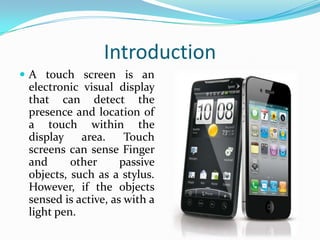
 A touch screen is an

electronic visual display
that can detect the
presence and location of
a touch within the
display
area.
Touch
screens can sense Finger
and
other
passive
objects, such as a stylus.
However, if the objects
sensed is active, as with a
light pen.
History and Development
 In 1971 Dr. Samuel Hurst, founder of Elographics

developed the first touch sensor “Elograph” at the
University of Kentucky.
 In 1974, he developed the first real touch screen.
 In 1977, Elographics developed the five-wire resistive
technology a curved glass sensor called the Touch
Screen.
 The new transparent technology, AccuTouch, was later
developed by the founder of Elographics, Dr. Hurst
and Bill Colwell.
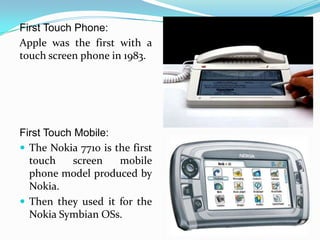
First Touch Phone:
Apple was the first with a
touch screen phone in 1983.

First Touch Mobile:
 The Nokia 7710 is the first
touch
screen
mobile
phone model produced by
Nokia.
 Then they used it for the
Nokia Symbian OSs.
Construction Of Touch Screen
A basic touch screen has three main
components:
A. A touch sensor
B. A controller
C. A software driver
Touch Sensor
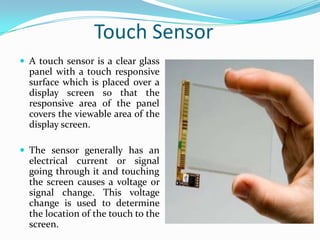
 A touch sensor is a clear glass

panel with a touch responsive
surface which is placed over a
display screen so that the
responsive area of the panel
covers the viewable area of the
display screen.
 The sensor generally has an

electrical current or signal
going through it and touching
the screen causes a voltage or
signal change. This voltage
change is used to determine
the location of the touch to the
screen.
Controller
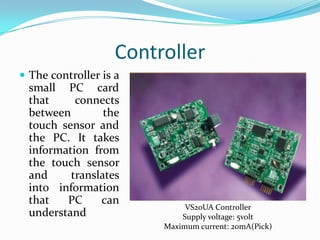
 The controller is a

small PC card
that
connects
between
the
touch sensor and
the PC. It takes
information from
the touch sensor
and
translates
into information
that
PC
can
understand

VS20UA Controller
Supply voltage: 5volt
Maximum current: 20mA(Pick)
Software Driver
 The driver is a software that allows the touch screen

and computer to work together. It tells the operating
system how to interpret the touch event information
that is sent from the controller
 Most touch screen drivers today are a mouseemulation type driver. This makes touching the screen
the same as clicking your mouse at the same location
on the screen.
Types of Touch Technologies
There are mainly 4 types of touch technologies:
 Resistive
 Surface acoustic wave(SAW)
 Capacitive
 Infrared
Resistive
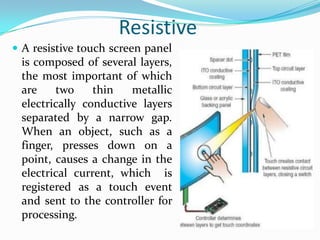
 A resistive touch screen panel

is composed of several layers,
the most important of which
are
two
thin
metallic
electrically conductive layers
separated by a narrow gap.
When an object, such as a
finger, presses down on a
point, causes a change in the
electrical current, which is
registered as a touch event
and sent to the controller for
processing.
Advantages And Disadvantages of
Resistive
 Advantages

Cost-effective
Activated by any stylus
Very accurate
Low power requirements
Liquids won’t affect touch screen performance
 Disadvantages
Polyester surface can be damaged
Surface Acoustic Wave(SAW)
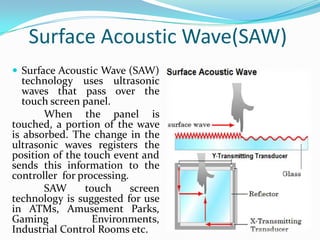
 Surface Acoustic Wave (SAW)

technology uses ultrasonic
waves that pass over the
touch screen panel.
When the panel is
touched, a portion of the wave
is absorbed. The change in the
ultrasonic waves registers the
position of the touch event and
sends this information to the
controller for processing.
SAW
touch
screen
technology is suggested for use
in ATMs, Amusement Parks,
Gaming
Environments,
Industrial Control Rooms etc.
Advantages and Disadvantages of
SAW
 Advantages

-Durable glass construction
-High optical clarity
-Activated by a finger, gloved hand, or soft tip stylus

 Disadvantages

-Moving liquids or condensation can cause false touch
-Solid contaminants create non-touches
-Doesn’t support drag or draw effectively
Capacitive
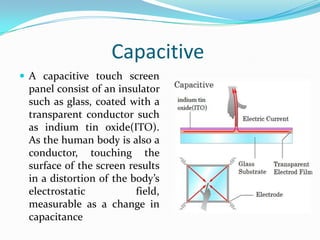
 A capacitive touch screen

panel consist of an insulator
such as glass, coated with a
transparent conductor such
as indium tin oxide(ITO).
As the human body is also a
conductor, touching the
surface of the screen results
in a distortion of the body’s
electrostatic
field,
measurable as a change in
capacitance
Advantages and Disadvantages Of
Capacitive
 Advantages

-Scratch resistance, Durable surface
-Very accurate
-Good optical clarity
-Liquid won’t affect touch screen performance
 Disadvantages
-Does not work with gloved fingers or stylus
Infrared
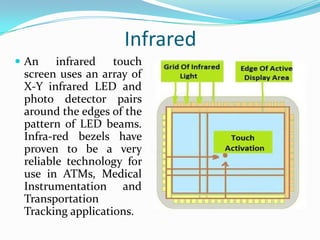
 An

infrared
touch
screen uses an array of
X-Y infrared LED and
photo detector pairs
around the edges of the
pattern of LED beams.
Infra-red bezels have
proven to be a very
reliable technology for
use in ATMs, Medical
Instrumentation and
Transportation
Tracking applications.
Advantages and Disadvantages of
Infrared Touch Screen
 Advantages

-Highest quality of underlying image
-Very high transmittance
-Can be activated with almost any device
-Higher accuracy than other technologies
-Very high durability and reliability
 Disadvantages
-It is very sensitive & can be activated by stray touches
-Low resolution
Manufacture
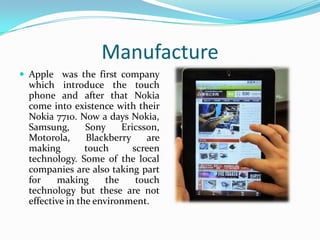
 Apple was the first company

which introduce the touch
phone and after that Nokia
come into existence with their
Nokia 7710. Now a days Nokia,
Samsung,
Sony
Ericsson,
Motorola,
Blackberry
are
making
touch
screen
technology. Some of the local
companies are also taking part
for
making
the
touch
technology but these are not
effective in the environment.
Advantages of all Touch Technology
Touch screen have several advantages over other
pointing devices:
 A touch screen is easy to use (as the user simply touches






what he or she sees on the display).
Save space as no buttons are required.
Touching a visual display of choices requires little thinking
and is a form of direct manipulation that is easy to learn.
Touch screens have easier hand eye coordination than
buttons.
Touch screens are durable in public access and high volume
usage.
Disadvantages of all Touch
Technology
 Screen has to be really big not to miss things when

pressing them with finger. So the big screen leads to
low battery life.
 Touch screen means can’t be read too well in direct
sunlight as it applies an additional not 100%
transparent.
 Touch screen devices usually has no additional keys
and this means when an application crashes, without
crashing the OS , you can’t get the main menu as the
whole screen becomes unresponsive.
 Screens get very dirty.
Touch Sreen Technology In Mobiles

Touch Sreen Technology In Mobiles

  • 1.
    Central Institute ofTechnology, Kokrajhar  Presentation on Touch Screen Technology In Mobiles Presented By: Ajay Kachari Roll No: Gau-C-12/48 Sweta Kriti Roll No: Gau-C-12/52
  • 2.
    Introduction  A touchscreen is an electronic visual display that can detect the presence and location of a touch within the display area. Touch screens can sense Finger and other passive objects, such as a stylus. However, if the objects sensed is active, as with a light pen.
  • 3.
    History and Development In 1971 Dr. Samuel Hurst, founder of Elographics developed the first touch sensor “Elograph” at the University of Kentucky.  In 1974, he developed the first real touch screen.  In 1977, Elographics developed the five-wire resistive technology a curved glass sensor called the Touch Screen.  The new transparent technology, AccuTouch, was later developed by the founder of Elographics, Dr. Hurst and Bill Colwell.
  • 4.
    First Touch Phone: Applewas the first with a touch screen phone in 1983. First Touch Mobile:  The Nokia 7710 is the first touch screen mobile phone model produced by Nokia.  Then they used it for the Nokia Symbian OSs.
  • 5.
    Construction Of TouchScreen A basic touch screen has three main components: A. A touch sensor B. A controller C. A software driver
  • 6.
    Touch Sensor  Atouch sensor is a clear glass panel with a touch responsive surface which is placed over a display screen so that the responsive area of the panel covers the viewable area of the display screen.  The sensor generally has an electrical current or signal going through it and touching the screen causes a voltage or signal change. This voltage change is used to determine the location of the touch to the screen.
  • 7.
    Controller  The controlleris a small PC card that connects between the touch sensor and the PC. It takes information from the touch sensor and translates into information that PC can understand VS20UA Controller Supply voltage: 5volt Maximum current: 20mA(Pick)
  • 8.
    Software Driver  Thedriver is a software that allows the touch screen and computer to work together. It tells the operating system how to interpret the touch event information that is sent from the controller  Most touch screen drivers today are a mouseemulation type driver. This makes touching the screen the same as clicking your mouse at the same location on the screen.
  • 9.
    Types of TouchTechnologies There are mainly 4 types of touch technologies:  Resistive  Surface acoustic wave(SAW)  Capacitive  Infrared
  • 10.
    Resistive  A resistivetouch screen panel is composed of several layers, the most important of which are two thin metallic electrically conductive layers separated by a narrow gap. When an object, such as a finger, presses down on a point, causes a change in the electrical current, which is registered as a touch event and sent to the controller for processing.
  • 11.
    Advantages And Disadvantagesof Resistive  Advantages Cost-effective Activated by any stylus Very accurate Low power requirements Liquids won’t affect touch screen performance  Disadvantages Polyester surface can be damaged
  • 12.
    Surface Acoustic Wave(SAW) Surface Acoustic Wave (SAW) technology uses ultrasonic waves that pass over the touch screen panel. When the panel is touched, a portion of the wave is absorbed. The change in the ultrasonic waves registers the position of the touch event and sends this information to the controller for processing. SAW touch screen technology is suggested for use in ATMs, Amusement Parks, Gaming Environments, Industrial Control Rooms etc.
  • 13.
    Advantages and Disadvantagesof SAW  Advantages -Durable glass construction -High optical clarity -Activated by a finger, gloved hand, or soft tip stylus  Disadvantages -Moving liquids or condensation can cause false touch -Solid contaminants create non-touches -Doesn’t support drag or draw effectively
  • 14.
    Capacitive  A capacitivetouch screen panel consist of an insulator such as glass, coated with a transparent conductor such as indium tin oxide(ITO). As the human body is also a conductor, touching the surface of the screen results in a distortion of the body’s electrostatic field, measurable as a change in capacitance
  • 15.
    Advantages and DisadvantagesOf Capacitive  Advantages -Scratch resistance, Durable surface -Very accurate -Good optical clarity -Liquid won’t affect touch screen performance  Disadvantages -Does not work with gloved fingers or stylus
  • 16.
    Infrared  An infrared touch screen usesan array of X-Y infrared LED and photo detector pairs around the edges of the pattern of LED beams. Infra-red bezels have proven to be a very reliable technology for use in ATMs, Medical Instrumentation and Transportation Tracking applications.
  • 17.
    Advantages and Disadvantagesof Infrared Touch Screen  Advantages -Highest quality of underlying image -Very high transmittance -Can be activated with almost any device -Higher accuracy than other technologies -Very high durability and reliability  Disadvantages -It is very sensitive & can be activated by stray touches -Low resolution
  • 18.
    Manufacture  Apple wasthe first company which introduce the touch phone and after that Nokia come into existence with their Nokia 7710. Now a days Nokia, Samsung, Sony Ericsson, Motorola, Blackberry are making touch screen technology. Some of the local companies are also taking part for making the touch technology but these are not effective in the environment.
  • 19.
    Advantages of allTouch Technology Touch screen have several advantages over other pointing devices:  A touch screen is easy to use (as the user simply touches     what he or she sees on the display). Save space as no buttons are required. Touching a visual display of choices requires little thinking and is a form of direct manipulation that is easy to learn. Touch screens have easier hand eye coordination than buttons. Touch screens are durable in public access and high volume usage.
  • 20.
    Disadvantages of allTouch Technology  Screen has to be really big not to miss things when pressing them with finger. So the big screen leads to low battery life.  Touch screen means can’t be read too well in direct sunlight as it applies an additional not 100% transparent.  Touch screen devices usually has no additional keys and this means when an application crashes, without crashing the OS , you can’t get the main menu as the whole screen becomes unresponsive.  Screens get very dirty.