Adaptive Learning Systems 
Towards “Adaptation Engine” 
Peter Brusilovsky 
School of Information Sciences 
University of Pittsburgh, USA
Caveat Emptor
Overview 
• Adaptation Technologies (what can be 
adapted and how) 
– Origins 
– Review 
– Place in the “Big Picture” 
• How it could be implemented – “adaptation 
engine”
Key Aspects of Adaptive Systems 
• Adapting to what? 
– User knowledge 
– User interests 
– User individual traits 
• What can be adapted? 
– Adaptive sequencing of educational tasks 
– Adaptive content presentation 
– Adaptive ordering of search results
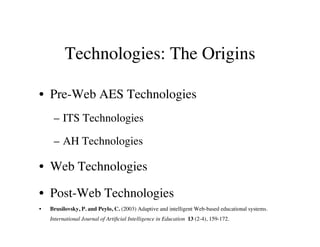
Technologies: The Origins 
• Pre-Web AES Technologies 
– ITS Technologies 
– AH Technologies 
• Web Technologies 
• Post-Web Technologies 
• Brusilovsky, P. and Peylo, C. (2003) Adaptive and intelligent Web-based educational systems. 
International Journal of Artificial Intelligence in Education 13 (2-4), 159-172.
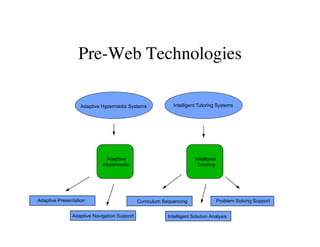
Pre-Web Technologies 
Adaptive Hypermedia Systems Intelligent Tutoring Systems 
Adaptive 
Hypermedia 
Intelligent 
Tutoring 
Adaptive Presentation 
Adaptive Navigation Support 
Curriculum Sequencing 
Problem Solving Support 
Intelligent Solution Analysis
Pre-Web Technologies 
• Intelligent Tutoring Systems 
– course sequencing 
– intelligent analysis of problem solutions 
– interactive problem solving support 
– example-based problem solving 
• Adaptive Hypermedia Systems 
– adaptive presentation 
– adaptive navigation support
How to Model User Knowledge 
• Domain model 
– The whole body of domain knowledge is 
decomposed into set of smaller knowledge 
componens (skills, concepts, topics, etc) 
• Student model 
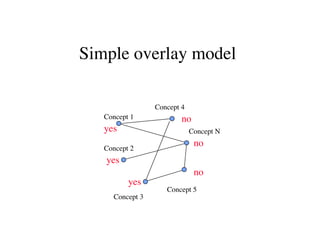
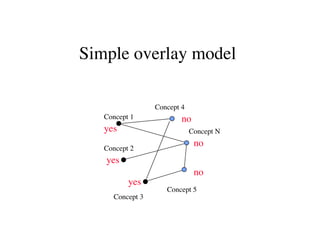
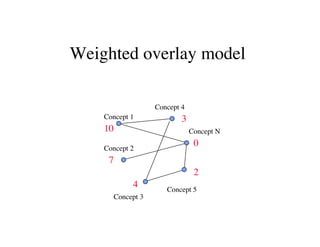
– Overlay model 
• Student knowledge is measured independently for 
each knowledge unit 
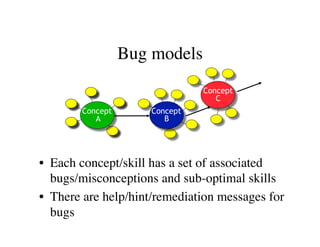
– Misconceptions (bugs)
Simple overlay model 
Concept 1 
Concept 2 
Concept 3 
Concept 4 
no 
Concept 5 
yes 
Concept N 
no 
no 
yes 
yes
Simple overlay model 
Concept 1 
Concept 2 
Concept 3 
Concept 4 
no 
Concept 5 
yes 
Concept N 
no 
no 
yes 
yes
Weighted overlay model 
Concept 1 
Concept 2 
Concept 3 
Concept 4 
Concept 5 
10 
Concept N 
3 
0 
2 
7 
4
Bug models 
Concept 
A 
Concept 
B 
Concept 
C 
• Each concept/skill has a set of associated 
bugs/misconceptions and sub-optimal skills 
• There are help/hint/remediation messages for 
bugs
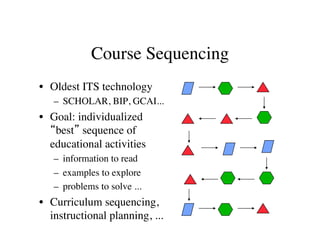
Course Sequencing 
• Oldest ITS technology 
– SCHOLAR, BIP, GCAI... 
• Goal: individualized 
“best” sequence of 
educational activities 
– information to read 
– examples to explore 
– problems to solve ... 
• Curriculum sequencing, 
instructional planning, ...
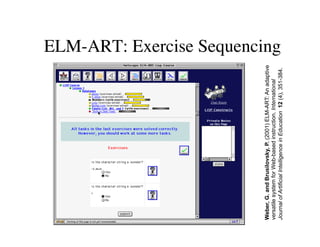
ELM-ART: Exercise Sequencing 
Weber, G. and Brusilovsky, P. (2001) ELM-ART: An adaptive 
versatile system for Web-based instruction. International 
Journal of Artificial Intelligence in Education 12 (4), 351-384.
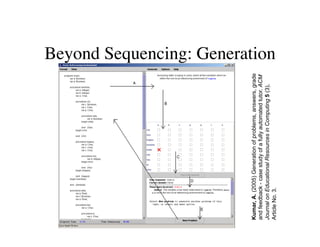
Beyond Sequencing: Generation 
Kumar, A. (2005) Generation of problems, answers, grade 
and feedback - case study of a fully automated tutor. ACM 
Journal on Educational Resources in Computing 5 (3), 
Article No. 3.
Adaptive Problem Solving Support 
• The core of Intelligent Tutoring Systems 
• From diagnosis to problem solving support 
• Low-interactive support 
– intelligent analysis of problem solutions 
• Highly-interactive support 
– interactive problem solving support
Intelligent analysis of problem 
solutions 
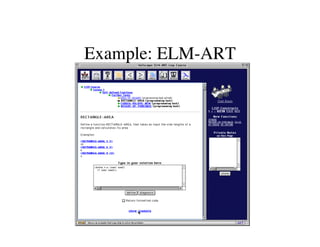
• Intelligent analysis of problem solutions 
• Support: Identifying misconceptions (bug 
model) and broken constraints (CM) 
• Provides feedback adapted to the user model: 
remediation, positive help 
• Low interactivity: Works after the (partial) 
solution is completed 
• Examples: PROUST, ELM-ART, SQL-Tutor
Example: ELM-ART
Interactive Problem Solving 
Support 
• Classic System: Lisp-Tutor 
• The “ultimate goal” of many ITS developers 
• Several kinds of adaptive feedback on every step 
of problem solving 
– Coach-style intervention 
– Highlight wrong step 
– What is wrong 
– What is the correct step 
– Several levels of help by request
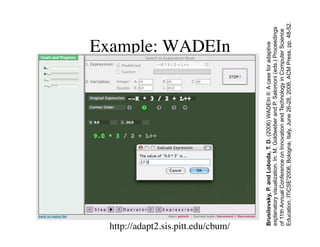
Example: WADEIn 
http://adapt2.sis.pitt.edu/cbum/ 
Brusilovsky, P. and Loboda, T. D. (2006) WADEIn II: A case for adaptive 
explanatory visualization. In: M. Goldweber and P. Salomoni (eds.) Proceedings 
of 11th Annual Conference on Innovation and Technology in Computer Science 
Education, ITiCSE'2006, Bologna, Italy, June 26-28, 2006, ACM Press, pp. 48-52.
Example-Based Technologies 
• While focused on problem solving, ITS research 
developed several adaptive example-based learning 
approaches 
• Example-based problem solving support 
– Adaptively suggesting relevant examples for given 
problem and student state of knowledge (ELM-ART) 
• Adaptive worked out examples 
– Steps could be presented with different level of details 
(fading with knowledge growth) 
– Example steps could be replaced with problem steps
Adaptive hypermedia 
• Hypermedia systems = Pages + Links 
• Adaptive presentation 
– content adaptation 
• Adaptive navigation support 
– link adaptation 
• Could be considered as “soft” sequencing 
– Helping the user to get to the right content
Adaptive navigation support 
• What could be done with links to provide 
personalized guidance? 
• Direct guidance 
• Restricting access 
– Removing, disabling, hiding 
• Link Ranking 
• Link Annotation 
• Link Generation 
– Similarity-based, interest-based
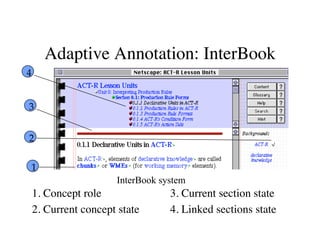
Adaptive Annotation: InterBook 
1. Concept role 
2. Current concept state 
3. Current section state 
4. Linked sections state 
4 
3 
2 
1 
√ 
InterBook system
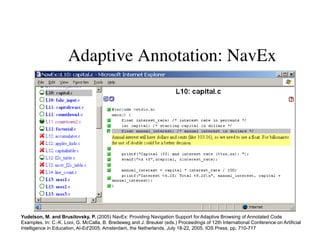
Adaptive Annotation: NavEx 
Yudelson, M. and Brusilovsky, P. (2005) NavEx: Providing Navigation Support for Adaptive Browsing of Annotated Code 
Examples. In: C.-K. Looi, G. McCalla, B. Bredeweg and J. Breuker (eds.) Proceedings of 12th International Conference on Artificial 
Intelligence in Education, AI-Ed'2005, Amsterdam, the Netherlands, July 18-22, 2005, IOS Press, pp. 710-717
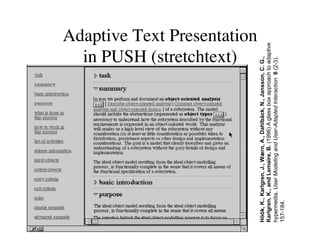
Adaptive Text Presentation 
in PUSH (stretchtext) 
Höök, K., Karlgren, J., Wærn, A., Dahlbäck, N., Jansson, C. G., 
Karlgren, K., and Lemaire, B. (1996) A glass box approach to adaptive 
hypermedia. User Modeling and User-Adapted Interaction 6 (2-3), 
157-184.
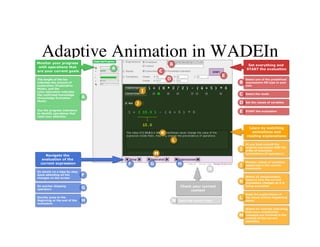
Adaptive Animation in WADEIn
Adapting to Individual Traits 
• Source of knowledge 
– educational psychology research on individual 
differences 
• Known as cognitive or learning styles 
– Field dependence, wholist/serialist (Pask) 
– Kolb, VARK, Felder-Silverman classifiers
Style-Adaptive Hypermedia 
• Different content for different style 
– Pictures for visually oriented 
– Little success, a lot of negative evidence 
• Better idea: different interface 
organization and navigation tools for 
different styles 
– Adding/removing maps, advanced organizers, 
etc.
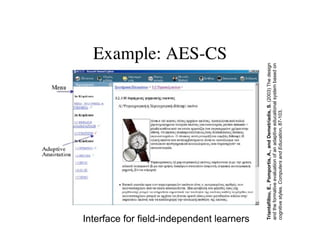
Example: AES-CS 
Interface for field-independent learners 
Triantafillou, E., Pomportis, A., and Demetriadis, S. (2003) The design 
and the formative evaluation of an adaptive educational system based on 
cognitive styles. Computers and Education, 87-103.
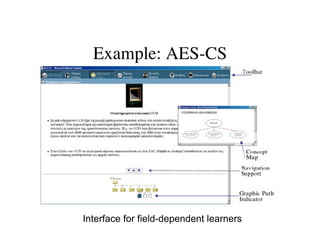
Example: AES-CS 
Interface for field-dependent learners
Web Impact: Early Migration 
• Intelligent Tutoring Systems (since 1970) 
– CALAT (CAIRNE, NTT) 
– PAT-ONLINE (PAT, Carnegie Mellon) 
• Adaptive Hypermedia Systems (since 1990) 
– AHA (Adaptive Hypertext Course, Eindhoven) 
– KBS-HyperBook (KB Hypertext, Hannover) 
• ITS and AHS 
– ELM-ART (ELM-PE, Trier, ISIS-Tutor, MSU)
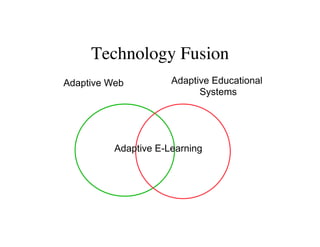
Technology Fusion 
Adaptive Web Adaptive Educational 
Systems 
Adaptive E-Learning
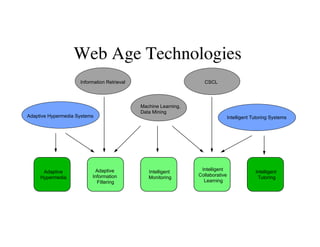
Web Age Technologies 
Information Retrieval 
Adaptive Hypermedia Systems Intelligent Tutoring Systems 
Adaptive 
Hypermedia 
Adaptive 
Information 
Filtering 
Intelligent 
Monitoring 
Intelligent 
Collaborative 
Learning 
Intelligent 
Tutoring 
Machine Learning, 
Data Mining 
CSCL
Native Web Technologies 
• Availability of logs 
– Log-mining 
– Intelligent class monitoring 
– Class progress visualization 
• One system, many users - group adaptation! 
– Adaptive collaboration support 
• Web is a large information resource - helping to 
find relevant open corpus information 
– Adaptive content recommendation
Adaptive Collaboration Support 
• Peer help / peer finding 
• Collaborative group formation 
• Group collaboration support 
– Collaborative work support 
– Forum discussion support 
• Awareness support
Educational Recommenders 
• Motivated by research on IR and 
Recommender Systems 
• Content based recommender systems 
• Collaborative recommender systems 
• Social recommender systems (based on 
social links) 
• Hybrid Recommenders
Modeling User Interests 
• Concept-level modeling 
– Same domain models as in knowledge 
modeling, but the overlay models level of 
interests, not level of knowledge 
• Keyword-level modeling 
– Uses a long list of keywords (terms) in place of 
domain model 
– User interests are modeled as weigthed vector 
or terms 
– Originated from adaptive filtering/search area
How it Fits Together?
Popular View on Adaptive 
Learning: Big PIcture 
• A learning course (system) is an organized 
collection of learning content (objects) 
• Students learn by moving from one content 
item to another interacting with each one 
depending on item nature (watch a movie, 
answer a quiz) 
• Results are stored and used for learner 
modeling and analytics
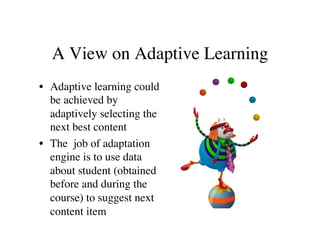
A View on Adaptive Learning 
• Adaptive learning could 
be achieved by 
adaptively selecting the 
next best content 
• The job of adaptation 
engine is to use data 
about student (obtained 
before and during the 
course) to suggest next 
content item
What is (Partially) Correct 
• This is a valuable adaptation context, exactly the 
place to use adaptive sequencing 
• Sequencing is an effective adaptation approach, 
comes in several well-explored brands: 
– Mastery learning 
– Remedial sequencing 
– Proactive sequencing 
• But – any personalized guidance technology that 
can guide the learner to the most appropriate content 
could be used in this context and there are other 
ways to do it 
– Adaptive navigation support 
– Recommendation with a ranked list
Lessons Learned I 
• Approaches that combine system-driven 
adaptation with user ability to select content 
work better for “mature” learners that purely 
system-driven “Deus ex machina” approaches 
while sequencing is critical for younger kids 
– If you want to apply sequencing, consider other 
guidance approaches as well 
• There are other approaches to support self-regulated 
learning related to adaptation and 
they work really well – open learner model! 
– If you build learner model, make it open! 
• Thanks, David, for explaining why we need it!
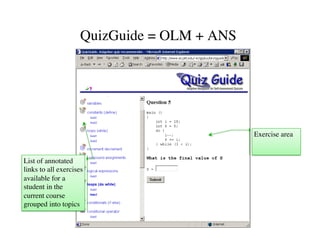
Exercise area 
QuizGuide = OLM + ANS 
List of annotated 
links to all exercises 
available for a 
student in the 
current course 
grouped into topics
• 
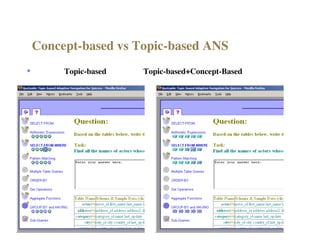
Concept-based vs Topic-based ANS 
Topic-based 
Topic-based+Concept-Based
Lessons Learned II 
• The largest impact is achieved by 
personalized guidance to complex activities 
(i.e., problems), while juggling static 
content has low impact 
– If you focus on sequencing, make sure you 
have advanced learning content 
• Selection of activities based on learning 
style is not (yet) an efficient approach, 
– If you want to build style-based adaptation, use 
more complex approaches
What is Usually Missed 
• Learning objects are not necessary static files 
• Most efficient learning “content” is interactive (might 
not even look like content, stored in files, copied) 
– Interactive simulations 
– Worked-out examples 
– Problems 
• This is exactly the place to apply “within-content” 
adaptation 
– All kind of problem-solving support “tutors” 
– All kinds of adaptive presentation such as adaptive 
animation and examples 
• There is a place for adaptation even beyond content 
– Adaptive collaboration support
Lessons Learned III 
• Within-content adaptation is important 
– Adaptive presentation significantly increases comprehension 
while decreasing learning time 
– Provides vital problem-solving support where students needs 
most help 
– Engages learners in interactive activities 
• There is no “single place” for adaptation 
– Every type of content might use different approaches for 
adaptation and use own appropriate “engine” 
– Different engines might need different information about 
learner and on different granularity levels 
• ITS is a great technology for content-level adaptation, 
but existing monolithic ITS should be re-engineered to 
fit the traditional learning architectures
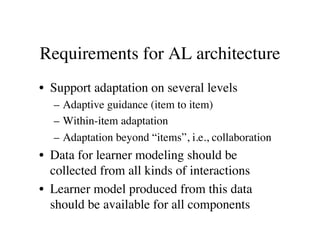
Requirements for AL architecture 
• Support adaptation on several levels 
– Adaptive guidance (item to item) 
– Within-item adaptation 
– Adaptation beyond “items”, i.e., collaboration 
• Data for learner modeling should be 
collected from all kinds of interactions 
• Learner model produced from this data 
should be available for all components
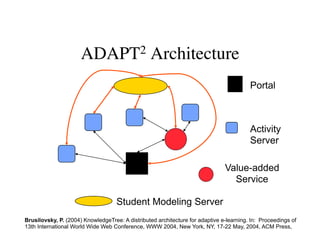
ADAPT2 Architecture 
Portal 
Activity 
Server 
Student Modeling Server 
Value-added 
Service 
Brusilovsky, P. (2004) KnowledgeTree: A distributed architecture for adaptive e-learning. In: Proceedings of 
13th International World Wide Web Conference, WWW 2004, New York, NY, 17-22 May, 2004, ACM Press,
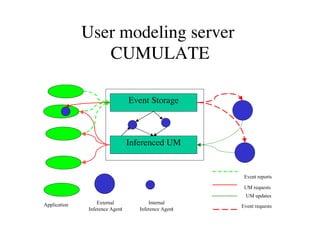
User modeling server 
CUMULATE 
Event Storage 
Inferenced UM 
Event reports 
UM requests 
Application External 
Inference Agent 
Internal 
Inference Agent 
UM updates 
Event requests
All Pieces in Place?
Next Challenges: Architecture 
• Post-Web Learning technologies are more 
diverse, but we need to find how to fit them 
into the architecture 
• Educational games 
• Virtual and Augmenter Reality 
• Mobile learning 
• “Real World” learning
Next Challenges: Adaptation 
• Most of existing adaptation technologies are 
based on knowledge engineering 
– Cognitive analysis 
– Metadata indexing 
• Works well, but expensive 
• How we could use large volume of data 
collected from many students to deliver and 
improve adaptation?
Social Personalization for AES 
• Starting with technologies based on shallow 
processing of social data 
• Social navigation support for open corpus 
resources 
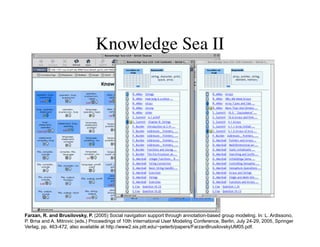
– Knowledge Sea II 
• Open Social Student Modeling with Social 
guidance 
– Progressor 
– MasteryGrids
Knowledge Sea II 
Farzan, R. and Brusilovsky, P. (2005) Social navigation support through annotation-based group modeling. In: L. Ardissono, 
P. Brna and A. Mitrovic (eds.) Proceedings of 10th International User Modeling Conference, Berlin, July 24-29, 2005, Springer 
Verlag, pp. 463-472, also available at http://www2.sis.pitt.edu/~peterb/papers/FarzanBrusilovskyUM05.pdf.
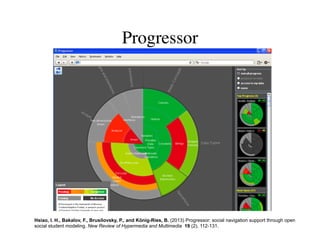
Progressor 
Hsiao, I. H., Bakalov, F., Brusilovsky, P., and König-Ries, B. (2013) Progressor: social navigation support through open 
social student modeling. New Review of Hypermedia and Multimedia 19 (2), 112-131.
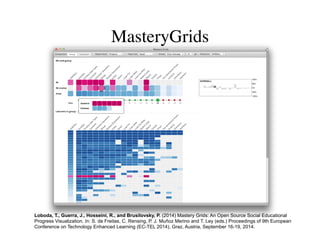
MasteryGrids 
Loboda, T., Guerra, J., Hosseini, R., and Brusilovsky, P. (2014) Mastery Grids: An Open Source Social Educational 
Progress Visualization. In: S. de Freitas, C. Rensing, P. J. Muñoz Merino and T. Ley (eds.) Proceedings of 9th European 
Conference on Technology Enhanced Learning (EC-TEL 2014), Graz, Austria, September 16-19, 2014.
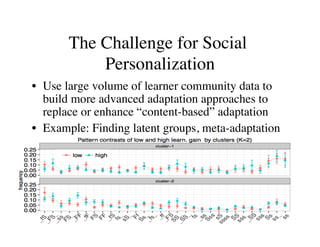
The Challenge for Social 
Personalization 
• Use large volume of learner community data to 
build more advanced adaptation approaches to 
replace or enhance “content-based” adaptation 
• Example: Finding latent groups, meta-adaptation

Adaptive Learning Systems: A review of Adaptation.

  • 1.
    Adaptive Learning Systems Towards “Adaptation Engine” Peter Brusilovsky School of Information Sciences University of Pittsburgh, USA
  • 2.
  • 3.
    Overview • AdaptationTechnologies (what can be adapted and how) – Origins – Review – Place in the “Big Picture” • How it could be implemented – “adaptation engine”
  • 4.
    Key Aspects ofAdaptive Systems • Adapting to what? – User knowledge – User interests – User individual traits • What can be adapted? – Adaptive sequencing of educational tasks – Adaptive content presentation – Adaptive ordering of search results
  • 5.
    Technologies: The Origins • Pre-Web AES Technologies – ITS Technologies – AH Technologies • Web Technologies • Post-Web Technologies • Brusilovsky, P. and Peylo, C. (2003) Adaptive and intelligent Web-based educational systems. International Journal of Artificial Intelligence in Education 13 (2-4), 159-172.
  • 6.
    Pre-Web Technologies AdaptiveHypermedia Systems Intelligent Tutoring Systems Adaptive Hypermedia Intelligent Tutoring Adaptive Presentation Adaptive Navigation Support Curriculum Sequencing Problem Solving Support Intelligent Solution Analysis
  • 7.
    Pre-Web Technologies •Intelligent Tutoring Systems – course sequencing – intelligent analysis of problem solutions – interactive problem solving support – example-based problem solving • Adaptive Hypermedia Systems – adaptive presentation – adaptive navigation support
  • 8.
    How to ModelUser Knowledge • Domain model – The whole body of domain knowledge is decomposed into set of smaller knowledge componens (skills, concepts, topics, etc) • Student model – Overlay model • Student knowledge is measured independently for each knowledge unit – Misconceptions (bugs)
  • 9.
    Simple overlay model Concept 1 Concept 2 Concept 3 Concept 4 no Concept 5 yes Concept N no no yes yes
  • 10.
    Simple overlay model Concept 1 Concept 2 Concept 3 Concept 4 no Concept 5 yes Concept N no no yes yes
  • 11.
    Weighted overlay model Concept 1 Concept 2 Concept 3 Concept 4 Concept 5 10 Concept N 3 0 2 7 4
  • 12.
    Bug models Concept A Concept B Concept C • Each concept/skill has a set of associated bugs/misconceptions and sub-optimal skills • There are help/hint/remediation messages for bugs
  • 13.
    Course Sequencing •Oldest ITS technology – SCHOLAR, BIP, GCAI... • Goal: individualized “best” sequence of educational activities – information to read – examples to explore – problems to solve ... • Curriculum sequencing, instructional planning, ...
  • 14.
    ELM-ART: Exercise Sequencing Weber, G. and Brusilovsky, P. (2001) ELM-ART: An adaptive versatile system for Web-based instruction. International Journal of Artificial Intelligence in Education 12 (4), 351-384.
  • 15.
    Beyond Sequencing: Generation Kumar, A. (2005) Generation of problems, answers, grade and feedback - case study of a fully automated tutor. ACM Journal on Educational Resources in Computing 5 (3), Article No. 3.
  • 16.
    Adaptive Problem SolvingSupport • The core of Intelligent Tutoring Systems • From diagnosis to problem solving support • Low-interactive support – intelligent analysis of problem solutions • Highly-interactive support – interactive problem solving support
  • 17.
    Intelligent analysis ofproblem solutions • Intelligent analysis of problem solutions • Support: Identifying misconceptions (bug model) and broken constraints (CM) • Provides feedback adapted to the user model: remediation, positive help • Low interactivity: Works after the (partial) solution is completed • Examples: PROUST, ELM-ART, SQL-Tutor
  • 18.
  • 19.
    Interactive Problem Solving Support • Classic System: Lisp-Tutor • The “ultimate goal” of many ITS developers • Several kinds of adaptive feedback on every step of problem solving – Coach-style intervention – Highlight wrong step – What is wrong – What is the correct step – Several levels of help by request
  • 20.
    Example: WADEIn http://adapt2.sis.pitt.edu/cbum/ Brusilovsky, P. and Loboda, T. D. (2006) WADEIn II: A case for adaptive explanatory visualization. In: M. Goldweber and P. Salomoni (eds.) Proceedings of 11th Annual Conference on Innovation and Technology in Computer Science Education, ITiCSE'2006, Bologna, Italy, June 26-28, 2006, ACM Press, pp. 48-52.
  • 21.
    Example-Based Technologies •While focused on problem solving, ITS research developed several adaptive example-based learning approaches • Example-based problem solving support – Adaptively suggesting relevant examples for given problem and student state of knowledge (ELM-ART) • Adaptive worked out examples – Steps could be presented with different level of details (fading with knowledge growth) – Example steps could be replaced with problem steps
  • 22.
    Adaptive hypermedia •Hypermedia systems = Pages + Links • Adaptive presentation – content adaptation • Adaptive navigation support – link adaptation • Could be considered as “soft” sequencing – Helping the user to get to the right content
  • 23.
    Adaptive navigation support • What could be done with links to provide personalized guidance? • Direct guidance • Restricting access – Removing, disabling, hiding • Link Ranking • Link Annotation • Link Generation – Similarity-based, interest-based
  • 24.
    Adaptive Annotation: InterBook 1. Concept role 2. Current concept state 3. Current section state 4. Linked sections state 4 3 2 1 √ InterBook system
  • 25.
    Adaptive Annotation: NavEx Yudelson, M. and Brusilovsky, P. (2005) NavEx: Providing Navigation Support for Adaptive Browsing of Annotated Code Examples. In: C.-K. Looi, G. McCalla, B. Bredeweg and J. Breuker (eds.) Proceedings of 12th International Conference on Artificial Intelligence in Education, AI-Ed'2005, Amsterdam, the Netherlands, July 18-22, 2005, IOS Press, pp. 710-717
  • 26.
    Adaptive Text Presentation in PUSH (stretchtext) Höök, K., Karlgren, J., Wærn, A., Dahlbäck, N., Jansson, C. G., Karlgren, K., and Lemaire, B. (1996) A glass box approach to adaptive hypermedia. User Modeling and User-Adapted Interaction 6 (2-3), 157-184.
  • 27.
  • 28.
    Adapting to IndividualTraits • Source of knowledge – educational psychology research on individual differences • Known as cognitive or learning styles – Field dependence, wholist/serialist (Pask) – Kolb, VARK, Felder-Silverman classifiers
  • 29.
    Style-Adaptive Hypermedia •Different content for different style – Pictures for visually oriented – Little success, a lot of negative evidence • Better idea: different interface organization and navigation tools for different styles – Adding/removing maps, advanced organizers, etc.
  • 30.
    Example: AES-CS Interfacefor field-independent learners Triantafillou, E., Pomportis, A., and Demetriadis, S. (2003) The design and the formative evaluation of an adaptive educational system based on cognitive styles. Computers and Education, 87-103.
  • 31.
    Example: AES-CS Interfacefor field-dependent learners
  • 32.
    Web Impact: EarlyMigration • Intelligent Tutoring Systems (since 1970) – CALAT (CAIRNE, NTT) – PAT-ONLINE (PAT, Carnegie Mellon) • Adaptive Hypermedia Systems (since 1990) – AHA (Adaptive Hypertext Course, Eindhoven) – KBS-HyperBook (KB Hypertext, Hannover) • ITS and AHS – ELM-ART (ELM-PE, Trier, ISIS-Tutor, MSU)
  • 33.
    Technology Fusion AdaptiveWeb Adaptive Educational Systems Adaptive E-Learning
  • 34.
    Web Age Technologies Information Retrieval Adaptive Hypermedia Systems Intelligent Tutoring Systems Adaptive Hypermedia Adaptive Information Filtering Intelligent Monitoring Intelligent Collaborative Learning Intelligent Tutoring Machine Learning, Data Mining CSCL
  • 35.
    Native Web Technologies • Availability of logs – Log-mining – Intelligent class monitoring – Class progress visualization • One system, many users - group adaptation! – Adaptive collaboration support • Web is a large information resource - helping to find relevant open corpus information – Adaptive content recommendation
  • 36.
    Adaptive Collaboration Support • Peer help / peer finding • Collaborative group formation • Group collaboration support – Collaborative work support – Forum discussion support • Awareness support
  • 37.
    Educational Recommenders •Motivated by research on IR and Recommender Systems • Content based recommender systems • Collaborative recommender systems • Social recommender systems (based on social links) • Hybrid Recommenders
  • 38.
    Modeling User Interests • Concept-level modeling – Same domain models as in knowledge modeling, but the overlay models level of interests, not level of knowledge • Keyword-level modeling – Uses a long list of keywords (terms) in place of domain model – User interests are modeled as weigthed vector or terms – Originated from adaptive filtering/search area
  • 39.
    How it FitsTogether?
  • 40.
    Popular View onAdaptive Learning: Big PIcture • A learning course (system) is an organized collection of learning content (objects) • Students learn by moving from one content item to another interacting with each one depending on item nature (watch a movie, answer a quiz) • Results are stored and used for learner modeling and analytics
  • 41.
    A View onAdaptive Learning • Adaptive learning could be achieved by adaptively selecting the next best content • The job of adaptation engine is to use data about student (obtained before and during the course) to suggest next content item
  • 42.
    What is (Partially)Correct • This is a valuable adaptation context, exactly the place to use adaptive sequencing • Sequencing is an effective adaptation approach, comes in several well-explored brands: – Mastery learning – Remedial sequencing – Proactive sequencing • But – any personalized guidance technology that can guide the learner to the most appropriate content could be used in this context and there are other ways to do it – Adaptive navigation support – Recommendation with a ranked list
  • 43.
    Lessons Learned I • Approaches that combine system-driven adaptation with user ability to select content work better for “mature” learners that purely system-driven “Deus ex machina” approaches while sequencing is critical for younger kids – If you want to apply sequencing, consider other guidance approaches as well • There are other approaches to support self-regulated learning related to adaptation and they work really well – open learner model! – If you build learner model, make it open! • Thanks, David, for explaining why we need it!
  • 44.
    Exercise area QuizGuide= OLM + ANS List of annotated links to all exercises available for a student in the current course grouped into topics
  • 45.
    • Concept-based vsTopic-based ANS Topic-based Topic-based+Concept-Based
  • 46.
    Lessons Learned II • The largest impact is achieved by personalized guidance to complex activities (i.e., problems), while juggling static content has low impact – If you focus on sequencing, make sure you have advanced learning content • Selection of activities based on learning style is not (yet) an efficient approach, – If you want to build style-based adaptation, use more complex approaches
  • 47.
    What is UsuallyMissed • Learning objects are not necessary static files • Most efficient learning “content” is interactive (might not even look like content, stored in files, copied) – Interactive simulations – Worked-out examples – Problems • This is exactly the place to apply “within-content” adaptation – All kind of problem-solving support “tutors” – All kinds of adaptive presentation such as adaptive animation and examples • There is a place for adaptation even beyond content – Adaptive collaboration support
  • 48.
    Lessons Learned III • Within-content adaptation is important – Adaptive presentation significantly increases comprehension while decreasing learning time – Provides vital problem-solving support where students needs most help – Engages learners in interactive activities • There is no “single place” for adaptation – Every type of content might use different approaches for adaptation and use own appropriate “engine” – Different engines might need different information about learner and on different granularity levels • ITS is a great technology for content-level adaptation, but existing monolithic ITS should be re-engineered to fit the traditional learning architectures
  • 49.
    Requirements for ALarchitecture • Support adaptation on several levels – Adaptive guidance (item to item) – Within-item adaptation – Adaptation beyond “items”, i.e., collaboration • Data for learner modeling should be collected from all kinds of interactions • Learner model produced from this data should be available for all components
  • 50.
    ADAPT2 Architecture Portal Activity Server Student Modeling Server Value-added Service Brusilovsky, P. (2004) KnowledgeTree: A distributed architecture for adaptive e-learning. In: Proceedings of 13th International World Wide Web Conference, WWW 2004, New York, NY, 17-22 May, 2004, ACM Press,
  • 51.
    User modeling server CUMULATE Event Storage Inferenced UM Event reports UM requests Application External Inference Agent Internal Inference Agent UM updates Event requests
  • 52.
  • 53.
    Next Challenges: Architecture • Post-Web Learning technologies are more diverse, but we need to find how to fit them into the architecture • Educational games • Virtual and Augmenter Reality • Mobile learning • “Real World” learning
  • 54.
    Next Challenges: Adaptation • Most of existing adaptation technologies are based on knowledge engineering – Cognitive analysis – Metadata indexing • Works well, but expensive • How we could use large volume of data collected from many students to deliver and improve adaptation?
  • 55.
    Social Personalization forAES • Starting with technologies based on shallow processing of social data • Social navigation support for open corpus resources – Knowledge Sea II • Open Social Student Modeling with Social guidance – Progressor – MasteryGrids
  • 56.
    Knowledge Sea II Farzan, R. and Brusilovsky, P. (2005) Social navigation support through annotation-based group modeling. In: L. Ardissono, P. Brna and A. Mitrovic (eds.) Proceedings of 10th International User Modeling Conference, Berlin, July 24-29, 2005, Springer Verlag, pp. 463-472, also available at http://www2.sis.pitt.edu/~peterb/papers/FarzanBrusilovskyUM05.pdf.
  • 57.
    Progressor Hsiao, I.H., Bakalov, F., Brusilovsky, P., and König-Ries, B. (2013) Progressor: social navigation support through open social student modeling. New Review of Hypermedia and Multimedia 19 (2), 112-131.
  • 58.
    MasteryGrids Loboda, T.,Guerra, J., Hosseini, R., and Brusilovsky, P. (2014) Mastery Grids: An Open Source Social Educational Progress Visualization. In: S. de Freitas, C. Rensing, P. J. Muñoz Merino and T. Ley (eds.) Proceedings of 9th European Conference on Technology Enhanced Learning (EC-TEL 2014), Graz, Austria, September 16-19, 2014.
  • 59.
    The Challenge forSocial Personalization • Use large volume of learner community data to build more advanced adaptation approaches to replace or enhance “content-based” adaptation • Example: Finding latent groups, meta-adaptation