B S Abhilash
Post-production
     Post-production is, in fact, many different processes grouped
      under one name. These typically include:-

        Editing the picture / television program


        Writing, (re-)recording, and editing the soundtrack.


        Adding visual special effects - mainly computer-generated imagery
         (CGI) and digital copy from which release prints will be made
         (although this may be made obsolete by digital-cinema
         technologies).

        Transfer of film to Video or Data with a telecine and Color grading.

2
Visual fx Vs Special fx
 “Visual Effects" is referring to digital post-production
  and "special effects" referring to on-set mechanical
  effects and in-camera optical effects.

 Special effects are created during shooting, and Visual
  effects are done in post.
Special Effects
 Mechanical effects
 Optical Effects
Mechanical Effects
 They are also called as practical or physical effects and
  are usually accomplished during the live-action
  shooting
 The use of
   mechanized props, scenery,
   scale models, Pyrotechnics
   Atmospheric Effects:
       creating physical wind,
       rain, fog, snow, clouds etc
Optical Effects
 Optical effects are done by manipulating the camera and
  lighting which in turn will make your scene look different
  than what it looks like to the naked eye.

 This could involve working with camera lenses, types of
  lighting, or camera movements that give a certain look to
  the shot.

 The special effects supervisor is in charge of making the
  creative decisions and works directly with the director on
  set to achieve what he/she wants.
VFX
     Visual effects may be divided into at least four categories:-

        Models: miniature sets and models, animatronics.

        Matte paintings and stills: digital or traditional paintings or
         photographs which serve as background plates for keyed or
         rotoscoped elements.

        Live-action effects: keying actors or models through bluescreening
         and greenscreening.

        Digital animation: modeling, computer graphics lighting, texturing,
         rigging, animating, and rendering computer-generated 3D
         characters, particle effects, digital sets, backgrounds.


7
Visual Effects
 Rotoscopy
 Rig and Wire Removal
 Camera Tracking and Match Moving
 Green and Blue Screen & 3D elements to interact with
  live action
 Color Correction
 Matte Painting
Compositing
 It is the combining of visual elements from separate
 sources into single image, often to create the illusion that
 all those elements are parts of the same scene


  9
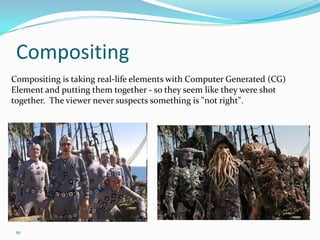
Compositing
Compositing is taking real-life elements with Computer Generated (CG)
Element and putting them together - so they seem like they were shot
together. The viewer never suspects something is "not right".


 10
VFX
  Visual effects (commonly shortened to Visual F/X or VFX) are
     the various processes by which imagery is created and/or
     manipulated outside the context of a live action shoot.

  Visual effects often involve the integration of live-action footage
     and computer generated imagery (CGI) in order to create
     environments which look realistic, but would be dangerous,
     costly, or simply impossible to capture on film.

  They have become increasingly common in big-budget films,
     and have also recently become accessible to the amateur
     filmmaker with the introduction of affordable animation and
     compositing software.

11
VFX
  A visual effects supervisor is usually involved with the
     production from an early stage to work closely with
     production and the film's director to achieve the
     desired effects.

  "visual effects" refer to digital post-production and
     "special effects" refer to on-set mechanical effects and
     in-camera optical effects.


12
Chroma keying
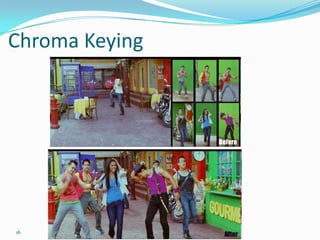
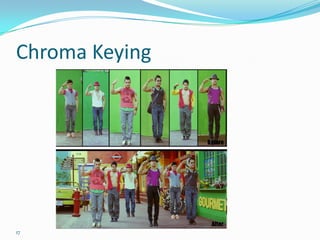
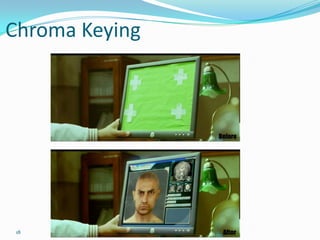
 Chroma key compositing (or
  chroma keying) is a technique for
  mixing two images or frames
  together in which a color (or a
  small color range) from one image
  is removed (or made transparent),
  revealing another image behind it.

 This technique is also referred to as
  color keying, color-separation
  overlay

 13
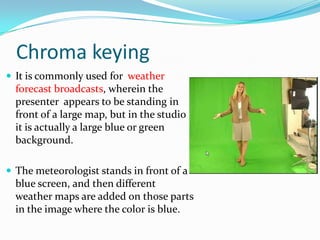
Chroma keying
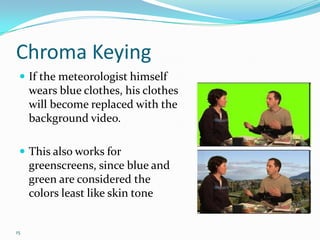
 It is commonly used for weather
  forecast broadcasts, wherein the
  presenter appears to be standing in
  front of a large map, but in the studio
  it is actually a large blue or green
  background.

 The meteorologist stands in front of a
  blue screen, and then different
  weather maps are added on those parts
  in the image where the color is blue.
Chroma Keying
  If the meteorologist himself
     wears blue clothes, his clothes
     will become replaced with the
     background video.

  This also works for
     greenscreens, since blue and
     green are considered the
     colors least like skin tone


15
Chroma Keying


16
Chroma Keying


17
Chroma Keying


 18
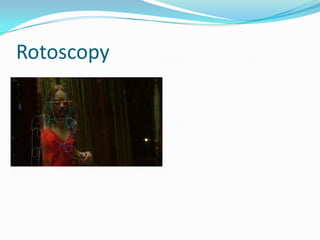
Rotoscoping
  Rotoscoping is an animation technique in which animators trace
     over live-action film movement, frame by frame, for use in
     animated films.

  Originally, pre-recorded live-action film images were projected
     onto a frosted glass panel and re-drawn by an animator.

  This projection equipment is called a rotoscope, although this
     device has been replaced by computers in recent years. In the
     visual effects industry, the term rotoscoping refers to the
     technique of manually creating a matte for an element on a live-
     action plate so it may be composited over another background.


19
Rotoscoping
              The artist is drawing on a
              transparent easel, onto which
              the movie projector at the
              right is throwing an image of
              a single film frame.


20
Rotoscopy
Rotoscopy
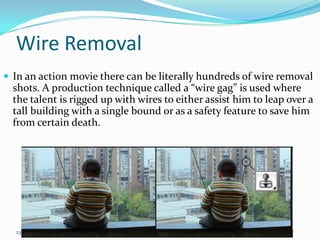
Wire Removal
 In an action movie there can be literally hundreds of wire removal
  shots. A production technique called a “wire gag” is used where
  the talent is rigged up with wires to either assist him to leap over a
  tall building with a single bound or as a safety feature to save him
  from certain death.


  23
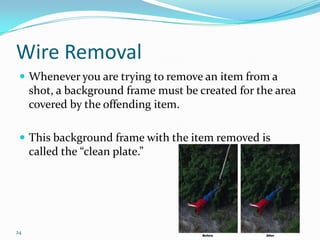
Wire Removal
  Whenever you are trying to remove an item from a
     shot, a background frame must be created for the area
     covered by the offending item.

  This background frame with the item removed is
     called the “clean plate.”


24
Rig Removal
      A close cousin of wire removal is rig removal. A rig is
         any kind of device used on the set to hold up an item
         up for filming.

      After the rig has done its job, it must then be removed
         from the scene. It is usually rigid like a rod or pole.


The city fathers were unwilling to cut the light down and the director simply
had to have this particular camera position to get his shot. The solution – rig removal.
    25
Matchmove and Camera Tracking
  Camera tracking is the
   process of matching the
   movement of the CG
   camera to the movement of
   the camera used in the live-
   action footage. As a result,
   it is a crucial part of all
   visual effects shots.
  Despite its importance, it is
   completely invisible in the
   final shot.
26
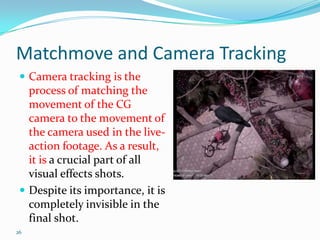
Matchmove and Camera Tracking
  If CG elements (the crow in this case) interacts with objects
     which are a part of the footage (the branch of a tree), then
     matchmoving is needed for that object or character.

  The CG model of that object or character needs to replicate
     the movement of the actual object or character.

  This is important as it can be used to cast shadows, receive
     reflection, and is also a very good base for animators to
     plan out their animation.

27
Matchmove and Camera Tracking
 The camera tracking information lets you add 3-D animated
 effects into live-action footage, such as:

  Animated 3-D character insertion (mascots, beasts, flying pixies,
     you name it). A favorite for commercials.

  Vehicle insertion. Aircraft, boats, cars, trucks, spacecraft, things
     you wish you could get live, but couldn't afford or don't exist.

  Architectural Pre visualization (ground level or helicopter)

  Virtual set extensions (boy, that's a fancy newsroom!)

28
Resources
 http://www.hollywoodcamerawork.us/trackingplates.
 html

 http://www.cgtantra.com/index.php?option=com_con
 tent&task=view&id=267&Itemid=40

Abhilash VFX presentation

  • 1.
  • 2.
    Post-production  Post-production is, in fact, many different processes grouped under one name. These typically include:-  Editing the picture / television program  Writing, (re-)recording, and editing the soundtrack.  Adding visual special effects - mainly computer-generated imagery (CGI) and digital copy from which release prints will be made (although this may be made obsolete by digital-cinema technologies).  Transfer of film to Video or Data with a telecine and Color grading. 2
  • 3.
    Visual fx VsSpecial fx  “Visual Effects" is referring to digital post-production and "special effects" referring to on-set mechanical effects and in-camera optical effects.  Special effects are created during shooting, and Visual effects are done in post.
  • 4.
    Special Effects  Mechanicaleffects  Optical Effects
  • 5.
    Mechanical Effects  Theyare also called as practical or physical effects and are usually accomplished during the live-action shooting  The use of  mechanized props, scenery,  scale models, Pyrotechnics  Atmospheric Effects:  creating physical wind,  rain, fog, snow, clouds etc
  • 6.
    Optical Effects  Opticaleffects are done by manipulating the camera and lighting which in turn will make your scene look different than what it looks like to the naked eye.  This could involve working with camera lenses, types of lighting, or camera movements that give a certain look to the shot.  The special effects supervisor is in charge of making the creative decisions and works directly with the director on set to achieve what he/she wants.
  • 7.
    VFX  Visual effects may be divided into at least four categories:-  Models: miniature sets and models, animatronics.  Matte paintings and stills: digital or traditional paintings or photographs which serve as background plates for keyed or rotoscoped elements.  Live-action effects: keying actors or models through bluescreening and greenscreening.  Digital animation: modeling, computer graphics lighting, texturing, rigging, animating, and rendering computer-generated 3D characters, particle effects, digital sets, backgrounds. 7
  • 8.
    Visual Effects  Rotoscopy Rig and Wire Removal  Camera Tracking and Match Moving  Green and Blue Screen & 3D elements to interact with live action  Color Correction  Matte Painting
  • 9.
    Compositing  It isthe combining of visual elements from separate sources into single image, often to create the illusion that all those elements are parts of the same scene 9
  • 10.
    Compositing Compositing is takingreal-life elements with Computer Generated (CG) Element and putting them together - so they seem like they were shot together. The viewer never suspects something is "not right". 10
  • 11.
    VFX  Visualeffects (commonly shortened to Visual F/X or VFX) are the various processes by which imagery is created and/or manipulated outside the context of a live action shoot.  Visual effects often involve the integration of live-action footage and computer generated imagery (CGI) in order to create environments which look realistic, but would be dangerous, costly, or simply impossible to capture on film.  They have become increasingly common in big-budget films, and have also recently become accessible to the amateur filmmaker with the introduction of affordable animation and compositing software. 11
  • 12.
    VFX  Avisual effects supervisor is usually involved with the production from an early stage to work closely with production and the film's director to achieve the desired effects.  "visual effects" refer to digital post-production and "special effects" refer to on-set mechanical effects and in-camera optical effects. 12
  • 13.
    Chroma keying  Chromakey compositing (or chroma keying) is a technique for mixing two images or frames together in which a color (or a small color range) from one image is removed (or made transparent), revealing another image behind it.  This technique is also referred to as color keying, color-separation overlay 13
  • 14.
    Chroma keying  Itis commonly used for weather forecast broadcasts, wherein the presenter appears to be standing in front of a large map, but in the studio it is actually a large blue or green background.  The meteorologist stands in front of a blue screen, and then different weather maps are added on those parts in the image where the color is blue.
  • 15.
    Chroma Keying If the meteorologist himself wears blue clothes, his clothes will become replaced with the background video.  This also works for greenscreens, since blue and green are considered the colors least like skin tone 15
  • 16.
  • 17.
  • 18.
  • 19.
    Rotoscoping  Rotoscopingis an animation technique in which animators trace over live-action film movement, frame by frame, for use in animated films.  Originally, pre-recorded live-action film images were projected onto a frosted glass panel and re-drawn by an animator.  This projection equipment is called a rotoscope, although this device has been replaced by computers in recent years. In the visual effects industry, the term rotoscoping refers to the technique of manually creating a matte for an element on a live- action plate so it may be composited over another background. 19
  • 20.
    Rotoscoping The artist is drawing on a transparent easel, onto which the movie projector at the right is throwing an image of a single film frame. 20
  • 21.
  • 22.
  • 23.
    Wire Removal  Inan action movie there can be literally hundreds of wire removal shots. A production technique called a “wire gag” is used where the talent is rigged up with wires to either assist him to leap over a tall building with a single bound or as a safety feature to save him from certain death. 23
  • 24.
    Wire Removal Whenever you are trying to remove an item from a shot, a background frame must be created for the area covered by the offending item.  This background frame with the item removed is called the “clean plate.” 24
  • 25.
    Rig Removal  A close cousin of wire removal is rig removal. A rig is any kind of device used on the set to hold up an item up for filming.  After the rig has done its job, it must then be removed from the scene. It is usually rigid like a rod or pole. The city fathers were unwilling to cut the light down and the director simply had to have this particular camera position to get his shot. The solution – rig removal. 25
  • 26.
    Matchmove and CameraTracking  Camera tracking is the process of matching the movement of the CG camera to the movement of the camera used in the live- action footage. As a result, it is a crucial part of all visual effects shots.  Despite its importance, it is completely invisible in the final shot. 26
  • 27.
    Matchmove and CameraTracking  If CG elements (the crow in this case) interacts with objects which are a part of the footage (the branch of a tree), then matchmoving is needed for that object or character.  The CG model of that object or character needs to replicate the movement of the actual object or character.  This is important as it can be used to cast shadows, receive reflection, and is also a very good base for animators to plan out their animation. 27
  • 28.
    Matchmove and CameraTracking The camera tracking information lets you add 3-D animated effects into live-action footage, such as:  Animated 3-D character insertion (mascots, beasts, flying pixies, you name it). A favorite for commercials.  Vehicle insertion. Aircraft, boats, cars, trucks, spacecraft, things you wish you could get live, but couldn't afford or don't exist.  Architectural Pre visualization (ground level or helicopter)  Virtual set extensions (boy, that's a fancy newsroom!) 28
  • 29.
    Resources  http://www.hollywoodcamerawork.us/trackingplates. html http://www.cgtantra.com/index.php?option=com_con tent&task=view&id=267&Itemid=40