PRE-PRODUCTION
Jordanne kay
STYLE SHEET
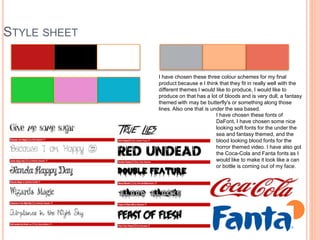
I have chosen these three colour schemes for my final
product because e I think that they fit in really well with the
different themes I would like to produce, I would like to
produce on that has a lot of bloods and is very dull, a fantasy
themed with may be butterfly's or something along those
lines. Also one that is under the sea based.
I have chosen these fonts of
DaFont, I have chosen some nice
looking soft fonts for the under the
sea and fantasy themed, and the
blood looking blood fonts for the
horror themed video. I have also got
the Coca-Cola and Fanta fonts as I
would like to make it look like a can
or bottle is coming out of my face.
LE SHEET
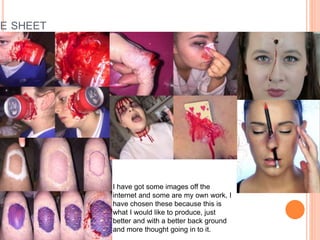
I have got some images off the
internet and some are my own work, I
have chosen these because this is
what I would like to produce, just
better and with a better back ground
and more thought going in to it.
LAYOUT 1
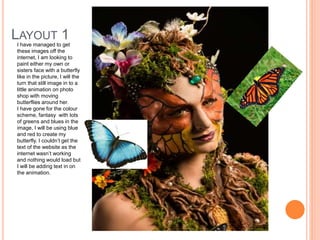
I have managed to get
these images off the
internet, I am looking to
paint either my own or
sisters face with a butterfly
like in the picture, I will the
turn that still image in to a
little animation on photo
shop with moving
butterflies around her.
I have gone for the colour
scheme, fantasy with lots
of greens and blues in the
image, I will be using blue
and red to create my
butterfly. I couldn’t get the
text of the website as the
internet wasn’t working
and nothing would load but
I will be adding text in on
the animation.
LAYOUT 2
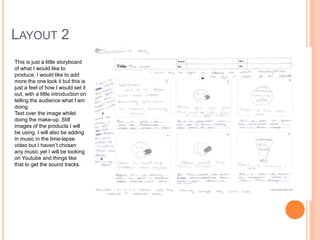
This is just a little storyboard
of what I would like to
produce, I would like to add
more the one look it but this is
just a feel of how I would set it
out, with a little introduction on
telling the audience what I am
doing.
Text over the image whilst
doing the make-up. Still
images of the products I will
be using. I will also be adding
in music in the time-lapse
video but I haven’t chosen
any music yet I will be looking
on Youtube and things like
that to get the sound tracks.
PROPS & LOCATIONS
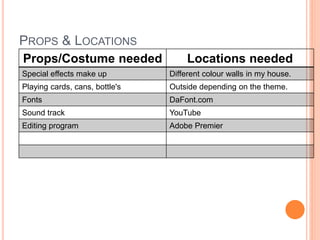
Props/Costume needed Locations needed
Special effects make up Different colour walls in my house.
Playing cards, cans, bottle's Outside depending on the theme.
Fonts DaFont.com
Sound track YouTube
Editing program Adobe Premier
CONTINGENCY PLANNING
Potential Issue Solution
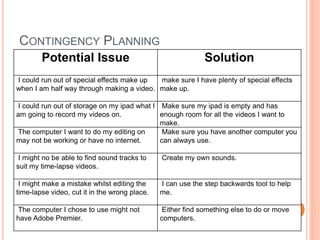
I could run out of special effects make up
when I am half way through making a video.
make sure I have plenty of special effects
make up.
I could run out of storage on my ipad what I
am going to record my videos on.
Make sure my ipad is empty and has
enough room for all the videos I want to
make.
The computer I want to do my editing on
may not be working or have no internet.
Make sure you have another computer you
can always use.
I might no be able to find sound tracks to
suit my time-lapse videos.
Create my own sounds.
I might make a mistake whilst editing the
time-lapse video, cut it in the wrong place.
I can use the step backwards tool to help
me.
The computer I chose to use might not
have Adobe Premier.
Either find something else to do or move
computers.
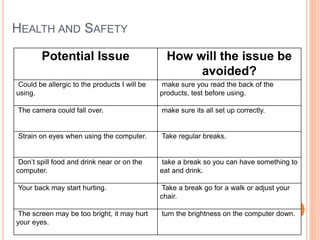
HEALTH AND SAFETY
Potential Issue How will the issue be
avoided?
Could be allergic to the products I will be
using.
make sure you read the back of the
products, test before using.
The camera could fall over. make sure its all set up correctly.
Strain on eyes when using the computer. Take regular breaks.
Don’t spill food and drink near or on the
computer.
take a break so you can have something to
eat and drink.
Your back may start hurting. Take a break go for a walk or adjust your
chair.
The screen may be too bright, it may hurt
your eyes.
turn the brightness on the computer down.
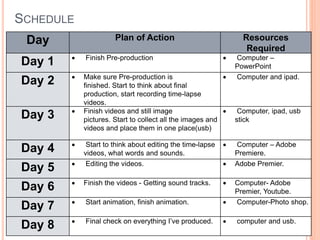
SCHEDULE
Day Plan of Action Resources
Required
Day 1  Finish Pre-production  Computer –
PowerPoint
Day 2  Make sure Pre-production is
finished. Start to think about final
production, start recording time-lapse
videos.
 Computer and ipad.
Day 3  Finish videos and still image
pictures. Start to collect all the images and
videos and place them in one place(usb)
 Computer, ipad, usb
stick
Day 4  Start to think about editing the time-lapse
videos, what words and sounds.
 Computer – Adobe
Premiere.
Day 5  Editing the videos.  Adobe Premier.
Day 6  Finish the videos - Getting sound tracks.  Computer- Adobe
Premier, Youtube.
Day 7  Start animation, finish animation.  Computer-Photo shop.
Day 8  Final check on everything I’ve produced.  computer and usb.

5. pre production

  • 1.
  • 2.
    STYLE SHEET I havechosen these three colour schemes for my final product because e I think that they fit in really well with the different themes I would like to produce, I would like to produce on that has a lot of bloods and is very dull, a fantasy themed with may be butterfly's or something along those lines. Also one that is under the sea based. I have chosen these fonts of DaFont, I have chosen some nice looking soft fonts for the under the sea and fantasy themed, and the blood looking blood fonts for the horror themed video. I have also got the Coca-Cola and Fanta fonts as I would like to make it look like a can or bottle is coming out of my face.
  • 3.
    LE SHEET I havegot some images off the internet and some are my own work, I have chosen these because this is what I would like to produce, just better and with a better back ground and more thought going in to it.
  • 4.
    LAYOUT 1 I havemanaged to get these images off the internet, I am looking to paint either my own or sisters face with a butterfly like in the picture, I will the turn that still image in to a little animation on photo shop with moving butterflies around her. I have gone for the colour scheme, fantasy with lots of greens and blues in the image, I will be using blue and red to create my butterfly. I couldn’t get the text of the website as the internet wasn’t working and nothing would load but I will be adding text in on the animation.
  • 5.
    LAYOUT 2 This isjust a little storyboard of what I would like to produce, I would like to add more the one look it but this is just a feel of how I would set it out, with a little introduction on telling the audience what I am doing. Text over the image whilst doing the make-up. Still images of the products I will be using. I will also be adding in music in the time-lapse video but I haven’t chosen any music yet I will be looking on Youtube and things like that to get the sound tracks.
  • 6.
    PROPS & LOCATIONS Props/Costumeneeded Locations needed Special effects make up Different colour walls in my house. Playing cards, cans, bottle's Outside depending on the theme. Fonts DaFont.com Sound track YouTube Editing program Adobe Premier
  • 7.
    CONTINGENCY PLANNING Potential IssueSolution I could run out of special effects make up when I am half way through making a video. make sure I have plenty of special effects make up. I could run out of storage on my ipad what I am going to record my videos on. Make sure my ipad is empty and has enough room for all the videos I want to make. The computer I want to do my editing on may not be working or have no internet. Make sure you have another computer you can always use. I might no be able to find sound tracks to suit my time-lapse videos. Create my own sounds. I might make a mistake whilst editing the time-lapse video, cut it in the wrong place. I can use the step backwards tool to help me. The computer I chose to use might not have Adobe Premier. Either find something else to do or move computers.
  • 8.
    HEALTH AND SAFETY PotentialIssue How will the issue be avoided? Could be allergic to the products I will be using. make sure you read the back of the products, test before using. The camera could fall over. make sure its all set up correctly. Strain on eyes when using the computer. Take regular breaks. Don’t spill food and drink near or on the computer. take a break so you can have something to eat and drink. Your back may start hurting. Take a break go for a walk or adjust your chair. The screen may be too bright, it may hurt your eyes. turn the brightness on the computer down.
  • 9.
    SCHEDULE Day Plan ofAction Resources Required Day 1  Finish Pre-production  Computer – PowerPoint Day 2  Make sure Pre-production is finished. Start to think about final production, start recording time-lapse videos.  Computer and ipad. Day 3  Finish videos and still image pictures. Start to collect all the images and videos and place them in one place(usb)  Computer, ipad, usb stick Day 4  Start to think about editing the time-lapse videos, what words and sounds.  Computer – Adobe Premiere. Day 5  Editing the videos.  Adobe Premier. Day 6  Finish the videos - Getting sound tracks.  Computer- Adobe Premier, Youtube. Day 7  Start animation, finish animation.  Computer-Photo shop. Day 8  Final check on everything I’ve produced.  computer and usb.

Editor's Notes

  • #3 Explore colours, fonts and image styles similar to what you want to produce. Discuss all three elements in relation to why you chose them and where you may use them in your project. Go over as many pages as you need to
  • #5 Mock up of a potential design using the colours and fonts established in your style sheet and sourced images
  • #6 Mock up of a potential design using the colours and fonts established in your style sheet and sourced images