Pre-Production
Reed Cunningham
Style sheet
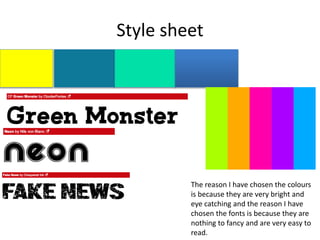
The reason I have chosen the colours
is because they are very bright and
eye catching and the reason I have
chosen the fonts is because they are
nothing to fancy and are very easy to
read.
Layout 1
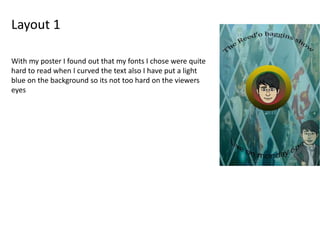
With my poster I found out that my fonts I chose were quite
hard to read when I curved the text also I have put a light
blue on the background so its not too hard on the viewers
eyes
Layout 2
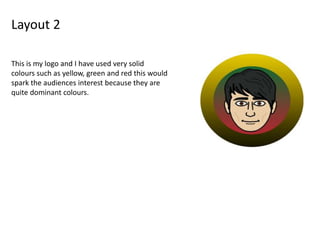
This is my logo and I have used very solid
colours such as yellow, green and red this would
spark the audiences interest because they are
quite dominant colours.
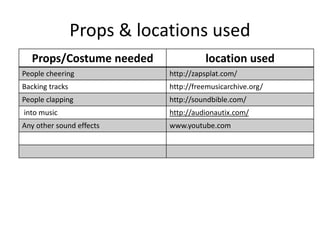
Props & locations used
Props/Costume needed location used
People cheering http://zapsplat.com/
Backing tracks http://freemusicarchive.org/
People clapping http://soundbible.com/
into music http://audionautix.com/
Any other sound effects www.youtube.com
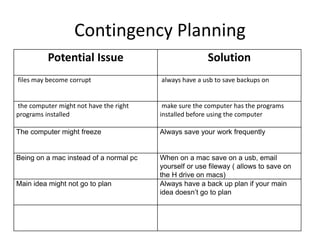
Contingency Planning
Potential Issue Solution
files may become corrupt always have a usb to save backups on
the computer might not have the right
programs installed
make sure the computer has the programs
installed before using the computer
The computer might freeze Always save your work frequently
Being on a mac instead of a normal pc When on a mac save on a usb, email
yourself or use fileway ( allows to save on
the H drive on macs)
Main idea might not go to plan Always have a back up plan if your main
idea doesn’t go to plan
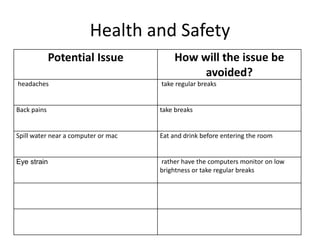
Health and Safety
Potential Issue How will the issue be
avoided?
headaches take regular breaks
Back pains take breaks
Spill water near a computer or mac Eat and drink before entering the room
Eye strain rather have the computers monitor on low
brightness or take regular breaks
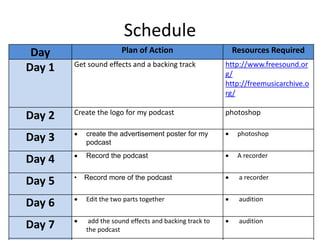
Schedule
Day Plan of Action Resources Required
Day 1 Get sound effects and a backing track http://www.freesound.or
g/
http://freemusicarchive.o
rg/
Day 2 Create the logo for my podcast photoshop
Day 3  create the advertisement poster for my
podcast
 photoshop
Day 4  Record the podcast  A recorder
Day 5 • Record more of the podcast  a recorder
Day 6  Edit the two parts together  audition
Day 7  add the sound effects and backing track to
the podcast
 audition

5. fmp pre production-2

  • 1.
  • 2.
    Style sheet The reasonI have chosen the colours is because they are very bright and eye catching and the reason I have chosen the fonts is because they are nothing to fancy and are very easy to read.
  • 3.
    Layout 1 With myposter I found out that my fonts I chose were quite hard to read when I curved the text also I have put a light blue on the background so its not too hard on the viewers eyes
  • 4.
    Layout 2 This ismy logo and I have used very solid colours such as yellow, green and red this would spark the audiences interest because they are quite dominant colours.
  • 5.
    Props & locationsused Props/Costume needed location used People cheering http://zapsplat.com/ Backing tracks http://freemusicarchive.org/ People clapping http://soundbible.com/ into music http://audionautix.com/ Any other sound effects www.youtube.com
  • 6.
    Contingency Planning Potential IssueSolution files may become corrupt always have a usb to save backups on the computer might not have the right programs installed make sure the computer has the programs installed before using the computer The computer might freeze Always save your work frequently Being on a mac instead of a normal pc When on a mac save on a usb, email yourself or use fileway ( allows to save on the H drive on macs) Main idea might not go to plan Always have a back up plan if your main idea doesn’t go to plan
  • 7.
    Health and Safety PotentialIssue How will the issue be avoided? headaches take regular breaks Back pains take breaks Spill water near a computer or mac Eat and drink before entering the room Eye strain rather have the computers monitor on low brightness or take regular breaks
  • 8.
    Schedule Day Plan ofAction Resources Required Day 1 Get sound effects and a backing track http://www.freesound.or g/ http://freemusicarchive.o rg/ Day 2 Create the logo for my podcast photoshop Day 3  create the advertisement poster for my podcast  photoshop Day 4  Record the podcast  A recorder Day 5 • Record more of the podcast  a recorder Day 6  Edit the two parts together  audition Day 7  add the sound effects and backing track to the podcast  audition

Editor's Notes

  • #3 Explore colours, fonts and image styles similar to what you want to produce. Discuss all three elements in relation to why you chose them and where you may use them in your project. Go over as many pages as you need to
  • #4 Mock up of a potential design using the colours and fonts established in your style sheet and sourced images
  • #5 Mock up of a potential design using the colours and fonts established in your style sheet and sourced images