MUSIC VIDEO
PRODUCTION
PROCESS LOG
AIDAN JONES
PRODUCTION LOG:
GUIDANCE
• This document is for you to track the progress of your
production – filming, editing and post-production.
• This is so you can track what you did and how you did it,
explaining and amendments and changes you made and
tracking the decisions that have shaped the practical
creation of your music video.
• The more detail you include about how you made your music
video, the better. The document is broken down in to two
sections, Filming and Editing, each of these is then made of
specific elements that occur in both.
• For each slide there is a prompt detailing what you should
include, delete the prompt after you have complete the slide.
• Remember, images often show what you’ve done more
effectively than words. Use text to explain an illustration.
FILMING
Explain what worked and didn’t work about your filming and how you
managed this covering the following areas:
• Technical – using the cameras and any technical equipment; this
could be how you did your lip sync, used the green screen, dealt
with problems with batteries, etc
• Logistical – did your locations work? Did you have any access
problems? Did it rain?
• Personnel – how were your cast/crew? Did anyone let you down?
How did you manage this?
• Planning – did your planning help? Do you think it could have
worked better? How?
• Next steps – do you need to re-film? Film more? Have you
changed your video? How/why?
TECHNICAL
I used one of the 600D cameras from the college. I set up the
camera facing front on to the performers. We recorded the
video quite a few times. Sometimes with the performers
together or on their own. Sometimed we would film the whole
song, and then at other times we would film different
sections seperately. We used one battery's life per recording
session. I would ask for / book to have an extra battery, if
needed. There was a green screen set up in the background,
so that when it came round to editing, I could add lots of
different backgrounds behind the performers. To do the lip
sync, the song with lyrics was held above the camera. This
was so that the performers could listen to the music and read
the lyrics. Before we started recording in each session the
performers would have a few minutes to familiarise
themselves with the song and its lyrics again.
LOGISTICAL
My locations did work. It was a bit of a mess at the start. My
plans had just changed, but I was happy because Plan A
wasn't going to work out. I recorded my music video in the
college studio. I was going to add a few videos of the areas
outside of college, to go as the background on the green
screen, but the weather wasn't the best. In Plan A I was
supposed to go to a studio on the right side of York, and then
to a park nearby. The studio seemed like a perfect place, until
I found out how much it would cost to film there (£250). I then
had to rethink my plan, so I had a talk with my friend and my
tutor about the situation. Plan B was set up for me to just use
the studio in the college, this seemed like a less interesting
idea, but it would work better and cost nothing.
PERSONNEL
The cast, in the final product, were very compliant. They
listened to my requests. They worked very professionally
during the recording sessions. I was supposed to have
someone named Zuzanna in the recording, but she had to
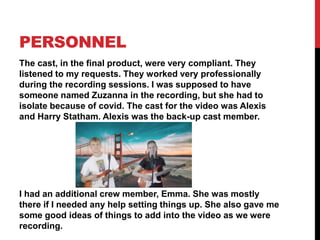
isolate because of covid. The cast for the video was Alexis
and Harry Statham. Alexis was the back-up cast member.
I had an additional crew member, Emma. She was mostly
there if I needed any help setting things up. She also gave me
some good ideas of things to add into the video as we were
recording.
PLANNING
When I was planning my music video, I spent a lot of
time writing lots of detailed ideas down, so that I had things
all planned out. The planning helped to construct my
product because I had an idea of what I wanted to achieve. I
made the goals that I wanted to complete, when making the
music video, realistic so that I could manage to do them.
I think that doing all the plannig for Plan A helped me out
because then I knew what was possible. I wish that I thought
about a Plan B sooner, so that I would have a better back-up
plan for if something was to go wrong.
EDITING
• Record your edit progress, decisions, problems, etc. in
this section
• Include screenshots with annotations, statements, etc
where possible
• Try to explain how you worked and justify why you chose
to work the way you did.
• Follow the structure and what to include on each slide as
this is necessary for evidence for assessment
• Pick notable moments in the editing process and discuss
them, what worked/didn’t work and why, how you adjusted
to problems. Discuss how you worked and what you
learned from the process
WHAT WENT WELL
[3 EXAMPLES]
• I quickly learned how to add different backgrounds behind
the performers.
• The video works to do what it is meant to, it's...interesting.
• I started to experiment with the options
to animate movement of different objects in the
background, and the different effects to add onto the same
layer.
WHAT PROBLEMS DID
YOU HAVE? [3
EXAMPLES]
• I don’t think that it is as amazing as it would've been if I
went ahead with Plan A. I could have played around with
the settings / colours on more backgrounds to make it
more alluring. Also, to make it more of a repetitive idea,
rather than a one-off idea.
• The editing wasn't very good. I hadn't used the software
very much, but I was getting better. I could have put the
performers / cast in more realistic places, but that
wouldn't have been as fun.
• I should have had more transitions between the different
clips. More objects moving in the background in the
second half of the video.
NEXT STEPS…
What are the main things you’ve learned from this project?
1. To always make a plan B, or C in the early days of the
project, so that I am not left in the same situation as I
was.
2. How to use the software (Premeire Pro) a lot more
effectively, and confidently.
3. To not make the ideas so advanced because it will be
diffulcult and you may risk not doing it very well. It would
be a better idea to do a simple project, that is really good.
4. Make good connections with people that are willing to be
on camera, because they are important to have.
5. Book the studio, and any other places, quickly because
otherwise you could risk not having it when you need it.

MV Process Log Form 2021

  • 1.
  • 2.
    PRODUCTION LOG: GUIDANCE • Thisdocument is for you to track the progress of your production – filming, editing and post-production. • This is so you can track what you did and how you did it, explaining and amendments and changes you made and tracking the decisions that have shaped the practical creation of your music video. • The more detail you include about how you made your music video, the better. The document is broken down in to two sections, Filming and Editing, each of these is then made of specific elements that occur in both. • For each slide there is a prompt detailing what you should include, delete the prompt after you have complete the slide. • Remember, images often show what you’ve done more effectively than words. Use text to explain an illustration.
  • 3.
    FILMING Explain what workedand didn’t work about your filming and how you managed this covering the following areas: • Technical – using the cameras and any technical equipment; this could be how you did your lip sync, used the green screen, dealt with problems with batteries, etc • Logistical – did your locations work? Did you have any access problems? Did it rain? • Personnel – how were your cast/crew? Did anyone let you down? How did you manage this? • Planning – did your planning help? Do you think it could have worked better? How? • Next steps – do you need to re-film? Film more? Have you changed your video? How/why?
  • 4.
    TECHNICAL I used oneof the 600D cameras from the college. I set up the camera facing front on to the performers. We recorded the video quite a few times. Sometimes with the performers together or on their own. Sometimed we would film the whole song, and then at other times we would film different sections seperately. We used one battery's life per recording session. I would ask for / book to have an extra battery, if needed. There was a green screen set up in the background, so that when it came round to editing, I could add lots of different backgrounds behind the performers. To do the lip sync, the song with lyrics was held above the camera. This was so that the performers could listen to the music and read the lyrics. Before we started recording in each session the performers would have a few minutes to familiarise themselves with the song and its lyrics again.
  • 5.
    LOGISTICAL My locations didwork. It was a bit of a mess at the start. My plans had just changed, but I was happy because Plan A wasn't going to work out. I recorded my music video in the college studio. I was going to add a few videos of the areas outside of college, to go as the background on the green screen, but the weather wasn't the best. In Plan A I was supposed to go to a studio on the right side of York, and then to a park nearby. The studio seemed like a perfect place, until I found out how much it would cost to film there (£250). I then had to rethink my plan, so I had a talk with my friend and my tutor about the situation. Plan B was set up for me to just use the studio in the college, this seemed like a less interesting idea, but it would work better and cost nothing.
  • 6.
    PERSONNEL The cast, inthe final product, were very compliant. They listened to my requests. They worked very professionally during the recording sessions. I was supposed to have someone named Zuzanna in the recording, but she had to isolate because of covid. The cast for the video was Alexis and Harry Statham. Alexis was the back-up cast member. I had an additional crew member, Emma. She was mostly there if I needed any help setting things up. She also gave me some good ideas of things to add into the video as we were recording.
  • 7.
    PLANNING When I wasplanning my music video, I spent a lot of time writing lots of detailed ideas down, so that I had things all planned out. The planning helped to construct my product because I had an idea of what I wanted to achieve. I made the goals that I wanted to complete, when making the music video, realistic so that I could manage to do them. I think that doing all the plannig for Plan A helped me out because then I knew what was possible. I wish that I thought about a Plan B sooner, so that I would have a better back-up plan for if something was to go wrong.
  • 8.
    EDITING • Record youredit progress, decisions, problems, etc. in this section • Include screenshots with annotations, statements, etc where possible • Try to explain how you worked and justify why you chose to work the way you did. • Follow the structure and what to include on each slide as this is necessary for evidence for assessment • Pick notable moments in the editing process and discuss them, what worked/didn’t work and why, how you adjusted to problems. Discuss how you worked and what you learned from the process
  • 9.
    WHAT WENT WELL [3EXAMPLES] • I quickly learned how to add different backgrounds behind the performers. • The video works to do what it is meant to, it's...interesting. • I started to experiment with the options to animate movement of different objects in the background, and the different effects to add onto the same layer.
  • 10.
    WHAT PROBLEMS DID YOUHAVE? [3 EXAMPLES] • I don’t think that it is as amazing as it would've been if I went ahead with Plan A. I could have played around with the settings / colours on more backgrounds to make it more alluring. Also, to make it more of a repetitive idea, rather than a one-off idea. • The editing wasn't very good. I hadn't used the software very much, but I was getting better. I could have put the performers / cast in more realistic places, but that wouldn't have been as fun. • I should have had more transitions between the different clips. More objects moving in the background in the second half of the video.
  • 11.
    NEXT STEPS… What arethe main things you’ve learned from this project? 1. To always make a plan B, or C in the early days of the project, so that I am not left in the same situation as I was. 2. How to use the software (Premeire Pro) a lot more effectively, and confidently. 3. To not make the ideas so advanced because it will be diffulcult and you may risk not doing it very well. It would be a better idea to do a simple project, that is really good. 4. Make good connections with people that are willing to be on camera, because they are important to have. 5. Book the studio, and any other places, quickly because otherwise you could risk not having it when you need it.