Pre-Production
Muhammad Syaffa
Style sheet
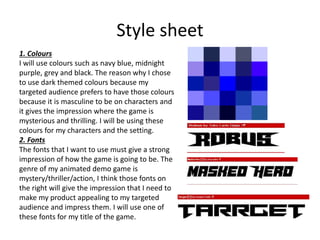
1. Colours
I will use colours such as navy blue, midnight
purple, grey and black. The reason why I chose
to use dark themed colours because my
targeted audience prefers to have those colours
because it is masculine to be on characters and
it gives the impression where the game is
mysterious and thrilling. I will be using these
colours for my characters and the setting.
2. Fonts
The fonts that I want to use must give a strong
impression of how the game is going to be. The
genre of my animated demo game is
mystery/thriller/action, I think those fonts on
the right will give the impression that I need to
make my product appealing to my targeted
audience and impress them. I will use one of
these fonts for my title of the game.
Style sheet
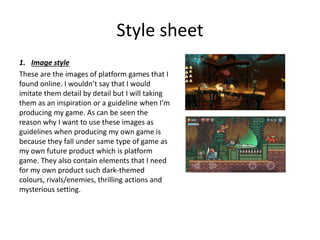
1. Image style
These are the images of platform games that I
found online. I wouldn’t say that I would
imitate them detail by detail but I will taking
them as an inspiration or a guideline when I’m
producing my game. As can be seen the
reason why I want to use these images as
guidelines when producing my own game is
because they fall under same type of game as
my own future product which is platform
game. They also contain elements that I need
for my own product such dark-themed
colours, rivals/enemies, thrilling actions and
mysterious setting.
Style sheet
1. Sound effect
The sound effects that I will be using will be
heavily depends on the type of action that is
happening during the demo animated game. I
will try my best to add a background music.
However if I find the background music
interrupts with the sound effects that I will be
using during certain actions in the game, I will
stop and remove the background music. This is
because I want emphasise more onto the
sound effects rather than the background
music as I believe the sound effects speaks
louder on what is going on and how thrilling
the current situation that is happening at that
moment rather than having a background
music running and interrupting the sound
effects.
Layout 1
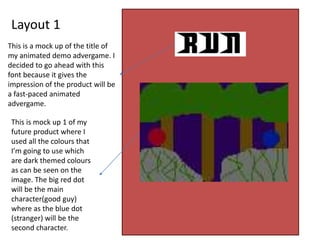
This is a mock up of the title of
my animated demo advergame. I
decided to go ahead with this
font because it gives the
impression of the product will be
a fast-paced animated
advergame.
This is mock up 1 of my
future product where I
used all the colours that
I’m going to use which
are dark themed colours
as can be seen on the
image. The big red dot
will be the main
character(good guy)
where as the blue dot
(stranger) will be the
second character.
Layout 2
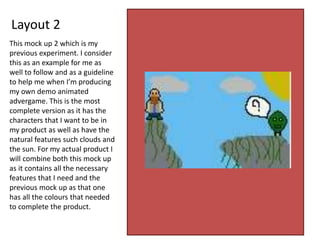
This mock up 2 which is my
previous experiment. I consider
this as an example for me as
well to follow and as a guideline
to help me when I’m producing
my own demo animated
advergame. This is the most
complete version as it has the
characters that I want to be in
my product as well as have the
natural features such clouds and
the sun. For my actual product I
will combine both this mock up
as it contains all the necessary
features that I need and the
previous mock up as that one
has all the colours that needed
to complete the product.
Layout 3
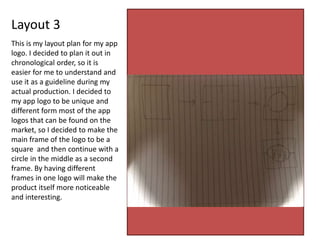
This is my layout plan for my app
logo. I decided to plan it out in
chronological order, so it is
easier for me to understand and
use it as a guideline during my
actual production. I decided to
my app logo to be unique and
different form most of the app
logos that can be found on the
market, so I decided to make the
main frame of the logo to be a
square and then continue with a
circle in the middle as a second
frame. By having different
frames in one logo will make the
product itself more noticeable
and interesting.
Props & Locations
Props/Costume needed Locations needed
- Classroom
- -
- -
- -
- -
- -
- -
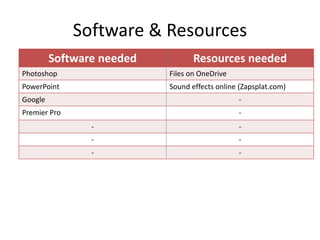
Software & Resources
Software needed Resources needed
Photoshop Files on OneDrive
PowerPoint Sound effects online (Zapsplat.com)
Google -
Premier Pro -
- -
- -
- -
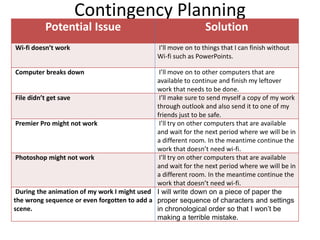
Contingency Planning
Potential Issue Solution
Wi-fi doesn’t work I’ll move on to things that I can finish without
Wi-fi such as PowerPoints.
Computer breaks down I’ll move on to other computers that are
available to continue and finish my leftover
work that needs to be done.
File didn’t get save I’ll make sure to send myself a copy of my work
through outlook and also send it to one of my
friends just to be safe.
Premier Pro might not work I’ll try on other computers that are available
and wait for the next period where we will be in
a different room. In the meantime continue the
work that doesn’t need wi-fi.
Photoshop might not work I’ll try on other computers that are available
and wait for the next period where we will be in
a different room. In the meantime continue the
work that doesn’t need wi-fi.
During the animation of my work I might used
the wrong sequence or even forgotten to add a
scene.
I will write down on a piece of paper the
proper sequence of characters and settings
in chronological order so that I won’t be
making a terrible mistake.
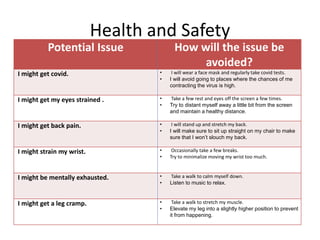
Health and Safety
Potential Issue How will the issue be
avoided?
I might get covid. • I will wear a face mask and regularly take covid tests.
• I will avoid going to places where the chances of me
contracting the virus is high.
I might get my eyes strained . • Take a few rest and eyes off the screen a few times.
• Try to distant myself away a little bit from the screen
and maintain a healthy distance.
I might get back pain. • I will stand up and stretch my back.
• I will make sure to sit up straight on my chair to make
sure that I won’t slouch my back.
I might strain my wrist. • Occasionally take a few breaks.
• Try to minimalize moving my wrist too much.
I might be mentally exhausted. • Take a walk to calm myself down.
• Listen to music to relax.
I might get a leg cramp. • Take a walk to stretch my muscle.
• Elevate my leg into a slightly higher position to prevent
it from happening.
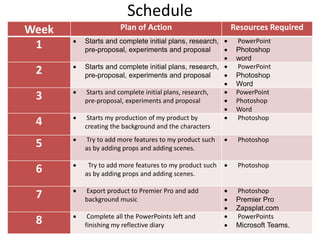
Schedule
Week Plan of Action Resources Required
1  Starts and complete initial plans, research,
pre-proposal, experiments and proposal
 PowerPoint
 Photoshop
 word
2  Starts and complete initial plans, research,
pre-proposal, experiments and proposal
 PowerPoint
 Photoshop
 Word
3  Starts and complete initial plans, research,
pre-proposal, experiments and proposal
 PowerPoint
 Photoshop
 Word
4  Starts my production of my product by
creating the background and the characters
 Photoshop
5  Try to add more features to my product such
as by adding props and adding scenes.
 Photoshop
6  Try to add more features to my product such
as by adding props and adding scenes.
 Photoshop
7  Export product to Premier Pro and add
background music
 Photoshop
 Premier Pro
 Zapsplat.com
8  Complete all the PowerPoints left and
finishing my reflective diary
 PowerPoints
 Microsoft Teams.

5. Pre-Production (FMP).pptx

  • 1.
  • 2.
    Style sheet 1. Colours Iwill use colours such as navy blue, midnight purple, grey and black. The reason why I chose to use dark themed colours because my targeted audience prefers to have those colours because it is masculine to be on characters and it gives the impression where the game is mysterious and thrilling. I will be using these colours for my characters and the setting. 2. Fonts The fonts that I want to use must give a strong impression of how the game is going to be. The genre of my animated demo game is mystery/thriller/action, I think those fonts on the right will give the impression that I need to make my product appealing to my targeted audience and impress them. I will use one of these fonts for my title of the game.
  • 3.
    Style sheet 1. Imagestyle These are the images of platform games that I found online. I wouldn’t say that I would imitate them detail by detail but I will taking them as an inspiration or a guideline when I’m producing my game. As can be seen the reason why I want to use these images as guidelines when producing my own game is because they fall under same type of game as my own future product which is platform game. They also contain elements that I need for my own product such dark-themed colours, rivals/enemies, thrilling actions and mysterious setting.
  • 4.
    Style sheet 1. Soundeffect The sound effects that I will be using will be heavily depends on the type of action that is happening during the demo animated game. I will try my best to add a background music. However if I find the background music interrupts with the sound effects that I will be using during certain actions in the game, I will stop and remove the background music. This is because I want emphasise more onto the sound effects rather than the background music as I believe the sound effects speaks louder on what is going on and how thrilling the current situation that is happening at that moment rather than having a background music running and interrupting the sound effects.
  • 5.
    Layout 1 This isa mock up of the title of my animated demo advergame. I decided to go ahead with this font because it gives the impression of the product will be a fast-paced animated advergame. This is mock up 1 of my future product where I used all the colours that I’m going to use which are dark themed colours as can be seen on the image. The big red dot will be the main character(good guy) where as the blue dot (stranger) will be the second character.
  • 6.
    Layout 2 This mockup 2 which is my previous experiment. I consider this as an example for me as well to follow and as a guideline to help me when I’m producing my own demo animated advergame. This is the most complete version as it has the characters that I want to be in my product as well as have the natural features such clouds and the sun. For my actual product I will combine both this mock up as it contains all the necessary features that I need and the previous mock up as that one has all the colours that needed to complete the product.
  • 7.
    Layout 3 This ismy layout plan for my app logo. I decided to plan it out in chronological order, so it is easier for me to understand and use it as a guideline during my actual production. I decided to my app logo to be unique and different form most of the app logos that can be found on the market, so I decided to make the main frame of the logo to be a square and then continue with a circle in the middle as a second frame. By having different frames in one logo will make the product itself more noticeable and interesting.
  • 8.
    Props & Locations Props/Costumeneeded Locations needed - Classroom - - - - - - - - - - - -
  • 9.
    Software & Resources Softwareneeded Resources needed Photoshop Files on OneDrive PowerPoint Sound effects online (Zapsplat.com) Google - Premier Pro - - - - - - -
  • 10.
    Contingency Planning Potential IssueSolution Wi-fi doesn’t work I’ll move on to things that I can finish without Wi-fi such as PowerPoints. Computer breaks down I’ll move on to other computers that are available to continue and finish my leftover work that needs to be done. File didn’t get save I’ll make sure to send myself a copy of my work through outlook and also send it to one of my friends just to be safe. Premier Pro might not work I’ll try on other computers that are available and wait for the next period where we will be in a different room. In the meantime continue the work that doesn’t need wi-fi. Photoshop might not work I’ll try on other computers that are available and wait for the next period where we will be in a different room. In the meantime continue the work that doesn’t need wi-fi. During the animation of my work I might used the wrong sequence or even forgotten to add a scene. I will write down on a piece of paper the proper sequence of characters and settings in chronological order so that I won’t be making a terrible mistake.
  • 11.
    Health and Safety PotentialIssue How will the issue be avoided? I might get covid. • I will wear a face mask and regularly take covid tests. • I will avoid going to places where the chances of me contracting the virus is high. I might get my eyes strained . • Take a few rest and eyes off the screen a few times. • Try to distant myself away a little bit from the screen and maintain a healthy distance. I might get back pain. • I will stand up and stretch my back. • I will make sure to sit up straight on my chair to make sure that I won’t slouch my back. I might strain my wrist. • Occasionally take a few breaks. • Try to minimalize moving my wrist too much. I might be mentally exhausted. • Take a walk to calm myself down. • Listen to music to relax. I might get a leg cramp. • Take a walk to stretch my muscle. • Elevate my leg into a slightly higher position to prevent it from happening.
  • 12.
    Schedule Week Plan ofAction Resources Required 1  Starts and complete initial plans, research, pre-proposal, experiments and proposal  PowerPoint  Photoshop  word 2  Starts and complete initial plans, research, pre-proposal, experiments and proposal  PowerPoint  Photoshop  Word 3  Starts and complete initial plans, research, pre-proposal, experiments and proposal  PowerPoint  Photoshop  Word 4  Starts my production of my product by creating the background and the characters  Photoshop 5  Try to add more features to my product such as by adding props and adding scenes.  Photoshop 6  Try to add more features to my product such as by adding props and adding scenes.  Photoshop 7  Export product to Premier Pro and add background music  Photoshop  Premier Pro  Zapsplat.com 8  Complete all the PowerPoints left and finishing my reflective diary  PowerPoints  Microsoft Teams.

Editor's Notes

  • #3 Explore colours, fonts and image styles similar to what you want to produce. Discuss all three elements in relation to why you chose them and where you may use them in your project. Go over as many pages as you need to
  • #6 Mock up of a potential design using the colours and fonts established in your style sheet and sourced images
  • #7 Mock up of a potential design using the colours and fonts established in your style sheet and sourced images
  • #8 Mock up of a potential design using the colours and fonts established in your style sheet and sourced images