Digimap – Urban map data for CAD 
26 November 2014 
Ian Holmes, EDINA Geo User Support 
Vivienne Mayo, EDINA User Support
Content 
• What data is available in CAD format? 
• Where do I get the data? 
• How do I use the data? 
• Copyright and Resources
What data is available in CAD format? 
• Vector datasets: 
– VectorMap Local [DWG] 
– MasterMap Topography Layer [DWG] 
• Height datasets: 
– Terrain 50 DTM and contours [ASCII, Shape, GML] 
– Land-Form PROFILE DTM and contours [DXF] 
– Land-Form PANORAMA DTM and contours [DXF] 
• Backdrop mapping [TIFF] 
– Various products e.g. 1:50,000 raster, all in TIFF format 
• Other 
– Building Height Attribute: extension to MasterMap Topography 
Layer [CSV]
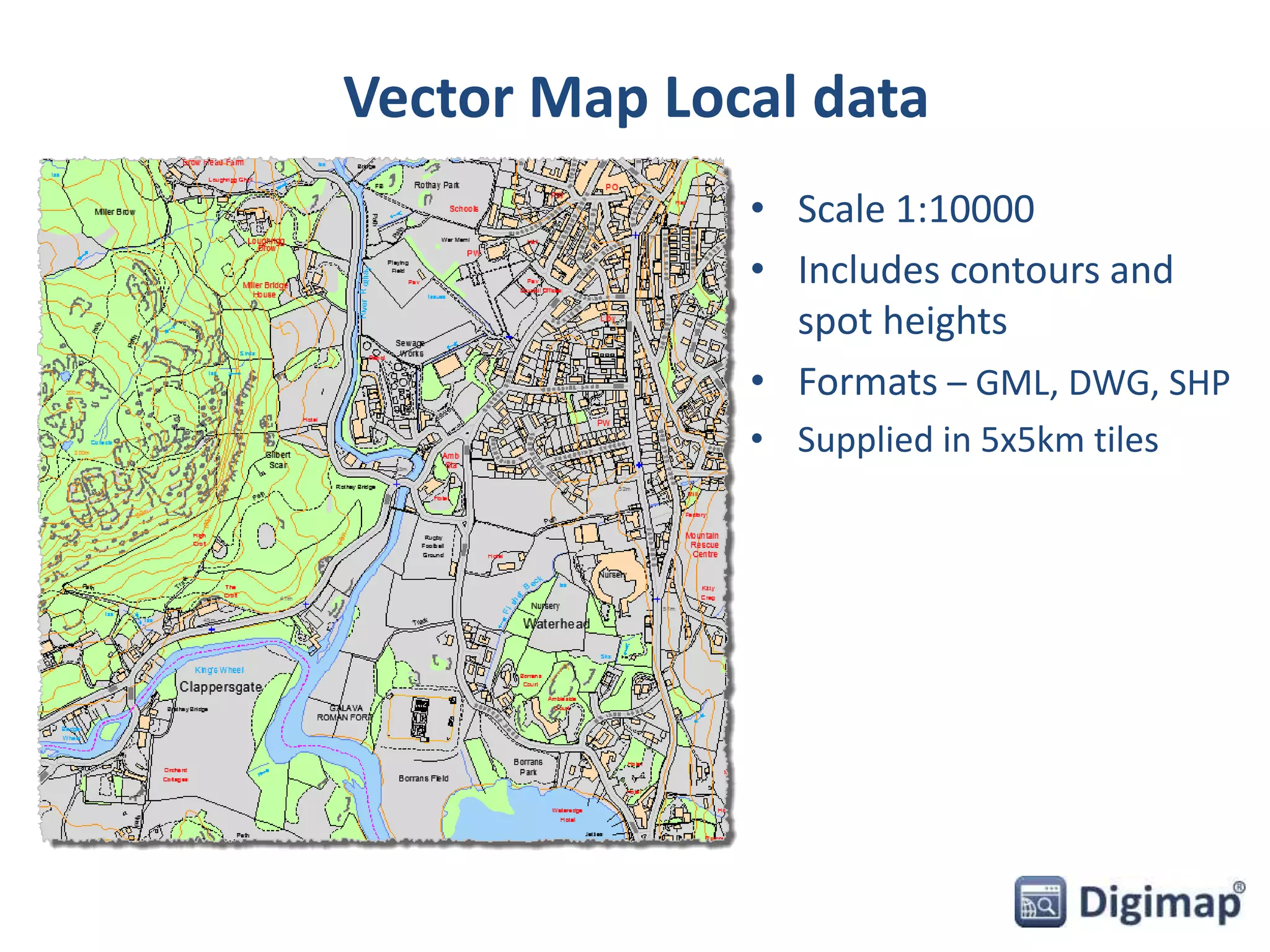
Vector Map Local data 
• Scale 1:10000 
• Includes contours and 
spot heights 
• Formats – GML, DWG, SHP 
• Supplied in 5x5km tiles
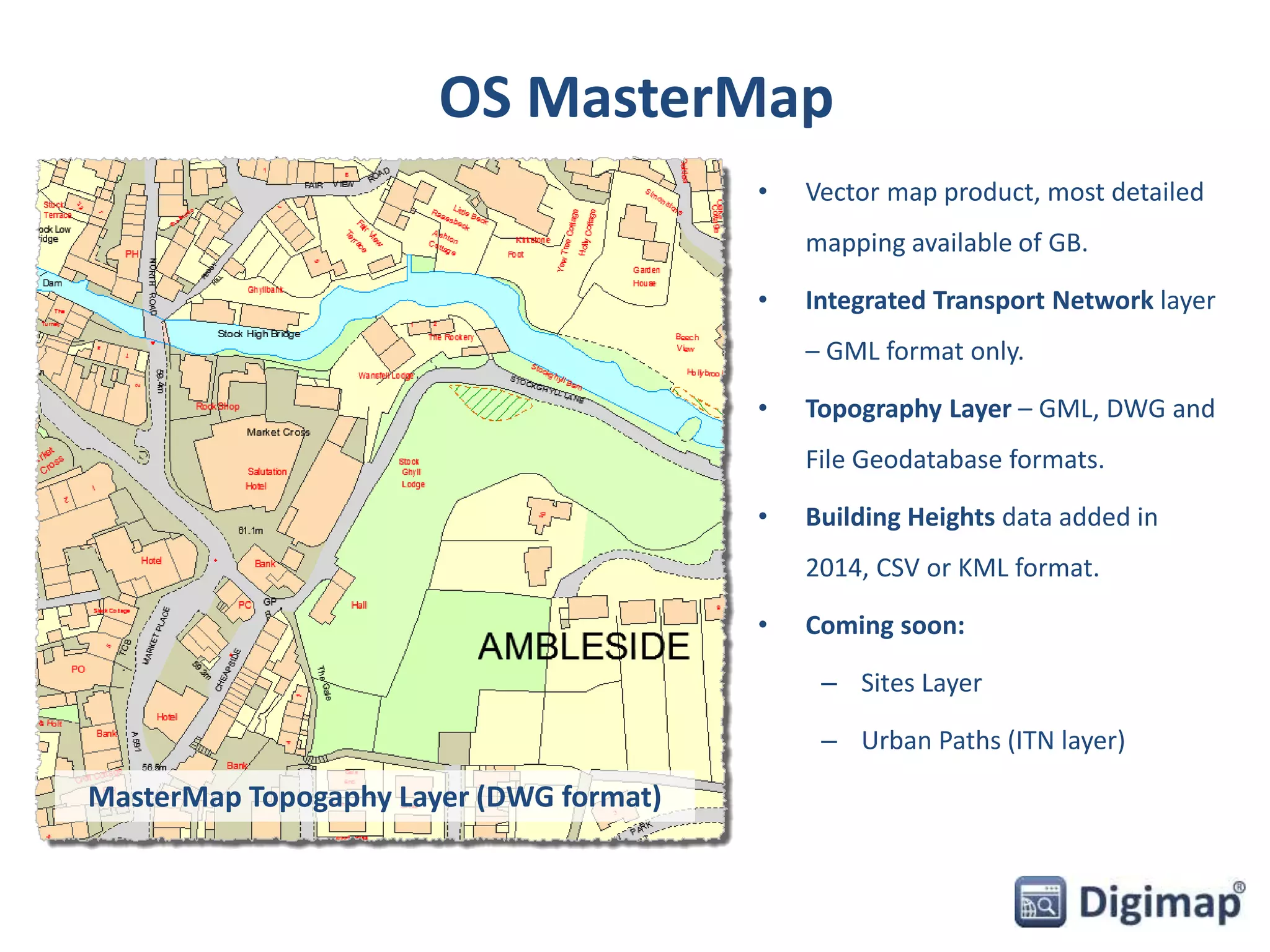
OS MasterMap 
• Vector map product, most detailed 
mapping available of GB. 
• Integrated Transport Network layer 
– GML format only. 
• Topography Layer – GML, DWG and 
File Geodatabase formats. 
• Building Heights data added in 
2014, CSV or KML format. 
• Coming soon: 
– Sites Layer 
– Urban Paths (ITN layer) 
MasterMap Topogaphy Layer (DWG format)
Height Data 
• Various Raster (DTM) 
and Vector (contour) 
datasets available: 
– Terrain 50 [ASCII, Shape, 
GML] – replacement for 
Land-Form PANORAMA 
– Land-Form PROFILE [DXF] 
– withdrawn by OS 
– Land-Form PANORAMA 
[DXF] – withdrawn by OS 
• Coming soon: 
– OS Terrain 5 – 
replacement for Land- 
Form PROFILE 
Terrain 50 DTM 
Terrain 50 Contours
Backdrop mapping 
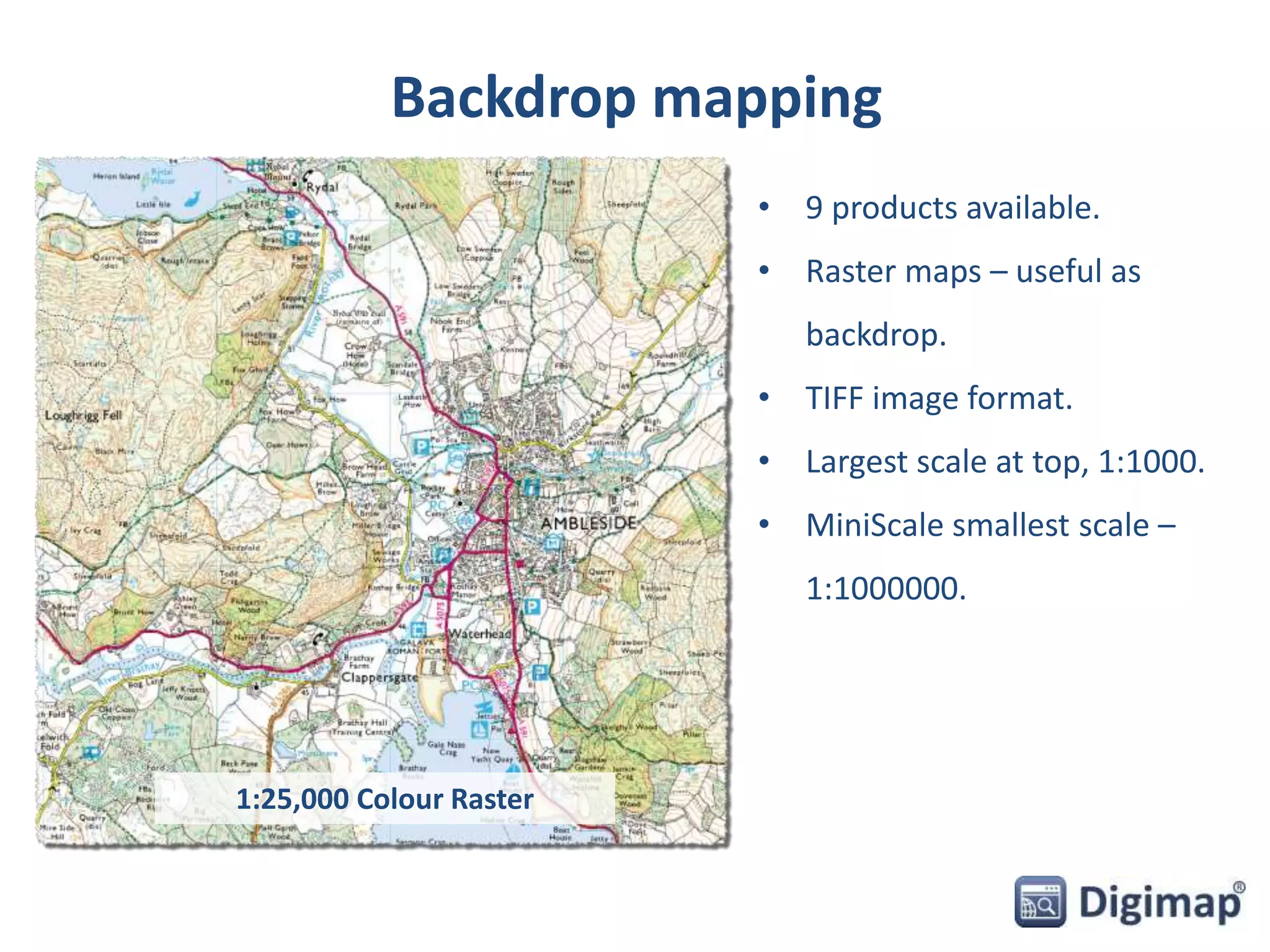
• 9 products available. 
• Raster maps – useful as 
backdrop. 
• TIFF image format. 
• Largest scale at top, 1:1000. 
• MiniScale smallest scale – 
1:1000000. 
1:25,000 Colour Raster
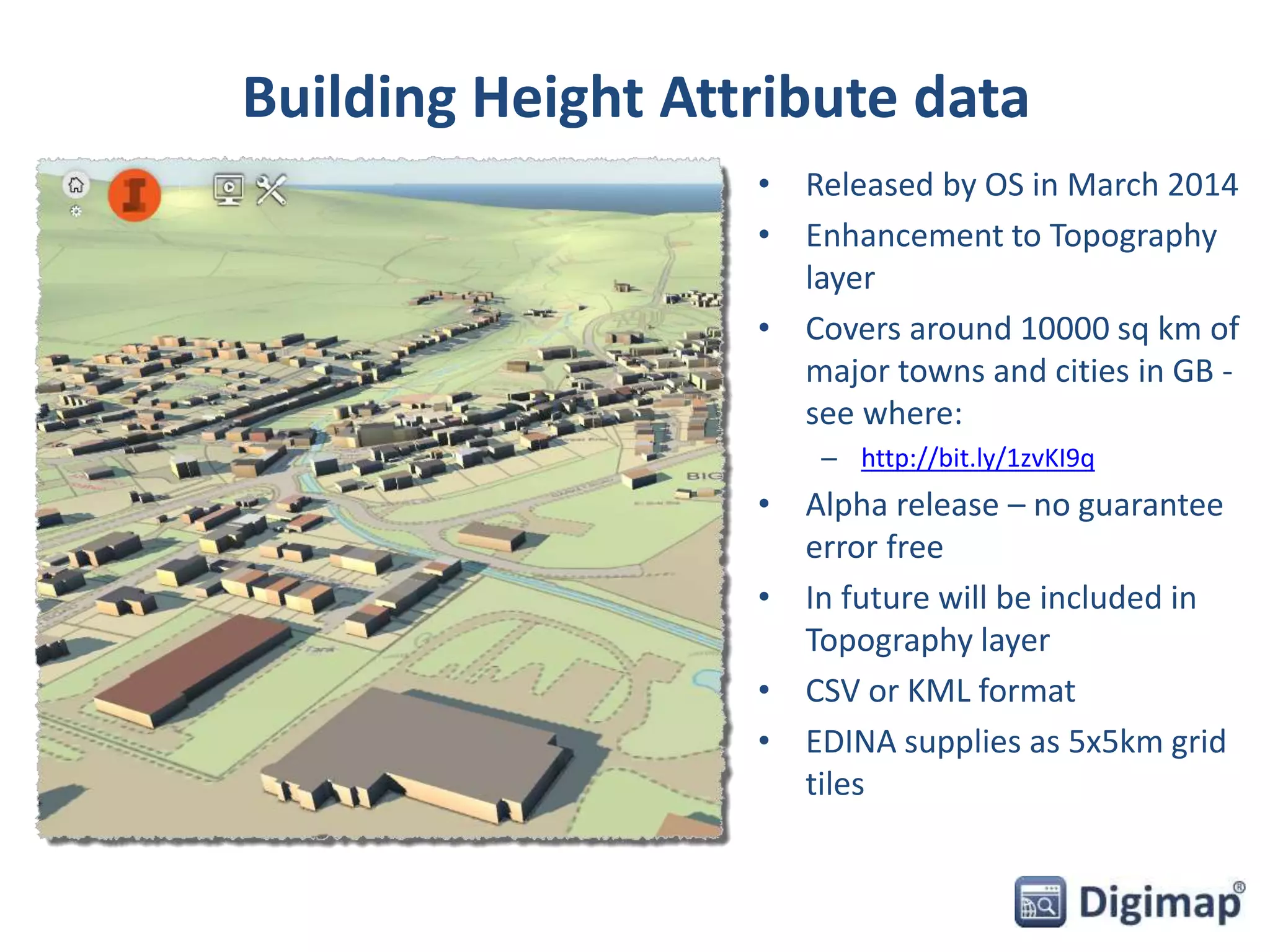
Building Height Attribute data 
• Released by OS in March 2014 
• Enhancement to Topography 
layer 
• Covers around 10000 sq km of 
major towns and cities in GB - 
see where: 
– http://bit.ly/1zvKI9q 
• Alpha release – no guarantee 
error free 
• In future will be included in 
Topography layer 
• CSV or KML format 
• EDINA supplies as 5x5km grid 
tiles
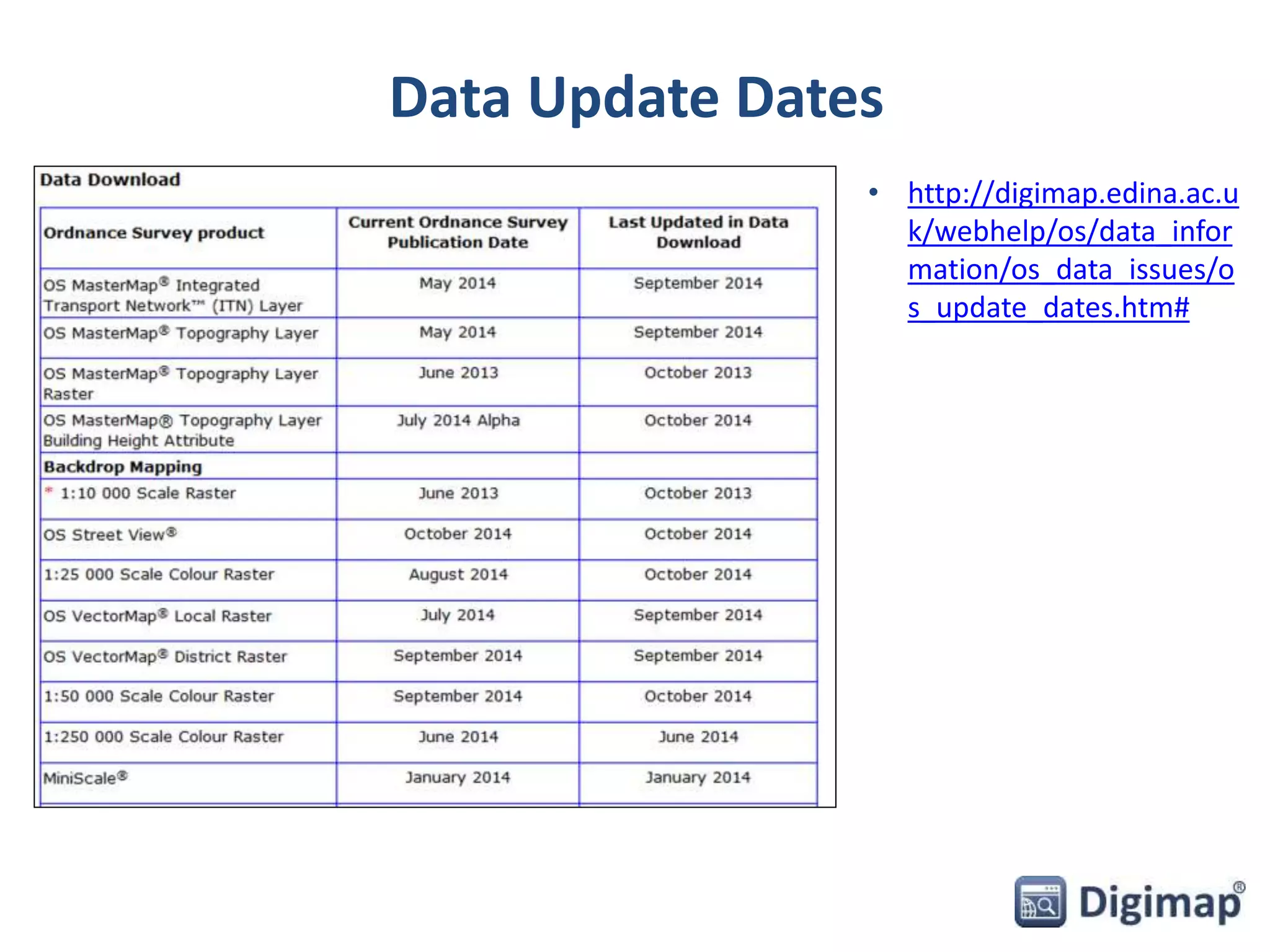
Data Update Dates 
• http://digimap.edina.ac.u 
k/webhelp/os/data_infor 
mation/os_data_issues/o 
s_update_dates.htm#
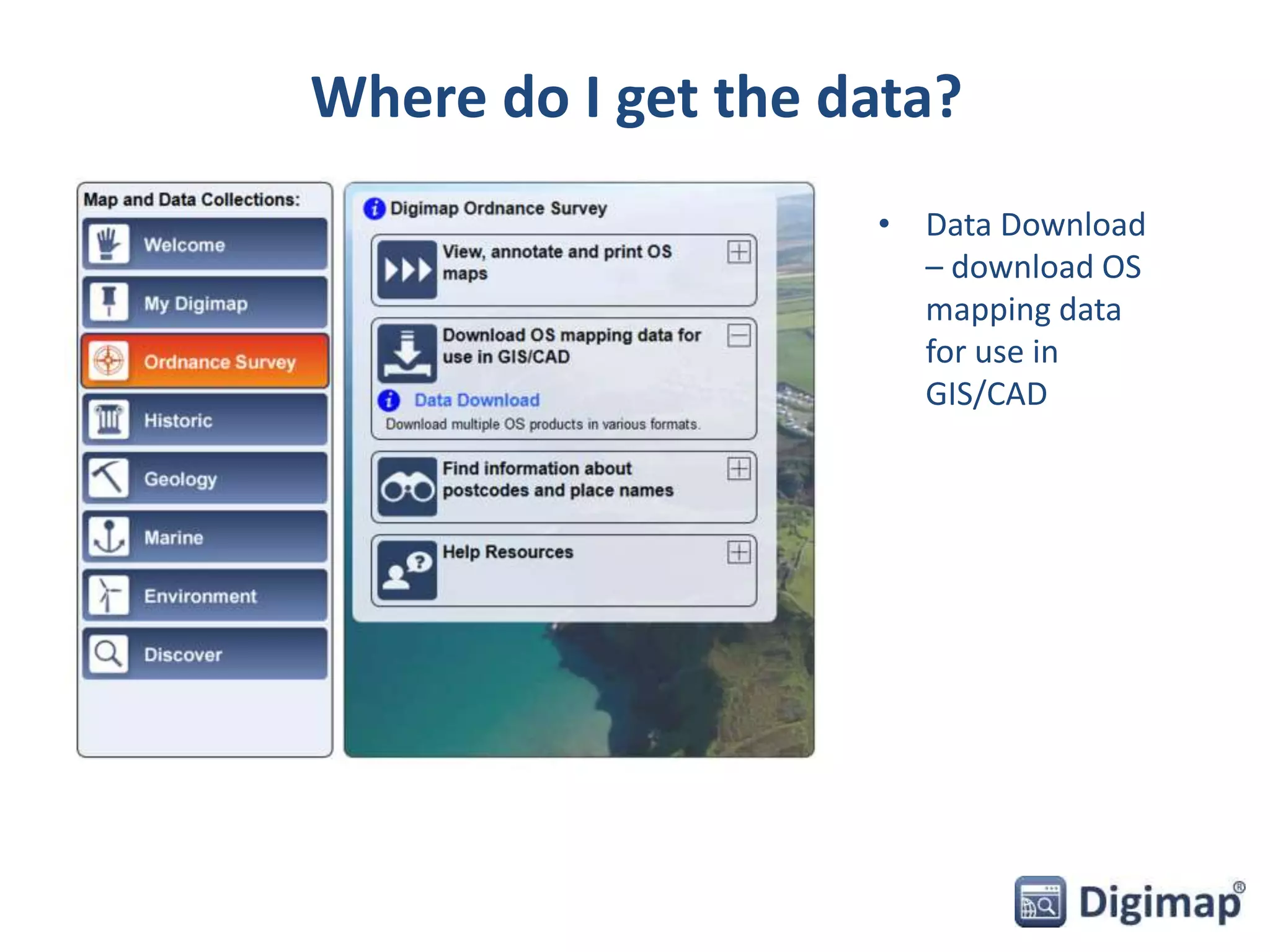
Where do I get the data? 
• Data Download 
– download OS 
mapping data 
for use in 
GIS/CAD
Data Download 
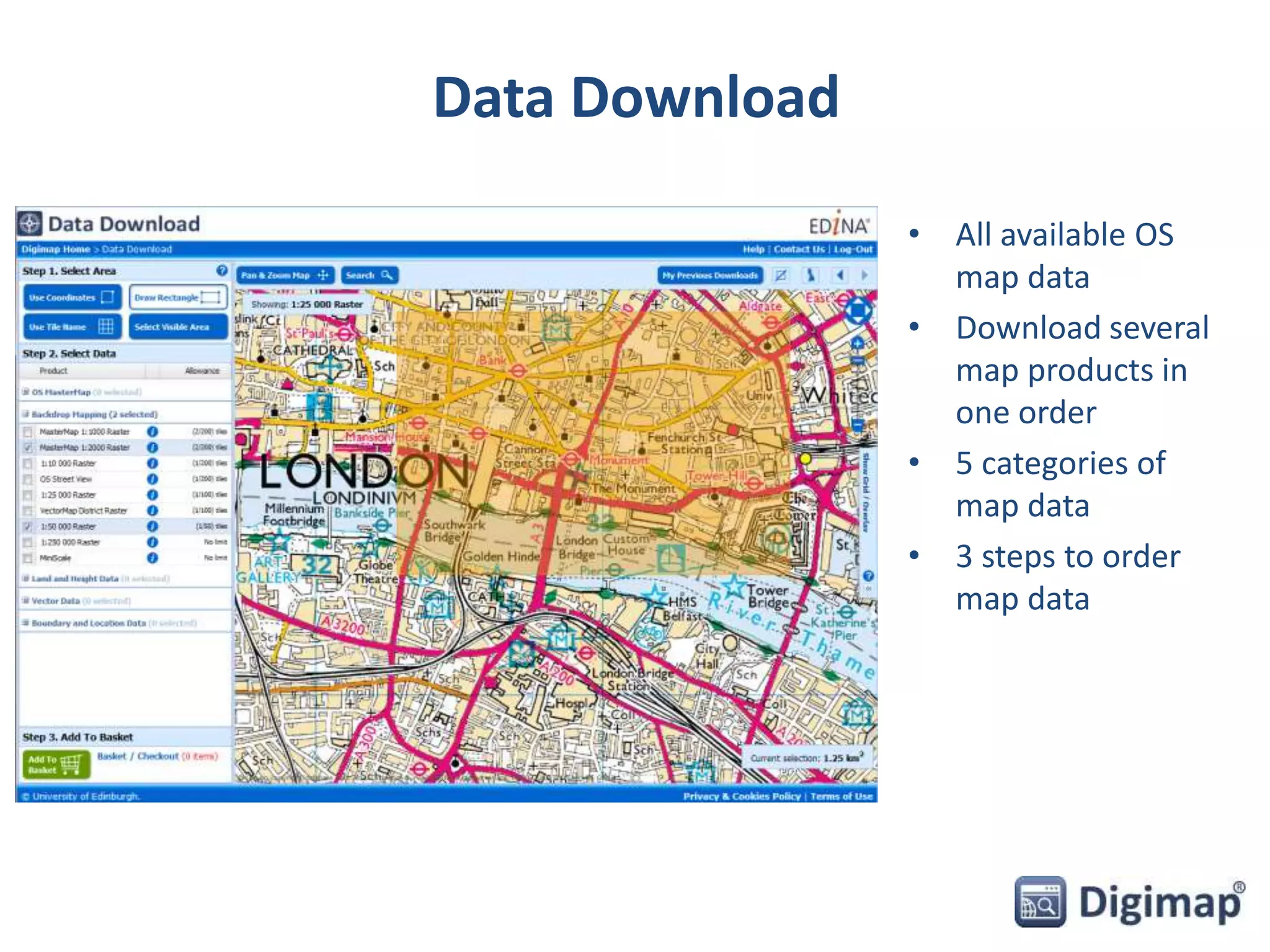
• All available OS 
map data 
• Download several 
map products in 
one order 
• 5 categories of 
map data 
• 3 steps to order 
map data
Using Data Download 
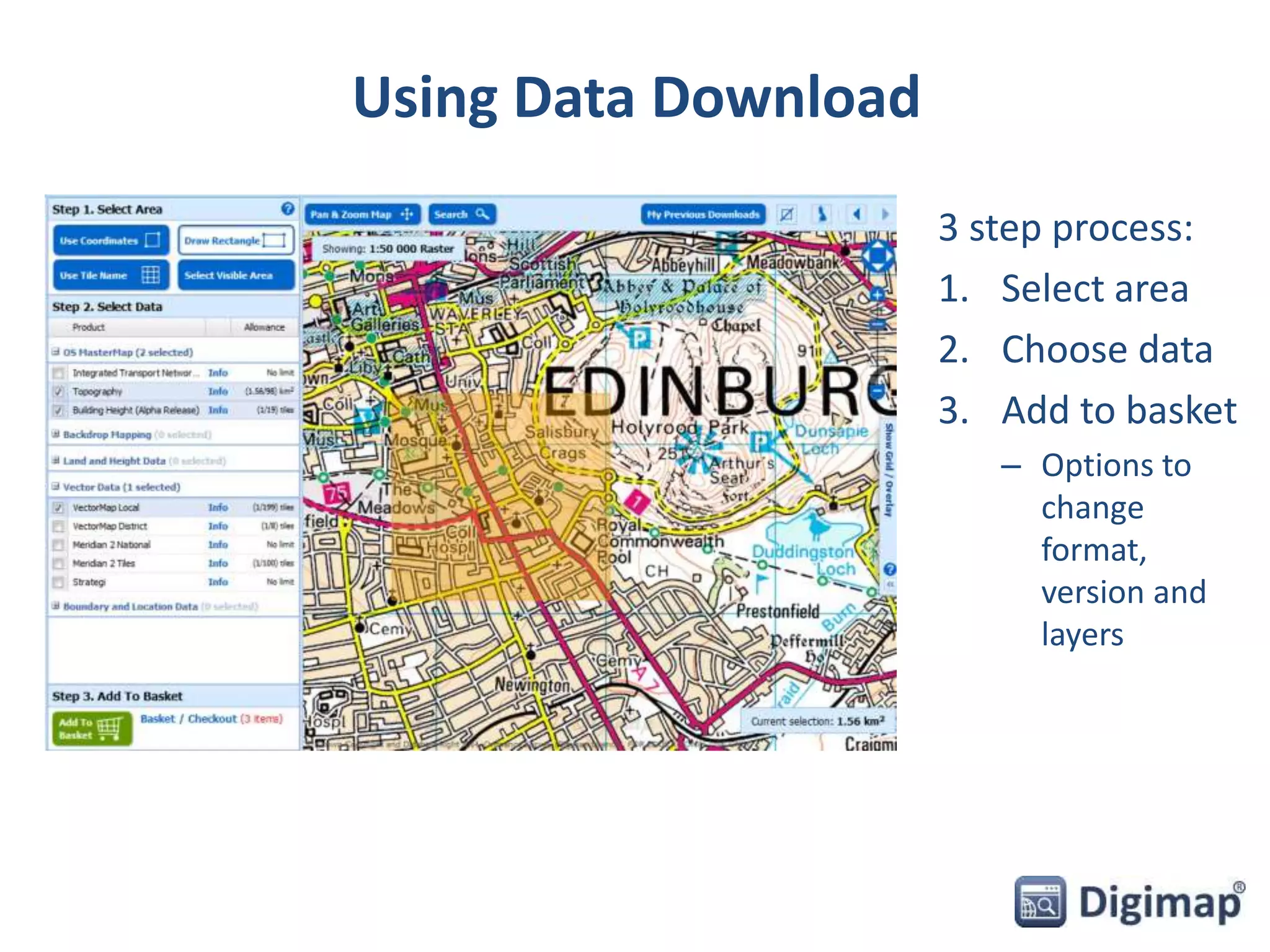
3 step process: 
1. Select area 
2. Choose data 
3. Add to basket 
– Options to 
change 
format, 
version and 
layers
Basket options 
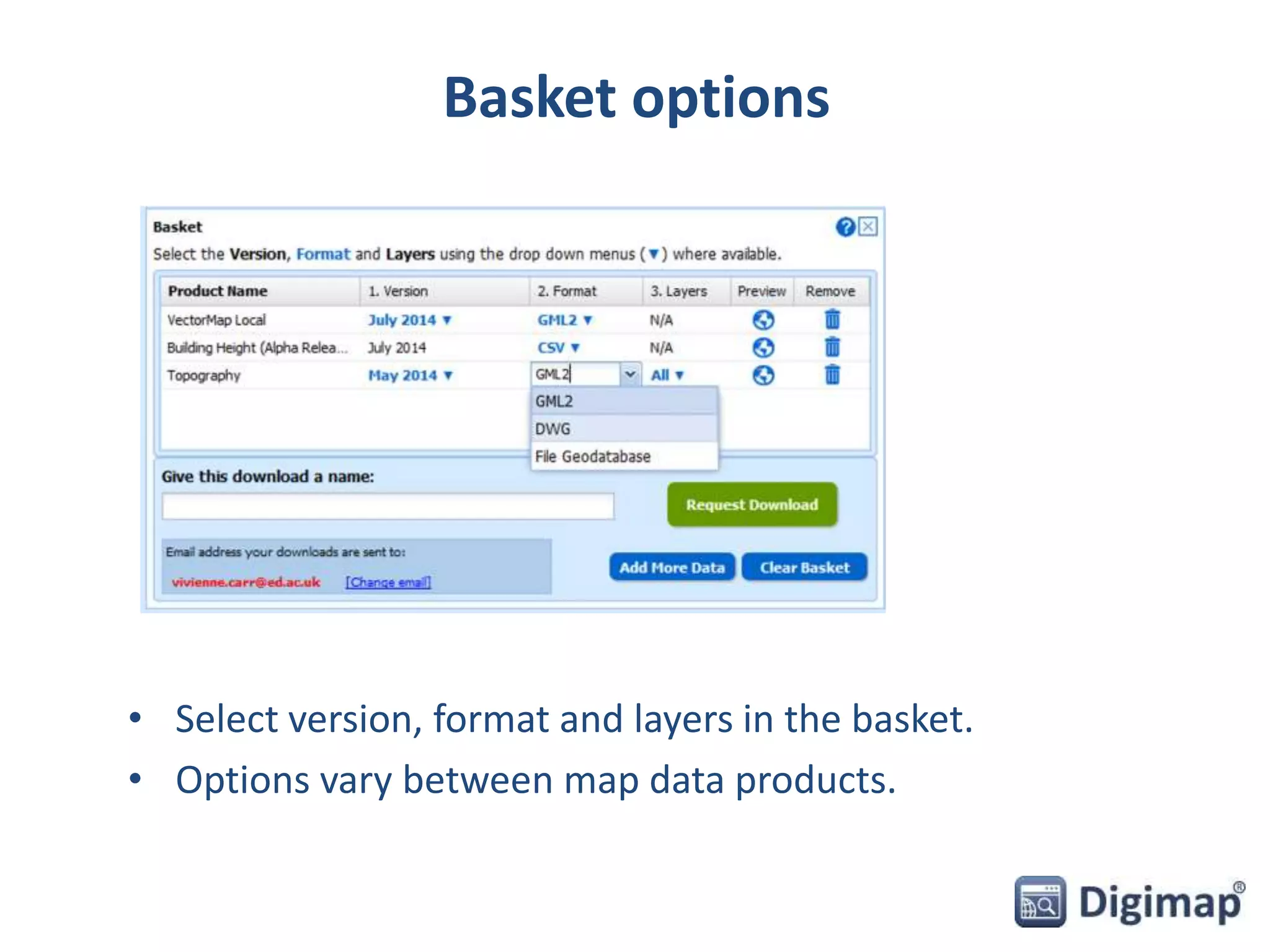
• Select version, format and layers in the basket. 
• Options vary between map data products.
How do I use the data? 
• Add VectorMap Local to AutoCAD Map 3D 
• Add OS MasterMap topography to AutoCAD Map 3D 
• Combine OS MasterMap with Building Height 
Attribute data in AutoCAD Map 3D and InfraWorks
Add VectorMap Local to AutoCAD Map 3D 
• Download data in DWG format 
• Open in AutoCAD Map 3D
Add OS MasterMap topography to AutoCAD 
Map 3D 
• DWG format: 
– Will open directly in AutoCAD products 
– Includes default OS representation 
– Attributes stored as Extended Attribute Data (Xdata), 
which is not easy to interrogate 
• GML format: 
– Can be imported in to AutoCAD 
– Minimal representation 
– Control over which features are imported 
– More detailed attribute analysis possible 
– Can control the order in which layers are drawn
Combine OS MasterMap with Building Height 
Attribute (BHA) 
• Download MasterMap Topography layer in GML 
format and BHA data in CSV format 
• Process BHA data, save as Excel spreadsheet and set 
up an ODBC connection to the spreadsheet 
• Join BHA data to the MasterMap data in AutoCAD 
Map 3D 
• Export joined data as .sdf file 
• Open .sdf file in InfraWorks and extrude buildings 
using BHA value
New datasets – coming soon 
PointX [points of interest] OS MasterMap ITN - Urban Paths Theme 
OS MasterMap Sites Layer 
OS Terrain 5
Future developments 
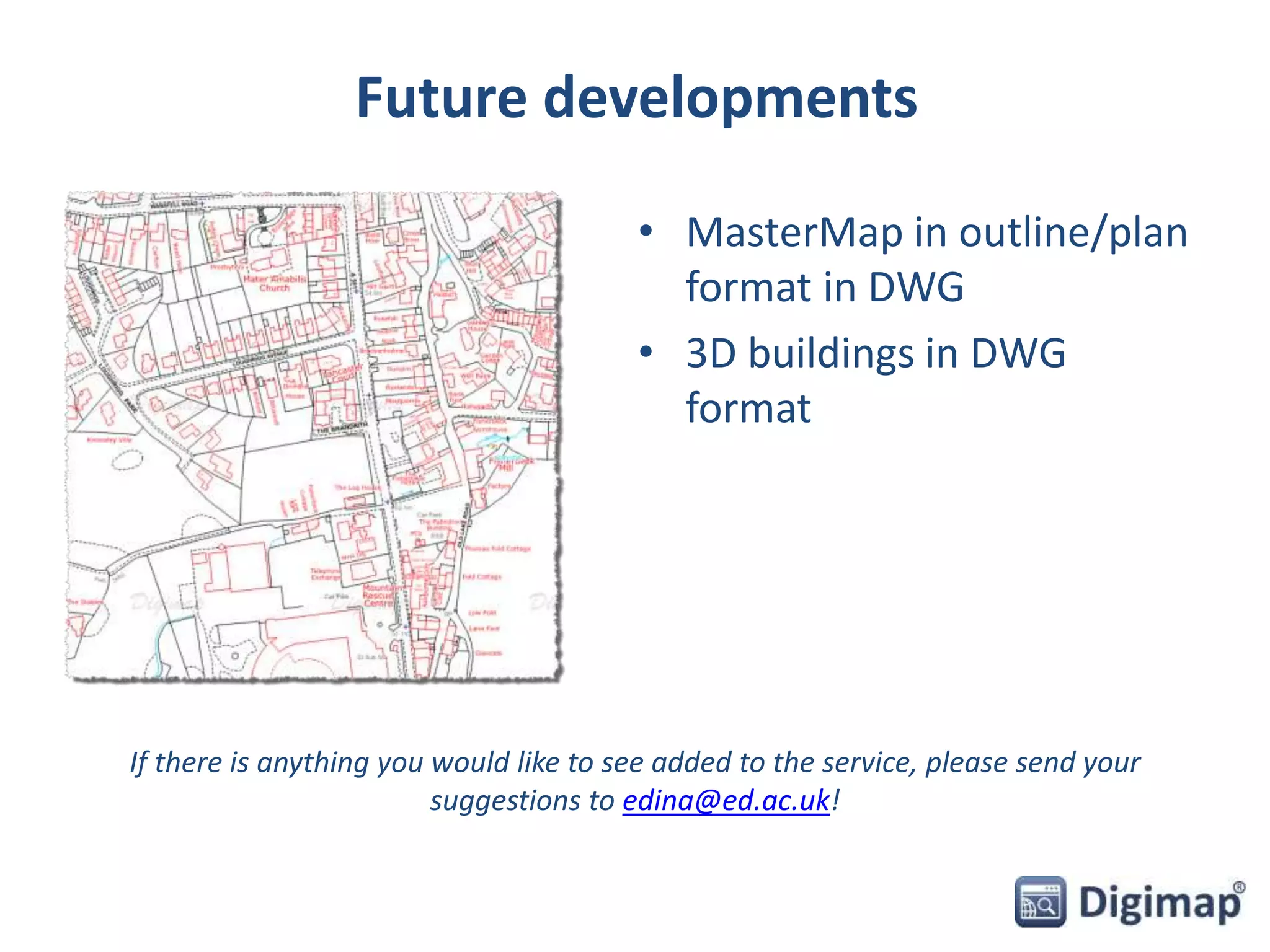
• MasterMap in outline/plan 
format in DWG 
• 3D buildings in DWG 
format 
If there is anything you would like to see added to the service, please send your 
suggestions to edina@ed.ac.uk!
Publication 
• You can publish Licensed Data and materials which contain 
Licensed Data 
• Subject to some restrictions which are detailed in the Licence 
• Includes various publications 
• Copyright acknowledgement required: 
© Crown Copyright and Database Right [insert date]. Ordnance 
Survey (Digimap Licence) 
– Copyright acknowledgement is included on all maps printed from Digimap 
Collections. 
– Remember to include copyright acknowledgement if you download data 
from Digimap and create maps!
Sharing Licensed Data 
• You may only share Licensed Data with: 
– other Authorised Users 
– Public Sector Mapping Agreement (PSMA) members 
– One Scotland Mapping Agreement (OSMA) members 
– Sponsors who have their own licence for the same data (type and 
coverage) 
• Sponsored research: 
– Results must be published widely and immediately 
– Hard copy plots can be supplied to sponsors 
– DATA cannot be supplied to sponsors 
– Excludes Research Council funded research centres with their own 
Ordnance Survey licence e.g.: 
 Institute of Hydrology 
 British Geological Survey
Support with copyright 
• Lists of Frequently Asked Questions: 
http://digimap.edina.ac.uk/webhelp/digimapsupport/access/licence_ag 
reements.htm 
• Your site representative: 
http://digimap.edina.ac.uk/webhelp/digimapsupport/service_info/site_r 
ep_list.htm 
• EDINA Help Desk: 
edina@ed.ac.uk 
0131 650 3302
Resources 
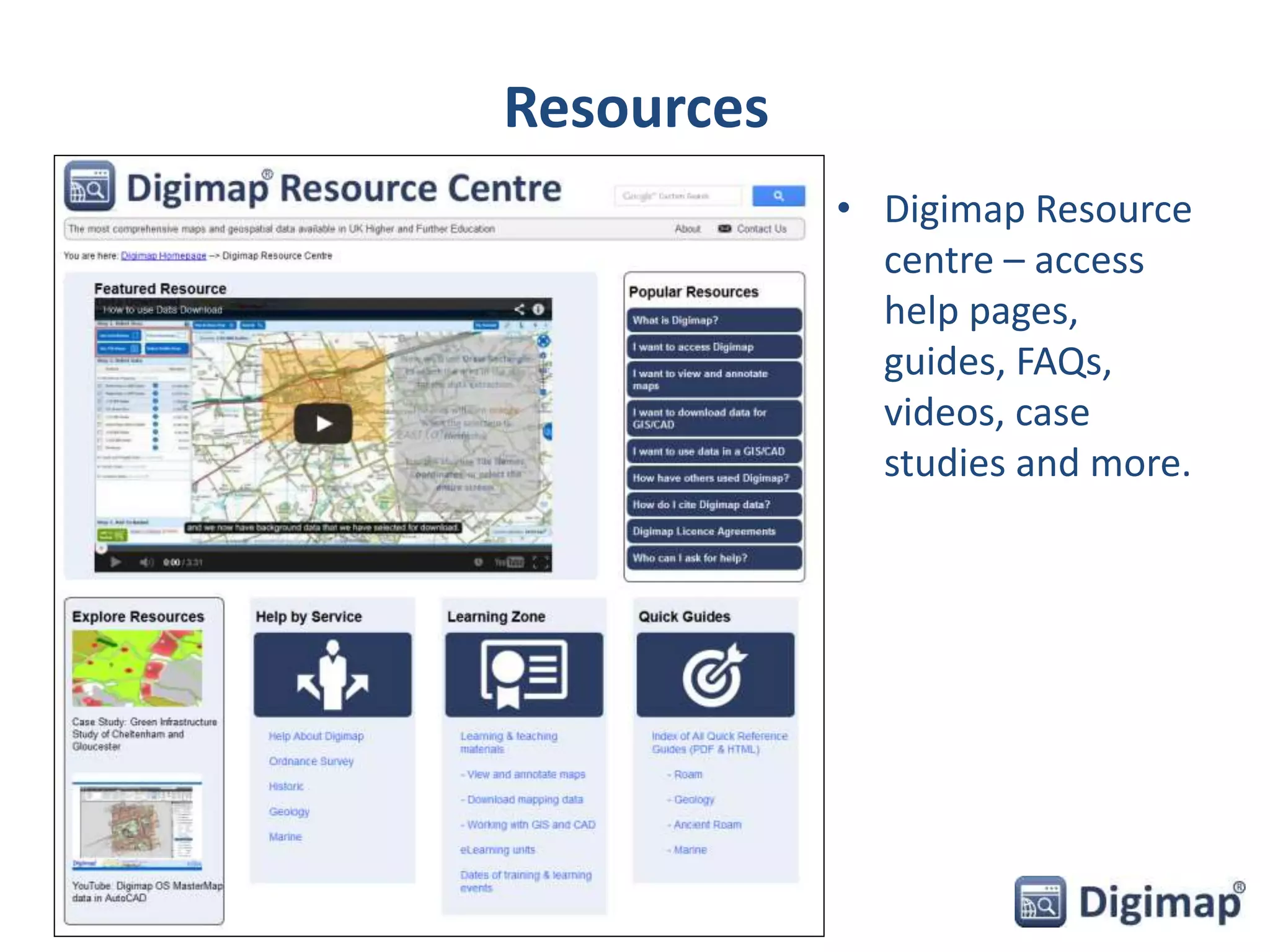
• Digimap Resource 
centre – access 
help pages, 
guides, FAQs, 
videos, case 
studies and more.

Digimap webinar - Urban Map data for CAD

  • 1.
    Digimap – Urbanmap data for CAD 26 November 2014 Ian Holmes, EDINA Geo User Support Vivienne Mayo, EDINA User Support
  • 2.
    Content • Whatdata is available in CAD format? • Where do I get the data? • How do I use the data? • Copyright and Resources
  • 3.
    What data isavailable in CAD format? • Vector datasets: – VectorMap Local [DWG] – MasterMap Topography Layer [DWG] • Height datasets: – Terrain 50 DTM and contours [ASCII, Shape, GML] – Land-Form PROFILE DTM and contours [DXF] – Land-Form PANORAMA DTM and contours [DXF] • Backdrop mapping [TIFF] – Various products e.g. 1:50,000 raster, all in TIFF format • Other – Building Height Attribute: extension to MasterMap Topography Layer [CSV]
  • 4.
    Vector Map Localdata • Scale 1:10000 • Includes contours and spot heights • Formats – GML, DWG, SHP • Supplied in 5x5km tiles
  • 5.
    OS MasterMap •Vector map product, most detailed mapping available of GB. • Integrated Transport Network layer – GML format only. • Topography Layer – GML, DWG and File Geodatabase formats. • Building Heights data added in 2014, CSV or KML format. • Coming soon: – Sites Layer – Urban Paths (ITN layer) MasterMap Topogaphy Layer (DWG format)
  • 6.
    Height Data •Various Raster (DTM) and Vector (contour) datasets available: – Terrain 50 [ASCII, Shape, GML] – replacement for Land-Form PANORAMA – Land-Form PROFILE [DXF] – withdrawn by OS – Land-Form PANORAMA [DXF] – withdrawn by OS • Coming soon: – OS Terrain 5 – replacement for Land- Form PROFILE Terrain 50 DTM Terrain 50 Contours
  • 7.
    Backdrop mapping •9 products available. • Raster maps – useful as backdrop. • TIFF image format. • Largest scale at top, 1:1000. • MiniScale smallest scale – 1:1000000. 1:25,000 Colour Raster
  • 8.
    Building Height Attributedata • Released by OS in March 2014 • Enhancement to Topography layer • Covers around 10000 sq km of major towns and cities in GB - see where: – http://bit.ly/1zvKI9q • Alpha release – no guarantee error free • In future will be included in Topography layer • CSV or KML format • EDINA supplies as 5x5km grid tiles
  • 9.
    Data Update Dates • http://digimap.edina.ac.u k/webhelp/os/data_infor mation/os_data_issues/o s_update_dates.htm#
  • 10.
    Where do Iget the data? • Data Download – download OS mapping data for use in GIS/CAD
  • 11.
    Data Download •All available OS map data • Download several map products in one order • 5 categories of map data • 3 steps to order map data
  • 12.
    Using Data Download 3 step process: 1. Select area 2. Choose data 3. Add to basket – Options to change format, version and layers
  • 13.
    Basket options •Select version, format and layers in the basket. • Options vary between map data products.
  • 14.
    How do Iuse the data? • Add VectorMap Local to AutoCAD Map 3D • Add OS MasterMap topography to AutoCAD Map 3D • Combine OS MasterMap with Building Height Attribute data in AutoCAD Map 3D and InfraWorks
  • 15.
    Add VectorMap Localto AutoCAD Map 3D • Download data in DWG format • Open in AutoCAD Map 3D
  • 16.
    Add OS MasterMaptopography to AutoCAD Map 3D • DWG format: – Will open directly in AutoCAD products – Includes default OS representation – Attributes stored as Extended Attribute Data (Xdata), which is not easy to interrogate • GML format: – Can be imported in to AutoCAD – Minimal representation – Control over which features are imported – More detailed attribute analysis possible – Can control the order in which layers are drawn
  • 17.
    Combine OS MasterMapwith Building Height Attribute (BHA) • Download MasterMap Topography layer in GML format and BHA data in CSV format • Process BHA data, save as Excel spreadsheet and set up an ODBC connection to the spreadsheet • Join BHA data to the MasterMap data in AutoCAD Map 3D • Export joined data as .sdf file • Open .sdf file in InfraWorks and extrude buildings using BHA value
  • 18.
    New datasets –coming soon PointX [points of interest] OS MasterMap ITN - Urban Paths Theme OS MasterMap Sites Layer OS Terrain 5
  • 19.
    Future developments •MasterMap in outline/plan format in DWG • 3D buildings in DWG format If there is anything you would like to see added to the service, please send your suggestions to edina@ed.ac.uk!
  • 20.
    Publication • Youcan publish Licensed Data and materials which contain Licensed Data • Subject to some restrictions which are detailed in the Licence • Includes various publications • Copyright acknowledgement required: © Crown Copyright and Database Right [insert date]. Ordnance Survey (Digimap Licence) – Copyright acknowledgement is included on all maps printed from Digimap Collections. – Remember to include copyright acknowledgement if you download data from Digimap and create maps!
  • 21.
    Sharing Licensed Data • You may only share Licensed Data with: – other Authorised Users – Public Sector Mapping Agreement (PSMA) members – One Scotland Mapping Agreement (OSMA) members – Sponsors who have their own licence for the same data (type and coverage) • Sponsored research: – Results must be published widely and immediately – Hard copy plots can be supplied to sponsors – DATA cannot be supplied to sponsors – Excludes Research Council funded research centres with their own Ordnance Survey licence e.g.:  Institute of Hydrology  British Geological Survey
  • 22.
    Support with copyright • Lists of Frequently Asked Questions: http://digimap.edina.ac.uk/webhelp/digimapsupport/access/licence_ag reements.htm • Your site representative: http://digimap.edina.ac.uk/webhelp/digimapsupport/service_info/site_r ep_list.htm • EDINA Help Desk: edina@ed.ac.uk 0131 650 3302
  • 23.
    Resources • DigimapResource centre – access help pages, guides, FAQs, videos, case studies and more.

Editor's Notes

  • #13 It’s straightforward to use Data Download – ordering map data involves 3 steps: Select your area on the map – there are 4 methods for selection. The shaded orange area you see here is our selected area. Select the map data that you wish to download. You can open any category of map data by clicking on the name. Then it’s a matter of ticking the box next to any map data you wish to download. You can download as many as you like in an order, provided you do not exceed the allowances. There is an allowance for each map data product – in order that our servers can process orders as quickly as possible. Third step is to add to basket. Once you click the add to basket button, your basket pops up on screen. You can then select from different formats, date versions and map layers, where available. Options will different depending on map product.
  • #22 This prevents sponsors using academic research as a “cheap” or “free” method of obtaining data they would otherwise need to pay for.