LTE Site Check
VERSION 2.2
2/14/2014
AGENDA
• What is LTE Site Check?

• Features
• Architecture
• Screenshots
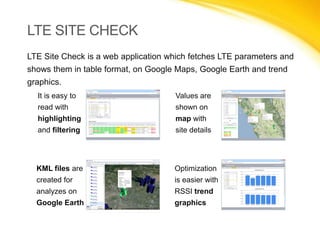
LTE SITE CHECK
LTE Site Check is a web application which fetches LTE parameters and shows
them in table format, on Google Maps, Google Earth and trend graphics.
It is easy to

Values are

read with

shown on

highlighting

map with

and filtering

site details

KML files are

Optimization

created for

is easier with

analyzes on

RSSI trend

Google Earth

graphics
FEATURES
•

Checks the values of the site parameters including:
 RSSI and VSWR

 Sync options

 Alarms

 Cabinet info

 FDD and BARRED

 RRU, MME, CVCU

 Power info

 Termpoint

 Feature list

•
•
•
•
•
•
•

Excel and PDF export
Report history
KML export
Values on map
Trend graphics
User management
Tracker
ARCHITECTURE
Presentation

Application

Data

Technologies used:

• Site selection and query running
• Presentation on table, map and graphic
• Output Files, Tracker
• OSS connector
• Data parsing engine
• Report generation logic

• Database (Sites, Users, History)
• Input Files
SCREENSHOTS

REPORT CREATION

Report is running
SCREENSHOTS

REPORT CREATION

Values are shown highlighting with different colors
according to the thresholds given by AT&T.
SCREENSHOTS

REPORT CREATION

Details of the report
SCREENSHOTS

REPORT CREATION

Excel and PDF export
SCREENSHOTS

REPORT HISTORY

Report History
SCREENSHOTS

TREND GRAPHIC

Trend Graphic
SCREENSHOTS

MAP DATA (RSSI)

RSSI values on map
SCREENSHOTS

MAP DATA (ALARMS)

Alarms on map
SCREENSHOTS

MAP DATA (LAUNCH INFO)

Launch info on map
SCREENSHOTS

KML EXPORT

KML file creation
SCREENSHOTS

KML EXPORT

Site info on Google Earth
SCREENSHOTS

KML EXPORT

Value details
SCREENSHOTS

TRACKER

Tracker
SCREENSHOTS

TRACKER

Table customization and change history
THANK YOU

LTE Site Check