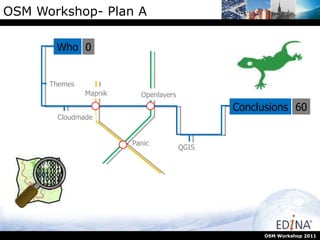
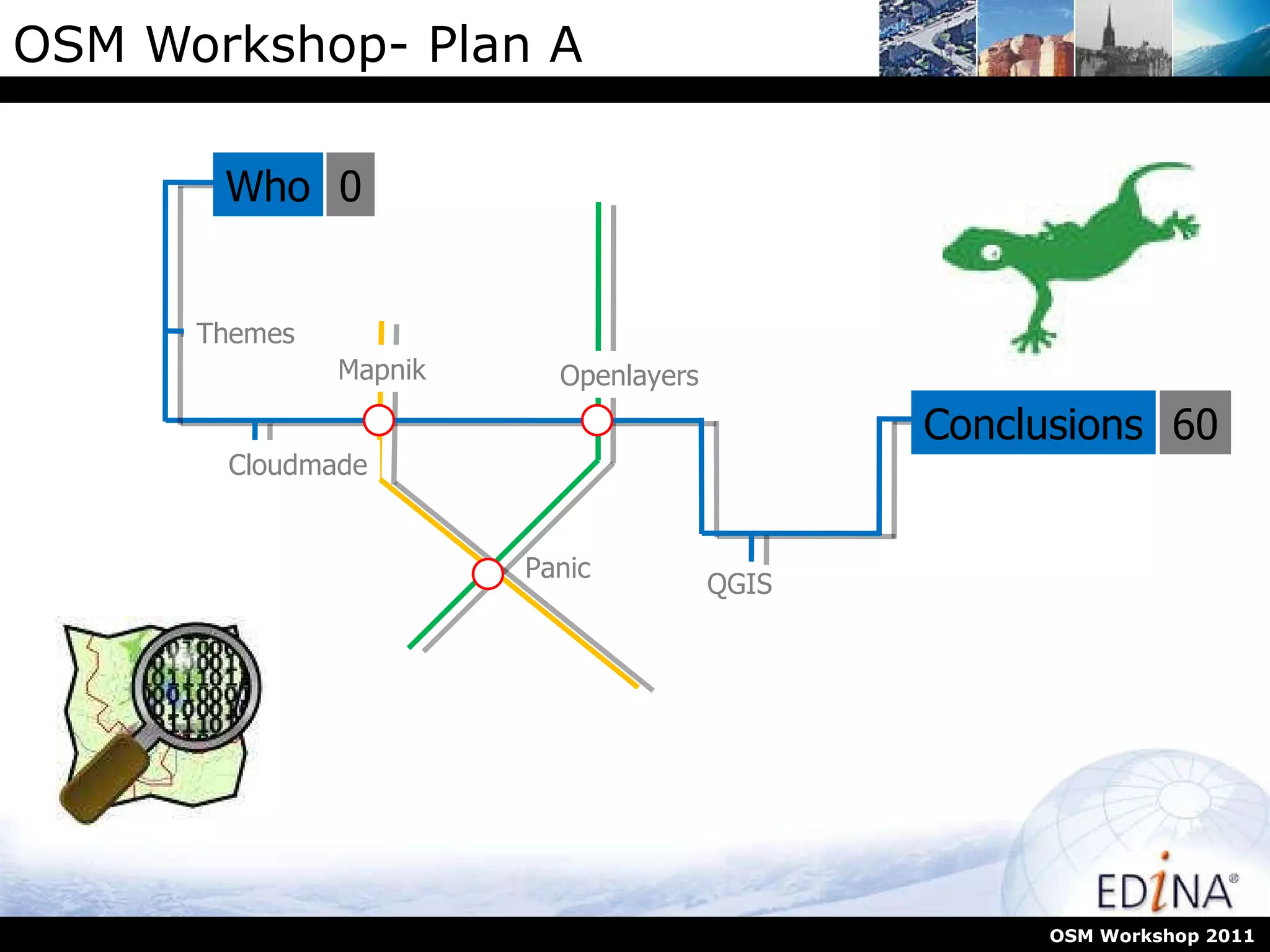
OSM Workshop- Plan A OSM Workshop 2011 Who Themes Cloudmade QGIS Conclusions 0 60 Panic Openlayers Mapnik
What is EDINA EDINA  is a National Data Centre supported by JISC to provide resources to higher and further institutions. OSM Workshop 2011 EDINA  has extensive experience in delivering and manipulating spatial data and is an active member of the  OSGeo  foundation providing persistent test beds for various packages. GECO  Geospatial Outreach and Community Outreach, EDINA coordinate this JISC funded project and aim to facilitate the use of geospatial data and tech beyond core user groups http://geco.blogs.edina.ac.uk/
Doing more with GIS/OpenLayers We’ve seen what OSM is and how we can contribute data to it. Now lets look at what we might want to do with it. OSM Workshop 2011
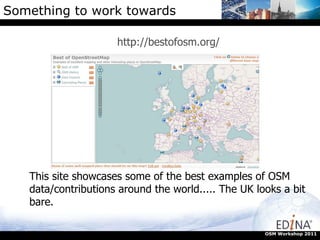
Something to work towards http://bestofosm.org/ OSM Workshop 2011 This site showcases some of the best examples of OSM data/contributions around the world..... The UK looks a bit bare.
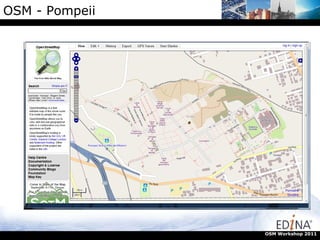
OSM - Pompeii OSM Workshop 2011
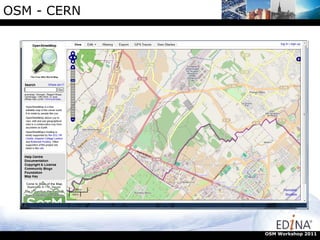
OSM - CERN OSM Workshop 2011
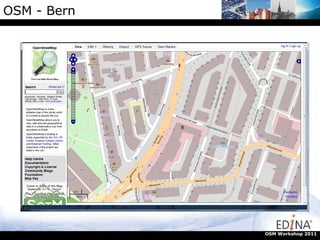
OSM - Bern OSM Workshop 2011
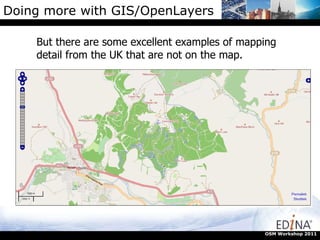
Doing more with GIS/OpenLayers But there are some excellent examples of mapping detail from the UK that are not on the map. OSM Workshop 2011
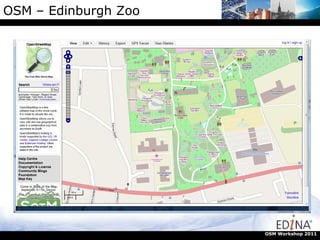
OSM – Edinburgh Zoo OSM Workshop 2011
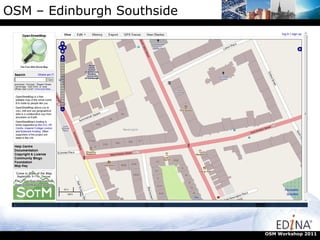
OSM – Edinburgh Southside OSM Workshop 2011
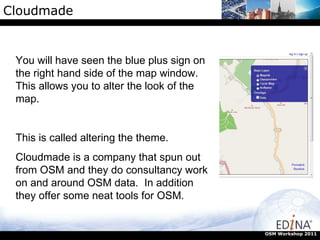
Cloudmade OSM Workshop 2011 You will have seen the blue plus sign on the right hand side of the map window. This allows you to alter the look of the map.  This is called altering the theme. Cloudmade is a company that spun out from OSM and they do consultancy work on and around OSM data.  In addition they offer some neat tools for OSM.
Cloudmade OSM Workshop 2011 Cloudmade is a company that spun out from OSM and they do consultancy work on and around OSM data.  In addition they offer some neat tools for OSM.
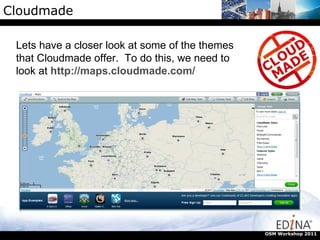
Cloudmade OSM Workshop 2011 Lets have a closer look at some of the themes that Cloudmade offer.  To do this, we need to look at  http://maps.cloudmade.com/
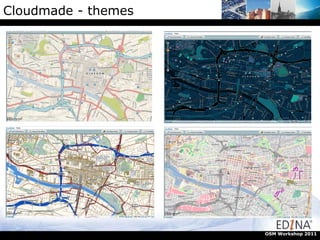
Cloudmade - themes OSM Workshop 2011
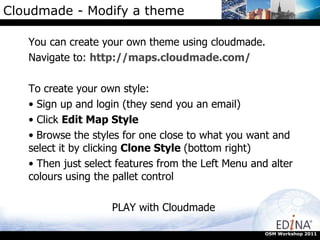
Cloudmade - Modify a theme You can create your own theme using cloudmade.  Navigate to:  http://maps.cloudmade.com/ To create your own style: Sign up and login (they send you an email) Click  Edit Map Style Browse the styles for one close to what you want and select it by clicking  Clone Style  (bottom right) Then just select features from the Left Menu and alter colours using the pallet control PLAY with Cloudmade OSM Workshop 2011
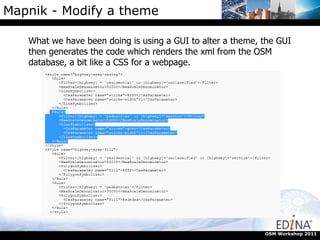
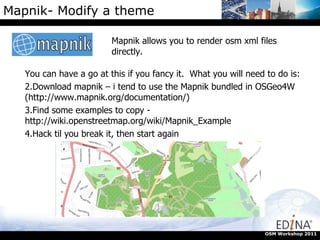
Mapnik - Modify a theme What we have been doing is using a GUI to alter a theme, the GUI then generates the code which renders the xml from the OSM database, a bit like a CSS for a webpage. OSM Workshop 2011
Mapnik- Modify a theme Mapnik allows you to render osm xml files directly.  OSM Workshop 2011 You can have a go at this if you fancy it.  What you will need to do is: Download mapnik – i tend to use the Mapnik bundled in OSGeo4W (http://www.mapnik.org/documentation/)  Find some examples to copy - http://wiki.openstreetmap.org/wiki/Mapnik_Example  Hack til you break it, then start again
Openlayers is an open source JavaScript library for displaying map data in web browsers. You will probably interacted and used Openlayers if you have used online mapping tools.  In this section we will look at what you can do with Openlayers. http://openlayers.org/dev/examples/ OSM Workshop 2011
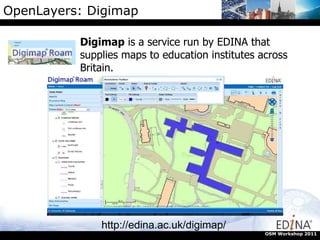
OpenLayers: Digimap Digimap  is a service run by EDINA that supplies maps to education institutes across Britain. http://edina.ac.uk/digimap/ OSM Workshop 2011
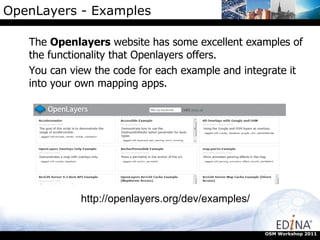
OpenLayers - Examples The  Openlayers  website has some excellent examples of the functionality that Openlayers offers.  You can view the code for each example and integrate it into your own mapping apps. OSM Workshop 2011 http://openlayers.org/dev/examples/
OpenLayers - Code Google overlay: var map;  function init() {  map = new OpenLayers.Map({  div: "map",  allOverlays: true  });  var osm = new OpenLayers.Layer.OSM();  var gmap = new OpenLayers.Layer.Google("Google Streets", {visibility: false});  // note that first layer must be visible  map.addLayers([osm, gmap]);  map.addControl(new OpenLayers.Control.LayerSwitcher());  map.zoomToMaxExtent(); }  OSM Workshop 2011
Doing more with GIS/OpenLayers But what if i want to have a map and put some of  my own data  onto in? Not a problem we can use QGIS to do most of the hard stuff. QGIS is a free, open source GIS package that runs on Window, Linux and Mac’s. It is (relatively) easy and intuitive to use There are loads of useful plugins that do neat things There is an active user group developing tools There are great demos and help pages to get you started www.qgis.org OSM Workshop 2011
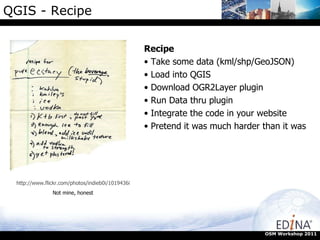
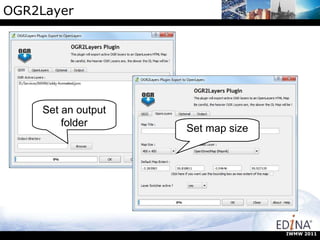
QGIS - Recipe OSM Workshop 2011 http://www.flickr.com/photos/indieb0i/101943682/ Not mine, honest Recipe Take some data (kml/shp/GeoJSON) Load into QGIS Download OGR2Layer plugin Run Data thru plugin Integrate the code in your website Pretend it was much harder than it was
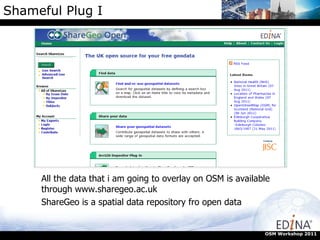
Shameful Plug I OSM Workshop 2011 All the data that i am going to overlay on OSM is available through www.sharegeo.ac.uk  ShareGeo is a spatial data repository fro open data
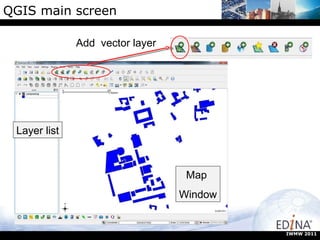
QGIS main screen Add  vector layer Layer list Map  Window IWMW 2011
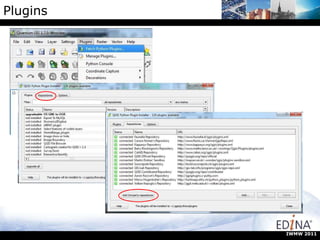
Plugins IWMW 2011
OGR2Layer Set an output folder Set map size IWMW 2011
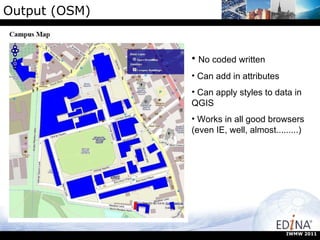
Output (OSM) No coded written Can add in attributes Can apply styles to data in QGIS Works in all good browsers (even IE, well, almost.........) IWMW 2011
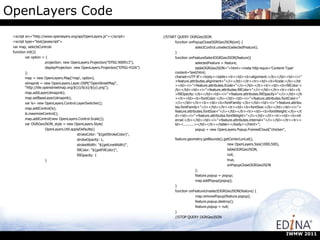
OpenLayers Code <script src=&quot;http://www.openlayers.org/api/OpenLayers.js&quot;></script> <script type=&quot;text/javascript&quot;> var map, selectsControls function init(){ var option = { projection: new OpenLayers.Projection(&quot;EPSG:900913&quot;), displayProjection: new OpenLayers.Projection(&quot;EPSG:4326&quot;) }; map = new OpenLayers.Map('map', option); olmapnik = new OpenLayers.Layer.OSM(&quot;OpenStreetMap&quot;, &quot;http://tile.openstreetmap.org/${z}/${x}/${y}.png&quot;); map.addLayer(olmapnik); map.setBaseLayer(olmapnik); var ls= new OpenLayers.Control.LayerSwitcher(); map.addControl(ls); ls.maximizeControl(); map.addControl(new OpenLayers.Control.Scale()); var OGRGeoJSON_style = new OpenLayers.Style( OpenLayers.Util.applyDefaults({ strokeColor: &quot;${getStrokeColor}&quot;, strokeOpacity: 1, strokeWidth: &quot;${getLineWidth}&quot;, fillColor: &quot;${getFillColor}&quot;, fillOpacity: 1 } //START QUERY OGRGeoJSON function onPopupCloseOGRGeoJSON(evt) { selectControl.unselect(selectedFeature); } function onFeatureSelectOGRGeoJSON(feature){ selectedFeature = feature; tableOGRGeoJSON=&quot;<html><meta http-equiv='Content-Type' content='text/html; charset=UTF-8'><body><table><tr><td><b>alignment:</b></td><td><i>&quot;+feature.attributes.alignment+&quot;</i></td></tr><tr><td><b>fcode:</b></td><td><i>&quot;+feature.attributes.fcode+&quot;</i></td></tr><tr><td><b>fillColor:</b></td><td><i>&quot;+feature.attributes.fillColor+&quot;</i></td></tr><tr><td><b>fillOpacity:</b></td><td><i>&quot;+feature.attributes.fillOpacity+&quot;</i></td></tr><tr><td><b>fontColor:</b></td><td><i>&quot;+feature.attributes.fontColor+&quot;</i></td></tr><tr><td><b>fontFamily:</b></td><td><i>&quot;+feature.attributes.fontFamily+&quot;</i></td></tr><tr><td><b>fontSize:</b></td><td><i>&quot;+feature.attributes.fontSize+&quot;</i></td></tr><tr><td><b>fontWeight:</b></td><td><i>&quot;+feature.attributes.fontWeight+&quot;</i></td></tr><tr><td><b>internal:</b></td><td><i>&quot;+feature.attributes.internal+&quot;</i></td></tr><tr><td><..........></td></tr></table></body></html>&quot;; popup = new OpenLayers.Popup.FramedCloud(&quot;chicken&quot;, feature.geometry.getBounds().getCenterLonLat(), new OpenLayers.Size(1000,500), tableOGRGeoJSON, null, true, onPopupCloseOGRGeoJSON ); feature.popup = popup; map.addPopup(popup); } function onFeatureUnselectOGRGeoJSON(feature) { map.removePopup(feature.popup); feature.popup.destroy(); feature.popup = null; } //STOP QUERY OGRGeoJSON IWMW 2011
QGIS Demo QGIS  demo of OGR2Layer http://www.qgis.org OSM Workshop 2011
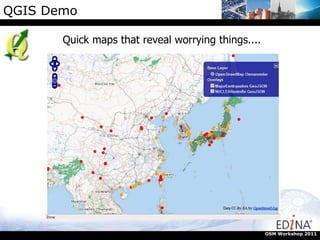
QGIS Demo Quick maps that reveal worrying things.... OSM Workshop 2011
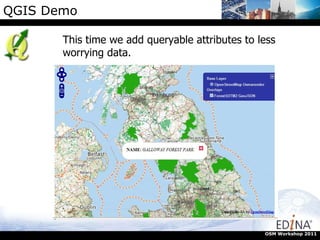
QGIS Demo This time we add queryable attributes to less worrying data. OSM Workshop 2011
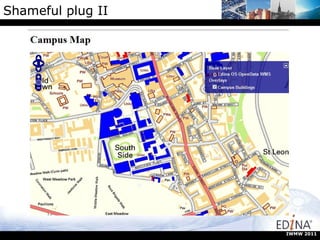
Shameful plug II You may wishto use OS Opendata, in which case you can access DigimapOpenstream Grab the example code from OpenStream site Copy the variables to the beginning of the script Add a new OpenLayer.map to the index.html Discover the projections dont match Panic! Find someone clever Copy their code (function proj2.js) IWMW 2011
Shameful plug II IWMW 2011
Useful Links http://edina.ac.uk http://edina.ac.uk/digimap/ http://www.gogeo.ac.uk/ http://openstream.edina.ac.uk/registration/ http://www.qgis.org http://fwtools.maptools.org/ http://openlayers.org/dev/examples/ http://maps.cloudmade.com/ https://github.com/lucadelu/OGR2Layers/wiki/How-to-use IWMW 2011
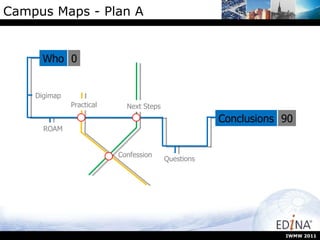
Campus Maps - Plan A IWMW 2011 Who Digimap ROAM Questions Conclusions 0 90 Confession Next Steps Practical
Practical Onto the practical exercise Familiarising yourself with Digimap ROAM This should take around 30 minutes Then we will look at what we can do with the output. IWMW 2011
After the magic button? Well, this is the bit has still to be decided and we want your help. IWMW 2011
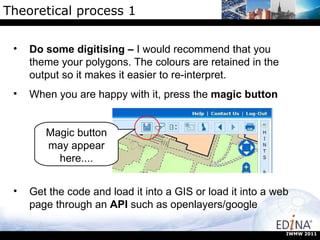
Theoretical process 1 Magic button may appear here.... IWMW 2011 Do some digitising –  I would recommend that you theme your polygons. The colours are retained in the output so it makes it easier to re-interpret. When you are happy with it, press the  magic button Get the code and load it into a GIS or load it into a web page through an  API  such as openlayers/google
What to do next? Now we have digitised the buildings and grabbed the GeoJSON through the “magic button” what options are there? Here we will outline 3 options: Google Earth Image files as output (for print or Google Earth) OpenLayers dynamic map There may be other options/needs. If you have any thoughts, we would like to hear them. IWMW 2011
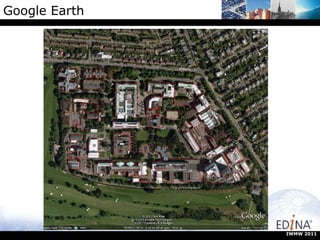
Google Earth To get the annotations into Google Earth it is pretty easy. We need to convert the GeoJSON to KML Using the ogr2ogr libraries: ogr2ogr –f “KML” campusmap.kml input.geoJSON IWMW 2011 OGR2OGR libraries available through FWTools http://fwtools.maptools.org/
Google Earth IWMW 2011
Case study Campus maps for Edinburgh University Requirements: Make map that can be integrated into MobileCampus App Define all university buildings as polygons Link to attributes Make maps which show uni building Maps must be “lite” enough to deploy on mobile IWMW 2011
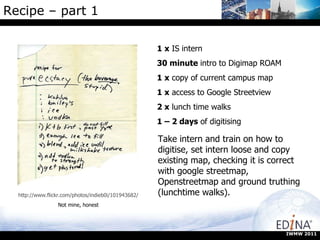
Recipe – part 1  1 x  IS intern 30 minute  intro to Digimap ROAM 1 x  copy of current campus map 1 x  access to Google Streetview 2 x  lunch time walks 1 – 2 days  of digitising http://www.flickr.com/photos/indieb0i/101943682/ Not mine, honest Take intern and train on how to digitise, set intern loose and copy existing map, checking it is correct with google streetmap, Openstreetmap and ground truthing (lunchtime walks). IWMW 2011
Recipe Part 2 Once you have the JSON, convert to shapefile format:  Ogr2ogr –f “ESRI SHAPE FILE” campusmap.shp input.geoJSON Import into GIS and theme Add basemap Export to desired file format (png in this case) Re-project png from OSGB to WGS84 for use in google maps. IWMW 2011
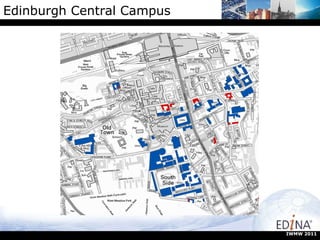
Edinburgh Central Campus IWMW 2011
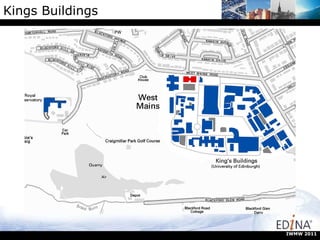
Kings Buildings IWMW 2011
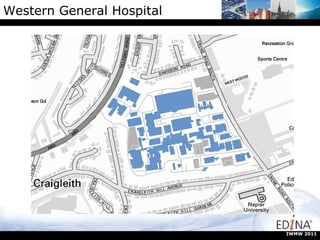
Western General Hospital IWMW 2011
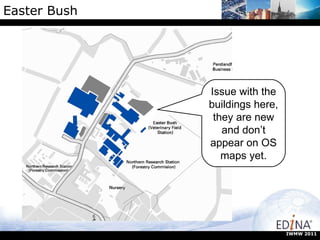
Easter Bush Issue with the buildings here, they are new and don’t appear on OS maps yet. IWMW 2011

Map Styling Tools and Interactive maps on the web with OpenLayers - Addy Pope, GoGeo

  • 1.
    OSM Workshop- PlanA OSM Workshop 2011 Who Themes Cloudmade QGIS Conclusions 0 60 Panic Openlayers Mapnik
  • 2.
    What is EDINAEDINA is a National Data Centre supported by JISC to provide resources to higher and further institutions. OSM Workshop 2011 EDINA has extensive experience in delivering and manipulating spatial data and is an active member of the OSGeo foundation providing persistent test beds for various packages. GECO Geospatial Outreach and Community Outreach, EDINA coordinate this JISC funded project and aim to facilitate the use of geospatial data and tech beyond core user groups http://geco.blogs.edina.ac.uk/
  • 3.
    Doing more withGIS/OpenLayers We’ve seen what OSM is and how we can contribute data to it. Now lets look at what we might want to do with it. OSM Workshop 2011
  • 4.
    Something to worktowards http://bestofosm.org/ OSM Workshop 2011 This site showcases some of the best examples of OSM data/contributions around the world..... The UK looks a bit bare.
  • 5.
    OSM - PompeiiOSM Workshop 2011
  • 6.
    OSM - CERNOSM Workshop 2011
  • 7.
    OSM - BernOSM Workshop 2011
  • 8.
    Doing more withGIS/OpenLayers But there are some excellent examples of mapping detail from the UK that are not on the map. OSM Workshop 2011
  • 9.
    OSM – EdinburghZoo OSM Workshop 2011
  • 10.
    OSM – EdinburghSouthside OSM Workshop 2011
  • 11.
    Cloudmade OSM Workshop2011 You will have seen the blue plus sign on the right hand side of the map window. This allows you to alter the look of the map. This is called altering the theme. Cloudmade is a company that spun out from OSM and they do consultancy work on and around OSM data. In addition they offer some neat tools for OSM.
  • 12.
    Cloudmade OSM Workshop2011 Cloudmade is a company that spun out from OSM and they do consultancy work on and around OSM data. In addition they offer some neat tools for OSM.
  • 13.
    Cloudmade OSM Workshop2011 Lets have a closer look at some of the themes that Cloudmade offer. To do this, we need to look at http://maps.cloudmade.com/
  • 14.
    Cloudmade - themesOSM Workshop 2011
  • 15.
    Cloudmade - Modifya theme You can create your own theme using cloudmade. Navigate to: http://maps.cloudmade.com/ To create your own style: Sign up and login (they send you an email) Click Edit Map Style Browse the styles for one close to what you want and select it by clicking Clone Style (bottom right) Then just select features from the Left Menu and alter colours using the pallet control PLAY with Cloudmade OSM Workshop 2011
  • 16.
    Mapnik - Modifya theme What we have been doing is using a GUI to alter a theme, the GUI then generates the code which renders the xml from the OSM database, a bit like a CSS for a webpage. OSM Workshop 2011
  • 17.
    Mapnik- Modify atheme Mapnik allows you to render osm xml files directly. OSM Workshop 2011 You can have a go at this if you fancy it. What you will need to do is: Download mapnik – i tend to use the Mapnik bundled in OSGeo4W (http://www.mapnik.org/documentation/) Find some examples to copy - http://wiki.openstreetmap.org/wiki/Mapnik_Example Hack til you break it, then start again
  • 18.
    Openlayers is anopen source JavaScript library for displaying map data in web browsers. You will probably interacted and used Openlayers if you have used online mapping tools. In this section we will look at what you can do with Openlayers. http://openlayers.org/dev/examples/ OSM Workshop 2011
  • 19.
    OpenLayers: Digimap Digimap is a service run by EDINA that supplies maps to education institutes across Britain. http://edina.ac.uk/digimap/ OSM Workshop 2011
  • 20.
    OpenLayers - ExamplesThe Openlayers website has some excellent examples of the functionality that Openlayers offers. You can view the code for each example and integrate it into your own mapping apps. OSM Workshop 2011 http://openlayers.org/dev/examples/
  • 21.
    OpenLayers - CodeGoogle overlay: var map; function init() { map = new OpenLayers.Map({ div: &quot;map&quot;, allOverlays: true }); var osm = new OpenLayers.Layer.OSM(); var gmap = new OpenLayers.Layer.Google(&quot;Google Streets&quot;, {visibility: false}); // note that first layer must be visible map.addLayers([osm, gmap]); map.addControl(new OpenLayers.Control.LayerSwitcher()); map.zoomToMaxExtent(); } OSM Workshop 2011
  • 22.
    Doing more withGIS/OpenLayers But what if i want to have a map and put some of my own data onto in? Not a problem we can use QGIS to do most of the hard stuff. QGIS is a free, open source GIS package that runs on Window, Linux and Mac’s. It is (relatively) easy and intuitive to use There are loads of useful plugins that do neat things There is an active user group developing tools There are great demos and help pages to get you started www.qgis.org OSM Workshop 2011
  • 23.
    QGIS - RecipeOSM Workshop 2011 http://www.flickr.com/photos/indieb0i/101943682/ Not mine, honest Recipe Take some data (kml/shp/GeoJSON) Load into QGIS Download OGR2Layer plugin Run Data thru plugin Integrate the code in your website Pretend it was much harder than it was
  • 24.
    Shameful Plug IOSM Workshop 2011 All the data that i am going to overlay on OSM is available through www.sharegeo.ac.uk ShareGeo is a spatial data repository fro open data
  • 25.
    QGIS main screenAdd vector layer Layer list Map Window IWMW 2011
  • 26.
  • 27.
    OGR2Layer Set anoutput folder Set map size IWMW 2011
  • 28.
    Output (OSM) Nocoded written Can add in attributes Can apply styles to data in QGIS Works in all good browsers (even IE, well, almost.........) IWMW 2011
  • 29.
    OpenLayers Code <scriptsrc=&quot;http://www.openlayers.org/api/OpenLayers.js&quot;></script> <script type=&quot;text/javascript&quot;> var map, selectsControls function init(){ var option = { projection: new OpenLayers.Projection(&quot;EPSG:900913&quot;), displayProjection: new OpenLayers.Projection(&quot;EPSG:4326&quot;) }; map = new OpenLayers.Map('map', option); olmapnik = new OpenLayers.Layer.OSM(&quot;OpenStreetMap&quot;, &quot;http://tile.openstreetmap.org/${z}/${x}/${y}.png&quot;); map.addLayer(olmapnik); map.setBaseLayer(olmapnik); var ls= new OpenLayers.Control.LayerSwitcher(); map.addControl(ls); ls.maximizeControl(); map.addControl(new OpenLayers.Control.Scale()); var OGRGeoJSON_style = new OpenLayers.Style( OpenLayers.Util.applyDefaults({ strokeColor: &quot;${getStrokeColor}&quot;, strokeOpacity: 1, strokeWidth: &quot;${getLineWidth}&quot;, fillColor: &quot;${getFillColor}&quot;, fillOpacity: 1 } //START QUERY OGRGeoJSON function onPopupCloseOGRGeoJSON(evt) { selectControl.unselect(selectedFeature); } function onFeatureSelectOGRGeoJSON(feature){ selectedFeature = feature; tableOGRGeoJSON=&quot;<html><meta http-equiv='Content-Type' content='text/html; charset=UTF-8'><body><table><tr><td><b>alignment:</b></td><td><i>&quot;+feature.attributes.alignment+&quot;</i></td></tr><tr><td><b>fcode:</b></td><td><i>&quot;+feature.attributes.fcode+&quot;</i></td></tr><tr><td><b>fillColor:</b></td><td><i>&quot;+feature.attributes.fillColor+&quot;</i></td></tr><tr><td><b>fillOpacity:</b></td><td><i>&quot;+feature.attributes.fillOpacity+&quot;</i></td></tr><tr><td><b>fontColor:</b></td><td><i>&quot;+feature.attributes.fontColor+&quot;</i></td></tr><tr><td><b>fontFamily:</b></td><td><i>&quot;+feature.attributes.fontFamily+&quot;</i></td></tr><tr><td><b>fontSize:</b></td><td><i>&quot;+feature.attributes.fontSize+&quot;</i></td></tr><tr><td><b>fontWeight:</b></td><td><i>&quot;+feature.attributes.fontWeight+&quot;</i></td></tr><tr><td><b>internal:</b></td><td><i>&quot;+feature.attributes.internal+&quot;</i></td></tr><tr><td><..........></td></tr></table></body></html>&quot;; popup = new OpenLayers.Popup.FramedCloud(&quot;chicken&quot;, feature.geometry.getBounds().getCenterLonLat(), new OpenLayers.Size(1000,500), tableOGRGeoJSON, null, true, onPopupCloseOGRGeoJSON ); feature.popup = popup; map.addPopup(popup); } function onFeatureUnselectOGRGeoJSON(feature) { map.removePopup(feature.popup); feature.popup.destroy(); feature.popup = null; } //STOP QUERY OGRGeoJSON IWMW 2011
  • 30.
    QGIS Demo QGIS demo of OGR2Layer http://www.qgis.org OSM Workshop 2011
  • 31.
    QGIS Demo Quickmaps that reveal worrying things.... OSM Workshop 2011
  • 32.
    QGIS Demo Thistime we add queryable attributes to less worrying data. OSM Workshop 2011
  • 33.
    Shameful plug IIYou may wishto use OS Opendata, in which case you can access DigimapOpenstream Grab the example code from OpenStream site Copy the variables to the beginning of the script Add a new OpenLayer.map to the index.html Discover the projections dont match Panic! Find someone clever Copy their code (function proj2.js) IWMW 2011
  • 34.
  • 35.
    Useful Links http://edina.ac.ukhttp://edina.ac.uk/digimap/ http://www.gogeo.ac.uk/ http://openstream.edina.ac.uk/registration/ http://www.qgis.org http://fwtools.maptools.org/ http://openlayers.org/dev/examples/ http://maps.cloudmade.com/ https://github.com/lucadelu/OGR2Layers/wiki/How-to-use IWMW 2011
  • 36.
    Campus Maps -Plan A IWMW 2011 Who Digimap ROAM Questions Conclusions 0 90 Confession Next Steps Practical
  • 37.
    Practical Onto thepractical exercise Familiarising yourself with Digimap ROAM This should take around 30 minutes Then we will look at what we can do with the output. IWMW 2011
  • 38.
    After the magicbutton? Well, this is the bit has still to be decided and we want your help. IWMW 2011
  • 39.
    Theoretical process 1Magic button may appear here.... IWMW 2011 Do some digitising – I would recommend that you theme your polygons. The colours are retained in the output so it makes it easier to re-interpret. When you are happy with it, press the magic button Get the code and load it into a GIS or load it into a web page through an API such as openlayers/google
  • 40.
    What to donext? Now we have digitised the buildings and grabbed the GeoJSON through the “magic button” what options are there? Here we will outline 3 options: Google Earth Image files as output (for print or Google Earth) OpenLayers dynamic map There may be other options/needs. If you have any thoughts, we would like to hear them. IWMW 2011
  • 41.
    Google Earth Toget the annotations into Google Earth it is pretty easy. We need to convert the GeoJSON to KML Using the ogr2ogr libraries: ogr2ogr –f “KML” campusmap.kml input.geoJSON IWMW 2011 OGR2OGR libraries available through FWTools http://fwtools.maptools.org/
  • 42.
  • 43.
    Case study Campusmaps for Edinburgh University Requirements: Make map that can be integrated into MobileCampus App Define all university buildings as polygons Link to attributes Make maps which show uni building Maps must be “lite” enough to deploy on mobile IWMW 2011
  • 44.
    Recipe – part1 1 x IS intern 30 minute intro to Digimap ROAM 1 x copy of current campus map 1 x access to Google Streetview 2 x lunch time walks 1 – 2 days of digitising http://www.flickr.com/photos/indieb0i/101943682/ Not mine, honest Take intern and train on how to digitise, set intern loose and copy existing map, checking it is correct with google streetmap, Openstreetmap and ground truthing (lunchtime walks). IWMW 2011
  • 45.
    Recipe Part 2Once you have the JSON, convert to shapefile format: Ogr2ogr –f “ESRI SHAPE FILE” campusmap.shp input.geoJSON Import into GIS and theme Add basemap Export to desired file format (png in this case) Re-project png from OSGB to WGS84 for use in google maps. IWMW 2011
  • 46.
  • 47.
  • 48.
  • 49.
    Easter Bush Issuewith the buildings here, they are new and don’t appear on OS maps yet. IWMW 2011