Ipads in the Classroom
A Leadership Perspective
 Looking at Academic Benefit and Technology Planning
 Nancy Caramanico, Technology and Education Specialist
Leadership for Digital Learning
and Ipads
  Welcome

  Research and Educational Technology Trends

  Leadership Looks at the Academic Benefit

  Ipad Capabilities

  Examples of Use in Schools

  Technology Deployment Planning, Choosing Ipads and
   Peripherals

  Policies and Ownership, Ipads vs. ‘Wepads’

  Assessing Progress for Students, School

  Next Steps for Your School
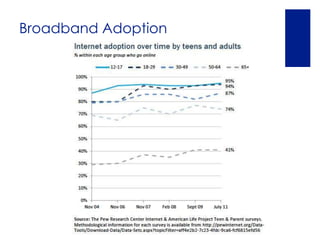
Broadband Adoption
‘All Change is Sweet’
~Aristotle
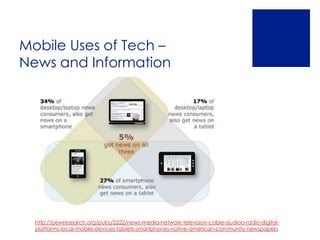
Mobile Uses of Tech –
News and Information


  http://pewresearch.org/pubs/2222/news-media-network-television-cable-audioo-radio-digital-
  platforms-local-mobile-devices-tablets-smartphones-native-american-community-newspapers
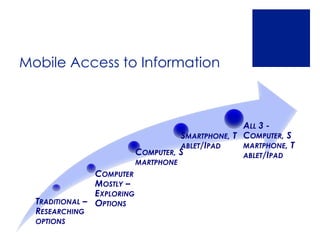
Mobile Access to Information


                                                    ALL 3 -
                                      SMARTPHONE, T COMPUTER, S
                                      ABLET/IPAD    MARTPHONE, T
                            COMPUTER, S             ABLET/IPAD
                            MARTPHONE
                COMPUTER
                MOSTLY –
                EXPLORING
  TRADITIONAL – OPTIONS
  RESEARCHING
  OPTIONS
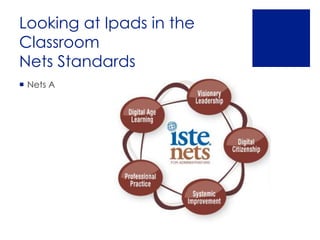
Looking at Ipads in the
Classroom
Nets Standards
 Nets A
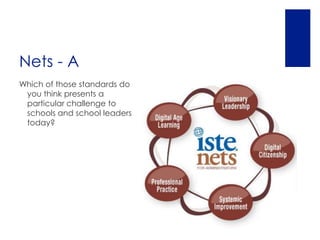
Nets - A
Which of those standards do
 you think presents a
 particular challenge to
 schools and school leaders
 today?
I. Visionary Leadership

 Change is a Constant

 __How can we look out on
  the ‘Horizon’?

 __How can we heed the
  Research?

 __How does this apply to our
  Mission, Vision?

 __How can this information
  benefit your students, school?

 __How will you inspire and
  lead others toward a shared
  vision to support change?
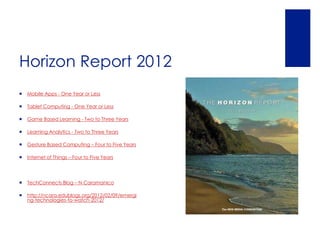
Horizon Report 2012
   Mobile Apps - One Year or Less

   Tablet Computing - One Year or Less

   Game Based Learning - Two to Three Years

   Learning Analytics - Two to Three Years

   Gesture Based Computing – Four to Five Years

   Internet of Things – Four to Five Years


   TechConnects Blog – N Caramanico

   http://ncara.edublogs.org/2012/02/09/emergi
    ng-technologies-to-watch-2012/
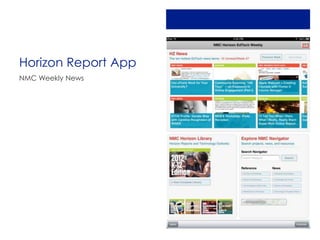
Horizon Report App
NMC Weekly News
II. Digital Learning
 __What instructional innovations are improving
  learning today?

 __What supports are in place for all learners?

 __How can we foster effective practice in our
  school?

 __How can we connect to digital learning ideas
  and collaborate with other schools, educators?
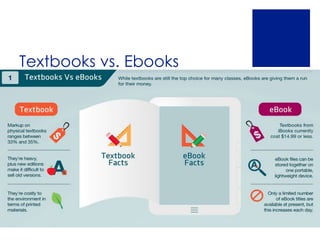
Textbooks vs. Ebooks
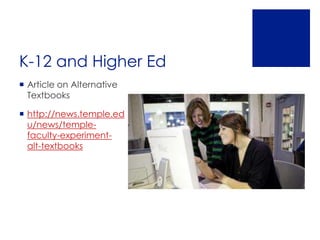
K-12 and Higher Ed
 Article on Alternative
  Textbooks

 http://news.temple.ed
  u/news/temple-
  faculty-experiment-
  alt-textbooks
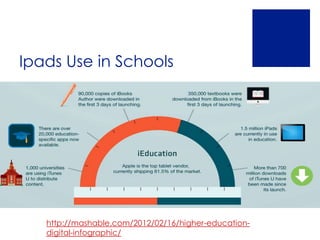
Ipads Use in Schools


   http://mashable.com/2012/02/16/higher-education-
   digital-infographic/
Ipad Basic Features
       User Friendly, Quick Learning Curve
       Search
       Buttons
       Wifi
       Settings Buffet
       Keyboard
       Downloading Apps via App Store
       Camera, Video Camera
Educational Uses
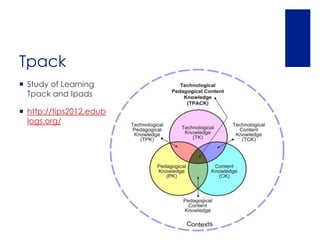
Tpack
 Study of Learning
  Tpack and Ipads

 http://tips2012.edub
  logs.org/
By Subject
 Math – Sketchitup, Khan Academy

 English – Ibooks, Essay Grader, Shakespeare

 Theology/Religion – Bible
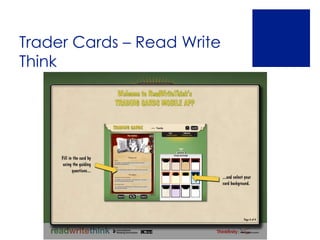
  Quiz, Blogger, Ibreviary, Trader Cards

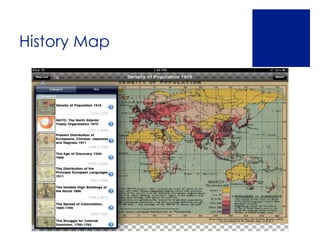
 History – World Maps

 World Languages – Audioboo

 Science – Vernier Physics, Showme

 http://www.gmahs.org/news/item/index.aspx?linkid
  =282&moduleid=82
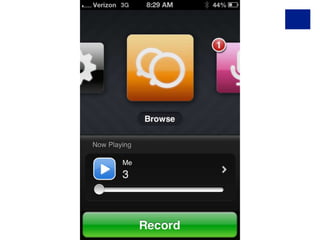
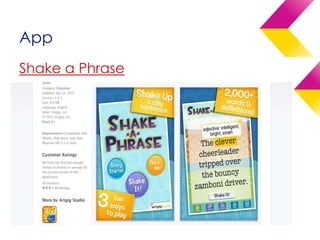
App
Shake a Phrase

Vocabulary Review
Trader Cards – Read Write
Think
History Map
21st Century Skills


 4 C’s 21st Century Learning www.p21.org
    Communication
    Creativity/Innovation
    Collaboration
    Critical Thinking
Communication
 Apps
  Facetime
  Skype
  Oovoo

 Online meetings
 Lesson Ideas:
  Connect with another classroom
  Connect with an author
  Skype in to professional development
Creativity

  Apps
   Snapseed
   Skitch
   Blurb Mobile
   Showme
   Trading Cards -Read Write Think
 Editing Images, Digital Storytelling

 Saint Cards

 Lessons:
   Social Studies – Have students collect and edit images for use if a project
    collage
   ILA – Have students create digital stories based on a writing projects
   Blurb Website http://www.blurb.com/mobile/home
Curation
 Ability to navigate and use            Create and Curate news and
  information is critically important     relevant articles
  in today’s technology filled world.
                                         Lessons
Apps                                       Any subject area – Students
                                            can collect and curate
 Flipboard                                 resources such as for current
                                            events. Use to discuss in real
 Scoop.it                                  time.

 Sky Grid


 “Curation is the new search’

 Article on Curation . J Valenza
Collaboration
 Google Apps
  Create and share docs
  Presentations
  Forms and more

 Diigo Social Bookmarking
  Storage of all articles online, Add notations
  Highlight Important points
  Students can add and comment to shared group
  Access from Ipad or other devices
Critical Thinking
Flipped Class and Critical Thinking. Encourages
    student independent learning. Become a true
    guide on the slide.

ITUNES U
    Ipads, Iphones, Computers
    Sign Up https://eduapp.apple.com/
    Support Site http://www.apple.com/support/itunes-
     u/using/
    Stanford on Itunes U 2010
    Lessons – Select modules you are interested in
      Digital Citizenship for Example
      Lectures on a specific historical event
Flipped Classroom
Apps
ItunesU
Khan Academy (Web and Ipad)
Poll Anywhere (Web Based)
  http://www.polleverywhere.com/#video

  Flipped Classroom http://www.knewton.com/flipped-classroom/

  http://www.youtube.com/watch?feature=player_embedded&v=2H4RkudFzlc#!
Productivity and Collaboration
 Notepad        Numbers

 Pages          Keynote
                 Standard + -
 Evernote
                  Calculator
 Notability     Filemaker Pro
                 Apple TV – Print
                  anywhere
Question: What is your favorite
productivity app for Ipad?
 Notability

 Pages

 Evernote

 Google Apps

 Other?
Creating and Using Ebooks
 I Books – Video http://www.apple.com/education/ibooks-
  textbooks/

 Pearson, McGraw Hill Samples
  http://www.apple.com/education/ibooks-
  textbooks/publishers.html

 Ibooks Author

 http://www.apple.com/education/ibooks-textbooks/

 Anthologize

 Sigil

 Pandoc
Creating Content,
Video
Apps
 Screen Casting, Educreations, Blurb Mobile
 Video Speak from Ipad
 Preso App
 Show Me
 Blurb Mobile
 Lessons:
   Create instructional videos
   Have students create videos
III. Systemic Improvement
 __What changes to policy do you need?

 __What changes to classroom procedures will be
  necessary?

 __What additional information literacy skills will
  students require?

 __ What Online Safety and Digital Citizenship
  resources can be used to enhance knowledge
  and practice?
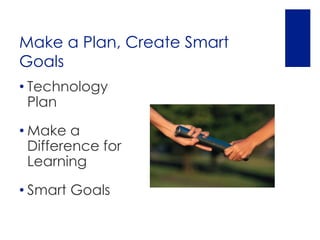
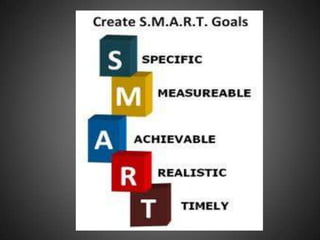
Make a Plan, Create Smart
Goals
• Technology
  Plan

• Make a
  Difference for
  Learning

• Smart Goals
Deployment Planning
 Beginning to Go Digital

 __Mission and vision correlations?

 __Academic correlations?

 __Standards correlations? Common Core, Other

 __Buy-in from faculty?

 __Professional Development Tie ins?

 __Buy in from School
  Community, Parents, Stakeholders?
Deployment Planning
 Beginning to Go Digital Checklist

 Network Readiness

 __Are you wireless?

 __Other network upgrades needed?

 __What about printing?

 __Display options?
Deployment Planning
 Pilots
   __Who will pilot?

   __What will they use? Tools? Pedagogy?

   __How will you evaluate?

     __What worked? Benefits

     __What did not? Challenges, Needs

     __How will you refine this?
   __How will you communicate results of pilot?
 Plan Next Round of Implementation
Deployment Planning
 IpadModels
  http://www.apple.com/ipad/compare/

 Peripherals

 Apple TV

 Printing

 Smartboard and Display Apps

 Volume Purchasing

 Choosing Apps and Installation
Pilots
 How have you piloted Ipads?

 What successes can you share?
Ownership Models
 School Owned Sets – Gwynedd

 School Owned One to One – Roman Catholic

 BYOD – Bring Your Own Device – New Canaan

 Student Owned and Purchased – St. Hubert’s


 Insurance
IV. Digital Citizenship
 __What changes to policy do you need?

 __What changes to classroom procedures will be
  necessary?

 __What additional information literacy skills will
  students require?

 __ What Online Safety and Digital Citizenship
  resources can be used to enhance knowledge
  and practice?
Policies and Procedures
 AUP – Acceptable Use
  Policies

 Classroom Guidelines

 Parent Communications

 Insurance Info/Guidelines
Policies and Procedures
 Communication is Key


  How has your school communicated
   the interest in 21st Century Change?


  What student and parent
   communications on Ipad policies and
   procedures did you find helpful?
V. Professional Practice
 __How can teachers and administrators learn
  using today’s technologies?

 __What professional development can be
  accessed? Both formal and informal?

 __How can leaders use technology in their
  professional practice?

 __What digital communications tools are being
  effectively used today for staying in touch
  w/staff, families and the broader school
  community?
Apps for School Leaders
 Evernote – Notetaking
 Google Forms for
  Walkthroughs, Surveys, More
 Horizon Report App
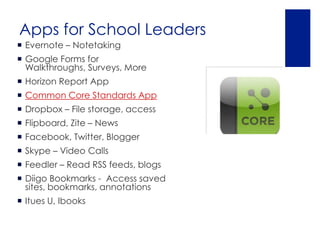
 Common Core Standards App
 Dropbox – File storage, access
 Flipboard, Zite – News
 Facebook, Twitter, Blogger
 Skype – Video Calls
 Feedler – Read RSS feeds, blogs
 Diigo Bookmarks - Access saved
  sites, bookmarks, annotations
 Itues U, Ibooks
What Apps Support Your
Professional Practice as a
School Leader, Instructional
Leader?
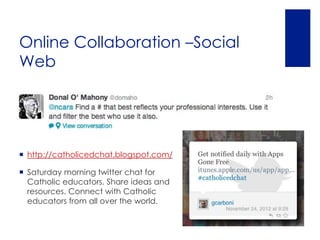
Online Collaboration –Social
Web


 http://catholicedchat.blogspot.com/

 Saturday morning twitter chat for
  Catholic educators. Share ideas and
  resources. Connect with Catholic
  educators from all over the world.
Assessment and Apps
 Assess Teacher and Student Progress

 Assess Apps

 NETS
Technology in the Classroom
 Objectives

 Activities

 Assessment


 What are effective lessons?

 How can technology be a meaningful component?

 What features of the tool can help students to
  demonstrate or enhance understanding?

 What apps should I look at which will help students to
  showcase mastery or enhance learning?
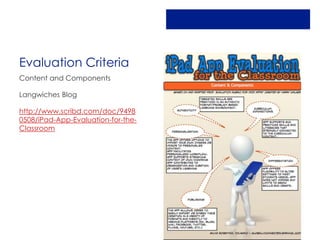
Evaluation Criteria
Content and Components

Langwiches Blog

http://www.scribd.com/doc/9498
0508/iPad-App-Evaluation-for-the-
Classroom
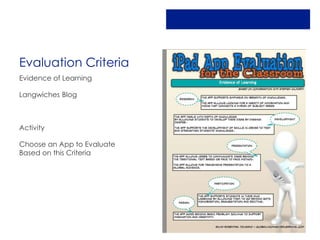
Evaluation Criteria
Evidence of Learning

Langwiches Blog


Activity

Choose an App to Evaluate
Based on this Criteria
Apps Indexes
 Bloom’s Taxonomy Apps, Kathy Schrock

http://www.schrockguide.net/bloomin-apps.html

Search Engine for Apps

https://www.quixey.com/
Next Steps
 How will you proceed?

 What information do you need to gather?
Images/Resources
 http://blog.proqc.com/s-m-a-r-t-quality-
  planning-goal-setting/

 www.mashable.com

 www.Fasticon.com
Thank You
Nancy Caramanico, Instructional
Technology and Learning
Specialist

www.caratechnology.net

Education Blog

http://ncara.edublogs.org

Nancy@caratechnology.net

Twitter @ncara

Leadership Perspective - Tablets/Ipads

  • 1.
    Ipads in theClassroom A Leadership Perspective Looking at Academic Benefit and Technology Planning Nancy Caramanico, Technology and Education Specialist
  • 2.
    Leadership for DigitalLearning and Ipads  Welcome  Research and Educational Technology Trends  Leadership Looks at the Academic Benefit  Ipad Capabilities  Examples of Use in Schools  Technology Deployment Planning, Choosing Ipads and Peripherals  Policies and Ownership, Ipads vs. ‘Wepads’  Assessing Progress for Students, School  Next Steps for Your School
  • 3.
  • 4.
    ‘All Change isSweet’ ~Aristotle
  • 5.
    Mobile Uses ofTech – News and Information http://pewresearch.org/pubs/2222/news-media-network-television-cable-audioo-radio-digital- platforms-local-mobile-devices-tablets-smartphones-native-american-community-newspapers
  • 6.
    Mobile Access toInformation ALL 3 - SMARTPHONE, T COMPUTER, S ABLET/IPAD MARTPHONE, T COMPUTER, S ABLET/IPAD MARTPHONE COMPUTER MOSTLY – EXPLORING TRADITIONAL – OPTIONS RESEARCHING OPTIONS
  • 7.
    Looking at Ipadsin the Classroom Nets Standards  Nets A
  • 8.
    Nets - A Whichof those standards do you think presents a particular challenge to schools and school leaders today?
  • 9.
    I. Visionary Leadership Change is a Constant  __How can we look out on the ‘Horizon’?  __How can we heed the Research?  __How does this apply to our Mission, Vision?  __How can this information benefit your students, school?  __How will you inspire and lead others toward a shared vision to support change?
  • 10.
    Horizon Report 2012  Mobile Apps - One Year or Less  Tablet Computing - One Year or Less  Game Based Learning - Two to Three Years  Learning Analytics - Two to Three Years  Gesture Based Computing – Four to Five Years  Internet of Things – Four to Five Years  TechConnects Blog – N Caramanico  http://ncara.edublogs.org/2012/02/09/emergi ng-technologies-to-watch-2012/
  • 11.
  • 12.
    II. Digital Learning __What instructional innovations are improving learning today?  __What supports are in place for all learners?  __How can we foster effective practice in our school?  __How can we connect to digital learning ideas and collaborate with other schools, educators?
  • 13.
  • 14.
    K-12 and HigherEd  Article on Alternative Textbooks  http://news.temple.ed u/news/temple- faculty-experiment- alt-textbooks
  • 15.
    Ipads Use inSchools http://mashable.com/2012/02/16/higher-education- digital-infographic/
  • 16.
    Ipad Basic Features  User Friendly, Quick Learning Curve  Search  Buttons  Wifi  Settings Buffet  Keyboard  Downloading Apps via App Store  Camera, Video Camera
  • 17.
  • 18.
    Tpack  Study ofLearning Tpack and Ipads  http://tips2012.edub logs.org/
  • 19.
    By Subject  Math– Sketchitup, Khan Academy  English – Ibooks, Essay Grader, Shakespeare  Theology/Religion – Bible Quiz, Blogger, Ibreviary, Trader Cards  History – World Maps  World Languages – Audioboo  Science – Vernier Physics, Showme  http://www.gmahs.org/news/item/index.aspx?linkid =282&moduleid=82
  • 21.
  • 22.
    Trader Cards –Read Write Think
  • 23.
  • 24.
    21st Century Skills 4 C’s 21st Century Learning www.p21.org  Communication  Creativity/Innovation  Collaboration  Critical Thinking
  • 25.
    Communication Apps Facetime  Skype  Oovoo Online meetings  Lesson Ideas:  Connect with another classroom  Connect with an author  Skype in to professional development
  • 26.
    Creativity Apps  Snapseed  Skitch  Blurb Mobile  Showme  Trading Cards -Read Write Think  Editing Images, Digital Storytelling  Saint Cards  Lessons:  Social Studies – Have students collect and edit images for use if a project collage  ILA – Have students create digital stories based on a writing projects  Blurb Website http://www.blurb.com/mobile/home
  • 27.
    Curation  Ability tonavigate and use  Create and Curate news and information is critically important relevant articles in today’s technology filled world.  Lessons Apps  Any subject area – Students can collect and curate  Flipboard resources such as for current events. Use to discuss in real  Scoop.it time.  Sky Grid  “Curation is the new search’  Article on Curation . J Valenza
  • 28.
    Collaboration  Google Apps  Create and share docs  Presentations  Forms and more  Diigo Social Bookmarking  Storage of all articles online, Add notations  Highlight Important points  Students can add and comment to shared group  Access from Ipad or other devices
  • 29.
    Critical Thinking Flipped Classand Critical Thinking. Encourages student independent learning. Become a true guide on the slide. ITUNES U  Ipads, Iphones, Computers  Sign Up https://eduapp.apple.com/  Support Site http://www.apple.com/support/itunes- u/using/  Stanford on Itunes U 2010  Lessons – Select modules you are interested in  Digital Citizenship for Example  Lectures on a specific historical event
  • 30.
    Flipped Classroom Apps ItunesU Khan Academy(Web and Ipad) Poll Anywhere (Web Based)  http://www.polleverywhere.com/#video  Flipped Classroom http://www.knewton.com/flipped-classroom/  http://www.youtube.com/watch?feature=player_embedded&v=2H4RkudFzlc#!
  • 31.
    Productivity and Collaboration Notepad  Numbers  Pages  Keynote  Standard + -  Evernote Calculator  Notability  Filemaker Pro  Apple TV – Print anywhere
  • 32.
    Question: What isyour favorite productivity app for Ipad?  Notability  Pages  Evernote  Google Apps  Other?
  • 33.
    Creating and UsingEbooks  I Books – Video http://www.apple.com/education/ibooks- textbooks/  Pearson, McGraw Hill Samples http://www.apple.com/education/ibooks- textbooks/publishers.html  Ibooks Author  http://www.apple.com/education/ibooks-textbooks/  Anthologize  Sigil  Pandoc
  • 34.
    Creating Content, Video Apps  ScreenCasting, Educreations, Blurb Mobile  Video Speak from Ipad  Preso App  Show Me  Blurb Mobile  Lessons:  Create instructional videos  Have students create videos
  • 35.
    III. Systemic Improvement __What changes to policy do you need?  __What changes to classroom procedures will be necessary?  __What additional information literacy skills will students require?  __ What Online Safety and Digital Citizenship resources can be used to enhance knowledge and practice?
  • 36.
    Make a Plan,Create Smart Goals • Technology Plan • Make a Difference for Learning • Smart Goals
  • 38.
    Deployment Planning  Beginningto Go Digital  __Mission and vision correlations?  __Academic correlations?  __Standards correlations? Common Core, Other  __Buy-in from faculty?  __Professional Development Tie ins?  __Buy in from School Community, Parents, Stakeholders?
  • 39.
    Deployment Planning  Beginningto Go Digital Checklist  Network Readiness  __Are you wireless?  __Other network upgrades needed?  __What about printing?  __Display options?
  • 40.
    Deployment Planning  Pilots  __Who will pilot?  __What will they use? Tools? Pedagogy?  __How will you evaluate?  __What worked? Benefits  __What did not? Challenges, Needs  __How will you refine this?  __How will you communicate results of pilot?  Plan Next Round of Implementation
  • 41.
    Deployment Planning  IpadModels http://www.apple.com/ipad/compare/  Peripherals  Apple TV  Printing  Smartboard and Display Apps  Volume Purchasing  Choosing Apps and Installation
  • 42.
    Pilots  How haveyou piloted Ipads?  What successes can you share?
  • 43.
    Ownership Models  SchoolOwned Sets – Gwynedd  School Owned One to One – Roman Catholic  BYOD – Bring Your Own Device – New Canaan  Student Owned and Purchased – St. Hubert’s  Insurance
  • 44.
    IV. Digital Citizenship __What changes to policy do you need?  __What changes to classroom procedures will be necessary?  __What additional information literacy skills will students require?  __ What Online Safety and Digital Citizenship resources can be used to enhance knowledge and practice?
  • 45.
    Policies and Procedures AUP – Acceptable Use Policies  Classroom Guidelines  Parent Communications  Insurance Info/Guidelines
  • 46.
    Policies and Procedures Communication is Key  How has your school communicated the interest in 21st Century Change?  What student and parent communications on Ipad policies and procedures did you find helpful?
  • 47.
    V. Professional Practice __How can teachers and administrators learn using today’s technologies?  __What professional development can be accessed? Both formal and informal?  __How can leaders use technology in their professional practice?  __What digital communications tools are being effectively used today for staying in touch w/staff, families and the broader school community?
  • 48.
    Apps for SchoolLeaders  Evernote – Notetaking  Google Forms for Walkthroughs, Surveys, More  Horizon Report App  Common Core Standards App  Dropbox – File storage, access  Flipboard, Zite – News  Facebook, Twitter, Blogger  Skype – Video Calls  Feedler – Read RSS feeds, blogs  Diigo Bookmarks - Access saved sites, bookmarks, annotations  Itues U, Ibooks
  • 49.
    What Apps SupportYour Professional Practice as a School Leader, Instructional Leader?
  • 50.
    Online Collaboration –Social Web http://catholicedchat.blogspot.com/  Saturday morning twitter chat for Catholic educators. Share ideas and resources. Connect with Catholic educators from all over the world.
  • 51.
    Assessment and Apps Assess Teacher and Student Progress  Assess Apps  NETS
  • 52.
    Technology in theClassroom  Objectives  Activities  Assessment  What are effective lessons?  How can technology be a meaningful component?  What features of the tool can help students to demonstrate or enhance understanding?  What apps should I look at which will help students to showcase mastery or enhance learning?
  • 53.
    Evaluation Criteria Content andComponents Langwiches Blog http://www.scribd.com/doc/9498 0508/iPad-App-Evaluation-for-the- Classroom
  • 54.
    Evaluation Criteria Evidence ofLearning Langwiches Blog Activity Choose an App to Evaluate Based on this Criteria
  • 55.
    Apps Indexes  Bloom’sTaxonomy Apps, Kathy Schrock http://www.schrockguide.net/bloomin-apps.html Search Engine for Apps https://www.quixey.com/
  • 56.
    Next Steps  Howwill you proceed?  What information do you need to gather?
  • 57.
    Images/Resources  http://blog.proqc.com/s-m-a-r-t-quality- planning-goal-setting/  www.mashable.com  www.Fasticon.com
  • 58.
    Thank You Nancy Caramanico,Instructional Technology and Learning Specialist www.caratechnology.net Education Blog http://ncara.edublogs.org Nancy@caratechnology.net Twitter @ncara

Editor's Notes