CLIPPING
NEHRUREVATHY
DEPT OF BCA
Clipping
• Definition:Any procedure that identifies those
portions of a picture that are either inside or
outside of a specified region or space is known as
clipping.
• For deciding the visible and invisible portion, a
particular process called clipping is used.
• Clipping determines each element into the visible
and invisible portion.
• Visible portion is selected.
• An invisible portion is discarded.
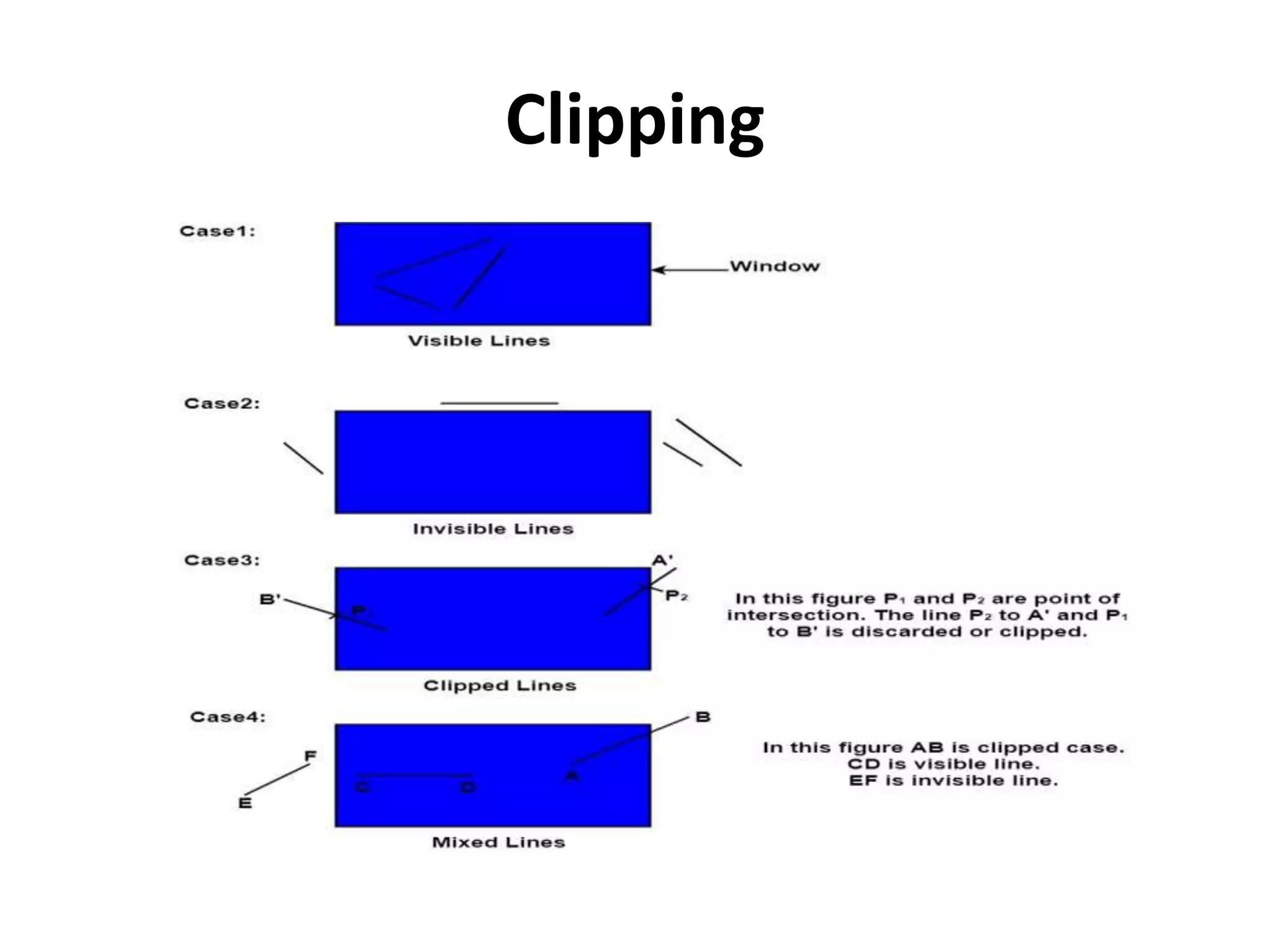
Types of Lines:Three types
• Visible: A line or lines entirely inside the
window is considered visible
• Invisible: A line entirely outside the window is
considered invisible
• Clipped: A line partially inside the window and
partially outside is clipped.
For clipping point of intersection of a line with
the window is determined.
Clipping
Types of Clipping:
• Point Clipping
• Line Clipping
• Area Clipping (Polygon)
• Curve Clipping
• Text Clipping
• Exterior Clipping
Line Clipping
• It is performed by using the line clipping
algorithm.
• The line clipping algorithms are:
Cohen Sutherland Line Clipping Algorithm
Midpoint Subdivision Line Clipping Algorithm
Liang-Barsky Line Clipping Algorithm
Cohen Sutherland Line Clipping
Algorithm:
• In the algorithm, first of all, it is detected
whether line lies inside the screen or it is
outside the screen.
• All lines come under any one of the following
categories:
Visible
Not Visible
Clipping Case
Cohen Sutherland Line Clipping
Algorithm:
1. Visible:
 If a line lies within the window, i.e., both
endpoints of the line lies within the window.
 A line is visible and will be displayed as it is.
2. Not Visible:
 If a line lies outside the window it will be
invisible and rejected. Such lines will not display.
Let A (x1,y2) and B (x2,y2) are endpoints of line.
 xmin,xmax are coordinates of the window.
ymin,ymax are also coordinates of the window.
If any one of the following inequalities is
satisfied, then the line is considered invisible.
x1>xmax
x2>xmax
y1>ymax
y2>ymax
x1<xmin
x2<xmin
y1<ymin
y2<ymin
Cohen Sutherland Line Clipping
Algorithm
3. Clipping Case:
If the line is neither visible case nor invisible case.
It is considered to be clipped case.
First of all, the category of a line is found based
on nine regions given below.
All nine regions are assigned codes.
 Each code is of 4 bits.
If both endpoints of the line have end bits zero,
then the line is considered to be visible.
The center area is having the code, 0000,
i.e., region 5 is considered a rectangle window.
Following figure show
lines of various types
Line AB is the visible case
Line OP is an invisible
case
Line PQ is an invisible
line
Line IJ are clipping
candidates
Line MN are clipping
candidate
Line CD are clipping
candidate
Advantage of Cohen Sutherland Line
Clipping:
• It calculates end-points very quickly and
rejects and accepts lines quickly.
• It can clip pictures much large than screen
size.
Algorithm of Cohen Sutherland Line
Clipping:
• Step1:Calculate positions of both endpoints of
the line
• Step2:Perform OR operation on both of these
end-points
• Step3:If the OR operation gives 0000
Then
line is considered to be visible
else
Perform AND operation on both endpoints
Algorithm:
If And ≠ 0000
then the line is invisible
else
And=0000
Line is considered the clipped case.
• Step4:If a line is clipped case, find an
intersection with boundaries of the window
m=(y2-y1 )(x2-x1)
Algorithm
• (a) If bit 1 is "1" line intersects with left boundary
of rectangle window
y3=y1+m(x-X1)
where X = Xwmin
where Xwminis the minimum value of X
co-ordinate of window
• (b) If bit 2 is "1" line intersect with right boundary
y3=y1+m(X-X1)
where X = Xwmax
where X more is maximum value of X co-
ordinate of the window
Algorithm
• (c) If bit 3 is "1" line intersects with bottom boundary
X3=X1+(y-y1)/m
where y = ywmin
ywmin is the minimum value of Y co-ordinate of
the window
• (d) If bit 4 is "1" line intersects with the top boundary
X3=X1+(y-y1)/m
where y = ywmax
ywmax is the maximum value of Y co-ordinate
of the window
Text Clipping
• A simple method is completely considered, or
nothing considers method.
• This method is also called as all or none.
• If all characters of the string are inside
window, then we will keep the string.
• If a string character is outside then whole
string will be discarded in fig (a).
Text Clipping
• Another method is discarded those characters
not completely inside the window.
• If a character overlap boundary of window.
Those will be discarded in fig (b).
• In fig (c) individual character is treated.
Character lies on boundary is discarded as
which it is outside the window.
Text Clipping-Example:
Polygon Clipping
• Polygon clipping is applied to the polygons.
• The term polygon is used to define objects
having outline of solid.
• These objects should maintain property and
shape of polygon after clipping.
Sutherland-Hodgeman Polygon
Clipping:
• It is performed by processing the boundary of
polygon against each window corner or edge.
• First of all entire polygon is clipped against
one edge, then resulting polygon is
considered, then the polygon is considered
against the second edge, so on for all four
edges.
Four possible situations while
processing
• If the first vertex is an outside the window, the second
vertex is inside the window. Then second vertex is
added to the output list. The point of intersection of
window boundary and polygon side (edge) is also
added to the output line.
• If both vertexes are inside window boundary. Then only
second vertex is added to the output list.
• If the first vertex is inside the window and second is an
outside window. The edge which intersects with
window is added to output list.
• If both vertices are the outside window, then nothing is
added to output list.
Example:
WINDOW-TO-VIEWPORT
COORDINATE TRANSFORMATION
• A world-coordinate area selected for display is
called a window.
• An area on a display device to which a
window is mapped is called a viewport.
• The window defines what is to be viewed; the
viewport defines where it is to be displayed.
Viewing transformation or window to viewport
transformation or windowing transformation:The
mapping of a part of a world-coordinate scene to
device coordinates is referred to as a viewing
transformation.
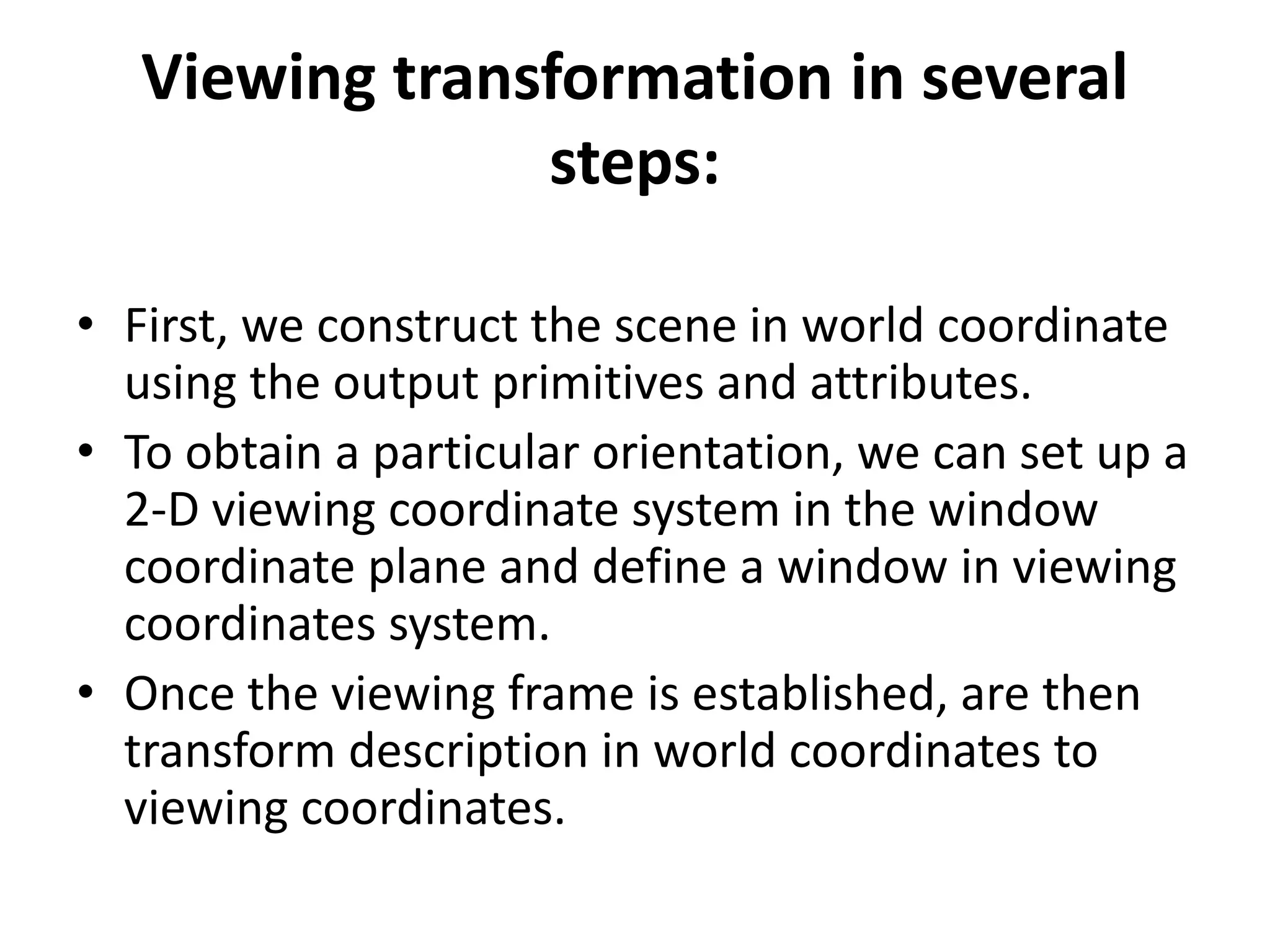
Viewing transformation in several
steps:
• First, we construct the scene in world coordinate
using the output primitives and attributes.
• To obtain a particular orientation, we can set up a
2-D viewing coordinate system in the window
coordinate plane and define a window in viewing
coordinates system.
• Once the viewing frame is established, are then
transform description in world coordinates to
viewing coordinates.
Viewing transformation in several
steps:
• Then, we define viewport in normalized
coordinates (range from 0 to 1) and map the
viewing coordinates description of the scene
to normalized coordinates.
• At the final step, all parts of the picture that
(i.e., outside the viewport are dipped, and the
contents are transferred to device
coordinates).
2D Viewing Transformation
WINDOW-TO-VIEWPORT
COORDINATE TRANSFORMATION
In order to maintain the same relative
placement of the point in the viewport
as in the window, we require:
viewport position (xv, yv), we have:
xv=xvmin+(xw-xwmin)sx
yv=yvmin+(yw-ywmin)sy ...........equation 2
Where scaling factors are
Equation (1) and Equation (2) can also
be derived with a set of
transformation that converts the
window or world coordinate area into
the viewport or screen coordinate
area.
This conversation is performed with the following
sequence of transformations:
Perform a scaling transformation using a fixed
point position (xwmin,ywmin) that scales the
window area to the size of the viewport.
Translate the scaled window area to the
position of the viewport. Relative proportions
of objects are maintained if the scaling factors
are the same (sx=sy).
THANK U

Clipping

  • 1.
  • 2.
    Clipping • Definition:Any procedurethat identifies those portions of a picture that are either inside or outside of a specified region or space is known as clipping. • For deciding the visible and invisible portion, a particular process called clipping is used. • Clipping determines each element into the visible and invisible portion. • Visible portion is selected. • An invisible portion is discarded.
  • 3.
    Types of Lines:Threetypes • Visible: A line or lines entirely inside the window is considered visible • Invisible: A line entirely outside the window is considered invisible • Clipped: A line partially inside the window and partially outside is clipped. For clipping point of intersection of a line with the window is determined.
  • 4.
  • 5.
    Types of Clipping: •Point Clipping • Line Clipping • Area Clipping (Polygon) • Curve Clipping • Text Clipping • Exterior Clipping
  • 6.
    Line Clipping • Itis performed by using the line clipping algorithm. • The line clipping algorithms are: Cohen Sutherland Line Clipping Algorithm Midpoint Subdivision Line Clipping Algorithm Liang-Barsky Line Clipping Algorithm
  • 7.
    Cohen Sutherland LineClipping Algorithm: • In the algorithm, first of all, it is detected whether line lies inside the screen or it is outside the screen. • All lines come under any one of the following categories: Visible Not Visible Clipping Case
  • 8.
    Cohen Sutherland LineClipping Algorithm: 1. Visible:  If a line lies within the window, i.e., both endpoints of the line lies within the window.  A line is visible and will be displayed as it is. 2. Not Visible:  If a line lies outside the window it will be invisible and rejected. Such lines will not display. Let A (x1,y2) and B (x2,y2) are endpoints of line.  xmin,xmax are coordinates of the window. ymin,ymax are also coordinates of the window.
  • 9.
    If any oneof the following inequalities is satisfied, then the line is considered invisible. x1>xmax x2>xmax y1>ymax y2>ymax x1<xmin x2<xmin y1<ymin y2<ymin
  • 10.
    Cohen Sutherland LineClipping Algorithm 3. Clipping Case: If the line is neither visible case nor invisible case. It is considered to be clipped case. First of all, the category of a line is found based on nine regions given below. All nine regions are assigned codes.  Each code is of 4 bits. If both endpoints of the line have end bits zero, then the line is considered to be visible.
  • 11.
    The center areais having the code, 0000, i.e., region 5 is considered a rectangle window.
  • 12.
    Following figure show linesof various types Line AB is the visible case Line OP is an invisible case Line PQ is an invisible line Line IJ are clipping candidates Line MN are clipping candidate Line CD are clipping candidate
  • 13.
    Advantage of CohenSutherland Line Clipping: • It calculates end-points very quickly and rejects and accepts lines quickly. • It can clip pictures much large than screen size.
  • 14.
    Algorithm of CohenSutherland Line Clipping: • Step1:Calculate positions of both endpoints of the line • Step2:Perform OR operation on both of these end-points • Step3:If the OR operation gives 0000 Then line is considered to be visible else Perform AND operation on both endpoints
  • 15.
    Algorithm: If And ≠0000 then the line is invisible else And=0000 Line is considered the clipped case. • Step4:If a line is clipped case, find an intersection with boundaries of the window m=(y2-y1 )(x2-x1)
  • 16.
    Algorithm • (a) Ifbit 1 is "1" line intersects with left boundary of rectangle window y3=y1+m(x-X1) where X = Xwmin where Xwminis the minimum value of X co-ordinate of window • (b) If bit 2 is "1" line intersect with right boundary y3=y1+m(X-X1) where X = Xwmax where X more is maximum value of X co- ordinate of the window
  • 17.
    Algorithm • (c) Ifbit 3 is "1" line intersects with bottom boundary X3=X1+(y-y1)/m where y = ywmin ywmin is the minimum value of Y co-ordinate of the window • (d) If bit 4 is "1" line intersects with the top boundary X3=X1+(y-y1)/m where y = ywmax ywmax is the maximum value of Y co-ordinate of the window
  • 18.
    Text Clipping • Asimple method is completely considered, or nothing considers method. • This method is also called as all or none. • If all characters of the string are inside window, then we will keep the string. • If a string character is outside then whole string will be discarded in fig (a).
  • 19.
    Text Clipping • Anothermethod is discarded those characters not completely inside the window. • If a character overlap boundary of window. Those will be discarded in fig (b). • In fig (c) individual character is treated. Character lies on boundary is discarded as which it is outside the window.
  • 20.
  • 21.
    Polygon Clipping • Polygonclipping is applied to the polygons. • The term polygon is used to define objects having outline of solid. • These objects should maintain property and shape of polygon after clipping.
  • 22.
    Sutherland-Hodgeman Polygon Clipping: • Itis performed by processing the boundary of polygon against each window corner or edge. • First of all entire polygon is clipped against one edge, then resulting polygon is considered, then the polygon is considered against the second edge, so on for all four edges.
  • 23.
    Four possible situationswhile processing • If the first vertex is an outside the window, the second vertex is inside the window. Then second vertex is added to the output list. The point of intersection of window boundary and polygon side (edge) is also added to the output line. • If both vertexes are inside window boundary. Then only second vertex is added to the output list. • If the first vertex is inside the window and second is an outside window. The edge which intersects with window is added to output list. • If both vertices are the outside window, then nothing is added to output list.
  • 24.
  • 25.
    WINDOW-TO-VIEWPORT COORDINATE TRANSFORMATION • Aworld-coordinate area selected for display is called a window. • An area on a display device to which a window is mapped is called a viewport. • The window defines what is to be viewed; the viewport defines where it is to be displayed.
  • 26.
    Viewing transformation orwindow to viewport transformation or windowing transformation:The mapping of a part of a world-coordinate scene to device coordinates is referred to as a viewing transformation.
  • 27.
    Viewing transformation inseveral steps: • First, we construct the scene in world coordinate using the output primitives and attributes. • To obtain a particular orientation, we can set up a 2-D viewing coordinate system in the window coordinate plane and define a window in viewing coordinates system. • Once the viewing frame is established, are then transform description in world coordinates to viewing coordinates.
  • 28.
    Viewing transformation inseveral steps: • Then, we define viewport in normalized coordinates (range from 0 to 1) and map the viewing coordinates description of the scene to normalized coordinates. • At the final step, all parts of the picture that (i.e., outside the viewport are dipped, and the contents are transferred to device coordinates).
  • 29.
  • 30.
  • 31.
    In order tomaintain the same relative placement of the point in the viewport as in the window, we require:
  • 32.
    viewport position (xv,yv), we have: xv=xvmin+(xw-xwmin)sx yv=yvmin+(yw-ywmin)sy ...........equation 2 Where scaling factors are
  • 33.
    Equation (1) andEquation (2) can also be derived with a set of transformation that converts the window or world coordinate area into the viewport or screen coordinate area.
  • 34.
    This conversation isperformed with the following sequence of transformations: Perform a scaling transformation using a fixed point position (xwmin,ywmin) that scales the window area to the size of the viewport. Translate the scaled window area to the position of the viewport. Relative proportions of objects are maintained if the scaling factors are the same (sx=sy).
  • 35.