ATA Features
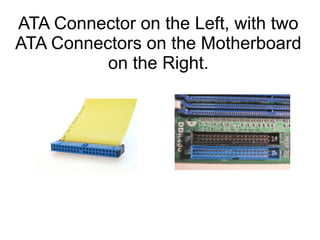
ATA Connector on the Left, with two
ATA Connectors on the Motherboard
          on the Right.
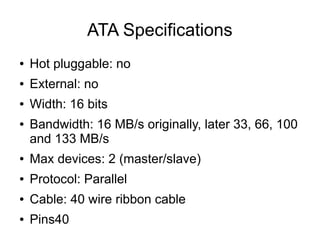
ATA Specifications
●   Hot pluggable: no
●   External: no
●   Width: 16 bits
●   Bandwidth: 16 MB/s originally, later 33, 66, 100
    and 133 MB/s
●   Max devices: 2 (master/slave)
●   Protocol: Parallel
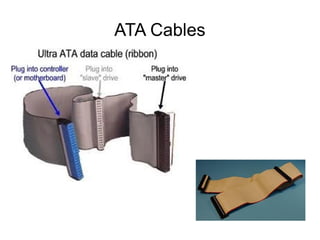
●   Cable: 40 wire ribbon cable
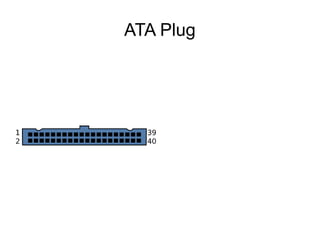
●   Pins40
ATA Plug
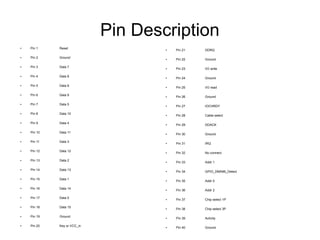
Pin Description
●   Pin 1    Reset                   ●   Pin 21   DDRQ

●   Pin 2    Ground                  ●   Pin 22   Ground

●   Pin 3    Data 7                  ●   Pin 23   I/O write

●   Pin 4    Data 8                  ●   Pin 24   Ground

●   Pin 5    Data 6                  ●   Pin 25   I/O read

●   Pin 6    Data 9                  ●   Pin 26   Ground

●   Pin 7    Data 5                  ●   Pin 27   IOCHRDY

●   Pin 8    Data 10                 ●   Pin 28   Cable select

●   Pin 9    Data 4                  ●   Pin 29   DDACK

●   Pin 10   Data 11                 ●   Pin 30   Ground

●   Pin 11   Data 3                  ●   Pin 31   IRQ

●   Pin 12   Data 12                 ●   Pin 32   No connect

●   Pin 13   Data 2                  ●   Pin 33   Addr 1

●   Pin 14   Data 13                 ●   Pin 34   GPIO_DMA66_Detect

●   Pin 15   Data 1                  ●   Pin 35   Addr 0

●   Pin 16   Data 14                 ●   Pin 36   Addr 2

●   Pin 17   Data 0                  ●   Pin 37   Chip select 1P

●   Pin 18   Data 15                 ●   Pin 38   Chip select 3P

●   Pin 19   Ground                  ●   Pin 39   Activity

●   Pin 20   Key or VCC_in           ●   Pin 40   Ground
ATA Cables
Multiple devices on a cable

If two devices attach to a single cable, one is commonly
referred to as a master and the other as a slave.
The master drive generally appears first when the
computer's BIOS and/or operating system enumerates
available drives
Cable Select
A drive set to "cable select" automatically
configures itself as master or slave, according to
its position on the cable. Cable select is controlled
by pin 28. The host adapter grounds this pin; if a
device sees that the pin is grounded, it becomes
the master device; if it sees that pin 28 is open,
the device becomes the slave device.
This setting is usually chosen by placing a jumper on the
"cable select" position, usually marked CS, rather than on
the "master" or "slave" position.

1454.ata features

  • 1.
  • 2.
    ATA Connector onthe Left, with two ATA Connectors on the Motherboard on the Right.
  • 3.
    ATA Specifications ● Hot pluggable: no ● External: no ● Width: 16 bits ● Bandwidth: 16 MB/s originally, later 33, 66, 100 and 133 MB/s ● Max devices: 2 (master/slave) ● Protocol: Parallel ● Cable: 40 wire ribbon cable ● Pins40
  • 4.
  • 5.
    Pin Description ● Pin 1 Reset ● Pin 21 DDRQ ● Pin 2 Ground ● Pin 22 Ground ● Pin 3 Data 7 ● Pin 23 I/O write ● Pin 4 Data 8 ● Pin 24 Ground ● Pin 5 Data 6 ● Pin 25 I/O read ● Pin 6 Data 9 ● Pin 26 Ground ● Pin 7 Data 5 ● Pin 27 IOCHRDY ● Pin 8 Data 10 ● Pin 28 Cable select ● Pin 9 Data 4 ● Pin 29 DDACK ● Pin 10 Data 11 ● Pin 30 Ground ● Pin 11 Data 3 ● Pin 31 IRQ ● Pin 12 Data 12 ● Pin 32 No connect ● Pin 13 Data 2 ● Pin 33 Addr 1 ● Pin 14 Data 13 ● Pin 34 GPIO_DMA66_Detect ● Pin 15 Data 1 ● Pin 35 Addr 0 ● Pin 16 Data 14 ● Pin 36 Addr 2 ● Pin 17 Data 0 ● Pin 37 Chip select 1P ● Pin 18 Data 15 ● Pin 38 Chip select 3P ● Pin 19 Ground ● Pin 39 Activity ● Pin 20 Key or VCC_in ● Pin 40 Ground
  • 6.
  • 7.
    Multiple devices ona cable If two devices attach to a single cable, one is commonly referred to as a master and the other as a slave. The master drive generally appears first when the computer's BIOS and/or operating system enumerates available drives
  • 8.
    Cable Select A driveset to "cable select" automatically configures itself as master or slave, according to its position on the cable. Cable select is controlled by pin 28. The host adapter grounds this pin; if a device sees that the pin is grounded, it becomes the master device; if it sees that pin 28 is open, the device becomes the slave device. This setting is usually chosen by placing a jumper on the "cable select" position, usually marked CS, rather than on the "master" or "slave" position.