For Systems Improvement Process Mapping: Adapted by Mitchell W. Manning from the work of the Process Mapping Training Team at GlaxoWellcome 1995-1997
Process Mapping Process Map : A graphic representation of a   process, showing the sequence of tasks; uses a modified version of standard flowcharting symbols Mapping : The activity of creating a detailed flowchart of a work process showing its inputs, tasks, and activities in sequence
A good map is the foundation for continuous quality improvement efforts in which you analyze and agree on the most efficient routes to take under various circumstances Continuous Improvement
Objectives Map process as it is now Produce a working document Recognize that real value is in the map’s creation
Process Definitions Process : A sequence of steps, tasks, or activities that converts inputs to an output; adds value to the inputs by changing them or using them to produce something new Input : The materials, equipment, information, people, money, or environmental conditions needed to carry out the process Output : The product or service that is created by the process; that which is handed off to the customer
Types of Customers External Customer : User of an organization’s overall product or service who is not a member of the organization Internal Customer : User of products or services who is a member of the organization
Mapping Levels Level 1—System Level 2—Primary Process Level 3—Function Level 4—Task
Level 1: System System Map : Organizational overview showing the first level of supply process and customer How? Interview Who? System owner Why? To get direction and establish boundaries
Level 2: Primary Process Primary Process Map : A high level overview of the basic steps of a primary process How Interview Who? Process owner Why? Systems improvement
Level 3: Function Function Map : A map which contains more detail and includes the major functions in the process How? SMEs describe functions in detail, usually through structured brainstorming Who? Process owner Direct reports Why? Process improvement
Level 4: Task Task Map : A more detailed map including individual tasks or activities which make up the function How? SMEs describe activities in detail, usually through structured brainstorming Why? Drill down to the lowest level of detail for process re-engineering, computer system implementation, etc. May include documents, screen prints, and data
Define the Process Output Customer(s) Requirements Process Participants Process Owner Stakeholders Process Boundaries Inputs and their Suppliers
Process Definitions Process Participants : People who perform the steps of the process Process Owner : Person responsible for the process and its output; key decision maker who can allot organization resources to the process   participants Stakeholder : Someone who is not a supplier, customer, or process owner; but who has an interest in the process and stands to gain or lose based on the results of the process Process Boundaries : The first and last steps of the process; the first thing done in the process and the last thing done before delivery to the customer Primary Process : The basic steps or activities that must occur to produce the output
Steps Each step, task, or activity within a flowchart is depicted as a rectangle Take out trash Wash dishes Sweep floor
Sweep floor Take out trash Wash dishes Put Steps in Sequence
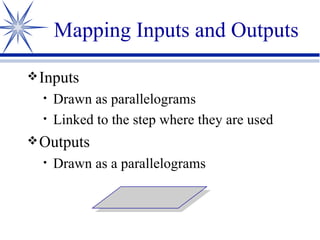
Inputs Drawn as parallelograms Linked to the step where they are used Outputs Drawn as a parallelograms Mapping Inputs and Outputs
Wash dishes Hot water Soap Sponge Broom Bag/can Inputs Process Kitchen cleaned Output Sweep floor Take out trash Map of a of Primary Process
Parallel Process Definition A process executed by someone (or something) else that occurs simultaneously (concurrently) with the primary process May or may not be part of the primary process
Clear table Map of a of Parallel Process Wash dishes Stack dishes Refrigerate leftovers Sweep floor Take out trash Dry dishes
Parallel Process Reduces cycle time Cycle time : The total amount of time required to complete the process, from boundary to boundary; one measure of productivity
Brown paper for background Transportable 3x5 stick-on notes or index cards Represent task rectangles Use a different  color  for input and output parallelograms May use different  c o l o r s  to represent different departments Easily moved around, re-sequenced, eliminated, or added to Pencil lines Erasable Mapping Guidelines
Steps in the Mapping Process Brainstorm Brainstorm a list of tasks and activities on a flip chart Write each item “as is” rather than the “should be” Include the boundary steps Have two or three people write the items listed on 3  x  5 stick-on notes or index cards Each task should include a verb and its object
Steps in the Mapping Process Sort Find a large, flat surface on which to lay out the notes Read the stick-on notes while moving around the work surface Remove any tasks that have to do with “inspection,” “revision,” “rework,” or “fix”  Remove any tasks that may belong to another administrative/management process
Sort Examine each remaining task and place it into one of two stacks/categories Tasks which absolutely must occur Tasks which occur sometimes *Team must be unanimous to put a task in the “must occur” pile *“Must occur” pile represents primary process Discard any duplicated tasks If different people, departments, or functions perform some of the tasks, code the stick-on notes with a colored dot coordinated to the individual, department, or function Steps in the Mapping Process
Select flowchart format Flowcharts may run either vertically or horizontally based on the amount and nature of the available wall space Steps in the Mapping Process
Prepare work field Attach brown paper firmly in place according to the format chosen and the available working surface Steps in the Mapping Process
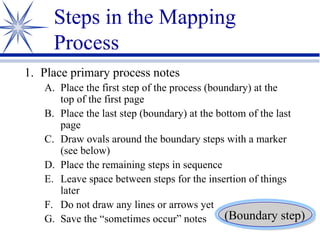
Place primary process notes Place the first step of the process (boundary) at the top of the first page Place the last step (boundary) at the bottom of the last page Draw ovals around the boundary steps with a marker (see below) Place the remaining steps in sequence Leave space between steps for the insertion of things later Do not draw any lines or arrows yet Save the “sometimes occur” notes Steps in the Mapping Process (Boundary step)
Check for reasonableness Consider each step of your primary process; is it necessary to produce the output? Have any important steps been forgotten? If so, add them Steps in the Mapping Process
Characteristics of a Truly Useful Map The map must  describe The map must allow  flexibility The map must build  alternative  paths, depending on circumstances or personal preference The map must represent the process   as it is , not as it ought to be
Alternative Path Definition A path through a flowchart comprised of one or more optional tasks off the mandatory primary path Preceded by a decision diamond ?
Decision Diamond Definition Used for a decision leading to an alternative path Depicted by a square stick-on note turned 45 degrees Always poses a question and requires an answer Most often, will lead to yes/no alternatives ?
Pick up son from baseball practice? Drive to  playground Drive home no yes Alternative Paths
Decision Diamond Each “sometimes occurs” task requires a decision diamond There is usually a three-step thought process for creating and placing a “sometimes occurs” step with its decision diamond
Three-Step Process Pair a “sometimes” task with a blank decision diamond Why would you do that optional step?  Write it in question form Place the pair (diamond and its task) in its appropriate sequence within the process with the “no” line being connected to the next task box in the primary process
Get out of car ? Sometimes Task Get out of car Self- service pump? yes
Get out of car Self- service pump? yes no Give order to  attendant Alternative Paths
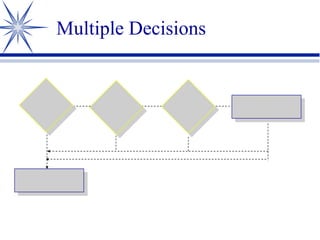
Multiple Response Paths
Multiple Decisions
Decision Questions Should be specific and objective  (measurable) Everyone should interpret the question the same way Many of the decisions in the “as is” version may be quite subjective ?
Inspection Point Finds errors before they reach the customer Decision diamond typically requiring a “pass/fail” answer Failures cause the process direction to reverse itself
Rework Loop Definition The result of a failed inspection point Adds steps to the process and generally leads back to the inspection diamond
Rework Loop Adds to cycle time Adds to cost no yes Inspect Pass? Correct
Do-Over Loop Definition Another result of a failed inspection point Leads to an earlier step in the process Steps must be repeated Associated with scrap
Do-Over Loop Do (Re-do) no yes Inspect Pass? Next step Do (Re-do)
Inspection Points Represent standards Should be  specific ,  objective , and  measurable If the above criteria are not met, this is an area for  improvement
Eliminate or Minimize  Non-Value-Added Steps This is one of the most important steps of improving a process Look for “approval” and “for-your-information” steps
Value-Added Step Definition A step that contributes to customer satisfaction A customer would notice if it were eliminated
Customer Requirements Definition The needs, wants, and expectations of your customers, in their words
Question your customers about their requirements Ask, “Does this step add value in our customers’ eyes?  What would happen to the customer if this step were eliminated?” Brainstorm creative ways to eliminate or shorten particularly time-consuming crucial steps Eliminate or Minimize  Non-Value-Added Steps
Develop and Apply Standards Each inspection point must clearly specify the conditions to “pass” Must have objective, measurable inspection   criteria
Process Standard Definition Precise, measurable statement of an acceptable level, quantity, or other characteristic
Develop and Apply Standards Select an inspection point for which you will begin developing measurable standards/criteria Using the flip chart, brainstorm a list of possible standards Reduce the list using the criteria of   criticality ,  objectivity ,  measurability , and  practicality Agree on standards for each inspection point in the process
Move Inspection Points Forward Decide where the process error is likely to occur Create an inspection point as close to the error-producing step as possible
Eliminate the Need for Inspection Points Identify the inspection point to be eliminated Brainstorm a number of ideas for elimination Evaluate each idea for its strengths and weaknesses Develop a solution and plan its implementation Try out the solution Continue to monitor for errors (check) to see if your solution has worked Rearrange and redraw affected sections of the map PDCA
Chart and Evaluate Inputs and Suppliers Select process steps for which there are multiple inputs Brainstorm inputs Fill in the name of the supplier for each input Rate each input as a  Needs attention now Postpone for later action No attention needed Develop requirements for inputs rated “1” Judge your inputs against your requirements Share findings with your suppliers and negotiate improved inputs
Total Cycle Time Definition The time it takes to complete a process, from boundary to boundary Sometimes called actual cycle time
Theoretical Cycle Time Definition The sum of the times required to perform each step in the process Does not account for hand-off or wait times Theoretically, the shortest possible time to complete the process
Cycle-Time Studies The  difference  between total and theoretical cycle times represents the  opportunity for improvement
Look for bottlenecks and other inefficiencies Develop solutions and try them out Take cycle-time measures of your changed process Adjust and adapt until your changes reliably reduce total cycle time Conduct a Cycle-Time Study PDCA
Move Steps into Another Process Means of uncluttering a process and minimizing cycle time Move one or more steps to an earlier time, making them part of a different, less time-sensitive process Look for anything that can be done ahead of time
Design a Parallel Process Occurs simultaneously with the primary process Reduces cycle time
Clear table Wash dishes Stack dishes Refrigerate leftovers Sweep floor Take out trash Dry dishes Design a Parallel Process
Identify steps that could be done by someone else, in parallel Map the parallel process so that all can see exactly what would occur Evaluate the idea by thinking of all the pluses and minuses of such a reorganization Design a Parallel Process
Automate or Mechanize Steps Reduces cycle time, errors, or both Identify steps that could be done by someone (or something) else Map the new process Evaluate the idea by thinking of all the pluses and minuses
Sub-process Level 3 Function The smaller steps that comprise one process step; the next level of detail Has all the same characteristics of a primary process, such as decision diamonds, parallel processes, and inspection points
Each step in the sub-process can be further broken down into its elements or tasks (sub-sub-process, or Level 4 Task) Map the sub-processes and sub-sub-processes when A primary step has been identified as a potential  problem  area No further improvement at the primary process level can be found You want to  understand  your process even better Mapping Sub-processes
To collaboratively gain an even deeper  understanding  of how the process works Gain new insights and to understand how your process  affects  other processes Get Feedback on Map
Process Mapping Guidelines Use brown paper for background Use stick-on notes or index cards Represent task rectangles Different  c o l o r s  to represent input/output parallelograms or different departments Turn 45 degrees to represent decision diamonds
Process Mapping Guidelines for Teams Boundary steps represented by oval drawn with a marker Connector nodes represented by circle drawn with a marker Process arrow showing direction of flow drawn initially with pencil
Process Mapping Symbols Symbols to be used for coding of tasks, activities, documents, etc. Telephone : Conversation Computer 1 : Mainframe Computer 2 : Client/Server
Computer 3 : PC Light Bulb : Bright idea Chain : Interface Clouds : Thought, issue, “Don’t forget this” Process Mapping Symbols  continued
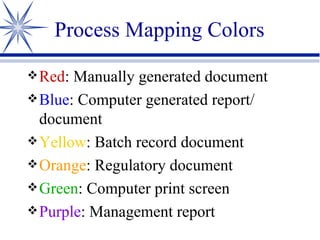
Red : Manually generated document Blue : Computer generated report/ document Yellow : Batch record document Orange : Regulatory document Green : Computer print screen Purple : Management report Process Mapping Colors
Summary A map is a  tool  for the organization to use Dozens of maps form a detailed system This is true  systems thinking

Process Mapping For Systems Improvement

  • 1.
    For Systems ImprovementProcess Mapping: Adapted by Mitchell W. Manning from the work of the Process Mapping Training Team at GlaxoWellcome 1995-1997
  • 2.
    Process Mapping ProcessMap : A graphic representation of a process, showing the sequence of tasks; uses a modified version of standard flowcharting symbols Mapping : The activity of creating a detailed flowchart of a work process showing its inputs, tasks, and activities in sequence
  • 3.
    A good mapis the foundation for continuous quality improvement efforts in which you analyze and agree on the most efficient routes to take under various circumstances Continuous Improvement
  • 4.
    Objectives Map processas it is now Produce a working document Recognize that real value is in the map’s creation
  • 5.
    Process Definitions Process: A sequence of steps, tasks, or activities that converts inputs to an output; adds value to the inputs by changing them or using them to produce something new Input : The materials, equipment, information, people, money, or environmental conditions needed to carry out the process Output : The product or service that is created by the process; that which is handed off to the customer
  • 6.
    Types of CustomersExternal Customer : User of an organization’s overall product or service who is not a member of the organization Internal Customer : User of products or services who is a member of the organization
  • 7.
    Mapping Levels Level1—System Level 2—Primary Process Level 3—Function Level 4—Task
  • 8.
    Level 1: SystemSystem Map : Organizational overview showing the first level of supply process and customer How? Interview Who? System owner Why? To get direction and establish boundaries
  • 9.
    Level 2: PrimaryProcess Primary Process Map : A high level overview of the basic steps of a primary process How Interview Who? Process owner Why? Systems improvement
  • 10.
    Level 3: FunctionFunction Map : A map which contains more detail and includes the major functions in the process How? SMEs describe functions in detail, usually through structured brainstorming Who? Process owner Direct reports Why? Process improvement
  • 11.
    Level 4: TaskTask Map : A more detailed map including individual tasks or activities which make up the function How? SMEs describe activities in detail, usually through structured brainstorming Why? Drill down to the lowest level of detail for process re-engineering, computer system implementation, etc. May include documents, screen prints, and data
  • 12.
    Define the ProcessOutput Customer(s) Requirements Process Participants Process Owner Stakeholders Process Boundaries Inputs and their Suppliers
  • 13.
    Process Definitions ProcessParticipants : People who perform the steps of the process Process Owner : Person responsible for the process and its output; key decision maker who can allot organization resources to the process participants Stakeholder : Someone who is not a supplier, customer, or process owner; but who has an interest in the process and stands to gain or lose based on the results of the process Process Boundaries : The first and last steps of the process; the first thing done in the process and the last thing done before delivery to the customer Primary Process : The basic steps or activities that must occur to produce the output
  • 14.
    Steps Each step,task, or activity within a flowchart is depicted as a rectangle Take out trash Wash dishes Sweep floor
  • 15.
    Sweep floor Takeout trash Wash dishes Put Steps in Sequence
  • 16.
    Inputs Drawn asparallelograms Linked to the step where they are used Outputs Drawn as a parallelograms Mapping Inputs and Outputs
  • 17.
    Wash dishes Hotwater Soap Sponge Broom Bag/can Inputs Process Kitchen cleaned Output Sweep floor Take out trash Map of a of Primary Process
  • 18.
    Parallel Process DefinitionA process executed by someone (or something) else that occurs simultaneously (concurrently) with the primary process May or may not be part of the primary process
  • 19.
    Clear table Mapof a of Parallel Process Wash dishes Stack dishes Refrigerate leftovers Sweep floor Take out trash Dry dishes
  • 20.
    Parallel Process Reducescycle time Cycle time : The total amount of time required to complete the process, from boundary to boundary; one measure of productivity
  • 21.
    Brown paper forbackground Transportable 3x5 stick-on notes or index cards Represent task rectangles Use a different color for input and output parallelograms May use different c o l o r s to represent different departments Easily moved around, re-sequenced, eliminated, or added to Pencil lines Erasable Mapping Guidelines
  • 22.
    Steps in theMapping Process Brainstorm Brainstorm a list of tasks and activities on a flip chart Write each item “as is” rather than the “should be” Include the boundary steps Have two or three people write the items listed on 3 x 5 stick-on notes or index cards Each task should include a verb and its object
  • 23.
    Steps in theMapping Process Sort Find a large, flat surface on which to lay out the notes Read the stick-on notes while moving around the work surface Remove any tasks that have to do with “inspection,” “revision,” “rework,” or “fix” Remove any tasks that may belong to another administrative/management process
  • 24.
    Sort Examine eachremaining task and place it into one of two stacks/categories Tasks which absolutely must occur Tasks which occur sometimes *Team must be unanimous to put a task in the “must occur” pile *“Must occur” pile represents primary process Discard any duplicated tasks If different people, departments, or functions perform some of the tasks, code the stick-on notes with a colored dot coordinated to the individual, department, or function Steps in the Mapping Process
  • 25.
    Select flowchart formatFlowcharts may run either vertically or horizontally based on the amount and nature of the available wall space Steps in the Mapping Process
  • 26.
    Prepare work fieldAttach brown paper firmly in place according to the format chosen and the available working surface Steps in the Mapping Process
  • 27.
    Place primary processnotes Place the first step of the process (boundary) at the top of the first page Place the last step (boundary) at the bottom of the last page Draw ovals around the boundary steps with a marker (see below) Place the remaining steps in sequence Leave space between steps for the insertion of things later Do not draw any lines or arrows yet Save the “sometimes occur” notes Steps in the Mapping Process (Boundary step)
  • 28.
    Check for reasonablenessConsider each step of your primary process; is it necessary to produce the output? Have any important steps been forgotten? If so, add them Steps in the Mapping Process
  • 29.
    Characteristics of aTruly Useful Map The map must describe The map must allow flexibility The map must build alternative paths, depending on circumstances or personal preference The map must represent the process as it is , not as it ought to be
  • 30.
    Alternative Path DefinitionA path through a flowchart comprised of one or more optional tasks off the mandatory primary path Preceded by a decision diamond ?
  • 31.
    Decision Diamond DefinitionUsed for a decision leading to an alternative path Depicted by a square stick-on note turned 45 degrees Always poses a question and requires an answer Most often, will lead to yes/no alternatives ?
  • 32.
    Pick up sonfrom baseball practice? Drive to playground Drive home no yes Alternative Paths
  • 33.
    Decision Diamond Each“sometimes occurs” task requires a decision diamond There is usually a three-step thought process for creating and placing a “sometimes occurs” step with its decision diamond
  • 34.
    Three-Step Process Paira “sometimes” task with a blank decision diamond Why would you do that optional step? Write it in question form Place the pair (diamond and its task) in its appropriate sequence within the process with the “no” line being connected to the next task box in the primary process
  • 35.
    Get out ofcar ? Sometimes Task Get out of car Self- service pump? yes
  • 36.
    Get out ofcar Self- service pump? yes no Give order to attendant Alternative Paths
  • 37.
  • 38.
  • 39.
    Decision Questions Shouldbe specific and objective (measurable) Everyone should interpret the question the same way Many of the decisions in the “as is” version may be quite subjective ?
  • 40.
    Inspection Point Findserrors before they reach the customer Decision diamond typically requiring a “pass/fail” answer Failures cause the process direction to reverse itself
  • 41.
    Rework Loop DefinitionThe result of a failed inspection point Adds steps to the process and generally leads back to the inspection diamond
  • 42.
    Rework Loop Addsto cycle time Adds to cost no yes Inspect Pass? Correct
  • 43.
    Do-Over Loop DefinitionAnother result of a failed inspection point Leads to an earlier step in the process Steps must be repeated Associated with scrap
  • 44.
    Do-Over Loop Do(Re-do) no yes Inspect Pass? Next step Do (Re-do)
  • 45.
    Inspection Points Representstandards Should be specific , objective , and measurable If the above criteria are not met, this is an area for improvement
  • 46.
    Eliminate or Minimize Non-Value-Added Steps This is one of the most important steps of improving a process Look for “approval” and “for-your-information” steps
  • 47.
    Value-Added Step DefinitionA step that contributes to customer satisfaction A customer would notice if it were eliminated
  • 48.
    Customer Requirements DefinitionThe needs, wants, and expectations of your customers, in their words
  • 49.
    Question your customersabout their requirements Ask, “Does this step add value in our customers’ eyes? What would happen to the customer if this step were eliminated?” Brainstorm creative ways to eliminate or shorten particularly time-consuming crucial steps Eliminate or Minimize Non-Value-Added Steps
  • 50.
    Develop and ApplyStandards Each inspection point must clearly specify the conditions to “pass” Must have objective, measurable inspection criteria
  • 51.
    Process Standard DefinitionPrecise, measurable statement of an acceptable level, quantity, or other characteristic
  • 52.
    Develop and ApplyStandards Select an inspection point for which you will begin developing measurable standards/criteria Using the flip chart, brainstorm a list of possible standards Reduce the list using the criteria of criticality , objectivity , measurability , and practicality Agree on standards for each inspection point in the process
  • 53.
    Move Inspection PointsForward Decide where the process error is likely to occur Create an inspection point as close to the error-producing step as possible
  • 54.
    Eliminate the Needfor Inspection Points Identify the inspection point to be eliminated Brainstorm a number of ideas for elimination Evaluate each idea for its strengths and weaknesses Develop a solution and plan its implementation Try out the solution Continue to monitor for errors (check) to see if your solution has worked Rearrange and redraw affected sections of the map PDCA
  • 55.
    Chart and EvaluateInputs and Suppliers Select process steps for which there are multiple inputs Brainstorm inputs Fill in the name of the supplier for each input Rate each input as a Needs attention now Postpone for later action No attention needed Develop requirements for inputs rated “1” Judge your inputs against your requirements Share findings with your suppliers and negotiate improved inputs
  • 56.
    Total Cycle TimeDefinition The time it takes to complete a process, from boundary to boundary Sometimes called actual cycle time
  • 57.
    Theoretical Cycle TimeDefinition The sum of the times required to perform each step in the process Does not account for hand-off or wait times Theoretically, the shortest possible time to complete the process
  • 58.
    Cycle-Time Studies The difference between total and theoretical cycle times represents the opportunity for improvement
  • 59.
    Look for bottlenecksand other inefficiencies Develop solutions and try them out Take cycle-time measures of your changed process Adjust and adapt until your changes reliably reduce total cycle time Conduct a Cycle-Time Study PDCA
  • 60.
    Move Steps intoAnother Process Means of uncluttering a process and minimizing cycle time Move one or more steps to an earlier time, making them part of a different, less time-sensitive process Look for anything that can be done ahead of time
  • 61.
    Design a ParallelProcess Occurs simultaneously with the primary process Reduces cycle time
  • 62.
    Clear table Washdishes Stack dishes Refrigerate leftovers Sweep floor Take out trash Dry dishes Design a Parallel Process
  • 63.
    Identify steps thatcould be done by someone else, in parallel Map the parallel process so that all can see exactly what would occur Evaluate the idea by thinking of all the pluses and minuses of such a reorganization Design a Parallel Process
  • 64.
    Automate or MechanizeSteps Reduces cycle time, errors, or both Identify steps that could be done by someone (or something) else Map the new process Evaluate the idea by thinking of all the pluses and minuses
  • 65.
    Sub-process Level 3Function The smaller steps that comprise one process step; the next level of detail Has all the same characteristics of a primary process, such as decision diamonds, parallel processes, and inspection points
  • 66.
    Each step inthe sub-process can be further broken down into its elements or tasks (sub-sub-process, or Level 4 Task) Map the sub-processes and sub-sub-processes when A primary step has been identified as a potential problem area No further improvement at the primary process level can be found You want to understand your process even better Mapping Sub-processes
  • 67.
    To collaboratively gainan even deeper understanding of how the process works Gain new insights and to understand how your process affects other processes Get Feedback on Map
  • 68.
    Process Mapping GuidelinesUse brown paper for background Use stick-on notes or index cards Represent task rectangles Different c o l o r s to represent input/output parallelograms or different departments Turn 45 degrees to represent decision diamonds
  • 69.
    Process Mapping Guidelinesfor Teams Boundary steps represented by oval drawn with a marker Connector nodes represented by circle drawn with a marker Process arrow showing direction of flow drawn initially with pencil
  • 70.
    Process Mapping SymbolsSymbols to be used for coding of tasks, activities, documents, etc. Telephone : Conversation Computer 1 : Mainframe Computer 2 : Client/Server
  • 71.
    Computer 3 :PC Light Bulb : Bright idea Chain : Interface Clouds : Thought, issue, “Don’t forget this” Process Mapping Symbols continued
  • 72.
    Red : Manuallygenerated document Blue : Computer generated report/ document Yellow : Batch record document Orange : Regulatory document Green : Computer print screen Purple : Management report Process Mapping Colors
  • 73.
    Summary A mapis a tool for the organization to use Dozens of maps form a detailed system This is true systems thinking