www.glcnetworks.com
Firewall Mangle
GLC webinar, 5 october 2017
Achmad Mardiansyah
achmad@glcnetworks.com
GLC Networks, Indonesia
1
www.glcnetworks.com
Agenda
â—Ź Introduction
â—Ź Firewall
â—Ź Firewall mangle
â—Ź Demo
â—Ź Q & A
2
www.glcnetworks.com
What is GLC?
â—Ź Garda Lintas Cakrawala (www.glcnetworks.com)
â—Ź An Indonesian company
â—Ź Located in Bandung
â—Ź Areas: Training, IT Consulting
â—Ź Mikrotik Certified Training Partner/Consultant/Distributor
â—Ź Ubiquiti Certified Trainer/Consultant
â—Ź RedHat Certified Trainer
3
www.glcnetworks.com
About GLC webinar?
â—Ź First webinar: january 1, 2010 (title:
tahun baru bersama solaris - new
year with solaris OS)
â—Ź As a sharing event with various
topics: linux, networking, wireless,
database, programming, etc
â—Ź Regular schedule: every 2 weeks
â—Ź Irregular schedule: as needed
â—Ź Checking schedule:
http://www.glcnetworks.com/main/sc
hedule
â—Ź You are invited to be a presenter
â—‹ No need to be an expert
â—‹ This is a forum for sharing: knowledge,
experiences, information
4
www.glcnetworks.com
Trainer Introduction
â—Ź Name: Achmad Mardiansyah
â—Ź Base: bandung, Indonesia
â—Ź Linux user (since 1999), Mikrotik user (since 2007),
ubnt user (since 2011)
â—Ź Certified Trainer (Mikrotik, Ubiquiti, Redhat)
â—Ź Certified Consultant
â—Ź Work: Telco engineer, Sysadmin, PHP programmer,
and Lecturer
â—Ź Personal website: http://achmadjournal.com
â—Ź More info:
http://au.linkedin.com/in/achmadmardiansyah
5
www.glcnetworks.com
Please introduce yourself
â—Ź Your name
â—Ź Your company/university?
â—Ź Your networking experience?
â—Ź Your mikrotik experience?
â—Ź Your expectation from this course?
6
www.glcnetworks.com
Firewall
7
www.glcnetworks.com
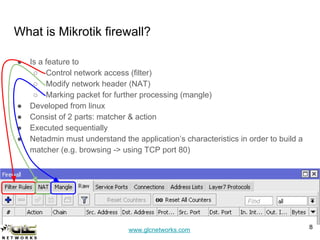
What is Mikrotik firewall?
â—Ź Is a feature to
â—‹ Control network access (filter)
â—‹ Modify network header (NAT)
â—‹ Marking packet for further processing (mangle)
â—Ź Developed from linux
â—Ź Consist of 2 parts: matcher & action
â—Ź Executed sequentially
● Netadmin must understand the application’s characteristics in order to build a
matcher (e.g. browsing -> using TCP port 80)
8
www.glcnetworks.com
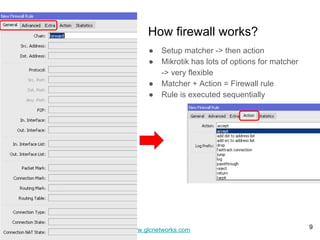
How firewall works?
â—Ź Setup matcher -> then action
â—Ź Mikrotik has lots of options for matcher
-> very flexible
â—Ź Matcher + Action = Firewall rule
â—Ź Rule is executed sequentially
9
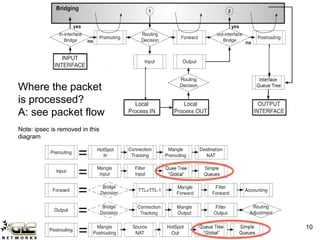
www.glcnetworks.com 10
Where the packet
is processed?
A: see packet flow
Note: ipsec is removed in this
diagram
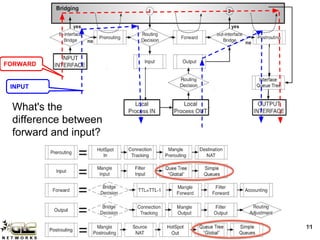
www.glcnetworks.com 1111
What's the
difference between
forward and input?
FORWARD
INPUT
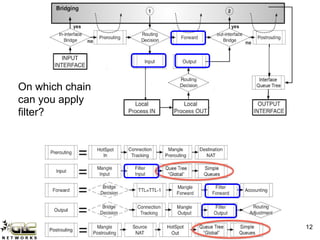
www.glcnetworks.com 12
On which chain
can you apply
filter?
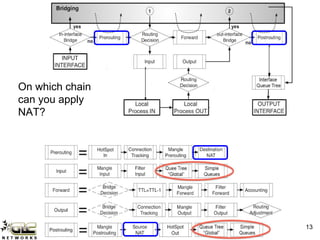
www.glcnetworks.com 13
On which chain
can you apply
NAT?
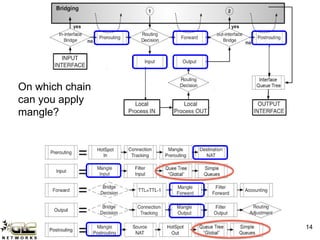
www.glcnetworks.com 14
On which chain
can you apply
mangle?
www.glcnetworks.com
Firewall mangle
15
www.glcnetworks.com
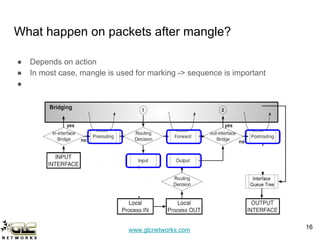
What happen on packets after mangle?
â—Ź Depends on action
â—Ź In most case, mangle is used for marking -> sequence is important
â—Ź
16
www.glcnetworks.com
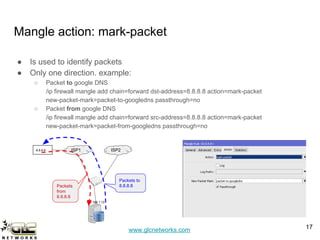
Mangle action: mark-packet
â—Ź Is used to identify packets
â—Ź Only one direction. example:
â—‹ Packet to google DNS
/ip firewall mangle add chain=forward dst-address=8.8.8.8 action=mark-packet
new-packet-mark=packet-to-googledns passthrough=no
â—‹ Packet from google DNS
/ip firewall mangle add chain=forward src-address=8.8.8.8 action=mark-packet
new-packet-mark=packet-from-googledns passthrough=no
17
ISP1 ISP28.8.8.8
192.168.1.10
Packets
from
8.8.8.8
Packets to
8.8.8.8
www.glcnetworks.com
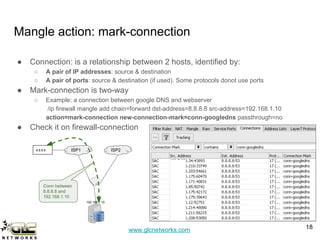
Mangle action: mark-connection
â—Ź Connection: is a relationship between 2 hosts, identified by:
â—‹ A pair of IP addresses: source & destination
â—‹ A pair of ports: source & destination (if used). Some protocols donot use ports
â—Ź Mark-connection is two-way
â—‹ Example: a connection between google DNS and webserver
/ip firewall mangle add chain=forward dst-address=8.8.8.8 src-address=192.168.1.10
action=mark-connection new-connection-mark=conn-googledns passthrough=no
â—Ź Check it on firewall-connection
18
ISP1 ISP28.8.8.8
192.168.1.10
Conn between
8.8.8.8 and
192.168.1.10
www.glcnetworks.com
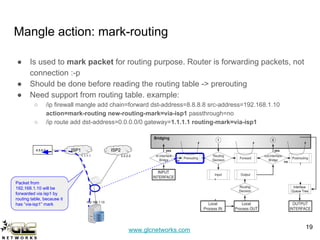
â—Ź Is used to mark packet for routing purpose. Router is forwarding packets, not
connection :-p
â—Ź Should be done before reading the routing table -> prerouting
â—Ź Need support from routing table. example:
â—‹ /ip firewall mangle add chain=forward dst-address=8.8.8.8 src-address=192.168.1.10
action=mark-routing new-routing-mark=via-isp1 passthrough=no
â—‹ /ip route add dst-address=0.0.0.0/0 gateway=1.1.1.1 routing-mark=via-isp1
Mangle action: mark-routing
19
ISP1 ISP28.8.8.8
192.168.1.10
1.1.1.1 2.2.2.2
Packet from
192.168.1.10 will be
forwarded via isp1 by
routing table, because it
has “via-isp1” mark
www.glcnetworks.com
Interested?
Just come to our
training...
Special price for webinar
attendees…
http://www.glcnetworks.c
om/main/schedule
20
www.glcnetworks.com
End of slides
â—Ź Thank you for your attention
â—Ź Please submit your feedback: http://bit.ly/glcfeedback
● Like our facebook page: “GLC networks”
â—Ź Slide: http://www.slideshare.net/r41nbuw
â—Ź Recording: https://www.youtube.com/channel/UCI611_IIkQC0rsLWIFIx_yg
â—Ź Stay tune with our schedule
21

Mikrotik firewall mangle

  • 1.
    www.glcnetworks.com Firewall Mangle GLC webinar,5 october 2017 Achmad Mardiansyah achmad@glcnetworks.com GLC Networks, Indonesia 1
  • 2.
  • 3.
    www.glcnetworks.com What is GLC? â—ŹGarda Lintas Cakrawala (www.glcnetworks.com) â—Ź An Indonesian company â—Ź Located in Bandung â—Ź Areas: Training, IT Consulting â—Ź Mikrotik Certified Training Partner/Consultant/Distributor â—Ź Ubiquiti Certified Trainer/Consultant â—Ź RedHat Certified Trainer 3
  • 4.
    www.glcnetworks.com About GLC webinar? â—ŹFirst webinar: january 1, 2010 (title: tahun baru bersama solaris - new year with solaris OS) â—Ź As a sharing event with various topics: linux, networking, wireless, database, programming, etc â—Ź Regular schedule: every 2 weeks â—Ź Irregular schedule: as needed â—Ź Checking schedule: http://www.glcnetworks.com/main/sc hedule â—Ź You are invited to be a presenter â—‹ No need to be an expert â—‹ This is a forum for sharing: knowledge, experiences, information 4
  • 5.
    www.glcnetworks.com Trainer Introduction â—Ź Name:Achmad Mardiansyah â—Ź Base: bandung, Indonesia â—Ź Linux user (since 1999), Mikrotik user (since 2007), ubnt user (since 2011) â—Ź Certified Trainer (Mikrotik, Ubiquiti, Redhat) â—Ź Certified Consultant â—Ź Work: Telco engineer, Sysadmin, PHP programmer, and Lecturer â—Ź Personal website: http://achmadjournal.com â—Ź More info: http://au.linkedin.com/in/achmadmardiansyah 5
  • 6.
    www.glcnetworks.com Please introduce yourself â—ŹYour name â—Ź Your company/university? â—Ź Your networking experience? â—Ź Your mikrotik experience? â—Ź Your expectation from this course? 6
  • 7.
  • 8.
    www.glcnetworks.com What is Mikrotikfirewall? ● Is a feature to ○ Control network access (filter) ○ Modify network header (NAT) ○ Marking packet for further processing (mangle) ● Developed from linux ● Consist of 2 parts: matcher & action ● Executed sequentially ● Netadmin must understand the application’s characteristics in order to build a matcher (e.g. browsing -> using TCP port 80) 8
  • 9.
    www.glcnetworks.com How firewall works? â—ŹSetup matcher -> then action â—Ź Mikrotik has lots of options for matcher -> very flexible â—Ź Matcher + Action = Firewall rule â—Ź Rule is executed sequentially 9
  • 10.
    www.glcnetworks.com 10 Where thepacket is processed? A: see packet flow Note: ipsec is removed in this diagram
  • 11.
    www.glcnetworks.com 1111 What's the differencebetween forward and input? FORWARD INPUT
  • 12.
    www.glcnetworks.com 12 On whichchain can you apply filter?
  • 13.
    www.glcnetworks.com 13 On whichchain can you apply NAT?
  • 14.
    www.glcnetworks.com 14 On whichchain can you apply mangle?
  • 15.
  • 16.
    www.glcnetworks.com What happen onpackets after mangle? â—Ź Depends on action â—Ź In most case, mangle is used for marking -> sequence is important â—Ź 16
  • 17.
    www.glcnetworks.com Mangle action: mark-packet â—ŹIs used to identify packets â—Ź Only one direction. example: â—‹ Packet to google DNS /ip firewall mangle add chain=forward dst-address=8.8.8.8 action=mark-packet new-packet-mark=packet-to-googledns passthrough=no â—‹ Packet from google DNS /ip firewall mangle add chain=forward src-address=8.8.8.8 action=mark-packet new-packet-mark=packet-from-googledns passthrough=no 17 ISP1 ISP28.8.8.8 192.168.1.10 Packets from 8.8.8.8 Packets to 8.8.8.8
  • 18.
    www.glcnetworks.com Mangle action: mark-connection â—ŹConnection: is a relationship between 2 hosts, identified by: â—‹ A pair of IP addresses: source & destination â—‹ A pair of ports: source & destination (if used). Some protocols donot use ports â—Ź Mark-connection is two-way â—‹ Example: a connection between google DNS and webserver /ip firewall mangle add chain=forward dst-address=8.8.8.8 src-address=192.168.1.10 action=mark-connection new-connection-mark=conn-googledns passthrough=no â—Ź Check it on firewall-connection 18 ISP1 ISP28.8.8.8 192.168.1.10 Conn between 8.8.8.8 and 192.168.1.10
  • 19.
    www.glcnetworks.com ● Is usedto mark packet for routing purpose. Router is forwarding packets, not connection :-p ● Should be done before reading the routing table -> prerouting ● Need support from routing table. example: ○ /ip firewall mangle add chain=forward dst-address=8.8.8.8 src-address=192.168.1.10 action=mark-routing new-routing-mark=via-isp1 passthrough=no ○ /ip route add dst-address=0.0.0.0/0 gateway=1.1.1.1 routing-mark=via-isp1 Mangle action: mark-routing 19 ISP1 ISP28.8.8.8 192.168.1.10 1.1.1.1 2.2.2.2 Packet from 192.168.1.10 will be forwarded via isp1 by routing table, because it has “via-isp1” mark
  • 20.
    www.glcnetworks.com Interested? Just come toour training... Special price for webinar attendees… http://www.glcnetworks.c om/main/schedule 20
  • 21.
    www.glcnetworks.com End of slides ●Thank you for your attention ● Please submit your feedback: http://bit.ly/glcfeedback ● Like our facebook page: “GLC networks” ● Slide: http://www.slideshare.net/r41nbuw ● Recording: https://www.youtube.com/channel/UCI611_IIkQC0rsLWIFIx_yg ● Stay tune with our schedule 21