




Tips and Tools for
Technology Planning

#12ntcttpl


Peter Campbell
Ariel Gilbert-Knight
Carlos Bergfeld
Karl Robillard
Evaluate This Session!
Each entry is a chance to win an NTEN engraved iPad!

                        INSERT
                       QR CODE
                         HERE


          or Online at www.nten.org/ntc/eval
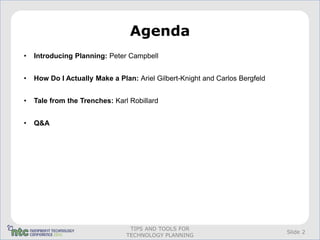
Agenda
•   Introducing Planning: Peter Campbell


•   How Do I Actually Make a Plan: Ariel Gilbert-Knight and Carlos Bergfeld


•   Tale from the Trenches: Karl Robillard


•   Q&A


                                 TIPS AND TOOLS FOR
                                                                              Slide 2
                                TECHNOLOGY PLANNING
Organizational Planning
A Technology Plan has to integrate with and support broader organizational
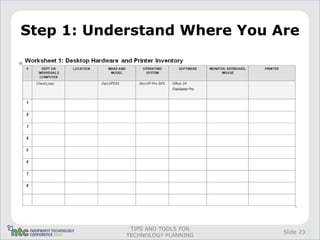
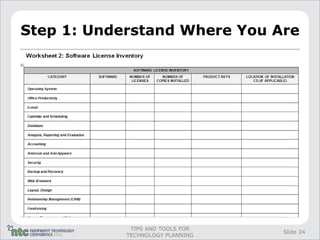
planning


A unified strategic plan ties together the
     •    Strategic plan,
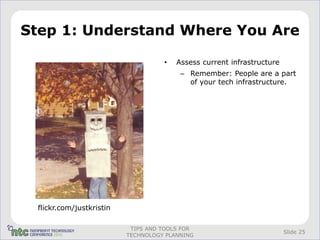
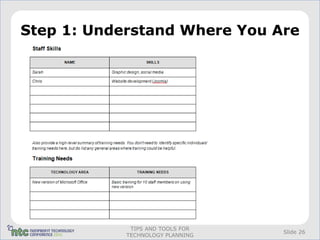
     •    Business plans, and
     •    Budget


                              TIPS AND TOOLS FOR
                                                                        Slide 3
                             TECHNOLOGY PLANNING
Definitions
•   A Strategic Plan describes the key strategies that the organization will
    pursue in order to accomplish the mission. These tie directly to the
    mission statement, goals and values.


•   A Business Plan outlines the steps required to accomplish the strategies.


                               TIPS AND TOOLS FOR
                                                                               Slide 4
                              TECHNOLOGY PLANNING
Planning Frameworks
All Stakeholder Input
     •   Anyone who makes decisions should be at the table and all staff
         perspectives should be considered


Balanced Scorecards
     •    Strategies should tie to key organizational components (Financial,
          Constituent, Internal Process, Employee)


                             TIPS AND TOOLS FOR
                                                                           Slide 5
                            TECHNOLOGY PLANNING
All Stakeholder Perspective
•   If only senior execs participate in planning, key perspectives will be
    missed. Include staff from all levels, board, constituents.


•   Democratizing the planning will infuse mission awareness at all levels of
    organization.


                               TIPS AND TOOLS FOR
                                                                             Slide 6
                              TECHNOLOGY PLANNING
Balanced Scorecards
A balanced scorecard identifies four areas that your strategic plan should
address:
     •    financial,
     •    constituent (or customer),
     •    internal business processes, and
     •    employee learning and growth.


                             TIPS AND TOOLS FOR
                                                                             Slide 7
                            TECHNOLOGY PLANNING
Balanced Scorecard
Constituent strategy:
• starting a newsletter to inform and engage constituents, or

Financial strategy:
• program-related services, such as offering classes to job seekers or
   providing counseling to abuse victims

Internal business process strategy:
• instituting a new purchase order process.

Employee training strategy:
• employee bonuses or internal training.


                             TIPS AND TOOLS FOR
                                                                         Slide 8
                            TECHNOLOGY PLANNING
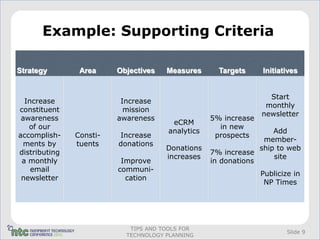
Example: Supporting Criteria

Strategy        Area     Objectives   Measures      Targets     Initiatives


                                                                  Start
  Increase                Increase
                                                                 monthly
constituent                mission
                                                                newsletter
 awareness               awareness                5% increase
                                       eCRM
   of our                                           in new
                                      analytics                    Add
accomplish-    Consti-   Increase                  prospects
                                                                member-
  ments by     tuents    donations
                                      Donations                ship to web
distributing                                      7% increase
                                      increases                    site
 a monthly                Improve                 in donations
    email                communi-
                                                                Publicize in
 newsletter                cation
                                                                 NP Times


                            TIPS AND TOOLS FOR
                                                                        Slide 9
                           TECHNOLOGY PLANNING
Strategic Implementation
•   Technology plans aren’t laundry lists of applications and systems to be installed.

•   A strategic technology plan must be well-informed by business needs and
    developed in light of org-wide goals.


                                   TIPS AND TOOLS FOR
                                                                                     Slide 10
                                  TECHNOLOGY PLANNING
Comprehensive Evaluation
•   SWOT analyses
•   Technical and end-user assessments of options
•   Clear understanding of business needs versus software assumptions
•   Creativity


                                TIPS AND TOOLS FOR
                                                                        Slide 11
                               TECHNOLOGY PLANNING
360°Participation
•   Software evaluations have to be made by both the technologists and the users, and
    those decisions have to be vetted from the top.
•   If the users don’t know what the application will do for them, it’s not worth buying


                                   TIPS AND TOOLS FOR
                                                                                      Slide 12
                                  TECHNOLOGY PLANNING
Technology Planning
•   You can’t budget effectively on a year-to-year basis.
•   Long-term planning allows you to spread out recurring costs and space
    out large projects in ways that even out the expense.
•   Developing a road map for major system upgrades and replacements will
    smooth and foster adoption.
•   Large projects, such as email system upgrades or changing databases,
    can be planned in ways that will ease the pain for everyone involved.


                              TIPS AND TOOLS FOR
                                                                       Slide 13
                             TECHNOLOGY PLANNING
Elements of the Plan
•   Technology plans should have at least three components:
                    Strategy
                    Support
                    Actions


                                TIPS AND TOOLS FOR
                                                              Slide 14
                               TECHNOLOGY PLANNING
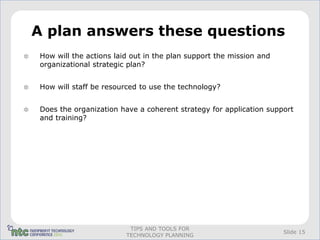
A plan answers these questions
How will the actions laid out in the plan support the mission and
organizational strategic plan?


How will staff be resourced to use the technology?


Does the organization have a coherent strategy for application support
and training?


                         TIPS AND TOOLS FOR
                                                                    Slide 15
                        TECHNOLOGY PLANNING
Conclusion
Good planning requires that you understand who you are, what technology
must do well for you, and where you can get away with it by doing things
more creatively, or, perhaps, not quite as elegantly as a for-profit
organization might.


                            TIPS AND TOOLS FOR
                                                                     Slide 16
                           TECHNOLOGY PLANNING
Resources
• Peter Campbell
• psc@techcafeteria.com
• http://techcafeteria.com


                       TIPS AND TOOLS FOR
                                            Slide 17
                      TECHNOLOGY PLANNING
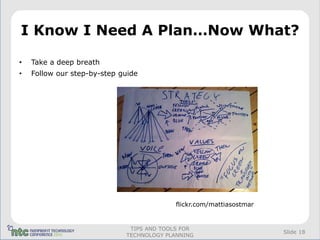
I Know I Need A Plan…Now What?

•   Take a deep breath
•   Follow our step-by-step guide


                                           flickr.com/mattiasostmar


                              TIPS AND TOOLS FOR
                                                                      Slide 18
                             TECHNOLOGY PLANNING
Mission, Mission, Mission

•   Before you get started, review your organization’s mission statement and
    strategic plan


•   Remember, technology is not a goal in and of itself - Technology is
    important because of what it allows people to do


•   See NTEN’s “Forget the Tech, Let’s Talk Mission” for an introduction to
    mission-driven technology planning (bit.ly/mission-driven)


                               TIPS AND TOOLS FOR
                                                                              Slide 19
                              TECHNOLOGY PLANNING
Creating Your Tech Strategy

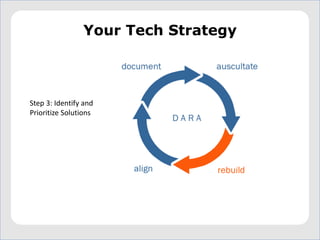
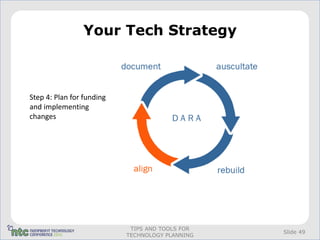
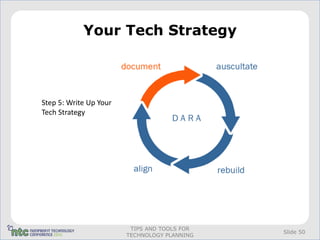
•   Step 1: Understand where you are.
•   Step 2: Understand where you want to be.
•   Step 3: Identify and prioritize technology solutions.
•   Step 4: Lay out a plan for funding and implementing technology changes.
•   Step 5: Write up your technology strategy.


                                TIPS AND TOOLS FOR
                                                                       Slide 20
                               TECHNOLOGY PLANNING
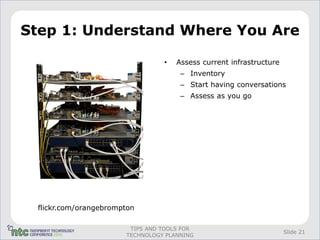
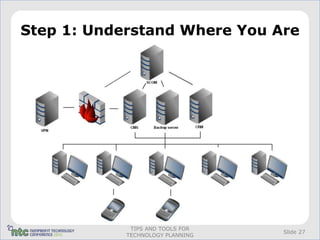
Step 1: Understand Where You Are

                                 •   Assess current infrastructure
                                      – Inventory
                                      – Start having conversations
                                      – Assess as you go


 flickr.com/orangebrompton

                        TIPS AND TOOLS FOR
                                                                     Slide 21
                       TECHNOLOGY PLANNING
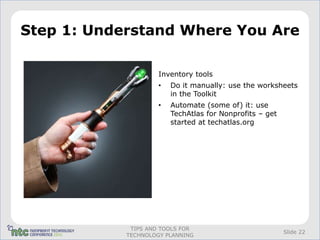
Step 1: Understand Where You Are

                     Inventory tools
                     •   Do it manually: use the worksheets
                         in the Toolkit
                     •   Automate (some of) it: use
                         TechAtlas for Nonprofits – get
                         started at techatlas.org


             TIPS AND TOOLS FOR
                                                          Slide 22
            TECHNOLOGY PLANNING
Step 1: Understand Where You Are


             TIPS AND TOOLS FOR
                                  Slide 23
            TECHNOLOGY PLANNING
Step 1: Understand Where You Are


             TIPS AND TOOLS FOR
                                  Slide 24
            TECHNOLOGY PLANNING
Step 1: Understand Where You Are

                                    •   Assess current infrastructure
                                         – Remember: People are a part
                                           of your tech infrastructure.


 flickr.com/justkristin

                           TIPS AND TOOLS FOR
                                                                        Slide 25
                          TECHNOLOGY PLANNING
Step 1: Understand Where You Are


             TIPS AND TOOLS FOR
                                  Slide 26
            TECHNOLOGY PLANNING
Step 1: Understand Where You Are


             TIPS AND TOOLS FOR
                                  Slide 27
            TECHNOLOGY PLANNING
Step 1: Understand Where You Are


             TIPS AND TOOLS FOR
                                  Slide 28
            TECHNOLOGY PLANNING
Step 1: Understand Where You Are

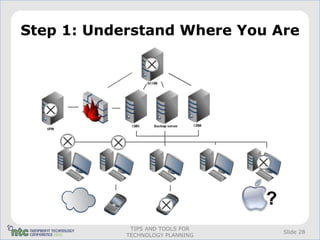
•   Don’t panic (yet)


                          flickr.com/lentaslagrimasnegras


                         TIPS AND TOOLS FOR
                                                            Slide 29
                        TECHNOLOGY PLANNING
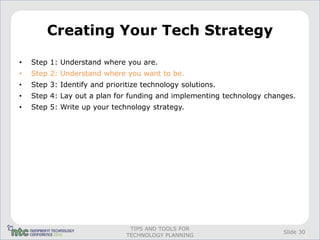
Creating Your Tech Strategy

•   Step 1: Understand where you are.
•   Step 2: Understand where you want to be.
•   Step 3: Identify and prioritize technology solutions.
•   Step 4: Lay out a plan for funding and implementing technology changes.
•   Step 5: Write up your technology strategy.


                                TIPS AND TOOLS FOR
                                                                       Slide 30
                               TECHNOLOGY PLANNING
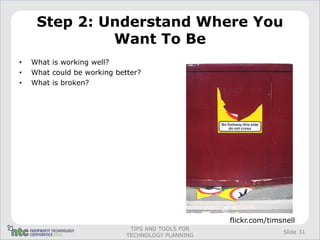
Step 2: Understand Where You
              Want To Be
•   What is working well?
•   What could be working better?
•   What is broken?


                                                   flickr.com/timsnell
                              TIPS AND TOOLS FOR
                                                                  Slide 31
                             TECHNOLOGY PLANNING
Step 2: Understand Where You
              Want To Be
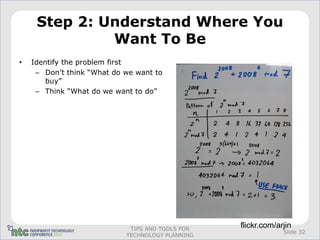
•   Identify the problem first
     – Don’t think “What do we want to
        buy”
     – Think “What do we want to do”


                             TIPS AND TOOLS FOR
                                                  flickr.com/arjin
                                                               Slide 32
                            TECHNOLOGY PLANNING
Step 2: Understand Where You
            Want to Be
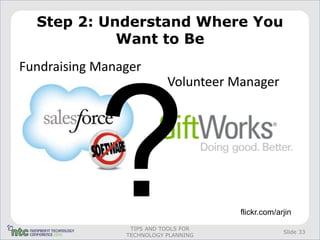
Fundraising Manager
                           Volunteer Manager


                                      flickr.com/arjin
                 TIPS AND TOOLS FOR
                                                   Slide 33
                TECHNOLOGY PLANNING
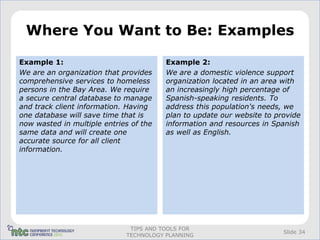
Where You Want to Be: Examples

Example 1:                              Example 2:
We are an organization that provides    We are a domestic violence support
comprehensive services to homeless      organization located in an area with
persons in the Bay Area. We require     an increasingly high percentage of
a secure central database to manage     Spanish-speaking residents. To
and track client information. Having    address this population's needs, we
one database will save time that is     plan to update our website to provide
now wasted in multiple entries of the   information and resources in Spanish
same data and will create one           as well as English.
accurate source for all client
information.


                              TIPS AND TOOLS FOR
                                                                        Slide 34
                             TECHNOLOGY PLANNING
Now It’s Your Turn…

Exercise:
• Write down a few technology goals
   for your organization
• Evaluate each one:
     – Can you clearly articulate the
        benefits the technology will
        provide?
     – Would implementing this
        technology help your organization
        better meet its mission? How so?
• Try to rewrite the goal so that it: is
   not focused on a particular
   technology, but is instead focused on
   what the technology will allow you to
   do (and why what it allows you to do            flickr.com/photosteve101
   is important for your organization)


                              TIPS AND TOOLS FOR
                                                                       Slide 35
                             TECHNOLOGY PLANNING
Creating Your Tech Strategy

•   Step   1:   Understand where you are.
•   Step   2:   Understand where you want to be.
•   Step   3:   Identify and prioritize technology solutions.
•   Step   4:   Lay out a plan for funding and implementing technology changes.
•   Step   5:   Write up your technology strategy.


                                  TIPS AND TOOLS FOR
                                                                           Slide 36
                                 TECHNOLOGY PLANNING
Step 3: Identify and Prioritize
         Technology Solutions
This is where you start talking about specific technologies
• How secure is your technology set-up? Are there any gaps that should be
   addressed?
• Are there better data storage and collaboration solutions available?
• Will upgrading to more recent hardware or software help?
• Is there a tool out there that will fill in a gap in your toolset?
• Would it help if your staff were trained (or retrained) in how to use your
   technology?


                              TIPS AND TOOLS FOR
                                                                        Slide 37
                             TECHNOLOGY PLANNING
Creating Your Tech Strategy

•   Step   1:   Understand where you are.
•   Step   2:   Understand where you want to be.
•   Step   3:   Identify and prioritize technology solutions.
•   Step   4:   Lay out a plan for funding and implementing technology changes.
•   Step   5:   Write up your technology strategy.


                                  TIPS AND TOOLS FOR
                                                                           Slide 38
                                 TECHNOLOGY PLANNING
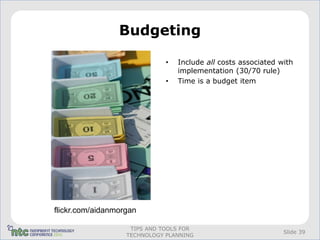
Budgeting

                              •   Include all costs associated with
                                  implementation (30/70 rule)
                              •   Time is a budget item


flickr.com/aidanmorgan

                    TIPS AND TOOLS FOR
                                                                Slide 39
                   TECHNOLOGY PLANNING
Budgeting

•   Total Cost of Ownership (TCO)
     – Staff support
     – Vendor fees
     – Staff training
     – Bandwidth costs
     – Hardware costs
     – Infrastructure costs
     – Technology replacement
     – Additional supplies


                                                   flickr.com/eric731


                              TIPS AND TOOLS FOR
                                                                Slide 40
                             TECHNOLOGY PLANNING
The Three P’s of Implementation


                  hased schedule

                  ublicize changes

                  lease, please, please train
                  your staff
 flickr.com/lwr
                        TIPS AND TOOLS FOR
                                                Slide 41
                       TECHNOLOGY PLANNING
More Implementation Tips

•   Know who you need to talk to
•   Designate a point person
•   Break projects into tasks
•   Assign responsibilities
•   Establish a timeline
•   Evaluate your success


                             TIPS AND TOOLS FOR
                                                  Slide 42
                            TECHNOLOGY PLANNING
Creating Your Tech Strategy

•   Step   1:   Understand where you are.
•   Step   2:   Understand where you want to be.
•   Step   3:   Identify and prioritize technology solutions.
•   Step   4:   Lay out a plan for funding and implementing technology changes.
•   Step   5:   Write your technology strategy.


                                  TIPS AND TOOLS FOR
                                                                           Slide 43
                                 TECHNOLOGY PLANNING
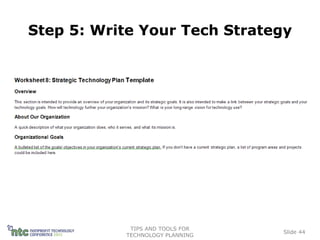
Step 5: Write Your Tech Strategy


            TIPS AND TOOLS FOR
                                 Slide 44
           TECHNOLOGY PLANNING
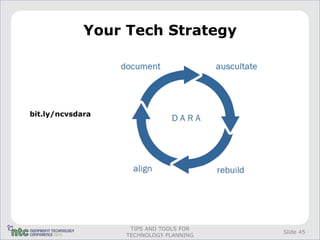
Your Tech Strategy


bit.ly/ncvsdara


                   TIPS AND TOOLS FOR
                                        Slide 45
                  TECHNOLOGY PLANNING
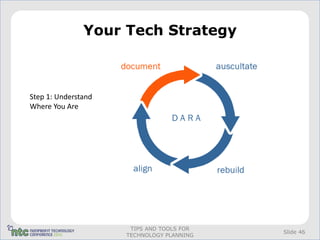
Your Tech Strategy


Step 1: Understand
Where You Are


                      TIPS AND TOOLS FOR
                                           Slide 46
                     TECHNOLOGY PLANNING
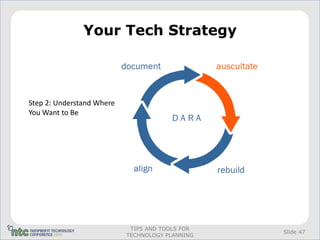
Your Tech Strategy


Step 2: Understand Where
You Want to Be


                            TIPS AND TOOLS FOR
                                                 Slide 47
                           TECHNOLOGY PLANNING
Your Tech Strategy


Step 3: Identify and
Prioritize Solutions
Your Tech Strategy


Step 4: Plan for funding
and implementing
changes


                            TIPS AND TOOLS FOR
                                                 Slide 49
                           TECHNOLOGY PLANNING
Your Tech Strategy


Step 5: Write Up Your
Tech Strategy


                         TIPS AND TOOLS FOR
                                              Slide 50
                        TECHNOLOGY PLANNING
Acknowledgments

Ariel and Carlos would like to thank
• The Blue Shield of California Foundation for their generous grant support
    for developing these materials
• Elliot Harmon, Tierney Smith, and Jane Zhang for their content
    contributions


                              TIPS AND TOOLS FOR
                                                                        Slide 51
                             TECHNOLOGY PLANNING
Contact Us

Ariel: agknight@techsoupglobal.org
Carlos: cbergfeld@techsoupglobal.org


                             TIPS AND TOOLS FOR
                                                  Slide 52
                            TECHNOLOGY PLANNING
Tale from the Trenches

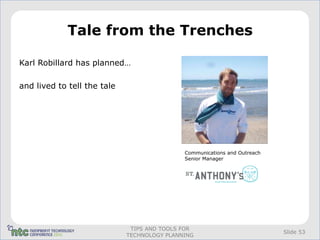
Karl Robillard has planned…

and lived to tell the tale


                                             Communications and Outreach
                                             Senior Manager


                              TIPS AND TOOLS FOR
                                                                           Slide 53
                             TECHNOLOGY PLANNING
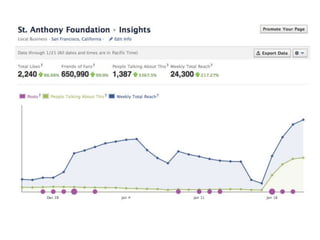
The Story of St. Anthony’s


         TIPS AND TOOLS FOR
                              Slide 54
        TECHNOLOGY PLANNING
A Direct Appeal


    TIPS AND TOOLS FOR
                         Slide 55
   TECHNOLOGY PLANNING
Tale from the Trenches


       TIPS AND TOOLS FOR
                            Slide 56
      TECHNOLOGY PLANNING
Creating Your Tech Strategy

•   Step 1: Understand where you are.
•   Step 2: Understand where you want to be.
•   Step 3: Identify and prioritize technology solutions.
•   Step 4: Lay out a plan for funding and implementing technology changes.
•   Step 5: Write up your technology strategy.


                                TIPS AND TOOLS FOR
                                                                       Slide 57
                               TECHNOLOGY PLANNING
The Technology Plan Trifecta

1) Mission

2) Values

3) Goals


             …then what?

                TIPS AND TOOLS FOR
                                     Slide 58
               TECHNOLOGY PLANNING
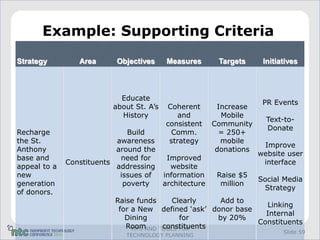
Example: Supporting Criteria
Strategy         Area      Objectives      Measures       Targets      Initiatives


                            Educate
                                                                       PR Events
                          about St. A’s   Coherent        Increase
                            History           and          Mobile
                                                                        Text-to-
                                          consistent     Community
                                                                        Donate
Recharge                      Build        Comm.           = 250+
the St.                    awareness       strategy        mobile
                                                                       Improve
Anthony                    around the                     donations
                                                                      website user
base and                    need for       Improved
              Constituents                                             interface
appeal to a                addressing       website
new                         issues of     information     Raise $5
                                                                      Social Media
generation                   poverty      architecture     million
                                                                       Strategy
of donors.
                          Raise funds    Clearly     Add to
                                                                Linking
                           for a New defined ‘ask’ donor base
                                                                Internal
                             Dining        for      by 20%
                                                              Constituents
                             RoomAND TOOLS FOR
                               TIPS   constituents
                                                                             Slide 59
                             TECHNOLOGY PLANNING
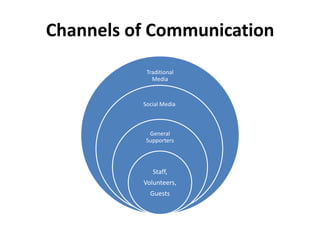
Channels of Communication
           Traditional
             Media


          Social Media


            General
           Supporters


             Staff,
          Volunteers,
            Guests
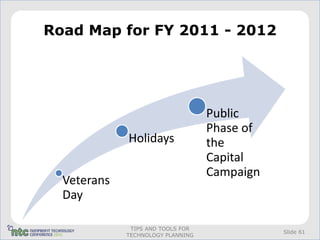
Road Map for FY 2011 - 2012


                                   Public
                                   Phase of
             Holidays              the
                                   Capital
                                   Campaign
  Veterans
  Day

              TIPS AND TOOLS FOR
                                              Slide 61
             TECHNOLOGY PLANNING
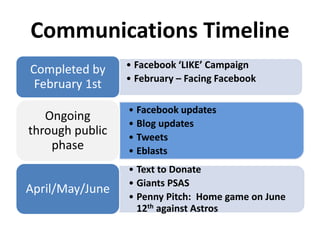
Communications Timeline
Completed by     • Facebook ‘LIKE’ Campaign
                 • February – Facing Facebook
 February 1st
                 • Facebook updates
   Ongoing
                 • Blog updates
through public   • Tweets
    phase        • Eblasts
                 • Text to Donate
                 • Giants PSAS
April/May/June
                 • Penny Pitch: Home game on June
                   12th against Astros
Duck and Cover

1. BUY-IN

2. Facing Facebook

3. Technical obstacles (seen and unforseen)

4. Tales from the city


                          TIPS AND TOOLS FOR
                                               Slide 64
                         TECHNOLOGY PLANNING
Questions


 TIPS AND TOOLS FOR
                      Slide 65
TECHNOLOGY PLANNING
Evaluate This Session!
Each entry is a chance to win an NTEN engraved iPad!

                        INSERT
                       QR CODE
                         HERE


          or Online at www.nten.org/ntc/eval

Tips and Tools for Technology Planning

  • 1.
    Tips and Toolsfor Technology Planning #12ntcttpl Peter Campbell Ariel Gilbert-Knight Carlos Bergfeld Karl Robillard
  • 2.
    Evaluate This Session! Eachentry is a chance to win an NTEN engraved iPad! INSERT QR CODE HERE or Online at www.nten.org/ntc/eval
  • 3.
    Agenda • Introducing Planning: Peter Campbell • How Do I Actually Make a Plan: Ariel Gilbert-Knight and Carlos Bergfeld • Tale from the Trenches: Karl Robillard • Q&A TIPS AND TOOLS FOR Slide 2 TECHNOLOGY PLANNING
  • 4.
    Organizational Planning A TechnologyPlan has to integrate with and support broader organizational planning A unified strategic plan ties together the • Strategic plan, • Business plans, and • Budget TIPS AND TOOLS FOR Slide 3 TECHNOLOGY PLANNING
  • 5.
    Definitions • A Strategic Plan describes the key strategies that the organization will pursue in order to accomplish the mission. These tie directly to the mission statement, goals and values. • A Business Plan outlines the steps required to accomplish the strategies. TIPS AND TOOLS FOR Slide 4 TECHNOLOGY PLANNING
  • 6.
    Planning Frameworks All StakeholderInput • Anyone who makes decisions should be at the table and all staff perspectives should be considered Balanced Scorecards • Strategies should tie to key organizational components (Financial, Constituent, Internal Process, Employee) TIPS AND TOOLS FOR Slide 5 TECHNOLOGY PLANNING
  • 7.
    All Stakeholder Perspective • If only senior execs participate in planning, key perspectives will be missed. Include staff from all levels, board, constituents. • Democratizing the planning will infuse mission awareness at all levels of organization. TIPS AND TOOLS FOR Slide 6 TECHNOLOGY PLANNING
  • 8.
    Balanced Scorecards A balancedscorecard identifies four areas that your strategic plan should address: • financial, • constituent (or customer), • internal business processes, and • employee learning and growth. TIPS AND TOOLS FOR Slide 7 TECHNOLOGY PLANNING
  • 9.
    Balanced Scorecard Constituent strategy: •starting a newsletter to inform and engage constituents, or Financial strategy: • program-related services, such as offering classes to job seekers or providing counseling to abuse victims Internal business process strategy: • instituting a new purchase order process. Employee training strategy: • employee bonuses or internal training. TIPS AND TOOLS FOR Slide 8 TECHNOLOGY PLANNING
  • 10.
    Example: Supporting Criteria Strategy Area Objectives Measures Targets Initiatives Start Increase Increase monthly constituent mission newsletter awareness awareness 5% increase eCRM of our in new analytics Add accomplish- Consti- Increase prospects member- ments by tuents donations Donations ship to web distributing 7% increase increases site a monthly Improve in donations email communi- Publicize in newsletter cation NP Times TIPS AND TOOLS FOR Slide 9 TECHNOLOGY PLANNING
  • 11.
    Strategic Implementation • Technology plans aren’t laundry lists of applications and systems to be installed. • A strategic technology plan must be well-informed by business needs and developed in light of org-wide goals. TIPS AND TOOLS FOR Slide 10 TECHNOLOGY PLANNING
  • 12.
    Comprehensive Evaluation • SWOT analyses • Technical and end-user assessments of options • Clear understanding of business needs versus software assumptions • Creativity TIPS AND TOOLS FOR Slide 11 TECHNOLOGY PLANNING
  • 13.
    360°Participation • Software evaluations have to be made by both the technologists and the users, and those decisions have to be vetted from the top. • If the users don’t know what the application will do for them, it’s not worth buying TIPS AND TOOLS FOR Slide 12 TECHNOLOGY PLANNING
  • 14.
    Technology Planning • You can’t budget effectively on a year-to-year basis. • Long-term planning allows you to spread out recurring costs and space out large projects in ways that even out the expense. • Developing a road map for major system upgrades and replacements will smooth and foster adoption. • Large projects, such as email system upgrades or changing databases, can be planned in ways that will ease the pain for everyone involved. TIPS AND TOOLS FOR Slide 13 TECHNOLOGY PLANNING
  • 15.
    Elements of thePlan • Technology plans should have at least three components: Strategy Support Actions TIPS AND TOOLS FOR Slide 14 TECHNOLOGY PLANNING
  • 16.
    A plan answersthese questions How will the actions laid out in the plan support the mission and organizational strategic plan? How will staff be resourced to use the technology? Does the organization have a coherent strategy for application support and training? TIPS AND TOOLS FOR Slide 15 TECHNOLOGY PLANNING
  • 17.
    Conclusion Good planning requiresthat you understand who you are, what technology must do well for you, and where you can get away with it by doing things more creatively, or, perhaps, not quite as elegantly as a for-profit organization might. TIPS AND TOOLS FOR Slide 16 TECHNOLOGY PLANNING
  • 18.
    Resources • Peter Campbell •psc@techcafeteria.com • http://techcafeteria.com TIPS AND TOOLS FOR Slide 17 TECHNOLOGY PLANNING
  • 19.
    I Know INeed A Plan…Now What? • Take a deep breath • Follow our step-by-step guide flickr.com/mattiasostmar TIPS AND TOOLS FOR Slide 18 TECHNOLOGY PLANNING
  • 20.
    Mission, Mission, Mission • Before you get started, review your organization’s mission statement and strategic plan • Remember, technology is not a goal in and of itself - Technology is important because of what it allows people to do • See NTEN’s “Forget the Tech, Let’s Talk Mission” for an introduction to mission-driven technology planning (bit.ly/mission-driven) TIPS AND TOOLS FOR Slide 19 TECHNOLOGY PLANNING
  • 21.
    Creating Your TechStrategy • Step 1: Understand where you are. • Step 2: Understand where you want to be. • Step 3: Identify and prioritize technology solutions. • Step 4: Lay out a plan for funding and implementing technology changes. • Step 5: Write up your technology strategy. TIPS AND TOOLS FOR Slide 20 TECHNOLOGY PLANNING
  • 22.
    Step 1: UnderstandWhere You Are • Assess current infrastructure – Inventory – Start having conversations – Assess as you go flickr.com/orangebrompton TIPS AND TOOLS FOR Slide 21 TECHNOLOGY PLANNING
  • 23.
    Step 1: UnderstandWhere You Are Inventory tools • Do it manually: use the worksheets in the Toolkit • Automate (some of) it: use TechAtlas for Nonprofits – get started at techatlas.org TIPS AND TOOLS FOR Slide 22 TECHNOLOGY PLANNING
  • 24.
    Step 1: UnderstandWhere You Are TIPS AND TOOLS FOR Slide 23 TECHNOLOGY PLANNING
  • 25.
    Step 1: UnderstandWhere You Are TIPS AND TOOLS FOR Slide 24 TECHNOLOGY PLANNING
  • 26.
    Step 1: UnderstandWhere You Are • Assess current infrastructure – Remember: People are a part of your tech infrastructure. flickr.com/justkristin TIPS AND TOOLS FOR Slide 25 TECHNOLOGY PLANNING
  • 27.
    Step 1: UnderstandWhere You Are TIPS AND TOOLS FOR Slide 26 TECHNOLOGY PLANNING
  • 28.
    Step 1: UnderstandWhere You Are TIPS AND TOOLS FOR Slide 27 TECHNOLOGY PLANNING
  • 29.
    Step 1: UnderstandWhere You Are TIPS AND TOOLS FOR Slide 28 TECHNOLOGY PLANNING
  • 30.
    Step 1: UnderstandWhere You Are • Don’t panic (yet) flickr.com/lentaslagrimasnegras TIPS AND TOOLS FOR Slide 29 TECHNOLOGY PLANNING
  • 31.
    Creating Your TechStrategy • Step 1: Understand where you are. • Step 2: Understand where you want to be. • Step 3: Identify and prioritize technology solutions. • Step 4: Lay out a plan for funding and implementing technology changes. • Step 5: Write up your technology strategy. TIPS AND TOOLS FOR Slide 30 TECHNOLOGY PLANNING
  • 32.
    Step 2: UnderstandWhere You Want To Be • What is working well? • What could be working better? • What is broken? flickr.com/timsnell TIPS AND TOOLS FOR Slide 31 TECHNOLOGY PLANNING
  • 33.
    Step 2: UnderstandWhere You Want To Be • Identify the problem first – Don’t think “What do we want to buy” – Think “What do we want to do” TIPS AND TOOLS FOR flickr.com/arjin Slide 32 TECHNOLOGY PLANNING
  • 34.
    Step 2: UnderstandWhere You Want to Be Fundraising Manager Volunteer Manager flickr.com/arjin TIPS AND TOOLS FOR Slide 33 TECHNOLOGY PLANNING
  • 35.
    Where You Wantto Be: Examples Example 1: Example 2: We are an organization that provides We are a domestic violence support comprehensive services to homeless organization located in an area with persons in the Bay Area. We require an increasingly high percentage of a secure central database to manage Spanish-speaking residents. To and track client information. Having address this population's needs, we one database will save time that is plan to update our website to provide now wasted in multiple entries of the information and resources in Spanish same data and will create one as well as English. accurate source for all client information. TIPS AND TOOLS FOR Slide 34 TECHNOLOGY PLANNING
  • 36.
    Now It’s YourTurn… Exercise: • Write down a few technology goals for your organization • Evaluate each one: – Can you clearly articulate the benefits the technology will provide? – Would implementing this technology help your organization better meet its mission? How so? • Try to rewrite the goal so that it: is not focused on a particular technology, but is instead focused on what the technology will allow you to do (and why what it allows you to do flickr.com/photosteve101 is important for your organization) TIPS AND TOOLS FOR Slide 35 TECHNOLOGY PLANNING
  • 37.
    Creating Your TechStrategy • Step 1: Understand where you are. • Step 2: Understand where you want to be. • Step 3: Identify and prioritize technology solutions. • Step 4: Lay out a plan for funding and implementing technology changes. • Step 5: Write up your technology strategy. TIPS AND TOOLS FOR Slide 36 TECHNOLOGY PLANNING
  • 38.
    Step 3: Identifyand Prioritize Technology Solutions This is where you start talking about specific technologies • How secure is your technology set-up? Are there any gaps that should be addressed? • Are there better data storage and collaboration solutions available? • Will upgrading to more recent hardware or software help? • Is there a tool out there that will fill in a gap in your toolset? • Would it help if your staff were trained (or retrained) in how to use your technology? TIPS AND TOOLS FOR Slide 37 TECHNOLOGY PLANNING
  • 39.
    Creating Your TechStrategy • Step 1: Understand where you are. • Step 2: Understand where you want to be. • Step 3: Identify and prioritize technology solutions. • Step 4: Lay out a plan for funding and implementing technology changes. • Step 5: Write up your technology strategy. TIPS AND TOOLS FOR Slide 38 TECHNOLOGY PLANNING
  • 40.
    Budgeting • Include all costs associated with implementation (30/70 rule) • Time is a budget item flickr.com/aidanmorgan TIPS AND TOOLS FOR Slide 39 TECHNOLOGY PLANNING
  • 41.
    Budgeting • Total Cost of Ownership (TCO) – Staff support – Vendor fees – Staff training – Bandwidth costs – Hardware costs – Infrastructure costs – Technology replacement – Additional supplies flickr.com/eric731 TIPS AND TOOLS FOR Slide 40 TECHNOLOGY PLANNING
  • 42.
    The Three P’sof Implementation hased schedule ublicize changes lease, please, please train your staff flickr.com/lwr TIPS AND TOOLS FOR Slide 41 TECHNOLOGY PLANNING
  • 43.
    More Implementation Tips • Know who you need to talk to • Designate a point person • Break projects into tasks • Assign responsibilities • Establish a timeline • Evaluate your success TIPS AND TOOLS FOR Slide 42 TECHNOLOGY PLANNING
  • 44.
    Creating Your TechStrategy • Step 1: Understand where you are. • Step 2: Understand where you want to be. • Step 3: Identify and prioritize technology solutions. • Step 4: Lay out a plan for funding and implementing technology changes. • Step 5: Write your technology strategy. TIPS AND TOOLS FOR Slide 43 TECHNOLOGY PLANNING
  • 45.
    Step 5: WriteYour Tech Strategy TIPS AND TOOLS FOR Slide 44 TECHNOLOGY PLANNING
  • 46.
    Your Tech Strategy bit.ly/ncvsdara TIPS AND TOOLS FOR Slide 45 TECHNOLOGY PLANNING
  • 47.
    Your Tech Strategy Step1: Understand Where You Are TIPS AND TOOLS FOR Slide 46 TECHNOLOGY PLANNING
  • 48.
    Your Tech Strategy Step2: Understand Where You Want to Be TIPS AND TOOLS FOR Slide 47 TECHNOLOGY PLANNING
  • 49.
    Your Tech Strategy Step3: Identify and Prioritize Solutions
  • 50.
    Your Tech Strategy Step4: Plan for funding and implementing changes TIPS AND TOOLS FOR Slide 49 TECHNOLOGY PLANNING
  • 51.
    Your Tech Strategy Step5: Write Up Your Tech Strategy TIPS AND TOOLS FOR Slide 50 TECHNOLOGY PLANNING
  • 52.
    Acknowledgments Ariel and Carloswould like to thank • The Blue Shield of California Foundation for their generous grant support for developing these materials • Elliot Harmon, Tierney Smith, and Jane Zhang for their content contributions TIPS AND TOOLS FOR Slide 51 TECHNOLOGY PLANNING
  • 53.
    Contact Us Ariel: agknight@techsoupglobal.org Carlos:cbergfeld@techsoupglobal.org TIPS AND TOOLS FOR Slide 52 TECHNOLOGY PLANNING
  • 54.
    Tale from theTrenches Karl Robillard has planned… and lived to tell the tale Communications and Outreach Senior Manager TIPS AND TOOLS FOR Slide 53 TECHNOLOGY PLANNING
  • 55.
    The Story ofSt. Anthony’s TIPS AND TOOLS FOR Slide 54 TECHNOLOGY PLANNING
  • 56.
    A Direct Appeal TIPS AND TOOLS FOR Slide 55 TECHNOLOGY PLANNING
  • 57.
    Tale from theTrenches TIPS AND TOOLS FOR Slide 56 TECHNOLOGY PLANNING
  • 58.
    Creating Your TechStrategy • Step 1: Understand where you are. • Step 2: Understand where you want to be. • Step 3: Identify and prioritize technology solutions. • Step 4: Lay out a plan for funding and implementing technology changes. • Step 5: Write up your technology strategy. TIPS AND TOOLS FOR Slide 57 TECHNOLOGY PLANNING
  • 59.
    The Technology PlanTrifecta 1) Mission 2) Values 3) Goals …then what? TIPS AND TOOLS FOR Slide 58 TECHNOLOGY PLANNING
  • 60.
    Example: Supporting Criteria Strategy Area Objectives Measures Targets Initiatives Educate PR Events about St. A’s Coherent Increase History and Mobile Text-to- consistent Community Donate Recharge Build Comm. = 250+ the St. awareness strategy mobile Improve Anthony around the donations website user base and need for Improved Constituents interface appeal to a addressing website new issues of information Raise $5 Social Media generation poverty architecture million Strategy of donors. Raise funds Clearly Add to Linking for a New defined ‘ask’ donor base Internal Dining for by 20% Constituents RoomAND TOOLS FOR TIPS constituents Slide 59 TECHNOLOGY PLANNING
  • 61.
    Channels of Communication Traditional Media Social Media General Supporters Staff, Volunteers, Guests
  • 62.
    Road Map forFY 2011 - 2012 Public Phase of Holidays the Capital Campaign Veterans Day TIPS AND TOOLS FOR Slide 61 TECHNOLOGY PLANNING
  • 63.
    Communications Timeline Completed by • Facebook ‘LIKE’ Campaign • February – Facing Facebook February 1st • Facebook updates Ongoing • Blog updates through public • Tweets phase • Eblasts • Text to Donate • Giants PSAS April/May/June • Penny Pitch: Home game on June 12th against Astros
  • 65.
    Duck and Cover 1.BUY-IN 2. Facing Facebook 3. Technical obstacles (seen and unforseen) 4. Tales from the city TIPS AND TOOLS FOR Slide 64 TECHNOLOGY PLANNING
  • 66.
    Questions TIPS ANDTOOLS FOR Slide 65 TECHNOLOGY PLANNING
  • 67.
    Evaluate This Session! Eachentry is a chance to win an NTEN engraved iPad! INSERT QR CODE HERE or Online at www.nten.org/ntc/eval