2015 Technology Planning
For Startups and Established Small/Mid Sized Business
Linda Kuppersmith, President and Chief Technology Advisor
CMIT Solutions of Stamford
11/14/2016 1
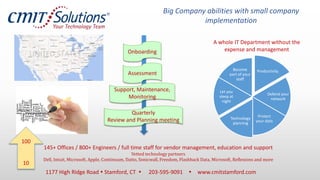
145+ Offices / 800+ Engineers / full time staff for vendor management, education and support
Vetted technology partners
Dell, Intuit, Microsoft, Apple, Continuum, Datto, Sonicwall, Freedom, Flashback Data, Microsoft, Reflexions and more
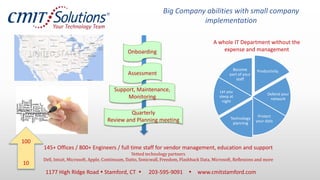
Big Company abilities with small company
implementation
Productivity
Defend your
network
Protect
your data
Technology
planning
Let you
sleep at
night
Become
part of your
staff
A whole IT Department without the
expense and managementOnboarding
Assessment
Support, Maintenance,
Monitoring
Quarterly
Review and Planning meeting
1177 High Ridge Road  Stamford, CT  203-595-9091  www.cmitstamford.com
100
10
1. Getting Ready
1. 2015 Business Goals
2. Create a list of Technology expenses in the last 3 years, 1 at a
minimum.
3. Create a list of your IT Assets
1. Hardware
2. Software
3. Support agreements
4. Services
4. 2015 Business Initiatives / 2015 Business Plan
11/14/2016 3
Deliverables
• Technology Plan
• Projects / Initiatives
• Budget needs
• Updates to your Business Plan
• 2015 Technology Budget
• Operating Expenses
• Capital Expenses - replacements
• Capital Expenses - growth
11/14/2016 4
2. Review Existing Technology
• Replacement
• Repairs
• Upgrades
• Don’t need
11/14/2016 5
3. Functional Needs Analysis
Functional Areas
• Executive
• Products & Services
• Marketing
• Sales
• Operations
• Accounting
• HR
• IT/IS
Technology Components
• Hardware
• Software
• Support Agreements
• Maintenance Agreements
• Internet based services – “the
cloud”
• Backup
• Business Contingency Planning
• Disaster Recovery
• Training
• Assessments
11/14/2016 6
Typical Technology Plan items- Executive
Function
1. Executive - Hardware
1. Desktop/laptop/smart
phone/tablet
2. Printer
3. Scanner
4. Desk phone
5. Headset
6. Home computer
7. Projector
2. Executive – Software
1. Freeware – ie: Adobe reader,
LogMeIn
2. Payware – Office, Quickbooks,
Lastpass, GTM,
3. Support Agreements
3. QuickBooks
4. LOB
5. Firewall
4. Maintenance Agreements
3. Printer
4. IT Provider
5. Internet based services – “the
cloud”
3. Website Hosting (Marketing)
4. Domain Registrar
5. DNS Host
6. Office 365
11/14/2016 7
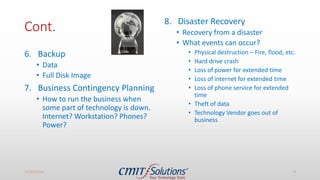
Cont.
6. Backup
• Data
• Full Disk Image
7. Business Contingency Planning
• How to run the business when
some part of technology is down.
Internet? Workstation? Phones?
Power?
8. Disaster Recovery
• Recovery from a disaster
• What events can occur?
• Physical destruction – Fire, flood, etc.
• Hard drive crash
• Loss of power for extended time
• Loss of internet for extended time
• Loss of phone service for extended
time
• Theft of data
• Technology Vendor goes out of
business
11/14/2016 8
Repeat
11/14/2016 9
4. For Each Technology Component Consider
• Operating Costs
• Replacement
• Upgrade
• ROI – Is this technology component providing you more value than it
costs?
• ROT – Return on Time – is this technology component robbing you of
time you should be using to grow your business and service your
clients?
• Management effort – DIY, Outsource or Hire a Pro
11/14/2016 10
5. Needs -> Impact Study
For each Technology Initiatives
(projects) consider
• strategic or tactical
• Infrastructure
• Needs
• Replacement
• Repairs
• Upgrades
• Don’t need
• Technology Training
• Data Management
• Communications
• LOB or Functional area computer
systems
• EMR
• Case Management
• Project costing and management
• ERP
• CRM
• Regulatory requirements
• Total Cost -
11/14/2016 11
6. Group the needs into initiatives
Need
1
Need
2
Need
3
Initiative
11/14/2016 12
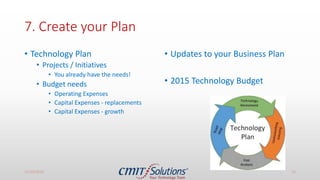
7. Create your Plan
• Technology Plan
• Projects / Initiatives
• You already have the needs!
• Budget needs
• Operating Expenses
• Capital Expenses - replacements
• Capital Expenses - growth
• Updates to your Business Plan
• 2015 Technology Budget
11/14/2016 13
Sample Initiatives
• Backup critical data on Lucy and
Bob’s machines to protect our
assets
• Move to a better email system
to increase productivity
• Purchase new equipment to
replace equipment older than 4
years
• Get a Security Risk Assessment
because we handle credit cards
and/or social security numbers
• Move to the cloud to reduce
expenses and increase
productivity
• Find a order management
system
• Hire a Technology Management
company to increase dollars and
time to our business goals.
11/14/2016 14
Review last
year’s
expenses
Equipment &
Services
Refresh
New IT needs
Growth
Regulation
Security
Disaster
Recovery
Technology Planning
1177 High Ridge Road  Stamford, CT  203-595-9091  www.cmitstamford.com
Summary
1. Get ready
2. Existing technology review
3. Functional Needs Analysis based on your goals
4. Additional Considerations for each tech component
5. Impact Study
6. Group into Initiatives
7. Create your Technology Plan
11/14/2016 16
Offer to attendees today
Start - ups
• 1 hour phone consult – tell me
about your business and I’ll
make some technology
recommendations to get started
on the right foot
Established Businesses
< 5 computers – 1 hour phone
consult
Or
Onsite technology assessment
11/14/2016 17
Give me your card and write “CALL ME” or email
Linda@cmitstamford.com
Bring your coach!
Coaches bring your
clients
145+ Offices / 800+ Engineers / full time staff for vendor management, education and support
Vetted technology partners
Dell, Intuit, Microsoft, Apple, Continuum, Datto, Sonicwall, Freedom, Flashback Data, Microsoft, Reflexions and more
Big Company abilities with small company
implementation
Productivity
Defend your
network
Protect
your data
Technology
planning
Let you
sleep at
night
Become
part of your
staff
A whole IT Department without the
expense and managementOnboarding
Assessment
Support, Maintenance,
Monitoring
Quarterly
Review and Planning meeting
1177 High Ridge Road  Stamford, CT  203-595-9091  www.cmitstamford.com
100
10

2015 Technology Planning

  • 1.
    2015 Technology Planning ForStartups and Established Small/Mid Sized Business Linda Kuppersmith, President and Chief Technology Advisor CMIT Solutions of Stamford 11/14/2016 1
  • 2.
    145+ Offices /800+ Engineers / full time staff for vendor management, education and support Vetted technology partners Dell, Intuit, Microsoft, Apple, Continuum, Datto, Sonicwall, Freedom, Flashback Data, Microsoft, Reflexions and more Big Company abilities with small company implementation Productivity Defend your network Protect your data Technology planning Let you sleep at night Become part of your staff A whole IT Department without the expense and managementOnboarding Assessment Support, Maintenance, Monitoring Quarterly Review and Planning meeting 1177 High Ridge Road  Stamford, CT  203-595-9091  www.cmitstamford.com 100 10
  • 3.
    1. Getting Ready 1.2015 Business Goals 2. Create a list of Technology expenses in the last 3 years, 1 at a minimum. 3. Create a list of your IT Assets 1. Hardware 2. Software 3. Support agreements 4. Services 4. 2015 Business Initiatives / 2015 Business Plan 11/14/2016 3
  • 4.
    Deliverables • Technology Plan •Projects / Initiatives • Budget needs • Updates to your Business Plan • 2015 Technology Budget • Operating Expenses • Capital Expenses - replacements • Capital Expenses - growth 11/14/2016 4
  • 5.
    2. Review ExistingTechnology • Replacement • Repairs • Upgrades • Don’t need 11/14/2016 5
  • 6.
    3. Functional NeedsAnalysis Functional Areas • Executive • Products & Services • Marketing • Sales • Operations • Accounting • HR • IT/IS Technology Components • Hardware • Software • Support Agreements • Maintenance Agreements • Internet based services – “the cloud” • Backup • Business Contingency Planning • Disaster Recovery • Training • Assessments 11/14/2016 6
  • 7.
    Typical Technology Planitems- Executive Function 1. Executive - Hardware 1. Desktop/laptop/smart phone/tablet 2. Printer 3. Scanner 4. Desk phone 5. Headset 6. Home computer 7. Projector 2. Executive – Software 1. Freeware – ie: Adobe reader, LogMeIn 2. Payware – Office, Quickbooks, Lastpass, GTM, 3. Support Agreements 3. QuickBooks 4. LOB 5. Firewall 4. Maintenance Agreements 3. Printer 4. IT Provider 5. Internet based services – “the cloud” 3. Website Hosting (Marketing) 4. Domain Registrar 5. DNS Host 6. Office 365 11/14/2016 7
  • 8.
    Cont. 6. Backup • Data •Full Disk Image 7. Business Contingency Planning • How to run the business when some part of technology is down. Internet? Workstation? Phones? Power? 8. Disaster Recovery • Recovery from a disaster • What events can occur? • Physical destruction – Fire, flood, etc. • Hard drive crash • Loss of power for extended time • Loss of internet for extended time • Loss of phone service for extended time • Theft of data • Technology Vendor goes out of business 11/14/2016 8
  • 9.
  • 10.
    4. For EachTechnology Component Consider • Operating Costs • Replacement • Upgrade • ROI – Is this technology component providing you more value than it costs? • ROT – Return on Time – is this technology component robbing you of time you should be using to grow your business and service your clients? • Management effort – DIY, Outsource or Hire a Pro 11/14/2016 10
  • 11.
    5. Needs ->Impact Study For each Technology Initiatives (projects) consider • strategic or tactical • Infrastructure • Needs • Replacement • Repairs • Upgrades • Don’t need • Technology Training • Data Management • Communications • LOB or Functional area computer systems • EMR • Case Management • Project costing and management • ERP • CRM • Regulatory requirements • Total Cost - 11/14/2016 11
  • 12.
    6. Group theneeds into initiatives Need 1 Need 2 Need 3 Initiative 11/14/2016 12
  • 13.
    7. Create yourPlan • Technology Plan • Projects / Initiatives • You already have the needs! • Budget needs • Operating Expenses • Capital Expenses - replacements • Capital Expenses - growth • Updates to your Business Plan • 2015 Technology Budget 11/14/2016 13
  • 14.
    Sample Initiatives • Backupcritical data on Lucy and Bob’s machines to protect our assets • Move to a better email system to increase productivity • Purchase new equipment to replace equipment older than 4 years • Get a Security Risk Assessment because we handle credit cards and/or social security numbers • Move to the cloud to reduce expenses and increase productivity • Find a order management system • Hire a Technology Management company to increase dollars and time to our business goals. 11/14/2016 14
  • 15.
    Review last year’s expenses Equipment & Services Refresh NewIT needs Growth Regulation Security Disaster Recovery Technology Planning 1177 High Ridge Road  Stamford, CT  203-595-9091  www.cmitstamford.com
  • 16.
    Summary 1. Get ready 2.Existing technology review 3. Functional Needs Analysis based on your goals 4. Additional Considerations for each tech component 5. Impact Study 6. Group into Initiatives 7. Create your Technology Plan 11/14/2016 16
  • 17.
    Offer to attendeestoday Start - ups • 1 hour phone consult – tell me about your business and I’ll make some technology recommendations to get started on the right foot Established Businesses < 5 computers – 1 hour phone consult Or Onsite technology assessment 11/14/2016 17 Give me your card and write “CALL ME” or email Linda@cmitstamford.com Bring your coach! Coaches bring your clients
  • 18.
    145+ Offices /800+ Engineers / full time staff for vendor management, education and support Vetted technology partners Dell, Intuit, Microsoft, Apple, Continuum, Datto, Sonicwall, Freedom, Flashback Data, Microsoft, Reflexions and more Big Company abilities with small company implementation Productivity Defend your network Protect your data Technology planning Let you sleep at night Become part of your staff A whole IT Department without the expense and managementOnboarding Assessment Support, Maintenance, Monitoring Quarterly Review and Planning meeting 1177 High Ridge Road  Stamford, CT  203-595-9091  www.cmitstamford.com 100 10