MOBILE Learning?
Flip me!
Using technology to improve independent learning
Thumb war
• In three stages...
WTF?
• Connected people
• Connected learning
• TOTALLY personalised learning
What is flipped learning?
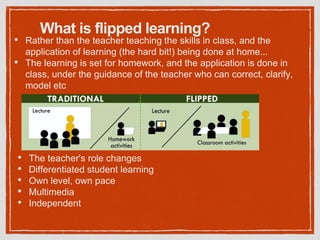
• Rather than the teacher teaching the skills in class, and the
application of learning (the hard bit!) being done at home...
• The learning is set for homework, and the application is done in
class, under the guidance of the teacher who can correct, clarify,
model etc
• The teacher's role changes
• Differentiated student learning
• Own level, own pace
• Multimedia
• Independent
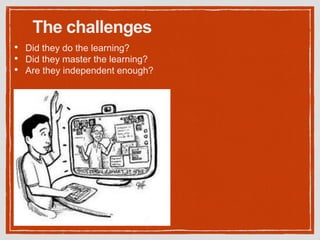
The challenges
• Did they do the learning?
• Did they master the learning?
• Are they independent enough?
Why is mobile learning the answer?
• Accessibility
• Used to learning things this way
• Motivation
• Extends the classroom
• Varies the educational diet
• Clear impact on student organisation
• Moves students from passive to active, collaborative learners
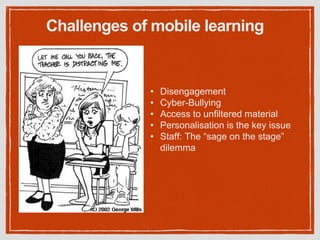
Challenges of mobile learning
• Disengagement
• Cyber-Bullying
• Access to unfiltered material
• Personalisation is the key issue
• Staff: The “sage on the stage”
dilemma
students writing notes
• Evernote
• GoogleDocs
• GoogleSlides
• Exactly the same tools as for AFL
• Multimedia, organisable, taggable,
collaborative, accessible anywhere
The best tools I've found for...
Evernote
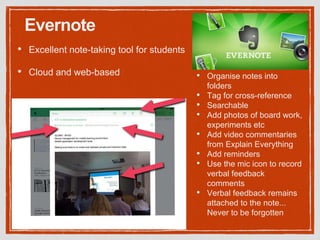
• Excellent note-taking tool for students
• Cloud and web-based • Organise notes into
folders
• Tag for cross-reference
• Searchable
• Add photos of board work,
experiments etc
• Add video commentaries
from Explain Everything
• Add reminders
• Use the mic icon to record
verbal feedback
comments
• Verbal feedback remains
attached to the note...
Never to be forgotten
Google Docs
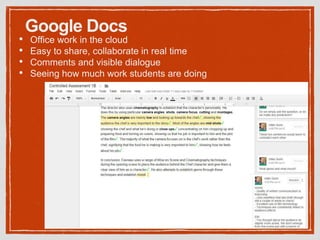
• Office work in the cloud
• Easy to share, collaborate in real time
• Comments and visible dialogue
• Seeing how much work students are doing
assessment for learning
• Evernote
• GoogleDocs
• Socrative
The best tools I've found for...
Socrative
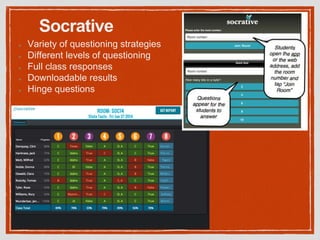
Variety of questioning strategies
Different levels of questioning
Full class responses
Downloadable results
Hinge questions
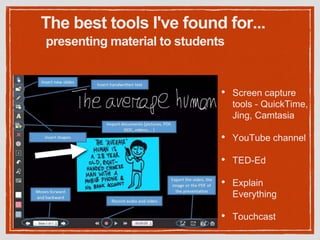
presenting material to students
• Screen capture
tools - QuickTime,
Jing, Camtasia
• YouTube channel
• TED-Ed
• Explain
Everything
• Touchcast
The best tools I've found for...
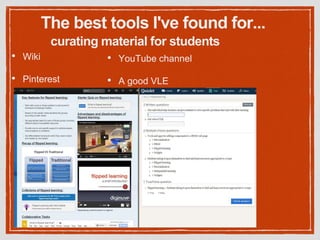
curating material for students
• Wiki
• Pinterest
The best tools I've found for...
• YouTube channel
• A good VLE
The best tools I've found for...
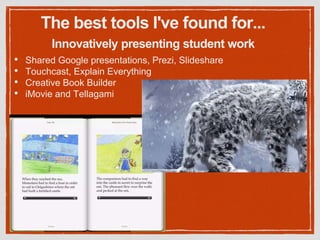
• Shared Google presentations, Prezi, Slideshare
• Touchcast, Explain Everything
• Creative Book Builder
• iMovie and Tellagami
Innovatively presenting student work
Key issues
• Less independent students need far more support
• Can't assume all students have access to Internet at home
• How much time do you really get to spend with the more able?
• Being comfortable with students learning at their own pace
• The pressure of time and targets
Most importantly
If you're going to do this, be
VERY reflective about whether it
is improving the knowledge,
resilience and skills of your
students
Mobile Technology + AFL
=
Flipped Learning Amaze-balls!

Flippin gthe classroom using mobile technology - #PedagooLondon2015 presentation

  • 1.
    MOBILE Learning? Flip me! Usingtechnology to improve independent learning
  • 2.
    Thumb war • Inthree stages... WTF? • Connected people • Connected learning • TOTALLY personalised learning
  • 3.
    What is flippedlearning? • Rather than the teacher teaching the skills in class, and the application of learning (the hard bit!) being done at home... • The learning is set for homework, and the application is done in class, under the guidance of the teacher who can correct, clarify, model etc • The teacher's role changes • Differentiated student learning • Own level, own pace • Multimedia • Independent
  • 4.
    The challenges • Didthey do the learning? • Did they master the learning? • Are they independent enough?
  • 5.
    Why is mobilelearning the answer? • Accessibility • Used to learning things this way • Motivation • Extends the classroom • Varies the educational diet • Clear impact on student organisation • Moves students from passive to active, collaborative learners
  • 6.
    Challenges of mobilelearning • Disengagement • Cyber-Bullying • Access to unfiltered material • Personalisation is the key issue • Staff: The “sage on the stage” dilemma
  • 7.
    students writing notes •Evernote • GoogleDocs • GoogleSlides • Exactly the same tools as for AFL • Multimedia, organisable, taggable, collaborative, accessible anywhere The best tools I've found for...
  • 8.
    Evernote • Excellent note-takingtool for students • Cloud and web-based • Organise notes into folders • Tag for cross-reference • Searchable • Add photos of board work, experiments etc • Add video commentaries from Explain Everything • Add reminders • Use the mic icon to record verbal feedback comments • Verbal feedback remains attached to the note... Never to be forgotten
  • 9.
    Google Docs • Officework in the cloud • Easy to share, collaborate in real time • Comments and visible dialogue • Seeing how much work students are doing
  • 10.
    assessment for learning •Evernote • GoogleDocs • Socrative The best tools I've found for...
  • 11.
    Socrative Variety of questioningstrategies Different levels of questioning Full class responses Downloadable results Hinge questions
  • 12.
    presenting material tostudents • Screen capture tools - QuickTime, Jing, Camtasia • YouTube channel • TED-Ed • Explain Everything • Touchcast The best tools I've found for...
  • 13.
    curating material forstudents • Wiki • Pinterest The best tools I've found for... • YouTube channel • A good VLE
  • 14.
    The best toolsI've found for... • Shared Google presentations, Prezi, Slideshare • Touchcast, Explain Everything • Creative Book Builder • iMovie and Tellagami Innovatively presenting student work
  • 15.
    Key issues • Lessindependent students need far more support • Can't assume all students have access to Internet at home • How much time do you really get to spend with the more able? • Being comfortable with students learning at their own pace • The pressure of time and targets
  • 16.
    Most importantly If you'regoing to do this, be VERY reflective about whether it is improving the knowledge, resilience and skills of your students
  • 17.
    Mobile Technology +AFL = Flipped Learning Amaze-balls!