Practical Strategies for Developing
Engaging Technology-enhanced Learning
Resources
Presented by Christina Del Medico & Helen Zimmerman
1
Agenda
• Introductions
• A framework for categorising learning
resources
• How students learn
• Strategies and ideas for improving
engagement using technologies
• Brief description of each strategy
• Links to affordable options
• Demonstration/Interaction
• Q&A
Introductions
Please introduce yourself by letting us know:
• Name
• Where are you from
• What you would like to get out of the
session
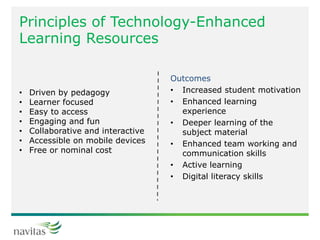
Principles of Technology-Enhanced
Learning Resources
Outcomes
• Increased student motivation
• Enhanced learning
experience
• Deeper learning of the
subject material
• Enhanced team working and
communication skills
• Active learning
• Digital literacy skills
• Driven by pedagogy
• Learner focused
• Easy to access
• Engaging and fun
• Collaborative and interactive
• Accessible on mobile devices
• Free or nominal cost
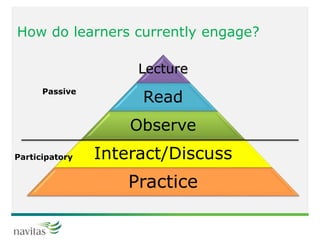
How do learners currently engage?
Lecture
Read
Observe
Interact/Discuss
Practice
Passive
Participatory
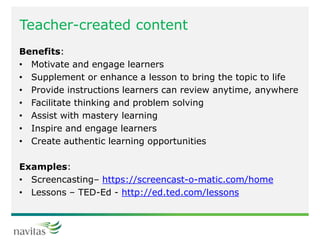
Teacher-created content
Benefits:
• Motivate and engage learners
• Supplement or enhance a lesson to bring the topic to life
• Provide instructions learners can review anytime, anywhere
• Facilitate thinking and problem solving
• Assist with mastery learning
• Inspire and engage learners
• Create authentic learning opportunities
Examples:
• Screencasting– https://screencast-o-matic.com/home
• Lessons – TED-Ed - http://ed.ted.com/lessons
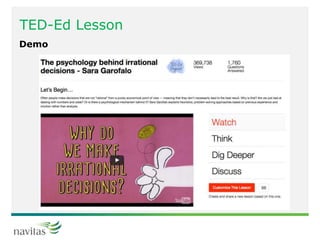
TED-Ed Lesson
Demo
Summary
Top uses for videos
• Recording lectures
• Desktop recordings
• Developing instructional videos
• Interviews
• Engaging learners
• Case studies/simulations/role plays
• Presentation skills and performance
• Learner-generated
• Creating lessons
Interactive content
Benefits:
• Accelerated development
• Cognitive improvement
• Sense of self-worth/self-improvement
• Educational standards changing
• Fun and informal
Examples:
• Brainstorming - https://answergarden.ch/
• Quizzes – Socrative - http://www.socrative.com/
Answer Garden
Demo
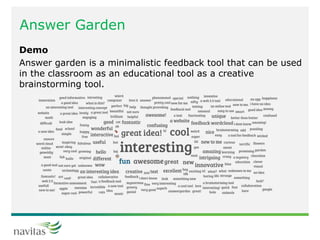
Answer garden is a minimalistic feedback tool that can be used
in the classroom as an educational tool as a creative
brainstorming tool.
Socrative
Demo
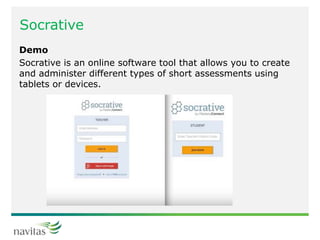
Socrative is an online software tool that allows you to create
and administer different types of short assessments using
tablets or devices.
Assessment Resources
Benefits:
• Personalised learning
• Expanded learning opportunities
• High engagement learning
• Competency-based learning
• Assessment for learning
• Quality learning products
Examples:
• Blogs– edublogs - http://edublogs.org/
• E-Portfolios - https://www.google.com/sites/
• Video instructions and feedback - https://www.screencast.com/
• Video interviews
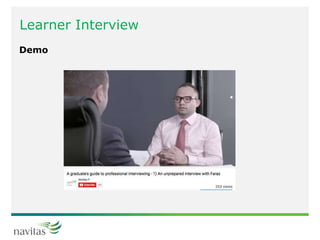
Learner Interview
Demo
Learner created resources
Benefits:
• Helps learners understand concepts
• Learner remain engaged
• Opportunities for learners to explore ideas and knowledge,
collaborate, solve problems and develop knowledge and skills
“You can teach a student a lesson for a day; but if you can teach him
to learn by creating curiosity, he will continue the learning process as
long as he lives.” (Bedford, n.d.)
Examples
• Flipgrid - http://flipgrid.com/info/
• Glossary - https://docs.moodle.org/23/en/Glossary_module
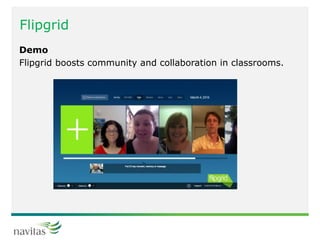
Flipgrid
Demo
Flipgrid boosts community and collaboration in classrooms.
Learner collaboration
Benefits:
• Social and active learning
• Learners develop teamwork and communication skills
• Learners assimilate multiple views to deepen knowledge
and promote critical thinking
• Learners develop independent learning strategies
• Learners can structure out-of-class learning
Examples:
Group work activities
Google apps https://apps.google.com/
Office 365 apps - https://portal.office.com/Home
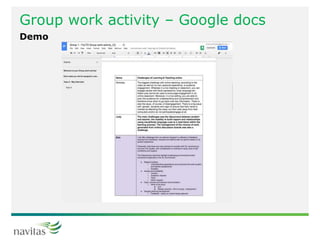
Group work activity – Google docs
Demo
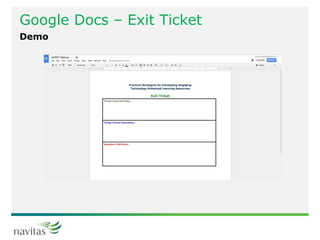
Google Docs – Exit Ticket
Demo
Where to from here?
• Navitas Learning and Teaching website -
http://learningandteaching-navitas.com/
• Access to slides
Other
E-books
Examples:
• Kitaboo - https://kitaboo.com/lp/create-ebooks
• Publishing house resources to accompany textbooks -
http://www.wileypluslearningspace.com.au/
Conclusion
We hope you enjoyed the session!

Practical strategies for developing engaging, technology enhanced learning resources

  • 1.
    Practical Strategies forDeveloping Engaging Technology-enhanced Learning Resources Presented by Christina Del Medico & Helen Zimmerman 1
  • 2.
    Agenda • Introductions • Aframework for categorising learning resources • How students learn • Strategies and ideas for improving engagement using technologies • Brief description of each strategy • Links to affordable options • Demonstration/Interaction • Q&A
  • 3.
    Introductions Please introduce yourselfby letting us know: • Name • Where are you from • What you would like to get out of the session
  • 4.
    Principles of Technology-Enhanced LearningResources Outcomes • Increased student motivation • Enhanced learning experience • Deeper learning of the subject material • Enhanced team working and communication skills • Active learning • Digital literacy skills • Driven by pedagogy • Learner focused • Easy to access • Engaging and fun • Collaborative and interactive • Accessible on mobile devices • Free or nominal cost
  • 5.
    How do learnerscurrently engage? Lecture Read Observe Interact/Discuss Practice Passive Participatory
  • 6.
    Teacher-created content Benefits: • Motivateand engage learners • Supplement or enhance a lesson to bring the topic to life • Provide instructions learners can review anytime, anywhere • Facilitate thinking and problem solving • Assist with mastery learning • Inspire and engage learners • Create authentic learning opportunities Examples: • Screencasting– https://screencast-o-matic.com/home • Lessons – TED-Ed - http://ed.ted.com/lessons
  • 7.
  • 8.
    Summary Top uses forvideos • Recording lectures • Desktop recordings • Developing instructional videos • Interviews • Engaging learners • Case studies/simulations/role plays • Presentation skills and performance • Learner-generated • Creating lessons
  • 9.
    Interactive content Benefits: • Accelerateddevelopment • Cognitive improvement • Sense of self-worth/self-improvement • Educational standards changing • Fun and informal Examples: • Brainstorming - https://answergarden.ch/ • Quizzes – Socrative - http://www.socrative.com/
  • 10.
    Answer Garden Demo Answer gardenis a minimalistic feedback tool that can be used in the classroom as an educational tool as a creative brainstorming tool.
  • 11.
    Socrative Demo Socrative is anonline software tool that allows you to create and administer different types of short assessments using tablets or devices.
  • 12.
    Assessment Resources Benefits: • Personalisedlearning • Expanded learning opportunities • High engagement learning • Competency-based learning • Assessment for learning • Quality learning products Examples: • Blogs– edublogs - http://edublogs.org/ • E-Portfolios - https://www.google.com/sites/ • Video instructions and feedback - https://www.screencast.com/ • Video interviews
  • 13.
  • 14.
    Learner created resources Benefits: •Helps learners understand concepts • Learner remain engaged • Opportunities for learners to explore ideas and knowledge, collaborate, solve problems and develop knowledge and skills “You can teach a student a lesson for a day; but if you can teach him to learn by creating curiosity, he will continue the learning process as long as he lives.” (Bedford, n.d.) Examples • Flipgrid - http://flipgrid.com/info/ • Glossary - https://docs.moodle.org/23/en/Glossary_module
  • 15.
    Flipgrid Demo Flipgrid boosts communityand collaboration in classrooms.
  • 16.
    Learner collaboration Benefits: • Socialand active learning • Learners develop teamwork and communication skills • Learners assimilate multiple views to deepen knowledge and promote critical thinking • Learners develop independent learning strategies • Learners can structure out-of-class learning Examples: Group work activities Google apps https://apps.google.com/ Office 365 apps - https://portal.office.com/Home
  • 17.
    Group work activity– Google docs Demo
  • 18.
    Google Docs –Exit Ticket Demo
  • 19.
    Where to fromhere? • Navitas Learning and Teaching website - http://learningandteaching-navitas.com/ • Access to slides
  • 20.
    Other E-books Examples: • Kitaboo -https://kitaboo.com/lp/create-ebooks • Publishing house resources to accompany textbooks - http://www.wileypluslearningspace.com.au/
  • 21.
    Conclusion We hope youenjoyed the session!

Editor's Notes

  • #3 Technology-enhanced learning resources can help engage learners with the knowledge and skills they need to successfully complete their program of study. This webinar will explore a number of practical strategies for use in learning environments, whether they are on-campus, online or a mixture of both, for engaging learners in presentations, activities and creating resources collaboratively.
  • #4 Please tell us in the chat box where you are from (College, BU) and what you would like to get out of this session
  • #5 Helen to present
  • #6 Helen to present. Moving toward the bottom, which are currently under-represented. These can be in f2f or online.
  • #7 The first strategy we will focus on is teacher-created content and specifically, using videos. There many benefits to using video in education as shown in several decades of research. There is a good video by Khan "Let's use video to reinvent education" which describes the transformative ways that videos can impact on learning and teaching and encourages teachers to use videos to flip their classroom, which means that learners can digest lecture content at their pace and explore content more deeply during class time. 
  • #8 TedEd can be used to create engaging video to create customised lessons. You can use, tweak, or completely redo any lesson featured on Ted-Ed or create lessons are Supplementary resources When you arrive on the Lesson, you simply click play In the quick quiz section you will find multiple choice questions around basic comprehension of the video You get real time feedback on your answers and if you get one wrong, you can use video hints In the think section, you will find open answer questions In the dig deeper section, you will find additional resources for exploring the topic You can complete the lessons anonymously or log in to track your learning Lessons can be shared with students with a URL You can re-use existing lessons and flip to make it your own Demo: http://ed.ted.com/lessons/the-psychology-behind-irrational-decisions-sara-garofalo
  • #10 Our next strategy we will focus on is Interactive Content, and specifically, Educational Apps.  Accelerated development - the way a learner understands and processes information will vary depending on their cognitive learning styles. Having an app which can facilitate their learning style whilst taking into consideration the curriculum requirements will accelerate the learning process and be beneficial to the learner.  Cognitive improvement - one of the most beneficial aspects of educational apps it how much mental development it can bring about. For example, an app  can challenge a learner's problem solving skills through the use of virtual rewards, incentives, etc that will motivate them to persist and continually develop themselves in the process (we will show you two examples in just a moment). Sense of self-worth/self-improvement - research has shown that apps can bring about emotional progress. As the learner continues to strive for improvement, the sense of achievement brings about positive emotional attachment to the learning process. Educational standards changing - the future is technology, and specifically, mobile technology and apps. Research has shown that the integration into curriculum can and will raise educational standards. 
  • #11 What is it? Answer Garden is a digital scribble space. It is a great tool for not only brainstorming with learners but also to check for correlation between other learner's ideas. The best way to describe Answer Garden is if you took a site for brainstorming like Padlet and you took a site for word clouds like Wordle, and you put them together, you would get Answer Garden. How to Create Presenter browses to: https://answergarden.ch/ "What educational apps have you heard of or used?" Ask participants to browse to: https://answergarden.ch/? or click the QR Reader once the Answer Garden is created Put URL in chat and ask participants to click on it and respond to the question or use their mobiles.  Participants put in their responses and watch the cloud build! Scroll to the far right to submit your answer This can then be embedded into your LMS You can hover over it and see how many students made that response You are hoping to see same kind of answers to take on word cloud effect and words answered more than once get larger Great way to start discussions It is anonymous so students don’t have to fear if they are shy
  • #12 Socrative empowers teachers to engage and assess your students as learning happens. Through the use of real-time questioning, result aggregation, and visualization, you have insight into levels of understanding so you can use class time to better collaborate and grow as a community of learners. Demo: Facilitator logs in at https://b.socrative.com/teacher/#dashboard and demonstrates how to set up a Quiz (very easy)! Ask participants to browse to https://b.socrative.com/login/student/ or if they have downloaded Socrative Student app use that. Facilitator logs in at https://b.socrative.com/teacher/#dashboard
  • #13 Helen 1. Personalized learning The opportunity to help every student learn at the best pace and path for them is the most important benefit of digital learning. be more quickly diagnosed, learning gaps will be addressed, and progress will be accelerated. 2. Expanded learning opportunities Digital learning is extending learning opportunities worldwide. Learning happens at many times and in many places and intentionally leverages its expansive nature in the learner’s development of competencies. learners with authentic, rich, and diverse learning opportunities.” 3. High engagement learning The shift to digital can boost student motivation. Anyone who has witnessed the engagement of game-based learning can appreciate the potential to create learning experiences that boost persistence. 4. Competency-based learning Students show what they know and progress based on demonstrated mastery. Competency-based learning is possible in paper and pencil but it is hard to monitor and manage an individual progress model at scale. 5. Assessment for learning Digital learning powers continuous feedback from content-embedded assessment, games, simulations, and adaptive learning. When students can track their own progress it can improve motivation and agency. 6. Quality learning products Digital learning tools allow students to produce professional quality products and to share them with public audiences.  
  • #14 Play video demonstrating interviewing skills:  Demo 1 - https://www.youtube.com/watch?v=SGsXUs_WozA Demo 2 - https://www.youtube.com/watch?v=8qEANbs0HXw
  • #15 Historically it was believed that learners weren't able to create content in courses, however research supports many benefits for learners in doing so. Technology-enabled resources which are created by learners can enhance learning, and improve learning outcomes. Quality would increase because of the learner's sense of pride as they continually push themselves to achieve and produce work that can stand tall amongst a public audience.  Creativity is enhanced Learners use social media with highly evolved emotional intelligence as they invest time into creating quality support networks.
  • #16 What is it? Flipgrid is an asynchronous, video-based discussion and reflection tool used to boost social presence in online discussions. Flipgrid creates grids of questions or topics using text or video and shares your questions with whomever you like. Your students then answer with recorded videos.
  • #17 We won't focus too much time on learner collaboration as we do haven upcoming PD event on September 23rd on Facilitating online group work: problems and solutions. The link is: http://learningandteaching-navitas.com/events/facilitating-online-group-work-problems-solutions/ 
  • #18 Benefits of Google Docs It's free It's easy Good for collaboration Excellent security Any device, anywhere Demo: https://learning.ltt.navitas.com/course/view.php?id=69 In this example, participants were asked to complete a group work activity around the challenges of learning and teaching in online and blended environments. We embedded an interactive Google Doc into our LMS - Moodle.
  • #19 Have a go - for our last activity, we will ask you to have a go at using Google Docs. We have created an "Exit Ticket" and you can have a go putting in your answer here in the Doc. https://docs.google.com/document/d/1VwJPBXUXBfNhWbLzkJgoaUnKPOBHC0J2SNotLlSEg-g/edit