Putting ideas into practice A rough and ready guide and a few answers. (what you might/can/should do, communication and learning networks) 'The core competency of universities is not transferring knowledge, but developing it, and that's done within intricate and robust networks and communities.'  Brown and Duguid, 1996
What are we trying to do anyway? Traditional teaching Can we effectively use large classes Utilize small group teaching And how effective is this for certain types of instructional work (labs, field) The 'numbers' problem; leading to The 'tail' problem The provision of independent learning in a diverse student population
Instructional Position Mix (Further Education Unit, 1981; Good 2000*) Deficiency model  - 'we're here to put something right that went wrong earlier' Competence model  - 'we're here to teach people some specific competence and skills' Socialization model  - 'we're here to help learners fit into society' Counselling model  - 'we're here to help our learners work through the key issues and crises' Guided discovery  - 'we're here to help learners discover things for themselves' Fostering autonomy  - 'we're here to help learners become autonomous and self-sufficient'
The level of technology Many teachers steer clear of engaging with technology - they leave it to the technologists and get on with the business of teaching'  (Good, 2001) Is this You?  If so, 'Don't Panic' (D. Adams) [I love deadlines.  I love the sound of them whooshing past!]
For  me , we have to attempt to: Achieve an  appropriate  mix of the previous approaches  and Reach more students, effectively Allow for student problems (jobs, Access etc) Use the technology available with our individual skills and aptitudes 'Blend' learning as an approach (embedded/involved) Within the usual constraints of time and cost etc BUT   - we try to do this anyway!  What does the 'e-' add?
Technology is  an  answer, not  the  answer, how can we make it more effective? Identify our own skills and aptitudes and reflect on them See what others have been doing Knowing how to use the technology imaginatively Making student-centred choices  'And the problem is not the technology.  The true problem in education is helping students to learn.'  (Freeman and Capper, 1999)*
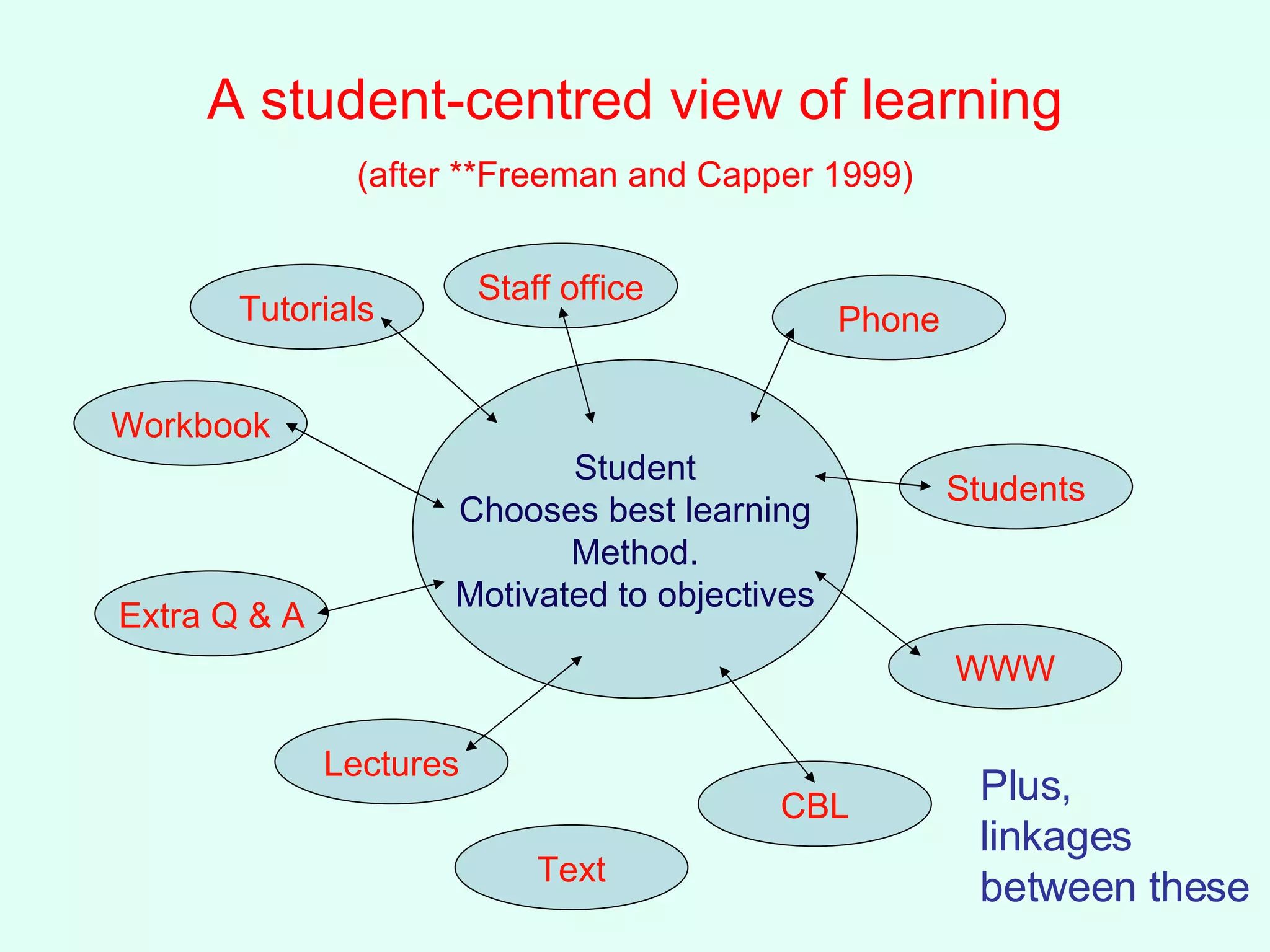
A student-centred view of learning   (after **Freeman and Capper 1999)   Student Chooses best learning Method. Motivated to objectives Workbook Extra Q & A Lectures Tutorials Staff office Phone Students WWW CBL Text Plus,  linkages between these
Overall, I believe we can Hand opportunities to students Enhance learning opportunities Provide freedom from (some) time constraints (I.e. towards distance learning) Enhance feedback opportunities Provide better 'Socratic' approaches Go from mass communication to become more personal
Learning and Understanding =  Education How to get to learning as understanding,  as a change in personal reality Encouraging active learning (strategies) Giving opportunities to practice skills Giving opportunities to consolidate learning Posing problems which develop critical thinking Allow Socratic approaches to learning
Assessment (Much assessment simply fails to engage students with appropriate types of learning - Gibbs and Simpson 2003*) Better frameworks of assessment (style, timing, frequency, submission etc) Allows conveying of high expectations (examples, feedback) Allows more concentration and engagement on the tasks (experiment design, problem solving, developing analytical skills) And of course we can add a variety of on-line systems for assessment such as MCQs (Aside from the relative weighting of exams vs coursework the above relate primarily to coursework.)
A few more words from:  Educational Innovation: Hvpe, Heresies and  Hopes (Freeman and Capper*) 1. We must understand the learning context. 2. We must carefully choose a curriculum that accommodates learners' previous knowledge and experiences and sets them on a course of improved understandings.  3. We must design learning activities that achieve learning outcomes that accommodate learners' contexts. This requires carefully selecting and supporting the appropriate human, print and electronic learning resources.  4. We must integrate assessment with the desired learning outcomes to maximize the likelihood of focused effort.   5. We must track the extent to which learning outcomes are achieved at a formative and summative level, and ensure such feedback is individualised and responsive.  6. We must change the way we see our roles as teachers, from expert content providers to people who can create and support learning communities, both with our students and among our peers.
Clarke and the Medievalists… '[she] argued that we should get back to a medieval concept of the university as a community of scholars unfettered by difficulties of the wider society.' Sage on the stage from this; the lecture? Traveling scholar and student  (Name of the Rose - Ecco) Traveling masters and their apprentices (Was this medieval situation as elitist as has been made out? We now have the chance to broaden the scope, access and allow 'elitism for all'.
The Hitch-Hikers Guide to surviving in the e-mediated age You can use what you already know and do You can find new skills without too much problem You can get students to provide mutual support You can get departmental/institutional help (with luck) by using common applications and systems You can find ideas, aids, examples etc. ready tried i.e. hitching a ride, and don't forget your towel .
Impediments - being honest Skills TIME And, er……. More time and Perhaps more skills Patience and enthusiasm…… And a bit more time (but don't be put off!)
Task 4  (2 minutes)  Making a start Please list the skills  you  have: 1 as a teacher 2 as an academic using computers  Write them down (2 minutes) in a column for each and then we'll list them on the board.
My guess: Face to Face (f2f) Tutorials Fieldwork Lecturing Labs E-mail Giving feedback Web-pages O-L discussion group Video conferencing 'Word' E-mail WWW - browsing Excel PowerPoint Minitab/SPSS etc Databases (Access/Endnote) Illustrator/Pagemaker Photoshop…… HTML editor
How can we bring some of these existing skills together and develop others? First of all, looking at some  pedagogic  issues Looking at the skills we have and The tools to provide better reflection and inter-activity
Technical fearlessness (*Good 2001) Level 1:  competent in a few tools that are used in everyday working, e.g. w/p Level 2:  competent in a wider range of tools to a higher level (e.g advanced w/p tools for productivity) use a conference area - but still a victim of the many problems that will happen and dependent on others to solve them Level 3:  autonomous explorer - engaged with technology and able to solve own problems and look for opportunities as things change and develop Level 4:  expert
What we might do  what we're not attempting Use what we know Adapt the tools we know Think about the methods we use to teach Help the students in their learning experience Full distance learning Technology for the sake of it Trying to re-invent the wheel Needing investment of masses of time Putting 'notes on the web'
How to add both technology and value Looking at the pedagogy Looking at what we do and how we do it Linking these to student needs Seeing if there are some general aids
A possible introductory model of operation Use a delivery system Use a presentational system Provide a query system Provide a feedback system Provide a support system Provide an instructive system  WWW PowerPoint E-mail Web - E-mail WWW E-libraries / WWW All within a VLE - WebCT You almost certainly know how to use all of these
Death by Bullet Point? or, how to do it by PowerPoint You don't have to be 'whizz-bang' But it will deliver lots of things that you want And that your students like It's easier than web pages It's easy to adapt and deliver It's a multi-media package (surprised?) It's amazing value for money   Even if it is from Microsoft!
Task 5  (10 minutes)  with a colleague of like specialism -  use a large sheet of paper Sketch (Storyboard) about 6-8 scenes/slides on a topic that you know students find 'difficult' Put bullet points of text - phrases are fine This can be done on simple ppt Then , include any static visuals that might help (35mm slides, graphs) Then, include any video shots Then, include any audio that might help Then, consider what you might want to elaborate upon - this could be placed in the 'Notes' section*.
Delivery systems and things you have to consider You can show it, how do students get to it? Web delivery (ftp for the techie bit) Student downloading and printing  Pitfalls: size of file and place (site/server) IPR and copyright  (this can be a serious problem)  Other considerations of security
Asynchronous Learning additions to make networks  Communication to, from and between students and staff using: E-mail,  discussion groups,  video conferencing (centralized/distributed) SMS
Some notes on the use of web pages Every module should have a home page! It  doesn't have to be  fancy or elaborate or comprehensive It  should be  a point of reference and a means of finding and linking to basic information and module materials This is where your PowerPoints should go
However - 'The notes are on the web' Is a minimum response (as web pages) and  Is a rather lazy way out (if it's only notes)  Denies the power of the web Isn't interactive Is probably less useful than putting PPT there Is less easy than putting on PPT Means you have to know something about HTML - Don't use the 'Save as HTML' option
Things to go on module websites All the 'official' bits (pre-session) Module reviews and evaluations ('Advertisements')  Time tables/assessment dates/changes Extras for the module (e.g. current events) Latest news, assignments, f-trip reminders Feedback; specific, general Pointers to resources, skills pages Links to departmental 'how to' pages Results of posters, web pages, Tests, MCQ, quizzes etc  Lab sheets, instructions, safety documents etc…….
Building your website Don't bother if you don't want to - Bare Bones Use WebCT This will allow you pretty much all you want to do for many purposes Add what you want to and when Update when you want Use the interactive facilities Use links to your (module) e-mail address
Other things to consider: Assessment  assuming assessment drives most things Question Mark  etc - web version MCQ Essay and project submission on line Question: What assessments do you want to run on line? 'Current assessment procedures in higher education are long overdue for a rethink.  They are particularly ill suited to the digital age in which using information is more important than remembering it, and where reusing material is a skill to be encouraged, not as academic plagiarism to be despised.'  Robin Mason 1998 Ac3
A quick note about CMC (Computer Mediated Communication) Video-conferencing Conferencing tools VLEs and MLEs
Tutor implications and concerns Changed role Workload Group size Activities Assessment
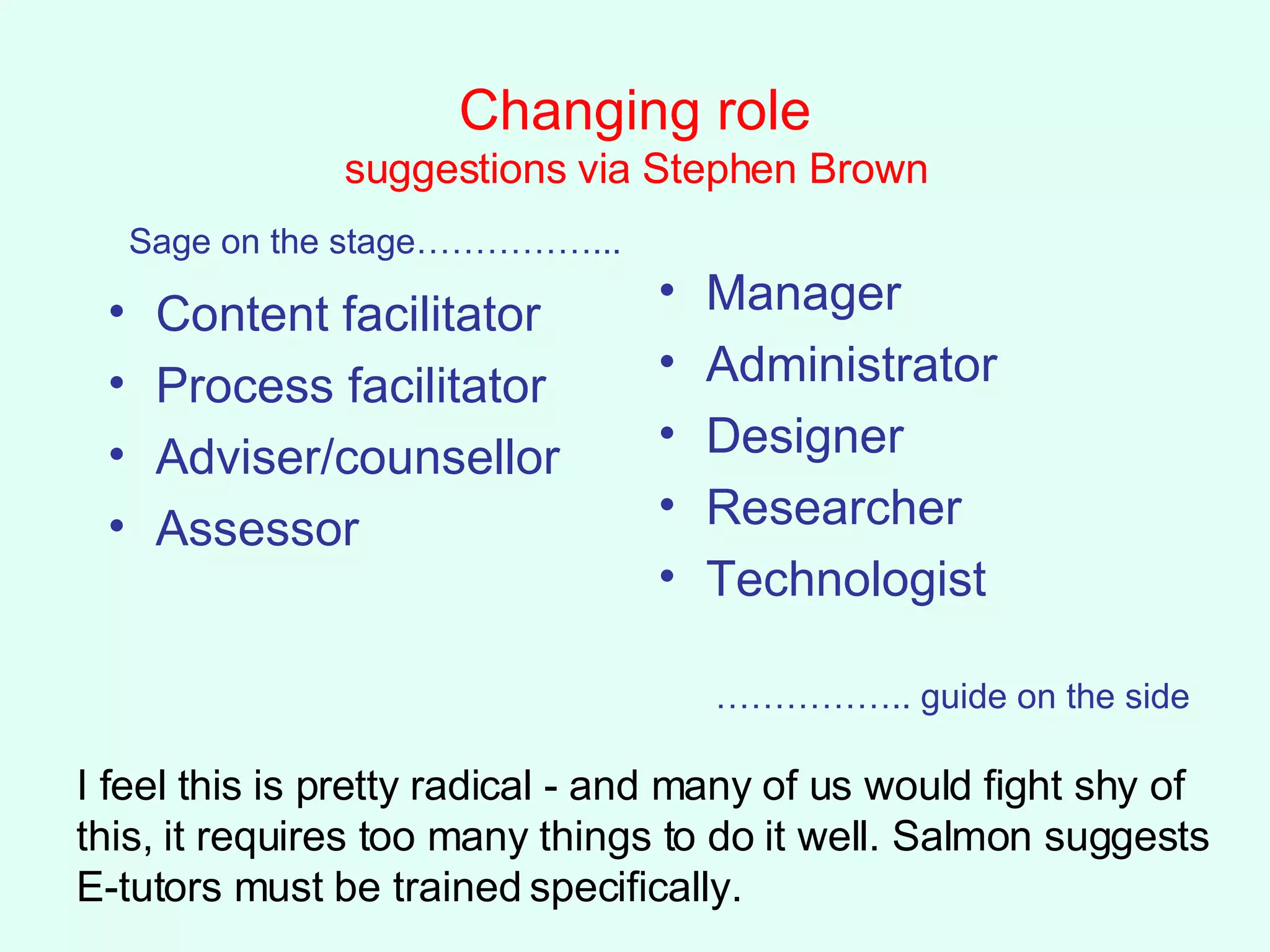
Changing role suggestions via Stephen Brown Content facilitator Process facilitator Adviser/counsellor Assessor Manager Administrator Designer Researcher Technologist Sage on the stage……………... …………… .. guide on the side I feel this is pretty radical - and many of us would fight shy of this, it requires too many things to do it well. Salmon suggests E-tutors must be trained specifically.
Involvement - summary of possibilities Remote access and experimentation Distributed synchronous communications Asynchronous collaborative learning Access to resources (libraries, WWW etc) Manipulating visualisations (learning styles, disabled students and staff) Simulations, models, laboratories, results 'Virtual' fieldwork (even true virtuality one day) Aids and prosthetics (e.g. dyslexia testing) Professional tools (applications, scenarios) On demand learning and assessment Managed learning environments (student tracking, students at risk)
Task 6 - individually - 5 minutes max Now (I hope) that you have some ideas about ALNs and general methods of  e-learning: communication moderation, etc, E-nhancement in general Can you write, in a priority order, three things that you might want to try using some form of  E-nhancement Please don't be afraid of writing 'none'! Then  (5 minutes) discuss your choice with 3-4 colleagues:  is there any common ground?
Other things,……looking onward Video of lectures Synchronous via video-conferencing Asynchronous, video on demand Streaming video Intelligent agents ('knowbots') Technology:  magic whiteboards Interactive TV capability Bluetooth capability; 3GN phones Wi-Fi,  Better software Falling prices Better not forget the students! (phones and laptops etc….)  More on this in  technology.ppt
At the end of this section, I hope that: You will be able to see what could go 'e' At least some of  your  skills could be 'e' There's plenty before the rigours of distance learning A basic application like PowerPoint will do a great deal to help you on your way  Even a little 'e-activity' may help Asynchronous Learning Networks are useful  There are good pedagogic reasons for 'e-stuff' It's not all that difficult  Students appreciate it. End   Powerpoint
Leading on to The wonders of PowerPoint Ooops,  I got carried away - it doesn't have to be like that!
A couple of quotes ( i.e.  it's not just me!) We must change the way we see our roles as teachers, from expert content providers to people who can create and support learning communities, both with our students and among our peers. Freeman and Capper 1999 Electronic resources therefore can play just as influential a role as other resources, in that they support "people's deep urges to learn and to teach.  ……. information technology should provide easy paths connecting people with information, teaching, learning and educational institutions...and with each other"   Freeman and Capper 1999 and  Biggs 1993
Benefits It will help your students  (and all that entails) It will, help you teach better  (as soon as you embark) A little can go a long way  You don't have to do it all in one go It's mutually beneficial in the department/university  (or should be) Quality and enhancement should go hand in hand It may/will/should help promotion  (if not, why not?)
Finally I hope I have shown you some ways to use e-learning That the opportunities are as diverse as you wish That many of the things you may want to done can be done in PPT  The utility of an ALN for embedding materials The importance of a set of techniques which really will help students That you might find it fun and even Help decrumblify you!

E Learning2

  • 1.
    Putting ideas intopractice A rough and ready guide and a few answers. (what you might/can/should do, communication and learning networks) 'The core competency of universities is not transferring knowledge, but developing it, and that's done within intricate and robust networks and communities.' Brown and Duguid, 1996
  • 2.
    What are wetrying to do anyway? Traditional teaching Can we effectively use large classes Utilize small group teaching And how effective is this for certain types of instructional work (labs, field) The 'numbers' problem; leading to The 'tail' problem The provision of independent learning in a diverse student population
  • 3.
    Instructional Position Mix(Further Education Unit, 1981; Good 2000*) Deficiency model - 'we're here to put something right that went wrong earlier' Competence model - 'we're here to teach people some specific competence and skills' Socialization model - 'we're here to help learners fit into society' Counselling model - 'we're here to help our learners work through the key issues and crises' Guided discovery - 'we're here to help learners discover things for themselves' Fostering autonomy - 'we're here to help learners become autonomous and self-sufficient'
  • 4.
    The level oftechnology Many teachers steer clear of engaging with technology - they leave it to the technologists and get on with the business of teaching' (Good, 2001) Is this You? If so, 'Don't Panic' (D. Adams) [I love deadlines. I love the sound of them whooshing past!]
  • 5.
    For me, we have to attempt to: Achieve an appropriate mix of the previous approaches and Reach more students, effectively Allow for student problems (jobs, Access etc) Use the technology available with our individual skills and aptitudes 'Blend' learning as an approach (embedded/involved) Within the usual constraints of time and cost etc BUT - we try to do this anyway! What does the 'e-' add?
  • 6.
    Technology is an answer, not the answer, how can we make it more effective? Identify our own skills and aptitudes and reflect on them See what others have been doing Knowing how to use the technology imaginatively Making student-centred choices 'And the problem is not the technology. The true problem in education is helping students to learn.' (Freeman and Capper, 1999)*
  • 7.
    A student-centred viewof learning (after **Freeman and Capper 1999) Student Chooses best learning Method. Motivated to objectives Workbook Extra Q & A Lectures Tutorials Staff office Phone Students WWW CBL Text Plus, linkages between these
  • 8.
    Overall, I believewe can Hand opportunities to students Enhance learning opportunities Provide freedom from (some) time constraints (I.e. towards distance learning) Enhance feedback opportunities Provide better 'Socratic' approaches Go from mass communication to become more personal
  • 9.
    Learning and Understanding= Education How to get to learning as understanding, as a change in personal reality Encouraging active learning (strategies) Giving opportunities to practice skills Giving opportunities to consolidate learning Posing problems which develop critical thinking Allow Socratic approaches to learning
  • 10.
    Assessment (Much assessmentsimply fails to engage students with appropriate types of learning - Gibbs and Simpson 2003*) Better frameworks of assessment (style, timing, frequency, submission etc) Allows conveying of high expectations (examples, feedback) Allows more concentration and engagement on the tasks (experiment design, problem solving, developing analytical skills) And of course we can add a variety of on-line systems for assessment such as MCQs (Aside from the relative weighting of exams vs coursework the above relate primarily to coursework.)
  • 11.
    A few morewords from: Educational Innovation: Hvpe, Heresies and Hopes (Freeman and Capper*) 1. We must understand the learning context. 2. We must carefully choose a curriculum that accommodates learners' previous knowledge and experiences and sets them on a course of improved understandings. 3. We must design learning activities that achieve learning outcomes that accommodate learners' contexts. This requires carefully selecting and supporting the appropriate human, print and electronic learning resources. 4. We must integrate assessment with the desired learning outcomes to maximize the likelihood of focused effort. 5. We must track the extent to which learning outcomes are achieved at a formative and summative level, and ensure such feedback is individualised and responsive. 6. We must change the way we see our roles as teachers, from expert content providers to people who can create and support learning communities, both with our students and among our peers.
  • 12.
    Clarke and theMedievalists… '[she] argued that we should get back to a medieval concept of the university as a community of scholars unfettered by difficulties of the wider society.' Sage on the stage from this; the lecture? Traveling scholar and student (Name of the Rose - Ecco) Traveling masters and their apprentices (Was this medieval situation as elitist as has been made out? We now have the chance to broaden the scope, access and allow 'elitism for all'.
  • 13.
    The Hitch-Hikers Guideto surviving in the e-mediated age You can use what you already know and do You can find new skills without too much problem You can get students to provide mutual support You can get departmental/institutional help (with luck) by using common applications and systems You can find ideas, aids, examples etc. ready tried i.e. hitching a ride, and don't forget your towel .
  • 14.
    Impediments - beinghonest Skills TIME And, er……. More time and Perhaps more skills Patience and enthusiasm…… And a bit more time (but don't be put off!)
  • 15.
    Task 4 (2 minutes) Making a start Please list the skills you have: 1 as a teacher 2 as an academic using computers Write them down (2 minutes) in a column for each and then we'll list them on the board.
  • 16.
    My guess: Faceto Face (f2f) Tutorials Fieldwork Lecturing Labs E-mail Giving feedback Web-pages O-L discussion group Video conferencing 'Word' E-mail WWW - browsing Excel PowerPoint Minitab/SPSS etc Databases (Access/Endnote) Illustrator/Pagemaker Photoshop…… HTML editor
  • 17.
    How can webring some of these existing skills together and develop others? First of all, looking at some pedagogic issues Looking at the skills we have and The tools to provide better reflection and inter-activity
  • 18.
    Technical fearlessness (*Good2001) Level 1: competent in a few tools that are used in everyday working, e.g. w/p Level 2: competent in a wider range of tools to a higher level (e.g advanced w/p tools for productivity) use a conference area - but still a victim of the many problems that will happen and dependent on others to solve them Level 3: autonomous explorer - engaged with technology and able to solve own problems and look for opportunities as things change and develop Level 4: expert
  • 19.
    What we mightdo what we're not attempting Use what we know Adapt the tools we know Think about the methods we use to teach Help the students in their learning experience Full distance learning Technology for the sake of it Trying to re-invent the wheel Needing investment of masses of time Putting 'notes on the web'
  • 20.
    How to addboth technology and value Looking at the pedagogy Looking at what we do and how we do it Linking these to student needs Seeing if there are some general aids
  • 21.
    A possible introductorymodel of operation Use a delivery system Use a presentational system Provide a query system Provide a feedback system Provide a support system Provide an instructive system WWW PowerPoint E-mail Web - E-mail WWW E-libraries / WWW All within a VLE - WebCT You almost certainly know how to use all of these
  • 22.
    Death by BulletPoint? or, how to do it by PowerPoint You don't have to be 'whizz-bang' But it will deliver lots of things that you want And that your students like It's easier than web pages It's easy to adapt and deliver It's a multi-media package (surprised?) It's amazing value for money Even if it is from Microsoft!
  • 23.
    Task 5 (10 minutes) with a colleague of like specialism - use a large sheet of paper Sketch (Storyboard) about 6-8 scenes/slides on a topic that you know students find 'difficult' Put bullet points of text - phrases are fine This can be done on simple ppt Then , include any static visuals that might help (35mm slides, graphs) Then, include any video shots Then, include any audio that might help Then, consider what you might want to elaborate upon - this could be placed in the 'Notes' section*.
  • 24.
    Delivery systems andthings you have to consider You can show it, how do students get to it? Web delivery (ftp for the techie bit) Student downloading and printing Pitfalls: size of file and place (site/server) IPR and copyright (this can be a serious problem) Other considerations of security
  • 25.
    Asynchronous Learning additionsto make networks Communication to, from and between students and staff using: E-mail, discussion groups, video conferencing (centralized/distributed) SMS
  • 26.
    Some notes onthe use of web pages Every module should have a home page! It doesn't have to be fancy or elaborate or comprehensive It should be a point of reference and a means of finding and linking to basic information and module materials This is where your PowerPoints should go
  • 27.
    However - 'Thenotes are on the web' Is a minimum response (as web pages) and Is a rather lazy way out (if it's only notes) Denies the power of the web Isn't interactive Is probably less useful than putting PPT there Is less easy than putting on PPT Means you have to know something about HTML - Don't use the 'Save as HTML' option
  • 28.
    Things to goon module websites All the 'official' bits (pre-session) Module reviews and evaluations ('Advertisements') Time tables/assessment dates/changes Extras for the module (e.g. current events) Latest news, assignments, f-trip reminders Feedback; specific, general Pointers to resources, skills pages Links to departmental 'how to' pages Results of posters, web pages, Tests, MCQ, quizzes etc Lab sheets, instructions, safety documents etc…….
  • 29.
    Building your websiteDon't bother if you don't want to - Bare Bones Use WebCT This will allow you pretty much all you want to do for many purposes Add what you want to and when Update when you want Use the interactive facilities Use links to your (module) e-mail address
  • 30.
    Other things toconsider: Assessment assuming assessment drives most things Question Mark etc - web version MCQ Essay and project submission on line Question: What assessments do you want to run on line? 'Current assessment procedures in higher education are long overdue for a rethink. They are particularly ill suited to the digital age in which using information is more important than remembering it, and where reusing material is a skill to be encouraged, not as academic plagiarism to be despised.' Robin Mason 1998 Ac3
  • 31.
    A quick noteabout CMC (Computer Mediated Communication) Video-conferencing Conferencing tools VLEs and MLEs
  • 32.
    Tutor implications andconcerns Changed role Workload Group size Activities Assessment
  • 33.
    Changing role suggestionsvia Stephen Brown Content facilitator Process facilitator Adviser/counsellor Assessor Manager Administrator Designer Researcher Technologist Sage on the stage……………... …………… .. guide on the side I feel this is pretty radical - and many of us would fight shy of this, it requires too many things to do it well. Salmon suggests E-tutors must be trained specifically.
  • 34.
    Involvement - summaryof possibilities Remote access and experimentation Distributed synchronous communications Asynchronous collaborative learning Access to resources (libraries, WWW etc) Manipulating visualisations (learning styles, disabled students and staff) Simulations, models, laboratories, results 'Virtual' fieldwork (even true virtuality one day) Aids and prosthetics (e.g. dyslexia testing) Professional tools (applications, scenarios) On demand learning and assessment Managed learning environments (student tracking, students at risk)
  • 35.
    Task 6 -individually - 5 minutes max Now (I hope) that you have some ideas about ALNs and general methods of e-learning: communication moderation, etc, E-nhancement in general Can you write, in a priority order, three things that you might want to try using some form of E-nhancement Please don't be afraid of writing 'none'! Then (5 minutes) discuss your choice with 3-4 colleagues: is there any common ground?
  • 36.
    Other things,……looking onwardVideo of lectures Synchronous via video-conferencing Asynchronous, video on demand Streaming video Intelligent agents ('knowbots') Technology: magic whiteboards Interactive TV capability Bluetooth capability; 3GN phones Wi-Fi, Better software Falling prices Better not forget the students! (phones and laptops etc….) More on this in technology.ppt
  • 37.
    At the endof this section, I hope that: You will be able to see what could go 'e' At least some of your skills could be 'e' There's plenty before the rigours of distance learning A basic application like PowerPoint will do a great deal to help you on your way Even a little 'e-activity' may help Asynchronous Learning Networks are useful There are good pedagogic reasons for 'e-stuff' It's not all that difficult Students appreciate it. End Powerpoint
  • 38.
    Leading on toThe wonders of PowerPoint Ooops, I got carried away - it doesn't have to be like that!
  • 39.
    A couple ofquotes ( i.e. it's not just me!) We must change the way we see our roles as teachers, from expert content providers to people who can create and support learning communities, both with our students and among our peers. Freeman and Capper 1999 Electronic resources therefore can play just as influential a role as other resources, in that they support "people's deep urges to learn and to teach. ……. information technology should provide easy paths connecting people with information, teaching, learning and educational institutions...and with each other" Freeman and Capper 1999 and Biggs 1993
  • 40.
    Benefits It willhelp your students (and all that entails) It will, help you teach better (as soon as you embark) A little can go a long way You don't have to do it all in one go It's mutually beneficial in the department/university (or should be) Quality and enhancement should go hand in hand It may/will/should help promotion (if not, why not?)
  • 41.
    Finally I hopeI have shown you some ways to use e-learning That the opportunities are as diverse as you wish That many of the things you may want to done can be done in PPT The utility of an ALN for embedding materials The importance of a set of techniques which really will help students That you might find it fun and even Help decrumblify you!

Editor's Notes

  • #2 Brown, J.S. and Duguid, P. 1996 Universities in the digital age. Change Jul/Aug 11-20