CS 354 Texture Mapping Mark Kilgard University of Texas February 23, 2012
Today’s material In-class quiz Lecture topics Texture mapping Course work Schedule your Project 1 demos with Randy Reading Chapter 5, pages 257-296 on Lighting Homework #3 Available on the course web site; announced on Piazza http://www.cs.utexas.edu/~mjk/teaching/cs354_s12/hw3.pdf Transforms, blending, compositing, color spaces Due Tuesday, February 28 at beginning of class
My Office Hours Tuesday, before class Painter (PAI) 5.35 8:45 a.m. to 9:15 Thursday, after class ACE 6.302 11:00 a.m. to 12:00
Last time, this time Last lecture, we discussed Finish off compositing Color representation This lecture Texture mapping
Daily Quiz Which is  not  a Porter-Duff compositing mode? a)  Src-Over b)  Pass-Through c)  Dst-Over d)  Clear e)  XOR Multiple choice:   Sample patterns for anti-aliasing generally result in better image quality when the sample pattern has a)   more samples on an orthogonal grid b)   fewer samples on a jittered grid c)   more samples on a jittered grid d)   fewer samples on an orthogonal grid e)  just one sample True or False:   The human eye has cones that detect red light, green light, and blue light. Which abbreviation does  not  refer to a color space? a)   RGB b)   XYZ c)   CYMK d)   YIQ e)   NTSC f)   HSL On a sheet of paper Write your EID, name, and date Write #1, #2, #3, #4 followed by its answer
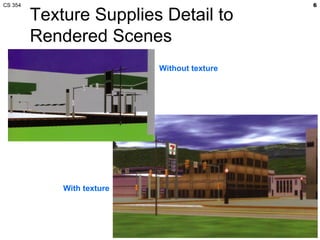
Texture Supplies Detail to Rendered Scenes Without texture With texture
Textures Make Graphics Pretty Texture  ->  detail, detail  ->  immersion, immersion  ->  fun Unreal Tournament Microsoft Flight Simulator X Sacred 2
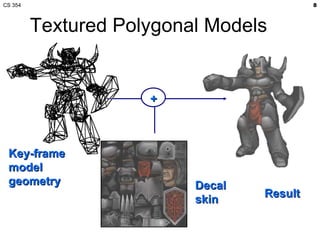
Textured Polygonal Models + Result Key-frame model geometry Decal skin
Multiple Textures for Involved Shading Key-frame model geometry Decal skin texture Bump skin texture Gloss skin texture +
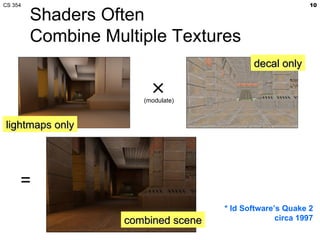
Shaders Often  Combine Multiple Textures  (modulate) = lightmaps only decal only combined scene * Id Software’s Quake 2   circa 1997
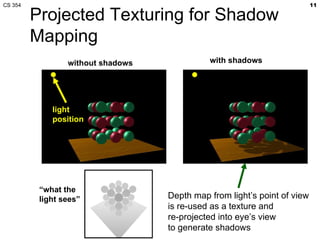
Projected Texturing for Shadow Mapping Depth map from light’s point of view is re-used as a texture and re-projected into eye’s view  to generate shadows light position without shadows with shadows “ what the light sees”
Shadow Mapping Explained Planar distance from light Depth map projected onto scene ≤ = less than True “un-shadowed” region shown green equals
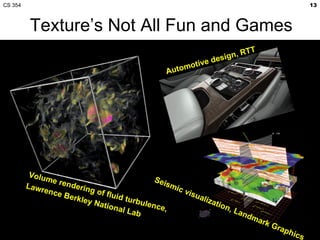
Texture’s Not All Fun and Games Volume rendering of fluid turbulence, Lawrence Berkley National Lab Automotive design, RTT Seismic visualization, Landmark Graphics
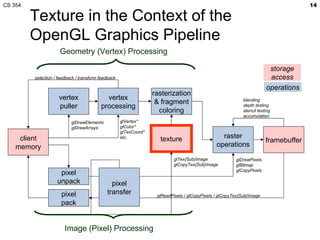
Texture in the Context of the OpenGL Graphics Pipeline vertex processing rasterization & fragment coloring texture raster operations framebuffer pixel unpack pixel pack vertex puller client memory pixel transfer glReadPixels / glCopyPixels / glCopyTex{Sub}Image glDrawPixels glBitmap glCopyPixels glTex{Sub}Image glCopyTex{Sub}Image glDrawElements glDrawArrays selection / feedback / transform feedback glVertex* glColor* glTexCoord* etc.  blending depth testing stencil testing accumulation storage access operations Image (Pixel) Processing Geometry (Vertex) Processing
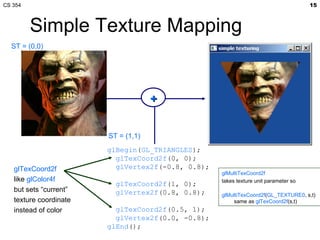
Simple Texture Mapping glBegin ( GL_TRIANGLES ); glTexCoord2f (0, 0); glVertex2f (-0.8, 0.8); glTexCoord2f (1, 0); glVertex2f (0.8, 0.8); glTexCoord2f (0.5, 1); glVertex2f (0.0, -0.8); glEnd (); + glTexCoord2f like  glColor4f but sets “current” texture coordinate instead of color glMultiTexCoord2f takes texture unit parameter so glMultiTexCoord2f ( GL_TEXTURE0 , s,t) same as  glTexCoord2f (s,t)  ST = (0,0) ST = (1,1)
Texture Coordinates Assigned at Each Vertex XYZ = (0,-0.8) ST = (0.5,1) XYZ = (0.8,0.8) ST = (1,0) XYZ = (-0.8,0.8) ST = (0,0)
Loose Ends of Texture Setup Texture object specification Fixed-function texture binding and enabling static const   GLubyte myDemonTextureImage[3*(128*128)] = { /* RGB8 image data for a mipmapped 128x128 demon texture */ #include "demon_image.h" }; /* Tightly packed texture data. */ glPixelStorei ( GL_UNPACK_ALIGNMENT , 1); glBindTexture ( GL_TEXTURE_2D ,  666 ); /* Load demon decal texture with mipmaps. */ gluBuild2DMipmaps ( GL_TEXTURE_2D ,  GL_RGB8 , 128, 128,  GL_RGB ,  GL_UNSIGNED_BYTE , myDemonTextureImage); glTexParameteri ( GL_TEXTURE_2D , GL_TEXTURE_MIN_FILTER , GL_LINEAR_MIPMAP_LINEAR ); glActiveTexture ( GL_TEXTURE0 ); glTexEnvi ( GL_TEXTURE_ENV , GL_TEXTURE_ENV_MODE ,  GL_REPLACE ); glEnable ( GL_TEXTURE_2D ); glBindTexture ( GL_TEXTURE_2D ,  666 ); gluBuild2DMipmaps calls  glTexImage2D  on image, then down-samples iteratively  64x64, 32x32, 16x16, 8x8, 4x4, 2x1, and 1x1 images (called  mipmap  chain)
What happens at every fragment when texturing? A basic operation called a “texture fetch” Seems pretty simple… Given An image A position Return the color of image at position Fetch at (s,t) = (0.6, 0.25) T axis S axis 0.0  1.0  0.0 1.0 RGBA Result is 0.95,0.4,0.24,1.0)
Texture Coordinates Associated with Transformed Vertices Interpolated over rasterized primitives parametric coordinates texture coordinates world coordinates window coordinates
Texture Resources Textures are loaded prior to rendering Stored on the GPU in video memory For speed and bandwidth reasons Each texture is an “object” Texture object = parameters + texture images In OpenGL, each texture has a  GLuint  “name” Games may have many thousands of textures When rendering with a texture Must first bind the texture object glBindTexture  in OpenGL Multiple parallel texture units allow multiple texture objects to be bound and accessed by shaders
Where do texture coordinates come from? Assigned ad-hoc by artist Tedious!  Has gift wrapping problem Computed based on XYZ position Texture coordinate generation (“texgen”) Hard to map to “surface space” Function maps ( x,y,z ) to ( s,t,r,q ) From bi-varite parameterization of geometry Good when geometry is generated from patches So ( u,v ) of patch maps to ( x,y,z ) and ( s,t ) [PTex]
What’s so hard about a texture fetch? Filtering Poor quality results if you just return the closest color sample in the image Bilinear filtering + mipmapping needed Complications Wrap modes, formats, compression, color spaces, other dimensionalities (1D, 3D, cube maps), etc. Gotta be quick Applications desire billions of fetches per second What’s done per-fragment in the shader, must be done per-texel in the texture fetch—so 8x times as much work! Essentially a miniature, real-time re-sampling kernel GeForce 480 capable of 42,000,000,000 per second!  * * 700 Mhz clock × 15 Streaming Multiprocessors × 4 fetches per clock
Anatomy of a Texture Fetch Filtered texel vector Texel Selection Texel Combination Texel offsets Texel data Texture images Combination parameters Texture parameters
Texture Fetch Functionality (1) Texture coordinate processing Projective texturing ( OpenGL 1.0 ) Cube map face selection ( OpenGL 1.3 ) Texture array indexing ( OpenGL 2.1 ) Coordinate scale: normalization ( ARB_texture_rectangle ) Level-of-detail (LOD) computation Log of maximum texture coordinate partial derivative ( OpenGL 1.0 ) LOD clamping ( OpenGL 1.2 ) LOD bias ( OpenGL 1.3 ) Anisotropic scaling of partial derivatives ( SGIX_texture_lod_bias ) Wrap modes Repeat, clamp ( OpenGL 1.0 ) Clamp to edge ( OpenGL 1.2 ), Clamp to border ( OpenGL 1.3 ) Mirrored repeat ( OpenGL 1.4 ) Fully generalized clamped mirror repeat ( EXT_texture_mirror_clamp ) Wrap to adjacent cube map face ( ARB_seamless_cube_map ) Region clamp & mirror ( PlayStation 2 )
Wrap Modes Texture image is defined in [0..1]x[0..1] region What happens outside that region? Texture wrap modes say texture s t GL_CLAMP wrapping GL_REPEAT wrapping
Projective Texturing Homogenous coordinates support projection Similar to (x/w,y/w,z/w) But (s/q,t/q,r/q) instead Also used in shadow mapping Source: Wolfgang [99]
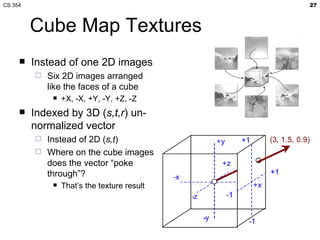
Cube Map Textures Instead of one 2D images Six 2D images arranged like the faces of a cube +X, -X, +Y, -Y, +Z, -Z Indexed by 3D ( s,t,r ) un-normalized vector Instead of 2D ( s,t ) Where on the cube images does the vector “poke through”? That’s the texture result
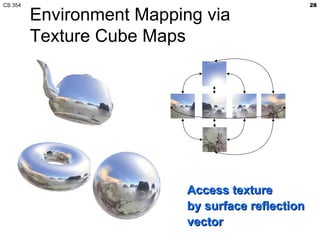
Environment Mapping via Texture Cube Maps Access texture by surface reflection vector
More Cube Mapping
Dynamic Cube Map Textures Rendered scene Dynamically created cube map image Image credit: “Guts” GeForce 2 GTS demo, Thant Thessman
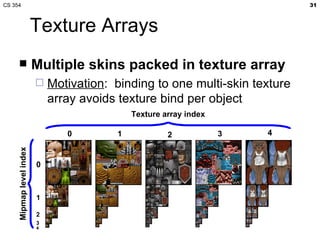
Texture Arrays Multiple skins packed in texture array Motivation :  binding to one multi-skin texture array avoids texture bind per object Texture array index 0 1 2 3 4 0 1 2 3 4 Mipmap level index
Texture Fetch Functionality (2) Filter modes Minification / magnification transition ( OpenGL 1.0 ) Nearest, linear, mipmap ( OpenGL 1.0 ) 1D & 2D ( OpenGL 1.0 ), 3D ( OpenGL 1.2 ), 4D ( SGIS_texture4D ) Anisotropic ( EXT_texture_filter_anisotropic ) Fixed-weights: Quincunx, 3x3 Gaussian Used for multi-sample resolves Detail texture magnification ( SGIS_detail_texture ) Sharpen texture magnification ( SGIS_sharpen_texture ) 4x4 filter ( SGIS_texture_filter4 ) Sharp-edge texture magnification ( E&S Harmony ) Floating-point texture filtering ( ARB_texture_float ,  OpenGL 3.0 )
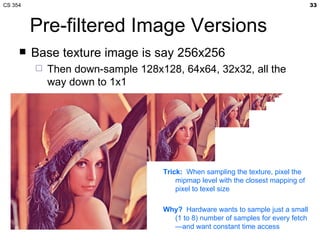
Pre-filtered Image Versions Base texture image is say 256x256 Then down-sample 128x128, 64x64, 32x32, all the way down to 1x1 Trick:   When sampling the texture, pixel the mipmap level with the closest mapping of pixel to texel size  Why?   Hardware wants to sample just a small (1 to 8) number of samples for every fetch—and want constant time access
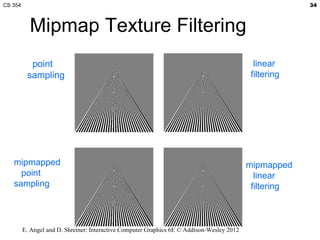
Mipmap Texture Filtering E. Angel and D. Shreiner: Interactive Computer Graphics 6E © Addison-Wesley 2012 point sampling mipmapped point sampling mipmapped linear filtering linear filtering
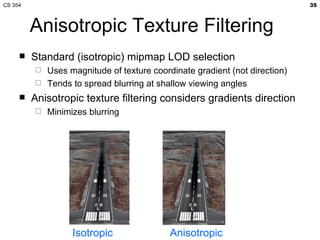
Anisotropic Texture Filtering Standard (isotropic) mipmap LOD selection Uses magnitude of texture coordinate gradient (not direction) Tends to spread blurring at shallow viewing angles Anisotropic texture filtering considers gradients direction Minimizes blurring Isotropic Anisotropic
Texture Fetch Functionality (3) Texture formats Uncompressed Packing: RGBA8, RGB5A1, etc. ( OpenGL 1.1 ) Type: unsigned, signed ( NV_texture_shader ) Normalized: fixed-point vs. integer ( OpenGL 3.0 ) Compressed DXT compression formats ( EXT_texture_compression_s3tc ) 4:2:2 video compression ( various extensions ) 1- and 2-component compression ( EXT_texture_compression_latc , OpenGL 3.0 ) Other approaches: IDCT, VQ, differential encoding, normal maps, separable decompositions Alternate encodings RGB9 with 5-bit shared exponent ( EXT_texture_shared_exponent ) Spherical harmonics Sum of product decompositions
Texture Fetch Functionality (4) Pre-filtering operations Gamma correction ( OpenGL 2.1 ) Table: sRGB / arbitrary Shadow map comparison ( OpenGL 1.4 ) Compare functions: LEQUAL, GREATER, etc. ( OpenGL 1.5 ) Needs “R” depth value per texel Palette lookup ( EXT_paletted_texture ) Thresh-holding Color key Generalized thresh-holding
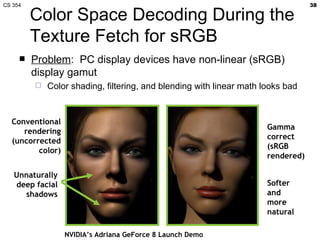
Color Space Decoding During the Texture Fetch for sRGB Problem :  PC display devices have non-linear (sRGB) display gamut Color shading, filtering, and blending with linear math looks bad Conventional rendering (uncorrected color) Gamma correct (sRGB rendered) Softer and more natural Unnaturally deep facial shadows NVIDIA’s Adriana GeForce 8 Launch Demo
Texture Fetch Functionality (5) Optimizations Level-of-detail weighting adjustments Mid-maps (extra pre-filtered levels in-between existing levels) Unconventional uses Bitmap textures for fonts with large filters ( Direct3D 10 ) Rip-mapping Non-uniform texture border color Clip-mapping ( SGIX_clipmap ) Multi-texel borders Silhouette maps (Pardeep Sen’s work) Shadow mapping Sharp piecewise linear magnification
Phased Data Flow Must hide long memory read latency between Selection and Combination phases Memory reads for samples FIFOing of combination parameters Filtered texel vector Texel Selection Texel Combination Texel offsets Texel data Texture images Combination parameters Texture   parameters Texture coordinate vector
What really happens? Let’s consider a simple tri-linear mip-mapped 2D projective texture fetch Logically one shader instruction float4 color = tex2Dproj(decalSampler, st); TXP o[COLR], f[TEX3], TEX2, 2D; Logically Texel selection Texel combination How many operations are involved? Assembly instruction (NV_fragment_program) High-level language statement (Cg/HLSL)
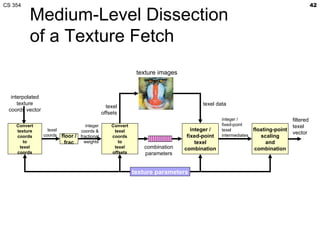
Medium-Level Dissection of a Texture Fetch Convert texel coords to texel offsets integer / fixed-point texel combination texel  offsets texel data texture images combination parameters interpolated texture coords vector texture parameters Convert texture coords to texel coords filtered texel vector texel coords floor / frac integer coords & fractional weights floating-point scaling and combination integer / fixed-point texel intermediates
Interpolation First we need to interpolate (s,t,r,q) This is the  f[TEX3]  part of the TXP instruction Projective texturing means we want (s/q, t/q) And possible r/q if shadow mapping In order to correct for perspective, hardware actually interpolates (s/w, t/w, r/w, q/w) If not projective texturing, could linearly interpolate inverse w (or 1/w) Then compute its reciprocal to get w Since 1/(1/w) equals w  Then multiply (s/w,t/w,r/w,q/w) times w To get (s,t,r,q) If projective texturing, we can instead Compute reciprocal of q/w to get w/q Then multiple (s/w,t/w,r/w) by w/q to get (s/q, t/q, r/q) Observe projective texturing is same cost as perspective correction
Interpolation Operations Ax + By + C per scalar linear interpolation 2 MADs One reciprocal to invert q/w for projective texturing Or one reciprocal to invert 1/w for perspective texturing Then 1 MUL per component for s/w * w/q Or s/w * w For (s,t) means 4 MADs, 2 MULs, & 1 RCP (s,t,r) requires 6 MADs, 3 MULs, & 1 RCP All floating-point operations
Texture Space Mapping Have interpolated & projected coordinates Now need to determine what texels to fetch Multiple (s,t) by (width,height) of texture base level Could convert (s,t) to fixed-point first Or do math in floating-point Say based texture is 256x256 so So compute (s*256, t*256)=(u,v)
Mipmap Level-of-detail Selection Tri-linear mip-mapping means compute appropriate mipmap level Hardware rasterizes in 2x2 pixel entities Typically called quad-pixels or just  quad Finite difference with neighbors to get change in u and v with respect to window space Approximation to  ∂u/∂x, ∂u/∂y, ∂v/∂x, ∂v/∂y Means 4 subtractions per quad (1 per pixel) Now compute approximation to gradient length p = max(sqrt((∂u/∂x) 2 +(∂u/∂y) 2 ),   sqrt((∂v/∂x) 2 +(∂v/∂y) 2 )) one-pixel separation
Level-of-detail Bias and Clamping Convert p length to power-of-two level-of-detail and apply LOD bias λ  = log2(p) + lodBias Now clamp  λ  to valid LOD range λ ’ = max(minLOD, min(maxLOD,  λ ))
Determine Mipmap Levels and Level Filtering Weight Determine lower and upper mipmap levels b = floor( λ ’)) is bottom mipmap level t = floor( λ ’+1) is top mipmap level Determine filter weight between levels w = frac( λ ’) is filter weight
Determine Texture Sample Point Get (u,v) for selected top and bottom mipmap levels Consider a level l which could be either level t or b With (u,v) locations (ul,vl) Perform  GL_CLAMP_TO_EDGE  wrap modes u w  = max(1/2*widthOfLevel(l),   min(1-1/2*widthOfLevel(l), u)) v w  = max(1/2*heightOfLevel(l),   min(1-1/2*heightOfLevel(l), v)) Get integer location (i,j) within each level (i,j) = ( floor(u w * widthOfLevel(l)),   floor(v w * ) ) border edge s t
Determine Texel Locations Bilinear sample needs 4 texel locations (i0,j0), (i0,j1), (i1,j0), (i1,j1) With integer texel coordinates i0 = floor(i-1/2) i1 = floor(i+1/2) j0 = floor(j-1/2) j1 = floor(j+1/2) Also compute fractional weights for bilinear filtering a = frac(i-1/2) b = frac(j-1/2)
Determine Texel Addresses Assuming a texture level image’s base pointer, compute a texel address of each texel to fetch Assume bytesPerTexel = 4 bytes for RGBA8 texture Example addr00 = baseOfLevel(l) +   bytesPerTexel*(i0+j0*widthOfLevel(l)) addr01 = baseOfLevel(l) +   bytesPerTexel*(i0+j1*widthOfLevel(l)) addr10 = baseOfLevel(l) +   bytesPerTexel*(i1+j0*widthOfLevel(l)) addr11 = baseOfLevel(l) +   bytesPerTexel*(i1+j1*widthOfLevel(l)) More complicated address schemes are needed for good texture locality!
Initiate Texture Reads Initiate texture memory reads at the 8 texel addresses addr00, addr01, addr10, addr11 for the  upper  level addr00, addr01, addr10, addr11 for the  lower  level Queue the weights a, b, and w Latency FIFO in hardware makes these weights available when texture reads complete
Phased Data Flow Must hide long memory read latency between Selection and Combination phases Memory reads for samples FIFOing of combination parameters Filtered texel vector Texel Selection Texel Combination Texel offsets Texel data Texture images Combination parameters Texture   parameters Texture coordinate vector
Texel Combination When texels reads are returned, begin filtering Assume results are Top texels: t00, t01, t10, t11 Bottom texels: b00, b01, b10, b11 Per-component filtering math is tri-linear filter RGBA8 is four components result = (1-a)*(1-b)*(1-w)*b00 +   (1-a)*b*(1-w)*b*b01 +   a*(1-b)*(1-w)*b10 +   a*b*(1-w)*b11 +   (1-a)*(1-b)*w*t00 +   (1-a)*b*w*t01 +   a*(1-b)*w*t10 +   a*b*w*t11; 24 MADs per component, or 96 for RGBA Lerp-tree could do 14 MADs per component, or 56 for RGBA
Total Texture Fetch Operations Interpolation 6 MADs, 3 MULs, & 1 RCP (floating-point) Texel selection Texture space mapping 2 MULs (fixed-point) LOD determination (floating-point) 1 pixel difference, 2 SQRTs, 4 MULs, 1 LOG2 LOD bias and clamping (fixed-point) 1 ADD, 1 MIN, 1 MAX Level determination and level weighting (fixed-point) 1 FLOOR, 1 ADD, 1 FRAC Texture sample point 4 MAXs, 4 MINs, 2 FLOORs (fixed-point) Texel locations and bi-linear weights 8 FLOORs, 4 FRACs, 8 ADDs (fixed-point) Addressing 16 integer MADs (integer) Texel combination 56 fixed-point MADs (fixed-point) Assuming a fixed-point RGBA tri-linear mipmap filtered projective texture fetch
Intel’s Larrabee Design Recognized the Texture Fetch’s Complexity Original intended to be a multi-core x86-based graphics architecture Texture  filtering  still  most  commonly  uses  8-bit  color components,  which  can  be  filtered  more  efficiently  in dedicated logic than in the 32-bit wide VPU lanes.  Efficiently selecting unaligned 2x2 quads to filter requires a specialized kind of pipelined gather logic.  Loading texture data into the VPU for filtering requires an impractical amount of register file bandwidth.  On-the-fly texture  decompression  is  dramatically more efficient in dedicated hardware than in CPU code.” — Larrabee: A Many-Core x86 Architecture for Visual Computing [2008]  “ Larrabee  includes  texture  filter  logic  because  this  operation  cannot  be  efficiently  performed  in  software   on  the  cores.  Our  analysis shows that software texture filtering on our cores would  take 12x to 40x longer than our fixed function logic, depending on  whether decompression is required. There are four basic reasons:
Take Away Information Texture mapping “bridges” geometry processing and image processing The GPU texture fetch is about two orders of magnitude more complex than the most complex CPU instruction And texture fetches are extremely common Dozens of billions of texture fetches are expected by modern GPU applications Texturing is  not just  a graphics thing Using CUDA, you can access textures from within your compute- and bandwidth-intensive parallel kernels
Next Lecture Lighting computations How can simulate how light interacts with surface appearance? As usual, expect a short quiz on today’s lecture Assignments Schedule your Project 1 demos with Randy Reading Chapter 5, pages 257-296 on Lighting Homework #3 Available on the course web site; announced on Piazza http://www.cs.utexas.edu/~mjk/teaching/cs354_s12/hw3.pdf Transforms, blending, compositing, color spaces Due Tuesday, February 28 at beginning of class

CS 354 Texture Mapping

  • 1.
    CS 354 TextureMapping Mark Kilgard University of Texas February 23, 2012
  • 2.
    Today’s material In-classquiz Lecture topics Texture mapping Course work Schedule your Project 1 demos with Randy Reading Chapter 5, pages 257-296 on Lighting Homework #3 Available on the course web site; announced on Piazza http://www.cs.utexas.edu/~mjk/teaching/cs354_s12/hw3.pdf Transforms, blending, compositing, color spaces Due Tuesday, February 28 at beginning of class
  • 3.
    My Office HoursTuesday, before class Painter (PAI) 5.35 8:45 a.m. to 9:15 Thursday, after class ACE 6.302 11:00 a.m. to 12:00
  • 4.
    Last time, thistime Last lecture, we discussed Finish off compositing Color representation This lecture Texture mapping
  • 5.
    Daily Quiz Whichis not a Porter-Duff compositing mode? a) Src-Over b) Pass-Through c) Dst-Over d) Clear e) XOR Multiple choice: Sample patterns for anti-aliasing generally result in better image quality when the sample pattern has a) more samples on an orthogonal grid b) fewer samples on a jittered grid c) more samples on a jittered grid d) fewer samples on an orthogonal grid e) just one sample True or False: The human eye has cones that detect red light, green light, and blue light. Which abbreviation does not refer to a color space? a) RGB b) XYZ c) CYMK d) YIQ e) NTSC f) HSL On a sheet of paper Write your EID, name, and date Write #1, #2, #3, #4 followed by its answer
  • 6.
    Texture Supplies Detailto Rendered Scenes Without texture With texture
  • 7.
    Textures Make GraphicsPretty Texture -> detail, detail -> immersion, immersion -> fun Unreal Tournament Microsoft Flight Simulator X Sacred 2
  • 8.
    Textured Polygonal Models+ Result Key-frame model geometry Decal skin
  • 9.
    Multiple Textures forInvolved Shading Key-frame model geometry Decal skin texture Bump skin texture Gloss skin texture +
  • 10.
    Shaders Often Combine Multiple Textures  (modulate) = lightmaps only decal only combined scene * Id Software’s Quake 2 circa 1997
  • 11.
    Projected Texturing forShadow Mapping Depth map from light’s point of view is re-used as a texture and re-projected into eye’s view to generate shadows light position without shadows with shadows “ what the light sees”
  • 12.
    Shadow Mapping ExplainedPlanar distance from light Depth map projected onto scene ≤ = less than True “un-shadowed” region shown green equals
  • 13.
    Texture’s Not AllFun and Games Volume rendering of fluid turbulence, Lawrence Berkley National Lab Automotive design, RTT Seismic visualization, Landmark Graphics
  • 14.
    Texture in theContext of the OpenGL Graphics Pipeline vertex processing rasterization & fragment coloring texture raster operations framebuffer pixel unpack pixel pack vertex puller client memory pixel transfer glReadPixels / glCopyPixels / glCopyTex{Sub}Image glDrawPixels glBitmap glCopyPixels glTex{Sub}Image glCopyTex{Sub}Image glDrawElements glDrawArrays selection / feedback / transform feedback glVertex* glColor* glTexCoord* etc. blending depth testing stencil testing accumulation storage access operations Image (Pixel) Processing Geometry (Vertex) Processing
  • 15.
    Simple Texture MappingglBegin ( GL_TRIANGLES ); glTexCoord2f (0, 0); glVertex2f (-0.8, 0.8); glTexCoord2f (1, 0); glVertex2f (0.8, 0.8); glTexCoord2f (0.5, 1); glVertex2f (0.0, -0.8); glEnd (); + glTexCoord2f like glColor4f but sets “current” texture coordinate instead of color glMultiTexCoord2f takes texture unit parameter so glMultiTexCoord2f ( GL_TEXTURE0 , s,t) same as glTexCoord2f (s,t) ST = (0,0) ST = (1,1)
  • 16.
    Texture Coordinates Assignedat Each Vertex XYZ = (0,-0.8) ST = (0.5,1) XYZ = (0.8,0.8) ST = (1,0) XYZ = (-0.8,0.8) ST = (0,0)
  • 17.
    Loose Ends ofTexture Setup Texture object specification Fixed-function texture binding and enabling static const GLubyte myDemonTextureImage[3*(128*128)] = { /* RGB8 image data for a mipmapped 128x128 demon texture */ #include "demon_image.h" }; /* Tightly packed texture data. */ glPixelStorei ( GL_UNPACK_ALIGNMENT , 1); glBindTexture ( GL_TEXTURE_2D , 666 ); /* Load demon decal texture with mipmaps. */ gluBuild2DMipmaps ( GL_TEXTURE_2D , GL_RGB8 , 128, 128, GL_RGB , GL_UNSIGNED_BYTE , myDemonTextureImage); glTexParameteri ( GL_TEXTURE_2D , GL_TEXTURE_MIN_FILTER , GL_LINEAR_MIPMAP_LINEAR ); glActiveTexture ( GL_TEXTURE0 ); glTexEnvi ( GL_TEXTURE_ENV , GL_TEXTURE_ENV_MODE , GL_REPLACE ); glEnable ( GL_TEXTURE_2D ); glBindTexture ( GL_TEXTURE_2D , 666 ); gluBuild2DMipmaps calls glTexImage2D on image, then down-samples iteratively 64x64, 32x32, 16x16, 8x8, 4x4, 2x1, and 1x1 images (called mipmap chain)
  • 18.
    What happens atevery fragment when texturing? A basic operation called a “texture fetch” Seems pretty simple… Given An image A position Return the color of image at position Fetch at (s,t) = (0.6, 0.25) T axis S axis 0.0 1.0 0.0 1.0 RGBA Result is 0.95,0.4,0.24,1.0)
  • 19.
    Texture Coordinates Associatedwith Transformed Vertices Interpolated over rasterized primitives parametric coordinates texture coordinates world coordinates window coordinates
  • 20.
    Texture Resources Texturesare loaded prior to rendering Stored on the GPU in video memory For speed and bandwidth reasons Each texture is an “object” Texture object = parameters + texture images In OpenGL, each texture has a GLuint “name” Games may have many thousands of textures When rendering with a texture Must first bind the texture object glBindTexture in OpenGL Multiple parallel texture units allow multiple texture objects to be bound and accessed by shaders
  • 21.
    Where do texturecoordinates come from? Assigned ad-hoc by artist Tedious! Has gift wrapping problem Computed based on XYZ position Texture coordinate generation (“texgen”) Hard to map to “surface space” Function maps ( x,y,z ) to ( s,t,r,q ) From bi-varite parameterization of geometry Good when geometry is generated from patches So ( u,v ) of patch maps to ( x,y,z ) and ( s,t ) [PTex]
  • 22.
    What’s so hardabout a texture fetch? Filtering Poor quality results if you just return the closest color sample in the image Bilinear filtering + mipmapping needed Complications Wrap modes, formats, compression, color spaces, other dimensionalities (1D, 3D, cube maps), etc. Gotta be quick Applications desire billions of fetches per second What’s done per-fragment in the shader, must be done per-texel in the texture fetch—so 8x times as much work! Essentially a miniature, real-time re-sampling kernel GeForce 480 capable of 42,000,000,000 per second! * * 700 Mhz clock × 15 Streaming Multiprocessors × 4 fetches per clock
  • 23.
    Anatomy of aTexture Fetch Filtered texel vector Texel Selection Texel Combination Texel offsets Texel data Texture images Combination parameters Texture parameters
  • 24.
    Texture Fetch Functionality(1) Texture coordinate processing Projective texturing ( OpenGL 1.0 ) Cube map face selection ( OpenGL 1.3 ) Texture array indexing ( OpenGL 2.1 ) Coordinate scale: normalization ( ARB_texture_rectangle ) Level-of-detail (LOD) computation Log of maximum texture coordinate partial derivative ( OpenGL 1.0 ) LOD clamping ( OpenGL 1.2 ) LOD bias ( OpenGL 1.3 ) Anisotropic scaling of partial derivatives ( SGIX_texture_lod_bias ) Wrap modes Repeat, clamp ( OpenGL 1.0 ) Clamp to edge ( OpenGL 1.2 ), Clamp to border ( OpenGL 1.3 ) Mirrored repeat ( OpenGL 1.4 ) Fully generalized clamped mirror repeat ( EXT_texture_mirror_clamp ) Wrap to adjacent cube map face ( ARB_seamless_cube_map ) Region clamp & mirror ( PlayStation 2 )
  • 25.
    Wrap Modes Textureimage is defined in [0..1]x[0..1] region What happens outside that region? Texture wrap modes say texture s t GL_CLAMP wrapping GL_REPEAT wrapping
  • 26.
    Projective Texturing Homogenouscoordinates support projection Similar to (x/w,y/w,z/w) But (s/q,t/q,r/q) instead Also used in shadow mapping Source: Wolfgang [99]
  • 27.
    Cube Map TexturesInstead of one 2D images Six 2D images arranged like the faces of a cube +X, -X, +Y, -Y, +Z, -Z Indexed by 3D ( s,t,r ) un-normalized vector Instead of 2D ( s,t ) Where on the cube images does the vector “poke through”? That’s the texture result
  • 28.
    Environment Mapping viaTexture Cube Maps Access texture by surface reflection vector
  • 29.
  • 30.
    Dynamic Cube MapTextures Rendered scene Dynamically created cube map image Image credit: “Guts” GeForce 2 GTS demo, Thant Thessman
  • 31.
    Texture Arrays Multipleskins packed in texture array Motivation : binding to one multi-skin texture array avoids texture bind per object Texture array index 0 1 2 3 4 0 1 2 3 4 Mipmap level index
  • 32.
    Texture Fetch Functionality(2) Filter modes Minification / magnification transition ( OpenGL 1.0 ) Nearest, linear, mipmap ( OpenGL 1.0 ) 1D & 2D ( OpenGL 1.0 ), 3D ( OpenGL 1.2 ), 4D ( SGIS_texture4D ) Anisotropic ( EXT_texture_filter_anisotropic ) Fixed-weights: Quincunx, 3x3 Gaussian Used for multi-sample resolves Detail texture magnification ( SGIS_detail_texture ) Sharpen texture magnification ( SGIS_sharpen_texture ) 4x4 filter ( SGIS_texture_filter4 ) Sharp-edge texture magnification ( E&S Harmony ) Floating-point texture filtering ( ARB_texture_float , OpenGL 3.0 )
  • 33.
    Pre-filtered Image VersionsBase texture image is say 256x256 Then down-sample 128x128, 64x64, 32x32, all the way down to 1x1 Trick: When sampling the texture, pixel the mipmap level with the closest mapping of pixel to texel size Why? Hardware wants to sample just a small (1 to 8) number of samples for every fetch—and want constant time access
  • 34.
    Mipmap Texture FilteringE. Angel and D. Shreiner: Interactive Computer Graphics 6E © Addison-Wesley 2012 point sampling mipmapped point sampling mipmapped linear filtering linear filtering
  • 35.
    Anisotropic Texture FilteringStandard (isotropic) mipmap LOD selection Uses magnitude of texture coordinate gradient (not direction) Tends to spread blurring at shallow viewing angles Anisotropic texture filtering considers gradients direction Minimizes blurring Isotropic Anisotropic
  • 36.
    Texture Fetch Functionality(3) Texture formats Uncompressed Packing: RGBA8, RGB5A1, etc. ( OpenGL 1.1 ) Type: unsigned, signed ( NV_texture_shader ) Normalized: fixed-point vs. integer ( OpenGL 3.0 ) Compressed DXT compression formats ( EXT_texture_compression_s3tc ) 4:2:2 video compression ( various extensions ) 1- and 2-component compression ( EXT_texture_compression_latc , OpenGL 3.0 ) Other approaches: IDCT, VQ, differential encoding, normal maps, separable decompositions Alternate encodings RGB9 with 5-bit shared exponent ( EXT_texture_shared_exponent ) Spherical harmonics Sum of product decompositions
  • 37.
    Texture Fetch Functionality(4) Pre-filtering operations Gamma correction ( OpenGL 2.1 ) Table: sRGB / arbitrary Shadow map comparison ( OpenGL 1.4 ) Compare functions: LEQUAL, GREATER, etc. ( OpenGL 1.5 ) Needs “R” depth value per texel Palette lookup ( EXT_paletted_texture ) Thresh-holding Color key Generalized thresh-holding
  • 38.
    Color Space DecodingDuring the Texture Fetch for sRGB Problem : PC display devices have non-linear (sRGB) display gamut Color shading, filtering, and blending with linear math looks bad Conventional rendering (uncorrected color) Gamma correct (sRGB rendered) Softer and more natural Unnaturally deep facial shadows NVIDIA’s Adriana GeForce 8 Launch Demo
  • 39.
    Texture Fetch Functionality(5) Optimizations Level-of-detail weighting adjustments Mid-maps (extra pre-filtered levels in-between existing levels) Unconventional uses Bitmap textures for fonts with large filters ( Direct3D 10 ) Rip-mapping Non-uniform texture border color Clip-mapping ( SGIX_clipmap ) Multi-texel borders Silhouette maps (Pardeep Sen’s work) Shadow mapping Sharp piecewise linear magnification
  • 40.
    Phased Data FlowMust hide long memory read latency between Selection and Combination phases Memory reads for samples FIFOing of combination parameters Filtered texel vector Texel Selection Texel Combination Texel offsets Texel data Texture images Combination parameters Texture parameters Texture coordinate vector
  • 41.
    What really happens?Let’s consider a simple tri-linear mip-mapped 2D projective texture fetch Logically one shader instruction float4 color = tex2Dproj(decalSampler, st); TXP o[COLR], f[TEX3], TEX2, 2D; Logically Texel selection Texel combination How many operations are involved? Assembly instruction (NV_fragment_program) High-level language statement (Cg/HLSL)
  • 42.
    Medium-Level Dissection ofa Texture Fetch Convert texel coords to texel offsets integer / fixed-point texel combination texel offsets texel data texture images combination parameters interpolated texture coords vector texture parameters Convert texture coords to texel coords filtered texel vector texel coords floor / frac integer coords & fractional weights floating-point scaling and combination integer / fixed-point texel intermediates
  • 43.
    Interpolation First weneed to interpolate (s,t,r,q) This is the f[TEX3] part of the TXP instruction Projective texturing means we want (s/q, t/q) And possible r/q if shadow mapping In order to correct for perspective, hardware actually interpolates (s/w, t/w, r/w, q/w) If not projective texturing, could linearly interpolate inverse w (or 1/w) Then compute its reciprocal to get w Since 1/(1/w) equals w Then multiply (s/w,t/w,r/w,q/w) times w To get (s,t,r,q) If projective texturing, we can instead Compute reciprocal of q/w to get w/q Then multiple (s/w,t/w,r/w) by w/q to get (s/q, t/q, r/q) Observe projective texturing is same cost as perspective correction
  • 44.
    Interpolation Operations Ax+ By + C per scalar linear interpolation 2 MADs One reciprocal to invert q/w for projective texturing Or one reciprocal to invert 1/w for perspective texturing Then 1 MUL per component for s/w * w/q Or s/w * w For (s,t) means 4 MADs, 2 MULs, & 1 RCP (s,t,r) requires 6 MADs, 3 MULs, & 1 RCP All floating-point operations
  • 45.
    Texture Space MappingHave interpolated & projected coordinates Now need to determine what texels to fetch Multiple (s,t) by (width,height) of texture base level Could convert (s,t) to fixed-point first Or do math in floating-point Say based texture is 256x256 so So compute (s*256, t*256)=(u,v)
  • 46.
    Mipmap Level-of-detail SelectionTri-linear mip-mapping means compute appropriate mipmap level Hardware rasterizes in 2x2 pixel entities Typically called quad-pixels or just quad Finite difference with neighbors to get change in u and v with respect to window space Approximation to ∂u/∂x, ∂u/∂y, ∂v/∂x, ∂v/∂y Means 4 subtractions per quad (1 per pixel) Now compute approximation to gradient length p = max(sqrt((∂u/∂x) 2 +(∂u/∂y) 2 ), sqrt((∂v/∂x) 2 +(∂v/∂y) 2 )) one-pixel separation
  • 47.
    Level-of-detail Bias andClamping Convert p length to power-of-two level-of-detail and apply LOD bias λ = log2(p) + lodBias Now clamp λ to valid LOD range λ ’ = max(minLOD, min(maxLOD, λ ))
  • 48.
    Determine Mipmap Levelsand Level Filtering Weight Determine lower and upper mipmap levels b = floor( λ ’)) is bottom mipmap level t = floor( λ ’+1) is top mipmap level Determine filter weight between levels w = frac( λ ’) is filter weight
  • 49.
    Determine Texture SamplePoint Get (u,v) for selected top and bottom mipmap levels Consider a level l which could be either level t or b With (u,v) locations (ul,vl) Perform GL_CLAMP_TO_EDGE wrap modes u w = max(1/2*widthOfLevel(l), min(1-1/2*widthOfLevel(l), u)) v w = max(1/2*heightOfLevel(l), min(1-1/2*heightOfLevel(l), v)) Get integer location (i,j) within each level (i,j) = ( floor(u w * widthOfLevel(l)), floor(v w * ) ) border edge s t
  • 50.
    Determine Texel LocationsBilinear sample needs 4 texel locations (i0,j0), (i0,j1), (i1,j0), (i1,j1) With integer texel coordinates i0 = floor(i-1/2) i1 = floor(i+1/2) j0 = floor(j-1/2) j1 = floor(j+1/2) Also compute fractional weights for bilinear filtering a = frac(i-1/2) b = frac(j-1/2)
  • 51.
    Determine Texel AddressesAssuming a texture level image’s base pointer, compute a texel address of each texel to fetch Assume bytesPerTexel = 4 bytes for RGBA8 texture Example addr00 = baseOfLevel(l) + bytesPerTexel*(i0+j0*widthOfLevel(l)) addr01 = baseOfLevel(l) + bytesPerTexel*(i0+j1*widthOfLevel(l)) addr10 = baseOfLevel(l) + bytesPerTexel*(i1+j0*widthOfLevel(l)) addr11 = baseOfLevel(l) + bytesPerTexel*(i1+j1*widthOfLevel(l)) More complicated address schemes are needed for good texture locality!
  • 52.
    Initiate Texture ReadsInitiate texture memory reads at the 8 texel addresses addr00, addr01, addr10, addr11 for the upper level addr00, addr01, addr10, addr11 for the lower level Queue the weights a, b, and w Latency FIFO in hardware makes these weights available when texture reads complete
  • 53.
    Phased Data FlowMust hide long memory read latency between Selection and Combination phases Memory reads for samples FIFOing of combination parameters Filtered texel vector Texel Selection Texel Combination Texel offsets Texel data Texture images Combination parameters Texture parameters Texture coordinate vector
  • 54.
    Texel Combination Whentexels reads are returned, begin filtering Assume results are Top texels: t00, t01, t10, t11 Bottom texels: b00, b01, b10, b11 Per-component filtering math is tri-linear filter RGBA8 is four components result = (1-a)*(1-b)*(1-w)*b00 + (1-a)*b*(1-w)*b*b01 + a*(1-b)*(1-w)*b10 + a*b*(1-w)*b11 + (1-a)*(1-b)*w*t00 + (1-a)*b*w*t01 + a*(1-b)*w*t10 + a*b*w*t11; 24 MADs per component, or 96 for RGBA Lerp-tree could do 14 MADs per component, or 56 for RGBA
  • 55.
    Total Texture FetchOperations Interpolation 6 MADs, 3 MULs, & 1 RCP (floating-point) Texel selection Texture space mapping 2 MULs (fixed-point) LOD determination (floating-point) 1 pixel difference, 2 SQRTs, 4 MULs, 1 LOG2 LOD bias and clamping (fixed-point) 1 ADD, 1 MIN, 1 MAX Level determination and level weighting (fixed-point) 1 FLOOR, 1 ADD, 1 FRAC Texture sample point 4 MAXs, 4 MINs, 2 FLOORs (fixed-point) Texel locations and bi-linear weights 8 FLOORs, 4 FRACs, 8 ADDs (fixed-point) Addressing 16 integer MADs (integer) Texel combination 56 fixed-point MADs (fixed-point) Assuming a fixed-point RGBA tri-linear mipmap filtered projective texture fetch
  • 56.
    Intel’s Larrabee DesignRecognized the Texture Fetch’s Complexity Original intended to be a multi-core x86-based graphics architecture Texture filtering still most commonly uses 8-bit color components, which can be filtered more efficiently in dedicated logic than in the 32-bit wide VPU lanes. Efficiently selecting unaligned 2x2 quads to filter requires a specialized kind of pipelined gather logic. Loading texture data into the VPU for filtering requires an impractical amount of register file bandwidth. On-the-fly texture decompression is dramatically more efficient in dedicated hardware than in CPU code.” — Larrabee: A Many-Core x86 Architecture for Visual Computing [2008] “ Larrabee includes texture filter logic because this operation cannot be efficiently performed in software on the cores. Our analysis shows that software texture filtering on our cores would take 12x to 40x longer than our fixed function logic, depending on whether decompression is required. There are four basic reasons:
  • 57.
    Take Away InformationTexture mapping “bridges” geometry processing and image processing The GPU texture fetch is about two orders of magnitude more complex than the most complex CPU instruction And texture fetches are extremely common Dozens of billions of texture fetches are expected by modern GPU applications Texturing is not just a graphics thing Using CUDA, you can access textures from within your compute- and bandwidth-intensive parallel kernels
  • 58.
    Next Lecture Lightingcomputations How can simulate how light interacts with surface appearance? As usual, expect a short quiz on today’s lecture Assignments Schedule your Project 1 demos with Randy Reading Chapter 5, pages 257-296 on Lighting Homework #3 Available on the course web site; announced on Piazza http://www.cs.utexas.edu/~mjk/teaching/cs354_s12/hw3.pdf Transforms, blending, compositing, color spaces Due Tuesday, February 28 at beginning of class