Advanced Lighting for Interactive Applications Shadow Algorithms Stefan Brabec Max-Planck-Institut für Informatik Saarbrücken, Germany
Overview Motivation Algorithms for hard shadows Algorithms for soft shadows Conclusion
Motivation Shadows do significantly contribute to the realism of rendered images Global effect which is expensive to compute Lot of work done in this area Which algorithms are suitable for interactive applications ?
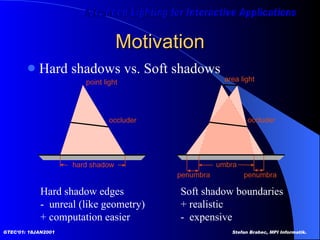
Motivation Hard shadows vs. Soft shadows Hard shadow edges -  unreal (like geometry) + computation easier Soft shadow boundaries + realistic -  expensive
Algorithms for Hard Shadows Approximated shadows Projected geometry  [Blinn88] Shadow volumes  [Crow77] Shadow maps  [Williams78] Hybrid approach  [McCool00] Extended light maps  [Brabec00]
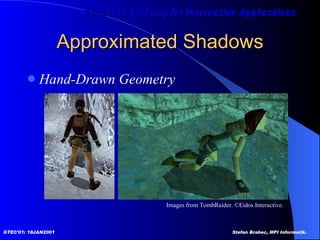
Approximated Shadows Hand-Drawn Geometry Images from TombRaider. ©Eidos Interactive.
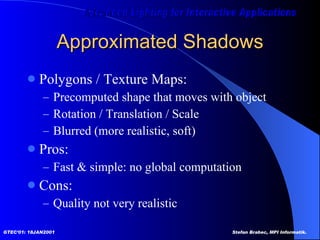
Approximated Shadows Polygons / Texture Maps: Precomputed shape that moves with object Rotation / Translation / Scale Blurred (more realistic, soft) Pros: Fast & simple: no global computation Cons: Quality not very realistic
Projected Geometry [Blinn88]  Me and my fake shadow Shadows for selected large receiver polygons Ground plane Walls
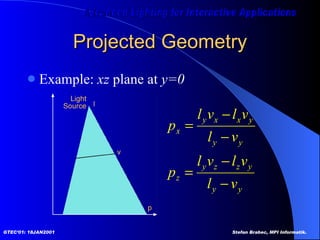
Projected Geometry Example:  xz  plane at  y=0
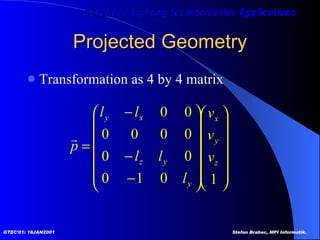
Projected Geometry Transformation as 4 by 4 matrix
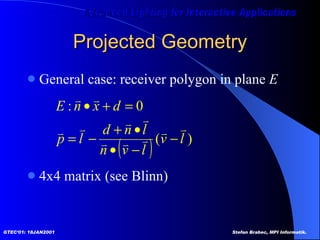
Projected Geometry General case: receiver polygon in plane  E 4x4 matrix (see Blinn)
Projected Geometry Basic algorithm Render scene (full lighting) For each receiver polygon Compute projection matrix  M Mult with actual transformation (modelview) Render selected (occluder) geometry Darken/Black
Projected Geometry Problems Z-Fighting Use bias when rendering shadow polygons Use stencil buffer (no depth test) Bounded receiver polygon ? Use stencil buffer (restrict drawing to receiver area) Shadow polygon overlap ? Use stencil count (only the first pixel gets through)
Projected Geometry Stencil buffer algorithm (1bit stencil) 1. Render scene without receiver polygon 2. Clear stencil buffer  3. Render receiver polygon - stencil operation ‘set’ (visible pixels) 4. Render shadow polygons - without depth test - stencil test ‘is set?’ - stencil operation ‘clear’ - blending e.g. ‘dest = dest * 0.2’ (darken)
Projected Geometry Wrong Shadows & Anti-Shadows Objects behind light source Objects behind receiver Solution Clipping  Use 3D-3D transformation e.g. [Heckbert97] for valid z coordinates
Projected Geometry Summary Only practical for very few, large receivers  Easy to implement Use stencil buffer (z fighting, overlap, receiver) Efficiency can be improved by rendering shadow polygons to texture maps Occluders and receiver ‘static’ for some time
Shadow Volumes [Crow77]   Shadow algorithms for computer graphics  Compute regions of shadow in 3D Object-space algorithm Cast shadows onto arbitrary receiver geometry (polygons)
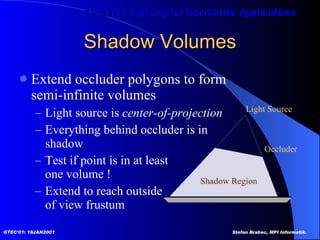
Shadow Volumes Extend occluder polygons to form  semi-infinite volumes Light source is  center-of-projection Everything behind occluder is in  shadow Test if point is in at least one volume ! Extend to reach outside of view frustum  Light Source Shadow Region Occluder
Shadow Volumes Shadow volume generation Trivial way One volume for each polygon Better Silhouette-based approach Goal: one shadow volume Selected occluders only By objects (shared edges)
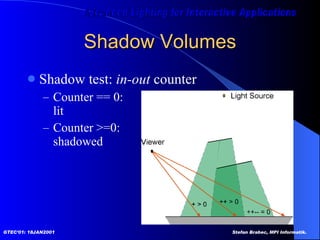
Shadow Volumes Shadow test:  in-out  counter  Counter == 0:  lit Counter >=0:  shadowed
Shadow Volumes Use stencil buffer as counter  1. Render scene (ambient color) 2. Render front-facing parts of shadow volumes   with stencil operation  increment  (enter) 3. Render back-facing parts of shadow volumes   with stencil operation  decrement  (exit) 4. Render scene (fully lit)    with stencil test  equal zero
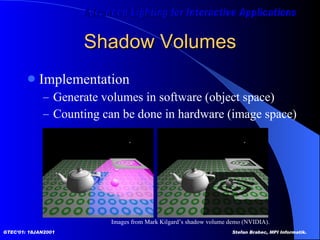
Shadow Volumes Implementation Generate volumes in software (object space) Counting can be done in hardware (image space) Images from Mark Kilgard’s shadow volume demo (NVIDIA).
Shadow Volumes Counting problems Viewer in shadow  (correct counter initialization) Correct ownership of adjacent polygons (no double hits)
Shadow Volumes Counting problems Stencil depth  8 bits for intersecting volumes Stencil wrap mode Missing shadows for ‘counter mod 2^n == 0’ Stencil clamp Missing shadows (missing some ‘enter’ events) 1 bit enough for non-intersecting volumes Generate volumes from silhouette Toggle stencil bit
Shadow Volumes Summary Shadow volumes in object precision CPU intensive, requires polygon representation Shadow test in image precision Stencil buffer count Hardware-accelerated Many, large shadow polygons Fill rate, geometry processing
Shadow Maps [Williams78]   Casting curved shadows on curved surfaces Image-space algorithm Well suited for hardware implementation
Shadow Maps Basic Algorithm Render scene as seen from light source Save back depth buffer (2D shadow map) Render scene from viewer’s position Transform pixel coordinates to light source space Compare z with z value stored in shadow map Pixel is in shadow if  z(light) < z(viewer)
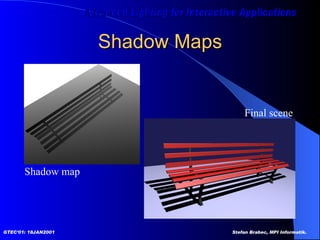
Shadow Maps Shadow map Final scene
Shadow Maps Hardware implementation Render scene to z-buffer (light source view) Depthbuffer-to-texture copy Render-to-texture / pbuffer
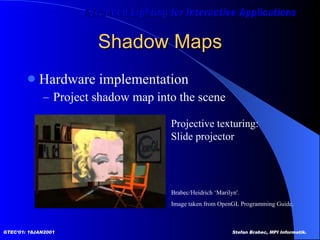
Shadow Maps Hardware implementation Project shadow map into the scene Brabec/Heidrich ‘Marilyn'. Image taken from OpenGL Programming Guide.  Projective texturing: Slide projector
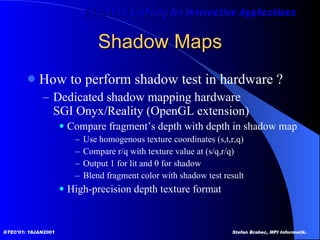
Shadow Maps How to perform shadow test in hardware ? Dedicated shadow mapping hardware SGI Onyx/Reality (OpenGL extension) Compare fragment’s depth with depth in shadow map Use homogenous texture coordinates (s,t,r,q) Compare r/q with texture value at (s/q,r/q) Output 1 for lit and 0 for shadow Blend fragment color with shadow test result High-precision depth texture format
Shadow Maps Shadow mapping using standard OpenGL   [Heidrich99] Encode depth values as alpha values Shadow test using alpha test or  programmable texture units (multi texturing)
Shadow Maps Distance to light source in alpha channel: Use 1D ramp texture and automatic  texture coordinate generation Use  fog factor  as linear distance function   [Brabec00]
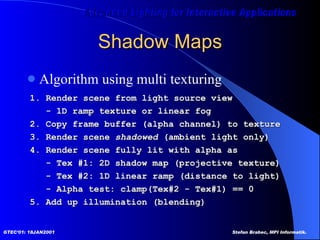
Shadow Maps Algorithm using multi texturing 1. Render scene from light source view - 1D ramp texture or linear fog 2. Copy frame buffer (alpha channel) to texture 3. Render scene  shadowed  (ambient light only) 4. Render scene fully lit with alpha as - Tex #1: 2D shadow map (projective texture) - Tex #2: 1D linear ramp (distance to light) - Alpha test: clamp(Tex#2 - Tex#1) == 0  5. Add up illumination (blending)
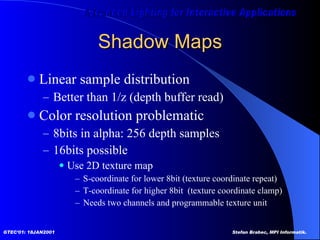
Shadow Maps Linear sample distribution Better than 1/z (depth buffer read) Color resolution problematic 8bits in alpha: 256 depth samples  16bits possible Use 2D texture map S-coordinate for lower 8bit (texture coordinate repeat) T-coordinate for higher 8bit  (texture coordinate clamp) Needs two channels and programmable texture unit
Shadow Maps Problems Needs high-resolution texture maps to sample fine details Offscreen buffers, render-to-texture  Filtering ?  Numerical problems (light leaks, surface acne) Bias needed  [Reeves87]
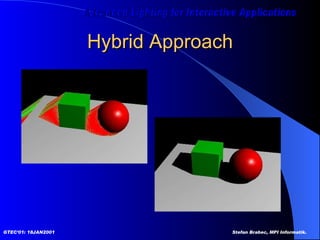
Hybrid Approach [McCool00]   Shadow volume reconstruction from depth maps  Combine the pros from shadow maps and  shadow volumes Shadow volumes generated from depth maps Reduced number of shadow volumes for very complex scenes Does not need special hardware features (standard shadow text using stencil buffer)
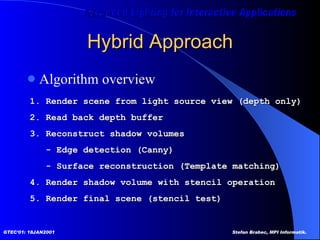
Hybrid Approach Algorithm overview 1. Render scene from light source view (depth only) 2. Read back depth buffer 3. Reconstruct shadow volumes - Edge detection (Canny) - Surface reconstruction (Template matching) 4. Render shadow volume with stencil operation 5. Render final scene (stencil test)
Hybrid Approach
Hybrid Approach Summary Better than  normal  shadow volumes for very complex scenes Volume for silhouette  Only one stencil bit (in-out toggle) Needs CPU and memory transfer Use CPU’s special instruction set OpenGL imaging extensions (convolution)
Extended Light Maps [Brabec00]  Extended Light Maps Additional calculations during shadow map generation  Utilize special hardware  features Pre-compute light-relative  ‘static’ things Use as much hardware  resources as available !
Extended Light Maps  Shadow map generation is expensive ! Additional geometry pass Needs frame buffer reconfiguration Idea Do as much work as possible  during shadow map generation
Extended Light Maps Light Maps store pre-computed illumination Extended Light Map Light Channel (RGB) Normal  light map Shadow Channel (Alpha) Alpha-encoded depth values
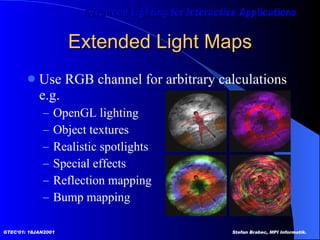
Extended Light Maps Use RGB channel for arbitrary calculations e.g. OpenGL lighting Object textures Realistic spotlights Special effects Reflection mapping Bump mapping
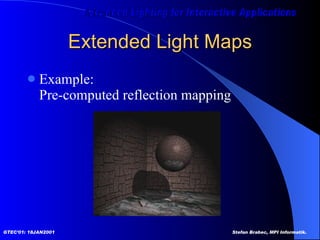
Extended Light Maps Example: Pre-computed reflection mapping
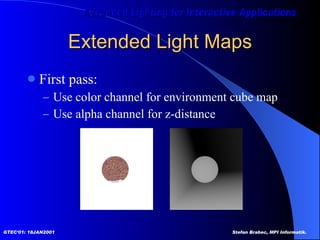
Extended Light Maps First pass: Use color channel for environment cube map Use alpha channel for z-distance
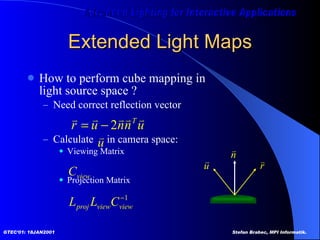
Extended Light Maps How to perform cube mapping in  light source space ? Need correct reflection vector Calculate  in camera space: Viewing Matrix Projection Matrix
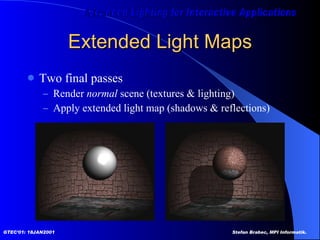
Extended Light Maps Two final passes Render  normal  scene (textures & lighting) Apply extended light map (shadows & reflections)
Algorithms for Soft Shadows Sampling the Light Source Soft Shadow Maps  [Heidrich00]
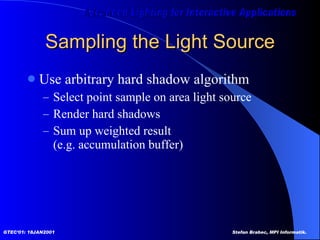
Sampling the Light Source Use arbitrary hard shadow algorithm Select point sample on area light source Render hard shadows Sum up weighted result  (e.g. accumulation buffer)
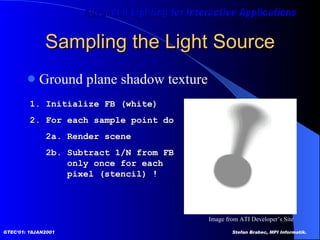
Sampling the Light Source Ground plane shadow texture 1. Initialize FB (white) 2. For each sample point do 2a. Render scene 2b. Subtract 1/N from FB   only once for each    pixel (stencil) ! Image from ATI Developer’s Site
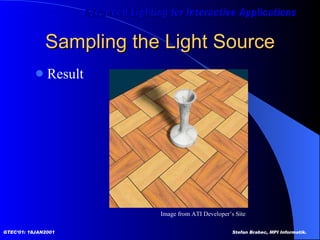
Sampling the Light Source Result Image from ATI Developer’s Site
Sampling the Light Source Number of samples == number of passes Problematic for complex scenes N samples == (N+1) levels of shadow Fully lit, fully shadowed (N-1) levels of penumbra How much samples ?
Sampling the Light Source Similar technique in  [Heckbert97]   Simulating soft shadows with graphics hardware Shadow texture for each receiver Perspective transformation Pyramid to box  Z value for clipping (behind light, behind receiver) Runs at interactive frame rates (reasonable number of receivers)
Soft Shadow Maps [Heidrich00]  Soft shadow maps for linear lights
Soft Shadow Maps [Heidrich00]  Soft penumbra regions for linear light sources Based on “traditional” shadow map algorithm Suitable for hardware and software rendering Very small number of light source samples Soft shadows at real-time / interactive frame rates
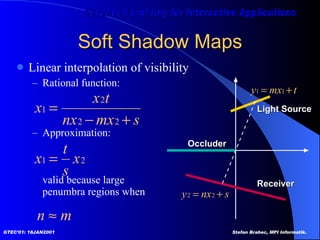
Soft Shadow Maps Visibility of light source 100% to 0% for [p1,p2] 0% for [p2,q2] 0% to 100% for [q2,q1] Idea Normal  shadow maps for umbra and completely lit regions Linear interpolation of  visibility for penumbra  regions
Soft Shadow Maps Linear interpolation of visibility Rational function: Approximation: valid because large  penumbra regions when Receiver Light Source Occluder
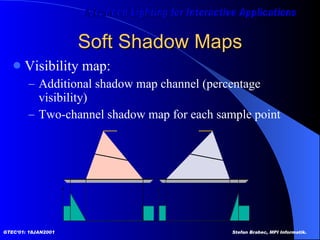
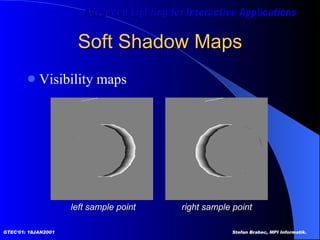
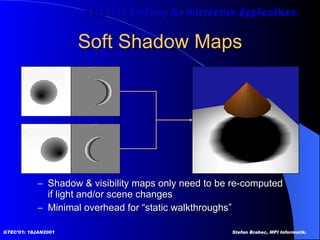
Soft Shadow Maps Visibility map: Additional shadow map channel (percentage visibility) Two-channel shadow map for each sample point
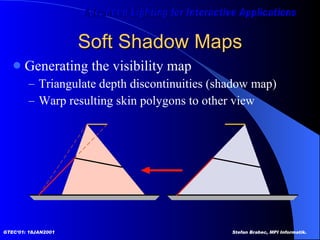
Soft Shadow Maps Generating the visibility map Triangulate depth discontinuities (shadow map) Warp resulting skin polygons to other view
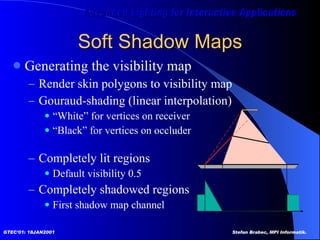
Soft Shadow Maps Generating the visibility map Render skin polygons to visibility map Gouraud-shading (linear interpolation) “ White” for vertices on receiver “ Black” for vertices on occluder Completely lit regions Default visibility 0.5 Completely shadowed regions First shadow map channel
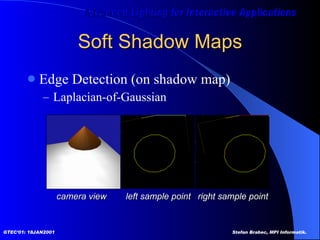
Soft Shadow Maps Edge Detection (on shadow map) Laplacian-of-Gaussian left sample point right sample point camera view
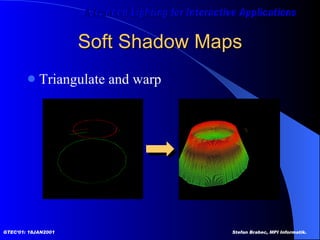
Soft Shadow Maps Triangulate and warp
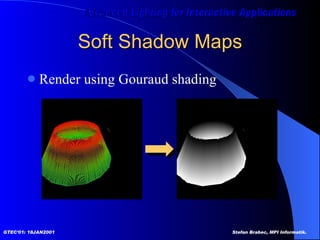
Soft Shadow Maps Render using Gouraud shading
Soft Shadow Maps Visibility maps left sample point right sample point
Soft Shadow Maps New shadow map algorithm shade(p) { if( depth 1 (p) > S 1 [p] )  l 1  = 0; else l 1  = V 1 [p] * illum(p,L 1 ); if( depth 2 (p) > S 2 [p] )  l 2  = 0; else l 2  = V 2 [p] * illum(p,L 2 ); return l 1 +l 2 ; }
Soft Shadow Maps Shadow & visibility maps only need to be re-computed if light and/or scene changes Minimal overhead for “static walkthroughs”
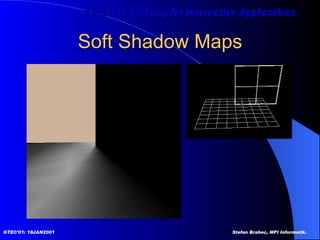
Soft Shadow Maps
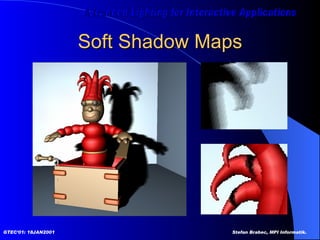
Soft Shadow Maps
Conclusion Without shadows there is no realism Good looking shadows are expensive Global effect Choice of algorithm depends on application Use CPU resources ? Use hardware resources ? Scene complexity Shadow quality
Thank you !

Advanced Lighting for Interactive Applications

  • 1.
    Advanced Lighting forInteractive Applications Shadow Algorithms Stefan Brabec Max-Planck-Institut für Informatik Saarbrücken, Germany
  • 2.
    Overview Motivation Algorithmsfor hard shadows Algorithms for soft shadows Conclusion
  • 3.
    Motivation Shadows dosignificantly contribute to the realism of rendered images Global effect which is expensive to compute Lot of work done in this area Which algorithms are suitable for interactive applications ?
  • 4.
    Motivation Hard shadowsvs. Soft shadows Hard shadow edges - unreal (like geometry) + computation easier Soft shadow boundaries + realistic - expensive
  • 5.
    Algorithms for HardShadows Approximated shadows Projected geometry [Blinn88] Shadow volumes [Crow77] Shadow maps [Williams78] Hybrid approach [McCool00] Extended light maps [Brabec00]
  • 6.
    Approximated Shadows Hand-DrawnGeometry Images from TombRaider. ©Eidos Interactive.
  • 7.
    Approximated Shadows Polygons/ Texture Maps: Precomputed shape that moves with object Rotation / Translation / Scale Blurred (more realistic, soft) Pros: Fast & simple: no global computation Cons: Quality not very realistic
  • 8.
    Projected Geometry [Blinn88] Me and my fake shadow Shadows for selected large receiver polygons Ground plane Walls
  • 9.
  • 10.
  • 11.
    Projected Geometry Generalcase: receiver polygon in plane E 4x4 matrix (see Blinn)
  • 12.
    Projected Geometry Basicalgorithm Render scene (full lighting) For each receiver polygon Compute projection matrix M Mult with actual transformation (modelview) Render selected (occluder) geometry Darken/Black
  • 13.
    Projected Geometry ProblemsZ-Fighting Use bias when rendering shadow polygons Use stencil buffer (no depth test) Bounded receiver polygon ? Use stencil buffer (restrict drawing to receiver area) Shadow polygon overlap ? Use stencil count (only the first pixel gets through)
  • 14.
    Projected Geometry Stencilbuffer algorithm (1bit stencil) 1. Render scene without receiver polygon 2. Clear stencil buffer 3. Render receiver polygon - stencil operation ‘set’ (visible pixels) 4. Render shadow polygons - without depth test - stencil test ‘is set?’ - stencil operation ‘clear’ - blending e.g. ‘dest = dest * 0.2’ (darken)
  • 15.
    Projected Geometry WrongShadows & Anti-Shadows Objects behind light source Objects behind receiver Solution Clipping Use 3D-3D transformation e.g. [Heckbert97] for valid z coordinates
  • 16.
    Projected Geometry SummaryOnly practical for very few, large receivers Easy to implement Use stencil buffer (z fighting, overlap, receiver) Efficiency can be improved by rendering shadow polygons to texture maps Occluders and receiver ‘static’ for some time
  • 17.
    Shadow Volumes [Crow77] Shadow algorithms for computer graphics Compute regions of shadow in 3D Object-space algorithm Cast shadows onto arbitrary receiver geometry (polygons)
  • 18.
    Shadow Volumes Extendoccluder polygons to form semi-infinite volumes Light source is center-of-projection Everything behind occluder is in shadow Test if point is in at least one volume ! Extend to reach outside of view frustum Light Source Shadow Region Occluder
  • 19.
    Shadow Volumes Shadowvolume generation Trivial way One volume for each polygon Better Silhouette-based approach Goal: one shadow volume Selected occluders only By objects (shared edges)
  • 20.
    Shadow Volumes Shadowtest: in-out counter Counter == 0: lit Counter >=0: shadowed
  • 21.
    Shadow Volumes Usestencil buffer as counter 1. Render scene (ambient color) 2. Render front-facing parts of shadow volumes with stencil operation increment (enter) 3. Render back-facing parts of shadow volumes with stencil operation decrement (exit) 4. Render scene (fully lit) with stencil test equal zero
  • 22.
    Shadow Volumes ImplementationGenerate volumes in software (object space) Counting can be done in hardware (image space) Images from Mark Kilgard’s shadow volume demo (NVIDIA).
  • 23.
    Shadow Volumes Countingproblems Viewer in shadow (correct counter initialization) Correct ownership of adjacent polygons (no double hits)
  • 24.
    Shadow Volumes Countingproblems Stencil depth 8 bits for intersecting volumes Stencil wrap mode Missing shadows for ‘counter mod 2^n == 0’ Stencil clamp Missing shadows (missing some ‘enter’ events) 1 bit enough for non-intersecting volumes Generate volumes from silhouette Toggle stencil bit
  • 25.
    Shadow Volumes SummaryShadow volumes in object precision CPU intensive, requires polygon representation Shadow test in image precision Stencil buffer count Hardware-accelerated Many, large shadow polygons Fill rate, geometry processing
  • 26.
    Shadow Maps [Williams78] Casting curved shadows on curved surfaces Image-space algorithm Well suited for hardware implementation
  • 27.
    Shadow Maps BasicAlgorithm Render scene as seen from light source Save back depth buffer (2D shadow map) Render scene from viewer’s position Transform pixel coordinates to light source space Compare z with z value stored in shadow map Pixel is in shadow if z(light) < z(viewer)
  • 28.
    Shadow Maps Shadowmap Final scene
  • 29.
    Shadow Maps Hardwareimplementation Render scene to z-buffer (light source view) Depthbuffer-to-texture copy Render-to-texture / pbuffer
  • 30.
    Shadow Maps Hardwareimplementation Project shadow map into the scene Brabec/Heidrich ‘Marilyn'. Image taken from OpenGL Programming Guide. Projective texturing: Slide projector
  • 31.
    Shadow Maps Howto perform shadow test in hardware ? Dedicated shadow mapping hardware SGI Onyx/Reality (OpenGL extension) Compare fragment’s depth with depth in shadow map Use homogenous texture coordinates (s,t,r,q) Compare r/q with texture value at (s/q,r/q) Output 1 for lit and 0 for shadow Blend fragment color with shadow test result High-precision depth texture format
  • 32.
    Shadow Maps Shadowmapping using standard OpenGL [Heidrich99] Encode depth values as alpha values Shadow test using alpha test or programmable texture units (multi texturing)
  • 33.
    Shadow Maps Distanceto light source in alpha channel: Use 1D ramp texture and automatic texture coordinate generation Use fog factor as linear distance function [Brabec00]
  • 34.
    Shadow Maps Algorithmusing multi texturing 1. Render scene from light source view - 1D ramp texture or linear fog 2. Copy frame buffer (alpha channel) to texture 3. Render scene shadowed (ambient light only) 4. Render scene fully lit with alpha as - Tex #1: 2D shadow map (projective texture) - Tex #2: 1D linear ramp (distance to light) - Alpha test: clamp(Tex#2 - Tex#1) == 0 5. Add up illumination (blending)
  • 35.
    Shadow Maps Linearsample distribution Better than 1/z (depth buffer read) Color resolution problematic 8bits in alpha: 256 depth samples 16bits possible Use 2D texture map S-coordinate for lower 8bit (texture coordinate repeat) T-coordinate for higher 8bit (texture coordinate clamp) Needs two channels and programmable texture unit
  • 36.
    Shadow Maps ProblemsNeeds high-resolution texture maps to sample fine details Offscreen buffers, render-to-texture Filtering ? Numerical problems (light leaks, surface acne) Bias needed [Reeves87]
  • 37.
    Hybrid Approach [McCool00] Shadow volume reconstruction from depth maps Combine the pros from shadow maps and shadow volumes Shadow volumes generated from depth maps Reduced number of shadow volumes for very complex scenes Does not need special hardware features (standard shadow text using stencil buffer)
  • 38.
    Hybrid Approach Algorithmoverview 1. Render scene from light source view (depth only) 2. Read back depth buffer 3. Reconstruct shadow volumes - Edge detection (Canny) - Surface reconstruction (Template matching) 4. Render shadow volume with stencil operation 5. Render final scene (stencil test)
  • 39.
  • 40.
    Hybrid Approach SummaryBetter than normal shadow volumes for very complex scenes Volume for silhouette Only one stencil bit (in-out toggle) Needs CPU and memory transfer Use CPU’s special instruction set OpenGL imaging extensions (convolution)
  • 41.
    Extended Light Maps[Brabec00] Extended Light Maps Additional calculations during shadow map generation Utilize special hardware features Pre-compute light-relative ‘static’ things Use as much hardware resources as available !
  • 42.
    Extended Light Maps Shadow map generation is expensive ! Additional geometry pass Needs frame buffer reconfiguration Idea Do as much work as possible during shadow map generation
  • 43.
    Extended Light MapsLight Maps store pre-computed illumination Extended Light Map Light Channel (RGB) Normal light map Shadow Channel (Alpha) Alpha-encoded depth values
  • 44.
    Extended Light MapsUse RGB channel for arbitrary calculations e.g. OpenGL lighting Object textures Realistic spotlights Special effects Reflection mapping Bump mapping
  • 45.
    Extended Light MapsExample: Pre-computed reflection mapping
  • 46.
    Extended Light MapsFirst pass: Use color channel for environment cube map Use alpha channel for z-distance
  • 47.
    Extended Light MapsHow to perform cube mapping in light source space ? Need correct reflection vector Calculate in camera space: Viewing Matrix Projection Matrix
  • 48.
    Extended Light MapsTwo final passes Render normal scene (textures & lighting) Apply extended light map (shadows & reflections)
  • 49.
    Algorithms for SoftShadows Sampling the Light Source Soft Shadow Maps [Heidrich00]
  • 50.
    Sampling the LightSource Use arbitrary hard shadow algorithm Select point sample on area light source Render hard shadows Sum up weighted result (e.g. accumulation buffer)
  • 51.
    Sampling the LightSource Ground plane shadow texture 1. Initialize FB (white) 2. For each sample point do 2a. Render scene 2b. Subtract 1/N from FB only once for each pixel (stencil) ! Image from ATI Developer’s Site
  • 52.
    Sampling the LightSource Result Image from ATI Developer’s Site
  • 53.
    Sampling the LightSource Number of samples == number of passes Problematic for complex scenes N samples == (N+1) levels of shadow Fully lit, fully shadowed (N-1) levels of penumbra How much samples ?
  • 54.
    Sampling the LightSource Similar technique in [Heckbert97] Simulating soft shadows with graphics hardware Shadow texture for each receiver Perspective transformation Pyramid to box Z value for clipping (behind light, behind receiver) Runs at interactive frame rates (reasonable number of receivers)
  • 55.
    Soft Shadow Maps[Heidrich00] Soft shadow maps for linear lights
  • 56.
    Soft Shadow Maps[Heidrich00] Soft penumbra regions for linear light sources Based on “traditional” shadow map algorithm Suitable for hardware and software rendering Very small number of light source samples Soft shadows at real-time / interactive frame rates
  • 57.
    Soft Shadow MapsVisibility of light source 100% to 0% for [p1,p2] 0% for [p2,q2] 0% to 100% for [q2,q1] Idea Normal shadow maps for umbra and completely lit regions Linear interpolation of visibility for penumbra regions
  • 58.
    Soft Shadow MapsLinear interpolation of visibility Rational function: Approximation: valid because large penumbra regions when Receiver Light Source Occluder
  • 59.
    Soft Shadow MapsVisibility map: Additional shadow map channel (percentage visibility) Two-channel shadow map for each sample point
  • 60.
    Soft Shadow MapsGenerating the visibility map Triangulate depth discontinuities (shadow map) Warp resulting skin polygons to other view
  • 61.
    Soft Shadow MapsGenerating the visibility map Render skin polygons to visibility map Gouraud-shading (linear interpolation) “ White” for vertices on receiver “ Black” for vertices on occluder Completely lit regions Default visibility 0.5 Completely shadowed regions First shadow map channel
  • 62.
    Soft Shadow MapsEdge Detection (on shadow map) Laplacian-of-Gaussian left sample point right sample point camera view
  • 63.
    Soft Shadow MapsTriangulate and warp
  • 64.
    Soft Shadow MapsRender using Gouraud shading
  • 65.
    Soft Shadow MapsVisibility maps left sample point right sample point
  • 66.
    Soft Shadow MapsNew shadow map algorithm shade(p) { if( depth 1 (p) > S 1 [p] ) l 1 = 0; else l 1 = V 1 [p] * illum(p,L 1 ); if( depth 2 (p) > S 2 [p] ) l 2 = 0; else l 2 = V 2 [p] * illum(p,L 2 ); return l 1 +l 2 ; }
  • 67.
    Soft Shadow MapsShadow & visibility maps only need to be re-computed if light and/or scene changes Minimal overhead for “static walkthroughs”
  • 68.
  • 69.
  • 70.
    Conclusion Without shadowsthere is no realism Good looking shadows are expensive Global effect Choice of algorithm depends on application Use CPU resources ? Use hardware resources ? Scene complexity Shadow quality
  • 71.