Stuttgart, April 23 - 26 2013
Hair Rendering in
Tomb Raider
Stephan Hodes, AMD
Wolfgang Engel, Confetti
Confetti
● Think-Tank for game and movie related industries
● Middleware packages
● Global Illumination – Aura
● Skydome system – Ephemeris
● Post-Processing Pipeline - PixelPuzzle
● Clients: INTEL, Qualcomm, AMD, many game
developers (“Engine Tuner”)
● Provides software solutions for games, movies and
tools for GPU manufacturers
● http://www.conffx.com
Overview
• Motivation/History
• Hair Authoring
• Simulation
• Rendering
● Geometry Expansion
● Anti-Aliasing
● Lighting/Shadows
● Per-Pixel linked list Usage
● Blend & Sort
● Performance Numbers
Motivation/History
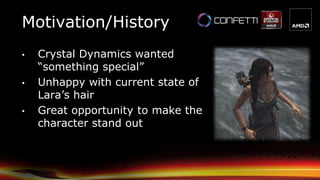
• Crystal Dynamics wanted
“something special”
• Unhappy with current state of
Lara’s hair
• Great opportunity to make the
character stand out
Motivation/History
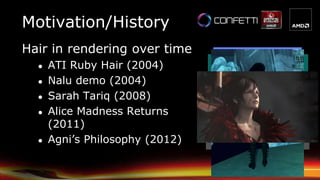
Hair in rendering over time
● ATI Ruby Hair (2004)
● Nalu demo (2004)
● Sarah Tariq (2008)
● Alice Madness Returns
(2011)
● Agni’s Philosophy (2012)
Motivation/History
● AMD presented TressFX sample to Crystal Dynamics
● Character model seemed somewhat familiar to them 
● Based on “A Framework for Rendering Complex
Scattering Effects on Hair“ [Yu et. All]
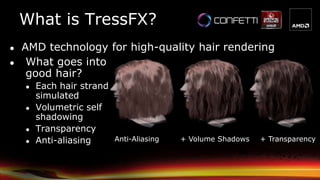
What is TressFX?
Anti-Aliasing + Volume Shadows + Transparency
● What goes into
good hair?
● Each hair strand
simulated
● Volumetric self
shadowing
● Transparency
● Anti-aliasing
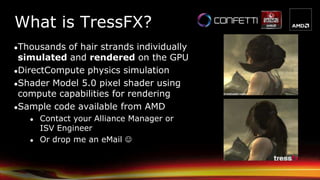
● AMD technology for high-quality hair rendering
What is TressFX?
●Thousands of hair strands individually
simulated and rendered on the GPU
●DirectCompute physics simulation
●Shader Model 5.0 pixel shader using
compute capabilities for rendering
●Sample code available from AMD
● Contact your Alliance Manager or
ISV Engineer
● Or drop me an eMail 
Integration
● Team effort involving multiple teams
● Square Enix
● Crystal Dynamics
● Nixxes
● AMD
● Confetti
● Confetti worked on integration, optimization and content pipeline
● Iteration on optimizations throughout the project by all teams
● Project duration ~6 months
● SDK sample continuously updated to reflect most changes
Hair Authoring
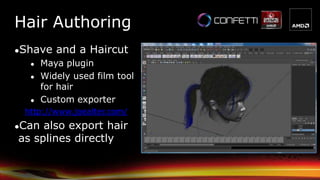
●Shave and a Haircut
● Maya plugin
● Widely used film tool
for hair
● Custom exporter
http://www.joealter.com/
●Can also export hair
as splines directly
Hair Authoring
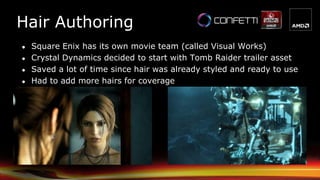
● Square Enix has its own movie team (called Visual Works)
● Crystal Dynamics decided to start with Tomb Raider trailer asset
● Saved a lot of time since hair was already styled and ready to use
● Had to add more hairs for coverage
Hair Authoring
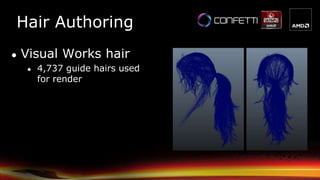
● Visual Works hair
● 4,737 guide hairs used
for render
Hair Authoring
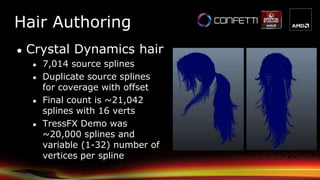
● Crystal Dynamics hair
● 7,014 source splines
● Duplicate source splines
for coverage with offset
● Final count is ~21,042
splines with 16 verts
● TressFX Demo was
~20,000 splines and
variable (1-32) number of
vertices per spline
Hair Authoring
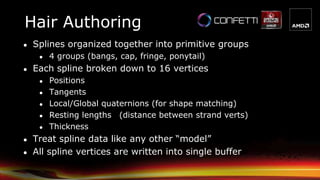
● Splines organized together into primitive groups
● 4 groups (bangs, cap, fringe, ponytail)
● Each spline broken down to 16 vertices
● Positions
● Tangents
● Local/Global quaternions (for shape matching)
● Resting lengths (distance between strand verts)
● Thickness
● Treat spline data like any other “model”
● All spline vertices are written into single buffer
Simulation
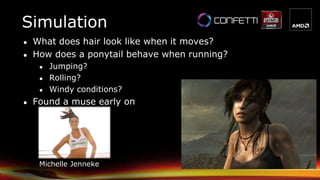
● What does hair look like when it moves?
● How does a ponytail behave when running?
● Jumping?
● Rolling?
● Windy conditions?
● Found a muse early on
Michelle Jenneke
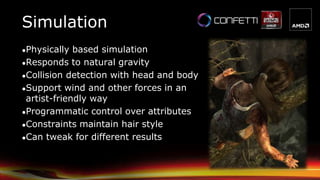
●Physically based simulation
●Responds to natural gravity
●Collision detection with head and body
●Support wind and other forces in an
artist-friendly way
●Programmatic control over attributes
●Constraints maintain hair style
●Can tweak for different results
Simulation
●Initialization is performed on CPU only once
● Preferably offline
●Update is performed at each frame on GPU
● All data resides on the GPU
●Update of one strand is a serial process but
independent to other strands.
● So we can update multiple strands in parallel
Simulation
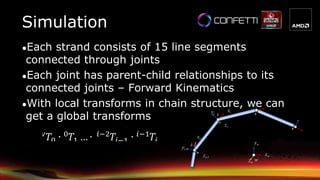
●Each strand consists of 15 line segments
connected through joints
●Each joint has parent-child relationships to its
connected joints – Forward Kinematics
●With local transforms in chain structure, we can
get a global transforms i
i-1
xiyi
zi
w
xw
yw
zw
xi-1
yi-1
zi-1
Simulation
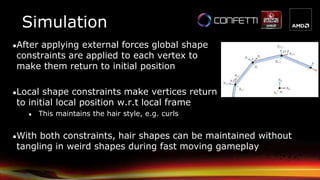
●After applying external forces global shape
constraints are applied to each vertex to
make them return to initial position
●Local shape constraints make vertices return
to initial local position w.r.t local frame
● This maintains the hair style, e.g. curls
●With both constraints, hair shapes can be maintained without
tangling in weird shapes during fast moving gameplay
Simulation
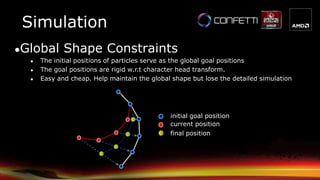
●Global Shape Constraints
● The initial positions of particles serve as the global goal positions
● The goal positions are rigid w.r.t character head transform.
● Easy and cheap. Help maintain the global shape but lose the detailed simulation
initial goal position
current position
final position
Simulation
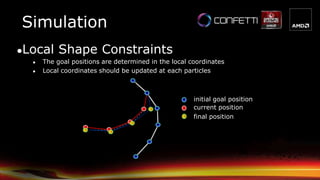
●Local Shape Constraints
● The goal positions are determined in the local coordinates
● Local coordinates should be updated at each particles
initial goal position
current position
final position
Simulation
Simulation
● In Tomb Raider Simulation consisted of 5 shaders (A-E)
● A: Gravity + Integration and Global Shape Matching
● B: Local Shape Constraints
● C: Wind application and length constraint enforcement
● D: Extra length constraint for erratic movement
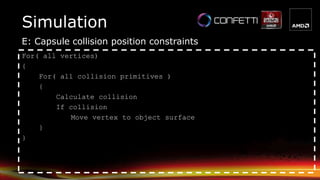
● E: Capsule collision position constraints
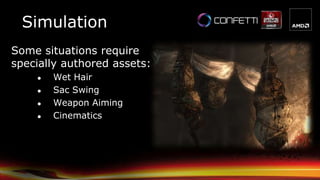
Some situations require
specially authored assets:
● Wet Hair
● Sac Swing
● Weapon Aiming
● Cinematics
Simulation
Simulation
● Use hair profiles to drive the simulation of each group
● These allow us to set up parameters to define hair in
different states (dry vs wet for example)
● Profile data is blended together when changes are needed
i.e. when going from dry to wet or vice versa
● Use a total of 7 simulation profiles
Dry, Mid Wet, Wet, Weapon Aiming, Upside Down,
Upside Down Sac Swing, Special Cine Clamp Down
Visualization
● Overview
● Geometry Expansion
● Anti-Aliasing
● Lighting
● Shadows
● Per-Pixel linked list Usage
● Blend & Sort
● Performance Numbers
Overview
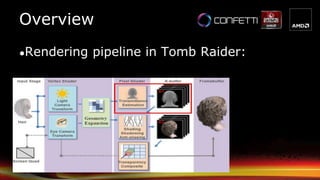
●The original rendering pipeline stages from
the paper [Yu et. All]
Overview
●Rendering pipeline in Tomb Raider:
Geometry Expansion
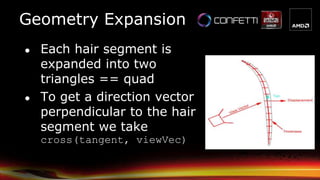
● Each hair segment is
expanded into two
triangles == quad
● To get a direction vector
perpendicular to the hair
segment we take
cross(tangent, viewVec)
Geometry Expansion
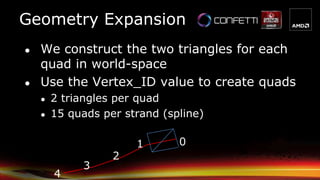
● We construct the two triangles for each
quad in world-space
● Use the Vertex_ID value to create quads
● 2 triangles per quad
● 15 quads per strand (spline)
01
2
3
4
Geometry Expansion
● In a second step the quad is projected into
screen-space and expanded by pixel width
(user defined value)
● Ensures a strand covers at least a pixel
width
Geometry Expansion
● Draw call
● Empty index and vertex buffer
● Pull vertex data from Compute results
● Use SV_VertexID to lookup vertex data
Geometry Expansion
● What number to provide to the draw call?
● Example
● For example you have
One hair strand with 16 vertices or 15 segments
-> draw call consists of number of segments * 6
-> 90 vertices
● In the “cooker” we count the number of segments
and take the number of segments * 6
-> this is what is provided to the draw call
Geometry Expansion
● Final output consists of:
● Position
● Tangent
● Left hair edge (screen-space) for AA (later in
code p0)
● Right hair edge (screen-space) for AA (later in
code p1)
● Texture coordinates
● Calculating the pixel distance to the closest
hair edge similar to GPAA [Persson]
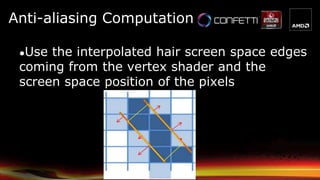
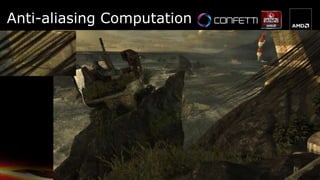
Anti-aliasing Computation
●Use the interpolated hair screen space edges
coming from the vertex shader and the
screen space position of the pixels
Anti-aliasing Computation
● The distance from the edge to the pixel center
is considered the alpha value for alpha
blending
● Higher value -> less transparent
● Lower value -> more transparent
●Inside hair strand -> 1.0
●Outside hair strand < 1.0
● Then alpha blending is used to blend the hair
into the frame buffer
// p0 / p1 are the interpolated values on the edge of the hair, coming from
// the vertex shader
p0dist = length(p0 - pixelLoc);
p1dist = length(p1 - pixelLoc);
hairWidth = length(p0 - p1);
// figure out if we are inside or outside the hair
// if we are outside the hair we want to scale towards zero, if we are
// inside, we want to scale towards 1
// will be 1.f if pixel outside hair, 0.f if pixel inside hair
outside = any( float2(step(hairWidth, p0dist), step(hairWidth,p1dist)) );
sign = outside > 0.f ? -1.f : 1.f;
// signed distance (positive if inside hair, negative if outside hair)
relDist = sign * saturate( min(p0dist, p1dist) );
// returns coverage based on the relative distance
// 0, if completely outside hair edge
// 1, if completely inside hair edge
return (relDist + 1.f) * 0.5f;
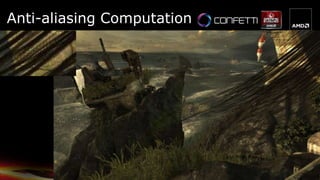
Anti-aliasing Computation
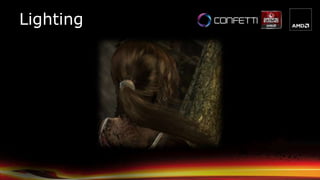
Lighting
Lighting
● Lighting of Hair uses the modified
Kajiya & Kay model [Kajiya]
● Hair strand == infinitely thin cylinder
● Anistropic strand lighting model
● Similar to standard Blinn- Phong: uses
hair Tangent T instead of Normal
yspecularit
yspecularit
specular
diffuse
2
22
)(1),sin(
)(1),cos(1),sin(
HTHT
LTLTLT
Lighting
● This lighting model was modified by
Marschner [Marschner] [Scheuermann]
● Math is complex, we’re just trying to
match these observations
phenomenologically 
Lighting
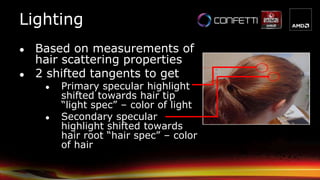
● Based on measurements of
hair scattering properties
● 2 shifted tangents to get
● Primary specular highlight
shifted towards hair tip
“light spec” – color of light
● Secondary specular
highlight shifted towards
hair root “hair spec” – color
of hair
Lighting
● Lighting equation
(ambient + diffuse + hair spec) * hair color + light
spec
● Use a diffuse texture for the hair
-> gives different hair strands different color
● Use hemispherical ambient lighting or
irradiance coefficient depending on unit
● Had 2 rendering profiles that described dry vs.
wet hair
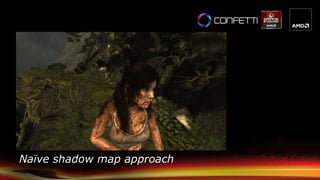
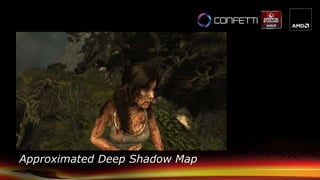
● Deep shadow maps is too expensive
● Following the existing shadow map approach, the
hair shadows were approximated
● Render hair splines as lines to shadow maps
● Do a deep shadow approximation when self-occluding hair
● Compare the depth in the shadow map == the closest to the
light with the depth of the hair strand that we are currently
drawing
● If the distance between the hair strand that is currently drawn
and the hair strand that is the closest to the light is large, the
shadow value is darker
● Bottom hair receives darker shadow values
● Top hairs receives brighter shadow values
Shadows
● Each shadow term is stored in the per-pixel
linked list combined with the lighting for each
strand
● After the per-pixel linked list is “resolved” the
resulting value is written into the framebuffer
● In case there is a tree shadow on top of hair,
it will be dark from that shadow already
Shadows
● Source code:
// lightSpaceLinearDepth – depth of the renderer hair pixel
// shadowLinearDepth – depth in the shadow map – only holds the closest to the light
float depthRange = max(0.f, lightSpaceLinearDepth - shadowLinearDepth);
// invFiberWidth – artist defined value what the width of the hair strands should be
float numFibers = depthRange * invFiberWidth;
if(depthRange > 1e-5) // 0.00001
numFibers += 1;
//
// stronger shadow term the deeper the fragment is within the hair
// g_FiberAlpha – artist defined value to control the strength of the shadow value
return pow(abs(1 - g_FiberAlpha), numFibers);
Shadows
Naïve shadow map approach
Approximated Deep Shadow Map
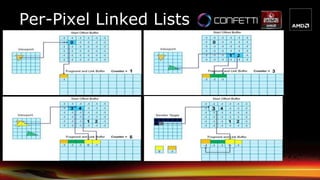
• Based on “Real-Time Concurrent Linked List
Construction on the GPU” [Yang]
• Each element holds three packed uints
• Fragment color (4 byte) (alpha in fourth channel)
• Depth (4 byte)
• + link (4 byte)
• Allocation is resolution * 12 bytes * 8
• Works well 99% of the time
• Can cause artifacts if hair takes up the entire screen
• At 1080p this costs ~200 MB
• Slightly higher in multi monitor setups (* 12)
Per-Pixel Linked Lists
● Requires two buffers
● Fragment and link buffer – holds elements
struct FragmentAndLinkBuffer_STRUCT
{
FramentData_STRUCT FragmentData;
uint uNext;
}
RWStructuredBuffer<FragmentAndLinkBuffer_STRUCT>FLBuffer;
● A “Start Offset Buffer” (SOB) holds offsets
Per-Pixel Linked Lists
●Traversing:
● viewport / SOB same size
● Look at the pixel in the SOB
● then follow the uNext entry in FLB until it is -1
Per-Pixel Linked Lists
Sort & Blend
● From the maximum 256 layers only the top
8 layers were sorted based on depth
● The remaining layers were just blended out
of order
● Hair is stenciled out - so only the
necessary pixels are touched
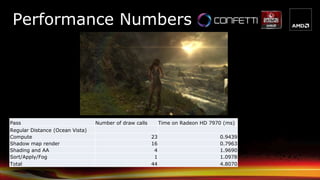
Performance Numbers
Pass Number of draw calls Time on Radeon HD 7970 (ms)
Regular Distance (Ocean Vista)
Compute 23 0.9439
Shadow map render 16 0.7963
Shading and AA 4 1.9690
Sort/Apply/Fog 1 1.0978
Total 44 4.8070
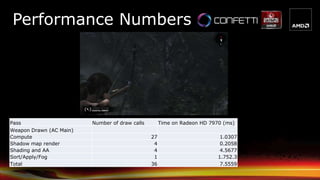
Pass Number of draw calls Time on Radeon HD 7970 (ms)
Weapon Drawn (AC Main)
Compute 27 1.0307
Shadow map render 4 0.2058
Shading and AA 4 4.5677
Sort/Apply/Fog 1 1.752.3
Total 36 7.5559
Performance Numbers
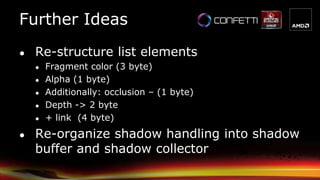
Further Ideas
● Re-structure list elements
● Fragment color (3 byte)
● Alpha (1 byte)
● Additionally: occlusion – (1 byte)
● Depth -> 2 byte
● + link (4 byte)
● Re-organize shadow handling into shadow
buffer and shadow collector
References
● [Yang] Jason C. Yang, Justin Hensley, Holger Grün, Nicolas Thibieroz, “Real-Time
Concurrent Linked List Construction on the GPU”, EGSR'10
● [Kajiya] J. Kajiya, T. Kay, “Rendering fur with three dimensional textures”, in
SIGGRAPH 89 conference proceedings, pp. 271 – 280, 1989
● [Marschner] Stephen R. Marschner, Henrik Wann Jensen, Mike Cammarano, Steve
Worley, and Pat Hanrahan, “Light Scattering from Human Hair Fibers”, in SIGGRAPH
2003 proceedings.
● [Persson] Emil Persson, “Geometric Anti-Aliasing Methods”, GPU Pro 3, CRC Press
● [Scheuermann] Thorsten Scheuermann, “Hair Rendering and Shading”, ShaderX 3
● [Yu et. All] Xuan Yu, Jason C. Yang, Justin Hensley, Takahiro Harada, Jingyi Yu. "A
Framework for Rendering Complex Scattering Effects on Hair", Interactive 3D
Graphics & Games (I3D), 2012
http://www.eecis.udel.edu/~xyu/publications/frameworkhair124.pdf
● Entire team at Nixxes
● Confetti
● Tim Martin
● AMD
● Jason Yang
● Karl Hillesland
● Dongsoo Han
● Nicolas Thibieroz
● Crystal Dynamics
● Jason Lacroix
● Tim Pease
● Brian Horton
● Morten Mikkelsen
Special Thanks
Wolfgang Engel wolf@conffx.com
http://www.conffx.com
Stephan Hodes stephan.hodes@amd.com
http://developer.amd.com/tools/graphics-development/amd-radeon-sdk/
Contact
Backup Slides
A: Gravity + Integration and Global Shape Matching
Simulation
For( each vertex i )
{
// integrate
NewPos = CurPos + g_Gravity * g_TimeStep^2;
// Global constraints
NewPos += stiffness * (CurPos – NewPos);
}
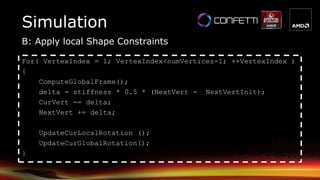
B: Apply local Shape Constraints
Simulation
For( VertexIndex = 1; VertexIndex<numVertices-1; ++VertexIndex )
{
ComputeGlobalFrame();
delta = stiffness * 0.5 * (NextVert - NextVertInit);
CurVert -= delta;
NextVert += delta;
UpdateCurLocalRotation ();
UpdateCurGlobalRotation();
}
C: Wind application and length constraint enforcement
Simulation
For( each vertex i )
{
// Apply Wind
a = (globalStrandIndex % 5) / 5;
w = a*g_Wind + (1-a)*g_Wind1 + a*g_Wind2 + (1-a)*g_Wind3;
V = pos[i] – pos[i+1];
Force = cross( cross(v, w), v );
Pos[i] = force * g_timeStep^2;
// Apply length constraint
delta = pos[i+1] – pos[i];
Stretching = 1-targetDistance / length(delta);
delta = stretching*delta;
pos[0] += 0.5*delta*stiffness;
pos[1] -= 0.5*delta*stiffness;
}
Simulation
D: Extra length constraint for erratic movement
For( vertex = 1; vertex<numVertices; ++vertex )
{
dir = pos[vertex] – pos[vertex-1]
len = length( dir )
dist = min( len, acceptableLength )
pos[vertex] = pos[vertex-1] + (dir * dist/len )
}
Simulation
E: Capsule collision position constraints
For( all vertices)
{
For( all collision primitives )
{
Calculate collision
If collision
Move vertex to object surface
}
}

Hair in Tomb Raider

  • 1.
    Stuttgart, April 23- 26 2013 Hair Rendering in Tomb Raider Stephan Hodes, AMD Wolfgang Engel, Confetti
  • 2.
    Confetti ● Think-Tank forgame and movie related industries ● Middleware packages ● Global Illumination – Aura ● Skydome system – Ephemeris ● Post-Processing Pipeline - PixelPuzzle ● Clients: INTEL, Qualcomm, AMD, many game developers (“Engine Tuner”) ● Provides software solutions for games, movies and tools for GPU manufacturers ● http://www.conffx.com
  • 3.
    Overview • Motivation/History • HairAuthoring • Simulation • Rendering ● Geometry Expansion ● Anti-Aliasing ● Lighting/Shadows ● Per-Pixel linked list Usage ● Blend & Sort ● Performance Numbers
  • 4.
    Motivation/History • Crystal Dynamicswanted “something special” • Unhappy with current state of Lara’s hair • Great opportunity to make the character stand out
  • 5.
    Motivation/History Hair in renderingover time ● ATI Ruby Hair (2004) ● Nalu demo (2004) ● Sarah Tariq (2008) ● Alice Madness Returns (2011) ● Agni’s Philosophy (2012)
  • 6.
    Motivation/History ● AMD presentedTressFX sample to Crystal Dynamics ● Character model seemed somewhat familiar to them  ● Based on “A Framework for Rendering Complex Scattering Effects on Hair“ [Yu et. All]
  • 7.
    What is TressFX? Anti-Aliasing+ Volume Shadows + Transparency ● What goes into good hair? ● Each hair strand simulated ● Volumetric self shadowing ● Transparency ● Anti-aliasing ● AMD technology for high-quality hair rendering
  • 8.
    What is TressFX? ●Thousandsof hair strands individually simulated and rendered on the GPU ●DirectCompute physics simulation ●Shader Model 5.0 pixel shader using compute capabilities for rendering ●Sample code available from AMD ● Contact your Alliance Manager or ISV Engineer ● Or drop me an eMail 
  • 9.
    Integration ● Team effortinvolving multiple teams ● Square Enix ● Crystal Dynamics ● Nixxes ● AMD ● Confetti ● Confetti worked on integration, optimization and content pipeline ● Iteration on optimizations throughout the project by all teams ● Project duration ~6 months ● SDK sample continuously updated to reflect most changes
  • 10.
    Hair Authoring ●Shave anda Haircut ● Maya plugin ● Widely used film tool for hair ● Custom exporter http://www.joealter.com/ ●Can also export hair as splines directly
  • 11.
    Hair Authoring ● SquareEnix has its own movie team (called Visual Works) ● Crystal Dynamics decided to start with Tomb Raider trailer asset ● Saved a lot of time since hair was already styled and ready to use ● Had to add more hairs for coverage
  • 12.
    Hair Authoring ● VisualWorks hair ● 4,737 guide hairs used for render
  • 13.
    Hair Authoring ● CrystalDynamics hair ● 7,014 source splines ● Duplicate source splines for coverage with offset ● Final count is ~21,042 splines with 16 verts ● TressFX Demo was ~20,000 splines and variable (1-32) number of vertices per spline
  • 14.
    Hair Authoring ● Splinesorganized together into primitive groups ● 4 groups (bangs, cap, fringe, ponytail) ● Each spline broken down to 16 vertices ● Positions ● Tangents ● Local/Global quaternions (for shape matching) ● Resting lengths (distance between strand verts) ● Thickness ● Treat spline data like any other “model” ● All spline vertices are written into single buffer
  • 15.
    Simulation ● What doeshair look like when it moves? ● How does a ponytail behave when running? ● Jumping? ● Rolling? ● Windy conditions? ● Found a muse early on Michelle Jenneke
  • 16.
    ●Physically based simulation ●Respondsto natural gravity ●Collision detection with head and body ●Support wind and other forces in an artist-friendly way ●Programmatic control over attributes ●Constraints maintain hair style ●Can tweak for different results Simulation
  • 17.
    ●Initialization is performedon CPU only once ● Preferably offline ●Update is performed at each frame on GPU ● All data resides on the GPU ●Update of one strand is a serial process but independent to other strands. ● So we can update multiple strands in parallel Simulation
  • 18.
    ●Each strand consistsof 15 line segments connected through joints ●Each joint has parent-child relationships to its connected joints – Forward Kinematics ●With local transforms in chain structure, we can get a global transforms i i-1 xiyi zi w xw yw zw xi-1 yi-1 zi-1 Simulation
  • 19.
    ●After applying externalforces global shape constraints are applied to each vertex to make them return to initial position ●Local shape constraints make vertices return to initial local position w.r.t local frame ● This maintains the hair style, e.g. curls ●With both constraints, hair shapes can be maintained without tangling in weird shapes during fast moving gameplay Simulation
  • 20.
    ●Global Shape Constraints ●The initial positions of particles serve as the global goal positions ● The goal positions are rigid w.r.t character head transform. ● Easy and cheap. Help maintain the global shape but lose the detailed simulation initial goal position current position final position Simulation
  • 21.
    ●Local Shape Constraints ●The goal positions are determined in the local coordinates ● Local coordinates should be updated at each particles initial goal position current position final position Simulation
  • 22.
    Simulation ● In TombRaider Simulation consisted of 5 shaders (A-E) ● A: Gravity + Integration and Global Shape Matching ● B: Local Shape Constraints ● C: Wind application and length constraint enforcement ● D: Extra length constraint for erratic movement ● E: Capsule collision position constraints
  • 23.
    Some situations require speciallyauthored assets: ● Wet Hair ● Sac Swing ● Weapon Aiming ● Cinematics Simulation
  • 24.
    Simulation ● Use hairprofiles to drive the simulation of each group ● These allow us to set up parameters to define hair in different states (dry vs wet for example) ● Profile data is blended together when changes are needed i.e. when going from dry to wet or vice versa ● Use a total of 7 simulation profiles Dry, Mid Wet, Wet, Weapon Aiming, Upside Down, Upside Down Sac Swing, Special Cine Clamp Down
  • 25.
    Visualization ● Overview ● GeometryExpansion ● Anti-Aliasing ● Lighting ● Shadows ● Per-Pixel linked list Usage ● Blend & Sort ● Performance Numbers
  • 26.
    Overview ●The original renderingpipeline stages from the paper [Yu et. All]
  • 27.
  • 28.
    Geometry Expansion ● Eachhair segment is expanded into two triangles == quad ● To get a direction vector perpendicular to the hair segment we take cross(tangent, viewVec)
  • 29.
    Geometry Expansion ● Weconstruct the two triangles for each quad in world-space ● Use the Vertex_ID value to create quads ● 2 triangles per quad ● 15 quads per strand (spline) 01 2 3 4
  • 30.
    Geometry Expansion ● Ina second step the quad is projected into screen-space and expanded by pixel width (user defined value) ● Ensures a strand covers at least a pixel width
  • 31.
    Geometry Expansion ● Drawcall ● Empty index and vertex buffer ● Pull vertex data from Compute results ● Use SV_VertexID to lookup vertex data
  • 32.
    Geometry Expansion ● Whatnumber to provide to the draw call? ● Example ● For example you have One hair strand with 16 vertices or 15 segments -> draw call consists of number of segments * 6 -> 90 vertices ● In the “cooker” we count the number of segments and take the number of segments * 6 -> this is what is provided to the draw call
  • 33.
    Geometry Expansion ● Finaloutput consists of: ● Position ● Tangent ● Left hair edge (screen-space) for AA (later in code p0) ● Right hair edge (screen-space) for AA (later in code p1) ● Texture coordinates
  • 34.
    ● Calculating thepixel distance to the closest hair edge similar to GPAA [Persson] Anti-aliasing Computation
  • 35.
    Anti-aliasing Computation ●Use theinterpolated hair screen space edges coming from the vertex shader and the screen space position of the pixels
  • 36.
    Anti-aliasing Computation ● Thedistance from the edge to the pixel center is considered the alpha value for alpha blending ● Higher value -> less transparent ● Lower value -> more transparent ●Inside hair strand -> 1.0 ●Outside hair strand < 1.0 ● Then alpha blending is used to blend the hair into the frame buffer
  • 37.
    // p0 /p1 are the interpolated values on the edge of the hair, coming from // the vertex shader p0dist = length(p0 - pixelLoc); p1dist = length(p1 - pixelLoc); hairWidth = length(p0 - p1); // figure out if we are inside or outside the hair // if we are outside the hair we want to scale towards zero, if we are // inside, we want to scale towards 1 // will be 1.f if pixel outside hair, 0.f if pixel inside hair outside = any( float2(step(hairWidth, p0dist), step(hairWidth,p1dist)) ); sign = outside > 0.f ? -1.f : 1.f; // signed distance (positive if inside hair, negative if outside hair) relDist = sign * saturate( min(p0dist, p1dist) ); // returns coverage based on the relative distance // 0, if completely outside hair edge // 1, if completely inside hair edge return (relDist + 1.f) * 0.5f; Anti-aliasing Computation
  • 38.
  • 39.
  • 40.
  • 41.
    Lighting ● Lighting ofHair uses the modified Kajiya & Kay model [Kajiya] ● Hair strand == infinitely thin cylinder ● Anistropic strand lighting model ● Similar to standard Blinn- Phong: uses hair Tangent T instead of Normal yspecularit yspecularit specular diffuse 2 22 )(1),sin( )(1),cos(1),sin( HTHT LTLTLT
  • 42.
    Lighting ● This lightingmodel was modified by Marschner [Marschner] [Scheuermann] ● Math is complex, we’re just trying to match these observations phenomenologically 
  • 43.
    Lighting ● Based onmeasurements of hair scattering properties ● 2 shifted tangents to get ● Primary specular highlight shifted towards hair tip “light spec” – color of light ● Secondary specular highlight shifted towards hair root “hair spec” – color of hair
  • 44.
    Lighting ● Lighting equation (ambient+ diffuse + hair spec) * hair color + light spec ● Use a diffuse texture for the hair -> gives different hair strands different color ● Use hemispherical ambient lighting or irradiance coefficient depending on unit ● Had 2 rendering profiles that described dry vs. wet hair
  • 45.
    ● Deep shadowmaps is too expensive ● Following the existing shadow map approach, the hair shadows were approximated ● Render hair splines as lines to shadow maps ● Do a deep shadow approximation when self-occluding hair ● Compare the depth in the shadow map == the closest to the light with the depth of the hair strand that we are currently drawing ● If the distance between the hair strand that is currently drawn and the hair strand that is the closest to the light is large, the shadow value is darker ● Bottom hair receives darker shadow values ● Top hairs receives brighter shadow values Shadows
  • 46.
    ● Each shadowterm is stored in the per-pixel linked list combined with the lighting for each strand ● After the per-pixel linked list is “resolved” the resulting value is written into the framebuffer ● In case there is a tree shadow on top of hair, it will be dark from that shadow already Shadows
  • 47.
    ● Source code: //lightSpaceLinearDepth – depth of the renderer hair pixel // shadowLinearDepth – depth in the shadow map – only holds the closest to the light float depthRange = max(0.f, lightSpaceLinearDepth - shadowLinearDepth); // invFiberWidth – artist defined value what the width of the hair strands should be float numFibers = depthRange * invFiberWidth; if(depthRange > 1e-5) // 0.00001 numFibers += 1; // // stronger shadow term the deeper the fragment is within the hair // g_FiberAlpha – artist defined value to control the strength of the shadow value return pow(abs(1 - g_FiberAlpha), numFibers); Shadows
  • 48.
  • 49.
  • 50.
    • Based on“Real-Time Concurrent Linked List Construction on the GPU” [Yang] • Each element holds three packed uints • Fragment color (4 byte) (alpha in fourth channel) • Depth (4 byte) • + link (4 byte) • Allocation is resolution * 12 bytes * 8 • Works well 99% of the time • Can cause artifacts if hair takes up the entire screen • At 1080p this costs ~200 MB • Slightly higher in multi monitor setups (* 12) Per-Pixel Linked Lists
  • 51.
    ● Requires twobuffers ● Fragment and link buffer – holds elements struct FragmentAndLinkBuffer_STRUCT { FramentData_STRUCT FragmentData; uint uNext; } RWStructuredBuffer<FragmentAndLinkBuffer_STRUCT>FLBuffer; ● A “Start Offset Buffer” (SOB) holds offsets Per-Pixel Linked Lists
  • 52.
  • 53.
    ●Traversing: ● viewport /SOB same size ● Look at the pixel in the SOB ● then follow the uNext entry in FLB until it is -1 Per-Pixel Linked Lists
  • 54.
    Sort & Blend ●From the maximum 256 layers only the top 8 layers were sorted based on depth ● The remaining layers were just blended out of order ● Hair is stenciled out - so only the necessary pixels are touched
  • 55.
    Performance Numbers Pass Numberof draw calls Time on Radeon HD 7970 (ms) Regular Distance (Ocean Vista) Compute 23 0.9439 Shadow map render 16 0.7963 Shading and AA 4 1.9690 Sort/Apply/Fog 1 1.0978 Total 44 4.8070
  • 56.
    Pass Number ofdraw calls Time on Radeon HD 7970 (ms) Weapon Drawn (AC Main) Compute 27 1.0307 Shadow map render 4 0.2058 Shading and AA 4 4.5677 Sort/Apply/Fog 1 1.752.3 Total 36 7.5559 Performance Numbers
  • 57.
    Further Ideas ● Re-structurelist elements ● Fragment color (3 byte) ● Alpha (1 byte) ● Additionally: occlusion – (1 byte) ● Depth -> 2 byte ● + link (4 byte) ● Re-organize shadow handling into shadow buffer and shadow collector
  • 58.
    References ● [Yang] JasonC. Yang, Justin Hensley, Holger Grün, Nicolas Thibieroz, “Real-Time Concurrent Linked List Construction on the GPU”, EGSR'10 ● [Kajiya] J. Kajiya, T. Kay, “Rendering fur with three dimensional textures”, in SIGGRAPH 89 conference proceedings, pp. 271 – 280, 1989 ● [Marschner] Stephen R. Marschner, Henrik Wann Jensen, Mike Cammarano, Steve Worley, and Pat Hanrahan, “Light Scattering from Human Hair Fibers”, in SIGGRAPH 2003 proceedings. ● [Persson] Emil Persson, “Geometric Anti-Aliasing Methods”, GPU Pro 3, CRC Press ● [Scheuermann] Thorsten Scheuermann, “Hair Rendering and Shading”, ShaderX 3 ● [Yu et. All] Xuan Yu, Jason C. Yang, Justin Hensley, Takahiro Harada, Jingyi Yu. "A Framework for Rendering Complex Scattering Effects on Hair", Interactive 3D Graphics & Games (I3D), 2012 http://www.eecis.udel.edu/~xyu/publications/frameworkhair124.pdf
  • 59.
    ● Entire teamat Nixxes ● Confetti ● Tim Martin ● AMD ● Jason Yang ● Karl Hillesland ● Dongsoo Han ● Nicolas Thibieroz ● Crystal Dynamics ● Jason Lacroix ● Tim Pease ● Brian Horton ● Morten Mikkelsen Special Thanks
  • 60.
    Wolfgang Engel wolf@conffx.com http://www.conffx.com StephanHodes stephan.hodes@amd.com http://developer.amd.com/tools/graphics-development/amd-radeon-sdk/ Contact
  • 61.
  • 62.
    A: Gravity +Integration and Global Shape Matching Simulation For( each vertex i ) { // integrate NewPos = CurPos + g_Gravity * g_TimeStep^2; // Global constraints NewPos += stiffness * (CurPos – NewPos); }
  • 63.
    B: Apply localShape Constraints Simulation For( VertexIndex = 1; VertexIndex<numVertices-1; ++VertexIndex ) { ComputeGlobalFrame(); delta = stiffness * 0.5 * (NextVert - NextVertInit); CurVert -= delta; NextVert += delta; UpdateCurLocalRotation (); UpdateCurGlobalRotation(); }
  • 64.
    C: Wind applicationand length constraint enforcement Simulation For( each vertex i ) { // Apply Wind a = (globalStrandIndex % 5) / 5; w = a*g_Wind + (1-a)*g_Wind1 + a*g_Wind2 + (1-a)*g_Wind3; V = pos[i] – pos[i+1]; Force = cross( cross(v, w), v ); Pos[i] = force * g_timeStep^2; // Apply length constraint delta = pos[i+1] – pos[i]; Stretching = 1-targetDistance / length(delta); delta = stretching*delta; pos[0] += 0.5*delta*stiffness; pos[1] -= 0.5*delta*stiffness; }
  • 65.
    Simulation D: Extra lengthconstraint for erratic movement For( vertex = 1; vertex<numVertices; ++vertex ) { dir = pos[vertex] – pos[vertex-1] len = length( dir ) dist = min( len, acceptableLength ) pos[vertex] = pos[vertex-1] + (dir * dist/len ) }
  • 66.
    Simulation E: Capsule collisionposition constraints For( all vertices) { For( all collision primitives ) { Calculate collision If collision Move vertex to object surface } }

Editor's Notes

  • #2 Wolfgang Engel, CEO of ConfettiStephan Hodes, Developer Relations Engineer at AMD
  • #7 Paper by AMD Researchand University of Delaware
  • #14 On the average there are over one hundred thousand strands of hair on a young adult. blondes average about 140,000 strands brunettes average 108,000 redheads average 90,000
  • #16 Michelle &quot;Shelly&quot; Jenneke (born 23 June 1993) is an Australian hurdler, received worldwide media attention in 2012 for her pre-race warm-up, which involved dancing.A lotofvideo material availableErraticmovementPony tail
  • #17 Make the hair look wet when passing under waterCan tweak for different results: hair weight, hair rigidness etc.
  • #21 Global shape constraints are using the initial hair vertex positions as their goal positions. The global goal position are eventually determined by considering character head transform but this transform is uniform and rigid across all hair vertices and is a given input. Global shape constraints are easy and cheap. They help maintain the global shape even under extreme agitations.
  • #23 In highvelocitysituations B getsapplied after D fortheponytailUpto 12 capsules per group