CONSIGNMENT PROCESS
By Srinivasulu Algaskhanpet (Sr. SAP SD Consultant) Page 1
Consignment goods are goods which are stored at the customer location but ownership
remains with the company itself. The customer is not liable to pay for these goods until they
removed from consignment stock. Customers store the consignment goods at their own
warehouse. The customer can access the goods in the consignment warehouse at any time.
Consignment stock is billed when they are removed from the warehouse and only for the actual
quantity taken.
Generally companies will do consignment process for slow moving items or newly launched
products. Whenever management decides to dump the stock on consignment basis, company
will inform to all the customers. If customer accepts then we do consignment fill up process.
Consignment process is classified into 4 types:
1. Consignment Fill Up
2. Consignment Issue
3. Consignment Pick Up
4. Consignment Returns
We will discuss one by one now.
1. Consignment Fill Up: Consignment fill up is all about dumping the stock at customers
location without billing.
Process: Consignment fill up > Delivery > Pro forma invoice
CF > KBN > E1 > 631
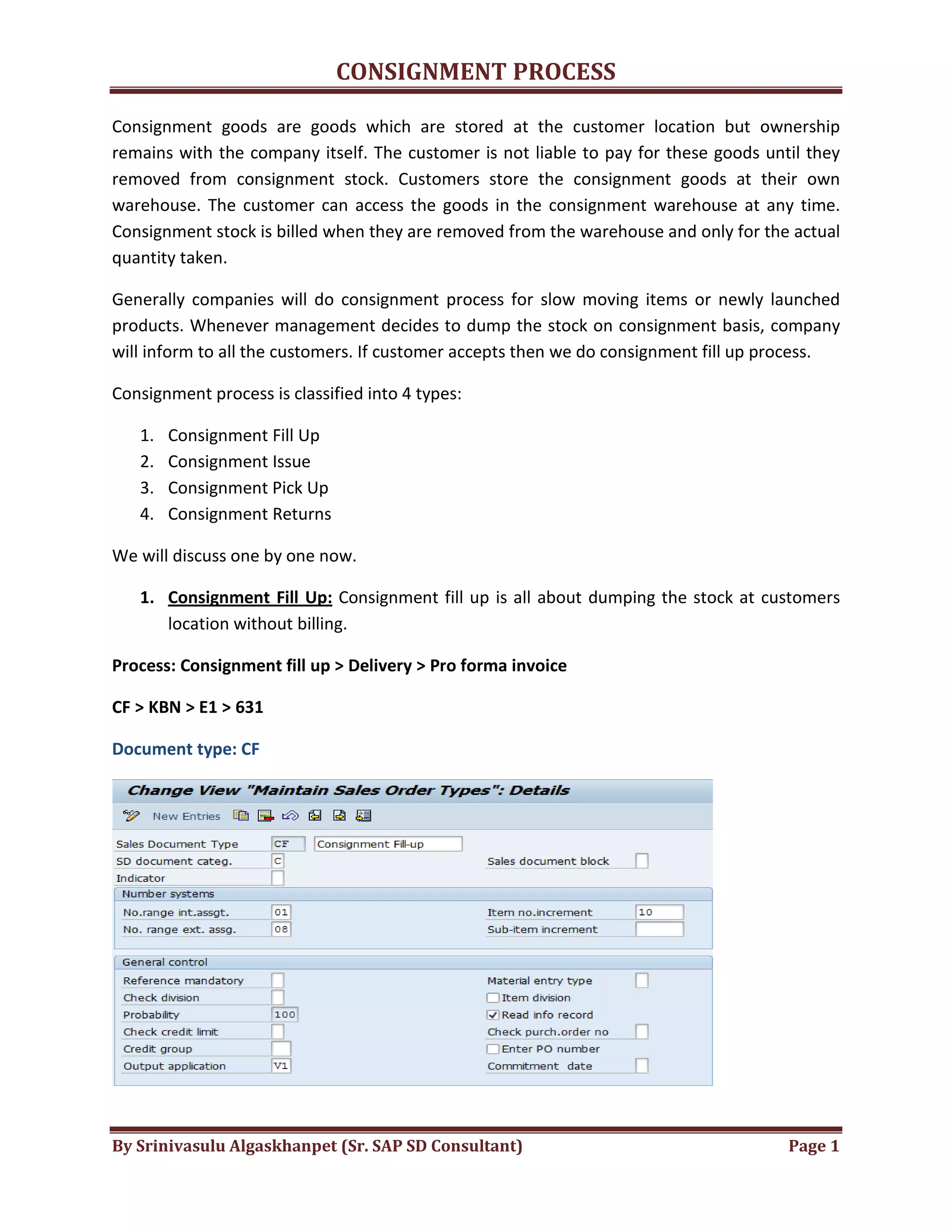
Document type: CF
CONSIGNMENT PROCESS
By Srinivasulu Algaskhanpet (Sr. SAP SD Consultant) Page 2
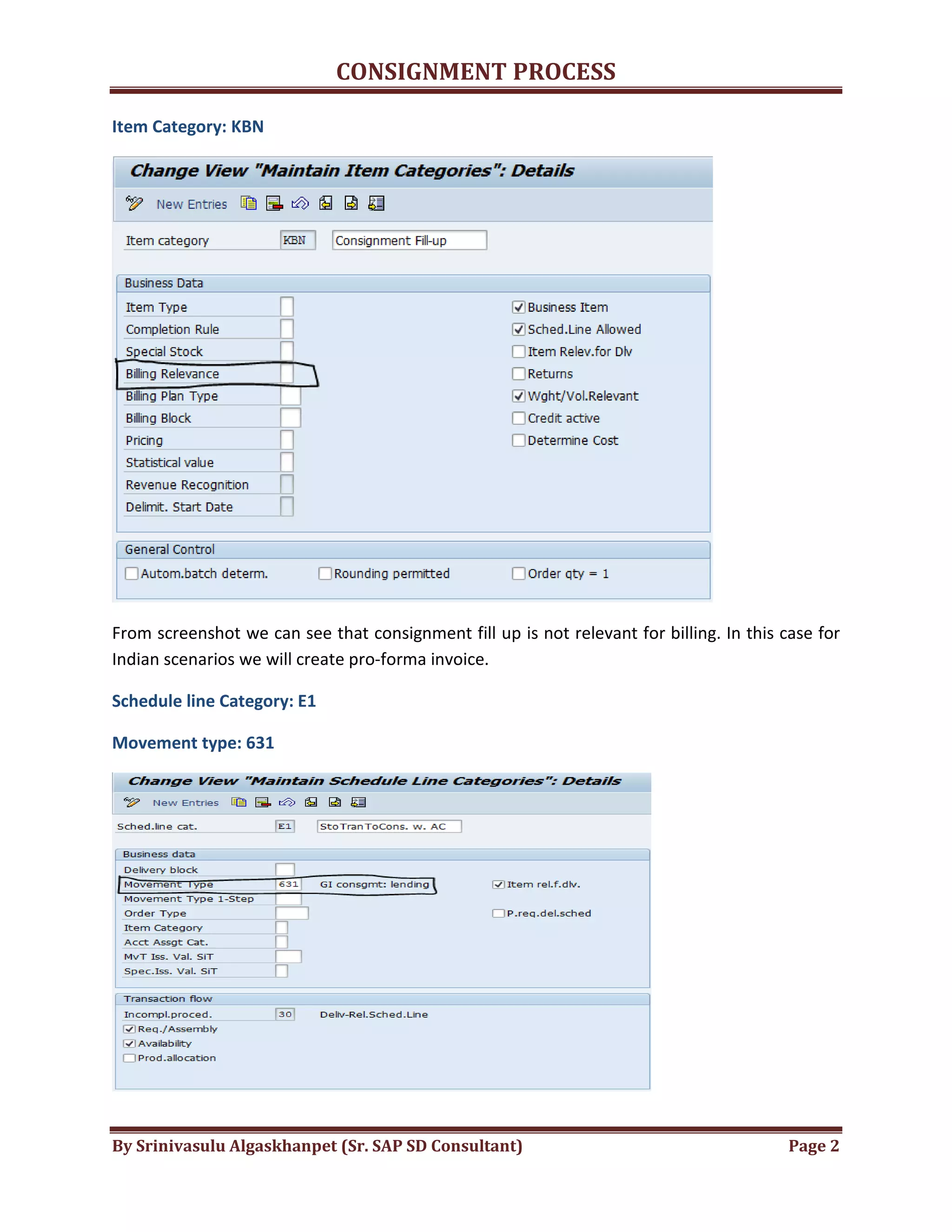
Item Category: KBN
From screenshot we can see that consignment fill up is not relevant for billing. In this case for
Indian scenarios we will create pro-forma invoice.
Schedule line Category: E1
Movement type: 631
CONSIGNMENT PROCESS
By Srinivasulu Algaskhanpet (Sr. SAP SD Consultant) Page 3
From above screenshot we can see that movement type for consignment issue is 631. The
effect of movement type 631 is it will reduce the stock from un-restricted stock and it will add
the stock to consignment stock.
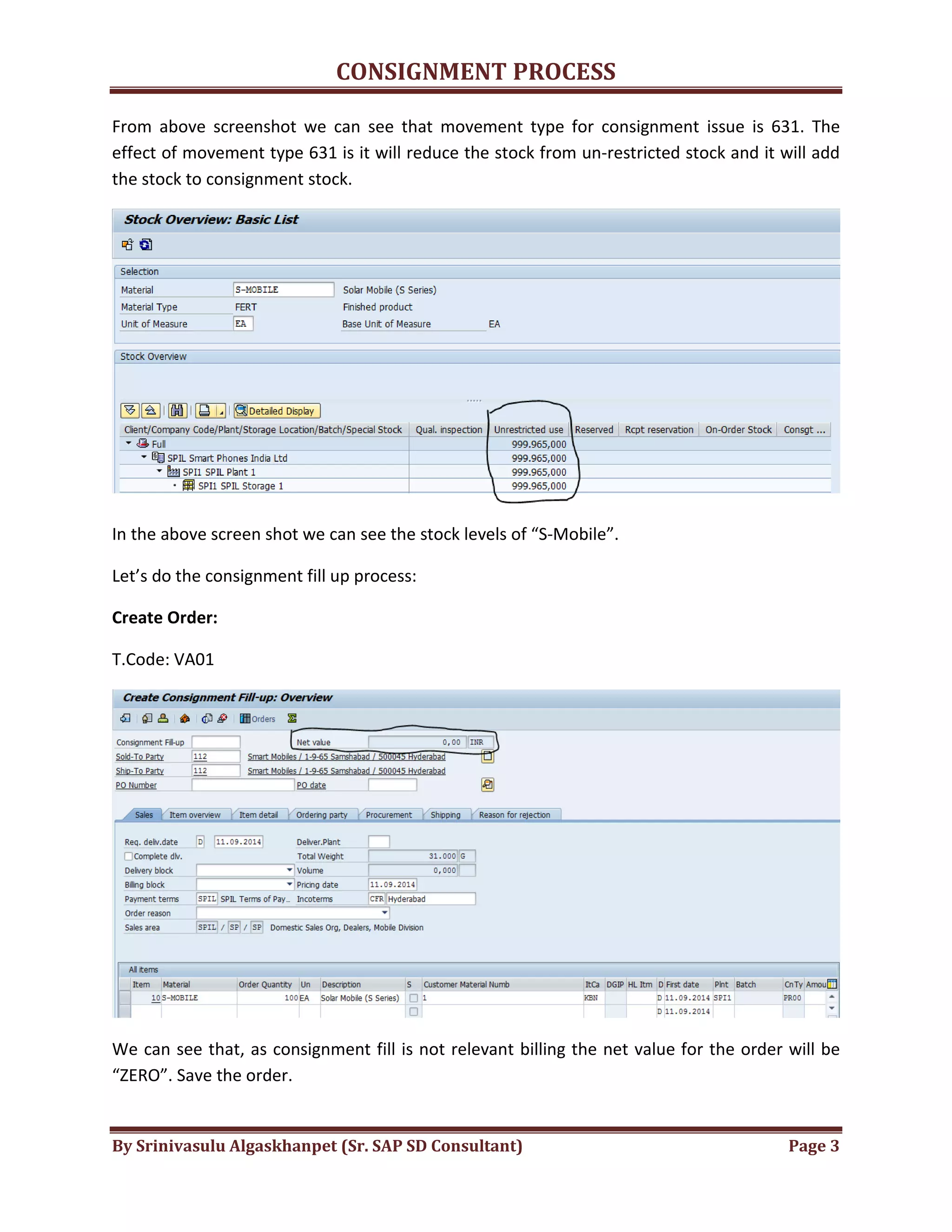
In the above screen shot we can see the stock levels of “S-Mobile”.
Let’s do the consignment fill up process:
Create Order:
T.Code: VA01
We can see that, as consignment fill is not relevant billing the net value for the order will be
“ZERO”. Save the order.
CONSIGNMENT PROCESS
By Srinivasulu Algaskhanpet (Sr. SAP SD Consultant) Page 4
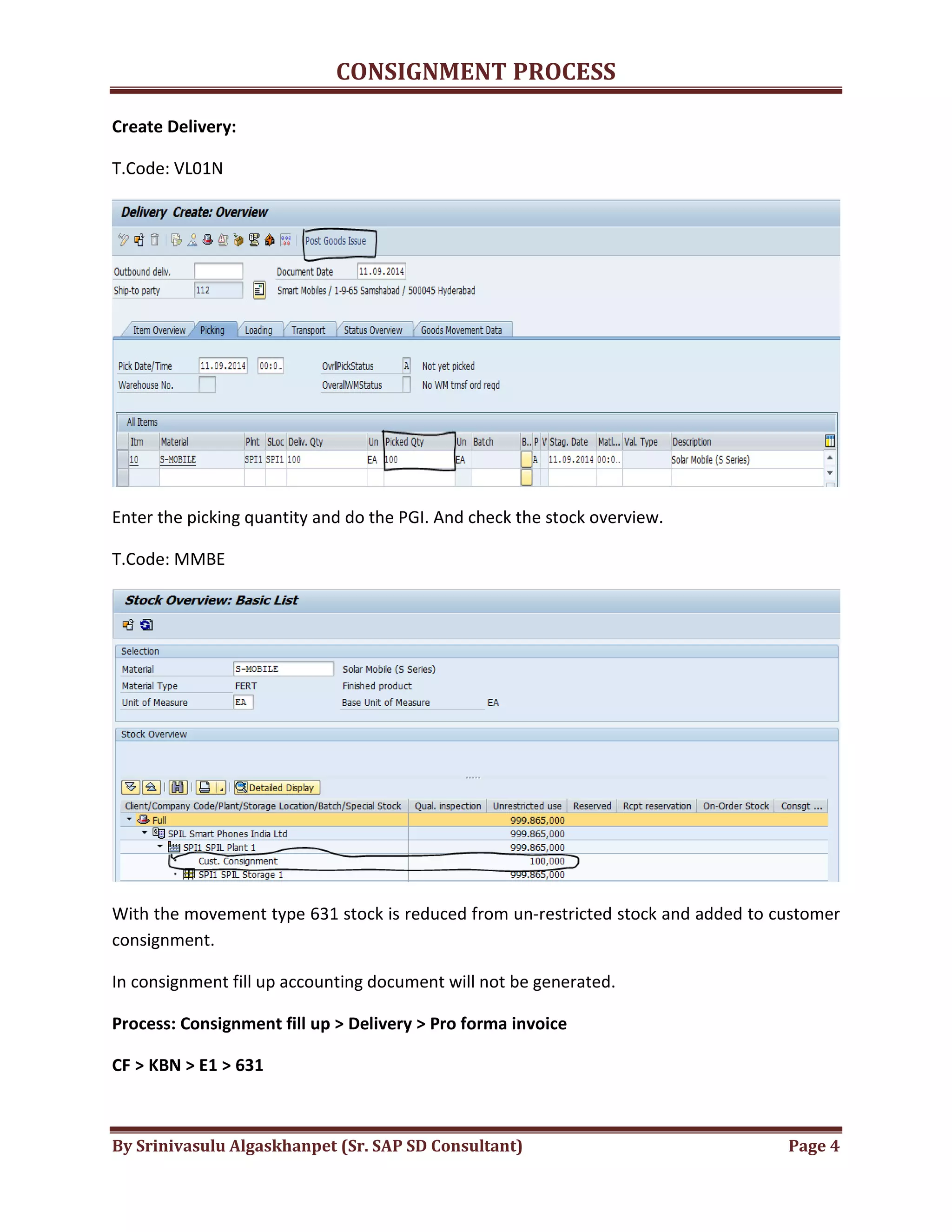
Create Delivery:
T.Code: VL01N
Enter the picking quantity and do the PGI. And check the stock overview.
T.Code: MMBE
With the movement type 631 stock is reduced from un-restricted stock and added to customer
consignment.
In consignment fill up accounting document will not be generated.
Process: Consignment fill up > Delivery > Pro forma invoice
CF > KBN > E1 > 631
CONSIGNMENT PROCESS
By Srinivasulu Algaskhanpet (Sr. SAP SD Consultant) Page 5
2. Consignment Issue: In consignment issue our customer sells the goods to the end
customer.
Process: Consignment Issue > Delivery > Invoice
Document type: CI
Item Category: KEN
CONSIGNMENT PROCESS
By Srinivasulu Algaskhanpet (Sr. SAP SD Consultant) Page 6
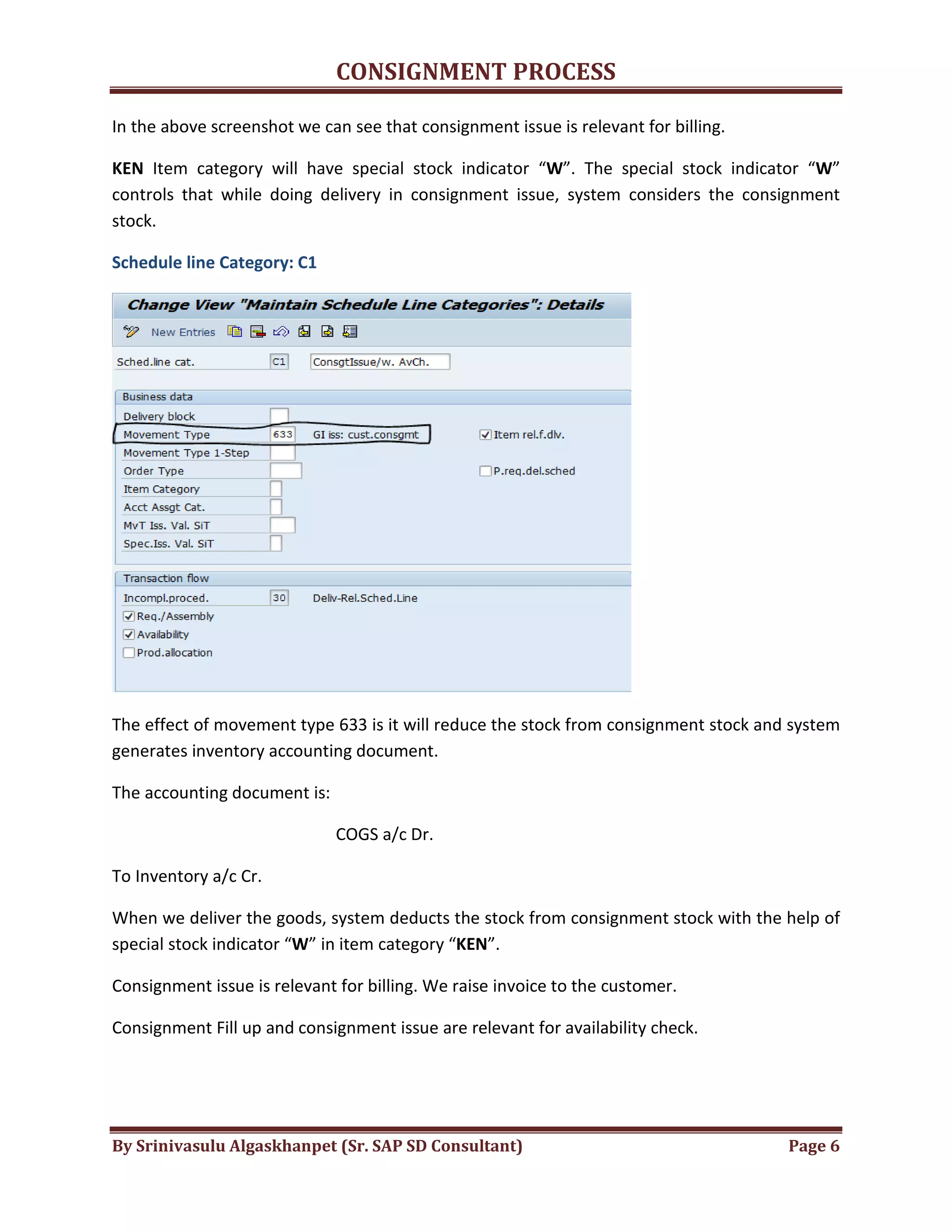
In the above screenshot we can see that consignment issue is relevant for billing.
KEN Item category will have special stock indicator “W”. The special stock indicator “W”
controls that while doing delivery in consignment issue, system considers the consignment
stock.
Schedule line Category: C1
The effect of movement type 633 is it will reduce the stock from consignment stock and system
generates inventory accounting document.
The accounting document is:
COGS a/c Dr.
To Inventory a/c Cr.
When we deliver the goods, system deducts the stock from consignment stock with the help of
special stock indicator “W” in item category “KEN”.
Consignment issue is relevant for billing. We raise invoice to the customer.
Consignment Fill up and consignment issue are relevant for availability check.
CONSIGNMENT PROCESS
By Srinivasulu Algaskhanpet (Sr. SAP SD Consultant) Page 7
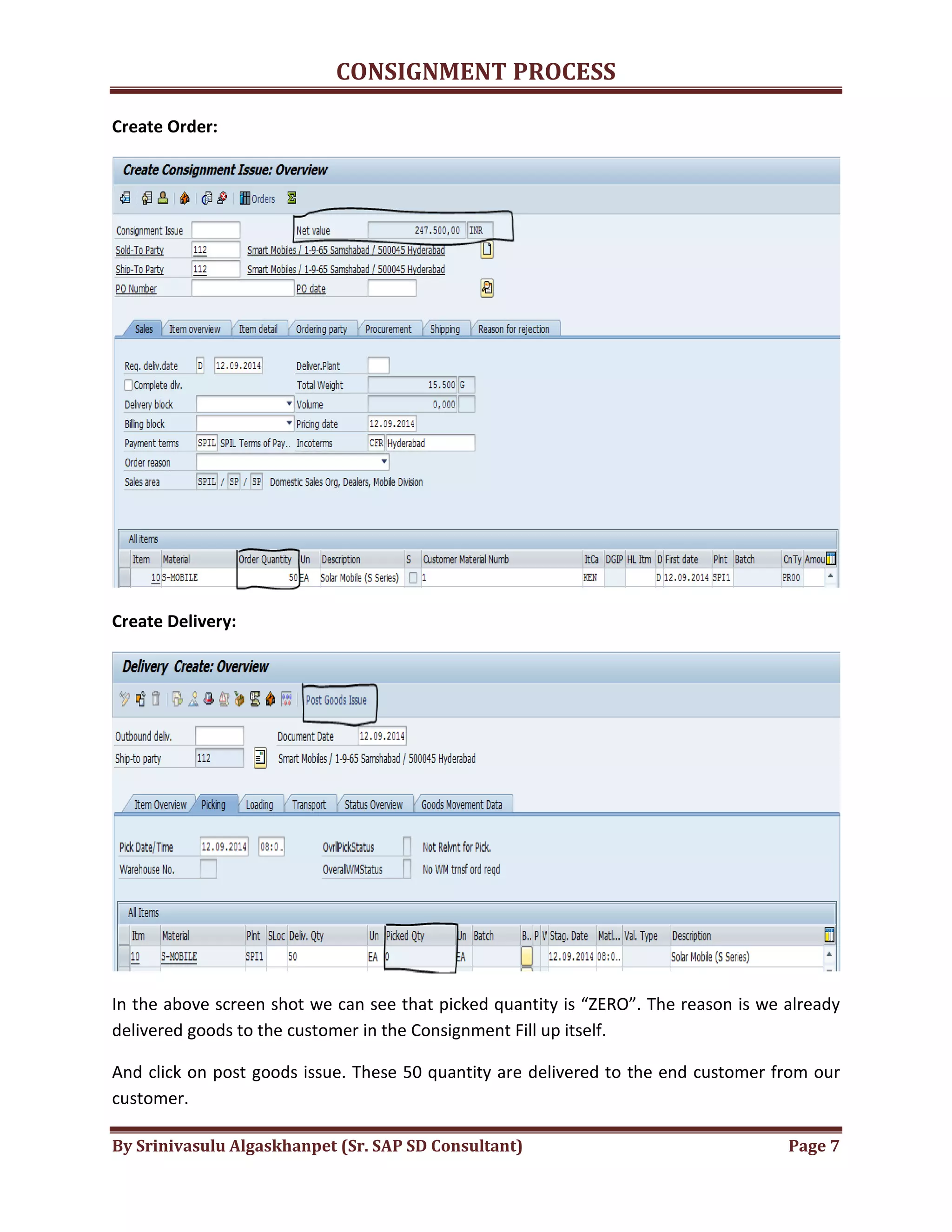
Create Order:
Create Delivery:
In the above screen shot we can see that picked quantity is “ZERO”. The reason is we already
delivered goods to the customer in the Consignment Fill up itself.
And click on post goods issue. These 50 quantity are delivered to the end customer from our
customer.
CONSIGNMENT PROCESS
By Srinivasulu Algaskhanpet (Sr. SAP SD Consultant) Page 8
Q. Why we are doing delivery again in consignment issue as we already delivered the goods to
the customer in consignment fill up?
A. i. To transfer the ownership
ii. To reduce the stock from consignment stock.
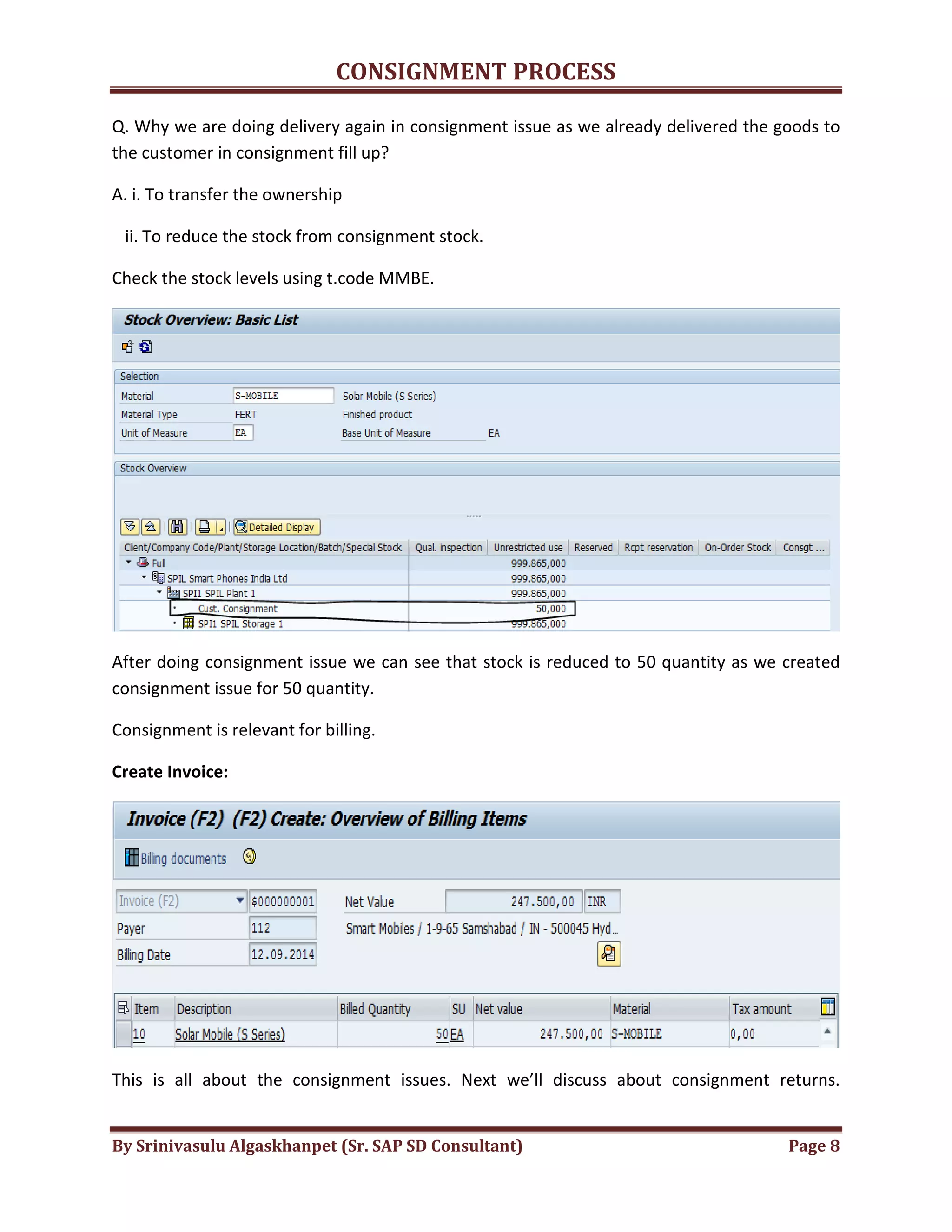
Check the stock levels using t.code MMBE.
After doing consignment issue we can see that stock is reduced to 50 quantity as we created
consignment issue for 50 quantity.
Consignment is relevant for billing.
Create Invoice:
This is all about the consignment issues. Next we’ll discuss about consignment returns.
CONSIGNMENT PROCESS
By Srinivasulu Algaskhanpet (Sr. SAP SD Consultant) Page 9
3. Consignment Returns: When end customer returns the consignment goods to our
customers then we do consignment returns.
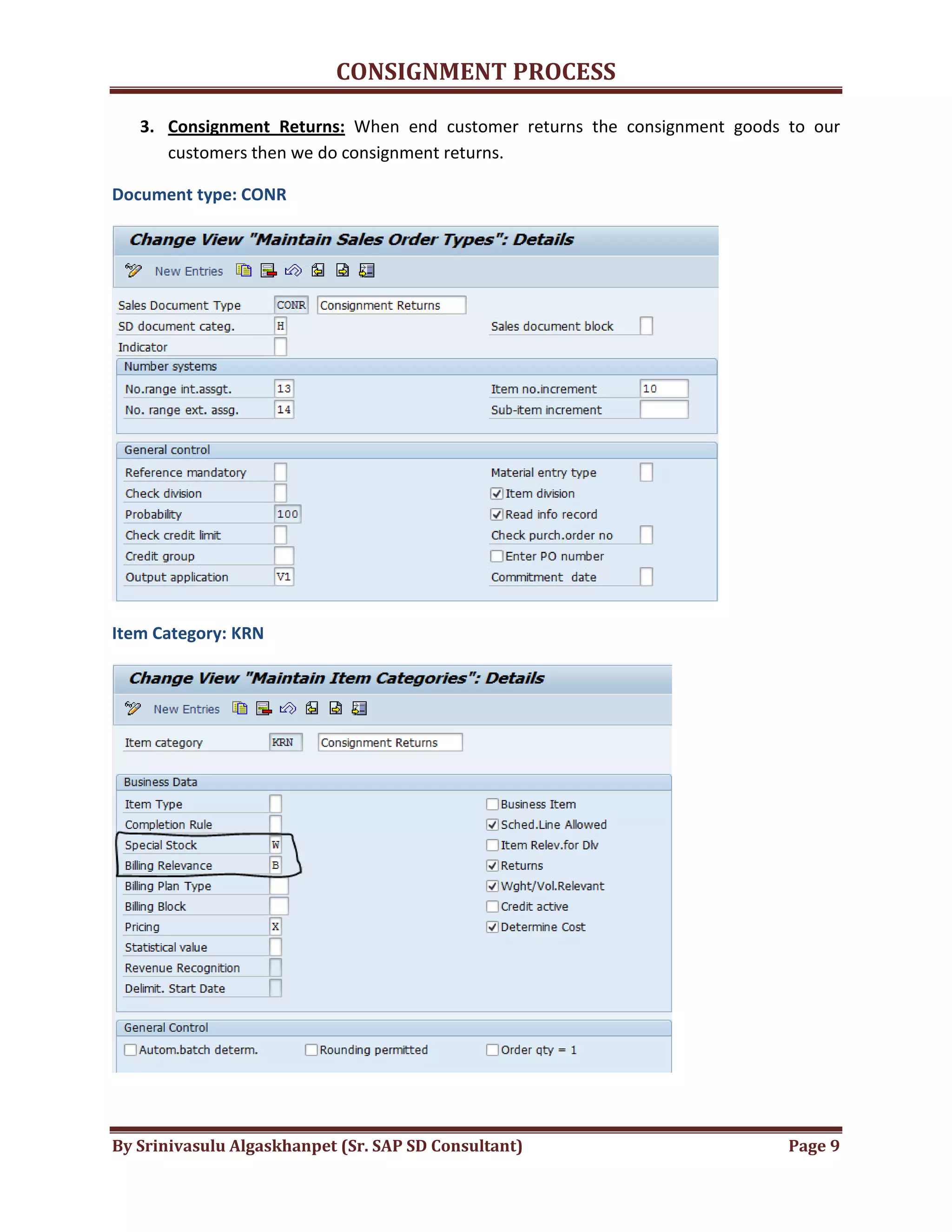
Document type: CONR
Item Category: KRN
CONSIGNMENT PROCESS
By Srinivasulu Algaskhanpet (Sr. SAP SD Consultant) Page 10
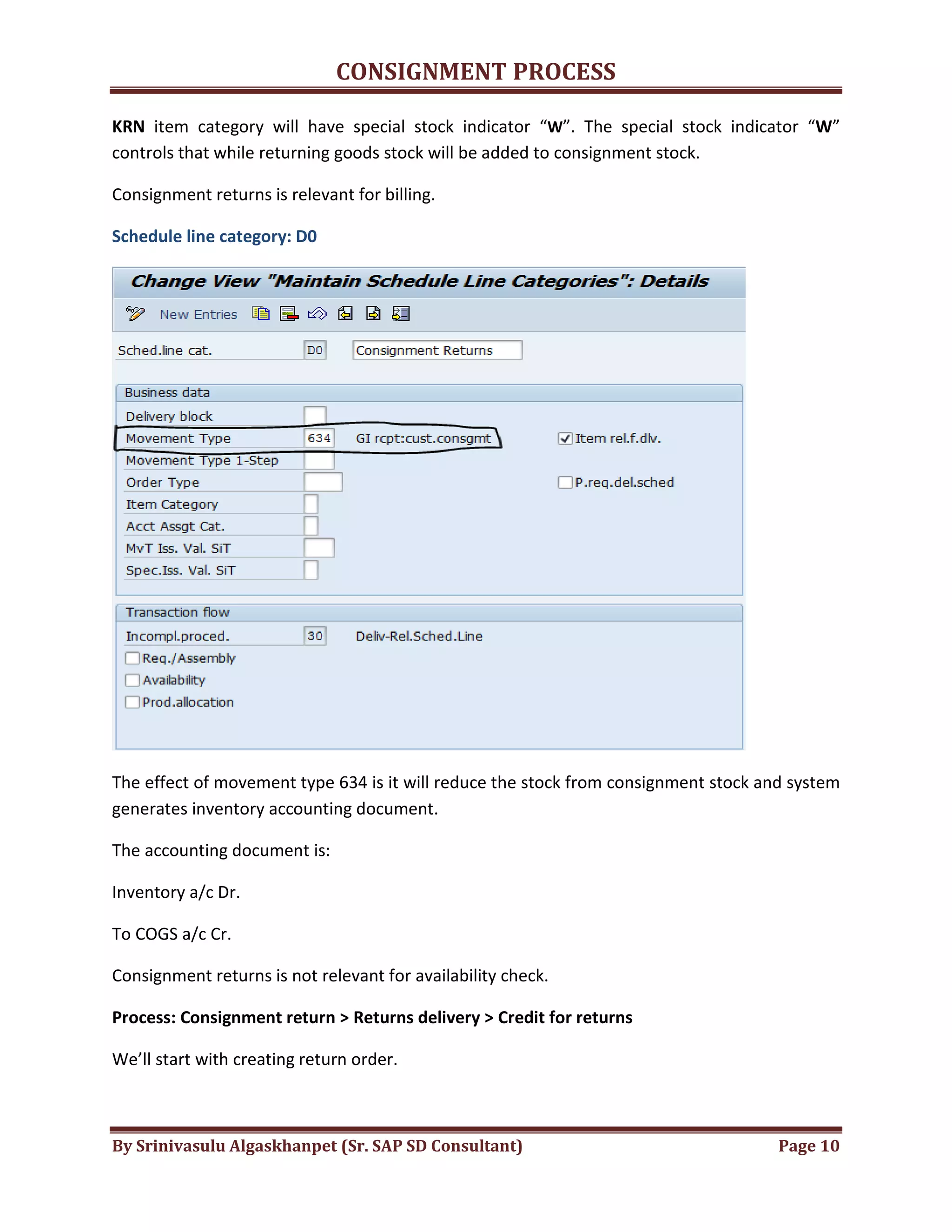
KRN item category will have special stock indicator “W”. The special stock indicator “W”
controls that while returning goods stock will be added to consignment stock.
Consignment returns is relevant for billing.
Schedule line category: D0
The effect of movement type 634 is it will reduce the stock from consignment stock and system
generates inventory accounting document.
The accounting document is:
Inventory a/c Dr.
To COGS a/c Cr.
Consignment returns is not relevant for availability check.
Process: Consignment return > Returns delivery > Credit for returns
We’ll start with creating return order.
CONSIGNMENT PROCESS
By Srinivasulu Algaskhanpet (Sr. SAP SD Consultant) Page 11
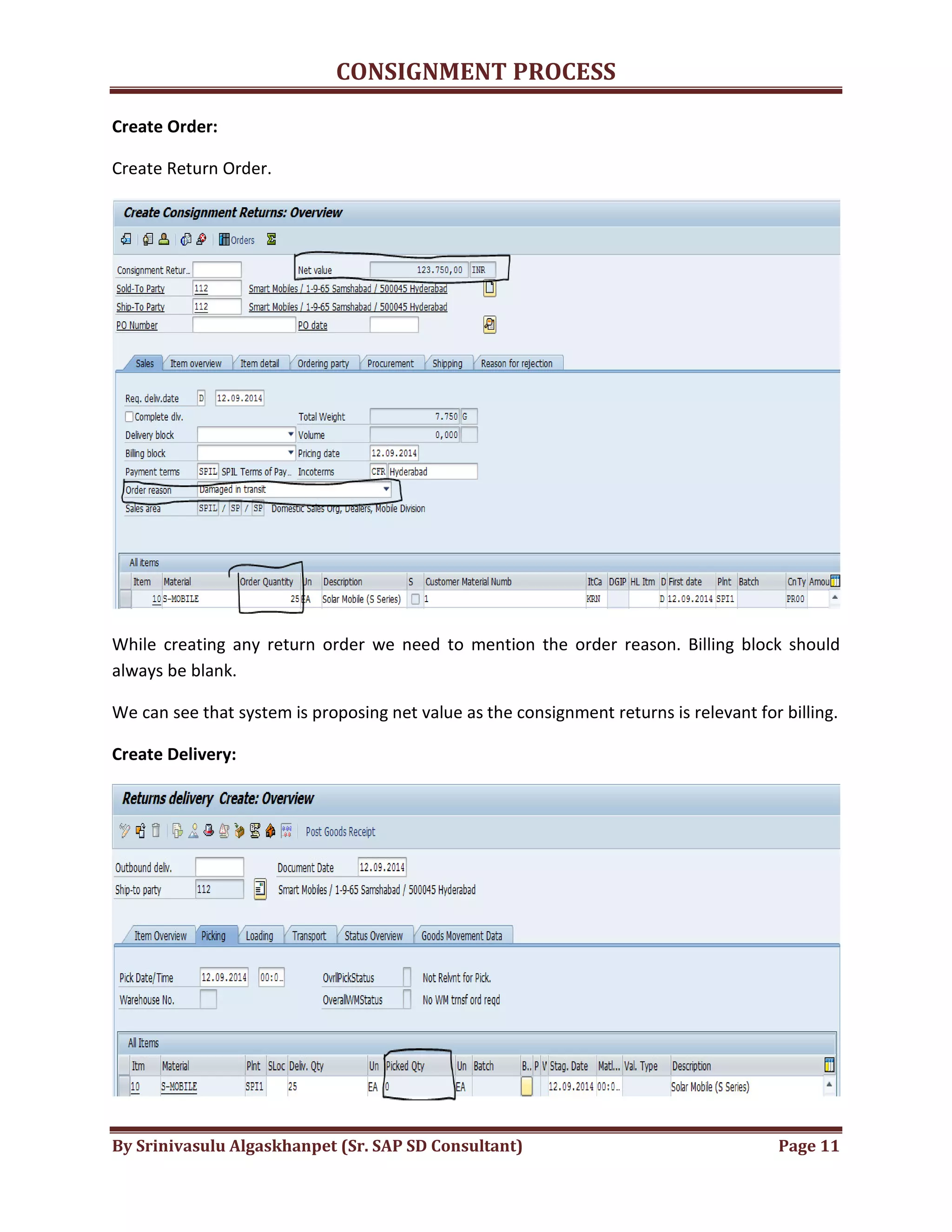
Create Order:
Create Return Order.
While creating any return order we need to mention the order reason. Billing block should
always be blank.
We can see that system is proposing net value as the consignment returns is relevant for billing.
Create Delivery:
CONSIGNMENT PROCESS
By Srinivasulu Algaskhanpet (Sr. SAP SD Consultant) Page 12
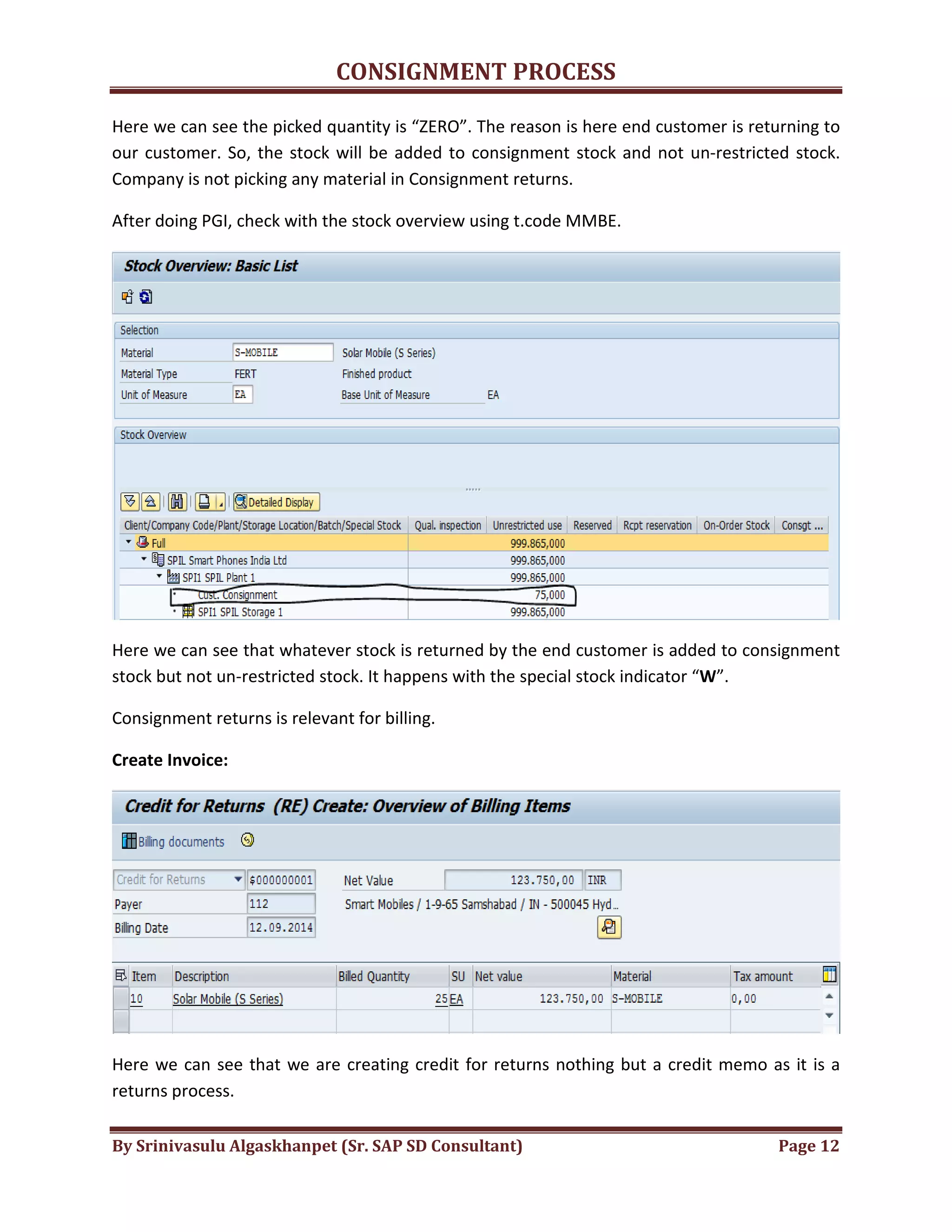
Here we can see the picked quantity is “ZERO”. The reason is here end customer is returning to
our customer. So, the stock will be added to consignment stock and not un-restricted stock.
Company is not picking any material in Consignment returns.
After doing PGI, check with the stock overview using t.code MMBE.
Here we can see that whatever stock is returned by the end customer is added to consignment
stock but not un-restricted stock. It happens with the special stock indicator “W”.
Consignment returns is relevant for billing.
Create Invoice:
Here we can see that we are creating credit for returns nothing but a credit memo as it is a
returns process.
CONSIGNMENT PROCESS
By Srinivasulu Algaskhanpet (Sr. SAP SD Consultant) Page 13
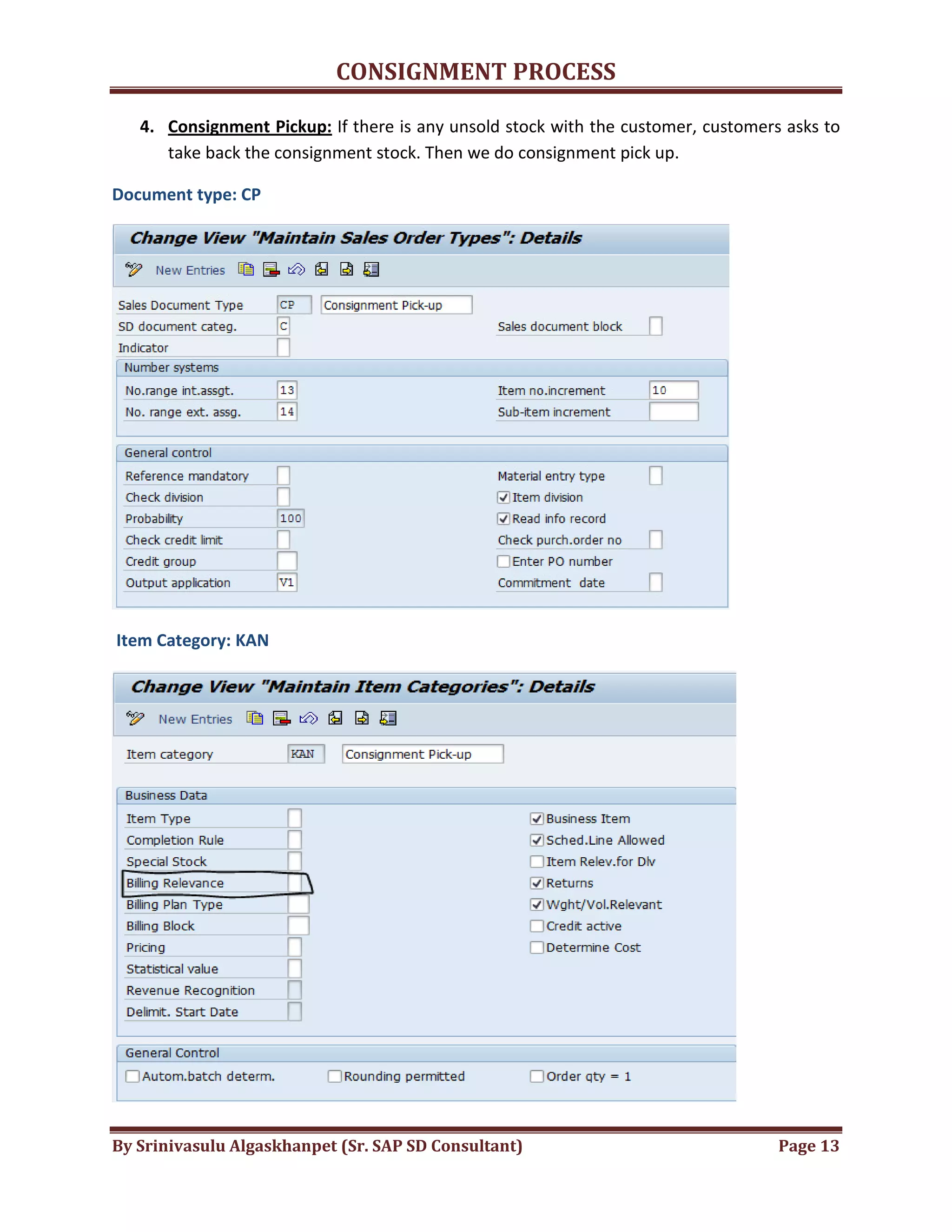
4. Consignment Pickup: If there is any unsold stock with the customer, customers asks to
take back the consignment stock. Then we do consignment pick up.
Document type: CP
Item Category: KAN
CONSIGNMENT PROCESS
By Srinivasulu Algaskhanpet (Sr. SAP SD Consultant) Page 14
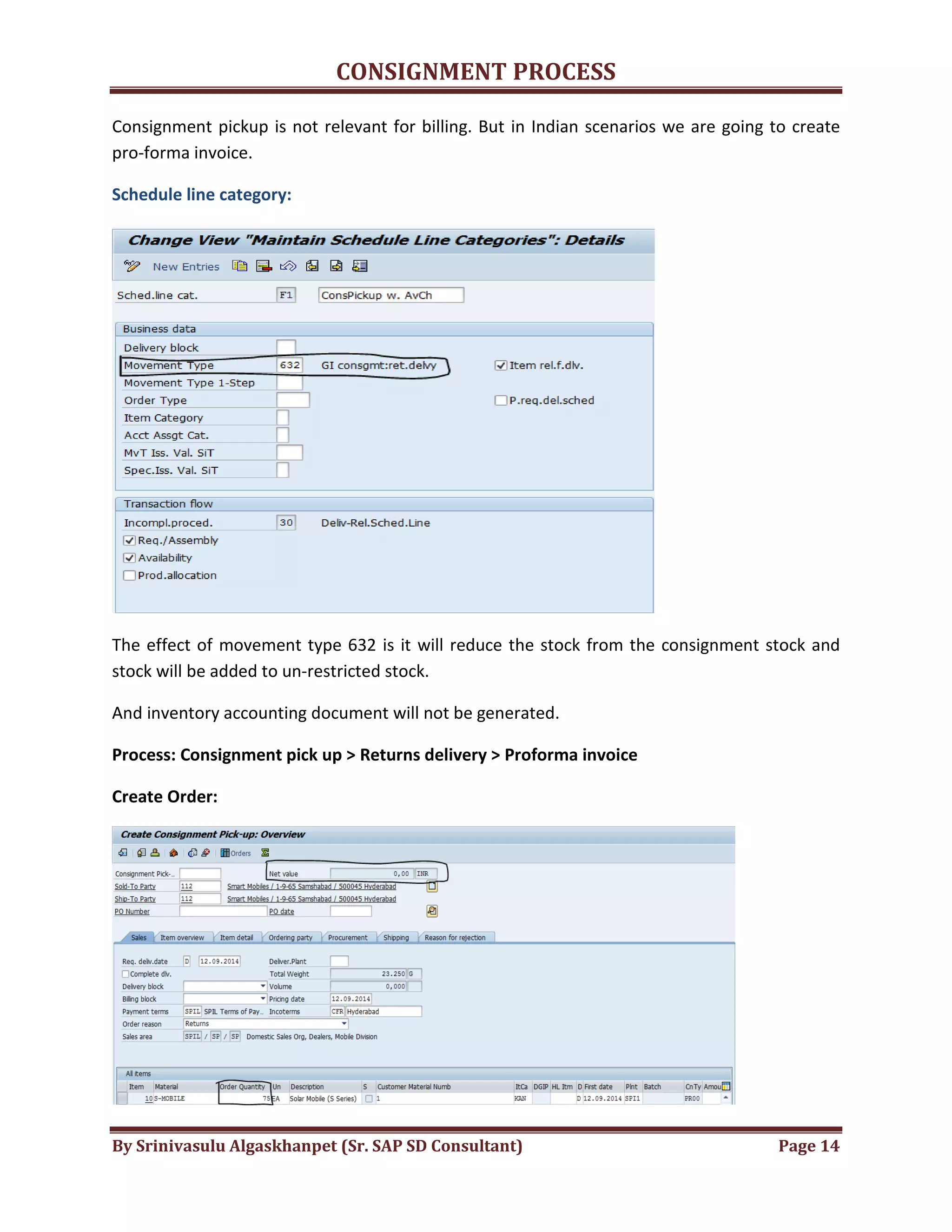
Consignment pickup is not relevant for billing. But in Indian scenarios we are going to create
pro-forma invoice.
Schedule line category:
The effect of movement type 632 is it will reduce the stock from the consignment stock and
stock will be added to un-restricted stock.
And inventory accounting document will not be generated.
Process: Consignment pick up > Returns delivery > Proforma invoice
Create Order:
CONSIGNMENT PROCESS
By Srinivasulu Algaskhanpet (Sr. SAP SD Consultant) Page 15
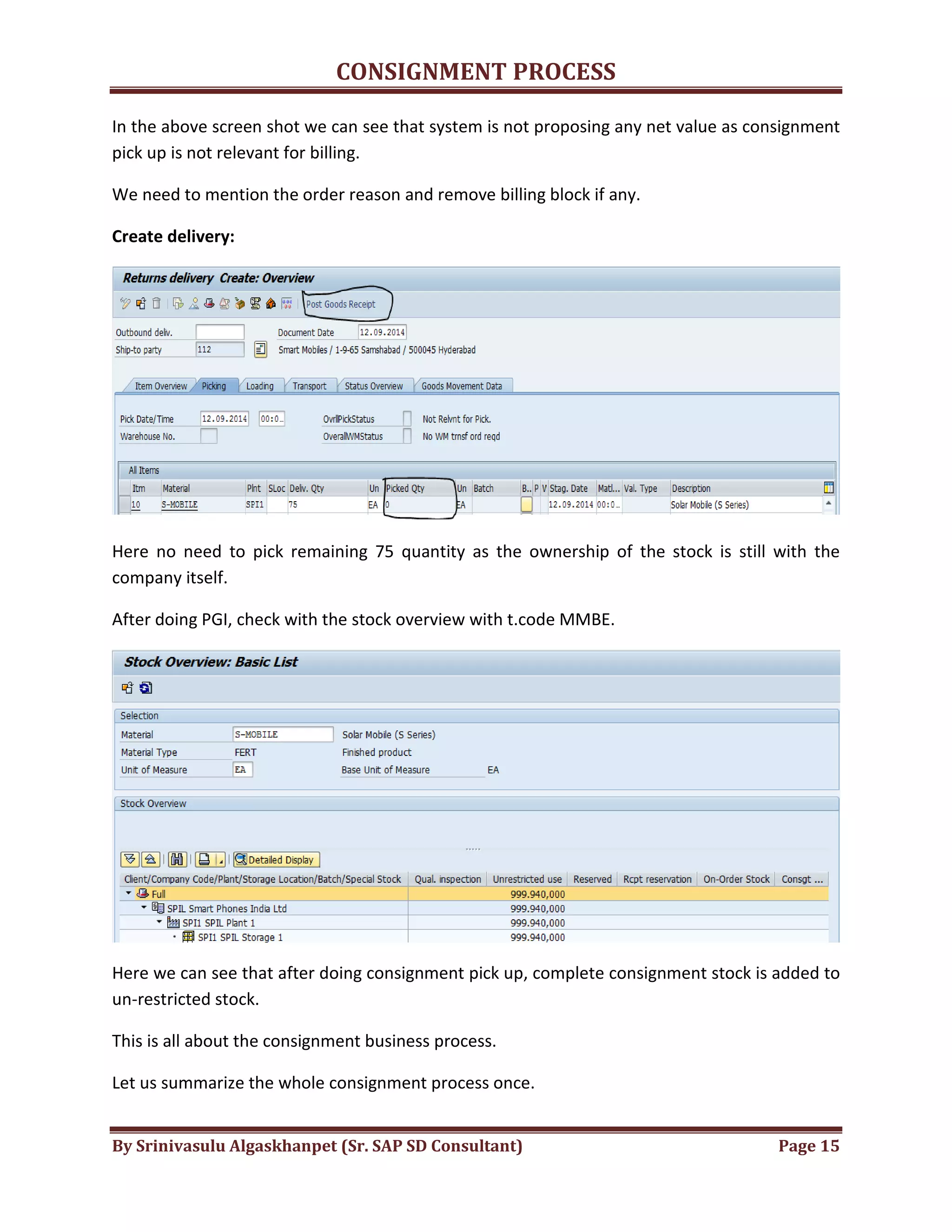
In the above screen shot we can see that system is not proposing any net value as consignment
pick up is not relevant for billing.
We need to mention the order reason and remove billing block if any.
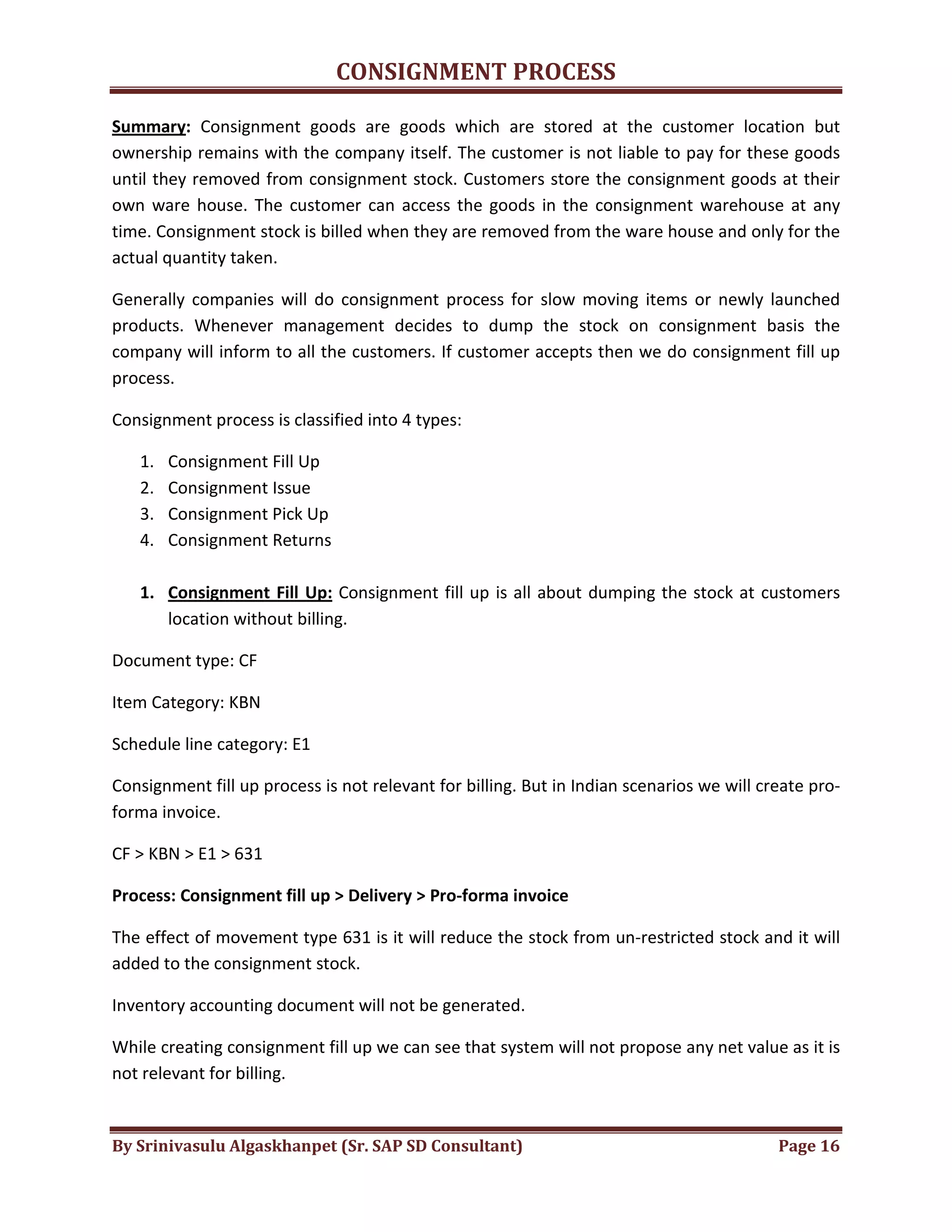
Create delivery:
Here no need to pick remaining 75 quantity as the ownership of the stock is still with the
company itself.
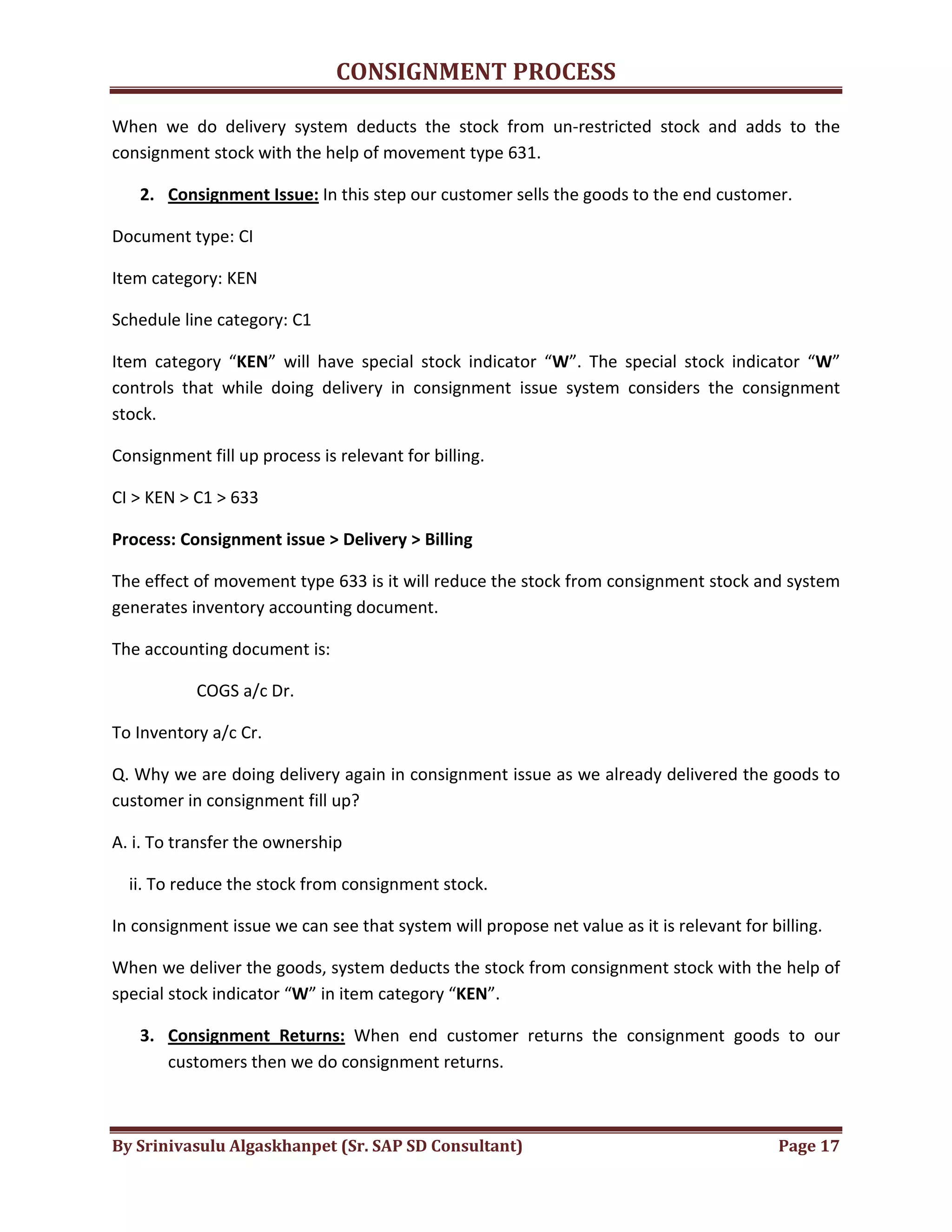
After doing PGI, check with the stock overview with t.code MMBE.
Here we can see that after doing consignment pick up, complete consignment stock is added to
un-restricted stock.
This is all about the consignment business process.
Let us summarize the whole consignment process once.
CONSIGNMENT PROCESS
By Srinivasulu Algaskhanpet (Sr. SAP SD Consultant) Page 16
Summary: Consignment goods are goods which are stored at the customer location but
ownership remains with the company itself. The customer is not liable to pay for these goods
until they removed from consignment stock. Customers store the consignment goods at their
own ware house. The customer can access the goods in the consignment warehouse at any
time. Consignment stock is billed when they are removed from the ware house and only for the
actual quantity taken.
Generally companies will do consignment process for slow moving items or newly launched
products. Whenever management decides to dump the stock on consignment basis the
company will inform to all the customers. If customer accepts then we do consignment fill up
process.
Consignment process is classified into 4 types:
1. Consignment Fill Up
2. Consignment Issue
3. Consignment Pick Up
4. Consignment Returns
1. Consignment Fill Up: Consignment fill up is all about dumping the stock at customers
location without billing.
Document type: CF
Item Category: KBN
Schedule line category: E1
Consignment fill up process is not relevant for billing. But in Indian scenarios we will create pro-
forma invoice.
CF > KBN > E1 > 631
Process: Consignment fill up > Delivery > Pro-forma invoice
The effect of movement type 631 is it will reduce the stock from un-restricted stock and it will
added to the consignment stock.
Inventory accounting document will not be generated.
While creating consignment fill up we can see that system will not propose any net value as it is
not relevant for billing.
CONSIGNMENT PROCESS
By Srinivasulu Algaskhanpet (Sr. SAP SD Consultant) Page 17
When we do delivery system deducts the stock from un-restricted stock and adds to the
consignment stock with the help of movement type 631.
2. Consignment Issue: In this step our customer sells the goods to the end customer.
Document type: CI
Item category: KEN
Schedule line category: C1
Item category “KEN” will have special stock indicator “W”. The special stock indicator “W”
controls that while doing delivery in consignment issue system considers the consignment
stock.
Consignment fill up process is relevant for billing.
CI > KEN > C1 > 633
Process: Consignment issue > Delivery > Billing
The effect of movement type 633 is it will reduce the stock from consignment stock and system
generates inventory accounting document.
The accounting document is:
COGS a/c Dr.
To Inventory a/c Cr.
Q. Why we are doing delivery again in consignment issue as we already delivered the goods to
customer in consignment fill up?
A. i. To transfer the ownership
ii. To reduce the stock from consignment stock.
In consignment issue we can see that system will propose net value as it is relevant for billing.
When we deliver the goods, system deducts the stock from consignment stock with the help of
special stock indicator “W” in item category “KEN”.
3. Consignment Returns: When end customer returns the consignment goods to our
customers then we do consignment returns.
CONSIGNMENT PROCESS
By Srinivasulu Algaskhanpet (Sr. SAP SD Consultant) Page 18
Document type: CONR
Item category: KRN
Schedule line category: D0
CONR > KRN > D0 > 634
Process: Consignment returns > Return delivery > Credit for returns
KRN Item category will have special stock indicator “W”. The special stock indicator “W”
controls that while returning goods stock will be added to consignment stock and inventory
accounting document will be generated.
It is relevant for billing.
The effect of movement type 634 is it will reduce the stock from consignment stock and system
generates inventory accounting document.
The accounting document is:
Inventory a/c Dr.
To COGS a/c Cr.
4. Consignment Pick up: When our customer asks to take back the consignment stock then
we do consignment pick up.
Document type: CP
Item category: KAN
Schedule line category: F1
CP > KAN > F1 > 632
Process: Consignment pick up > Returns delivery
The effect of movement type 632 is, it will reduce the stock from consignment stock and the
stock will be added to un-restricted stock.
Inventory accounting document will not be generated.

Consignment process

  • 1.
    CONSIGNMENT PROCESS By SrinivasuluAlgaskhanpet (Sr. SAP SD Consultant) Page 1 Consignment goods are goods which are stored at the customer location but ownership remains with the company itself. The customer is not liable to pay for these goods until they removed from consignment stock. Customers store the consignment goods at their own warehouse. The customer can access the goods in the consignment warehouse at any time. Consignment stock is billed when they are removed from the warehouse and only for the actual quantity taken. Generally companies will do consignment process for slow moving items or newly launched products. Whenever management decides to dump the stock on consignment basis, company will inform to all the customers. If customer accepts then we do consignment fill up process. Consignment process is classified into 4 types: 1. Consignment Fill Up 2. Consignment Issue 3. Consignment Pick Up 4. Consignment Returns We will discuss one by one now. 1. Consignment Fill Up: Consignment fill up is all about dumping the stock at customers location without billing. Process: Consignment fill up > Delivery > Pro forma invoice CF > KBN > E1 > 631 Document type: CF
  • 2.
    CONSIGNMENT PROCESS By SrinivasuluAlgaskhanpet (Sr. SAP SD Consultant) Page 2 Item Category: KBN From screenshot we can see that consignment fill up is not relevant for billing. In this case for Indian scenarios we will create pro-forma invoice. Schedule line Category: E1 Movement type: 631
  • 3.
    CONSIGNMENT PROCESS By SrinivasuluAlgaskhanpet (Sr. SAP SD Consultant) Page 3 From above screenshot we can see that movement type for consignment issue is 631. The effect of movement type 631 is it will reduce the stock from un-restricted stock and it will add the stock to consignment stock. In the above screen shot we can see the stock levels of “S-Mobile”. Let’s do the consignment fill up process: Create Order: T.Code: VA01 We can see that, as consignment fill is not relevant billing the net value for the order will be “ZERO”. Save the order.
  • 4.
    CONSIGNMENT PROCESS By SrinivasuluAlgaskhanpet (Sr. SAP SD Consultant) Page 4 Create Delivery: T.Code: VL01N Enter the picking quantity and do the PGI. And check the stock overview. T.Code: MMBE With the movement type 631 stock is reduced from un-restricted stock and added to customer consignment. In consignment fill up accounting document will not be generated. Process: Consignment fill up > Delivery > Pro forma invoice CF > KBN > E1 > 631
  • 5.
    CONSIGNMENT PROCESS By SrinivasuluAlgaskhanpet (Sr. SAP SD Consultant) Page 5 2. Consignment Issue: In consignment issue our customer sells the goods to the end customer. Process: Consignment Issue > Delivery > Invoice Document type: CI Item Category: KEN
  • 6.
    CONSIGNMENT PROCESS By SrinivasuluAlgaskhanpet (Sr. SAP SD Consultant) Page 6 In the above screenshot we can see that consignment issue is relevant for billing. KEN Item category will have special stock indicator “W”. The special stock indicator “W” controls that while doing delivery in consignment issue, system considers the consignment stock. Schedule line Category: C1 The effect of movement type 633 is it will reduce the stock from consignment stock and system generates inventory accounting document. The accounting document is: COGS a/c Dr. To Inventory a/c Cr. When we deliver the goods, system deducts the stock from consignment stock with the help of special stock indicator “W” in item category “KEN”. Consignment issue is relevant for billing. We raise invoice to the customer. Consignment Fill up and consignment issue are relevant for availability check.
  • 7.
    CONSIGNMENT PROCESS By SrinivasuluAlgaskhanpet (Sr. SAP SD Consultant) Page 7 Create Order: Create Delivery: In the above screen shot we can see that picked quantity is “ZERO”. The reason is we already delivered goods to the customer in the Consignment Fill up itself. And click on post goods issue. These 50 quantity are delivered to the end customer from our customer.
  • 8.
    CONSIGNMENT PROCESS By SrinivasuluAlgaskhanpet (Sr. SAP SD Consultant) Page 8 Q. Why we are doing delivery again in consignment issue as we already delivered the goods to the customer in consignment fill up? A. i. To transfer the ownership ii. To reduce the stock from consignment stock. Check the stock levels using t.code MMBE. After doing consignment issue we can see that stock is reduced to 50 quantity as we created consignment issue for 50 quantity. Consignment is relevant for billing. Create Invoice: This is all about the consignment issues. Next we’ll discuss about consignment returns.
  • 9.
    CONSIGNMENT PROCESS By SrinivasuluAlgaskhanpet (Sr. SAP SD Consultant) Page 9 3. Consignment Returns: When end customer returns the consignment goods to our customers then we do consignment returns. Document type: CONR Item Category: KRN
  • 10.
    CONSIGNMENT PROCESS By SrinivasuluAlgaskhanpet (Sr. SAP SD Consultant) Page 10 KRN item category will have special stock indicator “W”. The special stock indicator “W” controls that while returning goods stock will be added to consignment stock. Consignment returns is relevant for billing. Schedule line category: D0 The effect of movement type 634 is it will reduce the stock from consignment stock and system generates inventory accounting document. The accounting document is: Inventory a/c Dr. To COGS a/c Cr. Consignment returns is not relevant for availability check. Process: Consignment return > Returns delivery > Credit for returns We’ll start with creating return order.
  • 11.
    CONSIGNMENT PROCESS By SrinivasuluAlgaskhanpet (Sr. SAP SD Consultant) Page 11 Create Order: Create Return Order. While creating any return order we need to mention the order reason. Billing block should always be blank. We can see that system is proposing net value as the consignment returns is relevant for billing. Create Delivery:
  • 12.
    CONSIGNMENT PROCESS By SrinivasuluAlgaskhanpet (Sr. SAP SD Consultant) Page 12 Here we can see the picked quantity is “ZERO”. The reason is here end customer is returning to our customer. So, the stock will be added to consignment stock and not un-restricted stock. Company is not picking any material in Consignment returns. After doing PGI, check with the stock overview using t.code MMBE. Here we can see that whatever stock is returned by the end customer is added to consignment stock but not un-restricted stock. It happens with the special stock indicator “W”. Consignment returns is relevant for billing. Create Invoice: Here we can see that we are creating credit for returns nothing but a credit memo as it is a returns process.
  • 13.
    CONSIGNMENT PROCESS By SrinivasuluAlgaskhanpet (Sr. SAP SD Consultant) Page 13 4. Consignment Pickup: If there is any unsold stock with the customer, customers asks to take back the consignment stock. Then we do consignment pick up. Document type: CP Item Category: KAN
  • 14.
    CONSIGNMENT PROCESS By SrinivasuluAlgaskhanpet (Sr. SAP SD Consultant) Page 14 Consignment pickup is not relevant for billing. But in Indian scenarios we are going to create pro-forma invoice. Schedule line category: The effect of movement type 632 is it will reduce the stock from the consignment stock and stock will be added to un-restricted stock. And inventory accounting document will not be generated. Process: Consignment pick up > Returns delivery > Proforma invoice Create Order:
  • 15.
    CONSIGNMENT PROCESS By SrinivasuluAlgaskhanpet (Sr. SAP SD Consultant) Page 15 In the above screen shot we can see that system is not proposing any net value as consignment pick up is not relevant for billing. We need to mention the order reason and remove billing block if any. Create delivery: Here no need to pick remaining 75 quantity as the ownership of the stock is still with the company itself. After doing PGI, check with the stock overview with t.code MMBE. Here we can see that after doing consignment pick up, complete consignment stock is added to un-restricted stock. This is all about the consignment business process. Let us summarize the whole consignment process once.
  • 16.
    CONSIGNMENT PROCESS By SrinivasuluAlgaskhanpet (Sr. SAP SD Consultant) Page 16 Summary: Consignment goods are goods which are stored at the customer location but ownership remains with the company itself. The customer is not liable to pay for these goods until they removed from consignment stock. Customers store the consignment goods at their own ware house. The customer can access the goods in the consignment warehouse at any time. Consignment stock is billed when they are removed from the ware house and only for the actual quantity taken. Generally companies will do consignment process for slow moving items or newly launched products. Whenever management decides to dump the stock on consignment basis the company will inform to all the customers. If customer accepts then we do consignment fill up process. Consignment process is classified into 4 types: 1. Consignment Fill Up 2. Consignment Issue 3. Consignment Pick Up 4. Consignment Returns 1. Consignment Fill Up: Consignment fill up is all about dumping the stock at customers location without billing. Document type: CF Item Category: KBN Schedule line category: E1 Consignment fill up process is not relevant for billing. But in Indian scenarios we will create pro- forma invoice. CF > KBN > E1 > 631 Process: Consignment fill up > Delivery > Pro-forma invoice The effect of movement type 631 is it will reduce the stock from un-restricted stock and it will added to the consignment stock. Inventory accounting document will not be generated. While creating consignment fill up we can see that system will not propose any net value as it is not relevant for billing.
  • 17.
    CONSIGNMENT PROCESS By SrinivasuluAlgaskhanpet (Sr. SAP SD Consultant) Page 17 When we do delivery system deducts the stock from un-restricted stock and adds to the consignment stock with the help of movement type 631. 2. Consignment Issue: In this step our customer sells the goods to the end customer. Document type: CI Item category: KEN Schedule line category: C1 Item category “KEN” will have special stock indicator “W”. The special stock indicator “W” controls that while doing delivery in consignment issue system considers the consignment stock. Consignment fill up process is relevant for billing. CI > KEN > C1 > 633 Process: Consignment issue > Delivery > Billing The effect of movement type 633 is it will reduce the stock from consignment stock and system generates inventory accounting document. The accounting document is: COGS a/c Dr. To Inventory a/c Cr. Q. Why we are doing delivery again in consignment issue as we already delivered the goods to customer in consignment fill up? A. i. To transfer the ownership ii. To reduce the stock from consignment stock. In consignment issue we can see that system will propose net value as it is relevant for billing. When we deliver the goods, system deducts the stock from consignment stock with the help of special stock indicator “W” in item category “KEN”. 3. Consignment Returns: When end customer returns the consignment goods to our customers then we do consignment returns.
  • 18.
    CONSIGNMENT PROCESS By SrinivasuluAlgaskhanpet (Sr. SAP SD Consultant) Page 18 Document type: CONR Item category: KRN Schedule line category: D0 CONR > KRN > D0 > 634 Process: Consignment returns > Return delivery > Credit for returns KRN Item category will have special stock indicator “W”. The special stock indicator “W” controls that while returning goods stock will be added to consignment stock and inventory accounting document will be generated. It is relevant for billing. The effect of movement type 634 is it will reduce the stock from consignment stock and system generates inventory accounting document. The accounting document is: Inventory a/c Dr. To COGS a/c Cr. 4. Consignment Pick up: When our customer asks to take back the consignment stock then we do consignment pick up. Document type: CP Item category: KAN Schedule line category: F1 CP > KAN > F1 > 632 Process: Consignment pick up > Returns delivery The effect of movement type 632 is, it will reduce the stock from consignment stock and the stock will be added to un-restricted stock. Inventory accounting document will not be generated.