MATERIAL LISTING & EXCLUSION
By Srinivasulu Algaskhanpet (Sr. SAP SD Consultant) Page 1
Purpose: Material listing and exclusion lets you control which materials specific customers may
or may not buy. For example, if you create a material listing for a specific customer, the
customer can only order products from that list. You can also create a master record for
material exclusion for particular customer. Then the customer cannot order excluded materials
from you.
Listing: By creating a material listing for a specific customer, we are allowing that customer to
order only those materials that are maintained in the list of products.
Exclusion: By maintaining exclusion for a customer, we are restricting the customer from
ordering those materials which we maintained in the exclusion record.
Objective: The objective of the document is to understand the listing and exclusion concept
with step by step configuration and also process in SAP system.
Business Scenario:
The use of material listing or exclusion depends on the business scenario as both listing and
exclusion function lead to allow/restrict the sale of some particular material to specific
customers. If the business requirement is to allow only certain materials to be ordered then we
opt for listing. E.g. in pharma business, there may be some distributors who are allowed to sell
only certain materials from a huge list of products so we need to maintain the listing of these
materials for the given customers. Whereas, if business needs to restrict the sale of some
particular materials to some customer/group then we can go for exclusion. Such as in
pharmaceutical business, sometimes customers may not have the license to sell certain
products.
Note: Exclusion has the higher priority than the listing.
Partner Functions in Material listing:
In Sales and distribution, material listing/exclusion functionality is applicable to two partner
function: the sold-to-party and the payer. In the standard version of SAP R/3 system, when the
sold-to-party and payer are not same, the material listing check is as follows:
 If the sold-to-party has a material listing, the system only checks this listing (no other
check takes place).
 If there is no listing for the sold-to-party, but a listing has been created for the payer,
the system automatically checks the payer’s listing.
 If no material listing data exists for either the sold-to-party or payer, then the customer
may order any material.
MATERIAL LISTING & EXCLUSION
By Srinivasulu Algaskhanpet (Sr. SAP SD Consultant) Page 2
Configuration for Listing/Exclusion:
Material Listing/Exclusion is carried by using the condition technique. The following
configuration steps in SAP will meet the business scenario for material listing/exclusion.
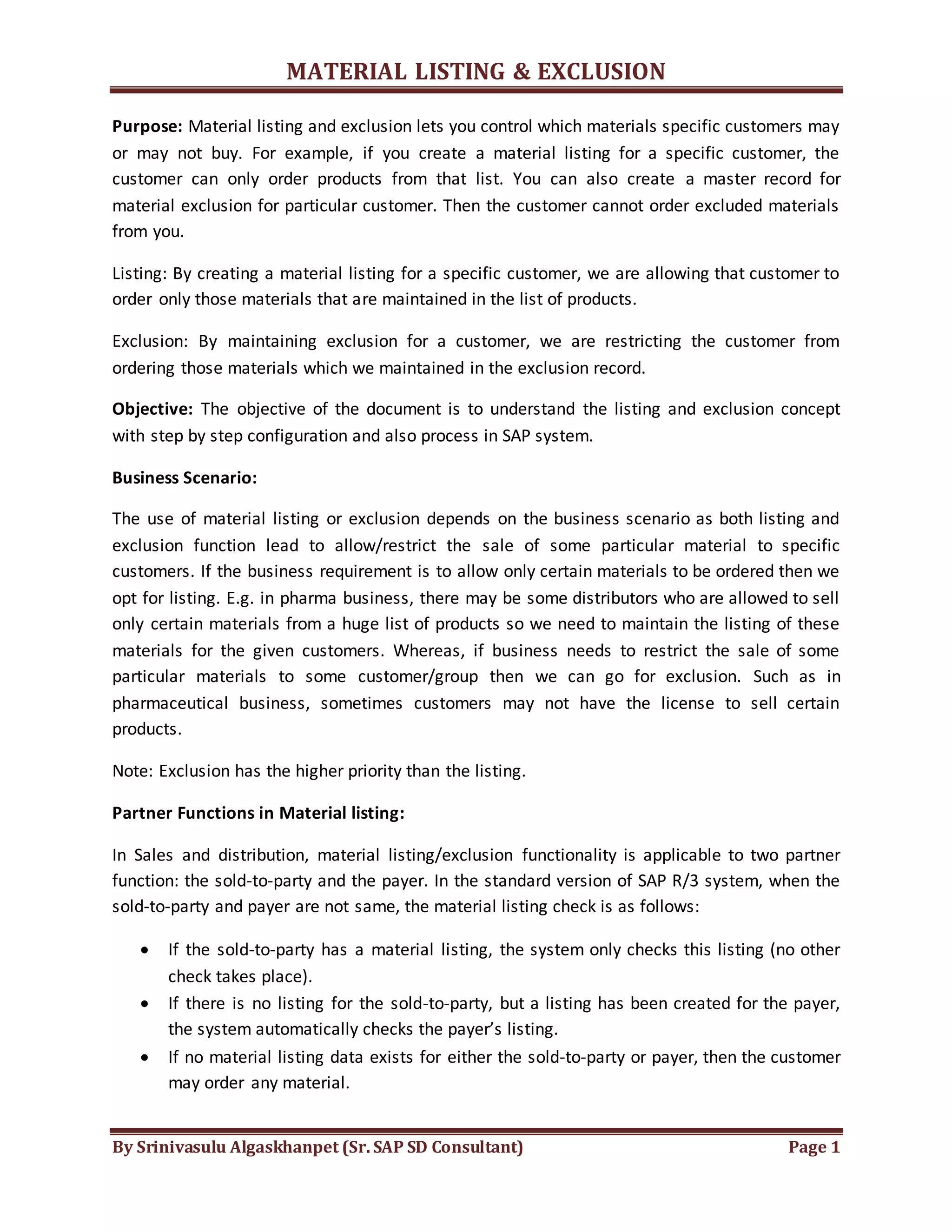
i. Create Condition table:
Path:SPRO > S&D > Basic functions > Listing/Exclusion > Maintain condition tables for
listing/exclusion
We can select the fields on which we want to create listing/exclusion.
ii. Create access sequence:
Path: SPRO > S&D > Basic functions > Listing/Exclusion > Maintain access sequence for
listing/exclusion
MATERIAL LISTING & EXCLUSION
By Srinivasulu Algaskhanpet (Sr. SAP SD Consultant) Page 3
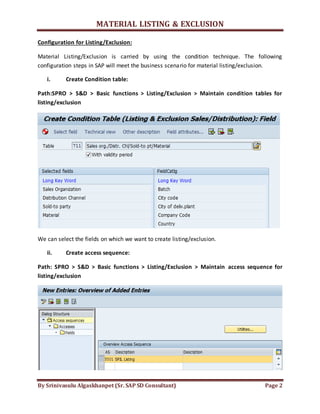
Select the access sequence and double click on accesses and place the condition table.
Select the table and double click on the fields for doing field assignment.
The standard access sequence for listing is “A001”
Exclusion is “B001”
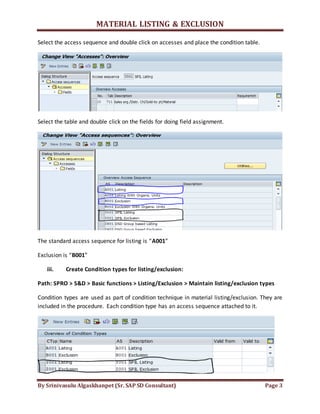
iii. Create Condition types for listing/exclusion:
Path: SPRO > S&D > Basic functions > Listing/Exclusion > Maintain listing/exclusion types
Condition types are used as part of condition technique in material listing/exclusion. They are
included in the procedure. Each condition type has an access sequence attached to it.
MATERIAL LISTING & EXCLUSION
By Srinivasulu Algaskhanpet (Sr. SAP SD Consultant) Page 4
In the same step we can create and assign the condition type to the access sequence.
The standard condition type for listing is “A001”
Exclusion is “B001”
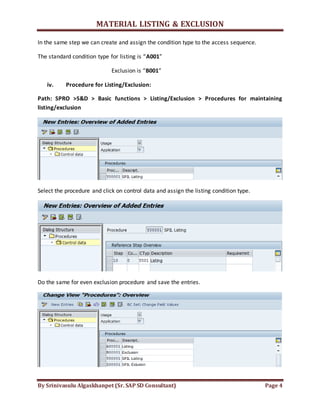
iv. Procedure for Listing/Exclusion:
Path: SPRO >S&D > Basic functions > Listing/Exclusion > Procedures for maintaining
listing/exclusion
Select the procedure and click on control data and assign the listing condition type.
Do the same for even exclusion procedure and save the entries.
MATERIAL LISTING & EXCLUSION
By Srinivasulu Algaskhanpet (Sr. SAP SD Consultant) Page 5
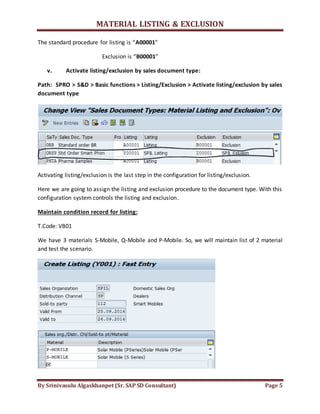
The standard procedure for listing is “A00001”
Exclusion is “B00001”
v. Activate listing/exclusion by sales document type:
Path: SPRO > S&D > Basic functions > Listing/Exclusion > Activate listing/exclusion by sales
document type
Activating listing/exclusion is the last step in the configuration for listing/exclusion.
Here we are going to assign the listing and exclusion procedure to the document type. With this
configuration system controls the listing and exclusion.
Maintain condition record for listing:
T.Code: VB01
We have 3 materials S-Mobile, Q-Mobile and P-Mobile. So, we will maintain list of 2 material
and test the scenario.
MATERIAL LISTING & EXCLUSION
By Srinivasulu Algaskhanpet (Sr. SAP SD Consultant) Page 6
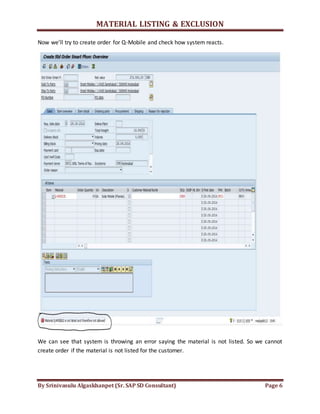
Now we’ll try to create order for Q-Mobile and check how system reacts.
We can see that system is throwing an error saying the material is not listed. So we cannot
create order if the material is not listed for the customer.
MATERIAL LISTING & EXCLUSION
By Srinivasulu Algaskhanpet (Sr. SAP SD Consultant) Page 7
Maintain condition record for Exclusion:
T.Code: VB01
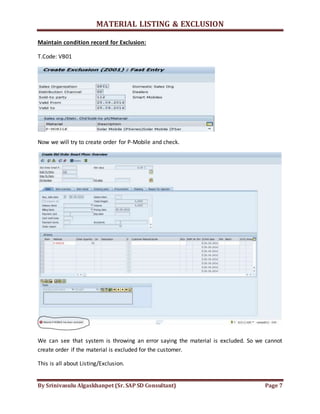
Now we will try to create order for P-Mobile and check.
We can see that system is throwing an error saying the material is excluded. So we cannot
create order if the material is excluded for the customer.
This is all about Listing/Exclusion.

Material listing & exclusion

  • 1.
    MATERIAL LISTING &EXCLUSION By Srinivasulu Algaskhanpet (Sr. SAP SD Consultant) Page 1 Purpose: Material listing and exclusion lets you control which materials specific customers may or may not buy. For example, if you create a material listing for a specific customer, the customer can only order products from that list. You can also create a master record for material exclusion for particular customer. Then the customer cannot order excluded materials from you. Listing: By creating a material listing for a specific customer, we are allowing that customer to order only those materials that are maintained in the list of products. Exclusion: By maintaining exclusion for a customer, we are restricting the customer from ordering those materials which we maintained in the exclusion record. Objective: The objective of the document is to understand the listing and exclusion concept with step by step configuration and also process in SAP system. Business Scenario: The use of material listing or exclusion depends on the business scenario as both listing and exclusion function lead to allow/restrict the sale of some particular material to specific customers. If the business requirement is to allow only certain materials to be ordered then we opt for listing. E.g. in pharma business, there may be some distributors who are allowed to sell only certain materials from a huge list of products so we need to maintain the listing of these materials for the given customers. Whereas, if business needs to restrict the sale of some particular materials to some customer/group then we can go for exclusion. Such as in pharmaceutical business, sometimes customers may not have the license to sell certain products. Note: Exclusion has the higher priority than the listing. Partner Functions in Material listing: In Sales and distribution, material listing/exclusion functionality is applicable to two partner function: the sold-to-party and the payer. In the standard version of SAP R/3 system, when the sold-to-party and payer are not same, the material listing check is as follows:  If the sold-to-party has a material listing, the system only checks this listing (no other check takes place).  If there is no listing for the sold-to-party, but a listing has been created for the payer, the system automatically checks the payer’s listing.  If no material listing data exists for either the sold-to-party or payer, then the customer may order any material.
  • 2.
    MATERIAL LISTING &EXCLUSION By Srinivasulu Algaskhanpet (Sr. SAP SD Consultant) Page 2 Configuration for Listing/Exclusion: Material Listing/Exclusion is carried by using the condition technique. The following configuration steps in SAP will meet the business scenario for material listing/exclusion. i. Create Condition table: Path:SPRO > S&D > Basic functions > Listing/Exclusion > Maintain condition tables for listing/exclusion We can select the fields on which we want to create listing/exclusion. ii. Create access sequence: Path: SPRO > S&D > Basic functions > Listing/Exclusion > Maintain access sequence for listing/exclusion
  • 3.
    MATERIAL LISTING &EXCLUSION By Srinivasulu Algaskhanpet (Sr. SAP SD Consultant) Page 3 Select the access sequence and double click on accesses and place the condition table. Select the table and double click on the fields for doing field assignment. The standard access sequence for listing is “A001” Exclusion is “B001” iii. Create Condition types for listing/exclusion: Path: SPRO > S&D > Basic functions > Listing/Exclusion > Maintain listing/exclusion types Condition types are used as part of condition technique in material listing/exclusion. They are included in the procedure. Each condition type has an access sequence attached to it.
  • 4.
    MATERIAL LISTING &EXCLUSION By Srinivasulu Algaskhanpet (Sr. SAP SD Consultant) Page 4 In the same step we can create and assign the condition type to the access sequence. The standard condition type for listing is “A001” Exclusion is “B001” iv. Procedure for Listing/Exclusion: Path: SPRO >S&D > Basic functions > Listing/Exclusion > Procedures for maintaining listing/exclusion Select the procedure and click on control data and assign the listing condition type. Do the same for even exclusion procedure and save the entries.
  • 5.
    MATERIAL LISTING &EXCLUSION By Srinivasulu Algaskhanpet (Sr. SAP SD Consultant) Page 5 The standard procedure for listing is “A00001” Exclusion is “B00001” v. Activate listing/exclusion by sales document type: Path: SPRO > S&D > Basic functions > Listing/Exclusion > Activate listing/exclusion by sales document type Activating listing/exclusion is the last step in the configuration for listing/exclusion. Here we are going to assign the listing and exclusion procedure to the document type. With this configuration system controls the listing and exclusion. Maintain condition record for listing: T.Code: VB01 We have 3 materials S-Mobile, Q-Mobile and P-Mobile. So, we will maintain list of 2 material and test the scenario.
  • 6.
    MATERIAL LISTING &EXCLUSION By Srinivasulu Algaskhanpet (Sr. SAP SD Consultant) Page 6 Now we’ll try to create order for Q-Mobile and check how system reacts. We can see that system is throwing an error saying the material is not listed. So we cannot create order if the material is not listed for the customer.
  • 7.
    MATERIAL LISTING &EXCLUSION By Srinivasulu Algaskhanpet (Sr. SAP SD Consultant) Page 7 Maintain condition record for Exclusion: T.Code: VB01 Now we will try to create order for P-Mobile and check. We can see that system is throwing an error saying the material is excluded. So we cannot create order if the material is excluded for the customer. This is all about Listing/Exclusion.