The document outlines the ATP (Availability to Promise) procedure in the SAP Sales and Distribution (SD) process, detailing prerequisites, scope, and actions for managing sales orders. It covers scenarios involving both stock availability and stock absence, explaining the role of material master data and system checks in confirming delivery dates. The document emphasizes the importance of coordinated planning between production and sales to ensure accurate ATP results for sales orders.
![Page [2]
Agenda
What’s ATP (Availability to Promise)
Prerequisites
Scope of ATP
Actions ATP in Sales Document
Sales Order with ATP process flow
Scenario 1 : Sales Order without Stock
Scenario 2 : Sales Order with Stock & Supply](https://image.slidesharecdn.com/sapatpinsalesdoc-161115062317/85/SAP-ATP-check-for-Sales-Order-2-320.jpg)
![What’s ATP
(Availability to Promise)
When you enter a sales order, you can confirm the delivery of the goods for the
required delivery date.
Page [3]](https://image.slidesharecdn.com/sapatpinsalesdoc-161115062317/85/SAP-ATP-check-for-Sales-Order-3-320.jpg)
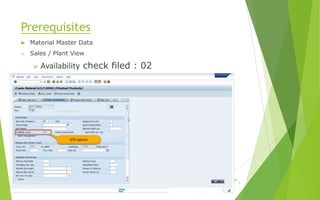
![Prerequisites
Material Master Data
Sales / Plant View
Availability check filed : 02
MRP 1 View
MRP type field : MX or PD
MRP group : M070
Page [4]](https://image.slidesharecdn.com/sapatpinsalesdoc-161115062317/85/SAP-ATP-check-for-Sales-Order-4-320.jpg)
![Prerequisites
Material Master Data
MRP 1 View
MRP type field : M0
MRP group : M070
Page [6]](https://image.slidesharecdn.com/sapatpinsalesdoc-161115062317/85/SAP-ATP-check-for-Sales-Order-6-320.jpg)
![Page [7]
Scope of ATP
Checking group : 02
Checking rule : A
Elements : Stock
UC stock
Safety Stock
Quality Inspection
Stock in transfer
Elements : inward/outward movement of goods
Sales requirements
Delivery requirements
Production Orders
Reservations
Dependent requirements](https://image.slidesharecdn.com/sapatpinsalesdoc-161115062317/85/SAP-ATP-check-for-Sales-Order-7-320.jpg)
![Page [ 8]
Sales Order Creating
Req. deliv. date in order header
Material and Order quantity
Sales Order Modification
Item’s Order quantity changed
Item’s delivery date changed
After new delivery schedule
Change to fixed qty and date
Change of Plant/Storage location
Inititating a check manually
Performing a check manually in Sales document
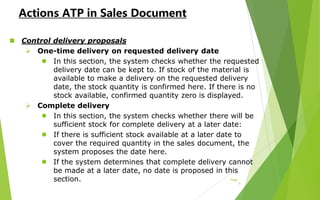
Actions ATP in Sales Document](https://image.slidesharecdn.com/sapatpinsalesdoc-161115062317/85/SAP-ATP-check-for-Sales-Order-8-320.jpg)
![Page
[11]
Sales Order with ATP process flow
SORO010 Sales order process
• Sales order
• Item no
• Delivery date
• Quantity
• ATP confirmed quantity
Production & Sales
Coordination
• Available Date for Planning
• Sales order
• Production
• Procurement
• Stock
PPPD010 Create Production
Order Process
• Production Order
• GR Date
• Order Quantity
PPMP020 MPS/MRP Process
• Stock
• Sales Order
• Production Order
• …ETC
Sales person Checks MRP(ATP)
Result
• Sales order
• Delivery date
• Available Quantity
Sales Person confirmed the
delivery date with customer](https://image.slidesharecdn.com/sapatpinsalesdoc-161115062317/85/SAP-ATP-check-for-Sales-Order-11-320.jpg)
![Page
[12]
Scenario 1 : Sales Order without
Stock
Stock : 0 EA (UC)
Sales order
Supply : Production order : 1 EA
Order no Item no Req. date Req. Quantity(EA)
1200219026 10 2016/9/27 2
ATP results
Order no Item no Rec./Req.
date
Rec/Req.
Quantity(EA)
ATP Quantity Available
Quantity
20810000025 2016/9/26 1 1 1
1200219026 10 2016/9/27 2 1 -1
Production Order GR. date GR. Quantity(EA)
20810000025 2016/9/26 1](https://image.slidesharecdn.com/sapatpinsalesdoc-161115062317/85/SAP-ATP-check-for-Sales-Order-12-320.jpg)

![Page
[15]
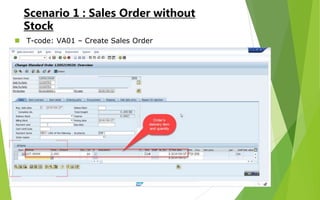
Scenario 1 : Sales Order without
Stock
T-code: VA01 - Sales order ATP information](https://image.slidesharecdn.com/sapatpinsalesdoc-161115062317/85/SAP-ATP-check-for-Sales-Order-15-320.jpg)
![Page
[16]
Scenario 1 : Sales Order without
Stock
T-code: MD4C
Sales order information
Stock and requirements list](https://image.slidesharecdn.com/sapatpinsalesdoc-161115062317/85/SAP-ATP-check-for-Sales-Order-16-320.jpg)
![Page
[18]
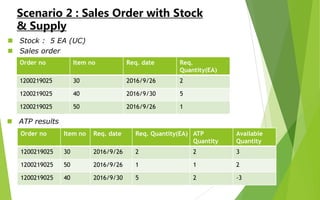
Scenario 2 : Sales Order with Stock
& Supply
T-code: VA01 – Create Sales Order](https://image.slidesharecdn.com/sapatpinsalesdoc-161115062317/85/SAP-ATP-check-for-Sales-Order-18-320.jpg)
![Page
[19]
Scenario 2 : Sales Order with Stock
& Supply
T-code: VA01 – ATP Control delivery proposals](https://image.slidesharecdn.com/sapatpinsalesdoc-161115062317/85/SAP-ATP-check-for-Sales-Order-19-320.jpg)
![Page
[20]
Scenario 2 : Sales Order with Stock
& Supply
T-code: VA01 – Sales order ATP information](https://image.slidesharecdn.com/sapatpinsalesdoc-161115062317/85/SAP-ATP-check-for-Sales-Order-20-320.jpg)
![Page
[21]
Scenario 2 : Sales Order with Stock
& Supply
T-code: MD4C
Sales order information
Stock and requirements list](https://image.slidesharecdn.com/sapatpinsalesdoc-161115062317/85/SAP-ATP-check-for-Sales-Order-21-320.jpg)


