CONSIGNMENT
PROCUREMENT
PROCESS
SAP – MATERIAL MANAGEMENT
BY: VIANY ADRIANA
CONTENTS
What is Consignment
Consignment Process
How to Reversed Settled Document for Consignment
WHAT IS CONSIGNMENT
• Consignment is a type of purchase where when we receipt the goods not yet declared as
own stock or expenses until we used it. In other words, when we receipt is still considered
as vendor’s stock.
• After stock transfer to own or we used this stock, we just responsible to received invoice
from vendor.
• With using consignment process, we can monitor vendor’s stock at our storage location
and analyze how many we using that stock per month or per week.
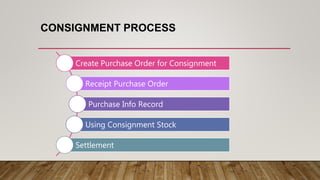
CONSIGNMENT PROCESS
Create Purchase Order for Consignment
Receipt Purchase Order
Purchase Info Record
Using Consignment Stock
Settlement
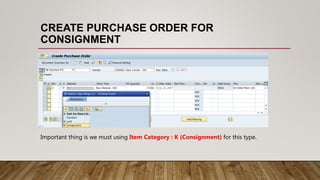
CREATE PURCHASE ORDER FOR
CONSIGNMENT
Important thing is we must using Item Category : K (Consignment) for this type.
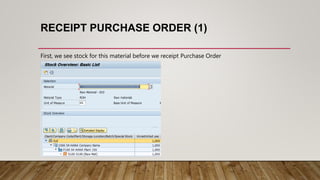
RECEIPT PURCHASE ORDER (1)
First, we see stock for this material before we receipt Purchase Order
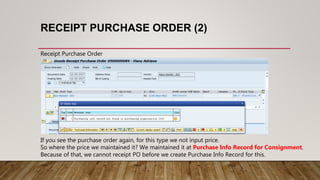
RECEIPT PURCHASE ORDER (2)
Receipt Purchase Order
If you see the purchase order again, for this type we not input price.
So where the price we maintained it? We maintained it at Purchase Info Record for Consignment.
Because of that, we cannot receipt PO before we create Purchase Info Record for this.
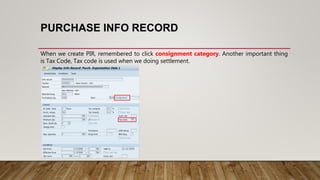
PURCHASE INFO RECORD
When we create PIR, remembered to click consignment category. Another important thing
is Tax Code, Tax code is used when we doing settlement.
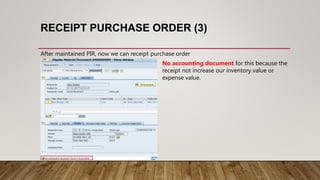
RECEIPT PURCHASE ORDER (3)
After maintained PIR, now we can receipt purchase order
No accounting document for this because the
receipt not increase our inventory value or
expense value.
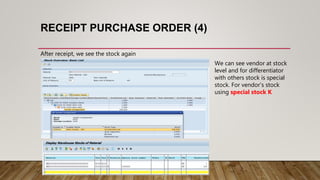
RECEIPT PURCHASE ORDER (4)
After receipt, we see the stock again
We can see vendor at stock
level and for differentiator
with others stock is special
stock. For vendor’s stock
using special stock K
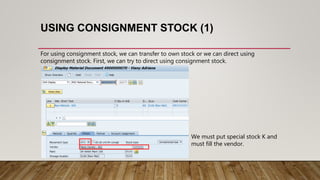
USING CONSIGNMENT STOCK (1)
For using consignment stock, we can transfer to own stock or we can direct using
consignment stock. First, we can try to direct using consignment stock.
We must put special stock K and
must fill the vendor.
USING CONSIGNMENT STOCK (2)
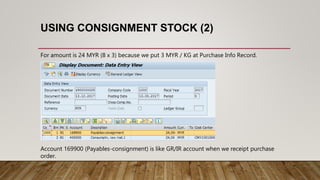
For amount is 24 MYR (8 x 3) because we put 3 MYR / KG at Purchase Info Record.
Account 169900 (Payables-consignment) is like GR/IR account when we receipt purchase
order.
USING CONSIGNMENT STOCK (3)
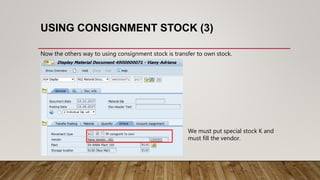
Now the others way to using consignment stock is transfer to own stock.
We must put special stock K and
must fill the vendor.
USING CONSIGNMENT STOCK (4)
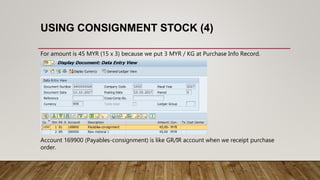
For amount is 45 MYR (15 x 3) because we put 3 MYR / KG at Purchase Info Record.
Account 169900 (Payables-consignment) is like GR/IR account when we receipt purchase
order.
USING CONSIGNMENT STOCK (5)
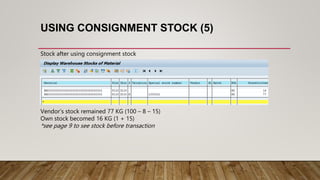
Stock after using consignment stock
Vendor’s stock remained 77 KG (100 – 8 – 15)
Own stock becomed 16 KG (1 + 15)
*see page 9 to see stock before transaction
SETTLEMENT
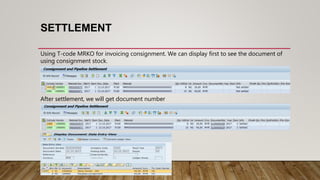
Using T-code MRKO for invoicing consignment. We can display first to see the document of
using consignment stock.
After settlement, we will get document number
HOW TO REVERSED SETTLED DOCUMENT (1)
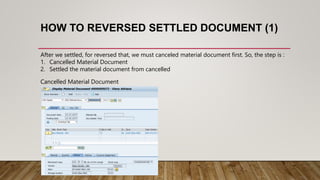
After we settled, for reversed that, we must canceled material document first. So, the step is :
1. Cancelled Material Document
2. Settled the material document from cancelled
Cancelled Material Document
HOW TO REVERSED SETTLED DOCUMENT (2)
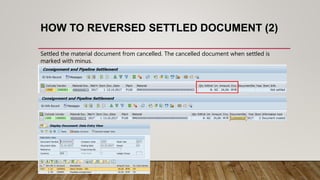
Settled the material document from cancelled. The cancelled document when settled is
marked with minus.
Consignment Process

Consignment Process

  • 1.
  • 2.
    CONTENTS What is Consignment ConsignmentProcess How to Reversed Settled Document for Consignment
  • 3.
    WHAT IS CONSIGNMENT •Consignment is a type of purchase where when we receipt the goods not yet declared as own stock or expenses until we used it. In other words, when we receipt is still considered as vendor’s stock. • After stock transfer to own or we used this stock, we just responsible to received invoice from vendor. • With using consignment process, we can monitor vendor’s stock at our storage location and analyze how many we using that stock per month or per week.
  • 4.
    CONSIGNMENT PROCESS Create PurchaseOrder for Consignment Receipt Purchase Order Purchase Info Record Using Consignment Stock Settlement
  • 5.
    CREATE PURCHASE ORDERFOR CONSIGNMENT Important thing is we must using Item Category : K (Consignment) for this type.
  • 6.
    RECEIPT PURCHASE ORDER(1) First, we see stock for this material before we receipt Purchase Order
  • 7.
    RECEIPT PURCHASE ORDER(2) Receipt Purchase Order If you see the purchase order again, for this type we not input price. So where the price we maintained it? We maintained it at Purchase Info Record for Consignment. Because of that, we cannot receipt PO before we create Purchase Info Record for this.
  • 8.
    PURCHASE INFO RECORD Whenwe create PIR, remembered to click consignment category. Another important thing is Tax Code, Tax code is used when we doing settlement.
  • 9.
    RECEIPT PURCHASE ORDER(3) After maintained PIR, now we can receipt purchase order No accounting document for this because the receipt not increase our inventory value or expense value.
  • 10.
    RECEIPT PURCHASE ORDER(4) After receipt, we see the stock again We can see vendor at stock level and for differentiator with others stock is special stock. For vendor’s stock using special stock K
  • 11.
    USING CONSIGNMENT STOCK(1) For using consignment stock, we can transfer to own stock or we can direct using consignment stock. First, we can try to direct using consignment stock. We must put special stock K and must fill the vendor.
  • 12.
    USING CONSIGNMENT STOCK(2) For amount is 24 MYR (8 x 3) because we put 3 MYR / KG at Purchase Info Record. Account 169900 (Payables-consignment) is like GR/IR account when we receipt purchase order.
  • 13.
    USING CONSIGNMENT STOCK(3) Now the others way to using consignment stock is transfer to own stock. We must put special stock K and must fill the vendor.
  • 14.
    USING CONSIGNMENT STOCK(4) For amount is 45 MYR (15 x 3) because we put 3 MYR / KG at Purchase Info Record. Account 169900 (Payables-consignment) is like GR/IR account when we receipt purchase order.
  • 15.
    USING CONSIGNMENT STOCK(5) Stock after using consignment stock Vendor’s stock remained 77 KG (100 – 8 – 15) Own stock becomed 16 KG (1 + 15) *see page 9 to see stock before transaction
  • 16.
    SETTLEMENT Using T-code MRKOfor invoicing consignment. We can display first to see the document of using consignment stock. After settlement, we will get document number
  • 17.
    HOW TO REVERSEDSETTLED DOCUMENT (1) After we settled, for reversed that, we must canceled material document first. So, the step is : 1. Cancelled Material Document 2. Settled the material document from cancelled Cancelled Material Document
  • 18.
    HOW TO REVERSEDSETTLED DOCUMENT (2) Settled the material document from cancelled. The cancelled document when settled is marked with minus.