In this documentI'm going to explain inter-CompanyStock transportOrder with SD Delivery, Billing & Logistics
Invoice verification.
Prerequisites:
1. Knowledge of MM & SD
2. Two organization structures: one for purchasing and another for sales
Purchasing: Company Code:8888, Plant: 8881, Sto. Loc: 0002, Purchase Organization:
8881,
Sales: Company Code:6666, Delivering Plant: 6661, Sto. Loc: 0001, Sales Area:6666, 66, 66, Shipping
Point 6666.
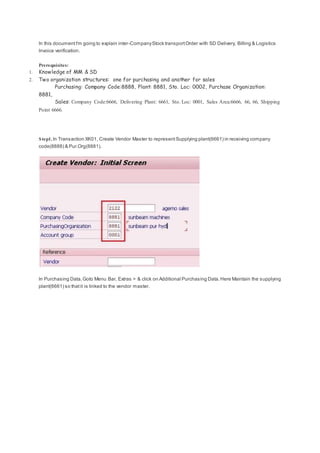
Step1. In Transaction XK01, Create Vendor Master to representSupplying plant(6661) in receiving company
code(8888) & Pur.Org(8881).
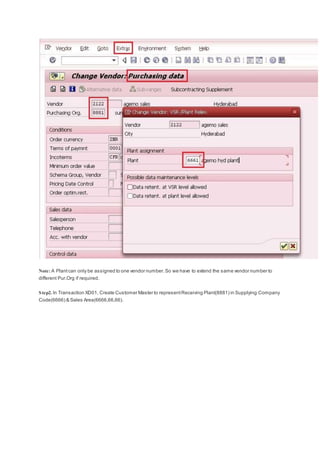
In Purchasing Data,Goto Menu Bar, Extras > & click on Additional Purchasing Data.Here Maintain the supplying
plant(6661) so thatit is linked to the vendor master.
Note: A Plantcan only be assigned to one vendor number.So we have to extend the same vendor number to
different Pur.Org if required.
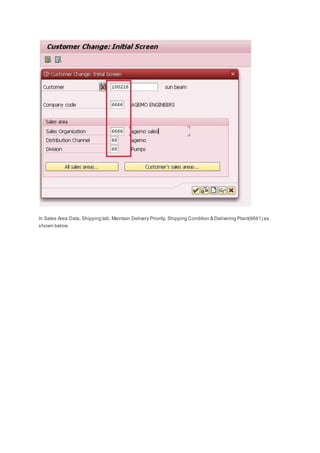
Step2. In Transaction XD01, Create Customer Master to representReceiving Plant(8881) in Supplying Company
Code(6666) & Sales Area(6666,66,66).
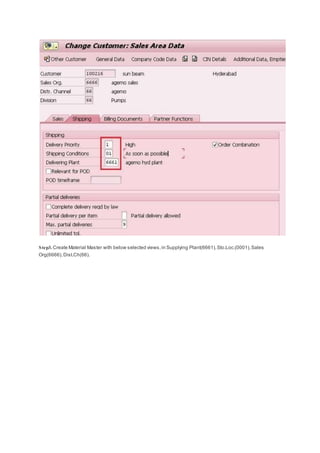
In Sales Area Data, Shipping tab, Maintain Delivery Priority, Shipping Condition & Delivering Plant(6661) as
shown below.
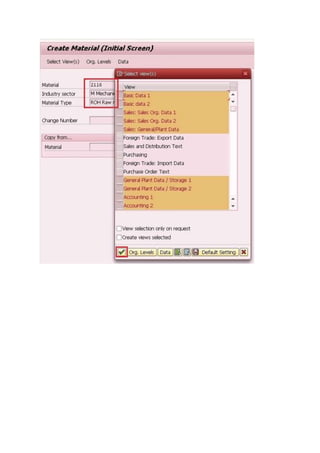
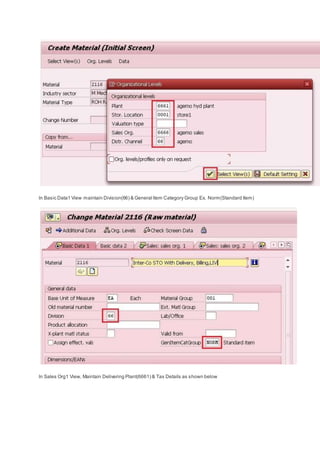
Step3. Create Material Master with below selected views,in Supplying Plant(6661),Sto.Loc.(0001),Sales
Org(6666),Dist.Ch(66).
In Basic Data1 View maintain Division(66) & General Item Category Group Ex. Norm(Standard Item)
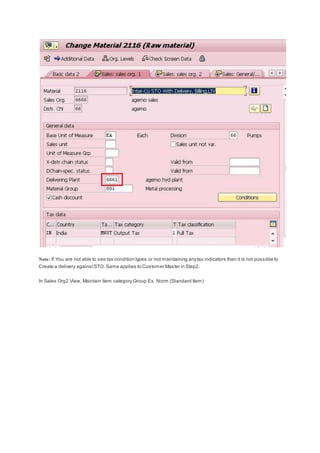
In Sales Org1 View, Maintain Delivering Plant(6661) & Tax Details as shown below
Note: If You are not able to see tax condition types or not maintaining anytax indicators then it is not possible to
Create a delivery againstSTO. Same applies to Customer Master in Step2.
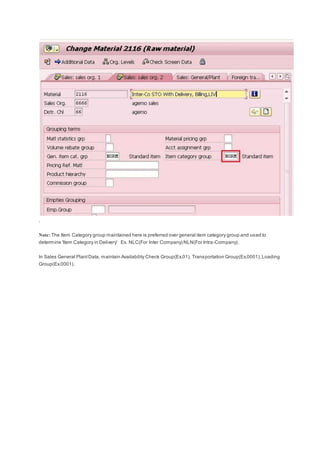
In Sales Org2 View, Maintain Item category Group Ex. Norm (Standard Item)
.
Note: The Item Category group maintained here is preferred over general item category group and used to
determine 'Item Category in Delivery' Ex. NLC(For Inter Company) NLN(For Intra-Company).
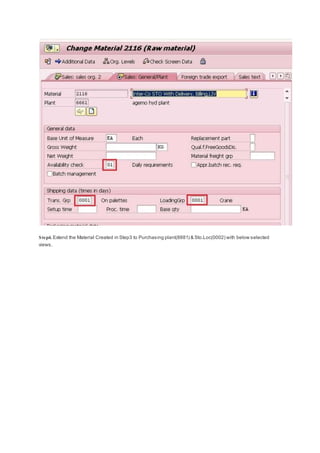
In Sales General PlantData, maintain Availability Check Group(Ex.01), Transportation Group(Ex.0001),Loading
Group(Ex.0001).
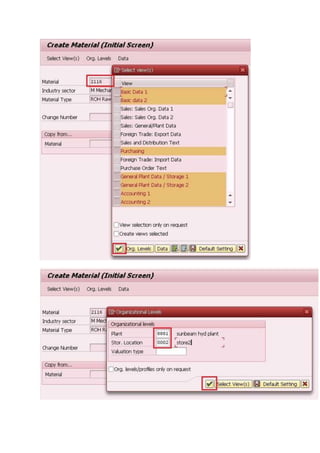
Step4. Extend the Material Created in Step3 to Purchasing plant(8881) & Sto.Loc(0002) with below selected
views.
Configuration Settings
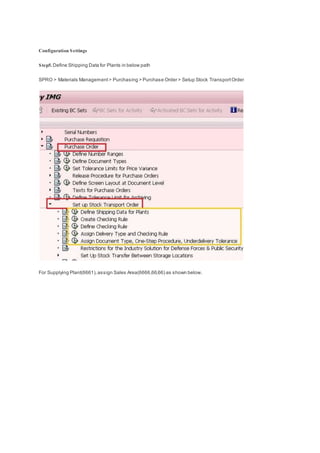
Step5. Define Shipping Data for Plants in below path
SPRO > Materials Management> Purchasing > Purchase Order > Setup Stock TransportOrder
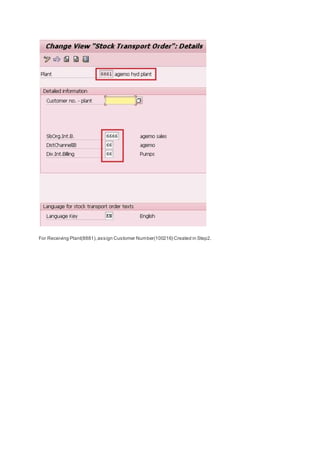
For Supplying Plant(6661),assign Sales Area(6666,66,66) as shown below.
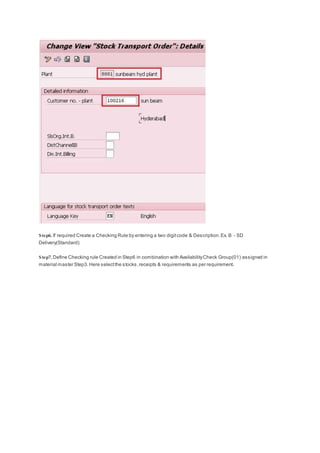
For Receiving Plant(8881),assign Customer Number(100216) Created in Step2.
Step6. If required Create a Checking Rule by entering a two digitcode & Description.Ex. B - SD
Delivery(Standard)
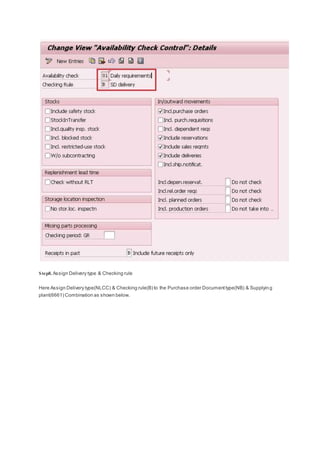
Step7. Define Checking rule Created in Step6 in combination with AvailabilityCheck Group(01) assigned in
material master Step3.Here selectthe stocks,receipts & requirements as per requirement.
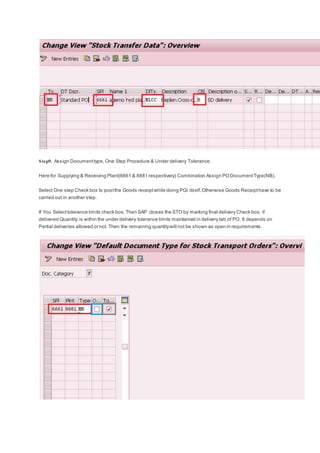
Step8. Assign Delivery type & Checking rule
Here Assign Delivery type(NLCC) & Checking rule(B) to the Purchase order Documenttype(NB) & Supplying
plant(6661) Combination as shown below.
Step9. Assign Documenttype, One Step Procedure & Under delivery Tolerance.
Here for Supplying & Receiving Plant(6661 & 8881 respectively) Combination Assign PODocumentType(NB).
Select One step Check box to postthe Goods receiptwhile doing PGI itself.Otherwise Goods Receipthave to be
carried out in another step.
If You Selecttolerance limits check box, Then SAP closes the STO by marking final delivery Check box, if
delivered Quantity is within the under delivery tolerance limits maintained in delivery tab of PO. It depends on
Partial deliveries allowed or not. Then the remaining quantitywill not be shown as open in requirements.
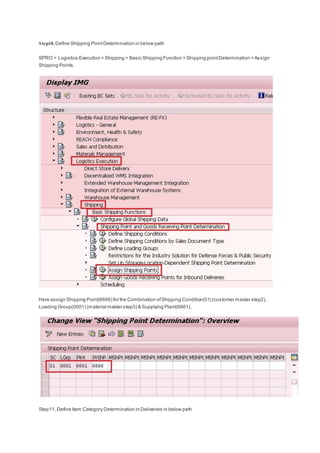
Step10. Define Shipping PointDetermination in below path
SPRO > Logistics Execution > Shipping > Basic Shipping Function > Shipping pointDetermination > Assign
Shipping Points.
Here assign Shipping Point(6666) for the Combination ofShipping Condition(01) (customer master step2),
Loading Group(0001) (material master step3) & Supplying Plant(6661).
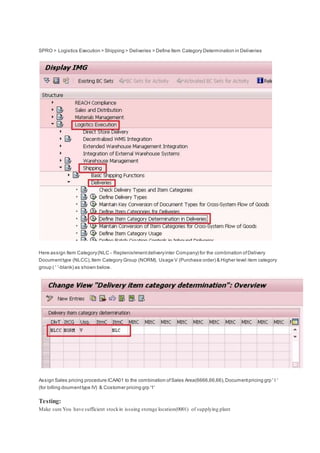
Step11. Define Item Category Determination in Deliveries in below path
SPRO > Logistics Execution > Shipping > Deliveries > Define Item Category Determination in Deliveries
Here assign Item Category(NLC - Replenishmentdeliveryinter Company) for the combination ofDelivery
Documenttype (NLCC),Item Category Group (NORM), Usage V (Purchase order) & Higher level item category
group ( ' '-blank) as shown below.
Assign Sales pricing procedure ICAA01 to the combination ofSales Area(6666,66,66),Documentpricing grp ' I '
(for billing doumenttype IV) & Costomer pricing grp '1'
Testing:
Make sure You have sufficient stockin issuing storage location(0001) of supplying plant
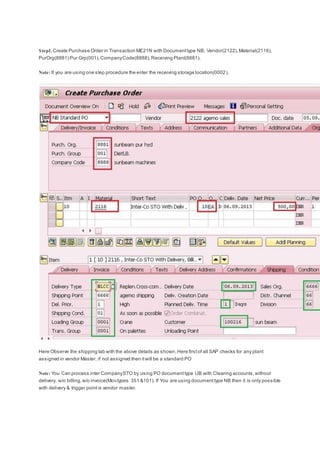
Step1. Create Purchase Order in Transaction ME21N with Documenttype NB, Vendor(2122),Material(2116),
PurOrg(8881) Pur Grp(001),CompanyCode(8888),Receiving Plant(8881).
Note: If you are using one step procedure the enter the receiving storage location(0002).
Here Observe the shipping tab with the above details as shown.Here firstof all SAP checks for any plant
assigned in vendor Master. if not assigned then itwill be a standard PO
Note: You Can process inter CompanySTO by using PO documenttype UB with Clearing accounts,without
delivery, w/o billing,w/o invoice(Mov.types 351 &101). If You are using documenttype NB then it is only possible
with delivery & trigger pointis vendor master.
make sure you have proper sales tax setup in SD > Basic Functions > Taxes.. Customer & Material Master is
assigned to tax indicators.Create condition record for outputtax condition type in Trasaction VK11. Ex. MWST
output tax
In Transaction VK11 Create Condition Record for Condition type PR00 with the sales price ifrequired.
Note: To adoptprice from purchasing in to billing create a condition type with same name as PB00.In copy
control enter reference as application purchasing & condition type PB00. Now assign this condition type in
procedure ICAA01 after step of condition type IV01. Now the PO price is adopted in to billing.
Step2. Generate Outbound delivery againstpurchase order in Transaction VL10Gor VL10D
Here make sure that delivery date is in between the dates entered.& enter the shipping pointtriggered in PO
shipping tab.Then Execute.
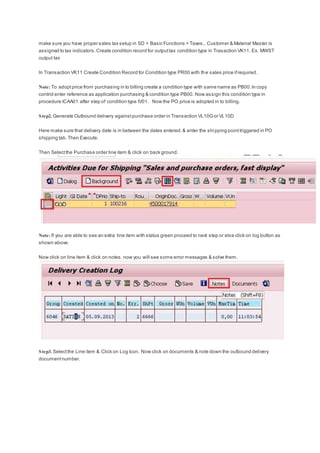
Then Selectthe Purchase order line item & click on back ground.
Note: If you are able to see an extra line item with status green proceed to next step or else click on log button as
shown above.
Now click on line item & click on notes. now you will see some error messages & solve them.
Step3. Selectthe Line item & Click on Log Icon. Now click on documents & note down the outbound delivery
documentnumber.
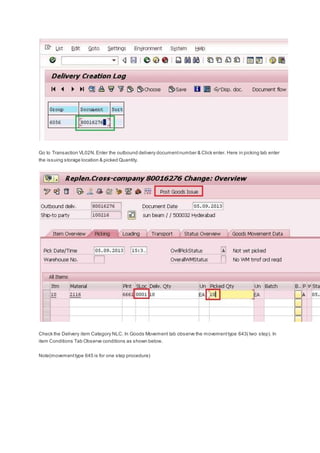
Go to Transaction VL02N.Enter the outbound delivery documentnumber & Click enter. Here in picking tab enter
the issuing storage location & picked Quantity.
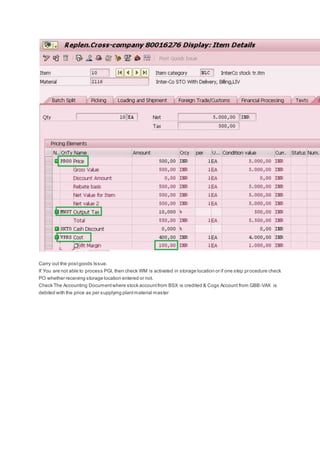
Check the Delivery item Category NLC. In Goods Movement tab observe the movementtype 643( two step). In
item Conditions Tab Observe conditions as shown below.
Note(movementtype 645 is for one step procedure)
Carry out the postgoods Issue.
If You are not able to process PGI, then check WM is activated in storage location or if one step procedure check
PO whether receiving storage location entered or not.
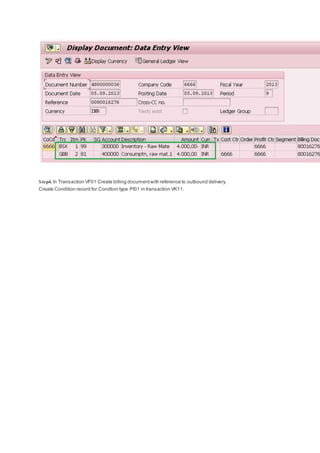
Check The Accounting Documentwhere stock accountfrom BSX is credited & Cogs Account from GBB-VAX is
debited with the price as per supplying plantmaterial master
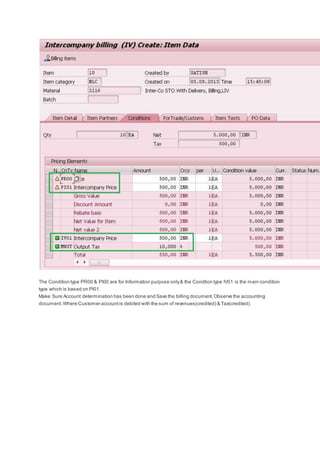
Step4. In Transaction VF01 Create billing documentwith reference to outbound delivery.
Create Condition record for Condtion type PI01 in transaction VK11.
The Condition type PR00 & PI00 are for Information purpose only& the Condtion type IV01 is the main condition
type which is based on PI01.
Make Sure Account determination has been done and Save the billing document.Observe the accounting
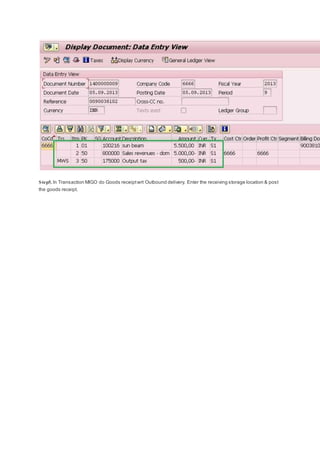
document.Where Customer accountis debited with the sum of revenues(credited) & Tax(credited).
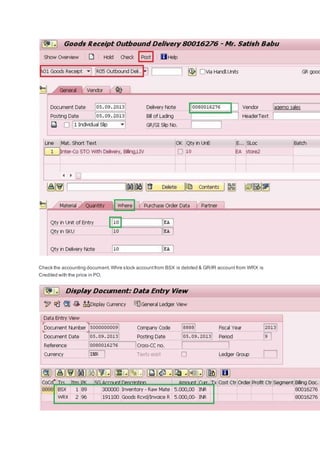
Step5. In Transaction MIGO do Goods receiptwrt Outbound delivery. Enter the receiving storage location & post
the goods receipt.
Check the accounting document.Whre stock accountfrom BSX is debited & GR/IR account from WRX is
Credited with the price in PO.
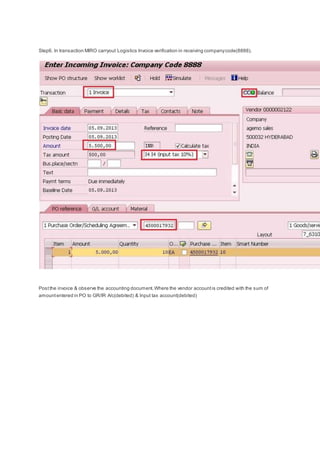
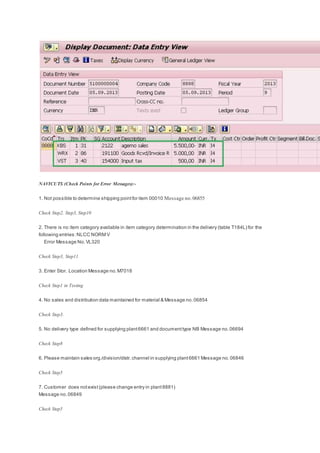
Step6. In transaction MIRO carryout Logistics Invoice verification in receiving companycode(8888).
Postthe invoice & observe the accounting document.Where the vendor accountis credited with the sum of
amountentered in PO to GR/IR A/c(debited) & Input tax account(debited)
NAVICUTS (Check Points for Error Messages):-
1. Not possible to determine shipping pointfor item 00010 Message no.06855
Check Step2, Step3, Step10
2. There is no item category available in item category determination in the delivery (table T184L) for the
following entries:NLCC NORM V
Error Message No.VL320
Check Step3, Step11
3. Enter Stor. Location Message no.M7018
Check Step1 in Testing
4. No sales and distribution data maintained for material & Message no.06854
Check Step3.
5. No delivery type defined for supplying plant6661 and documenttype NB Message no.06694
Check Step8
6. Please maintain sales org./division/distr.channel in supplying plant6661 Message no.06846
Check Step5
7. Customer does notexist(please change entry in plant8881)
Message no.06849
Check Step5
8. Not possible to determine shipping data for material & Message no.06280
This Error Message will notcome in inter companystock transportorders & Will only come in Intra companySTO
with Delivery & W/o Billing

Inter company STO

  • 1.
    In this documentI'mgoing to explain inter-CompanyStock transportOrder with SD Delivery, Billing & Logistics Invoice verification. Prerequisites: 1. Knowledge of MM & SD 2. Two organization structures: one for purchasing and another for sales Purchasing: Company Code:8888, Plant: 8881, Sto. Loc: 0002, Purchase Organization: 8881, Sales: Company Code:6666, Delivering Plant: 6661, Sto. Loc: 0001, Sales Area:6666, 66, 66, Shipping Point 6666. Step1. In Transaction XK01, Create Vendor Master to representSupplying plant(6661) in receiving company code(8888) & Pur.Org(8881). In Purchasing Data,Goto Menu Bar, Extras > & click on Additional Purchasing Data.Here Maintain the supplying plant(6661) so thatit is linked to the vendor master.
  • 2.
    Note: A Plantcanonly be assigned to one vendor number.So we have to extend the same vendor number to different Pur.Org if required. Step2. In Transaction XD01, Create Customer Master to representReceiving Plant(8881) in Supplying Company Code(6666) & Sales Area(6666,66,66).
  • 3.
    In Sales AreaData, Shipping tab, Maintain Delivery Priority, Shipping Condition & Delivering Plant(6661) as shown below.
  • 4.
    Step3. Create MaterialMaster with below selected views,in Supplying Plant(6661),Sto.Loc.(0001),Sales Org(6666),Dist.Ch(66).
  • 6.
    In Basic Data1View maintain Division(66) & General Item Category Group Ex. Norm(Standard Item) In Sales Org1 View, Maintain Delivering Plant(6661) & Tax Details as shown below
  • 7.
    Note: If Youare not able to see tax condition types or not maintaining anytax indicators then it is not possible to Create a delivery againstSTO. Same applies to Customer Master in Step2. In Sales Org2 View, Maintain Item category Group Ex. Norm (Standard Item)
  • 8.
    . Note: The ItemCategory group maintained here is preferred over general item category group and used to determine 'Item Category in Delivery' Ex. NLC(For Inter Company) NLN(For Intra-Company). In Sales General PlantData, maintain Availability Check Group(Ex.01), Transportation Group(Ex.0001),Loading Group(Ex.0001).
  • 9.
    Step4. Extend theMaterial Created in Step3 to Purchasing plant(8881) & Sto.Loc(0002) with below selected views.
  • 11.
    Configuration Settings Step5. DefineShipping Data for Plants in below path SPRO > Materials Management> Purchasing > Purchase Order > Setup Stock TransportOrder For Supplying Plant(6661),assign Sales Area(6666,66,66) as shown below.
  • 12.
    For Receiving Plant(8881),assignCustomer Number(100216) Created in Step2.
  • 13.
    Step6. If requiredCreate a Checking Rule by entering a two digitcode & Description.Ex. B - SD Delivery(Standard) Step7. Define Checking rule Created in Step6 in combination with AvailabilityCheck Group(01) assigned in material master Step3.Here selectthe stocks,receipts & requirements as per requirement.
  • 14.
    Step8. Assign Deliverytype & Checking rule Here Assign Delivery type(NLCC) & Checking rule(B) to the Purchase order Documenttype(NB) & Supplying plant(6661) Combination as shown below.
  • 15.
    Step9. Assign Documenttype,One Step Procedure & Under delivery Tolerance. Here for Supplying & Receiving Plant(6661 & 8881 respectively) Combination Assign PODocumentType(NB). Select One step Check box to postthe Goods receiptwhile doing PGI itself.Otherwise Goods Receipthave to be carried out in another step. If You Selecttolerance limits check box, Then SAP closes the STO by marking final delivery Check box, if delivered Quantity is within the under delivery tolerance limits maintained in delivery tab of PO. It depends on Partial deliveries allowed or not. Then the remaining quantitywill not be shown as open in requirements.
  • 16.
    Step10. Define ShippingPointDetermination in below path SPRO > Logistics Execution > Shipping > Basic Shipping Function > Shipping pointDetermination > Assign Shipping Points. Here assign Shipping Point(6666) for the Combination ofShipping Condition(01) (customer master step2), Loading Group(0001) (material master step3) & Supplying Plant(6661). Step11. Define Item Category Determination in Deliveries in below path
  • 17.
    SPRO > LogisticsExecution > Shipping > Deliveries > Define Item Category Determination in Deliveries Here assign Item Category(NLC - Replenishmentdeliveryinter Company) for the combination ofDelivery Documenttype (NLCC),Item Category Group (NORM), Usage V (Purchase order) & Higher level item category group ( ' '-blank) as shown below. Assign Sales pricing procedure ICAA01 to the combination ofSales Area(6666,66,66),Documentpricing grp ' I ' (for billing doumenttype IV) & Costomer pricing grp '1' Testing: Make sure You have sufficient stockin issuing storage location(0001) of supplying plant
  • 18.
    Step1. Create PurchaseOrder in Transaction ME21N with Documenttype NB, Vendor(2122),Material(2116), PurOrg(8881) Pur Grp(001),CompanyCode(8888),Receiving Plant(8881). Note: If you are using one step procedure the enter the receiving storage location(0002). Here Observe the shipping tab with the above details as shown.Here firstof all SAP checks for any plant assigned in vendor Master. if not assigned then itwill be a standard PO Note: You Can process inter CompanySTO by using PO documenttype UB with Clearing accounts,without delivery, w/o billing,w/o invoice(Mov.types 351 &101). If You are using documenttype NB then it is only possible with delivery & trigger pointis vendor master.
  • 19.
    make sure youhave proper sales tax setup in SD > Basic Functions > Taxes.. Customer & Material Master is assigned to tax indicators.Create condition record for outputtax condition type in Trasaction VK11. Ex. MWST output tax In Transaction VK11 Create Condition Record for Condition type PR00 with the sales price ifrequired. Note: To adoptprice from purchasing in to billing create a condition type with same name as PB00.In copy control enter reference as application purchasing & condition type PB00. Now assign this condition type in procedure ICAA01 after step of condition type IV01. Now the PO price is adopted in to billing. Step2. Generate Outbound delivery againstpurchase order in Transaction VL10Gor VL10D Here make sure that delivery date is in between the dates entered.& enter the shipping pointtriggered in PO shipping tab.Then Execute. Then Selectthe Purchase order line item & click on back ground. Note: If you are able to see an extra line item with status green proceed to next step or else click on log button as shown above. Now click on line item & click on notes. now you will see some error messages & solve them. Step3. Selectthe Line item & Click on Log Icon. Now click on documents & note down the outbound delivery documentnumber.
  • 20.
    Go to TransactionVL02N.Enter the outbound delivery documentnumber & Click enter. Here in picking tab enter the issuing storage location & picked Quantity. Check the Delivery item Category NLC. In Goods Movement tab observe the movementtype 643( two step). In item Conditions Tab Observe conditions as shown below. Note(movementtype 645 is for one step procedure)
  • 21.
    Carry out thepostgoods Issue. If You are not able to process PGI, then check WM is activated in storage location or if one step procedure check PO whether receiving storage location entered or not. Check The Accounting Documentwhere stock accountfrom BSX is credited & Cogs Account from GBB-VAX is debited with the price as per supplying plantmaterial master
  • 22.
    Step4. In TransactionVF01 Create billing documentwith reference to outbound delivery. Create Condition record for Condtion type PI01 in transaction VK11.
  • 23.
    The Condition typePR00 & PI00 are for Information purpose only& the Condtion type IV01 is the main condition type which is based on PI01. Make Sure Account determination has been done and Save the billing document.Observe the accounting document.Where Customer accountis debited with the sum of revenues(credited) & Tax(credited).
  • 24.
    Step5. In TransactionMIGO do Goods receiptwrt Outbound delivery. Enter the receiving storage location & post the goods receipt.
  • 25.
    Check the accountingdocument.Whre stock accountfrom BSX is debited & GR/IR account from WRX is Credited with the price in PO.
  • 26.
    Step6. In transactionMIRO carryout Logistics Invoice verification in receiving companycode(8888). Postthe invoice & observe the accounting document.Where the vendor accountis credited with the sum of amountentered in PO to GR/IR A/c(debited) & Input tax account(debited)
  • 27.
    NAVICUTS (Check Pointsfor Error Messages):- 1. Not possible to determine shipping pointfor item 00010 Message no.06855 Check Step2, Step3, Step10 2. There is no item category available in item category determination in the delivery (table T184L) for the following entries:NLCC NORM V Error Message No.VL320 Check Step3, Step11 3. Enter Stor. Location Message no.M7018 Check Step1 in Testing 4. No sales and distribution data maintained for material & Message no.06854 Check Step3. 5. No delivery type defined for supplying plant6661 and documenttype NB Message no.06694 Check Step8 6. Please maintain sales org./division/distr.channel in supplying plant6661 Message no.06846 Check Step5 7. Customer does notexist(please change entry in plant8881) Message no.06849 Check Step5
  • 28.
    8. Not possibleto determine shipping data for material & Message no.06280 This Error Message will notcome in inter companystock transportorders & Will only come in Intra companySTO with Delivery & W/o Billing