

Zero Configuration
Networking
Shashwat Shriparv
dwivedishashwat@gmail.com
InfinitySoft
Overview
• What is Zero Configuration Networking?
– Origin: IETF
• Description of Protocols
– IP Address Auto configuration
– Name Resolution Without DNS
– Service Discovery
• Available Implementation
• Support
• Conclusion
Zero Configuration Networking
• The goal of the Zero Configuration Networking
(ZEROCONF) Working Group is to enable
networking in the absence of configuration and
administration
• “ Zeroconf ” is an umbrella term for a number of
underlying technologies which used to deploy
Automatic Configuration.
Origins: IETF
• Stuart Cheshire posted on the Net-Thinkers mailing
list in 1997
• Put forward before IETF meetings on the subject of
"Networking in the Small" (NITS).
• Zero Configuration Working Group was established
in September 1999.
• In May 2002, Apple announced its trademark
"Rendezvous” for the Zeroconf technologies.
• April 2005, Apple announced the new Apple name
for the Zeroconf technologies: "Bonjour."
Description of Protocols
The Zeroconf technology,
• IP Address Auto Configuration
(Addressing without DHCP)
• Multicast DNS
(Name resolution without DNS)
• Service Discovery
IP Address Auto configuration
• Absence of DHCP Server:
– Automatic selection of an IP address in the absence
of a DHCP server or network administrator
• Selection of addresses is done in a distributed
manner ie Each device is responsible for choosing
its own address and then verifying that it can use the
selected address.
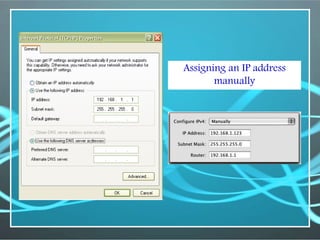
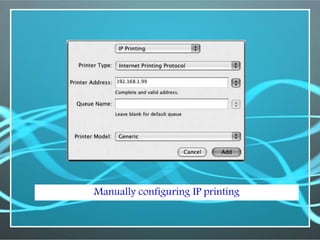
Assigning an IP address
manually
Manually configuring IP printing
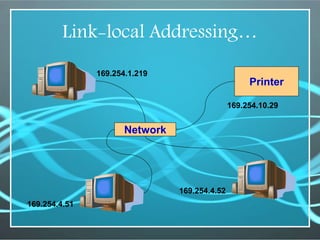
Link-local Addressing
• Automatic self-assigned link-local addresses, which
are guaranteed to work even when everything else
has failed, providing the solution.
• Link-local addressing is intended for two main
scenarios:
– For tiny ad-hoc local networks where communication is
desired without the overhead of setting up a DHCP server
– To provide a minimum safety-net level of service on
networks where there's supposed to be a DHCP server but
it's failed.
Link-local addressing…
• Link-local address range:
– Some of the IP addresses listed in RFC 3330 as being
reserved for local private use are:
• 10.0.0.0 to 10.255.255.255
• 172.16.0.0 to 172.31.255.255
• 192.168.0.0 to 192.168.255.255
• 169.254.0.0 to 169. 254.255.255
• Last set of numbers is the range that Zeroconf uses
when no DHCP server is available.
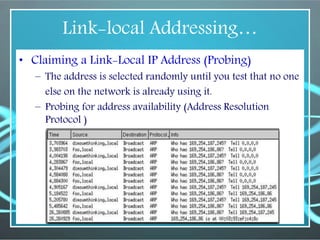
Link-local Addressing…
• Claiming a Link-Local IP Address (Probing)
– The address is selected randomly until you test that no one
else on the network is already using it.
– Probing for address availability (Address Resolution
Protocol )
Link-local Addressing…
Printer
Network
169.254.1.219
169.254.4.51
169.254.10.29
169.254.4.52
Name Resolution Without DNS
• Absence of DNS Server,
– Perform DNS queries via IP Multicast
• Multicast DNS
– Does not require any changes to the DNS Protocol
(messages, resource record types, etc).
– Resolve locally unique hostnames.
– ‘Answer list’ in Multicast-DNS will have details of the
mDNS Querier and Responder, and other mechanics of
where the messages are being sent and which devices are
listening.
Multicast DNS
• Multicast DNS Queries
– Set the destination address to 224.0.0.251 (IPv4 address
that has been reserved for mDNS), set the destination port
to 5353, and send the UDP packet as usual. When the
UDP response comes back, the DNS client receives and
handles it.
– When a machine receives a response to a query, other
machines on the network receive the response too and can
add it to their own caches for future use.
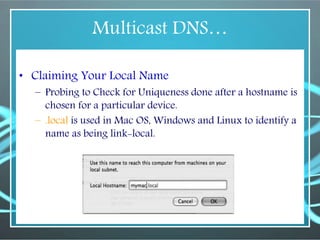
Multicast DNS…
• Claiming Your Local Name
– Probing to Check for Uniqueness done after a hostname is
chosen for a particular device.
– .local is used in Mac OS, Windows and Linux to identify a
name as being link-local.
Multicast DNS…
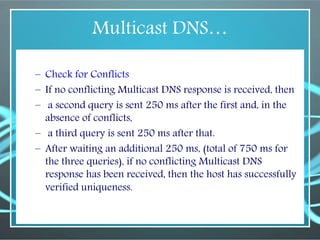
– Check for Conflicts
– If no conflicting Multicast DNS response is received, then
– a second query is sent 250 ms after the first and, in the
absence of conflicts,
– a third query is sent 250 ms after that.
– After waiting an additional 250 ms, (total of 750 ms for
the three queries), if no conflicting Multicast DNS
response has been received, then the host has successfully
verified uniqueness.
Multicast DNS…
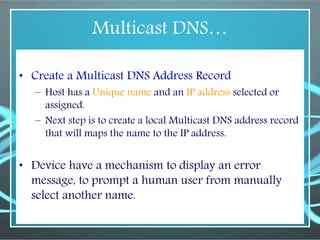
• Create a Multicast DNS Address Record
– Host has a Unique name and an IP address selected or
assigned.
– Next step is to create a local Multicast DNS address record
that will maps the name to the IP address.
• Device have a mechanism to display an error
message, to prompt a human user from manually
select another name.
Multicast DNS…
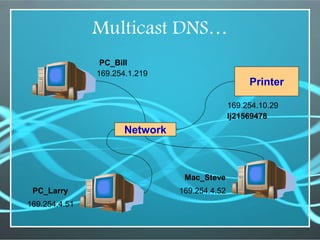
Printer
169.254.1.219
169.254.4.51
169.254.10.29
169.254.4.52
PC_Bill
PC_Larry
lj21569478
Network
Mac_Steve
Multicast DNS…
• Structure of the Multicast DNS Message
– Multicast DNS Message format is similar to that of
Unicast DNS Message format.
– In fact, software can decode and display mDNS packets
using the same decoder as uDNS packets.
• Minor differences:
– uDNS packets are limited to, at most, 512 bytes. mDNS
packets are allowed to be up to 9,000 bytes.
– mDNS uses UDP port 5353 instead of port 53.
– mDNS uses UTF-8, and only UTF-8, to encode resource
record names. uDNS, use variety of encodes for a
compatibility reasons.
Service Discovery
• DNS Service Discovery (DNS-SD), the mechanism in
Zeroconf that discover what services are available
on the network without having to know device or
service names in advance.
• Finding Services, Not Devices
• Client software store the chosen service name, type,
and domain, instead of resolving the named service
to an IP address and storing that.
Available Implementation
Benjour
• BENJOUR is Apple Computer’s implementation of
Zeroconf in its.
• Introduced in Mac OS X 10.2 (“Jaguar”) operating
systems.
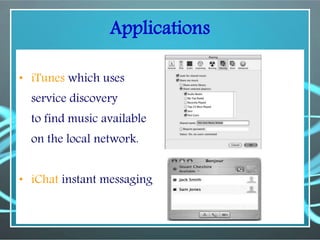
Applications
• iTunes which uses
service discovery
to find music available
on the local network.
• iChat instant messaging
Support
• General purpose operating systems now running the
Zeroconf protocols.
• Major vendors have announced support for
Zeroconf in their products. It including Apple,
Epson, HP, Lexmark, Philips, Canon…
• Many dedicated hardware devices now implement it
to advertise the services they provide.
– networked printer
– laptop, desktop computer, digital camera…
– iTunes/iPod
When & Where…
• Zeroconf is not appropriate
– Large networks or in Large public access networks.
– Networks where a high degree of security and control is
required
– Networks with low bandwidth and high latency
• Zeroconf is appropriate
– Home and small office networks, LAN.
– Ad hoc networks at meetings and conferences (especially
wireless networks)
– Two devices needing to spontaneously share or exchange
information
Conclusion
• Zero configuration networking is all about ,
providing real plug and play usability for
applications and devices.
• Networked applications can provide a friendly
networking experience to the user.
• Reducing support costs and increasing customer
satisfactions.
• It is platform independent.
Shashwat Shriparv
dwivedishashwat@gmail.com
InfinitySoft

Zero configuration networks

  • 1.
  • 2.
    Overview • What isZero Configuration Networking? – Origin: IETF • Description of Protocols – IP Address Auto configuration – Name Resolution Without DNS – Service Discovery • Available Implementation • Support • Conclusion
  • 3.
    Zero Configuration Networking •The goal of the Zero Configuration Networking (ZEROCONF) Working Group is to enable networking in the absence of configuration and administration • “ Zeroconf ” is an umbrella term for a number of underlying technologies which used to deploy Automatic Configuration.
  • 4.
    Origins: IETF • StuartCheshire posted on the Net-Thinkers mailing list in 1997 • Put forward before IETF meetings on the subject of "Networking in the Small" (NITS). • Zero Configuration Working Group was established in September 1999. • In May 2002, Apple announced its trademark "Rendezvous” for the Zeroconf technologies. • April 2005, Apple announced the new Apple name for the Zeroconf technologies: "Bonjour."
  • 5.
    Description of Protocols TheZeroconf technology, • IP Address Auto Configuration (Addressing without DHCP) • Multicast DNS (Name resolution without DNS) • Service Discovery
  • 6.
    IP Address Autoconfiguration • Absence of DHCP Server: – Automatic selection of an IP address in the absence of a DHCP server or network administrator • Selection of addresses is done in a distributed manner ie Each device is responsible for choosing its own address and then verifying that it can use the selected address.
  • 7.
    Assigning an IPaddress manually
  • 8.
  • 9.
    Link-local Addressing • Automaticself-assigned link-local addresses, which are guaranteed to work even when everything else has failed, providing the solution. • Link-local addressing is intended for two main scenarios: – For tiny ad-hoc local networks where communication is desired without the overhead of setting up a DHCP server – To provide a minimum safety-net level of service on networks where there's supposed to be a DHCP server but it's failed.
  • 10.
    Link-local addressing… • Link-localaddress range: – Some of the IP addresses listed in RFC 3330 as being reserved for local private use are: • 10.0.0.0 to 10.255.255.255 • 172.16.0.0 to 172.31.255.255 • 192.168.0.0 to 192.168.255.255 • 169.254.0.0 to 169. 254.255.255 • Last set of numbers is the range that Zeroconf uses when no DHCP server is available.
  • 11.
    Link-local Addressing… • Claiminga Link-Local IP Address (Probing) – The address is selected randomly until you test that no one else on the network is already using it. – Probing for address availability (Address Resolution Protocol )
  • 12.
  • 13.
    Name Resolution WithoutDNS • Absence of DNS Server, – Perform DNS queries via IP Multicast • Multicast DNS – Does not require any changes to the DNS Protocol (messages, resource record types, etc). – Resolve locally unique hostnames. – ‘Answer list’ in Multicast-DNS will have details of the mDNS Querier and Responder, and other mechanics of where the messages are being sent and which devices are listening.
  • 14.
    Multicast DNS • MulticastDNS Queries – Set the destination address to 224.0.0.251 (IPv4 address that has been reserved for mDNS), set the destination port to 5353, and send the UDP packet as usual. When the UDP response comes back, the DNS client receives and handles it. – When a machine receives a response to a query, other machines on the network receive the response too and can add it to their own caches for future use.
  • 15.
    Multicast DNS… • ClaimingYour Local Name – Probing to Check for Uniqueness done after a hostname is chosen for a particular device. – .local is used in Mac OS, Windows and Linux to identify a name as being link-local.
  • 16.
    Multicast DNS… – Checkfor Conflicts – If no conflicting Multicast DNS response is received, then – a second query is sent 250 ms after the first and, in the absence of conflicts, – a third query is sent 250 ms after that. – After waiting an additional 250 ms, (total of 750 ms for the three queries), if no conflicting Multicast DNS response has been received, then the host has successfully verified uniqueness.
  • 17.
    Multicast DNS… • Createa Multicast DNS Address Record – Host has a Unique name and an IP address selected or assigned. – Next step is to create a local Multicast DNS address record that will maps the name to the IP address. • Device have a mechanism to display an error message, to prompt a human user from manually select another name.
  • 18.
  • 19.
    Multicast DNS… • Structureof the Multicast DNS Message – Multicast DNS Message format is similar to that of Unicast DNS Message format. – In fact, software can decode and display mDNS packets using the same decoder as uDNS packets. • Minor differences: – uDNS packets are limited to, at most, 512 bytes. mDNS packets are allowed to be up to 9,000 bytes. – mDNS uses UDP port 5353 instead of port 53. – mDNS uses UTF-8, and only UTF-8, to encode resource record names. uDNS, use variety of encodes for a compatibility reasons.
  • 20.
    Service Discovery • DNSService Discovery (DNS-SD), the mechanism in Zeroconf that discover what services are available on the network without having to know device or service names in advance. • Finding Services, Not Devices • Client software store the chosen service name, type, and domain, instead of resolving the named service to an IP address and storing that.
  • 21.
    Available Implementation Benjour • BENJOURis Apple Computer’s implementation of Zeroconf in its. • Introduced in Mac OS X 10.2 (“Jaguar”) operating systems.
  • 22.
    Applications • iTunes whichuses service discovery to find music available on the local network. • iChat instant messaging
  • 23.
    Support • General purposeoperating systems now running the Zeroconf protocols. • Major vendors have announced support for Zeroconf in their products. It including Apple, Epson, HP, Lexmark, Philips, Canon… • Many dedicated hardware devices now implement it to advertise the services they provide. – networked printer – laptop, desktop computer, digital camera… – iTunes/iPod
  • 24.
    When & Where… •Zeroconf is not appropriate – Large networks or in Large public access networks. – Networks where a high degree of security and control is required – Networks with low bandwidth and high latency • Zeroconf is appropriate – Home and small office networks, LAN. – Ad hoc networks at meetings and conferences (especially wireless networks) – Two devices needing to spontaneously share or exchange information
  • 25.
    Conclusion • Zero configurationnetworking is all about , providing real plug and play usability for applications and devices. • Networked applications can provide a friendly networking experience to the user. • Reducing support costs and increasing customer satisfactions. • It is platform independent.
  • 27.