Infinity   1
•   Introduction
•   Download & Install Java S/W Development Kit
•   Download a server (Apache Tomcat)
•   Configure the server
•   Set up development environment
•   Test your setup
•   Establish a deployment method


                        Infinity                  2
• Apache is the most common HTTP Web Server on the
  Internet. It is the Web server used at http://web.njit.edu
• The Tomcat server is a Java-based Web Application
  container which is used to run Servlet and Java Server
  Pages (JSP) Web applications.
• Tomcat has become the reference implementation for
  both the Java Servlets and Java Server Pages
  specifications.


                             Infinity                          3
• Apache Tomcat is used to serve Java Servlets and
  Java Server Pages. It's a complex piece of software
  and though the documentation is very
  comprehensive, it helps to have a good reference
  work to hand.


• It is an open source Java Servlet application server
  used to deploy Java applications after they are built
  with JSP and Servlets. It can be used as a stand-
  alone product or it can be integrated with the
  Apache server.


                          Infinity                        4
Infinity   5
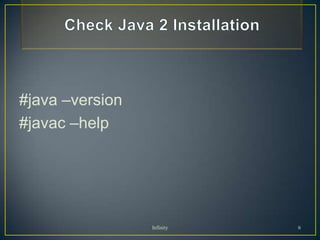
#java –version
#javac –help


                 Infinity   6
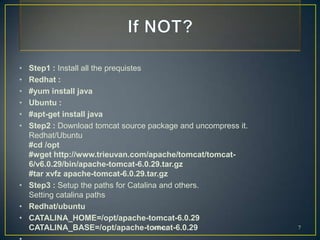
• Step1 : Install all the prequistes
• Redhat :
• #yum install java
• Ubuntu :
• #apt-get install java
• Step2 : Download tomcat source package and uncompress it.
  Redhat/Ubuntu
  #cd /opt
  #wget http://www.trieuvan.com/apache/tomcat/tomcat-
  6/v6.0.29/bin/apache-tomcat-6.0.29.tar.gz
  #tar xvfz apache-tomcat-6.0.29.tar.gz
• Step3 : Setup the paths for Catalina and others.
  Setting catalina paths
• Redhat/ubuntu
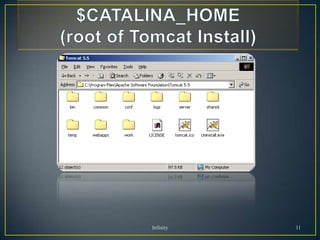
• CATALINA_HOME=/opt/apache-tomcat-6.0.29
  CATALINA_BASE=/opt/apache-tomcat-6.0.29
                                     Infinity                 7
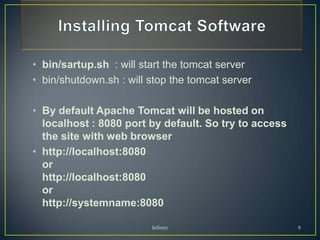
• bin/sartup.sh : will start the tomcat server
• bin/shutdown.sh : will stop the tomcat server

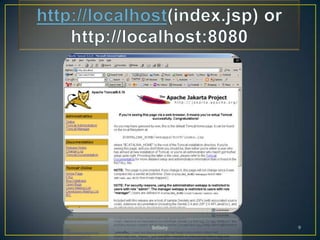
• By default Apache Tomcat will be hosted on
  localhost : 8080 port by default. So try to access
  the site with web browser
• http://localhost:8080
  or
  http://localhost:8080
  or
  http://systemname:8080

                         Infinity                      8
Infinity   9
Infinity   10
Infinity   11
Infinity   12
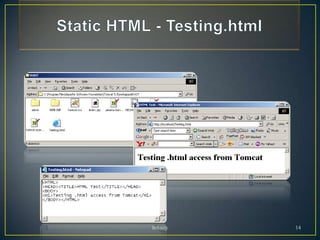
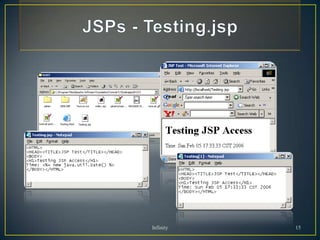
• Need to test
  • Static HTML
  • JSP
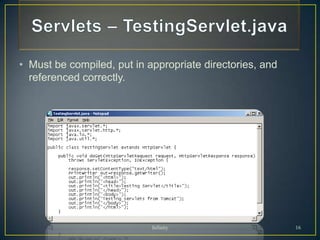
  • Servlets : A servlet is a Java programming
    language class used to extend the capabilities of
    servers that can be accessed by a host application via
    a request-response programming model
• Test files provided
     • Testing.html, Testing.jsp, TestingServlet.java
• Use default setting (webapps/ROOT)


                              Infinity                       13
Infinity   14
Infinity   15
• Must be compiled, put in appropriate directories, and
  referenced correctly.


                            Infinity                      16
Client       Web Server (Apache)


   Browser                               Tomcat
                   Servlet   JSP page

                    Java Web Container
  Application
    Client
  Client                                  Database
  Container        Session    Entity
                    Bean      Bean
Client Machine       EJB Container
                                         JBoss,
                                         WebSphere,
                                         WebLogic, etc

                             Infinity                17
∞

Infinity   18

Apache tomcat

  • 1.
  • 2.
    Introduction • Download & Install Java S/W Development Kit • Download a server (Apache Tomcat) • Configure the server • Set up development environment • Test your setup • Establish a deployment method Infinity 2
  • 3.
    • Apache isthe most common HTTP Web Server on the Internet. It is the Web server used at http://web.njit.edu • The Tomcat server is a Java-based Web Application container which is used to run Servlet and Java Server Pages (JSP) Web applications. • Tomcat has become the reference implementation for both the Java Servlets and Java Server Pages specifications. Infinity 3
  • 4.
    • Apache Tomcatis used to serve Java Servlets and Java Server Pages. It's a complex piece of software and though the documentation is very comprehensive, it helps to have a good reference work to hand. • It is an open source Java Servlet application server used to deploy Java applications after they are built with JSP and Servlets. It can be used as a stand- alone product or it can be integrated with the Apache server. Infinity 4
  • 5.
  • 6.
  • 7.
    • Step1 :Install all the prequistes • Redhat : • #yum install java • Ubuntu : • #apt-get install java • Step2 : Download tomcat source package and uncompress it. Redhat/Ubuntu #cd /opt #wget http://www.trieuvan.com/apache/tomcat/tomcat- 6/v6.0.29/bin/apache-tomcat-6.0.29.tar.gz #tar xvfz apache-tomcat-6.0.29.tar.gz • Step3 : Setup the paths for Catalina and others. Setting catalina paths • Redhat/ubuntu • CATALINA_HOME=/opt/apache-tomcat-6.0.29 CATALINA_BASE=/opt/apache-tomcat-6.0.29 Infinity 7
  • 8.
    • bin/sartup.sh :will start the tomcat server • bin/shutdown.sh : will stop the tomcat server • By default Apache Tomcat will be hosted on localhost : 8080 port by default. So try to access the site with web browser • http://localhost:8080 or http://localhost:8080 or http://systemname:8080 Infinity 8
  • 9.
  • 10.
  • 11.
  • 12.
  • 13.
    • Need totest • Static HTML • JSP • Servlets : A servlet is a Java programming language class used to extend the capabilities of servers that can be accessed by a host application via a request-response programming model • Test files provided • Testing.html, Testing.jsp, TestingServlet.java • Use default setting (webapps/ROOT) Infinity 13
  • 14.
  • 15.
  • 16.
    • Must becompiled, put in appropriate directories, and referenced correctly. Infinity 16
  • 17.
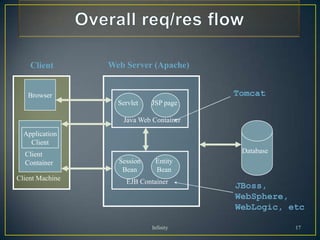
    Client Web Server (Apache) Browser Tomcat Servlet JSP page Java Web Container Application Client Client Database Container Session Entity Bean Bean Client Machine EJB Container JBoss, WebSphere, WebLogic, etc Infinity 17
  • 18.