


dwivedishashwat@gmail.com
http://helpmetocode.blogspot.com
 Well designed tables
 Partitioning

 Bucketing
 and well written queries can improve your query speed and

reduce processing cost.
Optimization on Table side
 Partitioning Hive Tables:
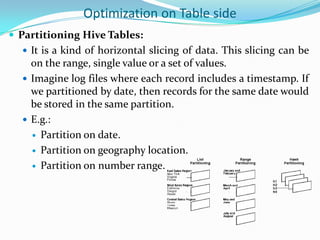
 It is a kind of horizontal slicing of data. This slicing can be

on the range, single value or a set of values.
 Imagine log files where each record includes a timestamp. If
we partitioned by date, then records for the same date would
be stored in the same partition.
 E.g.:
 Partition on date.
 Partition on geography location.
 Partition on number range.
Defining a table partition
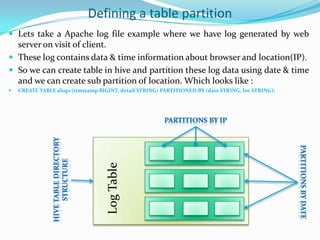
 Lets take a Apache log file example where we have log generated by web

server on visit of client.
 These log contains data & time information about browser and location(IP).
 So we can create table in hive and partition these log data using date & time
and we can create sub partition of location. Which looks like :
CREATE TABLE alogs (timstamp BIGINT, detail STRING) PARTITIONED BY (date STRING, loc STRING);

Log Table


Directory Structure

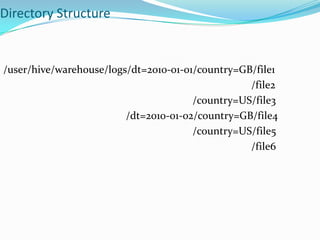
/user/hive/warehouse/logs/dt=2010-01-01/country=GB/file1
/file2
/country=US/file3
/dt=2010-01-02/country=GB/file4
/country=US/file5
/file6
Hive Buckets
 Bucketing Hive Tables:
 Bucketing hive table result in more efficient queries.


Bucketing imposes extra structure on the table, which Hive
can take advantage of when performing certain queries.

 It makes sampling more efficient.
 The two tables are bucketed in the same way, a mapper
processing a bucket of the left table knows that the
matching rows in the right table are in its corresponding
bucket, so it need only retrieve that bucket.
 Bucket may additionally be sorted by one or more columns.
This allows even more efficient map-side joins, since the
join of each bucket becomes an efficient merge-sort.
Parallel execution of queries
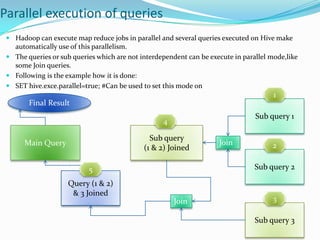
 Hadoop can execute map reduce jobs in parallel and several queries executed on Hive make
automatically use of this parallelism.
 The queries or sub queries which are not interdependent can be execute in parallel mode,like
some Join queries.
 Following is the example how it is done:

 SET hive.exce.parallel=true; #Can be used to set this mode on

1
Final Result
Sub query 1

4

Sub query
(1 & 2) Joined

Main Query

Join

2
Sub query 2

5
Query (1 & 2)
& 3 Joined
Join

3
Sub query 3
Misc
 So in the above flow, 1,2,4 can run in parallel as sub queries and

then joined finally to 3 and then to 5 and the final query result.

Since map join is faster than the common join, it's better to run the
map join whenever possible. Previously, Hive users needed to
give a hint in the query to specify the small table.
For example,
select /*+mapjoin(a)*/ * from src1 x join src2 y on x.key=y.key;
Newer hive automatically converts normal join to map join.
Some examples

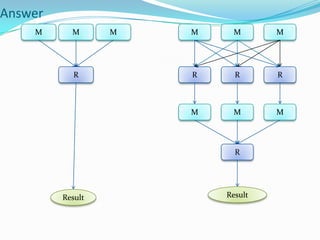
 Which query is faster?
 Select count(distinct(column)) from table.
 Or
 Select count(*) from (select distinct(column) from table) ??
Answer
M

M

M

M

M

R

R

R

M

R

M

M

M

R

Result

Result
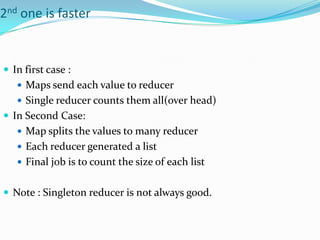
2nd one is faster

 In first case :
 Maps send each value to reducer
 Single reducer counts them all(over head)

 In Second Case:
 Map splits the values to many reducer
 Each reducer generated a list
 Final job is to count the size of each list

 Note : Singleton reducer is not always good.
Tips
 Hive does not know whether query is bad.
 So try to use “Explain” for queries which you doubt to be bad or

even don’t doubt.
 Explain tells about following
 Number of jobs
 Number of map and reduce
 What job is sorting by
 What are the directories it will read.
 So explain will help to see the difference between the two or
more queries for the same purpose.
 Job configuration and history can be studied for the query
performance.
Hive query optimization infinity

Hive query optimization infinity

  • 1.
  • 2.
     Well designedtables  Partitioning  Bucketing  and well written queries can improve your query speed and reduce processing cost.
  • 3.
    Optimization on Tableside  Partitioning Hive Tables:  It is a kind of horizontal slicing of data. This slicing can be on the range, single value or a set of values.  Imagine log files where each record includes a timestamp. If we partitioned by date, then records for the same date would be stored in the same partition.  E.g.:  Partition on date.  Partition on geography location.  Partition on number range.
  • 4.
    Defining a tablepartition  Lets take a Apache log file example where we have log generated by web server on visit of client.  These log contains data & time information about browser and location(IP).  So we can create table in hive and partition these log data using date & time and we can create sub partition of location. Which looks like : CREATE TABLE alogs (timstamp BIGINT, detail STRING) PARTITIONED BY (date STRING, loc STRING); Log Table 
  • 5.
  • 6.
    Hive Buckets  BucketingHive Tables:  Bucketing hive table result in more efficient queries.  Bucketing imposes extra structure on the table, which Hive can take advantage of when performing certain queries.  It makes sampling more efficient.  The two tables are bucketed in the same way, a mapper processing a bucket of the left table knows that the matching rows in the right table are in its corresponding bucket, so it need only retrieve that bucket.  Bucket may additionally be sorted by one or more columns. This allows even more efficient map-side joins, since the join of each bucket becomes an efficient merge-sort.
  • 7.
    Parallel execution ofqueries  Hadoop can execute map reduce jobs in parallel and several queries executed on Hive make automatically use of this parallelism.  The queries or sub queries which are not interdependent can be execute in parallel mode,like some Join queries.  Following is the example how it is done:  SET hive.exce.parallel=true; #Can be used to set this mode on 1 Final Result Sub query 1 4 Sub query (1 & 2) Joined Main Query Join 2 Sub query 2 5 Query (1 & 2) & 3 Joined Join 3 Sub query 3
  • 8.
    Misc  So inthe above flow, 1,2,4 can run in parallel as sub queries and then joined finally to 3 and then to 5 and the final query result. Since map join is faster than the common join, it's better to run the map join whenever possible. Previously, Hive users needed to give a hint in the query to specify the small table. For example, select /*+mapjoin(a)*/ * from src1 x join src2 y on x.key=y.key; Newer hive automatically converts normal join to map join.
  • 9.
    Some examples  Whichquery is faster?  Select count(distinct(column)) from table.  Or  Select count(*) from (select distinct(column) from table) ??
  • 10.
  • 11.
    2nd one isfaster  In first case :  Maps send each value to reducer  Single reducer counts them all(over head)  In Second Case:  Map splits the values to many reducer  Each reducer generated a list  Final job is to count the size of each list  Note : Singleton reducer is not always good.
  • 12.
    Tips  Hive doesnot know whether query is bad.  So try to use “Explain” for queries which you doubt to be bad or even don’t doubt.  Explain tells about following  Number of jobs  Number of map and reduce  What job is sorting by  What are the directories it will read.  So explain will help to see the difference between the two or more queries for the same purpose.  Job configuration and history can be studied for the query performance.