Linux Ad-HOC Networking Home Networks are Fun Again Chris Gragsone [email_address] ERIS RESEARCH
What is Local-Link? Any grouping of hosts without requiring a router or gateway and are directly reachable Local Area Networks Workgroups Peer Networks Ad-Hoc Networks Broadcast Domains
LAN Protocols Golden Age LAN Protocols NetBeui (Windows Native) Appletalk (Mac Native) IPX/SPX (Novell) TCP/IP Local-Link Protocols UPnP (Windows Native) Zeroconf (Mac Native “Bonjour”) SLP (Smells Like P…Novell)
Why Local-Link? Same reasons LAN’s were fun GAMES!!! Printers Entertainment and Home Automation Ad-Hoc and Disposable Networks Digital Living Network Alliance
Why Local-Link? (cont.) UPnP – SOHO/Firewalls devices Zeroconf – Network Printers
Local-Link Architecture APPLICATION DISCOVERY NAMING APPLICATION TRANSPORT NETWORK DATA-LINK UPnP TCP/IP Local-Link Zeroconf DNS-SD mDNS APIPA UPnP APIPA SLP ADDRESSING SLP SSDP
Primum non Nocere MUST NOT cause harm to the network Zeroconf protocols are designed to operate nicely or in concert with managed networks. Each layer is “á la cart,” operating entirely ad-hoc, hybrid with managed infrastructure, or disabled.
Addressing Layer Automatic Private IP Assignment  RFC 3927 – (169.254/16 Prefix) Selects a random host IP falling inside the Private IP range. Checks that the IP is unused via an Arp request Sends a Claiming-ARP to clean stale caches
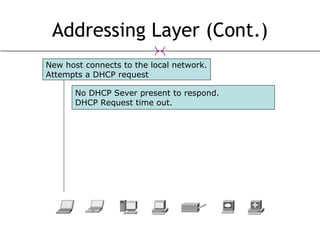
Addressing Layer (Cont.) New host connects to the local network. Attempts a DHCP request No DHCP Sever present to respond. DHCP Request time out.
Addressing Layer (Cont.) New host connects to the local network. Attempts a DHCP request Another host on the network answers the ARP request. New host now knows that IP address is taken. Host selects a random IP address in the 169.254.0.0/16 range. Performs an ARP request
Addressing Layer (Cont.) New host connects to the local network. Attempts a DHCP request No one replies after multiple ARP requests. New host has assurances that the IP is available. Host selects a random IP address in the 169.254.0.0/16 range. Performs an ARP request Host selects a new IP address in the 169.254.0.0/16 range. Performs an ARP request for the new IP
Addressing Layer New host connects to the local network. Attempts a DHCP request Host selects a random IP address in the 169.254.0.0/16 range. Performs an ARP request Host selects a new IP address in the 169.254.0.0/16 range. Performs an ARP request for the new IP Host assigns itself the IP address. Begins answering ARP requests.
AutoIP with Avahi! avahi-autoipd –D  INTERFACE stand-alone or plugin for a DHCP client, where it can be used as fallback solution if no DHCP server is found
Naming Layer Why? IP Addresses aren’t user-friendly, or in APIPA even significant. What? Use .local or .home TLD’s to replace IP addresses How? Magic…err, Multicast-DNS (mDNS)
Naming Layer (Cont.) mDNS Will attempt to resolve over centralized DNS servers if possible Failing that a DNS request will be sent to a multicast address on UDP 5353
Naming Layer (Cont.) Name Request Node will attempt to resolve the name it wants, waiting for an answer.  If the name is available, it will send out an mDNS answer. Nodes will cache mDNS replies to save bandwidth and will answer requests for hosts that are temporarily unavailable.
Naming Layer (Cont.) alice.laptop wants to know who charlie.mac is. alice.laptop doesn’t have a DNS server in its configuration. If alice.laptop was making a request to charlie.local, then normal DNS would automatically be skipped. alice.laptop sends a request to 224.0.0.251:5353 udp. While everyone on the network receives the request, only charlie.mac currently knows his address.
Naming Layer (Cont.) alice.laptop wants to know who charlie.mac is. alice.laptop doesn’t have a DNS server in its configuration. If alice.laptop was making a request to charlie.local, then normal DNS would automatically be skipped. alice.laptop sends a request to 224.0.0.251:5353 udp. While everyone on the network receives the request, only charlie.mac currently knows his address. Once charlie.mac replies to 224.0.0.251.5353 Then everyone else caches the responce
Naming Layer (Cont.) bob.laptop wants to know who charlie.mac is. bob.laptop sends a request to 224.0.0.251:5353 udp.
Naming Layer (Cont.) bob.laptop wants to know who charlie.mac is. bob.laptop sends a request to 224.0.0.251:5353 udp. Sadly, charlie.mac is currently rebooting
Naming Layer (Cont.) bob.laptop wants to know who charlie.mac is. bob.laptop sends a request to 224.0.0.251:5353 udp. Sadly, charlie.mac is currently rebooting Luckily, dave.pc has it stored in cache
Naming Layer (Cont.) Common Issue… If alice and bob are in two different ip assignments (ie. 10.0.0.0/8 and 169.254.0.0/16), but on the same broadcast domain.  They’ll be able to resolve each other, but unable to connect unless there is a router handling the relationship.
mDNS with Avahi! mDNS With Avahi! Avahi-daemon Launch and go for mDNS and DNS-SD /etc/avahi/avahi-daemon.conf works out of the box as expected fun things start here…
mDNS with Avahi! (Cont.) /etc/avahi/hosts Useful for publishing static addresses for   other hosts Formatted like /etc/hosts remember to suffix entries with .local avahi-publish -a  HOST-NAME   ADDRESS short term static address publishing avahi-set-host-name  HOST-NAME rename your host for a short term
mDNS with Avahi (Cont.) Avahi-resolve --name  HOST-NAME   Avahi-resolve --address  ADDRESS diagnostics tools if applications are working as expect, then you won’t need to run these.
Discovery Layer Why? Imagine never needing to Portscan :D Port numbers are boring Network Awareness, I want to know if the network I’m on has a web server… How? DNS-SD SSDP SLP
Discovery Layer (Cont.) DNS-Service Discovery (DNS-SD) Service discovery, mDNS style raison d'être of Zeroconf
DNS-SD with Avahi Avahi-daemon Launch and go for mDNS and DNS-SD /etc/avahi/avahi-daemon.conf  /etc/avahi/services/*.service useful for publishing static services XML files avahi-publish -s  NAME   SERVICE-TYPE   PORT   short term static service announcements
DNS-SD with Avahi (Cont.) Avahi-browse Avahi-discover diagnostics tools if applications are working as expect, then you won’t need to run these.
Bookmarks via DNS-SD Broadcasting Bookmarks via DNS-SD
Bookmarks via DNS-SD (Cont.) To see the bookmarks: avahi-bookmarks then goto  http://localhost:8080/
Application Layer Universal Plug and Play (UPnP) XML-SOAP Standard Multi-Vendor Language
Implementations UPnP Bonjour, formally known as  Rendezvous (Mac and Windows) Avahi (FOSS) Avahi-autoipd Avahi-deamon Avahi-discover Avahi-utils
Security Concerns Denial of Service Prevent people from obtaining IP addresses or Host names Spoofing Host name spoofing, Address spoofing, just as easy as ARP spoofing. Man in the Middle attacks Open-Disclosure of Assets Expects others to be playing nice
Security Concerns OpenPGP or X.509 certificates? Signed by trusted computing? I <3 Trusted computing
Questions? More Resources RFC 2608 Service Location Protocol RFC 3927 Dynamic Configuration of IPv4 Link-Local Addresses  http://www.zeroconf.org/ http://www.multicastdns.org/ http://www.dns-sd.org/ http://www.upnp.org/ http://developer.apple.com/networking/bonjour/
This presentation can be found at ERISresearch.org ERIS Research Internet Society This work is licensed under the Creative Commons Attribution-Noncommercial 3.0 United States License. To view a copy of this license, visit  http://creativecommons.org/licenses/by-nc/3.0/us/  or send a letter to Creative Commons 171 Second Street Suite 300 San Francisco California, 94105, USA.

Ad-Hoc Networking in Linux with Avahi

  • 1.
    Linux Ad-HOC NetworkingHome Networks are Fun Again Chris Gragsone [email_address] ERIS RESEARCH
  • 2.
    What is Local-Link?Any grouping of hosts without requiring a router or gateway and are directly reachable Local Area Networks Workgroups Peer Networks Ad-Hoc Networks Broadcast Domains
  • 3.
    LAN Protocols GoldenAge LAN Protocols NetBeui (Windows Native) Appletalk (Mac Native) IPX/SPX (Novell) TCP/IP Local-Link Protocols UPnP (Windows Native) Zeroconf (Mac Native “Bonjour”) SLP (Smells Like P…Novell)
  • 4.
    Why Local-Link? Samereasons LAN’s were fun GAMES!!! Printers Entertainment and Home Automation Ad-Hoc and Disposable Networks Digital Living Network Alliance
  • 5.
    Why Local-Link? (cont.)UPnP – SOHO/Firewalls devices Zeroconf – Network Printers
  • 6.
    Local-Link Architecture APPLICATIONDISCOVERY NAMING APPLICATION TRANSPORT NETWORK DATA-LINK UPnP TCP/IP Local-Link Zeroconf DNS-SD mDNS APIPA UPnP APIPA SLP ADDRESSING SLP SSDP
  • 7.
    Primum non NocereMUST NOT cause harm to the network Zeroconf protocols are designed to operate nicely or in concert with managed networks. Each layer is “á la cart,” operating entirely ad-hoc, hybrid with managed infrastructure, or disabled.
  • 8.
    Addressing Layer AutomaticPrivate IP Assignment RFC 3927 – (169.254/16 Prefix) Selects a random host IP falling inside the Private IP range. Checks that the IP is unused via an Arp request Sends a Claiming-ARP to clean stale caches
  • 9.
    Addressing Layer (Cont.)New host connects to the local network. Attempts a DHCP request No DHCP Sever present to respond. DHCP Request time out.
  • 10.
    Addressing Layer (Cont.)New host connects to the local network. Attempts a DHCP request Another host on the network answers the ARP request. New host now knows that IP address is taken. Host selects a random IP address in the 169.254.0.0/16 range. Performs an ARP request
  • 11.
    Addressing Layer (Cont.)New host connects to the local network. Attempts a DHCP request No one replies after multiple ARP requests. New host has assurances that the IP is available. Host selects a random IP address in the 169.254.0.0/16 range. Performs an ARP request Host selects a new IP address in the 169.254.0.0/16 range. Performs an ARP request for the new IP
  • 12.
    Addressing Layer Newhost connects to the local network. Attempts a DHCP request Host selects a random IP address in the 169.254.0.0/16 range. Performs an ARP request Host selects a new IP address in the 169.254.0.0/16 range. Performs an ARP request for the new IP Host assigns itself the IP address. Begins answering ARP requests.
  • 13.
    AutoIP with Avahi!avahi-autoipd –D INTERFACE stand-alone or plugin for a DHCP client, where it can be used as fallback solution if no DHCP server is found
  • 14.
    Naming Layer Why?IP Addresses aren’t user-friendly, or in APIPA even significant. What? Use .local or .home TLD’s to replace IP addresses How? Magic…err, Multicast-DNS (mDNS)
  • 15.
    Naming Layer (Cont.)mDNS Will attempt to resolve over centralized DNS servers if possible Failing that a DNS request will be sent to a multicast address on UDP 5353
  • 16.
    Naming Layer (Cont.)Name Request Node will attempt to resolve the name it wants, waiting for an answer. If the name is available, it will send out an mDNS answer. Nodes will cache mDNS replies to save bandwidth and will answer requests for hosts that are temporarily unavailable.
  • 17.
    Naming Layer (Cont.)alice.laptop wants to know who charlie.mac is. alice.laptop doesn’t have a DNS server in its configuration. If alice.laptop was making a request to charlie.local, then normal DNS would automatically be skipped. alice.laptop sends a request to 224.0.0.251:5353 udp. While everyone on the network receives the request, only charlie.mac currently knows his address.
  • 18.
    Naming Layer (Cont.)alice.laptop wants to know who charlie.mac is. alice.laptop doesn’t have a DNS server in its configuration. If alice.laptop was making a request to charlie.local, then normal DNS would automatically be skipped. alice.laptop sends a request to 224.0.0.251:5353 udp. While everyone on the network receives the request, only charlie.mac currently knows his address. Once charlie.mac replies to 224.0.0.251.5353 Then everyone else caches the responce
  • 19.
    Naming Layer (Cont.)bob.laptop wants to know who charlie.mac is. bob.laptop sends a request to 224.0.0.251:5353 udp.
  • 20.
    Naming Layer (Cont.)bob.laptop wants to know who charlie.mac is. bob.laptop sends a request to 224.0.0.251:5353 udp. Sadly, charlie.mac is currently rebooting
  • 21.
    Naming Layer (Cont.)bob.laptop wants to know who charlie.mac is. bob.laptop sends a request to 224.0.0.251:5353 udp. Sadly, charlie.mac is currently rebooting Luckily, dave.pc has it stored in cache
  • 22.
    Naming Layer (Cont.)Common Issue… If alice and bob are in two different ip assignments (ie. 10.0.0.0/8 and 169.254.0.0/16), but on the same broadcast domain. They’ll be able to resolve each other, but unable to connect unless there is a router handling the relationship.
  • 23.
    mDNS with Avahi!mDNS With Avahi! Avahi-daemon Launch and go for mDNS and DNS-SD /etc/avahi/avahi-daemon.conf works out of the box as expected fun things start here…
  • 24.
    mDNS with Avahi!(Cont.) /etc/avahi/hosts Useful for publishing static addresses for other hosts Formatted like /etc/hosts remember to suffix entries with .local avahi-publish -a HOST-NAME ADDRESS short term static address publishing avahi-set-host-name HOST-NAME rename your host for a short term
  • 25.
    mDNS with Avahi(Cont.) Avahi-resolve --name HOST-NAME Avahi-resolve --address ADDRESS diagnostics tools if applications are working as expect, then you won’t need to run these.
  • 26.
    Discovery Layer Why?Imagine never needing to Portscan :D Port numbers are boring Network Awareness, I want to know if the network I’m on has a web server… How? DNS-SD SSDP SLP
  • 27.
    Discovery Layer (Cont.)DNS-Service Discovery (DNS-SD) Service discovery, mDNS style raison d'être of Zeroconf
  • 28.
    DNS-SD with AvahiAvahi-daemon Launch and go for mDNS and DNS-SD /etc/avahi/avahi-daemon.conf /etc/avahi/services/*.service useful for publishing static services XML files avahi-publish -s NAME SERVICE-TYPE PORT short term static service announcements
  • 29.
    DNS-SD with Avahi(Cont.) Avahi-browse Avahi-discover diagnostics tools if applications are working as expect, then you won’t need to run these.
  • 30.
    Bookmarks via DNS-SDBroadcasting Bookmarks via DNS-SD
  • 31.
    Bookmarks via DNS-SD(Cont.) To see the bookmarks: avahi-bookmarks then goto http://localhost:8080/
  • 32.
    Application Layer UniversalPlug and Play (UPnP) XML-SOAP Standard Multi-Vendor Language
  • 33.
    Implementations UPnP Bonjour,formally known as Rendezvous (Mac and Windows) Avahi (FOSS) Avahi-autoipd Avahi-deamon Avahi-discover Avahi-utils
  • 34.
    Security Concerns Denialof Service Prevent people from obtaining IP addresses or Host names Spoofing Host name spoofing, Address spoofing, just as easy as ARP spoofing. Man in the Middle attacks Open-Disclosure of Assets Expects others to be playing nice
  • 35.
    Security Concerns OpenPGPor X.509 certificates? Signed by trusted computing? I <3 Trusted computing
  • 36.
    Questions? More ResourcesRFC 2608 Service Location Protocol RFC 3927 Dynamic Configuration of IPv4 Link-Local Addresses http://www.zeroconf.org/ http://www.multicastdns.org/ http://www.dns-sd.org/ http://www.upnp.org/ http://developer.apple.com/networking/bonjour/
  • 37.
    This presentation canbe found at ERISresearch.org ERIS Research Internet Society This work is licensed under the Creative Commons Attribution-Noncommercial 3.0 United States License. To view a copy of this license, visit http://creativecommons.org/licenses/by-nc/3.0/us/ or send a letter to Creative Commons 171 Second Street Suite 300 San Francisco California, 94105, USA.