DNS Service Discovery
  Automated configuration of sFlow agents
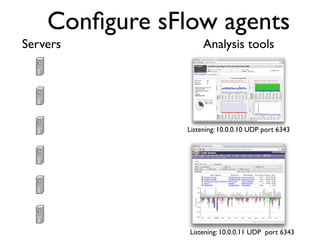
Configure sFlow agents
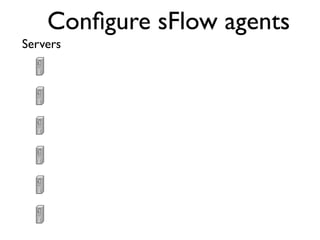
Servers
Configure sFlow agents
Servers              Analysis tools


                Listening: 10.0.0.10 UDP port 6343


                Listening: 10.0.0.11 UDP port 6343
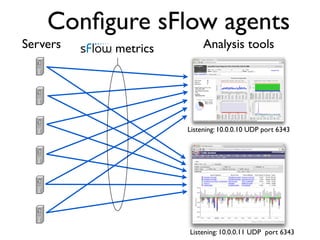
Configure sFlow agents
Servers   metrics        Analysis tools


                    Listening: 10.0.0.10 UDP port 6343


                    Listening: 10.0.0.11 UDP port 6343
DNS server configuration
    monitor.inmon.com.zone file
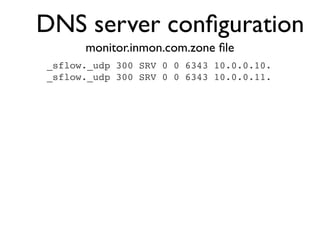
DNS server configuration
      monitor.inmon.com.zone file
_sflow._udp 300 SRV 0 0 6343 10.0.0.10.
_sflow._udp 300 SRV 0 0 6343 10.0.0.11.
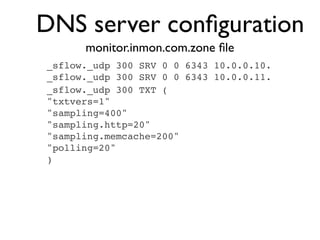
DNS server configuration
      monitor.inmon.com.zone file
_sflow._udp 300 SRV 0 0 6343 10.0.0.10.
_sflow._udp 300 SRV 0 0 6343 10.0.0.11.
_sflow._udp 300 TXT (
"txtvers=1"
"sampling=400"
"sampling.http=20"
"sampling.memcache=200"
"polling=20"
)
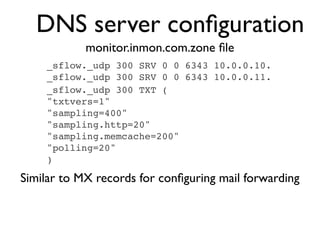
DNS server configuration
            monitor.inmon.com.zone file
    _sflow._udp 300 SRV 0 0 6343 10.0.0.10.
    _sflow._udp 300 SRV 0 0 6343 10.0.0.11.
    _sflow._udp 300 TXT (
    "txtvers=1"
    "sampling=400"
    "sampling.http=20"
    "sampling.memcache=200"
    "polling=20"
    )

Similar to MX records for configuring mail forwarding
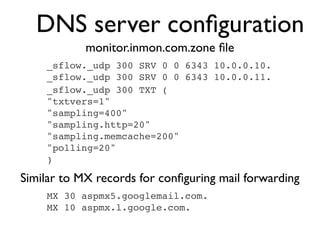
DNS server configuration
            monitor.inmon.com.zone file
    _sflow._udp 300 SRV 0 0 6343 10.0.0.10.
    _sflow._udp 300 SRV 0 0 6343 10.0.0.11.
    _sflow._udp 300 TXT (
    "txtvers=1"
    "sampling=400"
    "sampling.http=20"
    "sampling.memcache=200"
    "polling=20"
    )

Similar to MX records for configuring mail forwarding
    MX 30 aspmx5.googlemail.com.
    MX 10 aspmx.l.google.com.
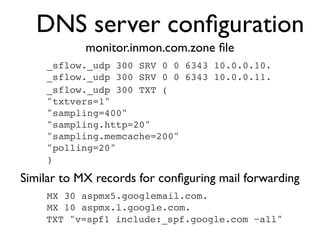
DNS server configuration
            monitor.inmon.com.zone file
    _sflow._udp 300 SRV 0 0 6343 10.0.0.10.
    _sflow._udp 300 SRV 0 0 6343 10.0.0.11.
    _sflow._udp 300 TXT (
    "txtvers=1"
    "sampling=400"
    "sampling.http=20"
    "sampling.memcache=200"
    "polling=20"
    )

Similar to MX records for configuring mail forwarding
    MX 30 aspmx5.googlemail.com.
    MX 10 aspmx.l.google.com.
    TXT "v=spf1 include:_spf.google.com ~all"
Test SRV query
[pp@pcentos ~]$ dig SRV _sflow._udp.monitor.inmon.com
Test SRV query
[pp@pcentos ~]$ dig SRV _sflow._udp.monitor.inmon.com

; <<>> DiG 9.2.4 <<>> SRV _sflow._udp.monitor.inmon.com
;; global options: printcmd
;; Got answer:
;; ->>HEADER<<- opcode: QUERY, status: NOERROR, id: 29097
;; flags: qr aa rd ra; QUERY: 1, ANSWER: 2, AUTHORITY: 2, ADDITIONAL: 2

;; QUESTION SECTION:
;_sflow._udp.monitor.inmon.com.!       IN! SRV

;; ANSWER SECTION:
_sflow._udp.monitor.inmon.com. 300!
                                  IN! SRV! 0 0 6343 10.0.0.10.
_sflow._udp.monitor.inmon.com. 300!
                                  IN! SRV! 0 0 6343 10.0.0.11.

;; AUTHORITY SECTION:
monitor.inmon.com.! !      259200! IN! NS! ns1.monitor.inmon.com.
monitor.inmon.com.! !      259200! IN! NS! ns2.monitor.inmon.com.

;; ADDITIONAL SECTION:
ns1.monitor.inmon.com.        259200     IN      A!   10.0.0.1
ns2.monitor.inmon.com.        259200     IN      A!   10.1.1.1

;;   Query time: 11 msec
;;   SERVER: 10.0.0.1#53(10.0.0.1)
;;   WHEN: Tue Feb 21 22:58:40 2012
;;   MSG SIZE rcvd: 316
Test TXT query
[pp@pcentos ~]$ dig TXT _sflow._udp.monitor.inmon.com
Test TXT query
[pp@pcentos ~]$ dig TXT _sflow._udp.monitor.inmon.com

; <<>> DiG 9.2.4 <<>> TXT _sflow._udp.monitor.inmon.com
;; global options: printcmd
;; Got answer:
;; ->>HEADER<<- opcode: QUERY, status: NOERROR, id: 53888
;; flags: qr aa rd ra; QUERY: 1, ANSWER: 1, AUTHORITY: 2, ADDITIONAL: 2

;; QUESTION SECTION:
;_sflow._udp.monitor.inmon.com.!      IN! TXT

;; ANSWER SECTION:
_sflow._udp.monitor.inmon.com. 300!
                                  IN! TXT! "txtvers=1" "sampling=400" "sampling.http=20"
"sampling.memcache=200" "polling=20"

;; AUTHORITY SECTION:
monitor.inmon.com.! !      259200! IN! NS! ns1.monitor.inmon.com.
monitor.inmon.com.! !      259200! IN! NS! ns2.monitor.inmon.com.

;; ADDITIONAL SECTION:
ns1.monitor.inmon.com.      259200    IN   A!   10.0.0.1
ns2.monitor.inmon.com.      259200    IN   A!   10.1.2.4

;;   Query time: 3 msec
;;   SERVER: 10.0.0.1#53(10.0.0.1)
;;   WHEN: Tue Feb 21 23:15:39 2012
;;   MSG SIZE rcvd: 253
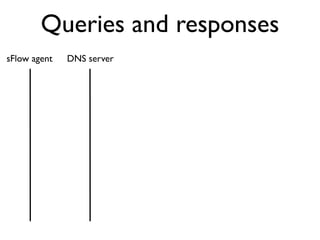
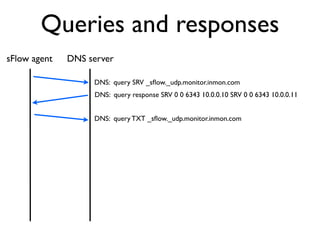
Queries and responses
sFlow agent   DNS server
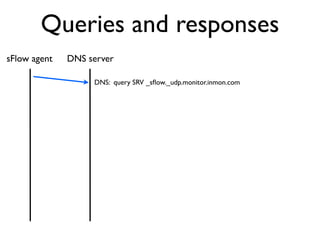
Queries and responses
sFlow agent   DNS server

                   DNS: query SRV _sflow._udp.monitor.inmon.com
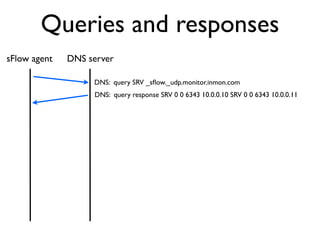
Queries and responses
sFlow agent   DNS server

                   DNS: query SRV _sflow._udp.monitor.inmon.com
                   DNS: query response SRV 0 0 6343 10.0.0.10 SRV 0 0 6343 10.0.0.11
Queries and responses
sFlow agent   DNS server

                   DNS: query SRV _sflow._udp.monitor.inmon.com
                   DNS: query response SRV 0 0 6343 10.0.0.10 SRV 0 0 6343 10.0.0.11


                   DNS: query TXT _sflow._udp.monitor.inmon.com
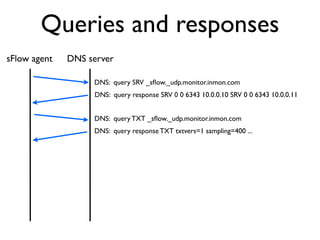
Queries and responses
sFlow agent   DNS server

                   DNS: query SRV _sflow._udp.monitor.inmon.com
                   DNS: query response SRV 0 0 6343 10.0.0.10 SRV 0 0 6343 10.0.0.11


                   DNS: query TXT _sflow._udp.monitor.inmon.com
                   DNS: query response TXT txtvers=1 sampling=400 ...
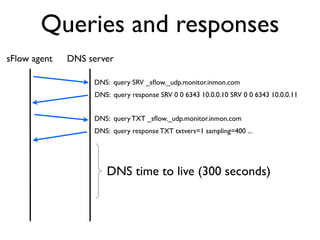
Queries and responses
sFlow agent   DNS server

                   DNS: query SRV _sflow._udp.monitor.inmon.com
                   DNS: query response SRV 0 0 6343 10.0.0.10 SRV 0 0 6343 10.0.0.11


                   DNS: query TXT _sflow._udp.monitor.inmon.com
                   DNS: query response TXT txtvers=1 sampling=400 ...


                      DNS time to live (300 seconds)
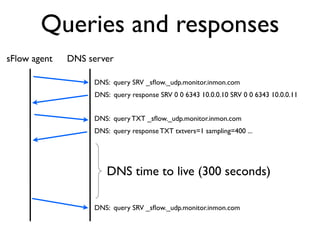
Queries and responses
sFlow agent   DNS server

                   DNS: query SRV _sflow._udp.monitor.inmon.com
                   DNS: query response SRV 0 0 6343 10.0.0.10 SRV 0 0 6343 10.0.0.11


                   DNS: query TXT _sflow._udp.monitor.inmon.com
                   DNS: query response TXT txtvers=1 sampling=400 ...


                      DNS time to live (300 seconds)

                   DNS: query SRV _sflow._udp.monitor.inmon.com
DNS-SD features
DNS-SD features
•   Plug and play - sFlow agents are automatically configured
    at server startup and can be reconfigured at any time by
    changing settings on DNS server.
DNS-SD features
•   Plug and play - sFlow agents are automatically configured
    at server startup and can be reconfigured at any time by
    changing settings on DNS server.

•   DNS is a basic network service - client libraries exist by
    default on virtually all platforms, including embedded
    systems - single configuration mechanism can be applied
    to Windows, Linux, hypervisors, switches, firewalls,
    routers
DNS-SD features
•   Plug and play - sFlow agents are automatically configured
    at server startup and can be reconfigured at any time by
    changing settings on DNS server.

•   DNS is a basic network service - client libraries exist by
    default on virtually all platforms, including embedded
    systems - single configuration mechanism can be applied
    to Windows, Linux, hypervisors, switches, firewalls,
    routers

•   Leverages existing DNS infrastructure for redundancy,
    security, scalability, delegated control etc.
When to consider DNS-SD

 • Small amount of client configuration state
When to consider DNS-SD

 • Small amount of client configuration state
 • Non-homogeneous clients
When to consider DNS-SD

 • Small amount of client configuration state
 • Non-homogeneous clients
 • Dynamic environment - clients added,
   moved, removed. Changing server
   population.
When to consider DNS-SD

 • Small amount of client configuration state
 • Non-homogeneous clients
 • Dynamic environment - clients added,
   moved, removed. Changing server
   population.
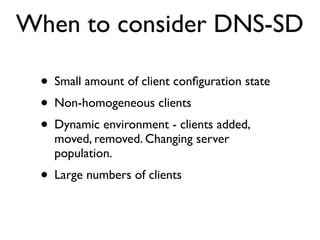
 • Large numbers of clients
When to consider DNS-SD

 • Small amount of client configuration state
 • Non-homogeneous clients
 • Dynamic environment - clients added,
   moved, removed. Changing server
   population.
 • Large numbers of clients
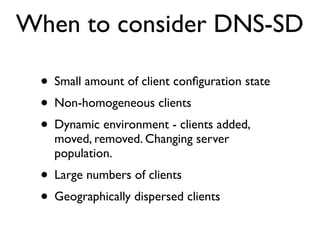
 • Geographically dispersed clients

DNS-SD

  • 1.
    DNS Service Discovery Automated configuration of sFlow agents
  • 2.
  • 3.
  • 4.
    Configure sFlow agents Servers Analysis tools Listening: 10.0.0.10 UDP port 6343 Listening: 10.0.0.11 UDP port 6343
  • 5.
    Configure sFlow agents Servers metrics Analysis tools Listening: 10.0.0.10 UDP port 6343 Listening: 10.0.0.11 UDP port 6343
  • 6.
  • 7.
    DNS server configuration monitor.inmon.com.zone file
  • 8.
    DNS server configuration monitor.inmon.com.zone file _sflow._udp 300 SRV 0 0 6343 10.0.0.10. _sflow._udp 300 SRV 0 0 6343 10.0.0.11.
  • 9.
    DNS server configuration monitor.inmon.com.zone file _sflow._udp 300 SRV 0 0 6343 10.0.0.10. _sflow._udp 300 SRV 0 0 6343 10.0.0.11. _sflow._udp 300 TXT ( "txtvers=1" "sampling=400" "sampling.http=20" "sampling.memcache=200" "polling=20" )
  • 10.
    DNS server configuration monitor.inmon.com.zone file _sflow._udp 300 SRV 0 0 6343 10.0.0.10. _sflow._udp 300 SRV 0 0 6343 10.0.0.11. _sflow._udp 300 TXT ( "txtvers=1" "sampling=400" "sampling.http=20" "sampling.memcache=200" "polling=20" ) Similar to MX records for configuring mail forwarding
  • 11.
    DNS server configuration monitor.inmon.com.zone file _sflow._udp 300 SRV 0 0 6343 10.0.0.10. _sflow._udp 300 SRV 0 0 6343 10.0.0.11. _sflow._udp 300 TXT ( "txtvers=1" "sampling=400" "sampling.http=20" "sampling.memcache=200" "polling=20" ) Similar to MX records for configuring mail forwarding MX 30 aspmx5.googlemail.com. MX 10 aspmx.l.google.com.
  • 12.
    DNS server configuration monitor.inmon.com.zone file _sflow._udp 300 SRV 0 0 6343 10.0.0.10. _sflow._udp 300 SRV 0 0 6343 10.0.0.11. _sflow._udp 300 TXT ( "txtvers=1" "sampling=400" "sampling.http=20" "sampling.memcache=200" "polling=20" ) Similar to MX records for configuring mail forwarding MX 30 aspmx5.googlemail.com. MX 10 aspmx.l.google.com. TXT "v=spf1 include:_spf.google.com ~all"
  • 13.
    Test SRV query [pp@pcentos~]$ dig SRV _sflow._udp.monitor.inmon.com
  • 14.
    Test SRV query [pp@pcentos~]$ dig SRV _sflow._udp.monitor.inmon.com ; <<>> DiG 9.2.4 <<>> SRV _sflow._udp.monitor.inmon.com ;; global options: printcmd ;; Got answer: ;; ->>HEADER<<- opcode: QUERY, status: NOERROR, id: 29097 ;; flags: qr aa rd ra; QUERY: 1, ANSWER: 2, AUTHORITY: 2, ADDITIONAL: 2 ;; QUESTION SECTION: ;_sflow._udp.monitor.inmon.com.! IN! SRV ;; ANSWER SECTION: _sflow._udp.monitor.inmon.com. 300! IN! SRV! 0 0 6343 10.0.0.10. _sflow._udp.monitor.inmon.com. 300! IN! SRV! 0 0 6343 10.0.0.11. ;; AUTHORITY SECTION: monitor.inmon.com.! ! 259200! IN! NS! ns1.monitor.inmon.com. monitor.inmon.com.! ! 259200! IN! NS! ns2.monitor.inmon.com. ;; ADDITIONAL SECTION: ns1.monitor.inmon.com. 259200 IN A! 10.0.0.1 ns2.monitor.inmon.com. 259200 IN A! 10.1.1.1 ;; Query time: 11 msec ;; SERVER: 10.0.0.1#53(10.0.0.1) ;; WHEN: Tue Feb 21 22:58:40 2012 ;; MSG SIZE rcvd: 316
  • 15.
    Test TXT query [pp@pcentos~]$ dig TXT _sflow._udp.monitor.inmon.com
  • 16.
    Test TXT query [pp@pcentos~]$ dig TXT _sflow._udp.monitor.inmon.com ; <<>> DiG 9.2.4 <<>> TXT _sflow._udp.monitor.inmon.com ;; global options: printcmd ;; Got answer: ;; ->>HEADER<<- opcode: QUERY, status: NOERROR, id: 53888 ;; flags: qr aa rd ra; QUERY: 1, ANSWER: 1, AUTHORITY: 2, ADDITIONAL: 2 ;; QUESTION SECTION: ;_sflow._udp.monitor.inmon.com.! IN! TXT ;; ANSWER SECTION: _sflow._udp.monitor.inmon.com. 300! IN! TXT! "txtvers=1" "sampling=400" "sampling.http=20" "sampling.memcache=200" "polling=20" ;; AUTHORITY SECTION: monitor.inmon.com.! ! 259200! IN! NS! ns1.monitor.inmon.com. monitor.inmon.com.! ! 259200! IN! NS! ns2.monitor.inmon.com. ;; ADDITIONAL SECTION: ns1.monitor.inmon.com. 259200 IN A! 10.0.0.1 ns2.monitor.inmon.com. 259200 IN A! 10.1.2.4 ;; Query time: 3 msec ;; SERVER: 10.0.0.1#53(10.0.0.1) ;; WHEN: Tue Feb 21 23:15:39 2012 ;; MSG SIZE rcvd: 253
  • 17.
  • 18.
    Queries and responses sFlowagent DNS server DNS: query SRV _sflow._udp.monitor.inmon.com
  • 19.
    Queries and responses sFlowagent DNS server DNS: query SRV _sflow._udp.monitor.inmon.com DNS: query response SRV 0 0 6343 10.0.0.10 SRV 0 0 6343 10.0.0.11
  • 20.
    Queries and responses sFlowagent DNS server DNS: query SRV _sflow._udp.monitor.inmon.com DNS: query response SRV 0 0 6343 10.0.0.10 SRV 0 0 6343 10.0.0.11 DNS: query TXT _sflow._udp.monitor.inmon.com
  • 21.
    Queries and responses sFlowagent DNS server DNS: query SRV _sflow._udp.monitor.inmon.com DNS: query response SRV 0 0 6343 10.0.0.10 SRV 0 0 6343 10.0.0.11 DNS: query TXT _sflow._udp.monitor.inmon.com DNS: query response TXT txtvers=1 sampling=400 ...
  • 22.
    Queries and responses sFlowagent DNS server DNS: query SRV _sflow._udp.monitor.inmon.com DNS: query response SRV 0 0 6343 10.0.0.10 SRV 0 0 6343 10.0.0.11 DNS: query TXT _sflow._udp.monitor.inmon.com DNS: query response TXT txtvers=1 sampling=400 ... DNS time to live (300 seconds)
  • 23.
    Queries and responses sFlowagent DNS server DNS: query SRV _sflow._udp.monitor.inmon.com DNS: query response SRV 0 0 6343 10.0.0.10 SRV 0 0 6343 10.0.0.11 DNS: query TXT _sflow._udp.monitor.inmon.com DNS: query response TXT txtvers=1 sampling=400 ... DNS time to live (300 seconds) DNS: query SRV _sflow._udp.monitor.inmon.com
  • 24.
  • 25.
    DNS-SD features • Plug and play - sFlow agents are automatically configured at server startup and can be reconfigured at any time by changing settings on DNS server.
  • 26.
    DNS-SD features • Plug and play - sFlow agents are automatically configured at server startup and can be reconfigured at any time by changing settings on DNS server. • DNS is a basic network service - client libraries exist by default on virtually all platforms, including embedded systems - single configuration mechanism can be applied to Windows, Linux, hypervisors, switches, firewalls, routers
  • 27.
    DNS-SD features • Plug and play - sFlow agents are automatically configured at server startup and can be reconfigured at any time by changing settings on DNS server. • DNS is a basic network service - client libraries exist by default on virtually all platforms, including embedded systems - single configuration mechanism can be applied to Windows, Linux, hypervisors, switches, firewalls, routers • Leverages existing DNS infrastructure for redundancy, security, scalability, delegated control etc.
  • 28.
  • 29.
    When to considerDNS-SD • Small amount of client configuration state
  • 30.
    When to considerDNS-SD • Small amount of client configuration state • Non-homogeneous clients
  • 31.
    When to considerDNS-SD • Small amount of client configuration state • Non-homogeneous clients • Dynamic environment - clients added, moved, removed. Changing server population.
  • 32.
    When to considerDNS-SD • Small amount of client configuration state • Non-homogeneous clients • Dynamic environment - clients added, moved, removed. Changing server population. • Large numbers of clients
  • 33.
    When to considerDNS-SD • Small amount of client configuration state • Non-homogeneous clients • Dynamic environment - clients added, moved, removed. Changing server population. • Large numbers of clients • Geographically dispersed clients