WordPress
The How To…

 Sherif S. Morgan
 Friday, January 25, 2013
Two Flavors
WordPress.com and WordPress.org
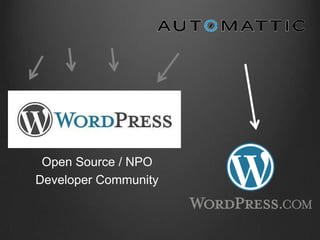
Open Source / NPO
Developer Community
WordPress.com
o Free* Site and Hosting
   Visit http://www.wordpress.com to sign up

o Maintained for users (i.e. no updates)

o Full of features (but cannot add/modify)

o But…
   Somewhat limited to what you control/customize
   upgrades
Your URL
o mywebsitename.wordpress.com

o For business, at the very least:
   domain mapping ($13/year)
   recommend purchasing domain separately
     e.g. from godaddy.com
     general recommendation (registrar and host)
The Second Flavor

                            .ORG

[ complete control = my choice ]
WordPress is a free and open source blogging tool
and a content management system (CMS) based on
PHP and MySQL. It has many features including a
plug-in architecture and a template system.
WordPress is used by over 16.7% of Alexa Internet’s
“top 1 million” websites and as of August 2011
manages 22% of all new websites.
                                    Source: Wikipedia


        http://wordpress.org/showcase/
Steps to Setup Self-hosted WordPress

1. Purchase domain name
2. Sign up for web hosting
3. Change nameservers for the domain
   this points the new domain to the hosting
4. Login to hosting & install WordPress
     cPanel > Fantastico > Install WordPress
     a note about username and password
Login


Login (domain.com/wp-admin)

The WordPress Dashboard
Basic Setup

WP Dashboard > Settings > …
 o General
   title, tagline, timezone, etc.
 o Permalinks
   change to “Post name”
Appearance
WP Dashboard > Appearance
        Themes
        Widgets
         Menus
         Header
      Background
         Editor
Widgets
 Add content to widget areas of your theme
WP Dashboard > Appearance > Widgets


  o Text Widget
     add text
     html
       e.g. YouTube code, Email Autoresponder

  o Some plugins will add “widget” options
     calendar, form, social media buttons, etc.
WordPress Plugins
add functionality to your WordPress site (e.g.
      SEO options, image gallery, etc.)

Browse (http://wordpress.org/extend/plugins/ or Google)

Install Plugins
    WordPress Dashboard > Plugins
    Upload zip file – or – FTP


Setting them up [where to find setup guide?]
own settings page, on a post/page, or a widget option
WordPress Most Popular Plugins


http://inspirationfeed.com/inspiration/infographics/30-most-
           popular-wordpress-plugins-infographic/
My Favorite Plugins

   SEO                       Sliders
    All in One SEO            WP Cycle
    Yoast                     Easing Slider
    Google XML Sitemaps       Nivo Slider [$]


   Gravity Forms [$]         Social Media
                               Socialize (sharing)
                               AddThis (sharing)
                               Social Media Widget
Working with Content

o Posts and Pages
  Visual vs. Text editors
  words, pictures, and links


o Media Uploader
The Codex
WordPress online manual, information, and documentation

              http://codex.wordpress.org/
an overview of the two flavors of
.com vs .org
              which is right for you?
http://en.support.wordpress.com/com-vs-org/


http://www.wpbeginner.com/beginners-guide/self-hosted-wordpress-org-vs-
free-wordpress-com-infograph


http://diythemes.com/thesis/rtfm/differences-wordpress-com-org/


http://remarkablogger.com/2009/11/19/wordpress-com-vs-wordpress-org-the-
definitive-overview-for-business/


http://www.problogger.net/archives/2012/03/04/wordpress-com-or-wordpress-
org-which-ones-right-for-you/
Dale Dillon and Michael Gray

SMART Team         Master Mind Members
Sherif Morgan      Deborah Munoz-Chacon
Aaron Eden         Chris Hazen Molina
                   Steve Frantzis
Staff              Pam Furlong
Danielle Lips


www.OnlineBizSMARTs.com

WordPress How To by Sherif Morgan

  • 1.
    WordPress The How To… Sherif S. Morgan Friday, January 25, 2013
  • 2.
  • 3.
    Open Source /NPO Developer Community
  • 4.
    WordPress.com o Free* Siteand Hosting  Visit http://www.wordpress.com to sign up o Maintained for users (i.e. no updates) o Full of features (but cannot add/modify) o But…  Somewhat limited to what you control/customize  upgrades
  • 5.
    Your URL o mywebsitename.wordpress.com oFor business, at the very least:  domain mapping ($13/year)  recommend purchasing domain separately  e.g. from godaddy.com  general recommendation (registrar and host)
  • 6.
    The Second Flavor .ORG [ complete control = my choice ]
  • 7.
    WordPress is afree and open source blogging tool and a content management system (CMS) based on PHP and MySQL. It has many features including a plug-in architecture and a template system. WordPress is used by over 16.7% of Alexa Internet’s “top 1 million” websites and as of August 2011 manages 22% of all new websites. Source: Wikipedia http://wordpress.org/showcase/
  • 8.
    Steps to SetupSelf-hosted WordPress 1. Purchase domain name 2. Sign up for web hosting 3. Change nameservers for the domain this points the new domain to the hosting 4. Login to hosting & install WordPress  cPanel > Fantastico > Install WordPress  a note about username and password
  • 9.
  • 10.
    Basic Setup WP Dashboard> Settings > … o General title, tagline, timezone, etc. o Permalinks change to “Post name”
  • 11.
    Appearance WP Dashboard >Appearance Themes Widgets Menus Header Background Editor
  • 12.
    Widgets Add contentto widget areas of your theme WP Dashboard > Appearance > Widgets o Text Widget  add text  html  e.g. YouTube code, Email Autoresponder o Some plugins will add “widget” options  calendar, form, social media buttons, etc.
  • 13.
    WordPress Plugins add functionalityto your WordPress site (e.g. SEO options, image gallery, etc.) Browse (http://wordpress.org/extend/plugins/ or Google) Install Plugins  WordPress Dashboard > Plugins  Upload zip file – or – FTP Setting them up [where to find setup guide?] own settings page, on a post/page, or a widget option
  • 14.
    WordPress Most PopularPlugins http://inspirationfeed.com/inspiration/infographics/30-most- popular-wordpress-plugins-infographic/
  • 15.
    My Favorite Plugins  SEO  Sliders  All in One SEO  WP Cycle  Yoast  Easing Slider  Google XML Sitemaps  Nivo Slider [$]  Gravity Forms [$]  Social Media  Socialize (sharing)  AddThis (sharing)  Social Media Widget
  • 16.
    Working with Content oPosts and Pages  Visual vs. Text editors  words, pictures, and links o Media Uploader
  • 17.
    The Codex WordPress onlinemanual, information, and documentation http://codex.wordpress.org/
  • 18.
    an overview ofthe two flavors of
  • 19.
    .com vs .org which is right for you? http://en.support.wordpress.com/com-vs-org/ http://www.wpbeginner.com/beginners-guide/self-hosted-wordpress-org-vs- free-wordpress-com-infograph http://diythemes.com/thesis/rtfm/differences-wordpress-com-org/ http://remarkablogger.com/2009/11/19/wordpress-com-vs-wordpress-org-the- definitive-overview-for-business/ http://www.problogger.net/archives/2012/03/04/wordpress-com-or-wordpress- org-which-ones-right-for-you/
  • 20.
    Dale Dillon andMichael Gray SMART Team Master Mind Members Sherif Morgan Deborah Munoz-Chacon Aaron Eden Chris Hazen Molina Steve Frantzis Staff Pam Furlong Danielle Lips www.OnlineBizSMARTs.com

Editor's Notes

  • #21 Mission is to provide high caliber social media and online marketing training to business owners and professionals so that they may thrive in the internet world. Where we distinguish ourselves is that we cover the full scope of the marketing options and tie them together with business strategy.