Getting Started with Wordpress Install, Theming, Plugins & Security Simple steps to building with Wordpress. Presented by Tony Zeoli Founder, Digital Strategy Works http://www.digitalstrategyworks.com
Two Types of Wordpress Hosted: Wordpress.com Self-Hosted: Wordpress.org Getting Started With Wordpress
Hosted You use the Wordpress.com system Your URL is foo.wordpress.com Enhanced services allow you to use your domain name Can only use approved themes and plug-ins Wordpress.com
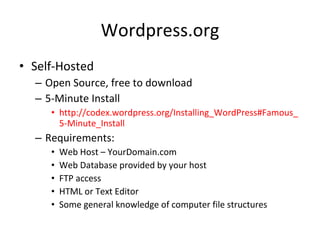
Wordpress.org Self-Hosted Open Source, free to download 5-Minute Install http://codex.wordpress.org/Installing_WordPress#Famous_5-Minute_Install Requirements: Web Host – YourDomain.com Web Database provided by your host FTP access HTML or Text Editor Some general knowledge of computer file structures
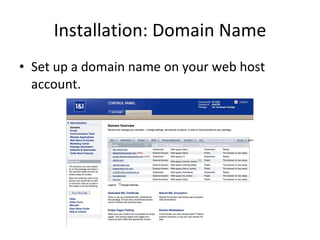
Installation: Domain Name Set up a domain name on your web host account.
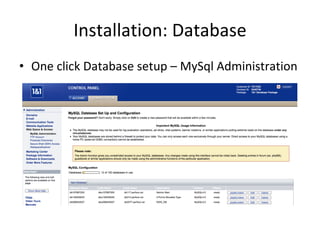
Installation: Database One click Database setup – MySql Administration
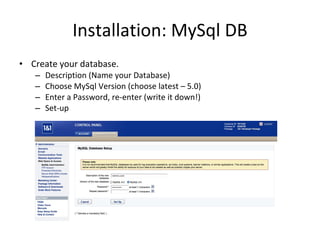
Installation: MySql DB Create your database. Description (Name your Database) Choose MySql Version (choose latest – 5.0) Enter a Password, re-enter (write it down!) Set-up
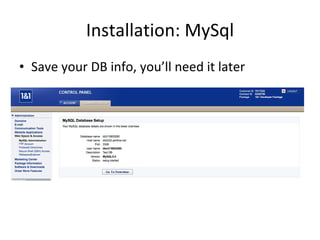
Installation: MySql Save your DB info, you’ll need it later
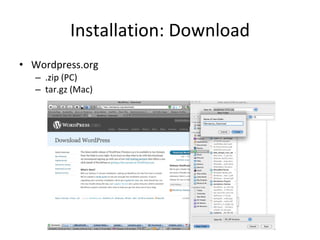
Installation: Download Wordpress.org .zip (PC) tar.gz (Mac)
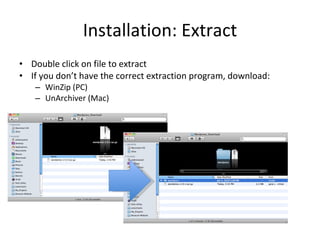
Installation: Extract Double click on file to extract If you don’t have the correct extraction program, download: WinZip (PC) UnArchiver (Mac)
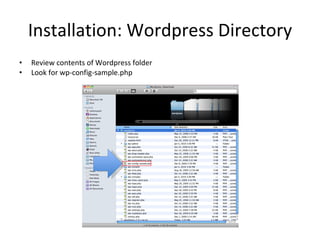
Installation: Wordpress Directory Review contents of Wordpress folder Look for wp-config-sample.php
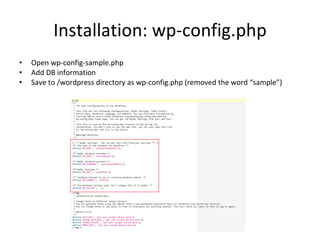
Installation: wp-config.php Open wp-config-sample.php Add DB information Save to /wordpress directory as wp-config.php (removed the word “sample”)
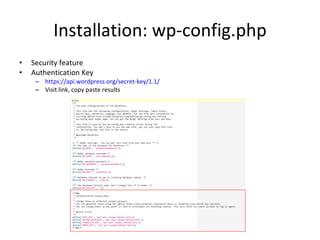
Installation: wp-config.php Security feature Authentication Key https://api.wordpress.org/secret-key/1.1/ Visit link, copy paste results
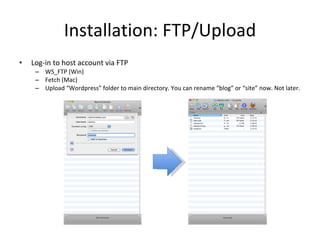
Installation: FTP/Upload Log-in to host account via FTP WS_FTP (Win) Fetch (Mac) Upload “Wordpress” folder to main directory. You can rename “blog” or “site” now. Not later.
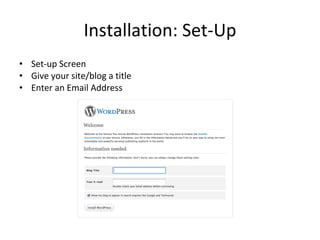
Installation: Set-Up Set-up Screen Give your site/blog a title Enter an Email Address
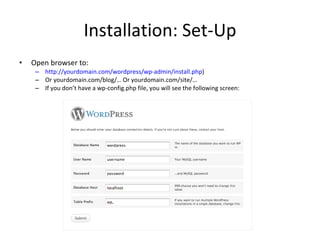
Installation: Set-Up Open browser to:  http://yourdomain.com/wordpress/wp-admin/install.php ) Or yourdomain.com/blog/… Or yourdomain.com/site/… If you don’t have a wp-config.php file, you will see the following screen:
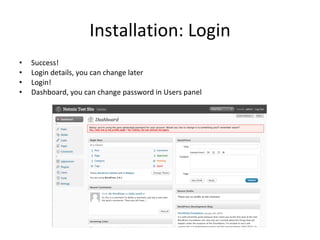
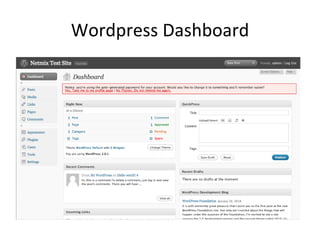
Installation: Login Success! Login details, you can change later Login! Dashboard, you can change password in Users panel
Wordpress Dashboard
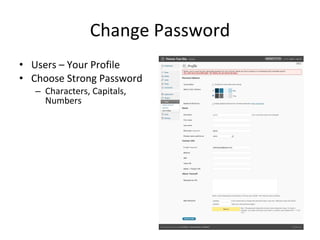
Change Password Users – Your Profile Choose Strong Password Characters, Capitals, Numbers
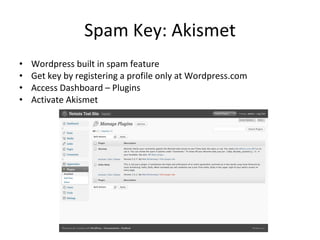
Spam Key: Akismet Wordpress built in spam feature Get key by registering a profile only at Wordpress.com Access Dashboard – Plugins Activate Akismet
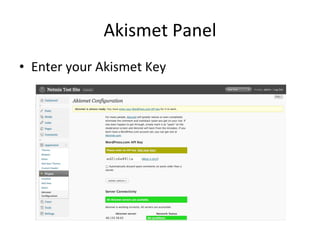
Akismet Panel Enter your Akismet Key
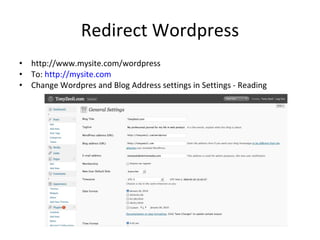
Redirect Wordpress http://www.mysite.com/wordpress To:  http://mysite.com Change Wordpress and Blog Address settings in Settings - General
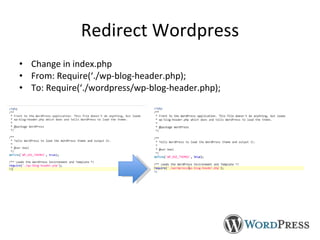
Redirect Wordpress Change in index.php From: Require(‘./wp-blog-header.php); To: Require(‘./wordpress/wp-blog-header.php); Note: You may have changed your Wordpress folder name to “blog” or “site”. It doesn’t have to be “wordpress.”
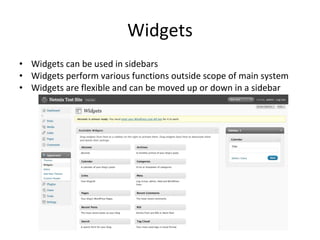
Widgets Widgets can be used in sidebars Widgets perform various functions outside scope of main system Widgets are flexible and can be moved up or down in a sidebar
Gravatar Globally Recognized Avatar Install WP-Gravatar Associate email addresses at Gravatar web site http://en.gravatar.com/
Plugins All In One SEO NextGenGallery TwitterTools Wordbook XML Sitemaps WordTube ShareThis ReCaptcha WP-Book Subscribe2 Newsletter Podcasting Lightbox Feedburner Disqus or IntenseDebate Amazon ReLoaded Snipi Google Analtyics GetClicky
Themes Free Themes Always download approved from Wordpress Codex Some free themes can back doors for hackers Paid Themes ThemeForest http://www.smashingmagazine.com/2009/05/18/100-amazing-free-wordpress-themes-for-2009/ Theme Frameworks http://codex.wordpress.org/Theme_Frameworks http://codefusionlab.blogspot.com/2009/07/20-kick-ass-wordpress-theme-frameworks.html DIYThemes.com Thematic Sandbox Basis Child Theming Rapid Dev off one theme framework http://themeshaper.com/wordpress-child-theme-basics/

Getting Started With Wordpress

  • 1.
    Getting Started withWordpress Install, Theming, Plugins & Security Simple steps to building with Wordpress. Presented by Tony Zeoli Founder, Digital Strategy Works http://www.digitalstrategyworks.com
  • 2.
    Two Types ofWordpress Hosted: Wordpress.com Self-Hosted: Wordpress.org Getting Started With Wordpress
  • 3.
    Hosted You usethe Wordpress.com system Your URL is foo.wordpress.com Enhanced services allow you to use your domain name Can only use approved themes and plug-ins Wordpress.com
  • 4.
    Wordpress.org Self-Hosted OpenSource, free to download 5-Minute Install http://codex.wordpress.org/Installing_WordPress#Famous_5-Minute_Install Requirements: Web Host – YourDomain.com Web Database provided by your host FTP access HTML or Text Editor Some general knowledge of computer file structures
  • 5.
    Installation: Domain NameSet up a domain name on your web host account.
  • 6.
    Installation: Database Oneclick Database setup – MySql Administration
  • 7.
    Installation: MySql DBCreate your database. Description (Name your Database) Choose MySql Version (choose latest – 5.0) Enter a Password, re-enter (write it down!) Set-up
  • 8.
    Installation: MySql Saveyour DB info, you’ll need it later
  • 9.
  • 10.
    Installation: Extract Doubleclick on file to extract If you don’t have the correct extraction program, download: WinZip (PC) UnArchiver (Mac)
  • 11.
    Installation: Wordpress DirectoryReview contents of Wordpress folder Look for wp-config-sample.php
  • 12.
    Installation: wp-config.php Openwp-config-sample.php Add DB information Save to /wordpress directory as wp-config.php (removed the word “sample”)
  • 13.
    Installation: wp-config.php Securityfeature Authentication Key https://api.wordpress.org/secret-key/1.1/ Visit link, copy paste results
  • 14.
    Installation: FTP/Upload Log-into host account via FTP WS_FTP (Win) Fetch (Mac) Upload “Wordpress” folder to main directory. You can rename “blog” or “site” now. Not later.
  • 15.
    Installation: Set-Up Set-upScreen Give your site/blog a title Enter an Email Address
  • 16.
    Installation: Set-Up Openbrowser to: http://yourdomain.com/wordpress/wp-admin/install.php ) Or yourdomain.com/blog/… Or yourdomain.com/site/… If you don’t have a wp-config.php file, you will see the following screen:
  • 17.
    Installation: Login Success!Login details, you can change later Login! Dashboard, you can change password in Users panel
  • 18.
  • 19.
    Change Password Users– Your Profile Choose Strong Password Characters, Capitals, Numbers
  • 20.
    Spam Key: AkismetWordpress built in spam feature Get key by registering a profile only at Wordpress.com Access Dashboard – Plugins Activate Akismet
  • 21.
    Akismet Panel Enteryour Akismet Key
  • 22.
    Redirect Wordpress http://www.mysite.com/wordpressTo: http://mysite.com Change Wordpress and Blog Address settings in Settings - General
  • 23.
    Redirect Wordpress Changein index.php From: Require(‘./wp-blog-header.php); To: Require(‘./wordpress/wp-blog-header.php); Note: You may have changed your Wordpress folder name to “blog” or “site”. It doesn’t have to be “wordpress.”
  • 24.
    Widgets Widgets canbe used in sidebars Widgets perform various functions outside scope of main system Widgets are flexible and can be moved up or down in a sidebar
  • 25.
    Gravatar Globally RecognizedAvatar Install WP-Gravatar Associate email addresses at Gravatar web site http://en.gravatar.com/
  • 26.
    Plugins All InOne SEO NextGenGallery TwitterTools Wordbook XML Sitemaps WordTube ShareThis ReCaptcha WP-Book Subscribe2 Newsletter Podcasting Lightbox Feedburner Disqus or IntenseDebate Amazon ReLoaded Snipi Google Analtyics GetClicky
  • 27.
    Themes Free ThemesAlways download approved from Wordpress Codex Some free themes can back doors for hackers Paid Themes ThemeForest http://www.smashingmagazine.com/2009/05/18/100-amazing-free-wordpress-themes-for-2009/ Theme Frameworks http://codex.wordpress.org/Theme_Frameworks http://codefusionlab.blogspot.com/2009/07/20-kick-ass-wordpress-theme-frameworks.html DIYThemes.com Thematic Sandbox Basis Child Theming Rapid Dev off one theme framework http://themeshaper.com/wordpress-child-theme-basics/