
Wordpress Training
DAY 2
It’s a Blog. It’s a Website.
It’s Marketing…
It’s WordPress!
Agenda
 What is Blog?
 Introduction to CMS
 Introduction to Wordpress
 Installing Wordpress
 Wordpress UI
 User Management
 Wordpress Database structure
 Wordpress Folder Structure
 Managing Posts
 Managing Media
 Managing Pages
3
What is CMS? 4
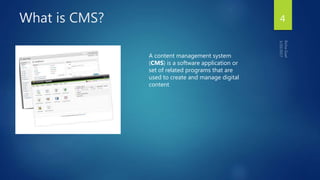
A content management system
(CMS) is a software application or
set of related programs that are
used to create and manage digital
content
What is CMS?
 A content management system (CMS) is a system used to manage
the content of a Web site.
 Typically, a CMS consists of two elements: the content management
application (CMA) and the content delivery application (CDA).
 The CMA element allows the content manager or author, to manage
the content from a Web site without needing the expertise of a
Webmaster.
 The CDA element uses and compiles that information to update the
Web site.
5
What is a Blog?
 A blog (short-form for weblog) is a website, usually maintained by an
individual with regular entries of commentary, descriptions of events,
or other material such as graphics or video.
 Entries are commonly displayed in reverse-chronological order.
 Types : Online diaries, photo blog, audio, video blog, business or
company blog etc
6
Why Blog?
 A blog is a simple, cost-effective way to create a professional online presence.
 A blog creates a conversation between you and the people who matter to you.
 A blog delivers a huge impact for very little money.
 A blog allows you to take control of what you publish.
 A blog allows you to develop a position of thought leadership.
 A blog is a valuable business tool for collecting customer feedback.
 A blog creates a historical record of your content.
7
8
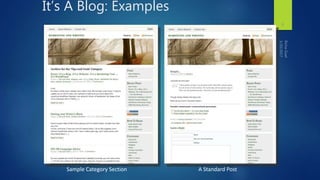
It’s A Blog: Examples
Sample Category Section A Standard Post
What is Blogging?
 A blog (or web log) is a discussion or informational site published on
the World Wide.
 Earlier blogs were usually the work of a single individual. More
recently "multi-author blogs" (MABs) have developed, with posts
written by large numbers of authors.
 http://www.smashingmagazine.com/
 http://mashable.com/
9
Why use a blog?
 Communicate
 More insight
 Allows your readers to give feedback
 Learn more about reader’s wants/needs
 Provides ideas for blog content and direction
10
What is WordPress?
 WordPress is web software to create a beautiful website.
 It's free and open source software based on PHP & MySQL.
 WordPress started as just a blogging system.
 The core software is built by hundreds of community volunteers.
 There are thousands of plugins and themes available to transform your site into almost
anything you can imagine.
 27% of the web uses WordPress, from hobby blogs to the biggest news sites online
 Over 60 million websites are powered by WordPress.
 You can get more details at www.wordpress.org.
11
Stats
WordPress was born out of a desire for an elegant, well-architectured
personal publishing system built on PHP and MySQL.
It was first released on May 27, 2003, by its founders, Matt Mullenweg and
Mike Little.
WordPress is used by more than 18.9% of the top 10 million websites as of
August 2013.
As of February 19, 2014, version 3.8 had been downloaded more than 20
million times.
12
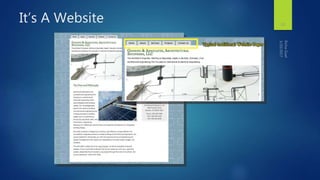
It’s A Website 13
Is it a Blog? Is it a Website?
 Are you confused? Of course, because it’s confusing. Now a Blog =
Website.
 But why can’t it do this? Because websites are hard work.
 WordPress has become a cult. It’s the future.
 SEO problems do occur with CMS vs standard files
 Hot Tip: You can add a blog feature to your existing site.
 About WordPress: Yes, the dashboard is intimidating.
14
How does a Website differ
from a Blog?
 Traditional Websites:
 A set of ‘static’ pages
 Content does not change
often (or at all)
 Tends to be more sales
oriented
 Typically does not offer a way
to interact with its visitors
 Often needs a web designer to
make even minor changes or
additions
 Traditional Blog:
 Fresh Content, changes often
 Newest posts appear highest
on the page
 Tends to share insights and
ideas
 Typically offers a space to
post comments and continue
the conversation
 Offers ability to add content
quickly
15
Wouldn’t it be great to combine
the benefits of both a site and a
blog into one full featured
solution?
EACH OFFERS VALUABLE INFORMATION AND
COMPLIMENTS THE OTHER
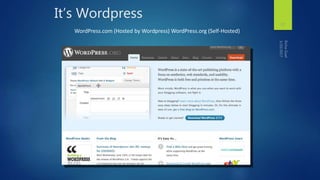
It’s Wordpress
17
WordPress.com (Hosted by Wordpress) WordPress.org (Self-Hosted)
What is WordPress?
 WordPress is an open source blog publishing application.
 WordPress is a state-of-the-art publishing platform with a focus on
aesthetics, web standards, and usability.
 WordPress is both free and priceless at the same time.
 Official Website : www.wordpress.org
18
What is Wordpress?
 Created as a Blog Software, in 2003
 Open Source (free) application
 Lots of developers came together and volunteered their experience
 Lots of folks continue to create additional tools and add-ons (i.e. themes and
plugins)
 Anyone can use this software free of charge
19
Introduction
WordPress is an online, open source website creation tool
written in PHP.
But in non-geek speak, it’s probably the easiest and most
powerful blogging and website content management
system (or CMS) in existence today.
20
What is Wordpress?
WordPress is highly customizable, and has literally thousands of plugin pieces of
software so you can use your site for just about anything.
If you’re ever curious about who uses WordPress, head on over to the WordPress
site showcase and you’ll be impressed by the number of well-known sites and
famous people using WordPress to power their websites.
What is Wordpress?
 You’re in good company if you use WordPress to publish on the web.
Many famous blogs, news outlets, music sites, Fortune 500 companies and
celebrities are using WordPress. For example, famous blogs like Mashable
and TechCrunch are both on WordPress. News outlets like The New York
Times’ blogs and CNN’s on-air personality blogs all use WordPress, too.
 That should tell you something about how powerful and safe it is to use.
22
Benefits of Wordpress
WordPress is highly customizable, and has literally thousands of plugin pieces of
software so you can use your site for just about anything.
Since WordPress is open source, it’s free. That’s always a bonus. And again, because
it’s open source, it also has a thriving community of developers constantly
improving the software and creating plugins to expand the software.
http://cresttechnosoft.com
Here are some of the benefits of
using WordPress:
• Software is Free
• Easy to use
• Control is in your hands
• SEO Advantages & SEO Friendly
• Very Large Community Support
Uncovering the Hidden Advantages
 Wordpress let’s you add web pages, not just blog posts
 This allows you to build your site and blog with one toolset
 You can maintain your site, yourself, without a designer
 Easy to add new pages, video, images…
 Search Engines (like Google) love Blogs
 Fresh, relevant, original content is important
25
It’s a Marketing Tool
 Gets the word out: Distribution/Syndication
 Your posts are instantly sent to the world with RSS
 Allows search engines to receive notice of new content
 Gets you ranked higher, quicker
 People find you easier
 Allows visitors to receive future posts automatically
 Offers interaction with your community
 People can post comments
 Helps you understand what they want and gives ideas for
future posts
 Provides more exposure for your E-newsletters
 Feature articles can be referenced in emails and linked to a
post online
 Brings email readers to your site
 Allows new site visitors to see what you’ve written about
 And articles are syndicated for you with RSS
26
More great things about Wordpress
 Plugins: Tons of free plugins are available
 Think of mini-applications that automate an action
 Sell from your site with the wp-commerce plugin
 Get site stats with the Google Analytics plugin
 Show your most read posts with the popularity plugin
 Easily add Scripts and 3rd party applications
 Amazon.com affiliate program scripts
 Constant Contact Sign Up boxes
 Customization
 You are free to customize away
 You may need to hire someone to create a truly custom look or
if you don’t want to try to figure it out yourself
27
Themes vs Templates vs Frameworks
 Templates can be used with HTML websites (yeah, let’s save 100+ hours of
programming.
 Themes are used with CMS
 Frameworks: Built on a solid core theme with quality code that includes a
lot of “inbuilt” functionality; continually being updated and improved;
easier customization; doesn’t break.
 Thesis, Genesis highly rated themes.
28
Why Wordpress?
 Personal familiarity
 Free!
 Easy to add, change, & correct public content with
no/ limited HTML knowledge
 Large number of users = lots of
open source templates & plug-ins
 Ability to customize template (change colors & other
aspects of the CSS, add new page templates, etc.)
29
Getting Started with Wordpress
 Activate Akismet – it stops spam
 Keep it private until you are ready to launch
 Select a template that will best suit your needs (or create your own)
 Save a backup of the template
 Start making changes
30

Wordpress Intro

  • 2.
    Wordpress Training DAY 2 It’sa Blog. It’s a Website. It’s Marketing… It’s WordPress!
  • 3.
    Agenda  What isBlog?  Introduction to CMS  Introduction to Wordpress  Installing Wordpress  Wordpress UI  User Management  Wordpress Database structure  Wordpress Folder Structure  Managing Posts  Managing Media  Managing Pages 3
  • 4.
    What is CMS?4 A content management system (CMS) is a software application or set of related programs that are used to create and manage digital content
  • 5.
    What is CMS? A content management system (CMS) is a system used to manage the content of a Web site.  Typically, a CMS consists of two elements: the content management application (CMA) and the content delivery application (CDA).  The CMA element allows the content manager or author, to manage the content from a Web site without needing the expertise of a Webmaster.  The CDA element uses and compiles that information to update the Web site. 5
  • 6.
    What is aBlog?  A blog (short-form for weblog) is a website, usually maintained by an individual with regular entries of commentary, descriptions of events, or other material such as graphics or video.  Entries are commonly displayed in reverse-chronological order.  Types : Online diaries, photo blog, audio, video blog, business or company blog etc 6
  • 7.
    Why Blog?  Ablog is a simple, cost-effective way to create a professional online presence.  A blog creates a conversation between you and the people who matter to you.  A blog delivers a huge impact for very little money.  A blog allows you to take control of what you publish.  A blog allows you to develop a position of thought leadership.  A blog is a valuable business tool for collecting customer feedback.  A blog creates a historical record of your content. 7
  • 8.
    8 It’s A Blog:Examples Sample Category Section A Standard Post
  • 9.
    What is Blogging? A blog (or web log) is a discussion or informational site published on the World Wide.  Earlier blogs were usually the work of a single individual. More recently "multi-author blogs" (MABs) have developed, with posts written by large numbers of authors.  http://www.smashingmagazine.com/  http://mashable.com/ 9
  • 10.
    Why use ablog?  Communicate  More insight  Allows your readers to give feedback  Learn more about reader’s wants/needs  Provides ideas for blog content and direction 10
  • 11.
    What is WordPress? WordPress is web software to create a beautiful website.  It's free and open source software based on PHP & MySQL.  WordPress started as just a blogging system.  The core software is built by hundreds of community volunteers.  There are thousands of plugins and themes available to transform your site into almost anything you can imagine.  27% of the web uses WordPress, from hobby blogs to the biggest news sites online  Over 60 million websites are powered by WordPress.  You can get more details at www.wordpress.org. 11
  • 12.
    Stats WordPress was bornout of a desire for an elegant, well-architectured personal publishing system built on PHP and MySQL. It was first released on May 27, 2003, by its founders, Matt Mullenweg and Mike Little. WordPress is used by more than 18.9% of the top 10 million websites as of August 2013. As of February 19, 2014, version 3.8 had been downloaded more than 20 million times. 12
  • 13.
  • 14.
    Is it aBlog? Is it a Website?  Are you confused? Of course, because it’s confusing. Now a Blog = Website.  But why can’t it do this? Because websites are hard work.  WordPress has become a cult. It’s the future.  SEO problems do occur with CMS vs standard files  Hot Tip: You can add a blog feature to your existing site.  About WordPress: Yes, the dashboard is intimidating. 14
  • 15.
    How does aWebsite differ from a Blog?  Traditional Websites:  A set of ‘static’ pages  Content does not change often (or at all)  Tends to be more sales oriented  Typically does not offer a way to interact with its visitors  Often needs a web designer to make even minor changes or additions  Traditional Blog:  Fresh Content, changes often  Newest posts appear highest on the page  Tends to share insights and ideas  Typically offers a space to post comments and continue the conversation  Offers ability to add content quickly 15
  • 16.
    Wouldn’t it begreat to combine the benefits of both a site and a blog into one full featured solution? EACH OFFERS VALUABLE INFORMATION AND COMPLIMENTS THE OTHER
  • 17.
    It’s Wordpress 17 WordPress.com (Hostedby Wordpress) WordPress.org (Self-Hosted)
  • 18.
    What is WordPress? WordPress is an open source blog publishing application.  WordPress is a state-of-the-art publishing platform with a focus on aesthetics, web standards, and usability.  WordPress is both free and priceless at the same time.  Official Website : www.wordpress.org 18
  • 19.
    What is Wordpress? Created as a Blog Software, in 2003  Open Source (free) application  Lots of developers came together and volunteered their experience  Lots of folks continue to create additional tools and add-ons (i.e. themes and plugins)  Anyone can use this software free of charge 19
  • 20.
    Introduction WordPress is anonline, open source website creation tool written in PHP. But in non-geek speak, it’s probably the easiest and most powerful blogging and website content management system (or CMS) in existence today. 20
  • 21.
    What is Wordpress? WordPressis highly customizable, and has literally thousands of plugin pieces of software so you can use your site for just about anything. If you’re ever curious about who uses WordPress, head on over to the WordPress site showcase and you’ll be impressed by the number of well-known sites and famous people using WordPress to power their websites.
  • 22.
    What is Wordpress? You’re in good company if you use WordPress to publish on the web. Many famous blogs, news outlets, music sites, Fortune 500 companies and celebrities are using WordPress. For example, famous blogs like Mashable and TechCrunch are both on WordPress. News outlets like The New York Times’ blogs and CNN’s on-air personality blogs all use WordPress, too.  That should tell you something about how powerful and safe it is to use. 22
  • 23.
    Benefits of Wordpress WordPressis highly customizable, and has literally thousands of plugin pieces of software so you can use your site for just about anything. Since WordPress is open source, it’s free. That’s always a bonus. And again, because it’s open source, it also has a thriving community of developers constantly improving the software and creating plugins to expand the software. http://cresttechnosoft.com
  • 24.
    Here are someof the benefits of using WordPress: • Software is Free • Easy to use • Control is in your hands • SEO Advantages & SEO Friendly • Very Large Community Support
  • 25.
    Uncovering the HiddenAdvantages  Wordpress let’s you add web pages, not just blog posts  This allows you to build your site and blog with one toolset  You can maintain your site, yourself, without a designer  Easy to add new pages, video, images…  Search Engines (like Google) love Blogs  Fresh, relevant, original content is important 25
  • 26.
    It’s a MarketingTool  Gets the word out: Distribution/Syndication  Your posts are instantly sent to the world with RSS  Allows search engines to receive notice of new content  Gets you ranked higher, quicker  People find you easier  Allows visitors to receive future posts automatically  Offers interaction with your community  People can post comments  Helps you understand what they want and gives ideas for future posts  Provides more exposure for your E-newsletters  Feature articles can be referenced in emails and linked to a post online  Brings email readers to your site  Allows new site visitors to see what you’ve written about  And articles are syndicated for you with RSS 26
  • 27.
    More great thingsabout Wordpress  Plugins: Tons of free plugins are available  Think of mini-applications that automate an action  Sell from your site with the wp-commerce plugin  Get site stats with the Google Analytics plugin  Show your most read posts with the popularity plugin  Easily add Scripts and 3rd party applications  Amazon.com affiliate program scripts  Constant Contact Sign Up boxes  Customization  You are free to customize away  You may need to hire someone to create a truly custom look or if you don’t want to try to figure it out yourself 27
  • 28.
    Themes vs Templatesvs Frameworks  Templates can be used with HTML websites (yeah, let’s save 100+ hours of programming.  Themes are used with CMS  Frameworks: Built on a solid core theme with quality code that includes a lot of “inbuilt” functionality; continually being updated and improved; easier customization; doesn’t break.  Thesis, Genesis highly rated themes. 28
  • 29.
    Why Wordpress?  Personalfamiliarity  Free!  Easy to add, change, & correct public content with no/ limited HTML knowledge  Large number of users = lots of open source templates & plug-ins  Ability to customize template (change colors & other aspects of the CSS, add new page templates, etc.) 29
  • 30.
    Getting Started withWordpress  Activate Akismet – it stops spam  Keep it private until you are ready to launch  Select a template that will best suit your needs (or create your own)  Save a backup of the template  Start making changes 30