WordPress for Beginners
with Michelle Ames
MarketedByMichelle.com
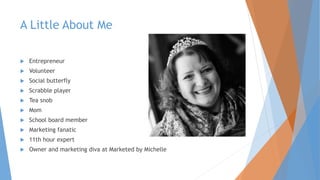
A Little About Me
 Entrepreneur
 Volunteer
 Social butterfly
 Scrabble player
 Tea snob
 Mom
 School board member
 Marketing fanatic
 11th hour expert
 Owner and marketing diva at Marketed by Michelle
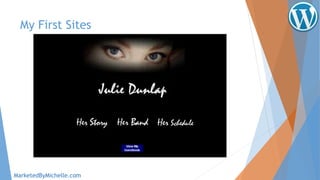
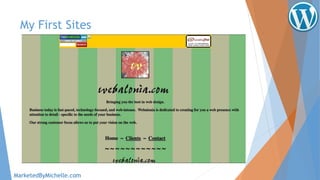
My First Sites
MarketedByMichelle.com
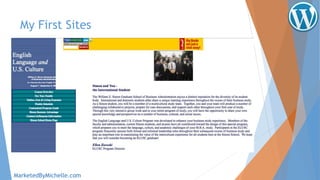
My First Sites
MarketedByMichelle.com
My First Sites
MarketedByMichelle.com
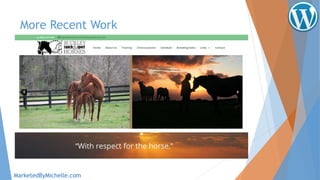
More Recent Work
MarketedByMichelle.com
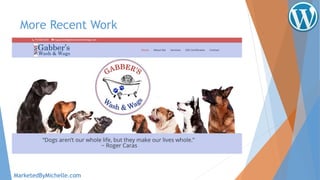
More Recent Work
MarketedByMichelle.com
So you want a piece of the Internet…
 Originally a blogging medium, WordPress now offers a
great platform for creating almost any kind of website –
from blogs to brochure sites to e-commerce.
 WordPress is used by 59.6% of all the websites whose
content management system we know. This is 26.5% of all
websites.
MarketedByMichelle.com
You’re in good company
 According to the WordPress
showcase page, WP powers
some major players,
including:
 Groupe Renault
 Vogue.com
 Smithsonian Institution’s
National Museum of African Art
 Tribune Media
 The New Yorker
 Time.com
 mercedes-benz.com
 Rush
 open.nasa.gov
 Ariana Grande
 Angry Birds
 Walt Disney Company
 NY Post
 Ringling Bros. Circus
 Fortune
 Beyonce
 Dallas Mavericks
 Wil Wheaton
 Sweden’s official site
 Georgia State University
 Justin Bieber
MarketedByMichelle.com
Basic Installation
 Where to get started
 Choose a theme. Upload it.
 Free vs. Premium
 Updates
 Less recognizable
 Documentation (usually)
 Support and forums
 Get rid of footer links
 Often easily customized
 Customize it.
 Logo, colors, background images.
Note:
Changing your theme won’t delete your content (media,
posts, and pages) but most likely WILL delete any
customization – so if you revert back to an older theme you
will have to re-enter customizations.
MarketedByMichelle.com
Basic Installation
 Where to get started
 Choose your plugins and upload them.
 Some of my “must haves” include:
 Security (WordFence)
 Spam Control (Disable Comments)
 Backup (Backup Buddy, WPClone)
 Forms (Gravity Forms, Jotform)
 Calendar (Timely)
 SEO (Yoast)
 Post Expirator
 Shopping Cart
(woo commerce, Ecwid, shopify)
Note:
Logged into your wordpress.org account? Favorite the
plugins you use frequently for easy uploading from the
repository.
MarketedByMichelle.com
Basic Installation
 Posts
 Where posts appear on the site is theme-dependent
 Categories vs. Tags
 Scheduling
 Expiration (plugin required)
 Featured Image
Note:
If you are using a slider, make sure your featured image
matches the slider dimensions.
MarketedByMichelle.com
Basic Installation
 Media
 Photos
 Graphics
 Pdf files
 Documents
 Etc.
Note:
Make sure photos are sized well so they don’t slow down
your site. Link to video on YouTube or Vimeo.
MarketedByMichelle.com
Basic Installation
 Pages – the “meat” of your site.
 Choose your template (different with every theme)
 Choose a “parent” for hierarchy
 Set featured image – if desired
 Use headings <H tags> for both reading and SEO purposes
 Use “save draft” to continue working without publishing the page –
or losing edits. Click “view page” to see work in progress
Note:
Using the “Visual” vs. “Text” views will allow you to access
and edit different aspects of the page.
MarketedByMichelle.com
Basic Installation
 Comments
 Use a spam filter if you invite comments.
Note
You can always check the spam filter to make sure that any
comments you want to let through are found and approved.
MarketedByMichelle.com
Appearance
 Themes
 Delete anything you are not using or will not use.
 Customize will have different options based on the theme.
 Background may or may not display as you intend – based
on the theme.
Note:
Never edit theme files directly! Use a child theme or CSS
editor (like the one included with Jetpack) to make CSS
edits.
MarketedByMichelle.com
Appearance
 Widgets
 Widget areas also vary based on themes, but most have
similar functions. Variations may include WHERE widgets can
be placed (i.e. footer, sidebar, header, etc.)
 Standard widgets include text boxes, meta functions,
calendar of posts, categories, menus, etc.
 Plugins can often provide additional widget options like
Facebook “like” boxes, Twitter feeds, and even industry-
specific options like real estate MLS lookups.
Note:
The Text Widget allows you to use basic HTML language to
add content, links, graphics, etc. This can really come in
handy!
MarketedByMichelle.com
Appearance
 Menus
 Menus are much more versatile than you may think!
 Establish link hierarchy through dropdowns
 Add links to outside pages in your menu
 Customize labels – change the menu name without changing
the target page or link name
 Add blog categories as their own menu items
Note:
Want a menu link to open in a new tab? Click the “Screen
Options” tab at the top of the menu dashboard and check
“link target.” Now when you edit a menu item you can
check “open in new window/tab.”
MarketedByMichelle.com
Users
 User Roles
 Administrator – somebody who has access to all the administration
features within a single site.
 Editor – somebody who can publish and manage posts including the
posts of other users.
 Author – somebody who can publish and manage their own posts.
 Contributor – somebody who can write and manage their own posts
but cannot publish them.
 Subscriber – somebody who can only manage their profile.
Note:
Be very cautious about assigning administrator rights to
anyone. They will have access to make ANY changes on your
site.
MarketedByMichelle.com
Settings
 What to Change
 General Settings
 Site Title
 Tagline
 Timezone
 Date Format
 Week Starts On
Note:
Be careful not to change your WP or Site addresses unless
you are confident of what you are doing. You can make your
site “disappear.” You have to know how to navigate the
cPanel well to fix it.
MarketedByMichelle.com
Settings
 What to Change
 Permalinks
 Permalinks will default to unfriendly URL page names (like
sitename.com/?p=123)
 Instead click the “Post Name” setting to have your page names
appear in the URL bar. (like www.sitename.com/pagename)
Note:
Using Post Names as the URL page name also assists with
SEO!
MarketedByMichelle.com
Must-Haves
 Favicon
 A favicon is that tiny 16x16 pixel image that displays in the
tab of your browser page and is unique to your site. Without
one all you will see is this.
 To create a great favicon, go to favicon.cc and upload and
edit the image.
 Some themes let you upload a file directly.
 You may need to FTP the file
to your theme’s image folder.
Note:
A favicon is the cherry on your website sundae! It’s good for
branding, too!
MarketedByMichelle.com
Must-Haves
 Social Media Link Buttons
 Social Share Buttons (via plugin like Simple Share Buttons)
 Footer – get rid of “proudly powered by WordPress” and
add © and designer.
 If your want to drive phone traffic, display the phone
number in the header.
 If your business or client’s business wants walk-in traffic,
add a map to the contact/location page.
Note:
Social sharing allows site visitors to share pages and posts to
their social media pages.
MarketedByMichelle.com
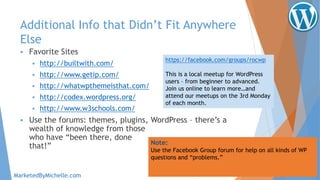
Additional Info that Didn’t Fit Anywhere
Else
 Favorite Sites
 http://builtwith.com/
 http://www.getip.com/
 http://whatwpthemeisthat.com/
 http://codex.wordpress.org/
 http://www.w3schools.com/
 Use the forums: themes, plugins, WordPress – there’s a
wealth of knowledge from those
who have “been there, done
that!” Note:
Use the Facebook Group forum for help on all kinds of WP
questions and “problems.”
MarketedByMichelle.com
https://facebook.com/groups/rocwp
This is a local meetup for WordPress
users – from beginner to advanced.
Join us online to learn more…and
attend our meetups on the 3rd Monday
of each month.
Questions? Contact Me!
Michelle Ames
Call/Text 585-749-5059
michelle@marketedbymichelle.com
MarketedByMichelle.com

WordPress for Beginners

  • 1.
    WordPress for Beginners withMichelle Ames MarketedByMichelle.com
  • 2.
    A Little AboutMe  Entrepreneur  Volunteer  Social butterfly  Scrabble player  Tea snob  Mom  School board member  Marketing fanatic  11th hour expert  Owner and marketing diva at Marketed by Michelle
  • 3.
  • 4.
  • 5.
  • 6.
  • 7.
  • 8.
    So you wanta piece of the Internet…  Originally a blogging medium, WordPress now offers a great platform for creating almost any kind of website – from blogs to brochure sites to e-commerce.  WordPress is used by 59.6% of all the websites whose content management system we know. This is 26.5% of all websites. MarketedByMichelle.com
  • 9.
    You’re in goodcompany  According to the WordPress showcase page, WP powers some major players, including:  Groupe Renault  Vogue.com  Smithsonian Institution’s National Museum of African Art  Tribune Media  The New Yorker  Time.com  mercedes-benz.com  Rush  open.nasa.gov  Ariana Grande  Angry Birds  Walt Disney Company  NY Post  Ringling Bros. Circus  Fortune  Beyonce  Dallas Mavericks  Wil Wheaton  Sweden’s official site  Georgia State University  Justin Bieber MarketedByMichelle.com
  • 10.
    Basic Installation  Whereto get started  Choose a theme. Upload it.  Free vs. Premium  Updates  Less recognizable  Documentation (usually)  Support and forums  Get rid of footer links  Often easily customized  Customize it.  Logo, colors, background images. Note: Changing your theme won’t delete your content (media, posts, and pages) but most likely WILL delete any customization – so if you revert back to an older theme you will have to re-enter customizations. MarketedByMichelle.com
  • 11.
    Basic Installation  Whereto get started  Choose your plugins and upload them.  Some of my “must haves” include:  Security (WordFence)  Spam Control (Disable Comments)  Backup (Backup Buddy, WPClone)  Forms (Gravity Forms, Jotform)  Calendar (Timely)  SEO (Yoast)  Post Expirator  Shopping Cart (woo commerce, Ecwid, shopify) Note: Logged into your wordpress.org account? Favorite the plugins you use frequently for easy uploading from the repository. MarketedByMichelle.com
  • 12.
    Basic Installation  Posts Where posts appear on the site is theme-dependent  Categories vs. Tags  Scheduling  Expiration (plugin required)  Featured Image Note: If you are using a slider, make sure your featured image matches the slider dimensions. MarketedByMichelle.com
  • 13.
    Basic Installation  Media Photos  Graphics  Pdf files  Documents  Etc. Note: Make sure photos are sized well so they don’t slow down your site. Link to video on YouTube or Vimeo. MarketedByMichelle.com
  • 14.
    Basic Installation  Pages– the “meat” of your site.  Choose your template (different with every theme)  Choose a “parent” for hierarchy  Set featured image – if desired  Use headings <H tags> for both reading and SEO purposes  Use “save draft” to continue working without publishing the page – or losing edits. Click “view page” to see work in progress Note: Using the “Visual” vs. “Text” views will allow you to access and edit different aspects of the page. MarketedByMichelle.com
  • 15.
    Basic Installation  Comments Use a spam filter if you invite comments. Note You can always check the spam filter to make sure that any comments you want to let through are found and approved. MarketedByMichelle.com
  • 16.
    Appearance  Themes  Deleteanything you are not using or will not use.  Customize will have different options based on the theme.  Background may or may not display as you intend – based on the theme. Note: Never edit theme files directly! Use a child theme or CSS editor (like the one included with Jetpack) to make CSS edits. MarketedByMichelle.com
  • 17.
    Appearance  Widgets  Widgetareas also vary based on themes, but most have similar functions. Variations may include WHERE widgets can be placed (i.e. footer, sidebar, header, etc.)  Standard widgets include text boxes, meta functions, calendar of posts, categories, menus, etc.  Plugins can often provide additional widget options like Facebook “like” boxes, Twitter feeds, and even industry- specific options like real estate MLS lookups. Note: The Text Widget allows you to use basic HTML language to add content, links, graphics, etc. This can really come in handy! MarketedByMichelle.com
  • 18.
    Appearance  Menus  Menusare much more versatile than you may think!  Establish link hierarchy through dropdowns  Add links to outside pages in your menu  Customize labels – change the menu name without changing the target page or link name  Add blog categories as their own menu items Note: Want a menu link to open in a new tab? Click the “Screen Options” tab at the top of the menu dashboard and check “link target.” Now when you edit a menu item you can check “open in new window/tab.” MarketedByMichelle.com
  • 19.
    Users  User Roles Administrator – somebody who has access to all the administration features within a single site.  Editor – somebody who can publish and manage posts including the posts of other users.  Author – somebody who can publish and manage their own posts.  Contributor – somebody who can write and manage their own posts but cannot publish them.  Subscriber – somebody who can only manage their profile. Note: Be very cautious about assigning administrator rights to anyone. They will have access to make ANY changes on your site. MarketedByMichelle.com
  • 20.
    Settings  What toChange  General Settings  Site Title  Tagline  Timezone  Date Format  Week Starts On Note: Be careful not to change your WP or Site addresses unless you are confident of what you are doing. You can make your site “disappear.” You have to know how to navigate the cPanel well to fix it. MarketedByMichelle.com
  • 21.
    Settings  What toChange  Permalinks  Permalinks will default to unfriendly URL page names (like sitename.com/?p=123)  Instead click the “Post Name” setting to have your page names appear in the URL bar. (like www.sitename.com/pagename) Note: Using Post Names as the URL page name also assists with SEO! MarketedByMichelle.com
  • 22.
    Must-Haves  Favicon  Afavicon is that tiny 16x16 pixel image that displays in the tab of your browser page and is unique to your site. Without one all you will see is this.  To create a great favicon, go to favicon.cc and upload and edit the image.  Some themes let you upload a file directly.  You may need to FTP the file to your theme’s image folder. Note: A favicon is the cherry on your website sundae! It’s good for branding, too! MarketedByMichelle.com
  • 23.
    Must-Haves  Social MediaLink Buttons  Social Share Buttons (via plugin like Simple Share Buttons)  Footer – get rid of “proudly powered by WordPress” and add © and designer.  If your want to drive phone traffic, display the phone number in the header.  If your business or client’s business wants walk-in traffic, add a map to the contact/location page. Note: Social sharing allows site visitors to share pages and posts to their social media pages. MarketedByMichelle.com
  • 24.
    Additional Info thatDidn’t Fit Anywhere Else  Favorite Sites  http://builtwith.com/  http://www.getip.com/  http://whatwpthemeisthat.com/  http://codex.wordpress.org/  http://www.w3schools.com/  Use the forums: themes, plugins, WordPress – there’s a wealth of knowledge from those who have “been there, done that!” Note: Use the Facebook Group forum for help on all kinds of WP questions and “problems.” MarketedByMichelle.com https://facebook.com/groups/rocwp This is a local meetup for WordPress users – from beginner to advanced. Join us online to learn more…and attend our meetups on the 3rd Monday of each month.
  • 25.
    Questions? Contact Me! MichelleAmes Call/Text 585-749-5059 michelle@marketedbymichelle.com MarketedByMichelle.com