Event Viewer
Prepared By Reviewer
Mathivanan Dharmalingam Raghul
Prepared by: Mathivanan Dharmalingam
What is an Event Viewer?
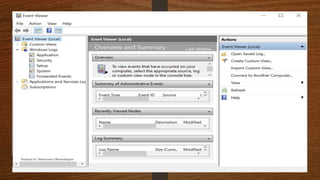
• Event Viewer is a component of Microsoft's Windows operating system that lets
administrators and users view the event logs on a local or remote machine.
• The Event Viewer maintains logs about program, security and system events in our
computer which are used to troubleshoot issues on a Windows-based system
• It contains many type of logs in which the following are considered important
 System log
 Security log
 Application log
Prepared by: Mathivanan Dharmalingam
Types of Windows logs
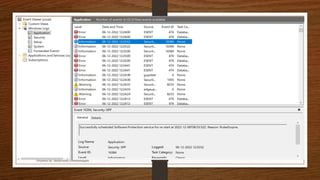
• Application logs:
These are the logs which are generated by the drivers and built-in
interface elements to run an app.
Prepared by: Mathivanan Dharmalingam
Types of Windows logs
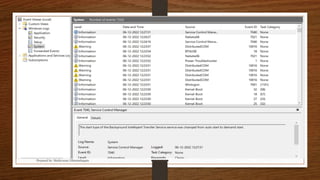
• System logs:
These are the logs generated from the services which are installed in
the computer.
Prepared by: Mathivanan Dharmalingam
Types of Windows logs
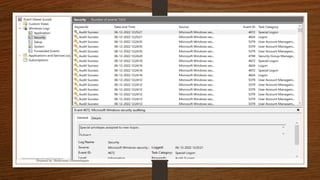
• Security logs:
The logs generated during logon, any attempted logon failures and
resource access are listed in this.
Prepared by: Mathivanan Dharmalingam
Types of Event
• Error - A failed service or function that affects process
• Warning - A failed service or function but that does not affect process
• Information - It contains the details about what happens when a user
does something in the system.
• Success Audit - It contains information about the privileges/rights
assigned to a user after successful login
• Failure Audit - It is the log of an failed user logon
Prepared by: Mathivanan Dharmalingam
Possible disadvantage
• Due to the Event Viewer's routine reporting of minor start-up and
processing errors, the software is frequently used by technical support
scammers to trick the victim into thinking that their computer contains
critical errors requiring immediate technical support
Prepared by: Mathivanan Dharmalingam
Thank you
Prepared by: Mathivanan Dharmalingam

Event Viewer

  • 1.
    Event Viewer Prepared ByReviewer Mathivanan Dharmalingam Raghul Prepared by: Mathivanan Dharmalingam
  • 2.
    What is anEvent Viewer? • Event Viewer is a component of Microsoft's Windows operating system that lets administrators and users view the event logs on a local or remote machine. • The Event Viewer maintains logs about program, security and system events in our computer which are used to troubleshoot issues on a Windows-based system • It contains many type of logs in which the following are considered important  System log  Security log  Application log Prepared by: Mathivanan Dharmalingam
  • 3.
  • 4.
    Types of Windowslogs • Application logs: These are the logs which are generated by the drivers and built-in interface elements to run an app. Prepared by: Mathivanan Dharmalingam
  • 5.
  • 6.
    Types of Windowslogs • System logs: These are the logs generated from the services which are installed in the computer. Prepared by: Mathivanan Dharmalingam
  • 7.
  • 8.
    Types of Windowslogs • Security logs: The logs generated during logon, any attempted logon failures and resource access are listed in this. Prepared by: Mathivanan Dharmalingam
  • 9.
  • 10.
    Types of Event •Error - A failed service or function that affects process • Warning - A failed service or function but that does not affect process • Information - It contains the details about what happens when a user does something in the system. • Success Audit - It contains information about the privileges/rights assigned to a user after successful login • Failure Audit - It is the log of an failed user logon Prepared by: Mathivanan Dharmalingam
  • 11.
    Possible disadvantage • Dueto the Event Viewer's routine reporting of minor start-up and processing errors, the software is frequently used by technical support scammers to trick the victim into thinking that their computer contains critical errors requiring immediate technical support Prepared by: Mathivanan Dharmalingam
  • 12.
    Thank you Prepared by:Mathivanan Dharmalingam