FAT vs NTFS
BY: AAQ & MAS
Hard Drive are like a File Cabinet
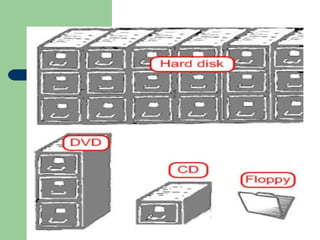
1. A popular metaphor is to compare a
computer’s hard drive to a file cabinet.
2. If a computer’s hard drive is a giant filing
cabinet, it’s safe to assume the computer
needs some sort of filing system so it can
quickly find the info it needs.
3. Just as there’s more than one way to file
company records, there’s more than one
way to store information on your hard drive.
What OS Support
 In general, systems that can support NTFS
also support FAT; WinNT, Windows 2000,
and WinXP support both FAT and NTFS.
 On the other hand, older versions of
Windows only support FAT (Win95, Win98,
me)
Larger Cluster vs. Smaller Cluster
 If a hard drive is similar to a filing cabinet, a
cluster would most closely resemble a
drawer in that filing cabinet.
 Smaller cluster sizes are more efficient from
a storage perspective, but they’re less
efficient in terms of performance.
 Larger clusters can hold more data, which
means less work for the PC and slightly
better performance.
Disk Defragmenter
1. Most versions of Windows include Disk
Defragmenter.
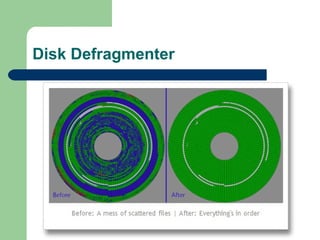
2. This utility examines data in each cluster
and reorganizes it so related clusters are
placed closer together on the hard drive.
3. Fragmentation is a problem for FAT and
NTFS partitions.
Disk Defragmenter
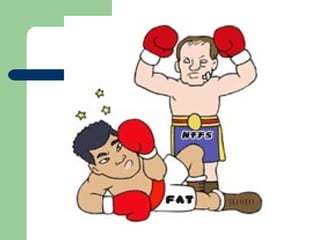
FAT
 FAT gets its name form the file allocation
table stored near the beginning of the drive
 FAT16 is a 16-bit file system
 FAT32 is a 32-bit file system
 FAT32 made its appearance in Windows
95, but 98 was the first retail version of
Windows to include support for FAT32
FAT 32 vs FAT 16?
 Because FAT32 is a 32-bit file system it can
address more clusters than FAT16
 It also means FAT32 can support larger
partitions
 With 32KB clusters, FAT32 can support
partitions up to 8TB in size
Convert FAT to NTFS
 NTFS is an Advanced File System
Compared to FAT
 Before converting FAT to NTFS, you might
want to know why it is necessary to convert
FAT to NTFS.
Convert FAT to NTFS
 Converting FAT (FAT12/FAT16/FAT32)
to NTFS is must because NTFS is more
powerful with more advanced features in
performance, security, reliability than FAT.
Cont…
 Converting FAT to NTFS by Convert.exe is
One Solution.
 FAT partition can be converted to NTFS by
using Convert.exe.
Cont…
 1. Click Start, click Run, type cmd, and then
press ENTER.
 2. In the command window, type ”help
convert” and then press ENTER. Information
about converting FAT volumes to NTFS is
made available as shown below.
 To convert a FAT volume to NTFS from the
command prompt, follow these tips:
Cont…
 Open Command Prompt. Click Start, point
to All Programs, point to Accessories, and
then click Command Prompt.
 2. In the command prompt window,
type: convert drive_letter: /fs:ntfs
Cont…
 Note: Once you convert FAT to NTFS, you
cannot simply convert it back to FAT or
FAT32. You will need to reformat the drive or
partition which will erase all data, including
programs and personal files, on the partition.
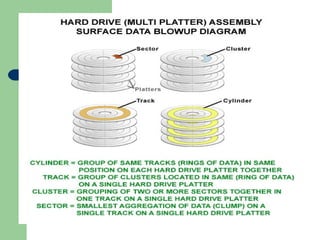
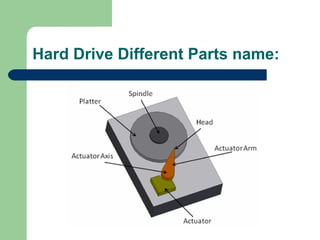
Hard Drive Different Parts name:

FAT vs NTFS

  • 1.
    FAT vs NTFS BY:AAQ & MAS
  • 2.
    Hard Drive arelike a File Cabinet 1. A popular metaphor is to compare a computer’s hard drive to a file cabinet. 2. If a computer’s hard drive is a giant filing cabinet, it’s safe to assume the computer needs some sort of filing system so it can quickly find the info it needs. 3. Just as there’s more than one way to file company records, there’s more than one way to store information on your hard drive.
  • 5.
    What OS Support In general, systems that can support NTFS also support FAT; WinNT, Windows 2000, and WinXP support both FAT and NTFS.  On the other hand, older versions of Windows only support FAT (Win95, Win98, me)
  • 7.
    Larger Cluster vs.Smaller Cluster  If a hard drive is similar to a filing cabinet, a cluster would most closely resemble a drawer in that filing cabinet.  Smaller cluster sizes are more efficient from a storage perspective, but they’re less efficient in terms of performance.  Larger clusters can hold more data, which means less work for the PC and slightly better performance.
  • 9.
    Disk Defragmenter 1. Mostversions of Windows include Disk Defragmenter. 2. This utility examines data in each cluster and reorganizes it so related clusters are placed closer together on the hard drive. 3. Fragmentation is a problem for FAT and NTFS partitions.
  • 10.
  • 11.
    FAT  FAT getsits name form the file allocation table stored near the beginning of the drive  FAT16 is a 16-bit file system  FAT32 is a 32-bit file system  FAT32 made its appearance in Windows 95, but 98 was the first retail version of Windows to include support for FAT32
  • 12.
    FAT 32 vsFAT 16?  Because FAT32 is a 32-bit file system it can address more clusters than FAT16  It also means FAT32 can support larger partitions  With 32KB clusters, FAT32 can support partitions up to 8TB in size
  • 13.
    Convert FAT toNTFS  NTFS is an Advanced File System Compared to FAT  Before converting FAT to NTFS, you might want to know why it is necessary to convert FAT to NTFS.
  • 14.
    Convert FAT toNTFS  Converting FAT (FAT12/FAT16/FAT32) to NTFS is must because NTFS is more powerful with more advanced features in performance, security, reliability than FAT.
  • 15.
    Cont…  Converting FATto NTFS by Convert.exe is One Solution.  FAT partition can be converted to NTFS by using Convert.exe.
  • 16.
    Cont…  1. ClickStart, click Run, type cmd, and then press ENTER.  2. In the command window, type ”help convert” and then press ENTER. Information about converting FAT volumes to NTFS is made available as shown below.  To convert a FAT volume to NTFS from the command prompt, follow these tips:
  • 17.
    Cont…  Open CommandPrompt. Click Start, point to All Programs, point to Accessories, and then click Command Prompt.  2. In the command prompt window, type: convert drive_letter: /fs:ntfs
  • 18.
    Cont…  Note: Onceyou convert FAT to NTFS, you cannot simply convert it back to FAT or FAT32. You will need to reformat the drive or partition which will erase all data, including programs and personal files, on the partition.
  • 19.