New Literacies for Early Elementary: Web 2.0 Tools to Support Literacy Jeremy Brueck, The University of Akron jbrueck@uakron.edu
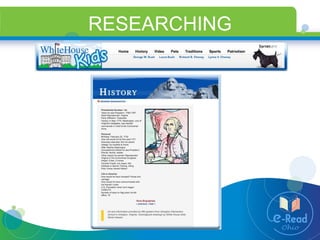
RESEARCHING
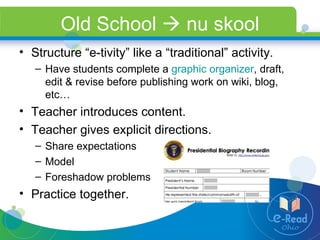
Old School    nu skool Structure “e-tivity” like a “traditional” activity. Have students complete a  graphic organizer , draft, edit & revise before publishing work on wiki, blog, etc…  Teacher introduces content. Teacher gives explicit directions.  Share expectations Model  Foreshadow problems Practice together.
Planning for Instruction BEGIN  and  END  with standards Keyboarding  OR   Copy/Paste ? What skills do your possess already? What skills do your students need to learn? What are your  lesson objectives ? Spelling Writing Process Handwriting
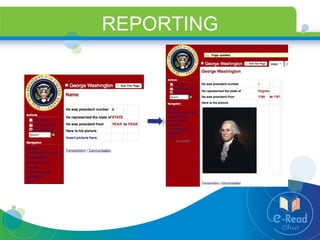
REPORTING
Choose appropriate resources Why use wikis? Structure based on hierarchical subject divisions through:  new page creation internal and external hyperlinking Allow basic page formatting functions Text editing (HTML editors) Insert images, tables & lists  Hyperlinking Embedded media Schwartz, L., Clark, S., Cossarin, M.,  and Rudolph, J. (2004).  Educational Wikis: features and selection criteria.  The International Review of Research in Open and Distance Learning, Vol 5, No 1. Retrieved July 1, 2008 from  http://www.irrodl.org/index.php/irrodl/article/view/163/244 .
Free wiki resources wikispaces http://www.wikispaces.com/ pbwiki http://pbwiki.com/ seedwiki http://seedwiki.com/ wetpaint http://www.wetpaint.com/
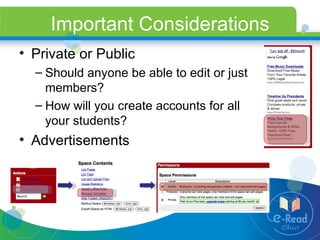
Important Considerations Private or Public Should anyone be able to edit or just members? How will you create accounts for all your students? Advertisements
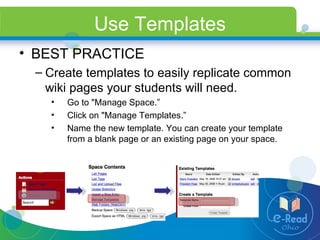
Use Templates BEST PRACTICE Create templates to easily replicate common wiki pages your students will need. Go to "Manage Space.” Click on "Manage Templates.” Name the new template. You can create your template from a blank page or an existing page on your space.
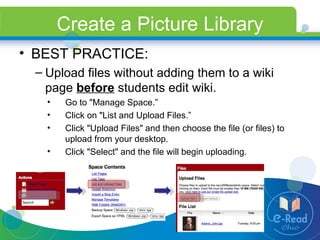
Create a Picture Library BEST PRACTICE: Upload files without adding them to a wiki page  before  students edit wiki. Go to "Manage Space.” Click on "List and Upload Files.” Click "Upload Files" and then choose the file (or files) to upload from your desktop. Click "Select" and the file will begin uploading.
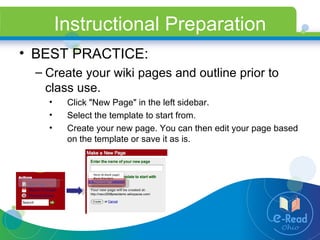
Instructional Preparation BEST PRACTICE: Create your wiki pages and outline prior to class use. Click "New Page" in the left sidebar. Select the template to start from. Create your new page. You can then edit your page based on the template or save it as is.
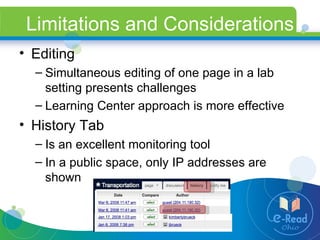
Limitations and Considerations Editing Simultaneous editing of one page in a lab setting presents challenges Learning Center approach is more effective History Tab Is an excellent monitoring tool In a public space, only IP addresses are shown
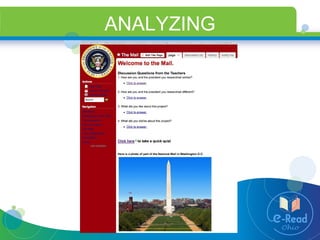
ANALYZING
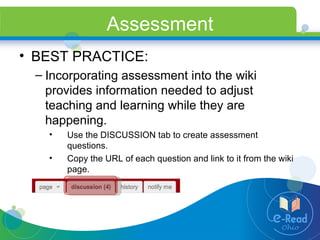
Assessment BEST PRACTICE: Incorporating assessment into the wiki provides information needed to adjust teaching and learning while they are happening. Use the DISCUSSION tab to create assessment questions. Copy the URL of each question and link to it from the wiki page.
Assessment Survey Tools SchoolWires http://www.schoolwires.com   SurveyMonkey http://www.surveymonkey.com   Free account allows 10 questions Zoomerang http://www.zoomerang.com   Basic service is free Educational pricing allows you to export & analyze results
Questions/Comments Please post your questions in the comment section of this wiki. http://early-elementary-wikis.pbwiki.com/   Jeremy Brueck The University of Akron jbrueck@uakron.edu

Wiki Classroom Integration Example

  • 1.
    New Literacies forEarly Elementary: Web 2.0 Tools to Support Literacy Jeremy Brueck, The University of Akron jbrueck@uakron.edu
  • 2.
  • 3.
    Old School  nu skool Structure “e-tivity” like a “traditional” activity. Have students complete a graphic organizer , draft, edit & revise before publishing work on wiki, blog, etc… Teacher introduces content. Teacher gives explicit directions. Share expectations Model Foreshadow problems Practice together.
  • 4.
    Planning for InstructionBEGIN and END with standards Keyboarding OR Copy/Paste ? What skills do your possess already? What skills do your students need to learn? What are your lesson objectives ? Spelling Writing Process Handwriting
  • 5.
  • 6.
    Choose appropriate resourcesWhy use wikis? Structure based on hierarchical subject divisions through: new page creation internal and external hyperlinking Allow basic page formatting functions Text editing (HTML editors) Insert images, tables & lists Hyperlinking Embedded media Schwartz, L., Clark, S., Cossarin, M., and Rudolph, J. (2004). Educational Wikis: features and selection criteria. The International Review of Research in Open and Distance Learning, Vol 5, No 1. Retrieved July 1, 2008 from http://www.irrodl.org/index.php/irrodl/article/view/163/244 .
  • 7.
    Free wiki resourceswikispaces http://www.wikispaces.com/ pbwiki http://pbwiki.com/ seedwiki http://seedwiki.com/ wetpaint http://www.wetpaint.com/
  • 8.
    Important Considerations Privateor Public Should anyone be able to edit or just members? How will you create accounts for all your students? Advertisements
  • 9.
    Use Templates BESTPRACTICE Create templates to easily replicate common wiki pages your students will need. Go to "Manage Space.” Click on "Manage Templates.” Name the new template. You can create your template from a blank page or an existing page on your space.
  • 10.
    Create a PictureLibrary BEST PRACTICE: Upload files without adding them to a wiki page before students edit wiki. Go to "Manage Space.” Click on "List and Upload Files.” Click "Upload Files" and then choose the file (or files) to upload from your desktop. Click "Select" and the file will begin uploading.
  • 11.
    Instructional Preparation BESTPRACTICE: Create your wiki pages and outline prior to class use. Click "New Page" in the left sidebar. Select the template to start from. Create your new page. You can then edit your page based on the template or save it as is.
  • 12.
    Limitations and ConsiderationsEditing Simultaneous editing of one page in a lab setting presents challenges Learning Center approach is more effective History Tab Is an excellent monitoring tool In a public space, only IP addresses are shown
  • 13.
  • 14.
    Assessment BEST PRACTICE:Incorporating assessment into the wiki provides information needed to adjust teaching and learning while they are happening. Use the DISCUSSION tab to create assessment questions. Copy the URL of each question and link to it from the wiki page.
  • 15.
    Assessment Survey ToolsSchoolWires http://www.schoolwires.com SurveyMonkey http://www.surveymonkey.com Free account allows 10 questions Zoomerang http://www.zoomerang.com Basic service is free Educational pricing allows you to export & analyze results
  • 16.
    Questions/Comments Please postyour questions in the comment section of this wiki. http://early-elementary-wikis.pbwiki.com/ Jeremy Brueck The University of Akron jbrueck@uakron.edu