New Literacies for Early Elementary: Web 2.0 Tools to Support Literacy Jeremy Brueck Web Services Manager e-Read Ohio at The University of Akron jbrueck@uakron.edu
Who We Are e-Read Ohio  is a division of the Reading First - Ohio Center.   The goal of e-Read Ohio is to create an online professional development system for teachers in grades Pre-K-12.  This initiative was originally funded by  No Child Left Behind  through Reading First when the Reading First-Ohio Center for Professional Development and Technical Assistance in Effective Reading Instruction was formed.
What We Do Now expanded through funds from the  Ohio Department of Education’s   Literacy Educator Training: e-Learning ( LETe )  program, e-Read Ohio: Provides effective and efficient high-quality online professional development in the area of literacy for Ohio’s teachers, Selects and trains online instructors across the state, and  Builds Ohio’s learning objects repository for professional development.
Today we will… Take a closer look at reading and writing in the digital age Examine the implications of the read/write web Talk about how to use Web 2.0 to cultivate socially constructed thinking and learning in your students
Challenges of 21 st  Century Teaching ‘ Information Age’ technologies have made available copious amounts of information to anyone, anywhere, at anytime. Strict age/grade level approaches to education are being questioned as the appropriate way to prepare students for the coming decades.
Classroom Teaching Environments Education continues to mirror the industrial age ‘assembly line’ approach. We’re trying to produce the most product (to standards) in the shortest time with the fewest defects. Our instruction typically occurs in a room with teacher and students ‘same place - same time.’ Content (learning experience) is usually organized by topics and taught in time slots specified for that topic.
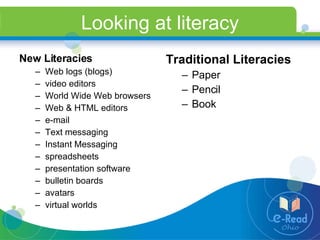
Looking at literacy Traditional Literacies Paper Pencil Book New Literacies Web logs (blogs)  video editors World Wide Web browsers Web & HTML editors e-mail Text messaging Instant Messaging spreadsheets  presentation software  bulletin boards avatars virtual worlds
What are New Literacies? Using information and communication technologies to: identify important questions  locate information critically evaluate the usefulness of that information synthesize information to answer those questions communicate the answers to others
Why integrate New Literacies? Young people will continue to socially engage in a variety of new literacies.  Educators need to make school literacy more engaging for students and more meaningful to their present and future lives in a digital world.  Educators MUST understand the shifts in practices and pedagogy that have taken place and consider how these shifts should inform our teaching of reading and writing.
Blogs What is a Blog? Blog is short for weblog.  A blog is a frequent and chronological publication of comments and thoughts on the web. A blog is often updated daily and contains all information that the person maintaining the BLOG (Blogger) wishes to share with the world.
Blogging in the Classroom TEACHERS School-to-Home Communication Announcements Calendar Newsletter Classroom Happenings STUDENTS Reflections or journals Example Dialogue with peers Communicate with teacher Group work
Blogs are FREE! Blogger Live Journal Diaryland Pitas
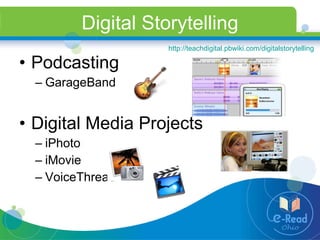
Digital Storytelling Podcasting GarageBand Digital Media Projects iPhoto iMovie VoiceThread http://teachdigital.pbwiki.com/digitalstorytelling
www.voicethread.com Web-based, interactive digital storytelling environment  FREE for educators  Safely publish student work on the Internet, as well as  PRIVATELY share student work with families, community or other classrooms
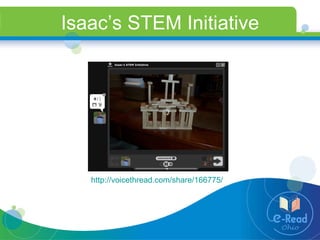
Isaac’s STEM Initiative http://voicethread.com/share/166775/
Wikis What is a Wiki? Wiki is a website that allows users to freely create and edit Web page content usually in a Web browser.  Wikis are free online writing spaces. Wikis use simple formatting rules--Like word processing. Authors do not always claim ownership. Wikis are published online. Wikis provide a history and anyone can revisit prior versions of text.   Why are Wikis useful? This ease of interaction and operation makes a wiki an effective tool for mass collaborative authoring.
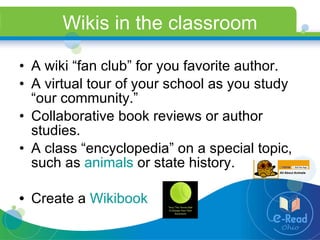
Wikis in the classroom A wiki “fan club” for you favorite author. A virtual tour of your school as you study “our community.” Collaborative book reviews or author studies. A class “encyclopedia” on a special topic, such as  animals  or state history. Create a  Wikibook
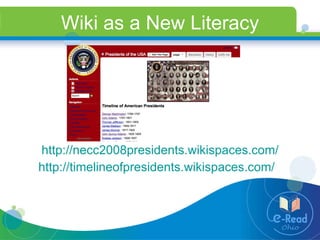
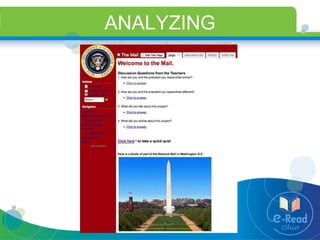
Wiki as a New Literacy http://necc2008presidents.wikispaces.com/ http://timelineofpresidents.wikispaces.com/
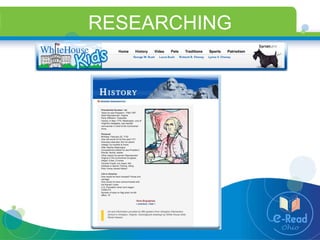
RESEARCHING
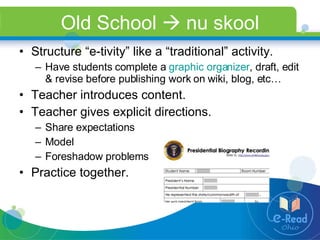
Old School    nu skool Structure “e-tivity” like a “traditional” activity. Have students complete a  graphic organizer , draft, edit & revise before publishing work on wiki, blog, etc…  Teacher introduces content. Teacher gives explicit directions.  Share expectations Model  Foreshadow problems Practice together.
Planning for Instruction BEGIN  and  END  with standards Keyboarding  OR   Copy/Paste ? What skills do your possess already? What skills do your students need to learn? What are your  lesson objectives ? Spelling Writing Process Handwriting
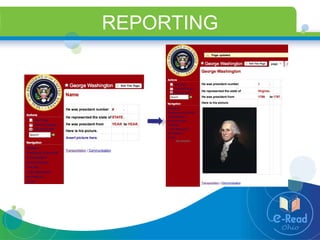
REPORTING
Choose appropriate resources Why use wikis? Structure based on hierarchical subject divisions through:  new page creation internal and external hyperlinking Allow basic page formatting functions Text editing (HTML editors) Insert images, tables & lists  Hyperlinking Embedded media Schwartz, L., Clark, S., Cossarin, M.,  and Rudolph, J. (2004).  Educational Wikis: features and selection criteria.  The International Review of Research in Open and Distance Learning, Vol 5, No 1. Retrieved July 1, 2008 from  http://www.irrodl.org/index.php/irrodl/article/view/163/244 .
Free wiki resources wikispaces http://www.wikispaces.com/ pbwiki http://pbwiki.com/ seedwiki http://seedwiki.com/ wetpaint http://www.wetpaint.com/
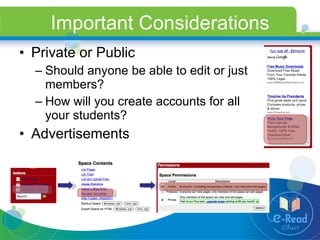
Important Considerations Private or Public Should anyone be able to edit or just members? How will you create accounts for all your students? Advertisements
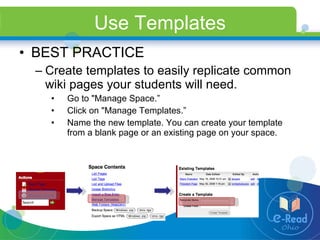
Use Templates BEST PRACTICE Create templates to easily replicate common wiki pages your students will need. Go to "Manage Space.” Click on "Manage Templates.” Name the new template. You can create your template from a blank page or an existing page on your space.
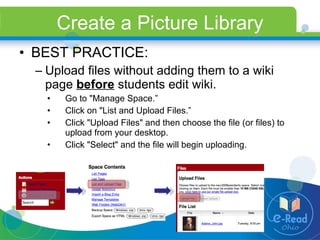
Create a Picture Library BEST PRACTICE: Upload files without adding them to a wiki page  before  students edit wiki. Go to "Manage Space.” Click on "List and Upload Files.” Click "Upload Files" and then choose the file (or files) to upload from your desktop. Click "Select" and the file will begin uploading.
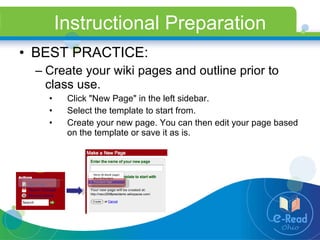
Instructional Preparation BEST PRACTICE: Create your wiki pages and outline prior to class use. Click "New Page" in the left sidebar. Select the template to start from. Create your new page. You can then edit your page based on the template or save it as is.
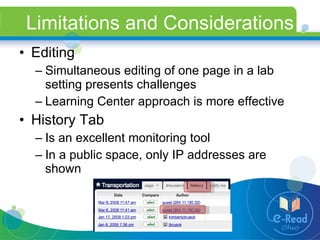
Limitations and Considerations Editing Simultaneous editing of one page in a lab setting presents challenges Learning Center approach is more effective History Tab Is an excellent monitoring tool In a public space, only IP addresses are shown
ANALYZING
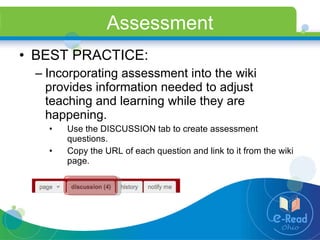
Assessment BEST PRACTICE: Incorporating assessment into the wiki provides information needed to adjust teaching and learning while they are happening. Use the DISCUSSION tab to create assessment questions. Copy the URL of each question and link to it from the wiki page.
Assessment Survey Tools SchoolWires http://www.schoolwires.com   SurveyMonkey http://www.surveymonkey.com   Free account allows 10 questions Zoomerang http://www.zoomerang.com   Basic service is free Educational pricing allows you to export & analyze results
Questions/Comments Jeremy Brueck e-Read Ohio Web Services Manager The University of Akron [email_address] www.raiseddigital.blogspot.com

New Literacies in Early Elementary

  • 1.
    New Literacies forEarly Elementary: Web 2.0 Tools to Support Literacy Jeremy Brueck Web Services Manager e-Read Ohio at The University of Akron jbrueck@uakron.edu
  • 2.
    Who We Aree-Read Ohio is a division of the Reading First - Ohio Center. The goal of e-Read Ohio is to create an online professional development system for teachers in grades Pre-K-12. This initiative was originally funded by No Child Left Behind through Reading First when the Reading First-Ohio Center for Professional Development and Technical Assistance in Effective Reading Instruction was formed.
  • 3.
    What We DoNow expanded through funds from the Ohio Department of Education’s Literacy Educator Training: e-Learning ( LETe ) program, e-Read Ohio: Provides effective and efficient high-quality online professional development in the area of literacy for Ohio’s teachers, Selects and trains online instructors across the state, and Builds Ohio’s learning objects repository for professional development.
  • 4.
    Today we will…Take a closer look at reading and writing in the digital age Examine the implications of the read/write web Talk about how to use Web 2.0 to cultivate socially constructed thinking and learning in your students
  • 5.
    Challenges of 21st Century Teaching ‘ Information Age’ technologies have made available copious amounts of information to anyone, anywhere, at anytime. Strict age/grade level approaches to education are being questioned as the appropriate way to prepare students for the coming decades.
  • 6.
    Classroom Teaching EnvironmentsEducation continues to mirror the industrial age ‘assembly line’ approach. We’re trying to produce the most product (to standards) in the shortest time with the fewest defects. Our instruction typically occurs in a room with teacher and students ‘same place - same time.’ Content (learning experience) is usually organized by topics and taught in time slots specified for that topic.
  • 7.
    Looking at literacyTraditional Literacies Paper Pencil Book New Literacies Web logs (blogs) video editors World Wide Web browsers Web & HTML editors e-mail Text messaging Instant Messaging spreadsheets presentation software bulletin boards avatars virtual worlds
  • 8.
    What are NewLiteracies? Using information and communication technologies to: identify important questions locate information critically evaluate the usefulness of that information synthesize information to answer those questions communicate the answers to others
  • 9.
    Why integrate NewLiteracies? Young people will continue to socially engage in a variety of new literacies. Educators need to make school literacy more engaging for students and more meaningful to their present and future lives in a digital world. Educators MUST understand the shifts in practices and pedagogy that have taken place and consider how these shifts should inform our teaching of reading and writing.
  • 10.
    Blogs What isa Blog? Blog is short for weblog. A blog is a frequent and chronological publication of comments and thoughts on the web. A blog is often updated daily and contains all information that the person maintaining the BLOG (Blogger) wishes to share with the world.
  • 11.
    Blogging in theClassroom TEACHERS School-to-Home Communication Announcements Calendar Newsletter Classroom Happenings STUDENTS Reflections or journals Example Dialogue with peers Communicate with teacher Group work
  • 12.
    Blogs are FREE!Blogger Live Journal Diaryland Pitas
  • 13.
    Digital Storytelling PodcastingGarageBand Digital Media Projects iPhoto iMovie VoiceThread http://teachdigital.pbwiki.com/digitalstorytelling
  • 14.
    www.voicethread.com Web-based, interactivedigital storytelling environment FREE for educators Safely publish student work on the Internet, as well as PRIVATELY share student work with families, community or other classrooms
  • 15.
    Isaac’s STEM Initiativehttp://voicethread.com/share/166775/
  • 16.
    Wikis What isa Wiki? Wiki is a website that allows users to freely create and edit Web page content usually in a Web browser. Wikis are free online writing spaces. Wikis use simple formatting rules--Like word processing. Authors do not always claim ownership. Wikis are published online. Wikis provide a history and anyone can revisit prior versions of text. Why are Wikis useful? This ease of interaction and operation makes a wiki an effective tool for mass collaborative authoring.
  • 17.
    Wikis in theclassroom A wiki “fan club” for you favorite author. A virtual tour of your school as you study “our community.” Collaborative book reviews or author studies. A class “encyclopedia” on a special topic, such as animals or state history. Create a Wikibook
  • 18.
    Wiki as aNew Literacy http://necc2008presidents.wikispaces.com/ http://timelineofpresidents.wikispaces.com/
  • 19.
  • 20.
    Old School  nu skool Structure “e-tivity” like a “traditional” activity. Have students complete a graphic organizer , draft, edit & revise before publishing work on wiki, blog, etc… Teacher introduces content. Teacher gives explicit directions. Share expectations Model Foreshadow problems Practice together.
  • 21.
    Planning for InstructionBEGIN and END with standards Keyboarding OR Copy/Paste ? What skills do your possess already? What skills do your students need to learn? What are your lesson objectives ? Spelling Writing Process Handwriting
  • 22.
  • 23.
    Choose appropriate resourcesWhy use wikis? Structure based on hierarchical subject divisions through: new page creation internal and external hyperlinking Allow basic page formatting functions Text editing (HTML editors) Insert images, tables & lists Hyperlinking Embedded media Schwartz, L., Clark, S., Cossarin, M., and Rudolph, J. (2004). Educational Wikis: features and selection criteria. The International Review of Research in Open and Distance Learning, Vol 5, No 1. Retrieved July 1, 2008 from http://www.irrodl.org/index.php/irrodl/article/view/163/244 .
  • 24.
    Free wiki resourceswikispaces http://www.wikispaces.com/ pbwiki http://pbwiki.com/ seedwiki http://seedwiki.com/ wetpaint http://www.wetpaint.com/
  • 25.
    Important Considerations Privateor Public Should anyone be able to edit or just members? How will you create accounts for all your students? Advertisements
  • 26.
    Use Templates BESTPRACTICE Create templates to easily replicate common wiki pages your students will need. Go to "Manage Space.” Click on "Manage Templates.” Name the new template. You can create your template from a blank page or an existing page on your space.
  • 27.
    Create a PictureLibrary BEST PRACTICE: Upload files without adding them to a wiki page before students edit wiki. Go to "Manage Space.” Click on "List and Upload Files.” Click "Upload Files" and then choose the file (or files) to upload from your desktop. Click "Select" and the file will begin uploading.
  • 28.
    Instructional Preparation BESTPRACTICE: Create your wiki pages and outline prior to class use. Click "New Page" in the left sidebar. Select the template to start from. Create your new page. You can then edit your page based on the template or save it as is.
  • 29.
    Limitations and ConsiderationsEditing Simultaneous editing of one page in a lab setting presents challenges Learning Center approach is more effective History Tab Is an excellent monitoring tool In a public space, only IP addresses are shown
  • 30.
  • 31.
    Assessment BEST PRACTICE:Incorporating assessment into the wiki provides information needed to adjust teaching and learning while they are happening. Use the DISCUSSION tab to create assessment questions. Copy the URL of each question and link to it from the wiki page.
  • 32.
    Assessment Survey ToolsSchoolWires http://www.schoolwires.com SurveyMonkey http://www.surveymonkey.com Free account allows 10 questions Zoomerang http://www.zoomerang.com Basic service is free Educational pricing allows you to export & analyze results
  • 33.
    Questions/Comments Jeremy Bruecke-Read Ohio Web Services Manager The University of Akron [email_address] www.raiseddigital.blogspot.com