Using Web 2.0 technologies to enhance Student Centred Learning (SCL)
Matt Esterman Currently in 3 rd  year of teaching History & English Brigidine College, St Ives, NSW Qualifications: BADipEd (History/English)  Macquarie University  & Master of Learning Science & Technology (Research Steam)  University of Sydney [email_address] ELH, 2008
Matt Esterman, 2008 “ Change calls the tune we dance to.” Al Swerengen,  Deadwood  Series Three
Explore  some Web 2.0 technologies for SCL Make  connections  to our own programs/syllabi  Create  a learning activity/task/environment to use in class Share  our ideas Matt Esterman, 2008 Our overall aim:  to enable students to effectively  aquire and communicate knowledge in creative and intelligent ways
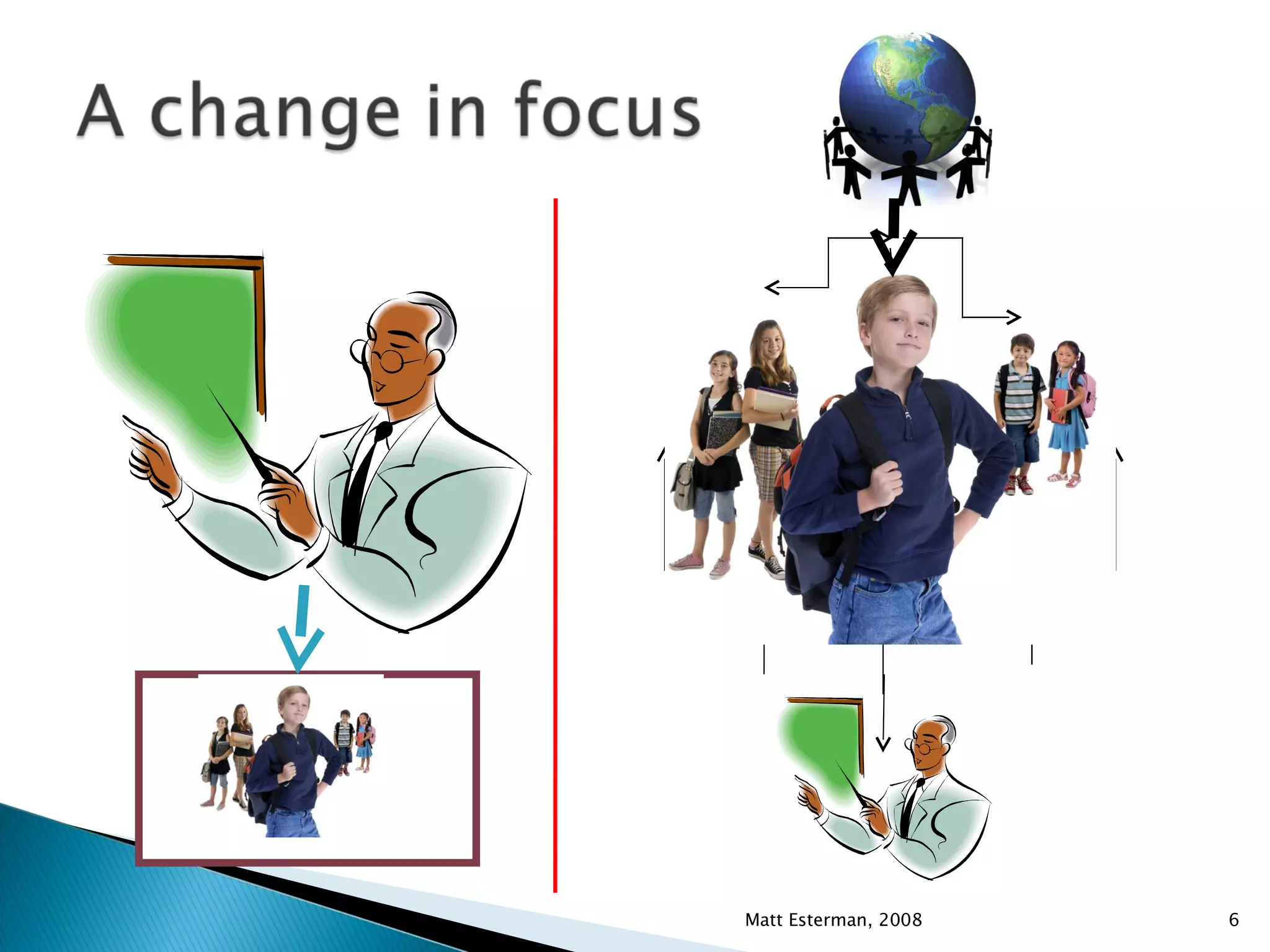
Matt Esterman, 2008 It is a change in how information is gathered,  assessed, analysed and shared Teacher roles Student roles Enabler Guide Mentor Support Motivator Resource evaluation Assessment Initiator Planner Explorer Discoverer Researcher Reflector Motivator Peer mentor Peer support Presenter Communicator Assessor (self and peers)
Matt Esterman, 2008
Matt Esterman, 2008 http://www.alicechristie.org/pubs/assets/e6.gif
24 hour access to information Endless supply of information Rapidly growing free storage space Confidence and familiarity with technology (students) Rapid increase in the variety and depth of potential SCL activities thanks to technology Endless audiences Matt Esterman, 2008
Matt Esterman, 2008
http://del.icio.us/ http://edublogs.org http://www.wikispaces.com Matt Esterman, 2008
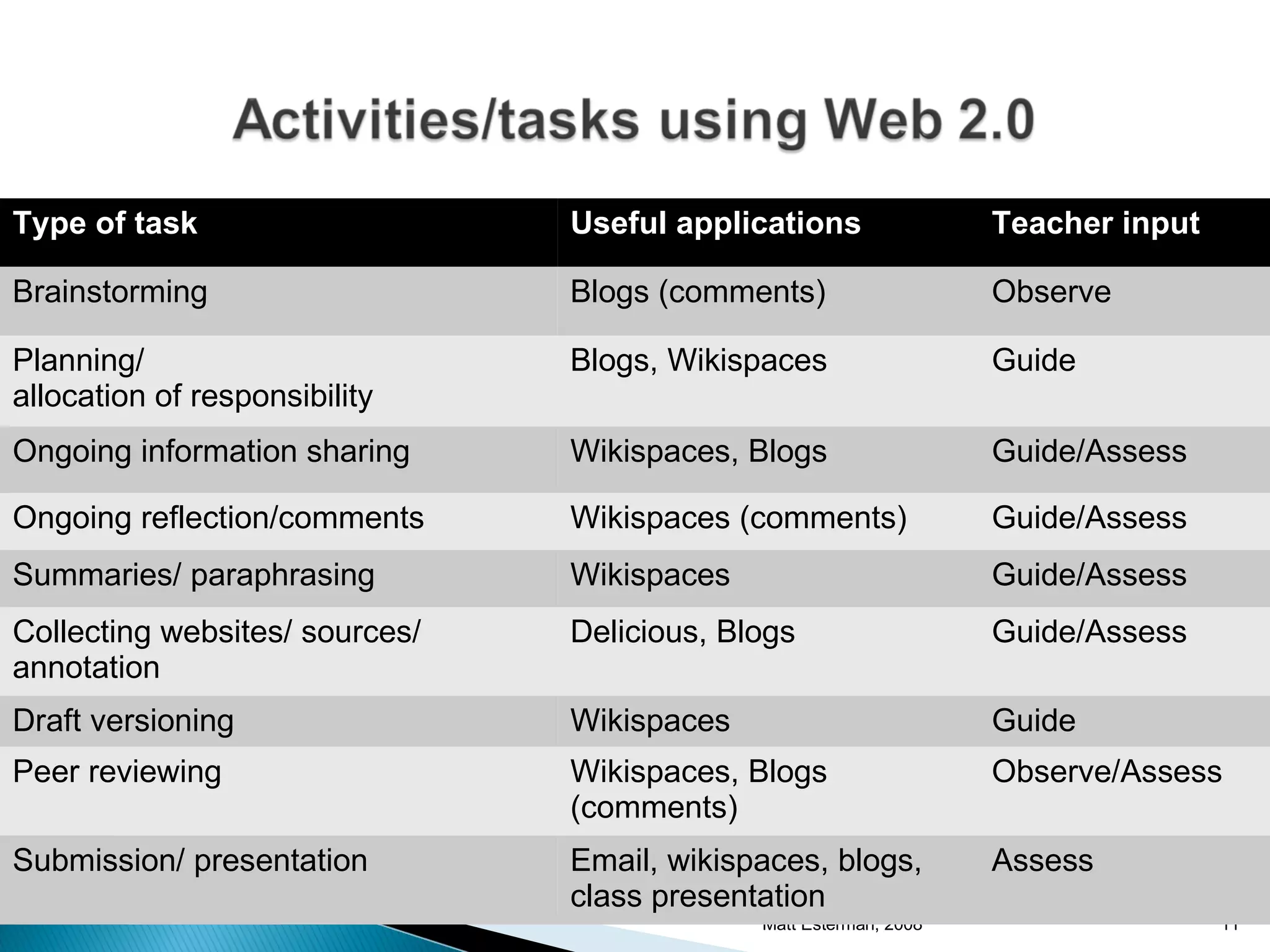
Matt Esterman, 2008 Type of task Useful applications Teacher input Brainstorming Blogs (comments) Observe Planning/ allocation of responsibility Blogs, Wikispaces Guide Ongoing information sharing Wikispaces, Blogs Guide/Assess Ongoing reflection/comments Wikispaces (comments) Guide/Assess Summaries/ paraphrasing Wikispaces Guide/Assess Collecting websites/ sources/ annotation Delicious, Blogs Guide/Assess Draft versioning Wikispaces Guide Peer reviewing Wikispaces, Blogs (comments) Observe/Assess Submission/ presentation Email, wikispaces, blogs, class presentation Assess
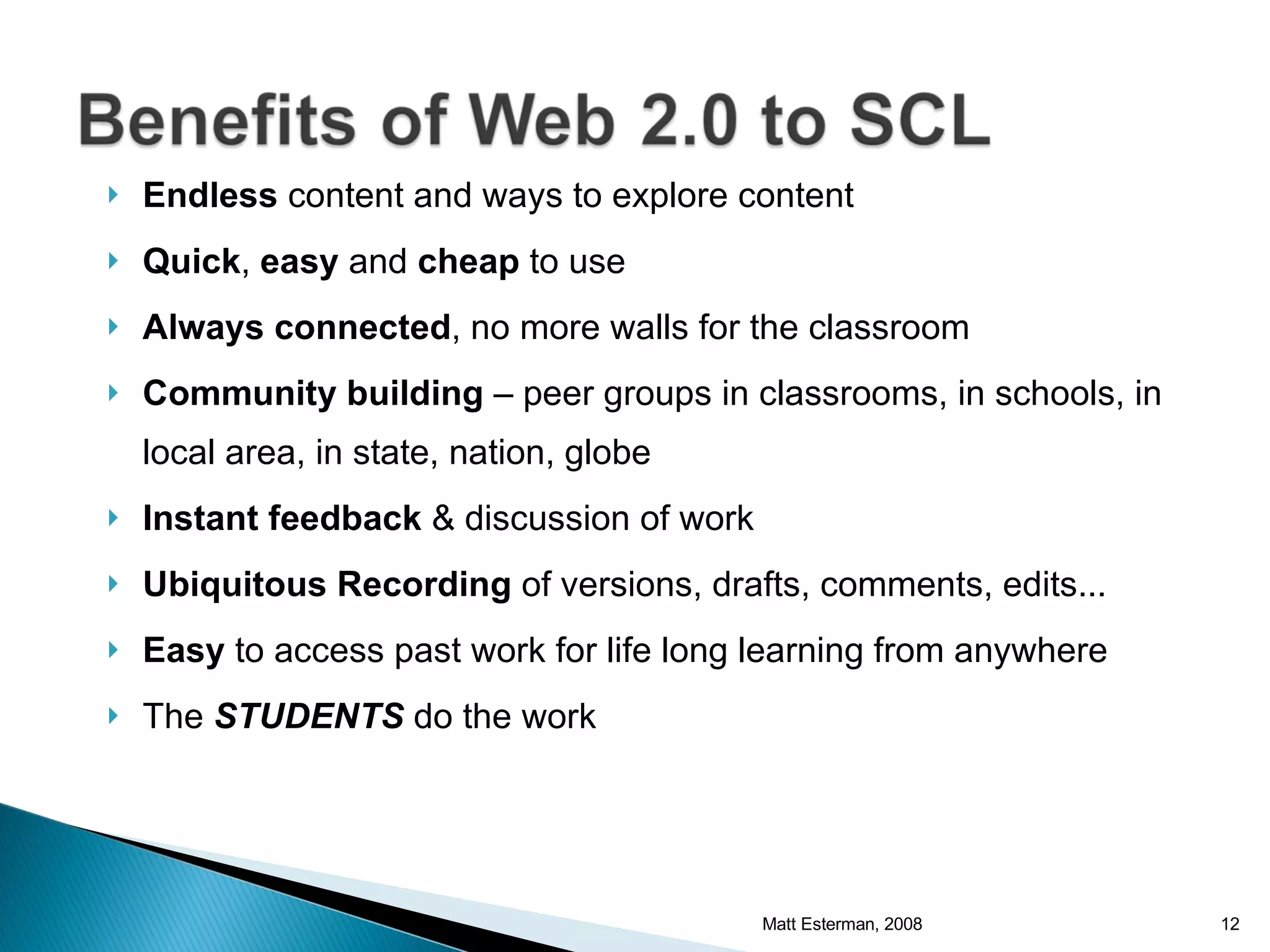
Endless  content and ways to explore content Quick ,  easy  and  cheap  to use Always connected , no more walls for the classroom Community building  – peer groups in classrooms, in schools, in local area, in state, nation, globe Instant   feedback  & discussion of work Ubiquitous Recording  of versions, drafts, comments, edits... Easy  to access past work for life long learning from anywhere The  STUDENTS  do the work Matt Esterman, 2008
Matt Esterman, 2008
Plan their own work Develop their own ideas Take risks Fail and understand why Achieve standards they set in collaboration with teachers Present in a variety of ways to many audiences Reflect on their work Matt Esterman, 2008
One project  or one  part  of one project Try spending time discussing the task with the class – see what they want to do Encourage the use of  reflection Make discussion, discovery, experimentation and exploration the focus of the task The end product or the process? Matt Esterman, 2008
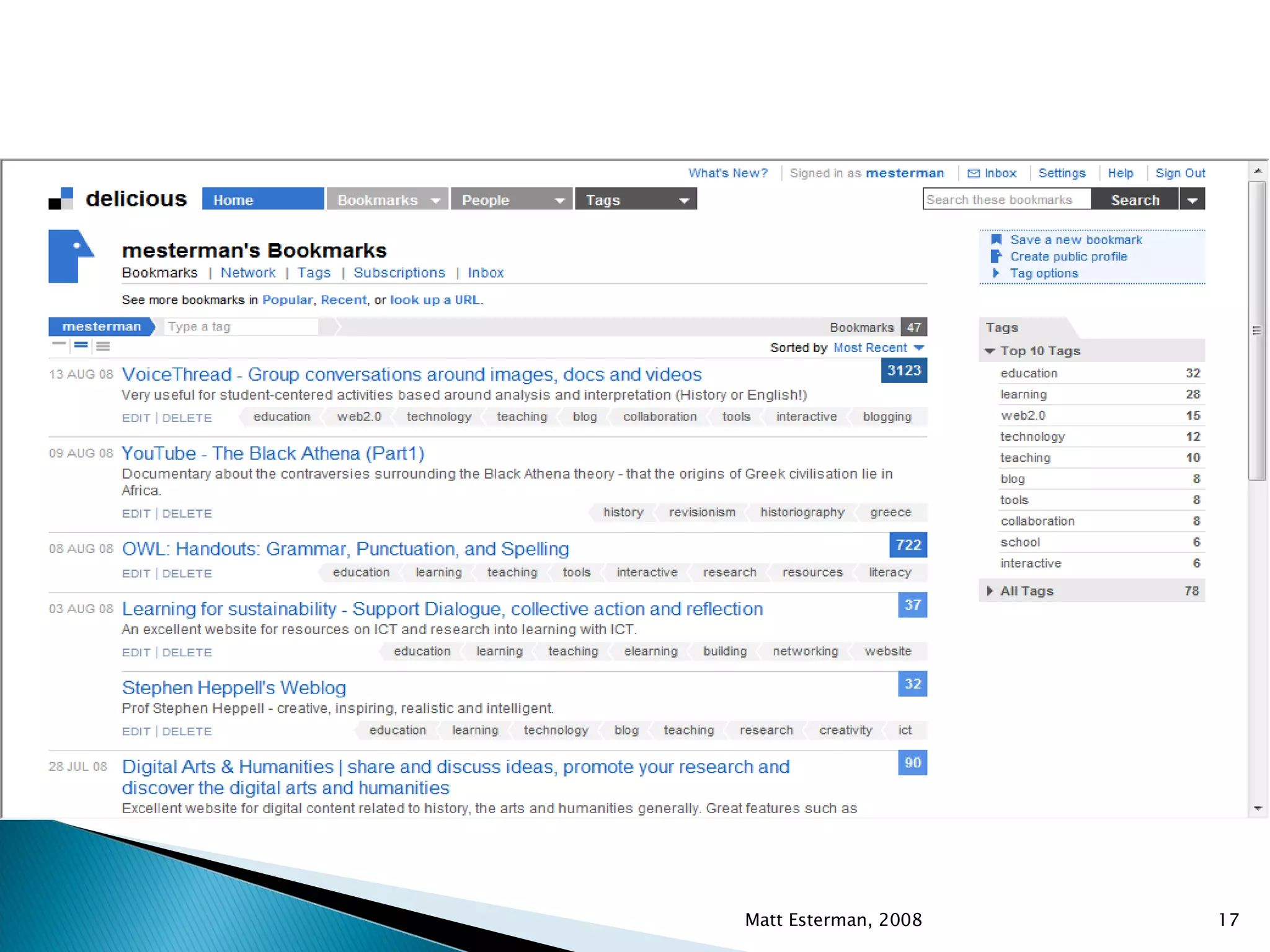
Benefits of social bookmarking Permanent, editable bibliography that can be used for multiple subjects and for any kind of research task Gives access to other users’ lists that may have further information on a particular topic Makes students think about how to describe and tag the website for better annotation 24 hour access, web-based Matt Esterman, 2008
Matt Esterman, 2008
Basic bibliography – attach to project Annotated bibliography – saying how useful the website/resource is & reliability etc. Collaborative research – create a network of usernames that have similar interests to you etc Class list of users – group bibliographies Compare websites based on number of tags, users, etc and explain why website X is tagged more than website Y. Matt Esterman, 2008
Aim: to create a short annotated bibliography using del.icio.us Go to  http://del.icio.us  and create your own account (valid email address needed) Search the internet for 5 sites related to a topic of your choosing Post each website to your new account Add a  description Add  notes  eg. Reliability, accuracy, usefulness Add  tags  of key words that other members may use to search for that website Take a mental note of how many others have added this website and perhaps they may have other similar websites in their del.icio.us bookmarks that may be useful! Matt Esterman, 2008
Some ideas for blogging: Reflective blogs for reading a text or completing activities Collaborative blogs for team discussion/decision making Evidence of learning Developing and monitoring literacy skills Commenting on other blogs/having other students comment on your thoughts Principal’s/Departmental blog – instead of waiting for the newsletter!  COMMENTING & CRITICAL ANALYSIS = BLOG Matt Esterman, 2008
Matt Esterman, 2008
Aim: to create a reflective blog that we can use as evidence of learning. Web 2.0 tool:  www.edublogs.com Go to the website and  create  an account. Post  a blog entry describing what you have experienced so far at the Conference or continue a blog you have already begun in another session Comment  on at least two other blogs of your own choosing Matt Esterman, 2008
Wikis can be used as: Basic individual websites (with easy links back and forth) Quizzes Collaborative spaces for class activities Independent learning environments Presentation tools Resource repositories A combination of ALL Wikis are not meant to be static, once-off projects. Matt Esterman, 2008
Matt Esterman, 2008 A Brigidine wiki (with Scholaris)
Aim: to create a wiki that we use to create a simple web page. Web 2.0 tool:  http://www.wikispaces.com  OR  www.elh2008.wetpaint.com   Go to the website  www.elhconference2008.wikispaces.com   Try adding your contact details by  editing  the contact page OR Create  an account Browse  some wikis and make edits/comments if you like Create  your own wiki page on a topic you will use. Matt Esterman, 2008
For each new tool that is created: How long will I and the students take to master it? Does it build on previous skills/knowledge gained? Where will it fit in or enhance our programs? Am I going to  teach with  it or are the kids going to  learn with  it? Is it subject specific or can we link it to other KLAs? Matt Esterman, 2008 These are all questions we ask of any new resource, electronic or not!
Delicious Blogs and Wikis:  Using Web 2.0 technologies to enhance Student Centred Learning (SCL) Matt Esterman Brigidine College, St Ives [email_address] Matt Esterman, 2008

Delicious Blogs And Wikis

  • 1.
    Using Web 2.0technologies to enhance Student Centred Learning (SCL)
  • 2.
    Matt Esterman Currentlyin 3 rd year of teaching History & English Brigidine College, St Ives, NSW Qualifications: BADipEd (History/English) Macquarie University & Master of Learning Science & Technology (Research Steam) University of Sydney [email_address] ELH, 2008
  • 3.
    Matt Esterman, 2008“ Change calls the tune we dance to.” Al Swerengen, Deadwood Series Three
  • 4.
    Explore someWeb 2.0 technologies for SCL Make connections to our own programs/syllabi Create a learning activity/task/environment to use in class Share our ideas Matt Esterman, 2008 Our overall aim: to enable students to effectively aquire and communicate knowledge in creative and intelligent ways
  • 5.
    Matt Esterman, 2008It is a change in how information is gathered, assessed, analysed and shared Teacher roles Student roles Enabler Guide Mentor Support Motivator Resource evaluation Assessment Initiator Planner Explorer Discoverer Researcher Reflector Motivator Peer mentor Peer support Presenter Communicator Assessor (self and peers)
  • 6.
  • 7.
    Matt Esterman, 2008http://www.alicechristie.org/pubs/assets/e6.gif
  • 8.
    24 hour accessto information Endless supply of information Rapidly growing free storage space Confidence and familiarity with technology (students) Rapid increase in the variety and depth of potential SCL activities thanks to technology Endless audiences Matt Esterman, 2008
  • 9.
  • 10.
  • 11.
    Matt Esterman, 2008Type of task Useful applications Teacher input Brainstorming Blogs (comments) Observe Planning/ allocation of responsibility Blogs, Wikispaces Guide Ongoing information sharing Wikispaces, Blogs Guide/Assess Ongoing reflection/comments Wikispaces (comments) Guide/Assess Summaries/ paraphrasing Wikispaces Guide/Assess Collecting websites/ sources/ annotation Delicious, Blogs Guide/Assess Draft versioning Wikispaces Guide Peer reviewing Wikispaces, Blogs (comments) Observe/Assess Submission/ presentation Email, wikispaces, blogs, class presentation Assess
  • 12.
    Endless contentand ways to explore content Quick , easy and cheap to use Always connected , no more walls for the classroom Community building – peer groups in classrooms, in schools, in local area, in state, nation, globe Instant feedback & discussion of work Ubiquitous Recording of versions, drafts, comments, edits... Easy to access past work for life long learning from anywhere The STUDENTS do the work Matt Esterman, 2008
  • 13.
  • 14.
    Plan their ownwork Develop their own ideas Take risks Fail and understand why Achieve standards they set in collaboration with teachers Present in a variety of ways to many audiences Reflect on their work Matt Esterman, 2008
  • 15.
    One project or one part of one project Try spending time discussing the task with the class – see what they want to do Encourage the use of reflection Make discussion, discovery, experimentation and exploration the focus of the task The end product or the process? Matt Esterman, 2008
  • 16.
    Benefits of socialbookmarking Permanent, editable bibliography that can be used for multiple subjects and for any kind of research task Gives access to other users’ lists that may have further information on a particular topic Makes students think about how to describe and tag the website for better annotation 24 hour access, web-based Matt Esterman, 2008
  • 17.
  • 18.
    Basic bibliography –attach to project Annotated bibliography – saying how useful the website/resource is & reliability etc. Collaborative research – create a network of usernames that have similar interests to you etc Class list of users – group bibliographies Compare websites based on number of tags, users, etc and explain why website X is tagged more than website Y. Matt Esterman, 2008
  • 19.
    Aim: to createa short annotated bibliography using del.icio.us Go to http://del.icio.us and create your own account (valid email address needed) Search the internet for 5 sites related to a topic of your choosing Post each website to your new account Add a description Add notes eg. Reliability, accuracy, usefulness Add tags of key words that other members may use to search for that website Take a mental note of how many others have added this website and perhaps they may have other similar websites in their del.icio.us bookmarks that may be useful! Matt Esterman, 2008
  • 20.
    Some ideas forblogging: Reflective blogs for reading a text or completing activities Collaborative blogs for team discussion/decision making Evidence of learning Developing and monitoring literacy skills Commenting on other blogs/having other students comment on your thoughts Principal’s/Departmental blog – instead of waiting for the newsletter! COMMENTING & CRITICAL ANALYSIS = BLOG Matt Esterman, 2008
  • 21.
  • 22.
    Aim: to createa reflective blog that we can use as evidence of learning. Web 2.0 tool: www.edublogs.com Go to the website and create an account. Post a blog entry describing what you have experienced so far at the Conference or continue a blog you have already begun in another session Comment on at least two other blogs of your own choosing Matt Esterman, 2008
  • 23.
    Wikis can beused as: Basic individual websites (with easy links back and forth) Quizzes Collaborative spaces for class activities Independent learning environments Presentation tools Resource repositories A combination of ALL Wikis are not meant to be static, once-off projects. Matt Esterman, 2008
  • 24.
    Matt Esterman, 2008A Brigidine wiki (with Scholaris)
  • 25.
    Aim: to createa wiki that we use to create a simple web page. Web 2.0 tool: http://www.wikispaces.com OR www.elh2008.wetpaint.com Go to the website www.elhconference2008.wikispaces.com Try adding your contact details by editing the contact page OR Create an account Browse some wikis and make edits/comments if you like Create your own wiki page on a topic you will use. Matt Esterman, 2008
  • 26.
    For each newtool that is created: How long will I and the students take to master it? Does it build on previous skills/knowledge gained? Where will it fit in or enhance our programs? Am I going to teach with it or are the kids going to learn with it? Is it subject specific or can we link it to other KLAs? Matt Esterman, 2008 These are all questions we ask of any new resource, electronic or not!
  • 27.
    Delicious Blogs andWikis: Using Web 2.0 technologies to enhance Student Centred Learning (SCL) Matt Esterman Brigidine College, St Ives [email_address] Matt Esterman, 2008