Week 3 Housekeeping:
• Blog posts are going well

• Still a couple having trouble opening

• Are you checking the comments on blogs?

• Name posts by week

• I am going to use my blog space as a storage area

• Keep blog for your CV
Today we will review;
•Unpack the assessment due 21 April 2013

•Group 1 tools – blogs, wikis and static websites.

•eLearning – how do we integrate ICTs into learning
design?
Assessment 1

The big picture- Gary draws on the whiteboard
Your requests:

Unpack assessment – Analysis of digital
technologies due Friday 12 April 2013.
Assessment Examples from 2012
How will your work be assessed?
Thinking strategies that
help scaffold learning:

•PMI- You are invited to work with a
partner to create a PMI for blogs.

•SWOT- Next construct a SWOT
analysis of digital pedagogy as you
know it now.
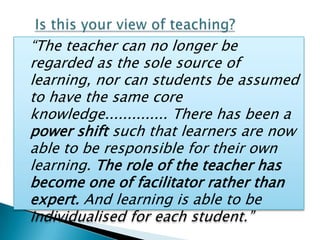
“The teacher can no longer be
regarded as the sole source of
learning, nor can students be assumed
to have the same core
knowledge.............. There has been a
power shift such that learners are now
able to be responsible for their own
learning. The role of the teacher has
become one of facilitator rather than
expert. And learning is able to be
individualised for each student.”
Are they more useful than Blogs?
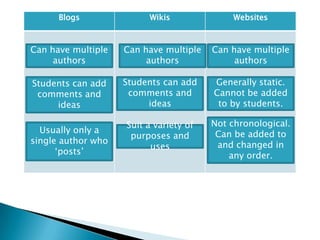
Blogs              Wikis               Websites


Can have multiple   Can have multiple   Can have multiple
     authors             authors             authors

Students can add    Students can add    Generally static.
 comments and        comments and       Cannot be added
     ideas               ideas           to by students.

                    Suit a variety of   Not chronological.
  Usually only a                         Can be added to
                     purposes and
single author who                        and changed in
                          uses
      „posts‟                               any order.
Pedagogical hint:

Writing comments in blogs
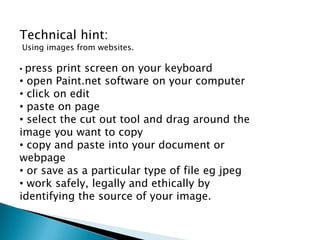
Technical hint:
Using images from websites.

•press print screen on your keyboard
• open Paint.net software on your computer
• click on edit
• paste on page
• select the cut out tool and drag around the
image you want to copy
• copy and paste into your document or
webpage
• or save as a particular type of file eg jpeg
• work safely, legally and ethically by
identifying the source of your image.
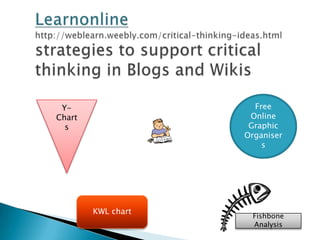
Y-                   Free
Chart                Online
  s                  Graphic
                    Organiser
                        s


        KWL chart
                     Fishbone
                     Analysis
   Multimedia and the web – how do locate and
    use these resources?

   Linking pedagogy.

   Hints how to create your own resources.

   For those reading ahead – there is a lot in this
    week‟s activities, so concentrate of the
    compulsory activities, and selectively explore
    the rest.
Activity 1: Creating a Blog - Reflection

   You have already created your first blog, and are going to continue to use this Blog in your construction of Assignment
    Task 2. This activity asks you to reflect on your learning about blogs.


Activity 2: Creating a Wiki
   It is now time for you to build your first Wiki - there is a „how to‟ tutorial to help you along.

Activity 3: Creating a wiki - blog reflection
   In your blog, create a new posting reflecting on the learning potential of a wiki in your context.
   As should now be embedded in your practice, be sure to consider the legal, safe and ethical requirements in working in
    a wiki. How will you support the development of these habits in your students?


Activity 4: Creating a website – link with instructions for using Weebly
   A link is provided in the Engagement section to assist you in this task.


Engagement Activity 5: Creating a website - blog reflection

   Reflect on the functionality of a website. What did it allow you to do?

Activity 6: Participate in, and contribute to online tutorial
   The link for this is being established in Moodle and will be email to you when available.

Engagement Activity 7: Work collaboratively on Quiz responses
  To support your approach to the Multiple choice quizzes, a set of pages in our group wiki has been established with
   some sample questions. You are invited to add your name to a page, and over the next three weeks, work
   collaboratively to negotiate the most appropriate response to each question. Your lecturers will drop in periodically and
    add comments.

Week 3 tutorial

  • 1.
    Week 3 Housekeeping: •Blog posts are going well • Still a couple having trouble opening • Are you checking the comments on blogs? • Name posts by week • I am going to use my blog space as a storage area • Keep blog for your CV
  • 2.
    Today we willreview; •Unpack the assessment due 21 April 2013 •Group 1 tools – blogs, wikis and static websites. •eLearning – how do we integrate ICTs into learning design?
  • 3.
    Assessment 1 The bigpicture- Gary draws on the whiteboard
  • 4.
    Your requests: Unpack assessment– Analysis of digital technologies due Friday 12 April 2013.
  • 5.
  • 6.
    How will yourwork be assessed?
  • 7.
    Thinking strategies that helpscaffold learning: •PMI- You are invited to work with a partner to create a PMI for blogs. •SWOT- Next construct a SWOT analysis of digital pedagogy as you know it now.
  • 8.
    “The teacher canno longer be regarded as the sole source of learning, nor can students be assumed to have the same core knowledge.............. There has been a power shift such that learners are now able to be responsible for their own learning. The role of the teacher has become one of facilitator rather than expert. And learning is able to be individualised for each student.”
  • 9.
    Are they moreuseful than Blogs?
  • 11.
    Blogs Wikis Websites Can have multiple Can have multiple Can have multiple authors authors authors Students can add Students can add Generally static. comments and comments and Cannot be added ideas ideas to by students. Suit a variety of Not chronological. Usually only a Can be added to purposes and single author who and changed in uses „posts‟ any order.
  • 12.
  • 13.
    Technical hint: Using imagesfrom websites. •press print screen on your keyboard • open Paint.net software on your computer • click on edit • paste on page • select the cut out tool and drag around the image you want to copy • copy and paste into your document or webpage • or save as a particular type of file eg jpeg • work safely, legally and ethically by identifying the source of your image.
  • 14.
    Y- Free Chart Online s Graphic Organiser s KWL chart Fishbone Analysis
  • 15.
    Multimedia and the web – how do locate and use these resources?  Linking pedagogy.  Hints how to create your own resources.  For those reading ahead – there is a lot in this week‟s activities, so concentrate of the compulsory activities, and selectively explore the rest.
  • 16.
    Activity 1: Creatinga Blog - Reflection  You have already created your first blog, and are going to continue to use this Blog in your construction of Assignment Task 2. This activity asks you to reflect on your learning about blogs. Activity 2: Creating a Wiki  It is now time for you to build your first Wiki - there is a „how to‟ tutorial to help you along. Activity 3: Creating a wiki - blog reflection  In your blog, create a new posting reflecting on the learning potential of a wiki in your context.  As should now be embedded in your practice, be sure to consider the legal, safe and ethical requirements in working in a wiki. How will you support the development of these habits in your students? Activity 4: Creating a website – link with instructions for using Weebly  A link is provided in the Engagement section to assist you in this task. Engagement Activity 5: Creating a website - blog reflection  Reflect on the functionality of a website. What did it allow you to do? Activity 6: Participate in, and contribute to online tutorial  The link for this is being established in Moodle and will be email to you when available. Engagement Activity 7: Work collaboratively on Quiz responses  To support your approach to the Multiple choice quizzes, a set of pages in our group wiki has been established with some sample questions. You are invited to add your name to a page, and over the next three weeks, work collaboratively to negotiate the most appropriate response to each question. Your lecturers will drop in periodically and add comments.