

Technology in
Education - Blogging
MEDA 5400 Integrating Technology
  into Teaching and Learning

               Spring 2012
       Michelle Childress, M.S. Ed.
What History has Taught Us
Technology is:
• not a quick-fix for education’s problems
• shows literacy offers limited rationale
• proves teachers are not developers
• demonstrates what is possible is not always
desirable or feasible
• showing change is too fast to keep up with
• proving older technologies can be useful
• not going to replace teachers
Some Rationale for Technology Use
Technology is:
• motivating
• providing unique
instructional opportunities
• supports new instructional
approaches
• increases teacher productivity
• supplies required skills for an Information Age
Why Use Technology?
 Technology will:
• influence student academic performance
• assist in the development of higher order thinking
  and problem solving
• improve student motivation, attitude, and interest
  in learning
• help prepare students for the workforce
• address the needs of low performing, at-risk, and
  learning disabled students
                Center for Applied Research in Educational Technology (CARET) http://caret.iste.edu
When Does Technology Work?
Technology will work when:
• directly supporting the curriculum objectives
• providing opportunities for student collaboration
• adjusting for student abilities and prior
  experiences, and providing feedback
• integrated into the instructional day
• providing opportunities for students to design and
  implement projects
• used in environments where teachers, the school
  community, and the district support the use of
  technology
                Center for Applied Research in Educational Technology (CARET) http://caret.iste.edu
What is a blog?
A blog is a type of website in which items are posted
and displayed with the newest information at the top.
Like other web media, blogs typically focus on a
subject or theme, like food, politics, education, or
news. Some blogs function as personal, online
diaries. A typical blog combines text, images, and
links to other blogs, web pages, and other media
related to its topic. Since its appearance in
1995, blogging has emerged as a popular means of
communication. Blogs can be hosted by dedicated
blog hosts, or they can be run using blog software
on regular web hosting services.
Blog Basics
The term blog is a blend of the terms web and log, leading to
web log, weblog, and finally blog. Authoring and maintaining
a blog or adding an article to an existing blog is called
blogging. Individual articles on a blog are called blog posts,
or entries. A blogger is posting these entries.

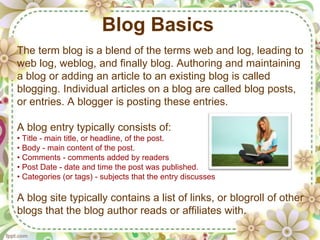
A blog entry typically consists of:
• Title - main title, or headline, of the post.
• Body - main content of the post.
• Comments - comments added by readers
• Post Date - date and time the post was published.
• Categories (or tags) - subjects that the entry discusses

A blog site typically contains a list of links, or blogroll of other
blogs that the blog author reads or affiliates with.
How Blogs Differ From Websites
A blog has certain attributes that distinguish it
from a standard web page. A blog typically:

• allows for easy creation of new posts from the home page
• uses templates to maintain a consistent appearance
• allows for filtering of information with tags
• arranges new information chronologically
• allows for easy filtering of content for various entries by date, category,
or other attributes

Modern blogs also allow for the creation of pages--a single
page that can be devoted to a topic which does not change.
Examples of static pages on an education blog might include
examples of student projects, research articles, and lesson
plans.
How Blogs are Made
Blogs can be created by a user by hosting the software and
blog site on their own server. They can also be created on a
dedicated blog server-based system which eliminates the
blog owner from needing to manage a server or software.
With the current Web 2.0 interfaces, these systems allow
bloggers who travel to blog from anywhere on the Internet
without having to maintain their own server.

Popular systems for blogging educators include Edublogs,
Blogger, and Wordpress. All of these services are currently
free and offer easy use and a quick start for anyone wishing
to create an online presence.
An example from Blogger:
          Technology Integration Tools for Teachers
Examples of Blogs
Blogs can be created for many different
educational purposes. Some of these include:

• communication between home and school (Example: The Blog Dogs)
• encouraging students to comment and think about assignments (Example:
Mr. Remien’s Digital World)
• a location for additional resources on particular topics (Example: The
Connected Classroom)
• a teacher portfolio of work, projects, resume, and/or examples of student
work (Examples: Jody J. Wright and Keri Drish [former MEDA5400 student])
• an archive of great ideas, reviews of books, or websites that would be
helpful for projects (Example: Nerdy Book Club)
• serving as a teacher webpage for a classroom (Example: Runde’s Room)
• sharing ideas and professional development for educators (Example:
Teaching Blog Addict)
Why Create a Blog?
1. Communication with parents and students: blogging is
a simple tool for basic communication, especially when
dealing with large class sizes and busy schedules; a
summary of ‘what's going on’ can be shared with families
who have Internet access; teachers can choose whether they
wish to have comments/questions posted by readers
2. Communication with your peers: blogging allows for a
professional dialogue with peers; everyone can benefit from
focused, professional discussions; some educational
bloggers like Will Richardson and David Warlick have
developed a large following due to their spirited discussions
and creativity; blogs now can serve the same purpose as the
older concept of email groups from the past decade but are
more personal and creative
Why Create a Blog?
3. Showcase student work: blogs can be used to highlight
your students' work, providing a method of sharing for a
much larger and expansive audience; more and more
educators are using blogging as a method for students to
actively engage in publishing their individual writing
assignments in the real world where they receive feedback
from each other, as well as other online mentors. Student
blogs can either feature
polished work or drafts for
peer review. One example is:
Madness in the Method (a
blog developed to improve
writing skills of high school
English students)
Why Create a Blog?
4. Other educator ideas for using blogs:

• student feedback on classroom activities--what works and what doesn't

• student reflection and analysis of class topics to enhance meaning and
significance

• student simulations and role playing which have participants actively
participate to heighten interest/motivation and bring subjects alive

• student logs of daily experiences during projects or investigations

• student responses to controversial subjects and current events

• student opinions and ideas as an asynchronous dialogue on topics
Drawbacks to Blogs
 It is felt by some educators that the biggest difficulty with
using blogging technology is figuring out where blogging fits
into classroom curriculum objectives.
 Blogging may require some long-range thoughts about the
integration of this type of technology in the classroom.
 The informal nature can sometimes hinder teachers who
want to have a formal system for assessment. However blog
responses by students can be evaluated.
Please see the rubrics available at Rubistar
[http://rubistar.4teachers.org/index.php?ts=1284310576]
 Students may also not feel immediately comfortable in the
blogging environment and need help with how they can
express themselves.
Planning for the Use of Blogs
Have a blogging game plan! Do some background work and
consider the following:

 determine how a classroom blog fits into your curriculum long-term
 explain your expectations and objectives clearly
 develop and share either an informal or formal evaluation system
 guide your students though a few activities to increase their comfort
 enhance collaboration and community-building by asking students to
both read and comment on posts made by their peers
 use blog posts/comments for starting, enhancing, and prolonging in-
class discussions; make specific references to the class blog during 'face'
time
 create 'scaffolded' assignments where blogging is an integral part of
the completion of the project; do not always create isolated blogging
activities
Your Blog - Final Course Project
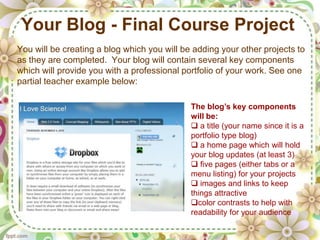
You will be creating a blog which you will be adding your other projects to
as they are completed. Your blog will contain several key components
which will provide you with a professional portfolio of your work. See one
partial teacher example below:

                                             The blog’s key components
                                             will be:
                                              a title (your name since it is a
                                             portfolio type blog)
                                              a home page which will hold
                                             your blog updates (at least 3)
                                              five pages (either tabs or a
                                             menu listing) for your projects
                                              images and links to keep
                                             things attractive
                                             color contrasts to help with
                                             readability for your audience
Task - Creating a Blog
Task Rationale: This task provides for creating a professional portfolio online to
which this class’s technology projects, research paper, and personal blog postings
will be added.

Task Guidelines:
1. Review this PPT and create your personal blog on Blogger using your
    ETSU email address. [http://www.blogger.com] You can create more than
    one blog using the same address.
2. Read the article: HOT Blogging: Framework for Blogging to Promote Higher
    Order Thinking, L. Zawilinski (attached in D2L)
3. Review the rubric for this project to see what components are contained in
    this task. (This task will not be scored until the END of our course, after
    you have added all the components which we will be creating together.)
4. Read and follow the directions for completing your blog (attached in D2L).
5. Begin creating your blog (does NOT need to be completed) by the due
    date on your calendar for this week. PLAY with your blog and experiment.
6. Questions? Ask them in the discussion section of D2L.
Blogs About Blogging and Technology
• Cool Cat Teacher Blog (just a section of this teacher’s blog
which discusses tips for blogging)

• Kathy Schrock’s Kaffeeklatsch (truly a motivational,
dynamic speaker and all things technology guru in the
education field)

•Technology Integration Tools for Teachers (a personal
technology blog I’ve created and shared; a continual work in
progress)

• Daily Blog Tips (interesting an up-to-date tips for bloggers)

Meda5400 Teaching with Technology-Blogging

  • 1.
    Technology in Education -Blogging MEDA 5400 Integrating Technology into Teaching and Learning Spring 2012 Michelle Childress, M.S. Ed.
  • 2.
    What History hasTaught Us Technology is: • not a quick-fix for education’s problems • shows literacy offers limited rationale • proves teachers are not developers • demonstrates what is possible is not always desirable or feasible • showing change is too fast to keep up with • proving older technologies can be useful • not going to replace teachers
  • 3.
    Some Rationale forTechnology Use Technology is: • motivating • providing unique instructional opportunities • supports new instructional approaches • increases teacher productivity • supplies required skills for an Information Age
  • 4.
    Why Use Technology? Technology will: • influence student academic performance • assist in the development of higher order thinking and problem solving • improve student motivation, attitude, and interest in learning • help prepare students for the workforce • address the needs of low performing, at-risk, and learning disabled students Center for Applied Research in Educational Technology (CARET) http://caret.iste.edu
  • 5.
    When Does TechnologyWork? Technology will work when: • directly supporting the curriculum objectives • providing opportunities for student collaboration • adjusting for student abilities and prior experiences, and providing feedback • integrated into the instructional day • providing opportunities for students to design and implement projects • used in environments where teachers, the school community, and the district support the use of technology Center for Applied Research in Educational Technology (CARET) http://caret.iste.edu
  • 6.
    What is ablog? A blog is a type of website in which items are posted and displayed with the newest information at the top. Like other web media, blogs typically focus on a subject or theme, like food, politics, education, or news. Some blogs function as personal, online diaries. A typical blog combines text, images, and links to other blogs, web pages, and other media related to its topic. Since its appearance in 1995, blogging has emerged as a popular means of communication. Blogs can be hosted by dedicated blog hosts, or they can be run using blog software on regular web hosting services.
  • 7.
    Blog Basics The termblog is a blend of the terms web and log, leading to web log, weblog, and finally blog. Authoring and maintaining a blog or adding an article to an existing blog is called blogging. Individual articles on a blog are called blog posts, or entries. A blogger is posting these entries. A blog entry typically consists of: • Title - main title, or headline, of the post. • Body - main content of the post. • Comments - comments added by readers • Post Date - date and time the post was published. • Categories (or tags) - subjects that the entry discusses A blog site typically contains a list of links, or blogroll of other blogs that the blog author reads or affiliates with.
  • 8.
    How Blogs DifferFrom Websites A blog has certain attributes that distinguish it from a standard web page. A blog typically: • allows for easy creation of new posts from the home page • uses templates to maintain a consistent appearance • allows for filtering of information with tags • arranges new information chronologically • allows for easy filtering of content for various entries by date, category, or other attributes Modern blogs also allow for the creation of pages--a single page that can be devoted to a topic which does not change. Examples of static pages on an education blog might include examples of student projects, research articles, and lesson plans.
  • 9.
    How Blogs areMade Blogs can be created by a user by hosting the software and blog site on their own server. They can also be created on a dedicated blog server-based system which eliminates the blog owner from needing to manage a server or software. With the current Web 2.0 interfaces, these systems allow bloggers who travel to blog from anywhere on the Internet without having to maintain their own server. Popular systems for blogging educators include Edublogs, Blogger, and Wordpress. All of these services are currently free and offer easy use and a quick start for anyone wishing to create an online presence. An example from Blogger: Technology Integration Tools for Teachers
  • 10.
    Examples of Blogs Blogscan be created for many different educational purposes. Some of these include: • communication between home and school (Example: The Blog Dogs) • encouraging students to comment and think about assignments (Example: Mr. Remien’s Digital World) • a location for additional resources on particular topics (Example: The Connected Classroom) • a teacher portfolio of work, projects, resume, and/or examples of student work (Examples: Jody J. Wright and Keri Drish [former MEDA5400 student]) • an archive of great ideas, reviews of books, or websites that would be helpful for projects (Example: Nerdy Book Club) • serving as a teacher webpage for a classroom (Example: Runde’s Room) • sharing ideas and professional development for educators (Example: Teaching Blog Addict)
  • 11.
    Why Create aBlog? 1. Communication with parents and students: blogging is a simple tool for basic communication, especially when dealing with large class sizes and busy schedules; a summary of ‘what's going on’ can be shared with families who have Internet access; teachers can choose whether they wish to have comments/questions posted by readers 2. Communication with your peers: blogging allows for a professional dialogue with peers; everyone can benefit from focused, professional discussions; some educational bloggers like Will Richardson and David Warlick have developed a large following due to their spirited discussions and creativity; blogs now can serve the same purpose as the older concept of email groups from the past decade but are more personal and creative
  • 12.
    Why Create aBlog? 3. Showcase student work: blogs can be used to highlight your students' work, providing a method of sharing for a much larger and expansive audience; more and more educators are using blogging as a method for students to actively engage in publishing their individual writing assignments in the real world where they receive feedback from each other, as well as other online mentors. Student blogs can either feature polished work or drafts for peer review. One example is: Madness in the Method (a blog developed to improve writing skills of high school English students)
  • 13.
    Why Create aBlog? 4. Other educator ideas for using blogs: • student feedback on classroom activities--what works and what doesn't • student reflection and analysis of class topics to enhance meaning and significance • student simulations and role playing which have participants actively participate to heighten interest/motivation and bring subjects alive • student logs of daily experiences during projects or investigations • student responses to controversial subjects and current events • student opinions and ideas as an asynchronous dialogue on topics
  • 14.
    Drawbacks to Blogs It is felt by some educators that the biggest difficulty with using blogging technology is figuring out where blogging fits into classroom curriculum objectives.  Blogging may require some long-range thoughts about the integration of this type of technology in the classroom.  The informal nature can sometimes hinder teachers who want to have a formal system for assessment. However blog responses by students can be evaluated. Please see the rubrics available at Rubistar [http://rubistar.4teachers.org/index.php?ts=1284310576]  Students may also not feel immediately comfortable in the blogging environment and need help with how they can express themselves.
  • 15.
    Planning for theUse of Blogs Have a blogging game plan! Do some background work and consider the following:  determine how a classroom blog fits into your curriculum long-term  explain your expectations and objectives clearly  develop and share either an informal or formal evaluation system  guide your students though a few activities to increase their comfort  enhance collaboration and community-building by asking students to both read and comment on posts made by their peers  use blog posts/comments for starting, enhancing, and prolonging in- class discussions; make specific references to the class blog during 'face' time  create 'scaffolded' assignments where blogging is an integral part of the completion of the project; do not always create isolated blogging activities
  • 16.
    Your Blog -Final Course Project You will be creating a blog which you will be adding your other projects to as they are completed. Your blog will contain several key components which will provide you with a professional portfolio of your work. See one partial teacher example below: The blog’s key components will be:  a title (your name since it is a portfolio type blog)  a home page which will hold your blog updates (at least 3)  five pages (either tabs or a menu listing) for your projects  images and links to keep things attractive color contrasts to help with readability for your audience
  • 17.
    Task - Creatinga Blog Task Rationale: This task provides for creating a professional portfolio online to which this class’s technology projects, research paper, and personal blog postings will be added. Task Guidelines: 1. Review this PPT and create your personal blog on Blogger using your ETSU email address. [http://www.blogger.com] You can create more than one blog using the same address. 2. Read the article: HOT Blogging: Framework for Blogging to Promote Higher Order Thinking, L. Zawilinski (attached in D2L) 3. Review the rubric for this project to see what components are contained in this task. (This task will not be scored until the END of our course, after you have added all the components which we will be creating together.) 4. Read and follow the directions for completing your blog (attached in D2L). 5. Begin creating your blog (does NOT need to be completed) by the due date on your calendar for this week. PLAY with your blog and experiment. 6. Questions? Ask them in the discussion section of D2L.
  • 18.
    Blogs About Bloggingand Technology • Cool Cat Teacher Blog (just a section of this teacher’s blog which discusses tips for blogging) • Kathy Schrock’s Kaffeeklatsch (truly a motivational, dynamic speaker and all things technology guru in the education field) •Technology Integration Tools for Teachers (a personal technology blog I’ve created and shared; a continual work in progress) • Daily Blog Tips (interesting an up-to-date tips for bloggers)