SRM – Sourcing Product Management SAPMarkets
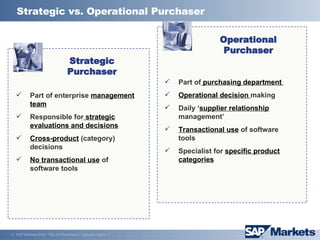
Strategic vs. Operational Purchaser Part of enterprise  management team Responsible for  strategic evaluations and decisions Cross-product  (category) decisions No transactional use  of software tools Part of  purchasing department  Operational decision  making Daily ‘ supplier relationship  management’ Transactional use  of software tools Specialist for  specific product categories Strategic Purchaser Operational Purchaser
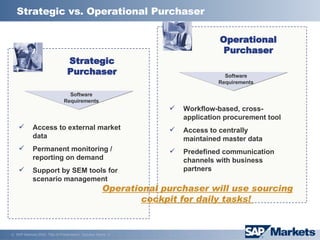
Strategic vs. Operational Purchaser Strategic Purchaser Operational Purchaser Software Requirements Software Requirements Access to external market data Permanent monitoring / reporting on demand Support by SEM tools for scenario management Workflow-based, cross-application procurement tool Access to centrally maintained master data Predefined communication channels with business partners Operational purchaser will use sourcing cockpit for daily tasks!
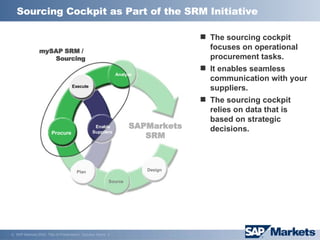
Sourcing Cockpit as Part of the SRM Initiative SAPMarkets SRM Procure Enable Suppliers Execute Analyze Source Design Plan mySAP  SRM  /  Sourcing The sourcing cockpit focuses on operational procurement tasks. It enables seamless communication with your suppliers. The sourcing cockpit relies on data that is based on strategic decisions.
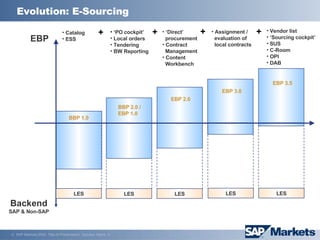
Evolution: E-Sourcing EBP Backend SAP & Non-SAP Catalog ESS ‘ PO cockpit’ Local orders Tendering BW Reporting  ‘ Direct’   procurement Contract   Management Content   Workbench LES LES LES LES LES + + + Assignment /   evaluation of   local contracts Vendor list ‘ Sourcing cockpit’ SUS C-Room OPI DAB + BBP 1.0 BBP 2.0 / EBP 1.0 EBP 2.0 EBP 3.0 EBP 3.5
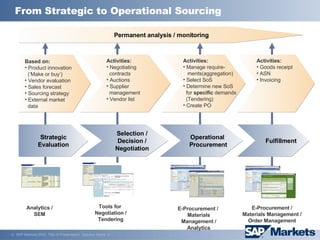
Activities: Goods receipt ASN Invoicing Fulfillment Activities:  Negotiating   contracts Auctions Supplier   management Vendor list Selection / Decision / Negotiation Operational   Procurement Activities: Manage require - ments(aggregation) Select SoS Determine new SoS   for  specific  demands   (Tendering) Create PO  Strategic Evaluation Based on: Product innovation   (‘Make or buy‘)  Vendor evaluation Sales forecast Sourcing strategy External market   data From Strategic to Operational Sourcing Permanent analysis / monitoring Analytics / SEM Tools for  Negotiation / Tendering E-Procurement /  Materials Management / Analytics E-Procurement /  Materials Management /  Order Management
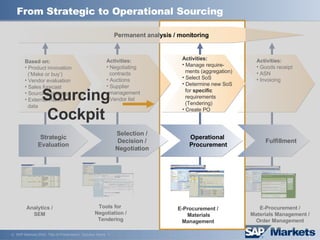
From Strategic to Operational Sourcing Strategic Evaluation Based on: Product innovation   (‘Make or buy‘)  Vendor evaluation Sales forecast Sourcing strategy External market   data Activities: Goods receipt ASN Invoicing Activities:  Negotiating   contracts Auctions Supplier   management Vendor list Fulfillment Selection / Decision / Negotiation Operational   Procurement Activities: Manage require-   ments (aggregation) Select SoS Determine new SoS   for  specific     requirements   (Tendering) Create PO  Permanent analysis / monitoring Analytics / SEM Tools for  Negotiation / Tendering E-Procurement /  Materials Management  E-Procurement /  Materials Management /  Order Management Sourcing Cockpit
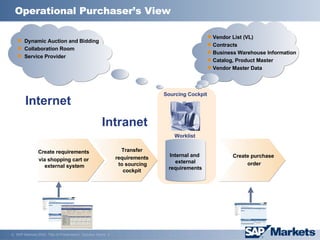
Internal and  external requirements Dynamic Auction and Bidding Collaboration Room Service Provider  Vendor List (VL) Contracts Business Warehouse Information Catalog, Product Master Vendor Master Data Create purchase order Create requirements  via   shopping cart or   external system Transfer requirements  to   sourcing cockpit Sourcing Cockpit Internet Intranet Worklist Operational  Purchaser’s  View
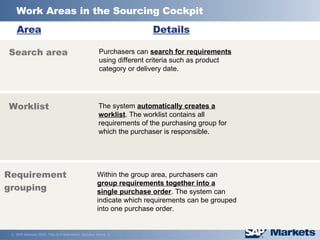
Work Areas in the Sourcing Cockpit Worklist   Search area Requirement grouping Area Details Purchasers can  search for requirements  using different criteria such as product category or delivery date. The system  automatically creates a worklist . The worklist contains all requirements of the purchasing group for which the purchaser is responsible. Within the group area, purchasers can  group requirements together into a single purchase order . The system can indicate which requirements can be grouped into one purchase order.
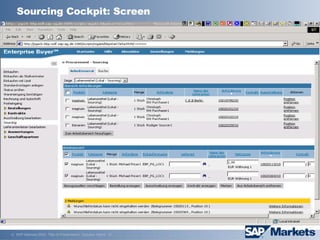
Sourcing Cockpit: Screen
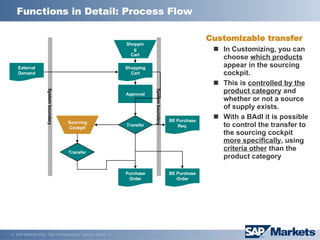
Functions in Detail: Process Flow System boundary System boundary Shopping Cart Shopping Cart External Demand Approval Sourcing Cockpit Purchase Order BE Purchase Req. BE Purchase Order Transfer Transfer Customizable transfer In Customizing, you can choose  which products  appear in the sourcing cockpit. This is  controlled by the product category  and whether or not a source of supply exists.  With a BAdl it is possible to control the transfer to the sourcing cockpit  more specifically , using  criteria other  than the product category
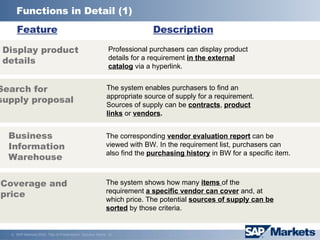
Functions in Detail (1) Search for supply proposal Display product details Business Information Warehouse Feature Description Coverage and  price Professional purchasers can display product details for a requirement  in the external catalog  via a hyperlink.  The system enables purchasers to find an appropriate source of supply for a requirement. Sources of supply can be  contracts ,  product links  or  vendors .   The corresponding  vendor evaluation report  can be viewed with BW. In the requirement list, purchasers can also find the  purchasing history  in BW for a specific item. The system shows how many  items  of the requirement  a specific vendor can cover  and, at which price. The potential  sources of supply can be sorted  by those criteria.
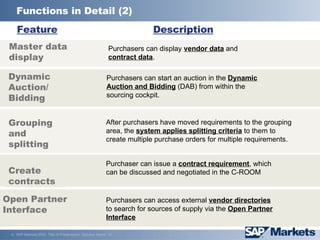
Functions in Detail (2) Feature Description Create c ontracts Purchaser can issue a  contract requirement , which  can be discussed and negotiated in the C-ROOM Purchasers can  access  external  vendor directories  to search for sources of supply  via the  Open Partner Interface   Open Partner Interface Master data display  Purchasers can display  vendor data  and  contract data .  Dynamic Auction/ Bidding Purchasers can start an auction in the  Dynamic Auction and Bidding  (DAB) from within the sourcing cockpit. Grouping and splitting After purchasers have moved requirements to the grouping area, the  system applies splitting criteria  to them to create multiple purchase orders for multiple requirements.
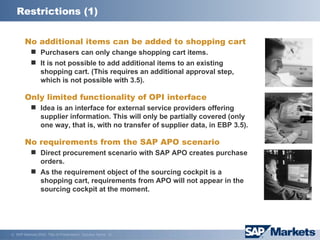
Restrictions (1) No additional items can be added to shopping cart Purchasers can only change shopping cart items. It is not possible to add additional items to an existing shopping cart. (This requires an additional approval step, which is not possible with 3.5). Only limited functionality of OPI interface Idea is an interface for external service providers offering supplier information. This will only be partially covered (only one way, that is, with no transfer of supplier data, in EBP 3.5). No requirements from the SAP APO scenario Direct procurement scenario with SAP APO creates purchase orders. As the requirement object of the sourcing cockpit is a shopping cart, requirements from APO will not appear in the sourcing cockpit at the moment.
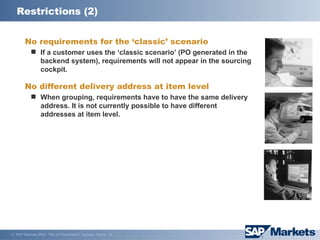
Restrictions (2) No requirements for the ‘classic’ scenario If a customer uses the ‘classic scenario’ (PO generated in the backend system), requirements will not appear in the sourcing cockpit. No different delivery address at item level When grouping, requirements have to have the same delivery address. It is not currently possible to have different addresses at item level.

SRM Sourcing - Overview

  • 1.
    SRM – SourcingProduct Management SAPMarkets
  • 2.
    Strategic vs. OperationalPurchaser Part of enterprise management team Responsible for strategic evaluations and decisions Cross-product (category) decisions No transactional use of software tools Part of purchasing department Operational decision making Daily ‘ supplier relationship management’ Transactional use of software tools Specialist for specific product categories Strategic Purchaser Operational Purchaser
  • 3.
    Strategic vs. OperationalPurchaser Strategic Purchaser Operational Purchaser Software Requirements Software Requirements Access to external market data Permanent monitoring / reporting on demand Support by SEM tools for scenario management Workflow-based, cross-application procurement tool Access to centrally maintained master data Predefined communication channels with business partners Operational purchaser will use sourcing cockpit for daily tasks!
  • 4.
    Sourcing Cockpit asPart of the SRM Initiative SAPMarkets SRM Procure Enable Suppliers Execute Analyze Source Design Plan mySAP SRM / Sourcing The sourcing cockpit focuses on operational procurement tasks. It enables seamless communication with your suppliers. The sourcing cockpit relies on data that is based on strategic decisions.
  • 5.
    Evolution: E-Sourcing EBPBackend SAP & Non-SAP Catalog ESS ‘ PO cockpit’ Local orders Tendering BW Reporting ‘ Direct’ procurement Contract Management Content Workbench LES LES LES LES LES + + + Assignment / evaluation of local contracts Vendor list ‘ Sourcing cockpit’ SUS C-Room OPI DAB + BBP 1.0 BBP 2.0 / EBP 1.0 EBP 2.0 EBP 3.0 EBP 3.5
  • 6.
    Activities: Goods receiptASN Invoicing Fulfillment Activities: Negotiating contracts Auctions Supplier management Vendor list Selection / Decision / Negotiation Operational Procurement Activities: Manage require - ments(aggregation) Select SoS Determine new SoS for specific demands (Tendering) Create PO Strategic Evaluation Based on: Product innovation (‘Make or buy‘) Vendor evaluation Sales forecast Sourcing strategy External market data From Strategic to Operational Sourcing Permanent analysis / monitoring Analytics / SEM Tools for Negotiation / Tendering E-Procurement / Materials Management / Analytics E-Procurement / Materials Management / Order Management
  • 7.
    From Strategic toOperational Sourcing Strategic Evaluation Based on: Product innovation (‘Make or buy‘) Vendor evaluation Sales forecast Sourcing strategy External market data Activities: Goods receipt ASN Invoicing Activities: Negotiating contracts Auctions Supplier management Vendor list Fulfillment Selection / Decision / Negotiation Operational Procurement Activities: Manage require- ments (aggregation) Select SoS Determine new SoS for specific requirements (Tendering) Create PO Permanent analysis / monitoring Analytics / SEM Tools for Negotiation / Tendering E-Procurement / Materials Management E-Procurement / Materials Management / Order Management Sourcing Cockpit
  • 8.
    Internal and external requirements Dynamic Auction and Bidding Collaboration Room Service Provider Vendor List (VL) Contracts Business Warehouse Information Catalog, Product Master Vendor Master Data Create purchase order Create requirements via shopping cart or external system Transfer requirements to sourcing cockpit Sourcing Cockpit Internet Intranet Worklist Operational Purchaser’s View
  • 9.
    Work Areas inthe Sourcing Cockpit Worklist Search area Requirement grouping Area Details Purchasers can search for requirements using different criteria such as product category or delivery date. The system automatically creates a worklist . The worklist contains all requirements of the purchasing group for which the purchaser is responsible. Within the group area, purchasers can group requirements together into a single purchase order . The system can indicate which requirements can be grouped into one purchase order.
  • 10.
  • 11.
    Functions in Detail:Process Flow System boundary System boundary Shopping Cart Shopping Cart External Demand Approval Sourcing Cockpit Purchase Order BE Purchase Req. BE Purchase Order Transfer Transfer Customizable transfer In Customizing, you can choose which products appear in the sourcing cockpit. This is controlled by the product category and whether or not a source of supply exists. With a BAdl it is possible to control the transfer to the sourcing cockpit more specifically , using criteria other than the product category
  • 12.
    Functions in Detail(1) Search for supply proposal Display product details Business Information Warehouse Feature Description Coverage and price Professional purchasers can display product details for a requirement in the external catalog via a hyperlink. The system enables purchasers to find an appropriate source of supply for a requirement. Sources of supply can be contracts , product links or vendors . The corresponding vendor evaluation report can be viewed with BW. In the requirement list, purchasers can also find the purchasing history in BW for a specific item. The system shows how many items of the requirement a specific vendor can cover and, at which price. The potential sources of supply can be sorted by those criteria.
  • 13.
    Functions in Detail(2) Feature Description Create c ontracts Purchaser can issue a contract requirement , which can be discussed and negotiated in the C-ROOM Purchasers can access external vendor directories to search for sources of supply via the Open Partner Interface Open Partner Interface Master data display Purchasers can display vendor data and contract data . Dynamic Auction/ Bidding Purchasers can start an auction in the Dynamic Auction and Bidding (DAB) from within the sourcing cockpit. Grouping and splitting After purchasers have moved requirements to the grouping area, the system applies splitting criteria to them to create multiple purchase orders for multiple requirements.
  • 14.
    Restrictions (1) Noadditional items can be added to shopping cart Purchasers can only change shopping cart items. It is not possible to add additional items to an existing shopping cart. (This requires an additional approval step, which is not possible with 3.5). Only limited functionality of OPI interface Idea is an interface for external service providers offering supplier information. This will only be partially covered (only one way, that is, with no transfer of supplier data, in EBP 3.5). No requirements from the SAP APO scenario Direct procurement scenario with SAP APO creates purchase orders. As the requirement object of the sourcing cockpit is a shopping cart, requirements from APO will not appear in the sourcing cockpit at the moment.
  • 15.
    Restrictions (2) Norequirements for the ‘classic’ scenario If a customer uses the ‘classic scenario’ (PO generated in the backend system), requirements will not appear in the sourcing cockpit. No different delivery address at item level When grouping, requirements have to have the same delivery address. It is not currently possible to have different addresses at item level.