New Features in Maximo 7.5
What’s Next?
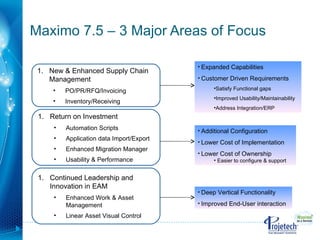
Maximo 7.5 – 3 Major Areas of Focus Additional Configuration  Lower Cost of Implementation Lower Cost of Ownership  Easier to configure & support Deep Vertical Functionality Improved End-User interaction Expanded Capabilities Customer Driven Requirements Satisfy Functional gaps Improved Usability/Maintainability Address Integration/ERP New & Enhanced Supply Chain Management  PO/PR/RFQ/Invoicing Inventory/Receiving Return on Investment Automation Scripts Application data Import/Export Enhanced Migration Manager Usability & Performance Continued Leadership and Innovation in EAM Enhanced Work & Asset Management  Linear Asset Visual Control
Supply Chain Enhancements
Purchasing Enhancements Purchase Order Revisions Provides revision (update) capability to purchase order (PO) document Uniqueness of the record based on PO number and the Revision number View Revision History to keep track of changes Purchasing – 360 view of Supply Chain New action will be introduced within the Purchasing module,  View Related Records Provides users with a view to all current SCM related records. The related records are PR, PO, RFQ, RECEIPT, INVOICE and CONTRACTS. User will be able to trace the status of PR, PO, Receipts, etc. One stop-shop for entire Supply Chain view Purchasing  - Taxes Additional Tax Types - Provide an easy and configurable option to define additional tax types Tax Exempt Items - Provide the capability to flag an item as tax exempt Tax Code Hierarchy - Configurable screen where tax code determination hierarchy can be defined. Maximo tax engines leverages the hierarchy to derive tax code
Receiving Enhancements Receipt Tolerances User can define receipt tolerance at various levels Establishes a tolerance threshold at which the user will be stopped during an over-receipt situation. Voiding Receipts Reverses a receipt transaction without the use of a return transaction. Voided receipts will execute the same business logic as a return (balance/cost adjustment, etc) but will not be available for inclusion on a credit invoice Voiding available for unprocessed receipts. Receipts that have been matched cannot be voided. Receipts that have inspected cannot be voided Receiving Returns Returning Service - Service Returns can be processed similar to Material returns. Simplifies return process for Service and makes return process consistent Returning Assets - User can select which assets to return Based on non rotating items logic. Added validation to check for Move and Cost consistency
Invoicing Enhancements Centralized Invoice Consolidate PO from different sites on a Single Invoice Reversed Invoice Error correction feature used to backout an approved invoice Copy PO Lines Better View to select PO for Invoicing purposes GL Post Date New Date column containing Invoice Post Date
Materials Management Enhancements Item Master – Stock Category Change to the Definition of Stock Category Previously, stock category controlled automatic   replenishment Stock category will now control whether an item is    ‘stockable’ and can exist in a storeroom or whether    it is only available for direct order from    a vendor (non-stocked). Stock Category Moved to Item/Organization level Controls stockability for items within an organization ‘ Reorder?’ yes/no flag added to Inventory record Allows for seamless transition from previous   functionality Benefits: Resolves functional gap on usage of stocked/non-stock item terminology.  Better alignment with ERP systems.
Materials Management Enhancements Inventory Costing  Default Costing Method Previously, costing method was defined at the site-level Costing method will now be set at the Inventory level   * The costing method will continue to be defaulted from the site    level   * Costing method can be set differently between inventory   records within the same storeroom and site LIFO/FIFO Costing Method ‘ New’ costing method to allow for valuation at actual   receipt costs on a LIFO or FIFO basis Consignment Inventory Adds support for ‘vendor-owned’ inventory valuation Allows for items to be paid for on use rather than pay on receipt
Materials Management Enhancements Reservation Management Reservations Can be Set as Hard or Soft Allows users to specify reservation priority Hard reservations affect available balance and require    the balance to be on-hand at the time of reservation   creation Soft reservations would be considered to be   uncommitted or contingency demand ‘ Automatic’ Reservation Processing Reservations can be created under automatic   processing.  The system will automatically set the reservation to    APSOFT or APHARD depending on the required  date   of the item compared to the lead time to procure the   item ‘ Backorder’ functionality to indicate when a hard    reservation is desired, but available balance on-hand    is insufficient to satisfy a hard reservation.
Materials Management Enhancements New Application – Inventory Usage Inventory usage replaces the Issues and Transfers application Simplified flow - Issues and transfers are recorded from   the same tab Inventory Usage records consist of a statusable header and related lines records. Allows for business process to be employed  prior  to   transaction creation. Workflow can be enabled on Inventory Usage   documents Robust ‘out-of-the-box’ business functionality Optional automatic creation of inventory usage   documents. Split quantities across multiple supplying bins.  Staging functionality to set aside balances for issue or    transfer and hold these balances in a staging bin until   ‘picked up’. Shipping - Transfers that require the use of an    intermediary location (courier, shipper, truck, etc)    can create shipment records to track items in transit.
Return on Investment Enhanced Usability and Performance
PO Revisioning  allows user to modify, resubmit and retain history of original PO Void Receipt ,  Receipt Quantity Tolerance  can prevent incorrect amounts from being received (saves time and reduces data entry errors) Reverse Invoice , backs out approved invoice, user can duplicate, make corrections and approve Inventory Usage  streamlines the process, supports workflow for issues & transfers, staged and shipped items, multiple assets/bins per line. ‘New’ costing method added to allow for valuation at actual receipt costs on a  LIFO or FIFO   basis  Solutions Addressed with Release 7.5
Issues and transfers can now be defined as either  ‘ Hard or Soft’ reservations …a ‘hard’ reservation blocks the reserved quantity from being available for other requests  Asset templates  can be used to create multiple assets or to update multiple existing assets with common asset information Repair Facility  locations enables work orders & PM’s to be completed for Assets from different sites  Job Plan Revisioning   can be enabled, each previous version is kept for full history and compliance  PM Forecasting  tab allows generating forecasted PM dates, dates can be changed or re-forecast as necessary   Solutions Addressed with Release 7.5
Table Window When I save, focus remains on the last table row that was edited
List Page When I save a record and go back to the List, the result set is still in the state I left it until I hit refresh. Records that have been touched are Italicized to indicate they have changed
‘ Heads down data entry’  (Asynchronous Validation) I can enter data at my own pace, and address errors and warnings when I want to
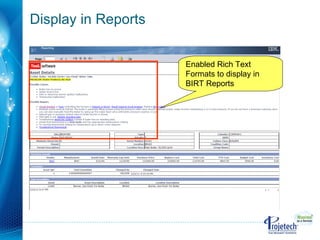
I can enter text in the format that I want  on a Maximo screen. I don’t need to rely on attachments for  rich-text formatting . Long Descriptions, Communication Templates and Displays in BIRT reports Flexible Fonts Bold ,  Italics ,  Underline , etc. Character Sizes Bullets Colors and Highlighting URL links Supports copy/paste from Word, etc.
Enabled Rich Text Formats to display in BIRT Reports Display in Reports
Give the User the ability to copy an Ad Hoc Report and Edit it (add/delete fields) as needed Implement Report Schedule Limits by Security Group Direct Print with Attachments property added in V6. Equivalent Property value added for BIRT in V7. Enable localization of Report Object Structures (ROS) Values - Cognos Packages – as seen to the end user within Report Studio or Query Studio Enable report emails to be sent via links instead of pdf, xls attachments (new Report Viewer application) Report Schedule Limits Report Administration Report Enable Rich Text Formats to display in BIRT Reports Enable direct launch to Cognos from applications Additions/Deletions of Report Design files to provide continued value-add for clients (updated for 7.x application enhancements) Maximo 7.5 Reporting Enhancements
Maximo Open Report Architecture External Report Integration V7 Reporting Open Database Platform Business Objects XI Enterprise BIRT (free) Integration Integration DB2 Tivoli Common Reporting (free)  Integration Embedded Externalized Cognos Reporting 8 Integration
The overall objective toward the enhancements to Help is to allow the user to accomplish their work while staying in the product Enhancements to Help Feature Benefit Technical content of the product is now in one information center and installed on the customer network Permits better access to a more complete library of information.  A single search for all products All help for all Service Management products available in one place!
Accomplish Your Work While in Product Information content improvements made to complex areas of product Included links to relevant topics for more information
Search with Highlighting
Continued Leadership and Innovation in EAM
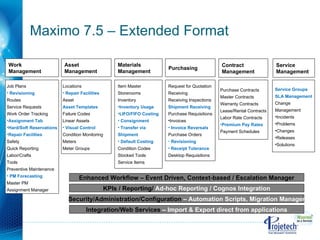
Maximo 7.5 – Extended Format Asset  Management KPIs / Reporting/  Ad-hoc Reporting / Cognos Integration Work  Management Materials  Management Purchasing   Locations Repair Facilities Asset  Asset Templates Failure Codes  Linear Assets Visual Control Condition Monitoring Meters Meter Groups Request for Quotation Receiving Receiving Inspections Shipment Receiving Purchase Requisitions Invoices Invoice Reversals Purchase Orders Revisioning Receipt Tolerance Desktop Requisitions Item Master Storerooms Inventory  Inventory Usage LIFO/FIFO Costing Consignment Transfer via  Shipment Default Costing Condition Codes Stocked Tools Service Items Job Plans Revisioning Routes Service Requests Work Order Tracking Assignment Tab Hard/Soft Reservations Repair Facilities Safety Quick Reporting Labor/Crafts Tools  Preventive Maintenance PM Forecasting Master PM Assignment Manager Enhanced Workflow – Event Driven, Context-based / Escalation Manager Contract  Management Purchase Contracts Master Contracts Warranty Contracts Lease/Rental Contracts Labor Rate Contracts Premium Pay Rates Payment Schedules Service  Management Service Groups SLA Management Change  Management Incidents Problems Changes Releases Solutions Security/Administration/Configuration  – Automation Scripts, Migration Manager Integration/Web Services  – Import & Export direct from applications
Questions

Maximo 7.5 New Features

  • 1.
    New Features inMaximo 7.5
  • 2.
  • 3.
    Maximo 7.5 –3 Major Areas of Focus Additional Configuration Lower Cost of Implementation Lower Cost of Ownership Easier to configure & support Deep Vertical Functionality Improved End-User interaction Expanded Capabilities Customer Driven Requirements Satisfy Functional gaps Improved Usability/Maintainability Address Integration/ERP New & Enhanced Supply Chain Management PO/PR/RFQ/Invoicing Inventory/Receiving Return on Investment Automation Scripts Application data Import/Export Enhanced Migration Manager Usability & Performance Continued Leadership and Innovation in EAM Enhanced Work & Asset Management Linear Asset Visual Control
  • 4.
  • 5.
    Purchasing Enhancements PurchaseOrder Revisions Provides revision (update) capability to purchase order (PO) document Uniqueness of the record based on PO number and the Revision number View Revision History to keep track of changes Purchasing – 360 view of Supply Chain New action will be introduced within the Purchasing module, View Related Records Provides users with a view to all current SCM related records. The related records are PR, PO, RFQ, RECEIPT, INVOICE and CONTRACTS. User will be able to trace the status of PR, PO, Receipts, etc. One stop-shop for entire Supply Chain view Purchasing - Taxes Additional Tax Types - Provide an easy and configurable option to define additional tax types Tax Exempt Items - Provide the capability to flag an item as tax exempt Tax Code Hierarchy - Configurable screen where tax code determination hierarchy can be defined. Maximo tax engines leverages the hierarchy to derive tax code
  • 6.
    Receiving Enhancements ReceiptTolerances User can define receipt tolerance at various levels Establishes a tolerance threshold at which the user will be stopped during an over-receipt situation. Voiding Receipts Reverses a receipt transaction without the use of a return transaction. Voided receipts will execute the same business logic as a return (balance/cost adjustment, etc) but will not be available for inclusion on a credit invoice Voiding available for unprocessed receipts. Receipts that have been matched cannot be voided. Receipts that have inspected cannot be voided Receiving Returns Returning Service - Service Returns can be processed similar to Material returns. Simplifies return process for Service and makes return process consistent Returning Assets - User can select which assets to return Based on non rotating items logic. Added validation to check for Move and Cost consistency
  • 7.
    Invoicing Enhancements CentralizedInvoice Consolidate PO from different sites on a Single Invoice Reversed Invoice Error correction feature used to backout an approved invoice Copy PO Lines Better View to select PO for Invoicing purposes GL Post Date New Date column containing Invoice Post Date
  • 8.
    Materials Management EnhancementsItem Master – Stock Category Change to the Definition of Stock Category Previously, stock category controlled automatic replenishment Stock category will now control whether an item is ‘stockable’ and can exist in a storeroom or whether it is only available for direct order from a vendor (non-stocked). Stock Category Moved to Item/Organization level Controls stockability for items within an organization ‘ Reorder?’ yes/no flag added to Inventory record Allows for seamless transition from previous functionality Benefits: Resolves functional gap on usage of stocked/non-stock item terminology. Better alignment with ERP systems.
  • 9.
    Materials Management EnhancementsInventory Costing Default Costing Method Previously, costing method was defined at the site-level Costing method will now be set at the Inventory level * The costing method will continue to be defaulted from the site level * Costing method can be set differently between inventory records within the same storeroom and site LIFO/FIFO Costing Method ‘ New’ costing method to allow for valuation at actual receipt costs on a LIFO or FIFO basis Consignment Inventory Adds support for ‘vendor-owned’ inventory valuation Allows for items to be paid for on use rather than pay on receipt
  • 10.
    Materials Management EnhancementsReservation Management Reservations Can be Set as Hard or Soft Allows users to specify reservation priority Hard reservations affect available balance and require the balance to be on-hand at the time of reservation creation Soft reservations would be considered to be uncommitted or contingency demand ‘ Automatic’ Reservation Processing Reservations can be created under automatic processing. The system will automatically set the reservation to APSOFT or APHARD depending on the required date of the item compared to the lead time to procure the item ‘ Backorder’ functionality to indicate when a hard reservation is desired, but available balance on-hand is insufficient to satisfy a hard reservation.
  • 11.
    Materials Management EnhancementsNew Application – Inventory Usage Inventory usage replaces the Issues and Transfers application Simplified flow - Issues and transfers are recorded from the same tab Inventory Usage records consist of a statusable header and related lines records. Allows for business process to be employed prior to transaction creation. Workflow can be enabled on Inventory Usage documents Robust ‘out-of-the-box’ business functionality Optional automatic creation of inventory usage documents. Split quantities across multiple supplying bins. Staging functionality to set aside balances for issue or transfer and hold these balances in a staging bin until ‘picked up’. Shipping - Transfers that require the use of an intermediary location (courier, shipper, truck, etc) can create shipment records to track items in transit.
  • 12.
    Return on InvestmentEnhanced Usability and Performance
  • 13.
    PO Revisioning allows user to modify, resubmit and retain history of original PO Void Receipt , Receipt Quantity Tolerance can prevent incorrect amounts from being received (saves time and reduces data entry errors) Reverse Invoice , backs out approved invoice, user can duplicate, make corrections and approve Inventory Usage streamlines the process, supports workflow for issues & transfers, staged and shipped items, multiple assets/bins per line. ‘New’ costing method added to allow for valuation at actual receipt costs on a LIFO or FIFO basis Solutions Addressed with Release 7.5
  • 14.
    Issues and transferscan now be defined as either ‘ Hard or Soft’ reservations …a ‘hard’ reservation blocks the reserved quantity from being available for other requests Asset templates can be used to create multiple assets or to update multiple existing assets with common asset information Repair Facility locations enables work orders & PM’s to be completed for Assets from different sites Job Plan Revisioning can be enabled, each previous version is kept for full history and compliance PM Forecasting tab allows generating forecasted PM dates, dates can be changed or re-forecast as necessary Solutions Addressed with Release 7.5
  • 15.
    Table Window WhenI save, focus remains on the last table row that was edited
  • 16.
    List Page WhenI save a record and go back to the List, the result set is still in the state I left it until I hit refresh. Records that have been touched are Italicized to indicate they have changed
  • 17.
    ‘ Heads downdata entry’ (Asynchronous Validation) I can enter data at my own pace, and address errors and warnings when I want to
  • 18.
    I can entertext in the format that I want on a Maximo screen. I don’t need to rely on attachments for rich-text formatting . Long Descriptions, Communication Templates and Displays in BIRT reports Flexible Fonts Bold , Italics , Underline , etc. Character Sizes Bullets Colors and Highlighting URL links Supports copy/paste from Word, etc.
  • 19.
    Enabled Rich TextFormats to display in BIRT Reports Display in Reports
  • 20.
    Give the Userthe ability to copy an Ad Hoc Report and Edit it (add/delete fields) as needed Implement Report Schedule Limits by Security Group Direct Print with Attachments property added in V6. Equivalent Property value added for BIRT in V7. Enable localization of Report Object Structures (ROS) Values - Cognos Packages – as seen to the end user within Report Studio or Query Studio Enable report emails to be sent via links instead of pdf, xls attachments (new Report Viewer application) Report Schedule Limits Report Administration Report Enable Rich Text Formats to display in BIRT Reports Enable direct launch to Cognos from applications Additions/Deletions of Report Design files to provide continued value-add for clients (updated for 7.x application enhancements) Maximo 7.5 Reporting Enhancements
  • 21.
    Maximo Open ReportArchitecture External Report Integration V7 Reporting Open Database Platform Business Objects XI Enterprise BIRT (free) Integration Integration DB2 Tivoli Common Reporting (free) Integration Embedded Externalized Cognos Reporting 8 Integration
  • 22.
    The overall objectivetoward the enhancements to Help is to allow the user to accomplish their work while staying in the product Enhancements to Help Feature Benefit Technical content of the product is now in one information center and installed on the customer network Permits better access to a more complete library of information. A single search for all products All help for all Service Management products available in one place!
  • 23.
    Accomplish Your WorkWhile in Product Information content improvements made to complex areas of product Included links to relevant topics for more information
  • 24.
  • 25.
    Continued Leadership andInnovation in EAM
  • 26.
    Maximo 7.5 –Extended Format Asset Management KPIs / Reporting/ Ad-hoc Reporting / Cognos Integration Work Management Materials Management Purchasing Locations Repair Facilities Asset Asset Templates Failure Codes Linear Assets Visual Control Condition Monitoring Meters Meter Groups Request for Quotation Receiving Receiving Inspections Shipment Receiving Purchase Requisitions Invoices Invoice Reversals Purchase Orders Revisioning Receipt Tolerance Desktop Requisitions Item Master Storerooms Inventory Inventory Usage LIFO/FIFO Costing Consignment Transfer via Shipment Default Costing Condition Codes Stocked Tools Service Items Job Plans Revisioning Routes Service Requests Work Order Tracking Assignment Tab Hard/Soft Reservations Repair Facilities Safety Quick Reporting Labor/Crafts Tools Preventive Maintenance PM Forecasting Master PM Assignment Manager Enhanced Workflow – Event Driven, Context-based / Escalation Manager Contract Management Purchase Contracts Master Contracts Warranty Contracts Lease/Rental Contracts Labor Rate Contracts Premium Pay Rates Payment Schedules Service Management Service Groups SLA Management Change Management Incidents Problems Changes Releases Solutions Security/Administration/Configuration – Automation Scripts, Migration Manager Integration/Web Services – Import & Export direct from applications
  • 27.

Editor's Notes

  • #4 The Next Generation of Maximo will continue to help customers drive down the total cost of implementation and ownership of their Asset and Service Management applications. Of note, there are three new capabilities that will help customers to achieve this. Dynamic User Interface – The behavior of UI Controls such as Fields, Tables, Tabs, and Buttons can be conditionally controlled. Behavior includes visibility, edit-ability and requiredness. Example: In the Asset Application, the Safety and Meter tabs can be hidden for IT assets. In the Work Order Application, the Change Approver field can be hidden for non-Changes and visible and required for Changes. This will provide customers a way to configure the User’s experience to the context of their role and the data being managed without having the overhead of creating and maintaining new applications for varying user roles, asset classifications and work types. Enhanced SOA – Maximo’s Service Oriented Architecture will be enhanced to make it even easier to create and implement Web Services, and to leverage standards such as WS-Security. Migration Manager – In conjunction with the increasing configurability of the product, the Migration Manager provides a tool to migrate configurations of Maximo, and will be primarily used by customers to efficiently manage the Development to Test to Production environments that they deploy. The Next Generation of Maximo will also provide continued EAM market leadership with enhancements to Maximo’s best-in-class work management functionality. This includes, among many other improvements, enhanced status and process management for work, job plan hierarchies for better work planning and procedure re-use, and context specific attributes on work orders. The 7.1 version of Maximo will also introduce capabilities to support Linear, or Continuous, Assets – such as highways, rail, piping, etc. Of significant importance to the Transportation and Government sectors, these capabilities will allow complex linear assets and relationships to be efficiently modeled, and for work and maintenance history to be recorded against that model.
  • #27 Speaker Notes: Objective: this slide is an alternative to the previous slide in case the presenter would provide slightly more details about the content of each of the Maximo modules