Alerts
Manage
Your
Business
Better

Reports
Workflow

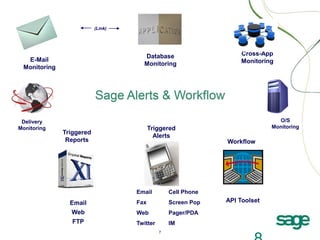
Sage Alerts & Workflow
(formerly known as “Sage KnowledgeSync”

Communicate More Efficiently
Do Less Manual Work
See Problems Before They Happen
The Cost of Not Knowing
“. . . if only w e had know n . . .”

2
Consider This . . .
Scenario:
• A customer who normally pays within 30 days
• They currently have $30K that is 45 days old, but . . .

. . . you don’t know it because you run your reports at month-end
• Today you ship out a $25K order to them
• At month-end you recognize the issue and discover the client is
having serious cash flow problems . . .

Cost of not know ing?
• Best case: Carrying $55K in A/R
• Worst case: Writing off $55K when they close shop
3
If You Are Data-Driven . . .
Solution:

• Alert the account manager about their overdue client
• Notify the finance dept to start collections
• Automatically re-send the client their statement
• Automatically put the client on credit hold
• Set up the A/R Aging report to auto-run whenever a client’s balance
and days overdue exceeds your threshold
The Technology:

Sage Alerts & Workflow
4
Business Activity Monitoring
Also known as Operational Business Intelligence* or “OBI”
BAM refers to a system of automated processes which analyze and
respond to organization-specific business activities and transactions.
BAM lets organizations automate manual tasks while providing
employees with task-specific, time-sensitive insight, helping them
complete their tasks more efficiently and intelligently.
BAM helps an organization increase daily operational efficiency and
improve their management of transactional “exceptions”.

(*Intelligent Enterprise, Jan 2008)
Sage Alerts & W orkflow consists of . . .
Four components:
-----

Data Mining (Business Intelligence)
Alerts / Notification
Form, Document, & Report Distribution
Workflow

Clients use it to:
•

Monitor business data and . . .

•
•
•
•
•
•

Trigger Alerts
Generate & Deliver Forms
Trigger & Distribute Reports
Trigger Task Creation
Integrate Application Data
Process Incoming Email

(page a technician)
(send a client an invoice)
(send a forecast report to a manager)
(schedule a follow-up phone call)
(create an order from a closed sale)
(create a support ticket)
(Link)

Database
Monitoring

E-Mail
Monitoring

Delivery
Monitoring

Triggered
Alerts

Triggered
Reports

Email

Email
Web
FTP

Screen Pop

Web

Pager/PDA

Twitter

IM

O/S
Monitoring

Workflow

Cell Phone

Fax

Cross-App
Monitoring

API Toolset
Sage ERP
Financial Conditions
Sage Alerts & Workflow identifies conditions such as . . .
 Overdue receivables (re-send invoice or dunning notice)

 Suppliers with perpetually late deliveries
 Terms discounts that are about to expire
 Inventory stock approaching re-order level
 Receipts against purchase order lines
 Orders with unapproved discounts
 Overstocks for products that need to be sold or written off
 Clients whose monthly sales dropped by at least ‘x’ percent (trend analysis)
 Clients put on / taken off credit hold
 Clients on credit hold who have open sales opportunities in a CRM system
Sales (CRM) Business
Conditions
Sage Alerts & Workflow identifies conditions such as . . .
 Opportunities that are overdue for closing or have not been followed-up on
 Client contracts that are due to expire
 Customers who have changed their buying habits
 Missing or erroneous data
 A client whose credit rating has changed
 Opportunities with unapproved discounts
 Sales reps who are “rolling over” their activities from one day to the next
 Leads that come in from your website or from an email campaign
 New or updated sales literature
 Time-sensitive pricing or promotions
 Remote sales reps who have not synched in over ‘x’ hours
E-Mail
Monitoring

(Link)

Sage ERP
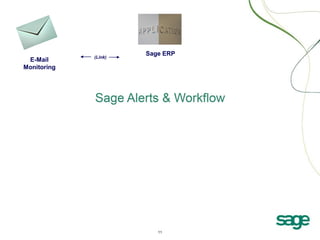
Email Monitoring
Sage Alerts & Workflow monitors and auto-processes incoming
Email, such as . . .
 Email messages sent to generic account such as “finance” or “sales”
 Order-related emails – such as questions about delivery dates
 Emails that are from existing clients, partners or vendors – matching the sender of the
Email with the corresponding contact record in your Accounting database
 Emails that are from new clients – automatically creating the appropriate account
record in your Accounting databases
 Website requests for information, automatically sending back the requested materials
 Website form registrations, automatically updating your applications with the details of
who signed up for what
 Web form content, automatically sending a receipt confirmation back to the person
who filled out the form, and notifying your staff about that visitor
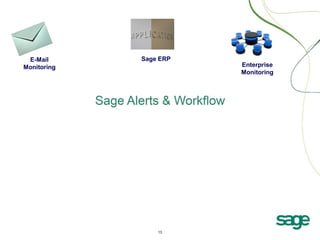
E-Mail
Monitoring

Sage ERP

Enterprise
Monitoring
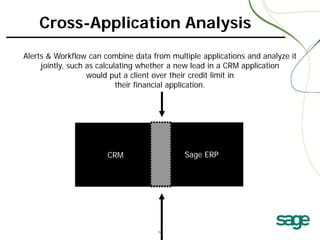
Cross-Application Analysis
Alerts & Workflow can combine data from multiple applications and analyze it
jointly, such as calculating whether a new lead in a CRM application
would put a client over their credit limit in
their financial application.

Uncompleted activities
Clients put on/off credit hold
Changes to sales opportunities
Overdue receivables/dunning notices
Dips in a salesrep’s pipeline
Sending order confirmations
Prospects not contacted in Stock that is nearing its re-order level
‘x’ days
Limited-time specials
Delayed order/part shipment
Sage
CRM
Changes in buying habits Auto-gen picking lists ERP
Salesreps who don’t synch Orders with un-approved discounts
Overloaded support reps Early payment discounts
Repeat buying incentives Match incoming stock with backorders
Leads not followed-up on Time-sensitive stock
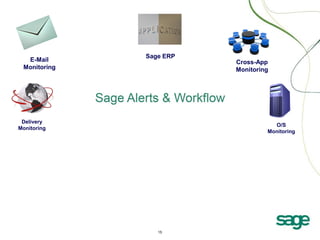
E-Mail
Monitoring

Delivery
Monitoring

Sage ERP

Cross-App
Monitoring

O/S
Monitoring
Sage ERP

E-Mail
Monitoring

Delivery
Monitoring

Triggered
Alerts

Email

Cell Phone

Fax

Screen Pop

Web

Pager/PDA

Twitter

IM

Cross-App
Monitoring

O/S
Monitoring
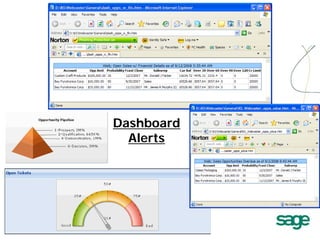
Dashboard
Alerts

18
Alerts & Workflow Version 8.0 –
Alert via Instant Message
(Microsoft Windows Messenger)
(Yahoo! Messenger)
(Google Talk)
(ICQ)
Sage ERP

E-Mail
Monitoring

Delivery
Monitoring

Triggered
Alerts

Forms, Documents
& Reports
Invoice
Picking List
A/R Aging

Email

Email
Web
FTP

Cell Phone

Fax

Screen Pop

Web

Pager/PDA

Twitter

IM

Cross-App
Monitoring

O/S
Monitoring
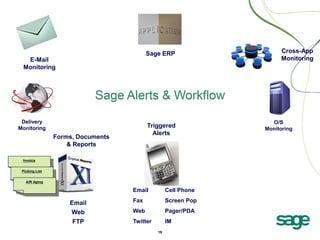
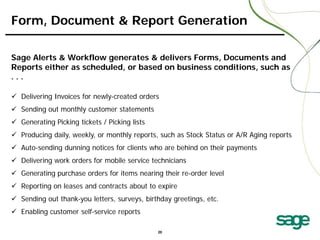
Form, Document & Report Generation
Sage Alerts & Workflow generates & delivers Forms, Documents and
Reports either as scheduled, or based on business conditions, such as
...
 Delivering Invoices for newly-created orders
 Sending out monthly customer statements
 Generating Picking tickets / Picking lists
 Producing daily, weekly, or monthly reports, such as Stock Status or A/R Aging reports
 Auto-sending dunning notices for clients who are behind on their payments
 Delivering work orders for mobile service technicians
 Generating purchase orders for items nearing their re-order level
 Reporting on leases and contracts about to expire
 Sending out thank-you letters, surveys, birthday greetings, etc.
 Enabling customer self-service reports
Sage ERP

E-Mail
Monitoring

Delivery
Monitoring

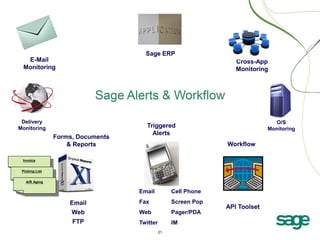
Forms, Documents
& Reports

Cross-App
Monitoring

O/S
Monitoring

Triggered
Alerts
Workflow

Invoice
Picking List
A/R Aging

Email

Email
Web
FTP

Cell Phone

Fax

Screen Pop

Web

Pager/PDA

Twitter

IM
21

API Toolset
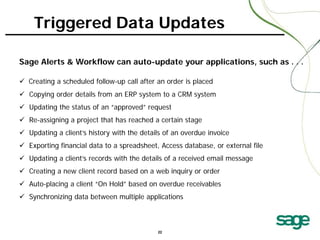
Triggered Data Updates
Sage Alerts & Workflow can auto-update your applications, such as . . .
 Creating a scheduled follow-up call after an order is placed
 Copying order details from an ERP system to a CRM system
 Updating the status of an “approved” request
 Re-assigning a project that has reached a certain stage
 Updating a client’s history with the details of an overdue invoice
 Exporting financial data to a spreadsheet, Access database, or external file
 Updating a client’s records with the details of a received email message
 Creating a new client record based on a web inquiry or order
 Auto-placing a client “On Hold” based on overdue receivables
 Synchronizing data between multiple applications

22
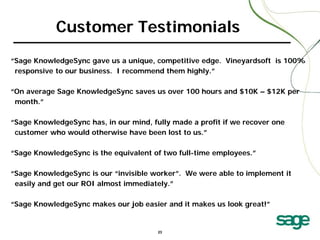
Customer Testimonials
“Sage KnowledgeSync gave us a unique, competitive edge. Vineyardsoft is 100%
responsive to our business. I recommend them highly.”
“On average Sage KnowledgeSync saves us over 100 hours and $10K – $12K per
month.”
“Sage KnowledgeSync has, in our mind, fully made a profit if we recover one
customer who would otherwise have been lost to us.”
“Sage KnowledgeSync is the equivalent of two full-time employees.”
“Sage KnowledgeSync is our “invisible worker”. We were able to implement it
easily and get our ROI almost immediately.”
“Sage KnowledgeSync makes our job easier and it makes us look great!”

23
Contact Details:
Calvin O’Driscoll, ERP Manager
(709) 726 – 8347 ext. 419
calvin.odriscoll@atlanticdatasystems.com
joanne.snow@atlanticdatasystems.com
For support:
support@atlanticdatasystems.com

24

Atlantic Datasystems: Sage Alerts and Workflow Add-on Formerly Known as "Sage Knowledge Snyc"

  • 1.
    Alerts Manage Your Business Better Reports Workflow Sage Alerts &Workflow (formerly known as “Sage KnowledgeSync” Communicate More Efficiently Do Less Manual Work See Problems Before They Happen
  • 2.
    The Cost ofNot Knowing “. . . if only w e had know n . . .” 2
  • 3.
    Consider This .. . Scenario: • A customer who normally pays within 30 days • They currently have $30K that is 45 days old, but . . . . . . you don’t know it because you run your reports at month-end • Today you ship out a $25K order to them • At month-end you recognize the issue and discover the client is having serious cash flow problems . . . Cost of not know ing? • Best case: Carrying $55K in A/R • Worst case: Writing off $55K when they close shop 3
  • 4.
    If You AreData-Driven . . . Solution: • Alert the account manager about their overdue client • Notify the finance dept to start collections • Automatically re-send the client their statement • Automatically put the client on credit hold • Set up the A/R Aging report to auto-run whenever a client’s balance and days overdue exceeds your threshold The Technology: Sage Alerts & Workflow 4
  • 5.
    Business Activity Monitoring Alsoknown as Operational Business Intelligence* or “OBI” BAM refers to a system of automated processes which analyze and respond to organization-specific business activities and transactions. BAM lets organizations automate manual tasks while providing employees with task-specific, time-sensitive insight, helping them complete their tasks more efficiently and intelligently. BAM helps an organization increase daily operational efficiency and improve their management of transactional “exceptions”. (*Intelligent Enterprise, Jan 2008)
  • 6.
    Sage Alerts &W orkflow consists of . . . Four components: ----- Data Mining (Business Intelligence) Alerts / Notification Form, Document, & Report Distribution Workflow Clients use it to: • Monitor business data and . . . • • • • • • Trigger Alerts Generate & Deliver Forms Trigger & Distribute Reports Trigger Task Creation Integrate Application Data Process Incoming Email (page a technician) (send a client an invoice) (send a forecast report to a manager) (schedule a follow-up phone call) (create an order from a closed sale) (create a support ticket)
  • 7.
  • 8.
  • 9.
    Financial Conditions Sage Alerts& Workflow identifies conditions such as . . .  Overdue receivables (re-send invoice or dunning notice)  Suppliers with perpetually late deliveries  Terms discounts that are about to expire  Inventory stock approaching re-order level  Receipts against purchase order lines  Orders with unapproved discounts  Overstocks for products that need to be sold or written off  Clients whose monthly sales dropped by at least ‘x’ percent (trend analysis)  Clients put on / taken off credit hold  Clients on credit hold who have open sales opportunities in a CRM system
  • 10.
    Sales (CRM) Business Conditions SageAlerts & Workflow identifies conditions such as . . .  Opportunities that are overdue for closing or have not been followed-up on  Client contracts that are due to expire  Customers who have changed their buying habits  Missing or erroneous data  A client whose credit rating has changed  Opportunities with unapproved discounts  Sales reps who are “rolling over” their activities from one day to the next  Leads that come in from your website or from an email campaign  New or updated sales literature  Time-sensitive pricing or promotions  Remote sales reps who have not synched in over ‘x’ hours
  • 11.
  • 12.
    Email Monitoring Sage Alerts& Workflow monitors and auto-processes incoming Email, such as . . .  Email messages sent to generic account such as “finance” or “sales”  Order-related emails – such as questions about delivery dates  Emails that are from existing clients, partners or vendors – matching the sender of the Email with the corresponding contact record in your Accounting database  Emails that are from new clients – automatically creating the appropriate account record in your Accounting databases  Website requests for information, automatically sending back the requested materials  Website form registrations, automatically updating your applications with the details of who signed up for what  Web form content, automatically sending a receipt confirmation back to the person who filled out the form, and notifying your staff about that visitor
  • 13.
  • 14.
    Cross-Application Analysis Alerts &Workflow can combine data from multiple applications and analyze it jointly, such as calculating whether a new lead in a CRM application would put a client over their credit limit in their financial application. Uncompleted activities Clients put on/off credit hold Changes to sales opportunities Overdue receivables/dunning notices Dips in a salesrep’s pipeline Sending order confirmations Prospects not contacted in Stock that is nearing its re-order level ‘x’ days Limited-time specials Delayed order/part shipment Sage CRM Changes in buying habits Auto-gen picking lists ERP Salesreps who don’t synch Orders with un-approved discounts Overloaded support reps Early payment discounts Repeat buying incentives Match incoming stock with backorders Leads not followed-up on Time-sensitive stock
  • 15.
  • 16.
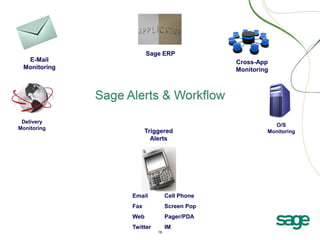
    Sage ERP E-Mail Monitoring Delivery Monitoring Triggered Alerts Email Cell Phone Fax ScreenPop Web Pager/PDA Twitter IM Cross-App Monitoring O/S Monitoring
  • 17.
  • 18.
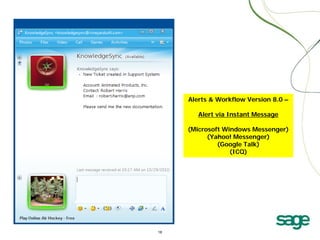
    Alerts & WorkflowVersion 8.0 – Alert via Instant Message (Microsoft Windows Messenger) (Yahoo! Messenger) (Google Talk) (ICQ)
  • 19.
    Sage ERP E-Mail Monitoring Delivery Monitoring Triggered Alerts Forms, Documents &Reports Invoice Picking List A/R Aging Email Email Web FTP Cell Phone Fax Screen Pop Web Pager/PDA Twitter IM Cross-App Monitoring O/S Monitoring
  • 20.
    Form, Document &Report Generation Sage Alerts & Workflow generates & delivers Forms, Documents and Reports either as scheduled, or based on business conditions, such as ...  Delivering Invoices for newly-created orders  Sending out monthly customer statements  Generating Picking tickets / Picking lists  Producing daily, weekly, or monthly reports, such as Stock Status or A/R Aging reports  Auto-sending dunning notices for clients who are behind on their payments  Delivering work orders for mobile service technicians  Generating purchase orders for items nearing their re-order level  Reporting on leases and contracts about to expire  Sending out thank-you letters, surveys, birthday greetings, etc.  Enabling customer self-service reports
  • 21.
    Sage ERP E-Mail Monitoring Delivery Monitoring Forms, Documents &Reports Cross-App Monitoring O/S Monitoring Triggered Alerts Workflow Invoice Picking List A/R Aging Email Email Web FTP Cell Phone Fax Screen Pop Web Pager/PDA Twitter IM 21 API Toolset
  • 22.
    Triggered Data Updates SageAlerts & Workflow can auto-update your applications, such as . . .  Creating a scheduled follow-up call after an order is placed  Copying order details from an ERP system to a CRM system  Updating the status of an “approved” request  Re-assigning a project that has reached a certain stage  Updating a client’s history with the details of an overdue invoice  Exporting financial data to a spreadsheet, Access database, or external file  Updating a client’s records with the details of a received email message  Creating a new client record based on a web inquiry or order  Auto-placing a client “On Hold” based on overdue receivables  Synchronizing data between multiple applications 22
  • 23.
    Customer Testimonials “Sage KnowledgeSyncgave us a unique, competitive edge. Vineyardsoft is 100% responsive to our business. I recommend them highly.” “On average Sage KnowledgeSync saves us over 100 hours and $10K – $12K per month.” “Sage KnowledgeSync has, in our mind, fully made a profit if we recover one customer who would otherwise have been lost to us.” “Sage KnowledgeSync is the equivalent of two full-time employees.” “Sage KnowledgeSync is our “invisible worker”. We were able to implement it easily and get our ROI almost immediately.” “Sage KnowledgeSync makes our job easier and it makes us look great!” 23
  • 24.
    Contact Details: Calvin O’Driscoll,ERP Manager (709) 726 – 8347 ext. 419 calvin.odriscoll@atlanticdatasystems.com joanne.snow@atlanticdatasystems.com For support: support@atlanticdatasystems.com 24