I.T. for Management


          Chapter 1
What is Computer& how it works
What is a Computer &
   How it works

      What is a computer

     A computer is a device
  which can process information
What does a computer consist of:

• A computer consists of Hardware and Software

• Hardware is the nuts and bolts of the machine
  that is the bare electronic circuit

• Software are the instructions given to the
  machine which makes it perform the necessary
  tasks
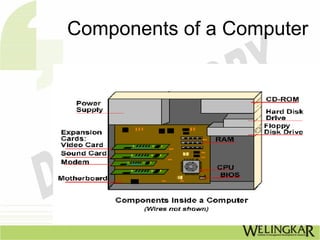
Components of a Computer

•The CPU Central processing unit
•Random access Memory (RAM)
•Read Only Memory (ROM)
•Secondary Storage devices
•Hard disk
•Floppy Drive
•CD/DVD Drive
•Pen Drive
Components of a Computer

      The Input Devices

      • Key Board
      • Mouse
      • Touch Screen
      • Scanner
      • Track ball
Components of a Computer

     The Output Devices

      Printer
      Plotter
      Screen/VDU
Components of a Computer


 •Bus
 •Power Supply
 • Ports
 •Other peripherals Such as Modems etc
Basic functions & Characteristics of
           hardware components

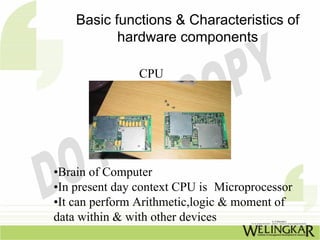
                CPU


•Brain of Computer
•In present day context CPU is Microprocessor
•It can perform Arithmetic,logic & moment of
data within & with other devices
Basic functions & Characteristics of
       hardware components

 CPU is Characteriterized by:

 •Word length 8,16,32 bit processor
 •Instruction set
 •Clock speed expressed in Mega hertz
 •Architecture i.e no of storage areas
 called registers
Basic functions & Characteristics of
        hardware components

What to look for in selecting CPU:

•Larger Word length means greater memory
access,greater speed in instructions per sec.
•Larger Instruction set makes CPU more
versatile
•Higher Clock speed results in higher speeds
Basic functions & Characteristics of
         hardware components

                     RAM
•Is memory where all transient data ,programs
& status information is kept while computer
is on& executing some task.
•RAM is volatile & its information is lost
once machine is switched off.
•This increases the overall performance of the
computer
Basic functions & Characteristics of
            hardware components
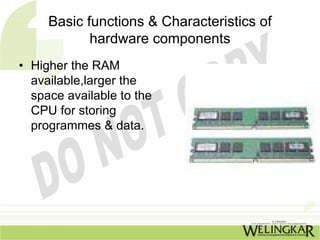
• Higher the RAM
  available,larger the
  space available to the
  CPU for storing
  programmes & data.
Basic functions & Characteristics of
          hardware components

                    ROM
•The read only memory is a memory where
all data programs are hard coded into

•ROM is non-volatile & its information is not
lost once machine is switched off

•As soon computer is switched on micro
code stored (burnt) into the chip gets
activated & is loaded into ROM
Basic functions & Characteristics of
       hardware components

            ROM

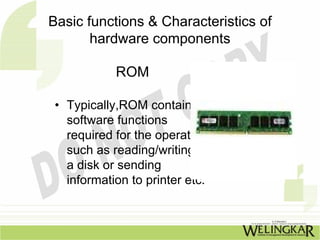
 • Typically,ROM contains
   software functions
   required for the operation
   such as reading/writing to
   a disk or sending
   information to printer etc.
Basic functions & Characteristics of
            hardware components
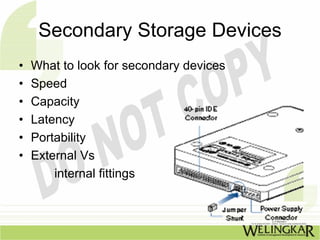
          • Secondary Storage Devices
• Since RAM is volatile,there is need for semi
  permanent means of storage.
• The secondary storage devices provides the
  means of storing,retrieving ,& modifying
  information
• Devices such as Hard disk,tapes,floppy drive are
  considered as secondary storage devices
Secondary Storage Devices
•   What to look for secondary devices
•   Speed
•   Capacity
•   Latency
•   Portability
•   External Vs
        internal fittings
Input/Output Devices

• Input /output devices enable human beings to
  interact with the computer
• Ihe common characteristics are:
   – Character set devices are recognized to certain
     character set
   – Larger the character more versatile would be
     device
   – Ports-Parallel ports tend to be faster than serial
     ports
   – Resolution-this refers to the accuracy & fidelity of
     the device in recognizing or representing a
     specified letter or symbol
   – Closer the representation better the resolution for
     instance a picture on low resolution would not
Input/Output Devices

• Ihe common characteristics
  are:……………(continue)
• Portability:
   – Input /output devices tend to get moved around
     to suit the users convenience,hence they need to
     be more portable & plug& play
• Ergonomically:
   – Since computer input/output devices are most
     visible components they should be good design
     look & feel
BUS
• Bus is an electrical connector which connects all
  the hardware components of a computer

• Their would be atleast a data bus, a instruction
  bus & control bus each carrying
  data,instruction& control signals respectively.

• Bus is like common highway shared by all all
  data traffic moving between various components
  of the computer.
                                      ……..Cont
BUS
• Since CPU has to access memory
  frequently,separate bus is provided which is
  known as Direct Memory Access(DMA)
• The capacity of bus is indicated by number of
  parallel lines of data traffic moving between the
  various components
• Thus it could be 16,32or 64bitbus
• Higher the number of bits faster will be data
  transfer& greater bandwidth
Ports
• Ports are external interfaces of the bus to
  enable people to connect external devices
• The keyboard,mouse,pen drive are all
  connected to external ports
• Greater the no of ports offer along with the
  comp ,greater the no of devices that can
  be connected at the same time
                           ……….Cont.
Ports
•   There are various standards for Ports
•   Serial ports are used by mouse
•   Parallel ports are for printers
•   Pen Devices fit on USB ports
•   The wider the variety of ports available
    better it is, since we wish to connect many
    devices to computer such as for
    audio/video
Ports
• Ports are the places on the outside of the
  computer case where you plug in hardware.
  On the inside of the case, they are
  connected to expansion cards.
• There are also extra ports to plug in extra
  hardware like joysticks, game pads,
  scanners, digital cameras and the like.
• The ports are controlled by their expansion
  cards which are plugged into the
  motherboard and are connected to other
  components by cables - long, flat bands that
  contain electrical wiring.
Power Supply
• The power supply coverts the A.C. power from
  mains to D.C. voltage& current levels so that it
  can serve different devices
• It is critical that the power supply provide
  exactly the right kind of power or the
  motherboard will be fried! Be careful when you
  are replacing the power supply or motherboard
  that they match
Power Supply
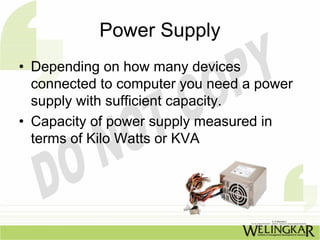
• Depending on how many devices
  connected to computer you need a power
  supply with sufficient capacity.
• Capacity of power supply measured in
  terms of Kilo Watts or KVA
Modem
• A modem is communication device
• It converts digital signals from computer
  into waveforms signals suitable for a
  telephone & like back to digital signals
• Modems are characteristics by there
  speed expressed in terms of bits per
  second
Modem

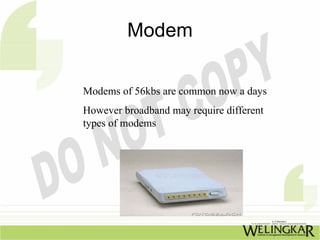
Modems of 56kbs are common now a days
However broadband may require different
types of modems
A typical computer configuration

•   Microprocessor such as Pentium,Celeron,AMD
•   OS such as Windows 98,2000,Xp,Linux etc.
•   Ram with size 64 ,128 ,265,512 MB
•   Disk Drives Hard Soft,ZIP,CD,DVD
•   Display Color,Mono chrome
•   Battery lithium,Nickel-Cadmium
•   Ports Serial Parallel,USB
•   Sound Cards,Speakers etc.
Software components of computer
                • System software
•   Utilities
•   Language compilers
•   Database Management systems
•   Networking & communication Software
•   Security related software
•   Infrastructure management system
•   Wide variety of software components
Software components of computer
             • Application software
•   Canned software
•   Packed Function software
•   Enterprise solutions
•   Custom based solutions using language
•   I.T. for Management


    End of Chapter 1

What is computer and how it works

  • 1.
    I.T. for Management Chapter 1 What is Computer& how it works
  • 2.
    What is aComputer & How it works What is a computer A computer is a device which can process information
  • 3.
    What does acomputer consist of: • A computer consists of Hardware and Software • Hardware is the nuts and bolts of the machine that is the bare electronic circuit • Software are the instructions given to the machine which makes it perform the necessary tasks
  • 4.
  • 5.
    Components of aComputer •The CPU Central processing unit •Random access Memory (RAM) •Read Only Memory (ROM) •Secondary Storage devices •Hard disk •Floppy Drive •CD/DVD Drive •Pen Drive
  • 6.
    Components of aComputer The Input Devices • Key Board • Mouse • Touch Screen • Scanner • Track ball
  • 7.
    Components of aComputer The Output Devices Printer Plotter Screen/VDU
  • 8.
    Components of aComputer •Bus •Power Supply • Ports •Other peripherals Such as Modems etc
  • 9.
    Basic functions &Characteristics of hardware components CPU •Brain of Computer •In present day context CPU is Microprocessor •It can perform Arithmetic,logic & moment of data within & with other devices
  • 10.
    Basic functions &Characteristics of hardware components CPU is Characteriterized by: •Word length 8,16,32 bit processor •Instruction set •Clock speed expressed in Mega hertz •Architecture i.e no of storage areas called registers
  • 11.
    Basic functions &Characteristics of hardware components What to look for in selecting CPU: •Larger Word length means greater memory access,greater speed in instructions per sec. •Larger Instruction set makes CPU more versatile •Higher Clock speed results in higher speeds
  • 12.
    Basic functions &Characteristics of hardware components RAM •Is memory where all transient data ,programs & status information is kept while computer is on& executing some task. •RAM is volatile & its information is lost once machine is switched off. •This increases the overall performance of the computer
  • 13.
    Basic functions &Characteristics of hardware components • Higher the RAM available,larger the space available to the CPU for storing programmes & data.
  • 14.
    Basic functions &Characteristics of hardware components ROM •The read only memory is a memory where all data programs are hard coded into •ROM is non-volatile & its information is not lost once machine is switched off •As soon computer is switched on micro code stored (burnt) into the chip gets activated & is loaded into ROM
  • 15.
    Basic functions &Characteristics of hardware components ROM • Typically,ROM contains software functions required for the operation such as reading/writing to a disk or sending information to printer etc.
  • 16.
    Basic functions &Characteristics of hardware components • Secondary Storage Devices • Since RAM is volatile,there is need for semi permanent means of storage. • The secondary storage devices provides the means of storing,retrieving ,& modifying information • Devices such as Hard disk,tapes,floppy drive are considered as secondary storage devices
  • 17.
    Secondary Storage Devices • What to look for secondary devices • Speed • Capacity • Latency • Portability • External Vs internal fittings
  • 18.
    Input/Output Devices • Input/output devices enable human beings to interact with the computer • Ihe common characteristics are: – Character set devices are recognized to certain character set – Larger the character more versatile would be device – Ports-Parallel ports tend to be faster than serial ports – Resolution-this refers to the accuracy & fidelity of the device in recognizing or representing a specified letter or symbol – Closer the representation better the resolution for instance a picture on low resolution would not
  • 19.
    Input/Output Devices • Ihecommon characteristics are:……………(continue) • Portability: – Input /output devices tend to get moved around to suit the users convenience,hence they need to be more portable & plug& play • Ergonomically: – Since computer input/output devices are most visible components they should be good design look & feel
  • 20.
    BUS • Bus isan electrical connector which connects all the hardware components of a computer • Their would be atleast a data bus, a instruction bus & control bus each carrying data,instruction& control signals respectively. • Bus is like common highway shared by all all data traffic moving between various components of the computer. ……..Cont
  • 21.
    BUS • Since CPUhas to access memory frequently,separate bus is provided which is known as Direct Memory Access(DMA) • The capacity of bus is indicated by number of parallel lines of data traffic moving between the various components • Thus it could be 16,32or 64bitbus • Higher the number of bits faster will be data transfer& greater bandwidth
  • 22.
    Ports • Ports areexternal interfaces of the bus to enable people to connect external devices • The keyboard,mouse,pen drive are all connected to external ports • Greater the no of ports offer along with the comp ,greater the no of devices that can be connected at the same time ……….Cont.
  • 23.
    Ports • There are various standards for Ports • Serial ports are used by mouse • Parallel ports are for printers • Pen Devices fit on USB ports • The wider the variety of ports available better it is, since we wish to connect many devices to computer such as for audio/video
  • 24.
    Ports • Ports arethe places on the outside of the computer case where you plug in hardware. On the inside of the case, they are connected to expansion cards. • There are also extra ports to plug in extra hardware like joysticks, game pads, scanners, digital cameras and the like. • The ports are controlled by their expansion cards which are plugged into the motherboard and are connected to other components by cables - long, flat bands that contain electrical wiring.
  • 25.
    Power Supply • Thepower supply coverts the A.C. power from mains to D.C. voltage& current levels so that it can serve different devices • It is critical that the power supply provide exactly the right kind of power or the motherboard will be fried! Be careful when you are replacing the power supply or motherboard that they match
  • 26.
    Power Supply • Dependingon how many devices connected to computer you need a power supply with sufficient capacity. • Capacity of power supply measured in terms of Kilo Watts or KVA
  • 27.
    Modem • A modemis communication device • It converts digital signals from computer into waveforms signals suitable for a telephone & like back to digital signals • Modems are characteristics by there speed expressed in terms of bits per second
  • 28.
    Modem Modems of 56kbsare common now a days However broadband may require different types of modems
  • 29.
    A typical computerconfiguration • Microprocessor such as Pentium,Celeron,AMD • OS such as Windows 98,2000,Xp,Linux etc. • Ram with size 64 ,128 ,265,512 MB • Disk Drives Hard Soft,ZIP,CD,DVD • Display Color,Mono chrome • Battery lithium,Nickel-Cadmium • Ports Serial Parallel,USB • Sound Cards,Speakers etc.
  • 30.
    Software components ofcomputer • System software • Utilities • Language compilers • Database Management systems • Networking & communication Software • Security related software • Infrastructure management system • Wide variety of software components
  • 31.
    Software components ofcomputer • Application software • Canned software • Packed Function software • Enterprise solutions • Custom based solutions using language
  • 32.
    I.T. for Management End of Chapter 1