Components of
 a computer
 A Technician's Guide
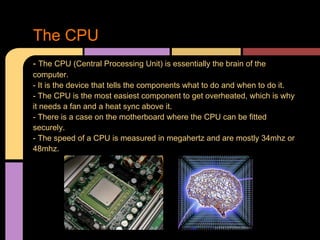
The CPU
- The CPU (Central Processing Unit) is essentially the brain of the
computer.
- It is the device that tells the components what to do and when to do it.
- The CPU is the most easiest component to get overheated, which is why
it needs a fan and a heat sync above it.
- There is a case on the motherboard where the CPU can be fitted
securely.
- The speed of a CPU is measured in megahertz and are mostly 34mhz or
48mhz.
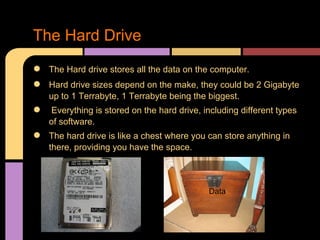
The Hard Drive
●   The Hard drive stores all the data on the computer.
●   Hard drive sizes depend on the make, they could be 2 Gigabyte
    up to 1 Terrabyte, 1 Terrabyte being the biggest.
●   Everything is stored on the hard drive, including different types
    of software.
●   The hard drive is like a chest where you can store anything in
    there, providing you have the space.


                                             Data
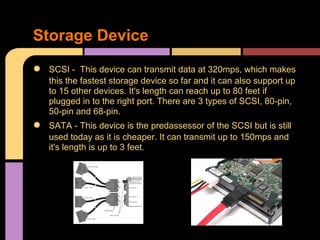
Storage Device
●   SCSI - This device can transmit data at 320mps, which makes
    this the fastest storage device so far and it can also support up
    to 15 other devices. It's length can reach up to 80 feet if
    plugged in to the right port. There are 3 types of SCSI, 80-pin,
    50-pin and 68-pin.
●   SATA - This device is the predassessor of the SCSI but is still
    used today as it is cheaper. It can transmit up to 150mps and
    it's length is up to 3 feet.
The Disk Drive
●   The disk drive runs any disks that are inserted in to it, disks for
    games or software installation.
●   The disk drive reads the disk that is inserted into it.
●   The Disk Drive looks very familiar to the hard drive but they can
    be identified through the liscense infront of the component.
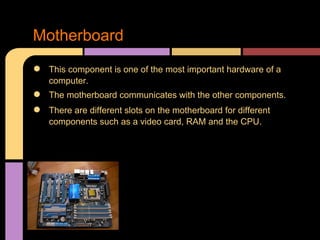
Motherboard
●   This component is one of the most important hardware of a
    computer.
●   The motherboard communicates with the other components.
●   There are different slots on the motherboard for different
    components such as a video card, RAM and the CPU.
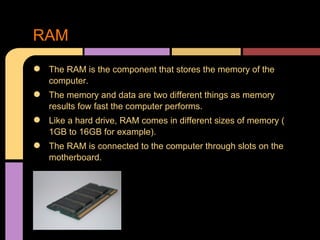
RAM
●   The RAM is the component that stores the memory of the
    computer.
●   The memory and data are two different things as memory
    results fow fast the computer performs.
●   Like a hard drive, RAM comes in different sizes of memory (
    1GB to 16GB for example).
●   The RAM is connected to the computer through slots on the
    motherboard.
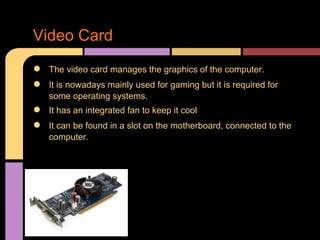
Video Card
●   The video card manages the graphics of the computer.
●   It is nowadays mainly used for gaming but it is required for
    some operating systems.
●   It has an integrated fan to keep it cool
●   It can be found in a slot on the motherboard, connected to the
    computer.
Data Cables
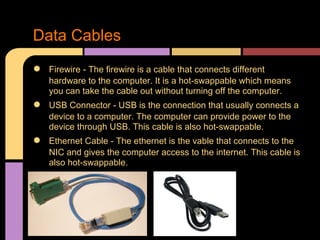
●   Firewire - The firewire is a cable that connects different
    hardware to the computer. It is a hot-swappable which means
    you can take the cable out without turning off the computer.
●   USB Connector - USB is the connection that usually connects a
    device to a computer. The computer can provide power to the
    device through USB. This cable is also hot-swappable.
●   Ethernet Cable - The ethernet is the vable that connects to the
    NIC and gives the computer access to the internet. This cable is
    also hot-swappable.
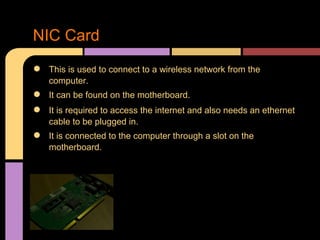
NIC Card
●   This is used to connect to a wireless network from the
    computer.
●   It can be found on the motherboard.
●   It is required to access the internet and also needs an ethernet
    cable to be plugged in.
●   It is connected to the computer through a slot on the
    motherboard.
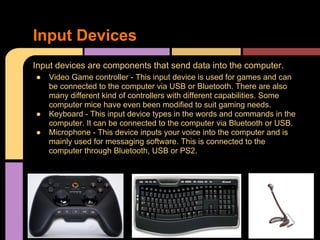
Input Devices
Input devices are components that send data into the computer.
●   Video Game controller - This input device is used for games and can
    be connected to the computer via USB or Bluetooth. There are also
    many different kind of controllers with different capabilities. Some
    computer mice have even been modified to suit gaming needs.
●   Keyboard - This input device types in the words and commands in the
    computer. It can be connected to the computer via Bluetooth or USB.
●   Microphone - This device inputs your voice into the computer and is
    mainly used for messaging software. This is connected to the
    computer through Bluetooth, USB or PS2.
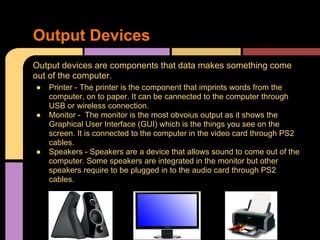
Output Devices
Output devices are components that data makes something come
out of the computer.
●   Printer - The printer is the component that imprints words from the
    computer, on to paper. It can be cannected to the computer through
    USB or wireless connection.
●   Monitor - The monitor is the most obvoius output as it shows the
    Graphical User Interface (GUI) which is the things you see on the
    screen. It is connected to the computer in the video card through PS2
    cables.
●   Speakers - Speakers are a device that allows sound to come out of the
    computer. Some speakers are integrated in the monitor but other
    speakers require to be plugged in to the audio card through PS2
    cables.
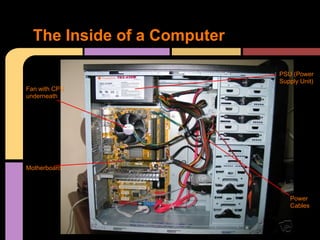
The Inside of a Computer

                             PSU (Power
                             Supply Unit)
Fan with CPU
underneath


Motherboard


                                Power
                                Cables

The components of a computer

  • 1.
    Components of acomputer A Technician's Guide
  • 2.
    The CPU - TheCPU (Central Processing Unit) is essentially the brain of the computer. - It is the device that tells the components what to do and when to do it. - The CPU is the most easiest component to get overheated, which is why it needs a fan and a heat sync above it. - There is a case on the motherboard where the CPU can be fitted securely. - The speed of a CPU is measured in megahertz and are mostly 34mhz or 48mhz.
  • 3.
    The Hard Drive ● The Hard drive stores all the data on the computer. ● Hard drive sizes depend on the make, they could be 2 Gigabyte up to 1 Terrabyte, 1 Terrabyte being the biggest. ● Everything is stored on the hard drive, including different types of software. ● The hard drive is like a chest where you can store anything in there, providing you have the space. Data
  • 4.
    Storage Device ● SCSI - This device can transmit data at 320mps, which makes this the fastest storage device so far and it can also support up to 15 other devices. It's length can reach up to 80 feet if plugged in to the right port. There are 3 types of SCSI, 80-pin, 50-pin and 68-pin. ● SATA - This device is the predassessor of the SCSI but is still used today as it is cheaper. It can transmit up to 150mps and it's length is up to 3 feet.
  • 5.
    The Disk Drive ● The disk drive runs any disks that are inserted in to it, disks for games or software installation. ● The disk drive reads the disk that is inserted into it. ● The Disk Drive looks very familiar to the hard drive but they can be identified through the liscense infront of the component.
  • 6.
    Motherboard ● This component is one of the most important hardware of a computer. ● The motherboard communicates with the other components. ● There are different slots on the motherboard for different components such as a video card, RAM and the CPU.
  • 7.
    RAM ● The RAM is the component that stores the memory of the computer. ● The memory and data are two different things as memory results fow fast the computer performs. ● Like a hard drive, RAM comes in different sizes of memory ( 1GB to 16GB for example). ● The RAM is connected to the computer through slots on the motherboard.
  • 8.
    Video Card ● The video card manages the graphics of the computer. ● It is nowadays mainly used for gaming but it is required for some operating systems. ● It has an integrated fan to keep it cool ● It can be found in a slot on the motherboard, connected to the computer.
  • 9.
    Data Cables ● Firewire - The firewire is a cable that connects different hardware to the computer. It is a hot-swappable which means you can take the cable out without turning off the computer. ● USB Connector - USB is the connection that usually connects a device to a computer. The computer can provide power to the device through USB. This cable is also hot-swappable. ● Ethernet Cable - The ethernet is the vable that connects to the NIC and gives the computer access to the internet. This cable is also hot-swappable.
  • 10.
    NIC Card ● This is used to connect to a wireless network from the computer. ● It can be found on the motherboard. ● It is required to access the internet and also needs an ethernet cable to be plugged in. ● It is connected to the computer through a slot on the motherboard.
  • 11.
    Input Devices Input devicesare components that send data into the computer. ● Video Game controller - This input device is used for games and can be connected to the computer via USB or Bluetooth. There are also many different kind of controllers with different capabilities. Some computer mice have even been modified to suit gaming needs. ● Keyboard - This input device types in the words and commands in the computer. It can be connected to the computer via Bluetooth or USB. ● Microphone - This device inputs your voice into the computer and is mainly used for messaging software. This is connected to the computer through Bluetooth, USB or PS2.
  • 12.
    Output Devices Output devicesare components that data makes something come out of the computer. ● Printer - The printer is the component that imprints words from the computer, on to paper. It can be cannected to the computer through USB or wireless connection. ● Monitor - The monitor is the most obvoius output as it shows the Graphical User Interface (GUI) which is the things you see on the screen. It is connected to the computer in the video card through PS2 cables. ● Speakers - Speakers are a device that allows sound to come out of the computer. Some speakers are integrated in the monitor but other speakers require to be plugged in to the audio card through PS2 cables.
  • 13.
    The Inside ofa Computer PSU (Power Supply Unit) Fan with CPU underneath Motherboard Power Cables